Email Alert not working properly
Available Languages
Applicability
Splunk Enterprise Splunk CloudDescription
Splunk admin configured alerts to be triggered in email under the following conditions :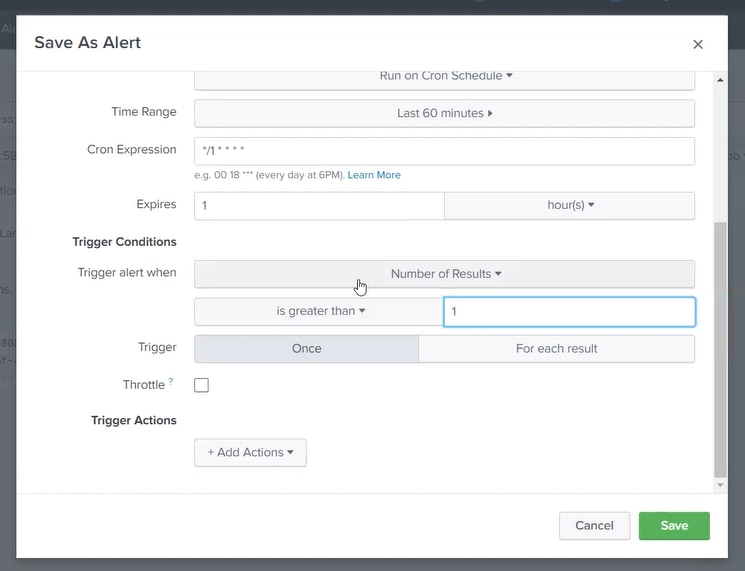
Investigation
- The following INFO message was found under #SPLUNKHOME/var/log/splunk/schedular.log :
02-28-2022 13:45:07.201 +0000 INFO SavedSplunker - savedsearch_id="nobody;search;ERROR Search", search_type="scheduled", user="admin", app="search", savedsearch_name="ERROR Search", priority=default, status=success, digest_mode=1, scheduled_time=1646055900, window_time=0, dispatch_time=1646055900, run_time=0.298, result_count=177, alert_actions="email", sid="scheduler__admin__search__RMD5a4449d7f17fb317d_at_1646055900_861", suppressed=0, thread_id="AlertNotifierWorker-1", workload_pool=""
Note that: status=success; result_count=177; alert_actions="email"
02-28-2022 14:17:02.302 +0000 INFO SavedSplunker - savedsearch_id="nobody;splunk_archiver;Bucket Copy Trigger", search_type="scheduled", user="nobody", app="splunk_archiver", savedsearch_name="Bucket Copy Trigger", priority=default, status=success, digest_mode=1, scheduled_time=1646057820, window_time=0, dispatch_time=1646057820, run_time=1.218, result_count=1, alert_actions="", sid="scheduler__nobody_c3BsdW5rX2FyY2hpdmVy__RMD5473cbac83d6c9db7_at_1646057820_862", suppressed=0, thread_id="AlertNotifierWorker-0", workload_pool=""
But status=success; result_count=1; alert_action="" (blank)
- The log indicates that the alert is executing successfully whenever the result_count i.e., when events are more than 1 the email is getting triggered that is status=success since that is how the condition of the alert has been configured.
- This is why no alert actions are being triggered as the condition did not meet.
- For Splunk Cloud UI, the same log can be viewed by running the below SPL query :
index=_internal source=*scheduler.log* savedsearch_name= <name of the alert/savedsearch>Resolution
SPL was returning only 1 event. So the alert was triggering but the alert was not getting triggered in the email.
After changing it to greater than 0 and configuring it properly, the email started to trigger and the issue is resolved.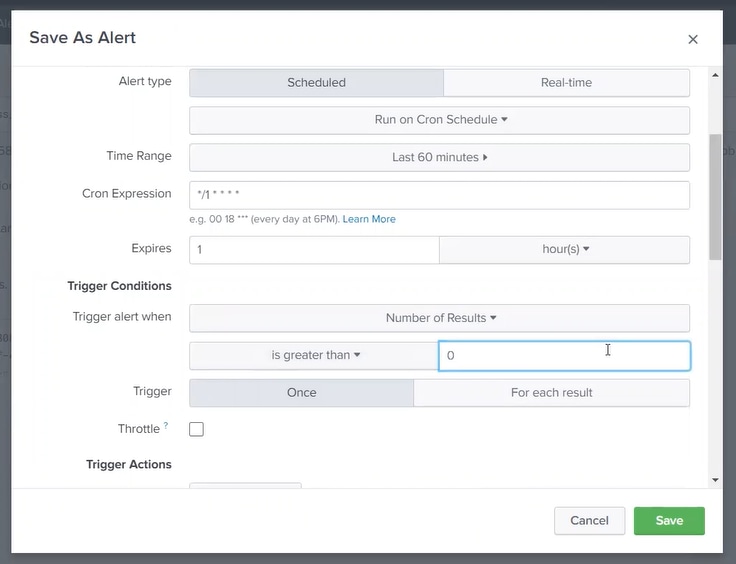
Related Links
Splunk latest - How to set up an alert
support.servicenow.com - Set an Alert
Revision History
| Revision | Publish Date | Comments |
|---|---|---|
1.0 |
29-Sep-2026
|
Initial Release |
 Feedback
Contact Cisco
- Open a Support Case

- (Requires a Cisco Service Contract)