Unable to manage SAML Users via Splunk UI.
Available Languages
Applicability
Splunk Cloud Splunk EnterpriseDescription
Administrators are not able to manage SAML users as they can with locally created accounts through the Users UI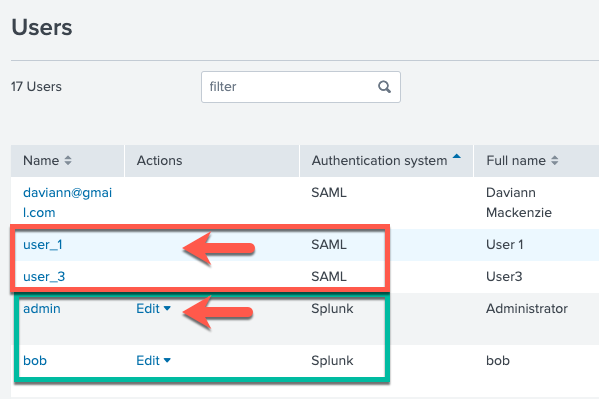 .
Resolution
The users that get provisioned via SAML integration can only be managed using two mechanisms:
1. IdP (Identity Provider): The IdP will send to the Splunk instance during login the "Roles" associated with the user logging in. If roles need to be added or removed for a user this will be done through IdP or through LDAP if the IdP is retrieving users from there.
2. SAML Groups (mapping): https://<Splunk instance>/en-GB/manager/launcher/saml
From this interface user role coming from the IdP can be mapped to Splunk roles
The documentation Modify or remove role mappings covers these options
If you are looking to remove SAML users this will need to be done first at an IdP/LDAP level by removing the roles associated (used in the Groups mapping in Splunk). Once this has been done then the user(s) can be removed in the Splunk instance.
If you are using Splunk Cloud, please have a look at this article How to remove old SAML Users in Splunk
If you are using an on-premise Splunk instance, review this community solution Remove Old SAML Users
Revision History
| Revision | Publish Date | Comments |
|---|---|---|
1.0 |
28-Sep-2026
|
Initial Release |
 Feedback
Contact Cisco
- Open a Support Case

- (Requires a Cisco Service Contract)