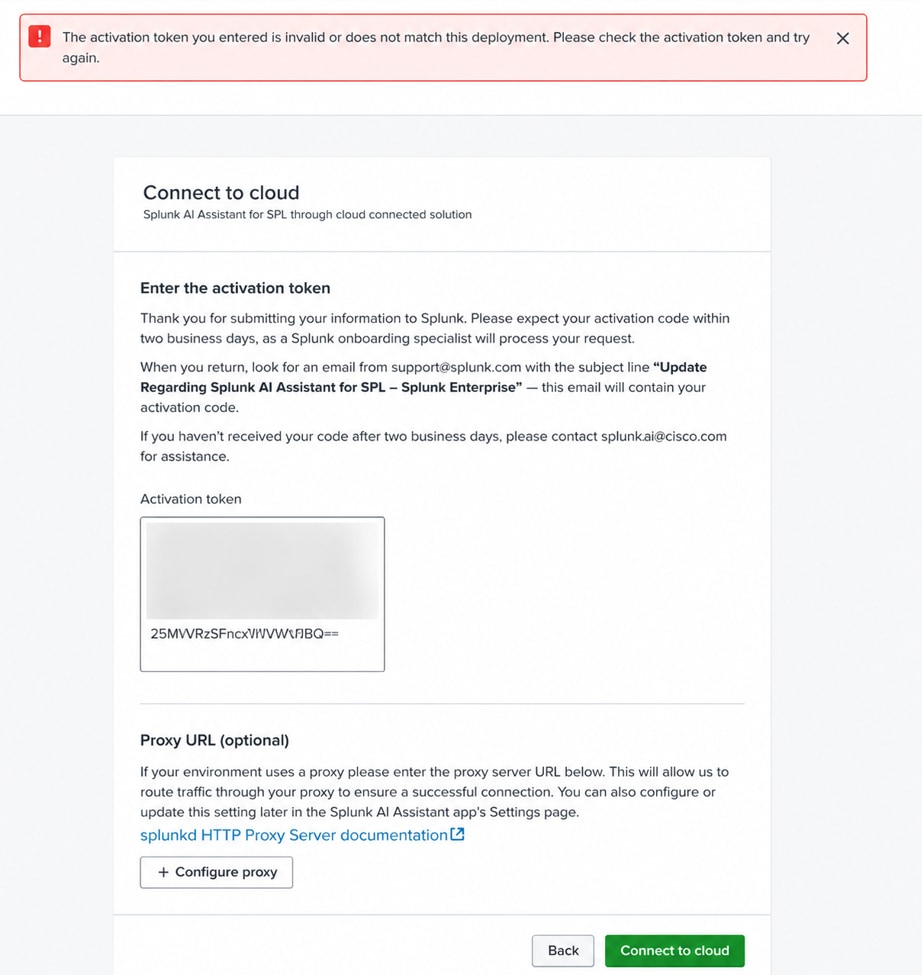
Splunk AI Assistant shows error "The activation token you entered is invalid or does not match this deployment".
Available Languages
Applicability
Splunk cloud Splunk enterprise Splunk AI AssistantDescription
When attempting to activate the Splunk AI Assistant app on a production Search Head Cluster using an activation token from a test server environment, an error appears: "The activation token you entered is invalid or does not match this deployment. Please check the activation token and try again".
- This occurs when an activation token generated for one Splunk environment is used on a different Search Head Cluster.
- The error indicates a mismatch between the activation token and the target deployment’s tenant registration.
Investigation
Splunk AI Assistant requires each Search Head Cluster to have a unique activation token generated during the onboarding process.
- The activation token from the test server is environment specific and bound only to that particular test deployment.
- The token cannot be manually transferred or reused across different Splunk environments.
- The production cluster had never been registered with Splunk's onboarding system and therefore had no valid activation token.
- The proper workflow requires generating a new tenant code from the production cluster itself and submitting it to Splunk for token generation.
- Each node in the cluster shares the same activation token once it is properly configured on any single node.
Resolution
- Generate a new tenant code from the production Search Head Cluster by starting the onboarding workflow within the Splunk AI Assistant app. This tenant code uniquely identifies the production deployment and is required for registration.
- Submit the generated tenant code to Splunk using the official Splunk AI Assistant submission portal as part of the onboarding and approval process.
- After submission, wait for Splunk to process the request and issue an activation token, which is sent via email. The standard service-level agreement (SLA) for receiving the token is up to two business days. Activate Splunk AI Assistant for SPL through cloud connected.
- Once the activation token is received, enter it in the “Connect to cloud” step within the Splunk AI Assistant app on the production Search Head Cluster.
- After the token is successfully applied on any one node, it automatically synchronizes across all members of the Search Head Cluster, eliminating the need for manual configuration on each node.
- Upon successful synchronization, the Splunk AI Assistant app is enabled and fully operational on the production Search Head Cluster.
Related Links
Activate Splunk AI Assistant for SPL through cloud connected - Splunk Document
Revision History
| Revision | Publish Date | Comments |
|---|---|---|
1.0 |
01-Oct-2026
|
Initial Release |
 Feedback
Contact Cisco
- Open a Support Case

- (Requires a Cisco Service Contract)