Troubleshoot WebRTC Calls on RoomOS Webex Devices
Available Languages
Introduction
This document describes WebRTC troubleshooting on RoomOS, covering architecture, diagnostics, log collection, and SSRC correlation techniques.
Prerequisites
Requirements
Cisco recommends that you have knowledge of these topics:
- Cisco RoomOS architecture and WebEngine browser framework.
- Cisco Webex Control Hub device administration, configuration profiles, and troubleshooting analytics.
- Network packet capture analysis using Wireshark to inspect SSRC streams and payload formats.
Components Used
The information in this document is based on these software and hardware versions:
- Cisco Room Series (Room Bar, Room Kit, Room Kit Pro, Room Kit EQ) running RoomOS 26.x or later
- Cisco Board Series (Board Pro 55/75, Board Pro G2) running RoomOS 26.x
- Cisco Desk Series (Desk Pro, Desk Mini)
- Cisco Webex Control Hub
- WebRTC Collaboration Services: Microsoft Teams Direct Guest Join (DGJ), Google Meet, Zoom WebRTC, and Webex Instant Connect
The information in this document was created from the devices in a specific lab environment. All of the devices used in this document started with a cleared (default) configuration. If your network is live, ensure that you understand the potential impact of any command.
Background Information
What is WebRTC?
WebRTC (Web Real-Time Communication) is an open-source standard built into modern web browsers. It enables real-time video, audio, and data streaming between endpoints without the need for proprietary plugins.
- JavaScript APIs: Provides standardized APIs (such as getUserMedia, RTCPeerConnection, and RTCDataChannel) that interact directly with audio/video hardware.
- Native Codec Support: Encapsulates modern high-definition audio and video codecs, including Opus, G.711, VP8, VP9, and H.264.
- Zero Plugin Dependency: Eliminates the requirement for add-ons, downloadable desktop executables, or administrative installation privileges.
How WebRTC Operates on Cisco RoomOS (WebEngine)
On Cisco video collaboration devices running RoomOS, WebRTC applications do not run as native compiled C/C++ firmware applications. Instead, they execute inside the embedded WebEngine browser environment, which is based on a high-performance Chromium core optimized for Cisco video processing hardware.

Note: Because WebRTC web applications (such as Microsoft Teams Direct Guest Join or Google Meet) run inside the WebEngine browser sandbox, the user experience, user interface layout, audio/video rendering pipeline, and hardware acceleration profiles reflect the web application implementation of the third-party meeting provider.

Tip: For optimal WebRTC performance on Cisco RoomOS devices, verify that the device is running RoomOS 26 or later, which includes enhanced hardware acceleration for VP8/VP9 and Opus audio stream decoding.
Configure
To enable comprehensive diagnostic capabilities for WebRTC and WebEngine sessions on Cisco RoomOS devices, administrators must enable Remote Debugging in Cisco Webex Control Hub or via the device xAPI.
Step 1: Enable WebEngine Remote Debugging in Cisco Collaboration Control Hub
- Sign in to Cisco Webex Control Hub.
- Navigate to Management > Devices and select the target video endpoint.
- Click All Configurations from the right-hand panel.
- Search for WebEngine and locate the RemoteDebugging parameter.
- Set WebEngine RemoteDebugging to On and click Save.
Alternatively, enable Remote Debugging directly via the device Command Line Interface (CLI):
xConfiguration WebEngine RemoteDebugging: On
xConfiguration WebEngine Features WebRTC: On

Caution: Enabling Remote Debugging exposes diagnostic interfaces for the active WebEngine browser session. Ensure that network access to the device management IP is restricted to authorized administrative subnets.
Step 2 : Verify
Use this section to confirm that WebEngine is properly initialized and actively processing WebRTC media channels during a call.
Execute the xStatus commands via the terminal while a WebRTC meeting is in progress:
xStatus WebEngine
xStatus WebRTC MediaChannels
Table 1: Describes the key operational fields returned by the WebRTC status command:
| xStatus Parameter | Expected State | Description & Diagnostic Impact |
| WebEngine Status |
Running |
Indicates whether the Chromium browser core is active and rendering. |
| WebRTC MediaChannels Client |
Active / Connected |
Indicates active media transport between the codec and the cloud media bridge. |
| Direction | Outgoing / Incoming |
Identifies whether the media channel represents local camera/mic transmission or remote video reception. |
| TargetBitrate |
1500000 bps (1.5 Mbps) |
The target bandwidth allocated by WebEngine based on available network capacity. |
Troubleshoot
This section provides comprehensive, step-by-step troubleshooting procedures, log collection instructions, and SSRC media stream correlation techniques for WebRTC issues.
- Gathering Logs from WebEngine & Touch Interface
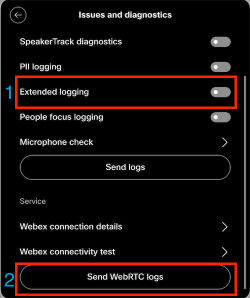
When a quality or connection issue occurs during an active WebRTC call, execute the procedure directly from the Cisco Room Navigator / Touch 10 panel. During the active WebRTC meeting, tap the device control menu and select Settings.
- Navigate to Issues and Diagnostics.
- Toggle Extended Logging to ON. (Extended logging records high-resolution packet timestamps, RTCP sender/receiver reports, and media stream statistics).
- Immediately after the audio/video issue reproduces, select Send WebRTC Logs.
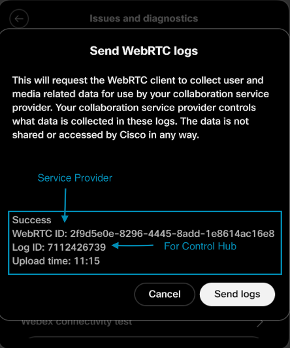
Once the logs are successfully uploaded to the Cisco cloud, the interface generates two unique tracking identifiers:
- WebRTC ID: This identifier is specifically formatted for third-party conference service providers (for example, Microsoft Support for Teams Direct Guest Join or Google Cloud Support for Google Meet). Provide this ID when opening a support case with the hosting provider.
- Log ID / Feedback ID: This identifier is indexed in Cisco Webex Control Hub. Cisco TAC engineers use this Log ID to locate, decrypt, and analyze the full endpoint system diagnostic bundle.
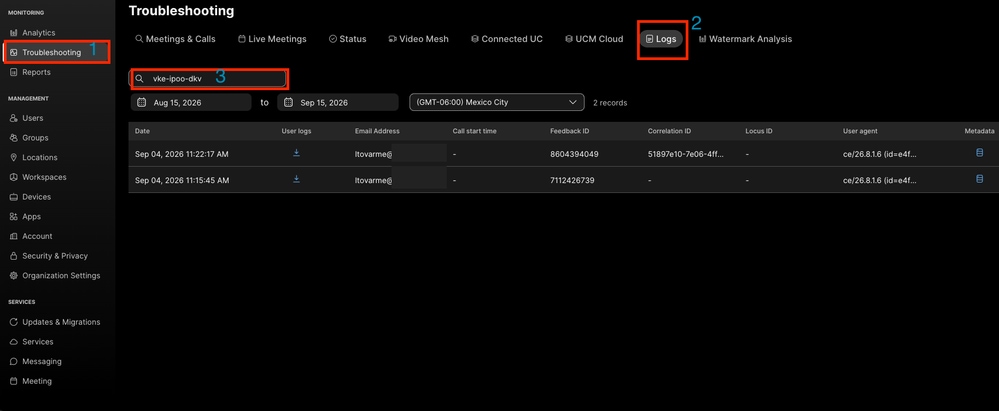
Log ID: The log ID can be used for searching the logs and download those logs for troubleshooting or for opening a case with TAC. The logs can be downloaded directly to the Collaboration Control Hub and can be collected using the Log ID/Feedback ID or the meeting ID in the troubleshooting section.
2. Mapping Media Streams & SSRC Identification (xStatus Correlation)
In Real-Time Transport Protocol (RTP) and WebRTC architectures, a Synchronization Source (SSRC) is a critical 32-bit numerical identifier that labels the origin of a media stream. Receivers use the SSRC to sequence packets, calculate jitter, and synchronize audio with video.
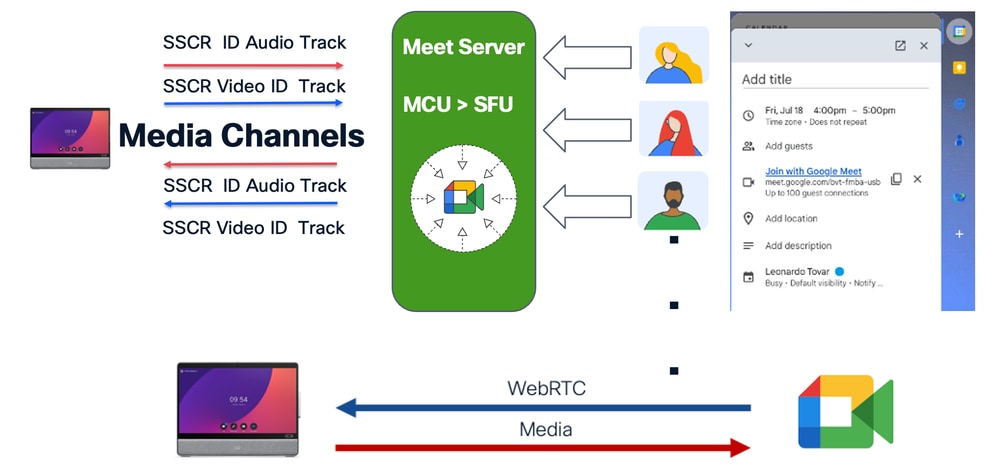
To map a specific video or audio stream between the device xStatus logs and a Wireshark packet capture, convert the decimal Channel ID from xstatus.txt into its hexadecimal equivalent:
(416917557)10  =  (0x18D9A835)16

Wireshark Display Filter: rtp.ssrc== 0x18D9A835

The log snippet illustrates a live WebRTC outgoing video channel extracted from an endpoint xstatus.txt diagnostic file:
*s WebRTC MediaChannels Client Channel 7 Direction: Incoming
*s WebRTC MediaChannels Client Channel 7 Id: "IT01V416917557"
*s WebRTC MediaChannels Client Channel 7 Netstat BytesSent: 89661904
*s WebRTC MediaChannels Client Channel 7 Netstat PacketsSent: 84431
*s WebRTC MediaChannels Client Channel 7 QualityLimitation NetworkBandwidthLimited: 50
*s WebRTC MediaChannels Client Channel 7 QualityLimitation NotLimited: 497
*s WebRTC MediaChannels Client Channel 7 TargetBitrate: 1500000
*s WebRTC MediaChannels Client Channel 7 Transport RTCP Local IpAddress: "<Local IP Address>"
*s WebRTC MediaChannels Client Channel 7 Transport RTCP Local Port: 1742
*s WebRTC MediaChannels Client Channel 7 Transport RTCP Local Protocol: UDP
*s WebRTC MediaChannels Client Channel 7 Transport RTCP Remote IpAddress: "<Server IP Address>"
*s WebRTC MediaChannels Client Channel 7 Transport RTCP Remote Port: 3478
*s WebRTC MediaChannels Client Channel 7 Transport RTCP Remote Protocol: UDP
*s WebRTC MediaChannels Client Channel 7 Type: Video
*s WebRTC MediaChannels Client Channel 7 Video EncoderImplementation: "ExternalEncoder"
*s WebRTC MediaChannels Client Channel 7 Video FrameHeight: 540
*s WebRTC MediaChannels Client Channel 7 Video FrameWidth: 960
*s WebRTC MediaChannels Client Channel 7 Video FramesPerSecond: 30
*s WebRTC MediaChannels Client Channel 7 Video Protocol: "video/VP8"
Key Diagnostic Takeaways from this Media Channel Analysis:
- SSRC Correlation: The Channel ID suffix "416917557" represents SSRC 0x18D9A835. Filtering Wireshark for this SSRC isolates all outbound video packets.
- Transport & Relay: The local endpoint (<Local IP Address>) is communicating directly with a remote Google STUN/TURN server (Public IP Server Address on UDP port 3478).
- Resolution & Codec: The stream is actively encoded using hardware-accelerated VP8 at 960x540 resolution at 30 frames per second.
- Quality Limitation Counter: The QualityLimitation NetworkBandwidthLimited counter of 50 indicates that the WebEngine congestion control algorithm downscaled resolution due to transient upstream bandwidth constraints.
3. Cisco Webex Control Hub Advanced Troubleshooting
Administrators can analyze live and historical WebRTC meeting metrics directly within Cisco Webex Control Hub:
- Navigate to Control Hub > Troubleshooting > Meetings & Calls.
- Filter by the MAC address, Serial Number, Device Name, or Log ID of the endpoint.
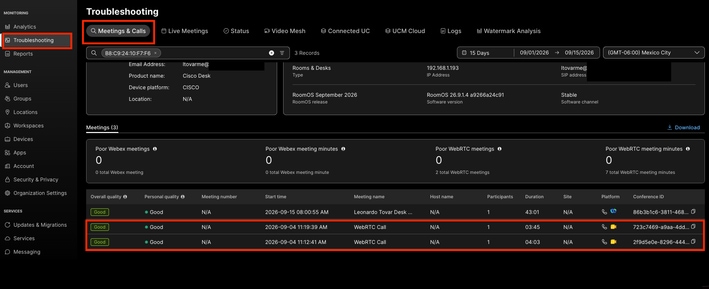
- Select the target meeting session from the chronological search results.
- Review the real-time hop-by-hop telemetry graphs: Packet Loss (Audio/Video), Jitter Buffer, Latency (RTT), and Dynamic Resolution Scaling.
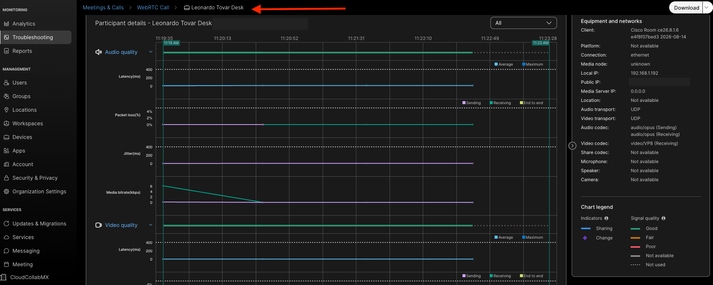
Table 2: Common WebRTC Failure Modes and Remediation Matrix
| Symptom |
Probable Root Cause |
Diagnostic Verification |
Remediation Step |
| Call fails to join / spins continuously |
Firewall blocking outbound STUN/TURN UDP ports (3478, 5004-65535) |
Wireshark shows repeated STUN Binding Requests without Binding Responses |
Open outbound UDP ports to WebRTC provider media IP ranges. |
| One-way audio / video freezes |
Symmetric NAT or UDP timeout on stateful enterprise firewall |
xStatus shows QualityLimitation NetworkBandwidthLimited incrementing rapidly |
Configure firewall UDP state timeout >= 60 seconds; enable STUN keepalives. |
| Black screen or crash on USB-C BYOM |
DisplayPort Alternate Mode negotiation failure over uncertified cable |
messages.log shows kernel USB power negotiation timeout |
Use USB-IF certified 10Gbps Type-C cable; set Video Output Connector MonitorRole to Auto. |
Related Information
- Cisco RoomOS Command Reference Guide (xAPI & WebEngine Configuration)
- Device Management at Cisco Collaboration Hub
- Webrtc API reference
- Best Practices for WebEngine
Revision History
| Revision | Publish Date | Comments |
|---|---|---|
1.0 |
20-Oct-2026
|
Initial Release |

 Feedback
Contact Cisco
- Open a Support Case

- (Requires a Cisco Service Contract)