Out of band best practices
Available Languages
Bias-Free Language
The documentation set for this product strives to use bias-free language. For the purposes of this documentation set, bias-free is defined as language that does not imply discrimination based on age, disability, gender, racial identity, ethnic identity, sexual orientation, socioeconomic status, and intersectionality. Exceptions may be present in the documentation due to language that is hardcoded in the user interfaces of the product software, language used based on RFP documentation, or language that is used by a referenced third-party product. Learn more about how Cisco is using Inclusive Language.
This document outlines a high-level architecture featuring established best practice recommendations for Out of Band Management of network access. Please note that these recommendations are not Cisco®-validated designs; therefore, careful consideration and due diligence are essential when deploying them in specific operating environments. It is advised to review these guidelines alongside the configuration guides and technical documentation for the relevant products, which provide more detailed instructions on implementing these best practices. References to configuration guides and technical documentation within this document serve as examples only. For product-specific guidance, please consult the appropriate configuration guides and technical documentation. For comprehensive architecture and design documentation, please contact the Cisco Customer Experience (CX) team.
A typical Out of Band (OoB) Network refers to a specialized, purpose-built management infrastructure designed explicitly to provide secure, reliable, and continuous access to mission-critical production devices, commonly referred to as Managed Network Devices. The primary objective of an OoB network is to ensure that authorized personnel can remotely manage, monitor, and troubleshoot these key infrastructure components, even when the primary production network is experiencing disruptions or outages. This capability is especially valuable in scenarios where devices become unreachable through conventional or in-band access methods, such as when primary network paths are down, hardware failures occur, or maintenance activities inadvertently impact connectivity.
Out of Band networks enable enhanced visibility and granular control, empowering network administrators and operations teams to remotely diagnose, isolate, and resolve issues—such as downed circuits, powered-off devices, or misconfigurations—without the immediate need to dispatch field technicians to physically access the affected sites. This not only increases operational efficiency and reduces Mean Time To Repair (MTTR), but also significantly lowers operational costs associated with on-site interventions.
In modern network environments, OoB access is no longer limited solely to traditional network devices (such as routers and switches). It has evolved to encompass a broader range of compute systems, servers, and appliances, many of which are equipped with dedicated management interfaces. These interfaces may include Web Graphical User Interfaces (GUIs), Command Line Interfaces (CLIs), and industry-standard protocols such as Intelligent Platform Management Interface (IPMI). Such comprehensive management capabilities allow for advanced monitoring, configuration, firmware updates, and even remote power cycling of devices—often independent of the device’s primary operating system or network connectivity.
The architecture of a typical OoB Network is carefully designed to maximize resilience, scalability, and security. Common key components include:
Dedicated Routers: These routers are specifically assigned to interconnect Central Offices (COs), Data Centers (DCs), and remote sites, forming a robust backbone for the management network that is logically and often physically separated from the production network traffic.
Dedicated Switches: Switches within the OoB network provide the necessary port density and Layer 2 connectivity to aggregate links from numerous Managed Devices, ensuring flexible and scalable connectivity options.
Console/Terminal Servers: These devices offer serial and asynchronous connectivity, enabling direct console access to Managed Devices. This is particularly valuable for performing low-level diagnostics or configuration tasks, even when network-based management is unavailable.
Jump Servers: Also known as bastion hosts, these secure intermediary servers enable administrators to safely traverse between different network segments or security zones, facilitating controlled and auditable access to devices that reside in isolated environments.
Firewalls and VPN Gateways: To safeguard the management infrastructure, firewalls are deployed to segment and protect the OoB network. VPN gateways enable secure remote access for authorized users, ensuring that all management traffic is encrypted and authenticated.
Given the inherent direct connectivity of the OoB Network to virtually all critical devices within the provider’s infrastructure, the implementation of stringent security controls is absolutely essential. Best practices dictate that management networks should be air-gapped, meaning they are physically and logically separated from external or production networks. This eliminates the risk of unauthorized or accidental access from untrusted sources and prevents any unencrypted direct internet connectivity. Such isolation is fundamental to maintaining the integrity, confidentiality, and overall security posture of the management environment, thus protecting both the managed devices and the broader organizational network from compromise.
Management network devices do not require the advanced feature sets often associated with production infrastructure, as their primary purpose is to provide stable and secure access for network operations personnel. Therefore, the design and implementation of the management network should prioritize simplicity and operational ease, deliberately avoiding unnecessary complexity that could increase maintenance burdens or introduce new failure points. In support of this approach, organizations are encouraged to consider repurposing decommissioned production network equipment—provided these devices still carry valid support contracts—for use within the management network. This strategy helps to maintain a streamlined architecture and minimizes both capital and operational expenditures, while still ensuring vendor support in case of hardware or software issues.
Scalability must be a central consideration throughout the planning and design process. In particular, it is critical to assess the following factors: anticipated port density requirements (to accommodate all devices requiring management connectivity), aggregate and per-device bandwidth needs (to avoid bottlenecks and ensure smooth operations), and the total number of hosts and routing entries that the management network must support (to guarantee future-proofing and performance). The architecture should be planned with sufficient headroom to adapt to organizational growth, evolving technology requirements, and potential changes in operational practices.
The following high-level requirements and recommendations are integral to building a resilient, scalable, and easily maintained management network:
● Redundancy: At every physical site, deploy a pair of dedicated management routers. These routers should be responsible for handling all management traffic between local devices, remote sites, and the central Network Operations Center (NOC). The use of dual routers ensures that failure of a single device does not compromise management access, thus supporting continuous operations during maintenance or unexpected outages.
● Power Resiliency: All management routers and switches must be equipped with two independent power supplies. Each power supply should be connected to a separate (A and B) power circuit or feed. This configuration guards against power-related failures by ensuring that the loss of a single power source does not impact the operation of management devices.
● Network Redundancy: To further enhance resiliency, each management router must be provisioned with at least two physically diverse and redundant network connections to other sites. This not only provides failover capability in the event of a link failure but also protects against localized outages affecting a single cable path or service provider.
● Isolation: The circuits used for management router interconnections must remain logically and physically isolated from the devices being managed. This means that management traffic should never traverse the same devices it is intended to monitor or control. The use of L2VPN or L3VPN technologies for management network transport is discouraged due to potential security and complexity concerns.
● Risk Mitigation: Management router circuits should be engineered so that no two circuits share a single point of failure, risk group, or physical infrastructure. This approach mitigates the risk of simultaneous failures impacting multiple management paths, thereby preserving operational continuity.
● Switching: Implement a pair of dedicated management switches at each site. These switches must be capable of providing sufficient port density to connect to all management interfaces (such as MgmtEth0/mgmt0) on managed devices. Dual switches ensure that switch failure does not result in total loss of management connectivity.
● Diverse Connectivity: Each management switch should be directly connected to a different management router. This ensures that if one router or its connections fail, the switch (and thus connected devices) can still reach the network via the second router.
● Physical Separation: Where practical, do not use the same Light Guide Cross-connect (LGX) or patch panel for critical management interconnections. Physical separation of cabling and cross-connect infrastructure further reduces the risk of accidental disconnection or simultaneous damage to multiple links.
● Console Access: Install a dedicated console server at each site, which should have redundant network connections to both management routers and management switches. This allows out-of-band access to devices for troubleshooting or recovery, even if primary management paths are unavailable.
● Console Server Resiliency: Like routers and switches, console servers must be equipped with dual power supplies, each connected to separate power feeds (A and B). This ensures continued access during power disturbances.
● Interface Support: Console servers must support all required connection types, including but not limited to RS-232, RJ-11/14/25, USB, and any additional interfaces necessary for the managed devices. Furthermore, the console server should have enough ports to connect to every managed device within its scope.
● Rack Placement: Whenever feasible, management devices should be installed in a physically separate lineup or rack row from production devices. Additionally, redundant management equipment should be distributed across multiple racks to enhance survivability and minimize the impact of localized rack-level failures.
Note: During the design and implementation of the management network, always incorporate future scalability and growth projections. This forward-looking approach ensures that the infrastructure can easily accommodate expansion and adapt to evolving operational requirements, thereby maintaining a robust and resilient management environment.
Support for Management Access for remote users and/or partners is a fundamental requirement for the continuous and effective operation of any network infrastructure. Ensuring that authorized personnel—including remote employees, contractors, and strategic partners—can securely access management interfaces and systems is vital for ongoing network administration and rapid response to incidents. Frequently, essential tasks such as scheduled or planned maintenance activities are executed remotely during designated maintenance windows, often occurring outside of standard business hours. Additionally, the ability to address unforeseen issues or emergent situations that may arise beyond regular working times relies heavily on robust remote access capabilities.
Offering Virtual Private Network (VPN) access has become a standard practice among service providers, and many organizations have already established procedures and strategies for onboarding users onto VPN platforms. It is highly recommended to deploy a dedicated firewall equipped with VPN capabilities, where feasible, to specifically support the needs of engineering and operations teams. This approach enhances security while ensuring flexible, reliable connectivity for those responsible for managing and maintaining critical network resources.
Outlined below are several key recommendations to effectively support remote access to the Management Network:
● Select and implement a VPN solution that utilizes strong cryptographic algorithms and protocols to ensure the confidentiality and integrity of management traffic traversing public networks.
● Enforce a comprehensive security stack for all VPN connections to and from the management network. This should include security appliances and tools such as a Web Application Firewall (WAF) and an Intrusion Prevention System (IPS) to inspect, detect, and mitigate potential threats.
● Promptly address and remediate any identified security vulnerabilities associated with remote access solutions, network devices, and supporting infrastructure to minimize exposure to potential threats.
● Integrate VPN authentication and authorization with centralized identity management systems, such as Active Directory (AD), to streamline user management, enforce consistent policies, and simplify auditing processes.
● Establish separate Active Directory (AD) groups for users based on their specific roles (such as Sales, Engineering, Operations, Network Operations Center [NOC], etc.), the types of devices they manage, or the technologies they support (e.g., Networking, Infrastructure, Security). This segmentation facilitates granular access controls and tailored policy enforcement.
● Ensure that the VPN solution leverages a dedicated “Service Account” within AD for VPN operations, rather than using personal user or administrative accounts. This approach improves accountability and reduces security risks associated with credential misuse.
● Create dedicated VPN groups that map directly to the corresponding AD groups established above, enabling clear separation of access privileges and simplifying policy management.
● Assign distinct VPN IP address pools for each VPN group to enable flexible access control mechanisms, such as whitelisting based on group membership, and to assist with monitoring and auditing user activity.
● Implement VPN filters for each VPN group to prevent lateral movement within the VPN environment and ensure that direct communication between VPN users is restricted, thereby reducing the risk of unauthorized access or internal threats.
● Adopt a strict “No-Split-Tunnel” policy for all VPN users, ensuring that all network traffic—including internet-bound traffic—flows through the corporate security perimeter for consistent inspection and protection.
● Mandate the use of Multi-Factor Authentication (MFA) for all users accessing the VPN, significantly strengthening the authentication process and reducing the risk of unauthorized access due to compromised credentials.
● Conduct regular audits of VPN user activity, preferably on a monthly basis, to identify and promptly disable inactive accounts, thereby minimizing the potential attack surface and enforcing least privilege principles.
Notes: Adjust these recommendations according to your organization’s specific regulatory, compliance, and operational requirements. Ensure all changes and configurations are thoroughly documented and communicated to relevant teams. Review VPN logs and security events regularly for indications of misuse or abnormal activity.
A Jumpserver—also referred to as a Jumphost, Jumpbox, or Bastion host—is a specially designated device or server that acts as an intermediary hop between two or more distinct network segments. This intermediary role enables users to connect securely from less-trusted networks (such as user workstations or external environments) to more sensitive, internal network zones in a controlled and tiered manner. The implementation of tiered access is a fundamental security practice, ensuring that all systems are protected by layers of isolation and that security zones remain effectively segmented. By requiring users to traverse the jumpserver before reaching critical assets, organizations can significantly reduce the risk of unauthorized or direct access to sensitive infrastructure components.
Jumpservers enhance network security by serving as a buffer or barrier between users and the most critical systems, thereby preventing direct connections that could bypass established security controls. Depending on the jumpserver solution and organizational requirements, these devices can be configured to provide both Command Line Interface (CLI) access for administrative tasks and Graphical User Interface (GUI) access for applications that require a desktop environment.
Key Characteristics:
● Access Control: Only users who have been explicitly authorized are permitted to access the jumpserver. Authentication mechanisms—such as Multi-Factor Authentication (MFA), integration with centralized directory services (e.g., Active Directory), or role-based access controls—ensure that only approved personnel can initiate connections. Once authenticated, these users can then access permitted internal resources through the jumpserver, which acts as a managed gateway.
● Isolation: A Jumpserver itself is typically deployed within a dedicated security zone, isolated from both untrusted and critical network segments. It is hardened according to best security practices, such as disabling unnecessary services, applying the latest patches, and enabling strict firewall rules. By serving as the exclusive entry point into the secure network, the jumpserver minimizes the network’s exposure to threats and constrains lateral movement within the environment.
● Auditing: All activities performed on or through the jumpserver can be extensively monitored, logged, and analyzed. This includes session recordings, command execution logs, and file transfer records. Detailed auditing supports both security monitoring and compliance requirements, enabling rapid detection and investigation of suspicious or unauthorized activity.
● Centralized Management: The jumpserver provides a centralized access point for administrators and users, streamlining management tasks and reducing operational complexity. By consolidating access through a single, well-controlled host, organizations can better enforce security policies, manage permissions, and limit the overall attack surface of their environment.
Common Use Cases:
● Remote Access to Data Center Resources: Jumpservers are commonly used to facilitate secure remote access for administrators and engineers who need to manage servers, network devices, or applications hosted within a secure data center. Instead of allowing direct connections, all remote access is routed through the jumpserver, ensuring enhanced oversight and security.
● Providing Temporary or Controlled Access to Third-Party Vendors: When external vendors or consultants require access to internal systems for maintenance, troubleshooting, or project work, jumpservers enable organizations to grant limited, time-bound access. This access can be tightly controlled, audited, and revoked as needed, reducing the risks associated with third-party connectivity.
● Segregating Access Between Different Network Segments: Jumpservers play a critical role in environments with multiple network segments—such as separating production, development, and management networks. By enforcing that all access between these segments flows through the jumpserver, organizations can ensure proper segmentation, prevent unauthorized lateral movement, and apply consistent access and monitoring policies.
Service Providers, Telecommunications Providers, and Data Center Operators typically manage environments that consist of multi-vendor and multi-platform devices. Each vendor and platform may offer unique features, but many are equipped with a dedicated management plane. However, the presence, configuration, and behavior of management interfaces can vary significantly from one vendor to another. This diversity can introduce complexity and inconsistency in the overall management of the network infrastructure.
To mitigate these challenges and promote operational efficiency, it is highly recommended to standardize deployment practices across all platforms and vendors. Standardization should extend from the selection of specific management ports, the addressing scheme used, and the processes for managing and labeling management interfaces. These practices enhance clarity, simplify troubleshooting, and enable more efficient day-to-day operations.
The following section outlines several key recommendations and considerations for achieving management plane standardization:
● Standard Port Assignment: Whenever possible, adopt a consistent and predictable naming convention for management ports across all platforms. For devices that offer dedicated management interfaces, utilize standard port identifiers such as "MgmtEth0" or "mgmt0." In scenarios where a dedicated management interface is unavailable, consider designating the "last port" on the device as the management interface to maintain consistency across the network.
● Comprehensive Interface Descriptions: Provide detailed and meaningful descriptions for all management interfaces. Recognize that the network may span a vast geography and include numerous devices, making it challenging to recall every detail. By thoroughly documenting each interface with a description, you enable self-documenting capabilities within the network, which greatly assists operations personnel during troubleshooting and maintenance.
● Detailed Interface Labeling: Ensure that both management devices and the devices being managed feature descriptive labels for interfaces. This practice facilitates easier identification and troubleshooting of connectivity issues. For example, interface descriptions could follow a structured format such as: "<InterfaceType (Local | Longhaul)>-<Circuit-ID>-<RemoteHostname>-<RemotePort>."
● Utilization of Dedicated Management Interfaces: Where possible, leverage a dedicated management or specifically designated interface as a secondary access path to the device. This separation of management traffic from production data enhances security and operational reliability.
● Isolation of Management Traffic: Consider isolating all management interfaces within a dedicated Virtual Routing and Forwarding (VRF) instance. This approach prevents management traffic from mingling with production data, reducing the risk of accidental exposure or unauthorized access.
● Enabling VRF-Aware Routing Protocols: If dynamic routing protocols are required for management connectivity, ensure that these protocols are enabled in a VRF-aware manner on the management interface. To further isolate management traffic, it is advisable to configure a separate routing process specifically for management, rather than sharing routing processes with the production network.
● Avoidance of Default Routing: Where feasible, refrain from using a default route (0.0.0.0/0) for management interfaces. This practice helps prevent unintended routing of management traffic to undesired destinations, enhancing the security and predictability of the management plane.
● Strict VTY Access Controls: Implement a robust and restrictive Virtual Terminal (VTY) Access Control List (ACL) to tightly control which sources are permitted to access management interfaces. This is crucial for preventing unauthorized east-west connections within the network and ensuring that only explicitly authorized personnel or systems can manage network devices.
Management Network High-Level Architecture
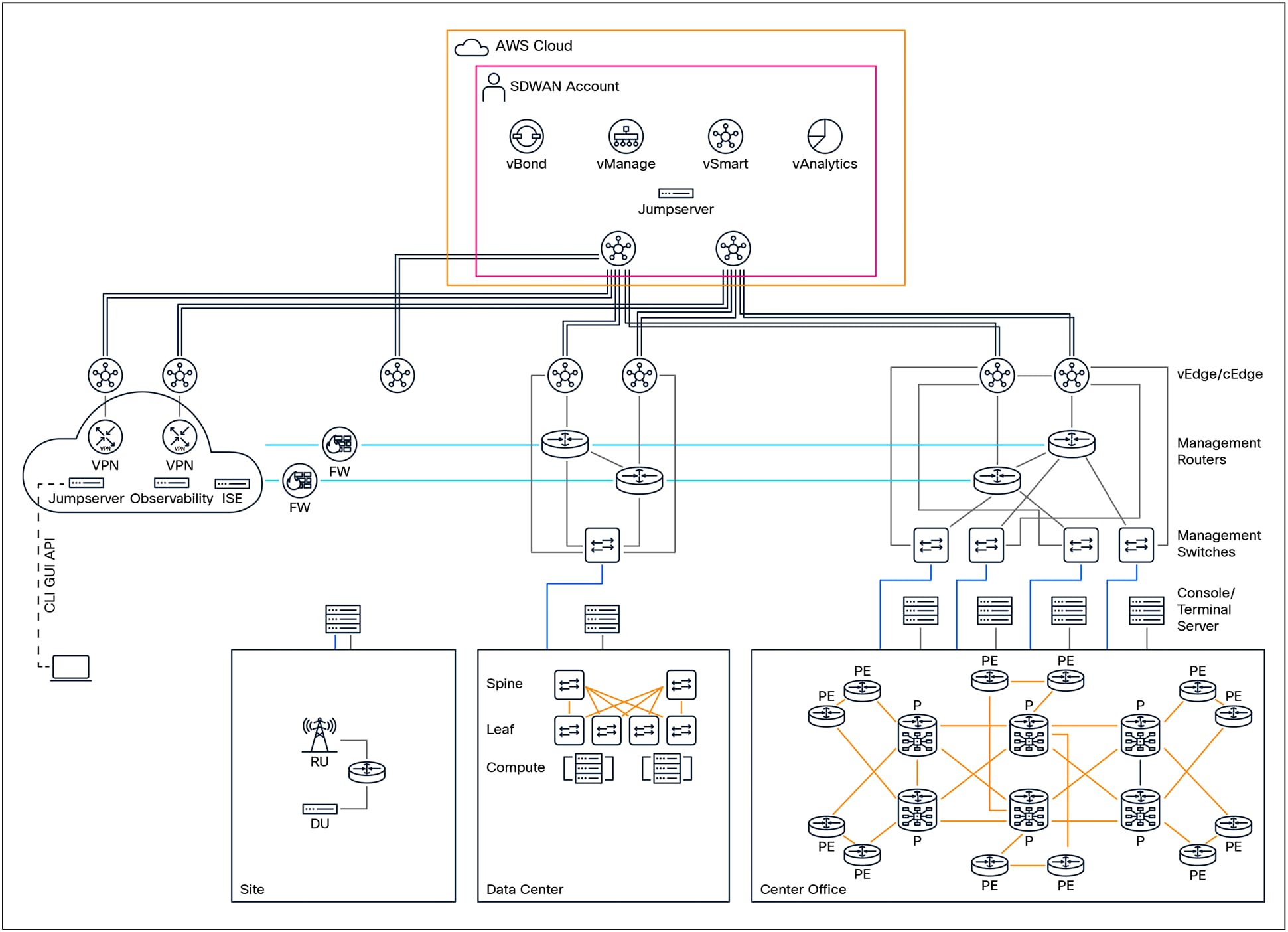
Service providers, Data Center operators, and Telecommunications providers are responsible for delivering a wide range of critical services to their end customers. To support these services, each type of provider employs architectures, designs, and device configurations that are specifically tailored to meet their unique operational needs and business objectives. These distinctive approaches are influenced by the types of services offered, customer requirements, regulatory considerations, and the scale of their respective networks.
Despite these differences in technical implementation and organizational focus, there are several fundamental, high-level requirements that all organizations must address when it comes to managing devices in their production environments. Effective device management is essential for ensuring service reliability, maintaining security, simplifying troubleshooting, and supporting day-to-day operational tasks.
Service Providers:
Service providers, such as Internet Service Providers (ISPs) and managed network service companies, typically manage a variety of network devices across large-scale, geographically distributed infrastructures. This includes Provider (P) routers, which operate within the core of the service provider network; Provider Edge (PE) devices, which form the interface between the provider’s network and customer networks; and Customer Premises Equipment (CPE), which is deployed at the customer’s site. Management of these devices is usually performed through dedicated management interfaces and secure console access, enabling operators to configure, monitor, and troubleshoot the network infrastructure efficiently and securely.
Data Center Providers:
Data center operators are tasked with managing a diverse set of devices within highly interconnected and performance-optimized environments. This includes the administration of routers, as well as spine and leaf switches. Management access to these devices is typically provided via out-of-band management interfaces and serial console connections. In addition, data center operators must manage the compute infrastructure—such as servers and appliances —using integrated management platforms that provide comprehensive visibility and control over hardware resources.
Telecommunications Providers:
Telecommunications providers operate some of the most complex network environments, often combining practices from both service provider and data center domains. In addition to managing core and edge network devices, telecom providers must also oversee a wide array of specialized equipment, such as cell site routers and radio access network (RAN) components. These devices are often deployed in remote or distributed locations, necessitating robust and secure management solutions that can operate reliably under varying conditions.
As cloud services continue to grow in importance and adoption, organizations in all of these sectors must increasingly consider the secure management of cloud-based resources. This includes managing virtual network devices, cloud-hosted compute instances, and integrated services that span both on-premises and public cloud environments. Security, scalability, and operational visibility remain key priorities as organizations expand their management capabilities to encompass both traditional infrastructure and new cloud-based assets.
The diagram above provides a visual representation of a typical management network architecture. It demonstrates how diverse operational environments—including those of service providers, data centers, and telecommunications networks—can be effectively managed. The diagram also highlights the interconnectivity between various network segments and emphasizes the need for secure management across both cloud and on-premises locations. By implementing robust management solutions, organizations can ensure the continuity, security, and performance of their critical services.
Management Network supporting Service Provider
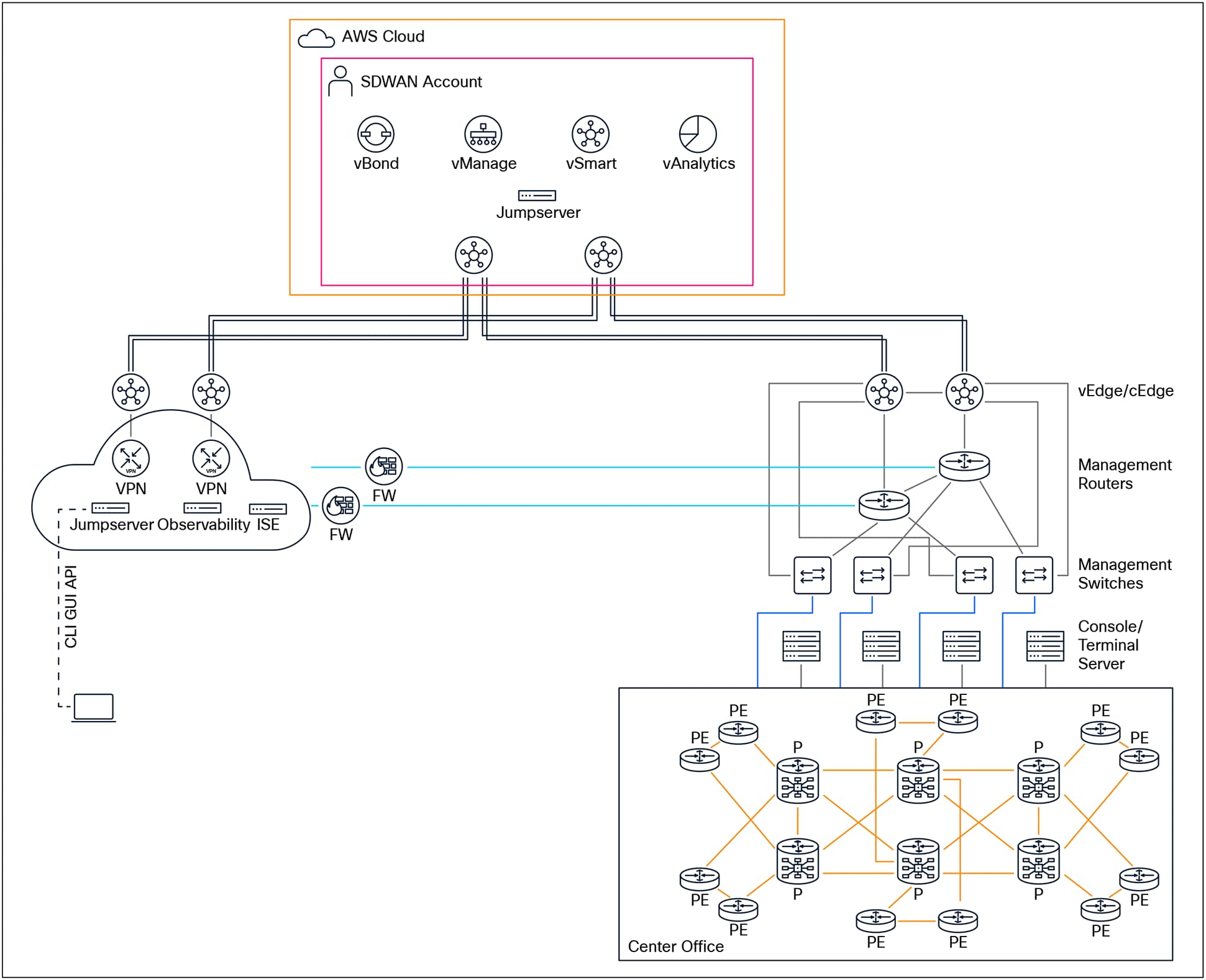
A robust and effective management network architecture for a Service Provider should be designed to optimize reliability, scalability, and operational efficiency. At the core of this architecture, it is highly recommended to deploy dedicated management routers. The choice of these management platforms should be carefully considered and guided by a set of critical criteria. These criteria include the specific location of the central office or site, differentiating between indoor and outdoor deployments, as well as assessing the power requirements—whether Alternating Current (AC) or Direct Current (DC) power is needed. Additionally, the number of devices that will require management connectivity—such as management switches, console servers, and other infrastructure components—should be evaluated. The overall scope and scale of the management network must also be taken into account, factoring in the expected number of routing entries and the selection of appropriate routing protocols to support the anticipated routing complexity and network growth.
To maximize network resiliency and ensure high availability, each management router should ideally be connected to two geographically and/or physically separate locations through redundant or diverse dedicated northbound circuits. This dual-homing strategy provides protection against circuit or site failures, thus maintaining continuous network management capabilities. Furthermore, it is recommended to establish redundant connections to adjacent or backup routers in the east/west direction, enhancing lateral redundancy within the management network. Southbound connections from each management router should extend to their corresponding management switches and console servers, thereby ensuring that all network elements can be consistently and securely managed.
Management switches form the next layer of the architecture and play a crucial role in aggregating management traffic from various devices. Each management switch should be connected northbound to its designated management router. To further reinforce network resilience, management switches should also have east/westbound connections to adjacent or redundant switches, creating a mesh topology that mitigates the risk of a single point of failure. The southbound ports of management switches should be used to connect console servers and managed devices, providing the necessary out-of-band management interfaces required for device provisioning, monitoring, and troubleshooting.
For optimal redundancy and fault tolerance, each managed device should have connections to two distinct management switches. For example, in scenarios where a managed device is equipped with dual Route Switch Processors (RSPs), it is best practice to connect the management interface of the active RSP to the primary management switch, and the management interface of the standby RSP to the secondary management switch. This arrangement ensures that if either switch or RSP fails, the device remains accessible for management purposes via the alternate path.
In cases where only a single RSP is present in a managed device, the active RSP should connect to the primary management switch. If there is a standby managed device (such as in a redundant pair configuration), the management interface of the standby device should connect to the secondary management switch. This approach not only enhances overall network resilience but also achieves a balanced distribution of port utilization across both management switches.
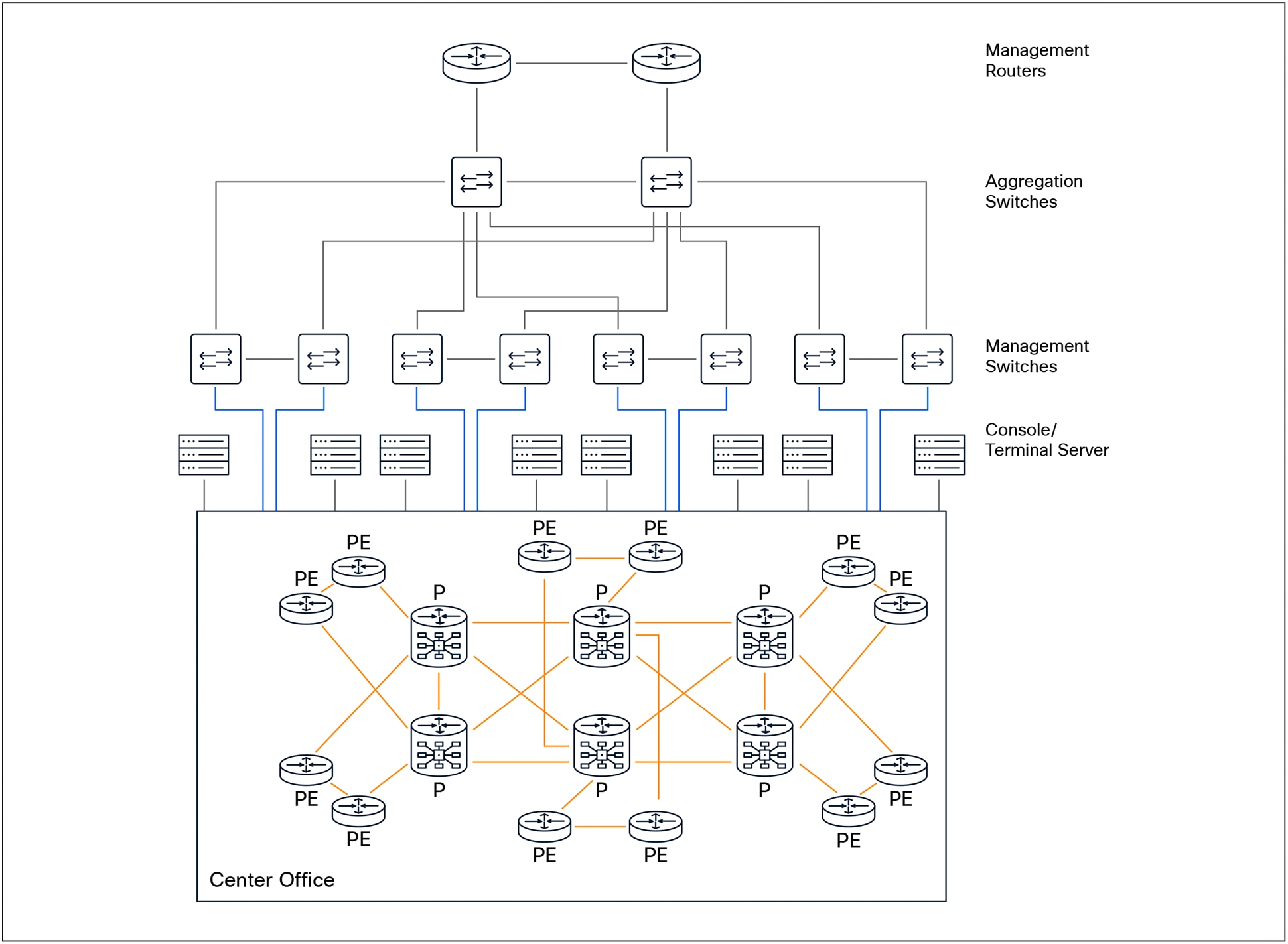
When supporting a large number of devices at a central office or site, it is advisable to introduce an additional layer of management switches to serve as an aggregation point for all management switches. This approach helps to optimize the architecture and minimize the number of ports required on the management routers.
Management Network supporting Data Center Provider
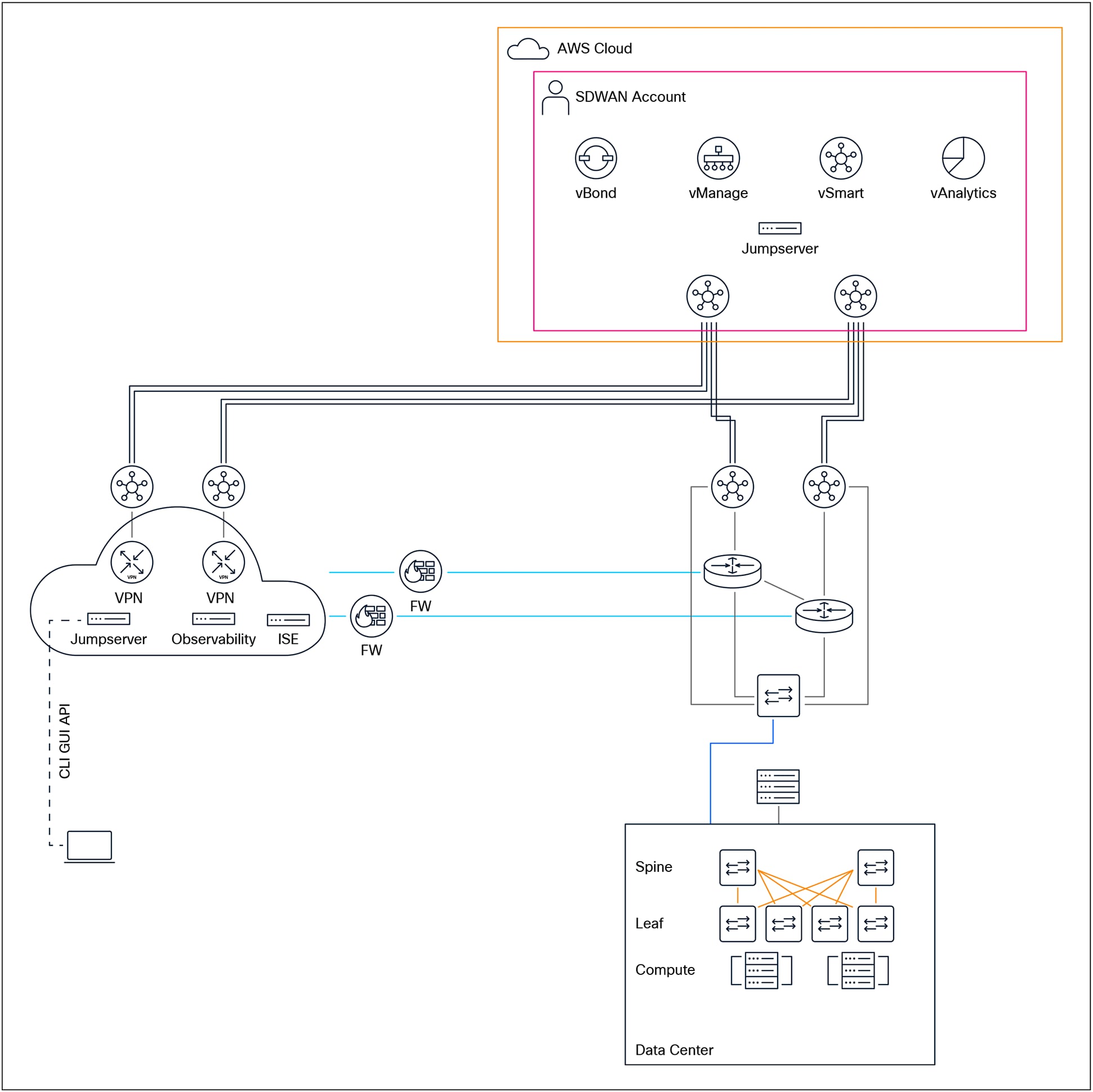
A recommended management network architecture for a data center provider should incorporate dedicated management routers to establish a secure and resilient infrastructure for managing all network devices. These management routers serve as the backbone of the management network, providing out-of-band access and supporting critical functions such as device configuration, monitoring, troubleshooting, and recovery, independent of the production data flows.
For optimal resiliency and fault tolerance, it is best practice for management routers to be connected to two geographically separate locations using redundant or diverse northbound uplink circuits. This dual-homing approach ensures continued connectivity even in the event of a single circuit failure or site outage. Additionally, management routers should be interconnected east/west with adjacent or backup routers through redundant links, further enhancing the network’s availability and reducing the risk of single points of failure.
Each management router should also have dedicated southbound connections to its associated management switches and console servers. This topology allows for isolated and secure access to the management plane of all devices within the data center, enabling administrators to perform maintenance and recovery operations efficiently.
To maintain robust connectivity and continuous reachability for all sites and devices within the management domain, it is essential that routing information be exchanged between adjacent management routers. This dynamic exchange of routes ensures that management traffic can be rerouted in the event of a failure, maintaining access to all critical systems.
Management switches, which form the distribution layer of the management network, should be connected northbound to their primary management routers. Where redundancy is required, east/west links between adjacent or backup switches provide additional resilience. Southbound connections from management switches should extend to console servers, to managed devices such as servers, storage systems, and network appliances, and to dedicated management interfaces, e.g., compute integrated management ports like Cisco Integrated Management Controller (CIMC), HP Integrated Lights-Out (iLO), or Dell integrated Dell Remote Access Controller (iDRAC).
Given the growing trend toward data center virtualization, many providers leverage virtualization technologies to reduce costs, increase flexibility, and simplify management. In this context, it is advisable to explore the use of virtual routing instances or software-defined WAN (SD-WAN) solutions within the management network. These solutions can enable rapid deployment, centralized policy control, and improved scalability, particularly in large or geographically dispersed data center environments. Further guidance and detailed considerations on the implementation of virtual management networks and SD-WAN-based architectures will be discussed in subsequent sections.
Management Network supporting Telco Provider
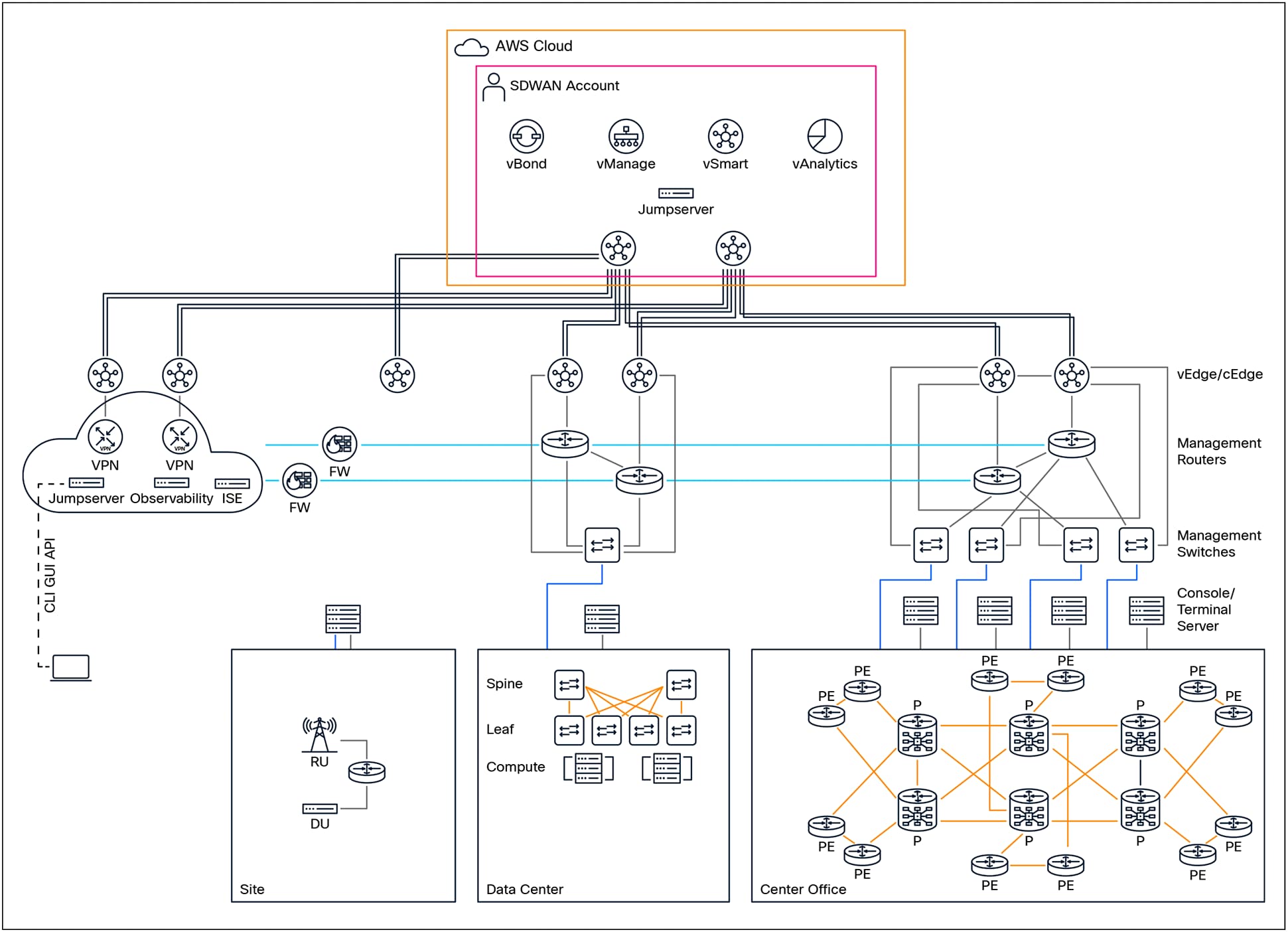
The management network architecture employed within telecommunications (Telco) networks shares many foundational similarities with the architectures found in both traditional service provider and data center provider environments. This likeness is largely due to the parallel infrastructure footprints that these sectors maintain, such as the extensive use of distributed network elements, multi-tiered management systems, and standardized protocols for device and service management.
Nevertheless, a unique and crucial aspect that distinguishes Telco environments is the widespread deployment of cell sites. Cell sites function as the physical locations where essential Radio Access Network (RAN) components are installed and operated. These typically include cell site routers, radio units, antennas, and a variety of supporting equipment. The primary purpose of these cell sites is to extend wireless coverage and capacity, ensuring seamless connectivity for mobile subscribers across diverse and often geographically dispersed regions.
Within a typical cell site, there is an integrated deployment of several types of network functions. These include Physical Network Functions (PNFs), which refer to dedicated hardware appliances; Virtual Network Functions (VNFs), which are software-based functions running on general-purpose hardware; and Container Network Functions (CNFs), which leverage containerization for flexible, lightweight service deployment. In addition to these core network functions, cell sites are often equipped with a suite of environmental and security sensors. These sensors play a vital role in monitoring the physical site environment, detecting security breaches, and ensuring operational integrity.
Given that the majority of cell sites are either unmanned or managed remotely, it is imperative that all these components—PNFs, VNFs, CNFs, and sensors—have robust out-of-band management access. Out-of-band access enables administrators to perform maintenance, troubleshooting, and configuration tasks independently of the primary data traffic, which enhances reliability and security.
The physical size and complexity of cell sites can vary widely. Larger cell sites, which may serve urban or high-traffic areas,
typically justify the deployment of a full-scale management network architecture. These architectures are designed to deliver comprehensive manageability, scalability, and resilience, mirroring the approaches used in large data centers or service provider networks. Conversely, smaller or remote cell sites, often found in rural or low-density areas, may benefit from a more compact and cost-effective management solution. For such scenarios, it is common to deploy an aggregation platform that consolidates management ports for PNFs, VNFs, and CNFs, as well as interfaces for other interconnections. This approach streamlines management while optimizing the use of available space and resources.
A significant operational challenge arises when cell sites are unable to achieve fiber diversity or do not have adequate capacity to support a dedicated management connection. In these instances, leveraging LTE or 5G wireless connectivity presents a practical alternative. Management access can be facilitated through either private LTE/5G networks, which are operated by the Telco itself, or through public networks provided by external service providers. Connectivity for management traffic can be established by utilizing adjacent cell towers or by routing through alternative service providers, thereby ensuring both redundancy and continuity of operations.
To address the complexities associated with such diverse connectivity options, it is highly recommended to implement a Software-Defined Wide Area Network (SD-WAN)–based solution. SD-WAN technology is well-suited for these use cases, as it delivers operational simplicity through centralized control, enables seamless scalability to accommodate network growth, and provides flexible policy-driven management for optimal use of available links. This ensures that the management infrastructure remains robust, adaptable, and capable of supporting the evolving needs of Telco cell sites across varying environments.
Management Network for Mission-Critical Networks
Most service providers maintain specific network locations categorized as “mission critical.” The importance of these sites can differ based on the network’s design and operational requirements. Examples of such mission-critical locations might include aggregation points that consolidate traffic from multiple remote or branch locations, core network devices integral to the overall functioning of the network, sites that host foundational or essential infrastructure components (such as authentication servers, DNS, or management platforms), or customer locations with the most stringent Service Level Agreements (SLAs) and Service Level Objectives (SLOs) that demand consistently high uptime and rapid incident response. Because these sites are so vital, any loss of connectivity or access—whether due to equipment failure, cyberattack, power outage, or natural disaster—can have far-reaching consequences for the network’s stability and the provider’s ability to meet contractual obligations.
In these scenarios, relying solely on one or two traditional methods of access—such as in-band management (where administrative access is provided through the same paths as production traffic) or out-of-band management (which uses dedicated pathways for device management)—can prove inadequate, especially during emergencies. Recent real-world events and incidents have underscored that having only limited access methods can leave critical sites vulnerable, particularly when facing sophisticated malicious attacks, cascading failures, or even unanticipated complications arising during routine maintenance activities. Such experiences have demonstrated that building redundancy (multiple, independent methods of access) and resiliency (the ability to recover quickly from disruptions) into the network is not merely advisable but essential for maintaining operational continuity and minimizing downtime.
To address these challenges and enhance both access flexibility and security in a manner that can scale with the network’s growth, implementing an SD-WAN (Software-Defined Wide Area Network) solution as an additional connectivity method is recommended. SD-WAN was specifically designed to provide secure, reliable, and efficient connections between data centers, branch offices, and other networked locations—often over the public internet. At a fundamental level, SD-WAN consists of centralized controllers (which can be hosted either on-premises or in public/private cloud environments) that manage the management and control planes of the network, along with distributed edge devices responsible for processing and forwarding data-plane traffic. These edge devices, which can be physical appliances or Virtual Network Functions (VNFs), are orchestrated and managed through the SD-WAN controllers, enabling consistent policy enforcement and simplified operations.
A notable advantage of SD-WAN edge devices is their deployment flexibility: they support a broad range of connectivity options, including physical wired interfaces, wireless Ethernet, and cellular connections (such as LTE or 5G). This flexibility allows organizations to extend secure network access to sites where physical connectivity options may be limited or unreliable, or to quickly provision backup connectivity paths that can be activated when primary links fail. The use of automation—often via templates and centralized policy management—further streamlines the provisioning, monitoring, and ongoing management of SD-WAN infrastructure, reducing operational overhead and the risk of human error.
Moreover, SD-WAN edge devices can serve as a critical alternative to traditional access methods, providing continuity of operations for mission-critical sites during outages or disruptions. For example, if both in-band and out-of-band links are compromised, an LTE or 5G SD-WAN link can serve as a secure, out-of-path management channel, ensuring administrators retain access to essential devices and services.
For more comprehensive information about SD-WAN, including its architecture, management capabilities, and deployment best practices, please refer here .
A robust and recommended SD-WAN architecture for mission-critical environments involves deploying the SD-WAN controllers within a public cloud platform. This approach enhances operational simplicity by leveraging cloud-native resiliency, geographic diversity, and elastic resource allocation. Simultaneously, redundant edge devices—implemented as Physical Network Functions (PNFs) or Virtual Network Functions (VNFs)—should be installed at each mission-critical site to ensure high availability and failover capabilities. Secure and selective route exchange between the management network, authenticated VPN users, and the SD-WAN overlay is imperative. Careful route design ensures that only authorized users and devices can reach sensitive network resources, thus maintaining both network security and reliable, uninterrupted access to distributed infrastructure.
● No user traffic shall traverse the Management network.
● Management Network shall not be accessed via Public Network.
● All interfaces on Management Routers, Management Switches, Console servers, and Managed devices must be configured with Static IPs
● All dependencies/supporting services shall be dedicated (Recommended) or reachable within Management network such as Terminal Access Controller Access-Control Systems (TACACs), syslog servers, observability solution, and any Automation supporting the Management Network.
● All Management Devices and Managed Devices shall be restricted to known internal IP/VPN IP pool sources.
● Consider implementing "port-security" on Management switches to restrict access to predetermined MAC address.
● Consider using multiple Jumpservers that are Geo-diverse to access devices rather than direct access.
● Ensure all circuits interconnecting Management devices, Management Switches, Console servers etc. do not have shared risk links.
● Consider simplifying routing for the overall Management solution; the intent is to provide connectivity and ease of operation.
● Managed Devices shall be accessed:
◦ Primary access: In-band
◦ Secondary access: Management interface (Dedicated/designated) via Management Network
◦ Tertiary access: Console
● Consider isolating Management into a dedicated VRF.
● Consider Cisco SD-WAN solution for a true OoB for large COs/DC/Sites—Cisco Integrated Services Routers (ISR) 1100-4G equipped with an LTE/5G connectivity to ensure reachability in the case of a catastrophic failure.
● Test Management interface and Console ports connectivity/reachability on a regular basis (consider Automation/Scripts to ensure reachability).
● Ensure all unused ports are shutdown and clearly labeled with "Unused."
● Disable unused ports and place them in an unused VLAN.
● Consider disabling Cisco Discovery Protocol/ Link Layer Discovery Protocol (CDP/LLDP) on non-critical ports.
● Perform regular failover of Management network to ensure survivability (at least once a year) and expose any unforeseen changes.
● When MFA (Multi-Factor Authentication) is enabled, ensure that in case of reachability issue to MFA, device shall fallback to "local account" for authentication.
● Maintain a descriptive "Port description" on all ports in Management network.
● Maintain a backup strategy (onsite/offsite) to ensure quick restoration of Management network.
● Know your routing protocol default behavior, scale, and limitation and perform a baseline.
● Document number of routes required and observe growth on a regular basis.
● Avoid route redistribution where possible, if redistribution is required ensure all route-policies/route filters are used for redistribution.
● Ensure network segmentation is in place. An outage in one part of the network shall not impact other part of the network.
● Use authentication with all routing protocols (where applicable).
● Adhere to a strict password rotation for security and accessibility consideration.
Best Practices for Linux-Based Jumpserver
● Implement a redundant deployment model, considering bare-metal, Virtual Machine (VM)-based, and containerized approaches to ensure virtualization diversity.
● Perform minimal operating system installations and ensure the OS is hardened.
● Encrypt Data Communication: Encrypt data communication for Linux servers.
● Strong Passwords and Policies: Enforce strong password policies, including minimum length, complexity (special characters, mixed case), and regular changes.
● Key-Based Authentication: Use Secure Shell (SSH) key pairs instead of passwords for more secure access.
● Two-Factor Authentication (2FA)
● Principle of Least Privilege: Grant users only the minimal level of access required to perform their tasks. Avoid using the root account for day-to-day administration; instead, create individual user accounts with sudo privileges.
● Limit application installations to only those required, enforce application controls, and restrict users from installing unauthorized applications.
● Enable only essential services for users; disable all non-essential services.
● Configure multi-factor authentication with a fallback to local user accounts.
● Do not store any end-user or sensitive data on the jump server.
● The jump server must not have internet or external connectivity.
● Maintain a rigorous patching and update policy to address all security vulnerabilities promptly.
● Use only air-gapped methods for patching and updating systems.
● Enable comprehensive monitoring and logging for both system and user activities, and conduct frequent audits.
● Apply thorough OS hardening practices, including but not limited to:
◦ BIOS protection
◦ Separating critical system directories into distinct partitions (e.g., /boot, /usr, /home, /tmp, /var/opt)
◦ Securing the boot directory by setting appropriate permissions and locking it
◦ Encrypt data communication: Encrypt data communication for Linux servers.
◦ Strict file permission
◦ Disable harmful commands that might impact the integrity of the jumpserver.
◦ Enable a firewall: Configure and enable a firewall (e.g., iptables, nftables, or firewalld) to control incoming and outgoing network traffic.
◦ Enabling SELinux for enhanced security
◦ Maintaining an inventory of installed packages and restricting users from installing additional packages
◦ Regularly scanning for open ports
◦ Restricting CRON access to the root user only
◦ Performing regular backups (onsite, offsite, and cloud-based)
The information below is not an all-inclusive list but rather a quick reference for general device hardening. For more information on device hardening, please refer to OS hardening guide I contributed to.
● Monitor Cisco Security Advisories and Responses
● Use Type 8 or 9 hashing for non-reversible passwords (local accounts).
● Use Type 6 encryption for reversible key strings (remote).
● Deploy a remote Authentication, Authorization, and Accounting (AAA) server (TACACS+ and/or RADIUS).
● Enable AAA accounting.
● Enable password strength check.
● Enable secure management protocols such as SSH and Secure Copy Protocol/ Secure File Transfer Protocol (SCP/SFTP) (where applicable), or HTTPS (where applicable), and disable unencrypted protocols such as Telnet, FTP, and HTTP.
● Enable management plane protocols as required (SSH, Simple Network Management Protocol [SNMP], Network Time Protocol (NTP), Netconf, Trivial File Transfer Protocol (TFTP), XML, HTTP/HTTPS).
● Use SNMPv3 and avoid SNMPv2c or SNMPv1.
● Avoid using SNMPv2 read-write community strings if SNMPv2 must be used.
● Configure Access Control Lists (ACLs) SNMP.
● Use a remote syslog server for centralized log collection and correlation.
● Configure secure logging.
● Configure a source interface for logging.
● Set the logging level to "informational."
● Configure logging timestamps with log datetime localtime msec.
● Disable Third-Party Applications (TPA) if they are enabled but not in use.
● Limit Third-Party Application (TPA) access via Traffic Protection, if applicable.
● Disable appmgr if enabled but not in use.
● Disable Linux Networking if enabled but not in use.
● Enable Traffic Protection if Linux networking is used.
● Enable NTP authentication.
● Configure Access Control Lists (ACLs) for NTP.
● Configure Cisco Border Gateway Protocol (BGP) Time-to-Live-based security protection.
● Authenticate BGP peer sessions using TCP Authentication Option (AO) instead of MD5.
● Set BGP maximum prefixes to prevent route table overflow.
● Filter iBGP prefixes for IPv4 using Route Policy Language (RPL) policies.
● Filter iBGP prefixes for IPv6 using Route Policy Language (RPL) policies.
● Authenticate IGP peer sessions using MD5.
● Use the Passive Interface feature on interfaces where protocol adjacency is not required.
● Disable IP source routing, IP directed broadcast, Internet Control Message Protocol (ICMP) redirects, and proxy ARP.
● Disable outbound SSH transport for Virtual Teletype (VTY) and Teletype (TTY) lines.
● Disable outbound SSH transport for the console.
● Set an EXEC timeout for VTY and Console sessions.