Mesh Policy Engine Ordering Guide
Available Languages
Bias-Free Language
The documentation set for this product strives to use bias-free language. For the purposes of this documentation set, bias-free is defined as language that does not imply discrimination based on age, disability, gender, racial identity, ethnic identity, sexual orientation, socioeconomic status, and intersectionality. Exceptions may be present in the documentation due to language that is hardcoded in the user interfaces of the product software, language used based on RFP documentation, or language that is used by a referenced third-party product. Learn more about how Cisco is using Inclusive Language.
This ordering guide is designed to help Cisco sales teams, partners, and distributors order Mesh Policy Engine. This guide will help you:
● Understand various offers
● Understand specific ordering SKUs for your customers’ needs
● Make sure that the right quantities are selected to reduce the risk of order rejection
● Provide information about the end-to-end quote-to-fulfillment process in Cisco Commerce
This guide is intended for Cisco sales teams, partners, and distributors qualified to sell Mesh Policy Engine on the Cisco Global Price List.
Mesh Policy Engine refers to the intent-based policy automation feature that is made available through Cisco Security Cloud Control. Mesh Policy Engine simplifies day-to-day operations and enables organizations to deploy Cisco Secure Firewall into their existing environment without adding operational overhead. Mesh Policy Engine eliminates the complexity of policy placement and creation by translating the intent-based request from the application owner/user (after approval) into the outcome-based policy rules that need to be placed on the relevant firewall devices, then orchestrating the placement of that policy onto both Cisco and non-Cisco firewall devices.
Scope
This guide addresses the ordering experience for Mesh Policy Engine.
Mesh Policy Engine requires licensing only for non-Cisco (third party) devices. Supported Cisco devices (first party) are entitled to Mesh Policy Engine at no cost.
| License Type |
Description |
Subscription PID |
Product PID |
Notes |
| Mesh Policy Engine for 3rd Party Firewalls |
Per device license for using Mesh Policy Engine with 3rd party |
MPE-SEC-SUB |
MPE-3P |
Required only for 3rd party firewalls. |
A purchase of the Mesh Policy Engine third-party license requires Cisco Support Enhanced, with the option to upgrade to Cisco Support Signature. Customers are entitled to technical support for the term of their subscription.
| Support Level |
Description |
| Cisco Support Enhanced |
● Technical Support (24x7 access to Cisco Cloud Security Support – phone/online)
● Software updates
● Primary point of contact with software expertise
● Technical onboarding and adoption assistance
|
| Cisco Support Signature |
Includes enhanced features plus:
● Prioritized case handling over Enhanced support
● Assigned expert who provides incident management and proactive consultation and recommendations to ensure successful security software deployment and ongoing management and optimization
● Support case analytics
|
To learn more about Cisco Support Services for Security Software, click here
Quoting guidelines
Mesh Policy Engine requires a per-device license for third-party (non-Cisco) device entitlement. The licenses are offered as a subscription of 1, 3, or 5 years.
Per-Device Licensing: Device licenses are based on the quantity of third-party (non-Cisco) devices. For instance, if you want to push policy to 5 supported Cisco firewalls and 10 supported non-Cisco firewalls, you are only required to purchase 10 Mesh Policy Engine licenses, accounting for the non- Cisco firewalls.
Purchasing Mesh Policy Engine Third-Party Device Licenses
Step 1: Selecting the Subscription SKU
There is one subscription SKU for Mesh Policy Engine (MPE-SEC-SUB). There is no price for the subscription SKU. Product quantities will be entered when the product SKUs are added to the subscription.
a. Search MPE-SEC-SUB and add it.
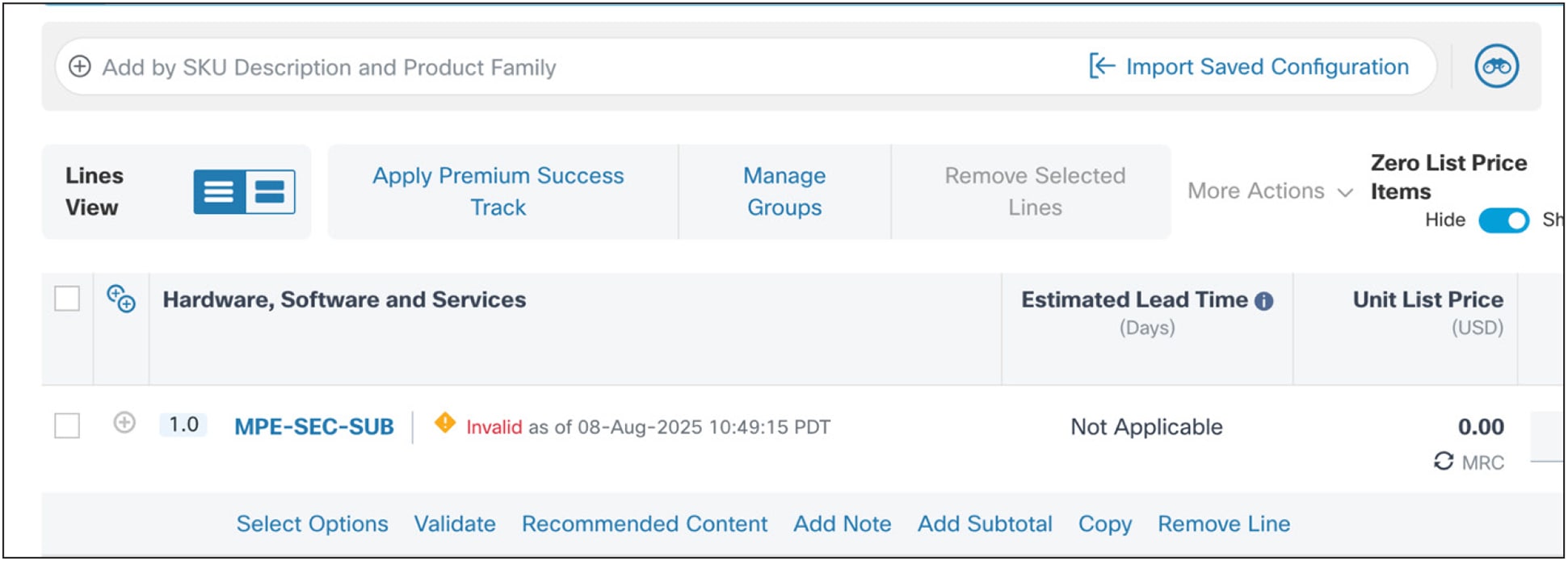
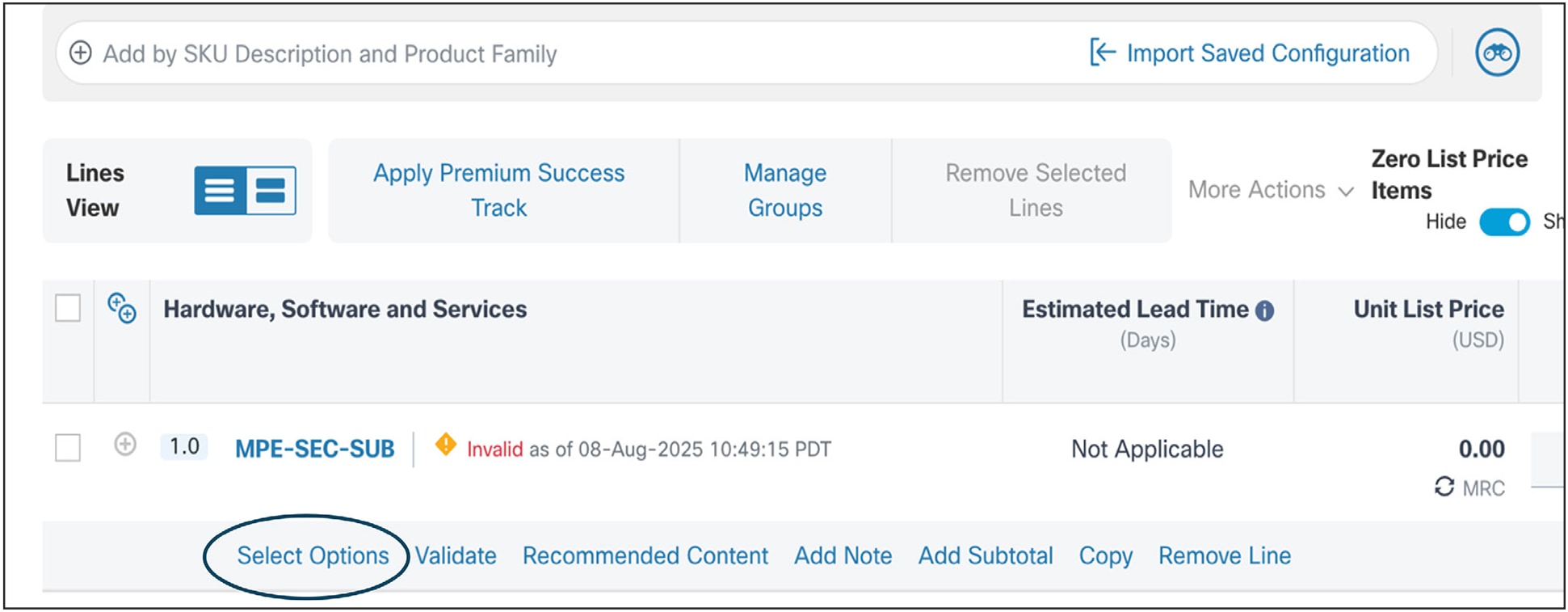
b. Click Select Options to add product SKUs to the subscription.
Step 2: Adding Product SKUs
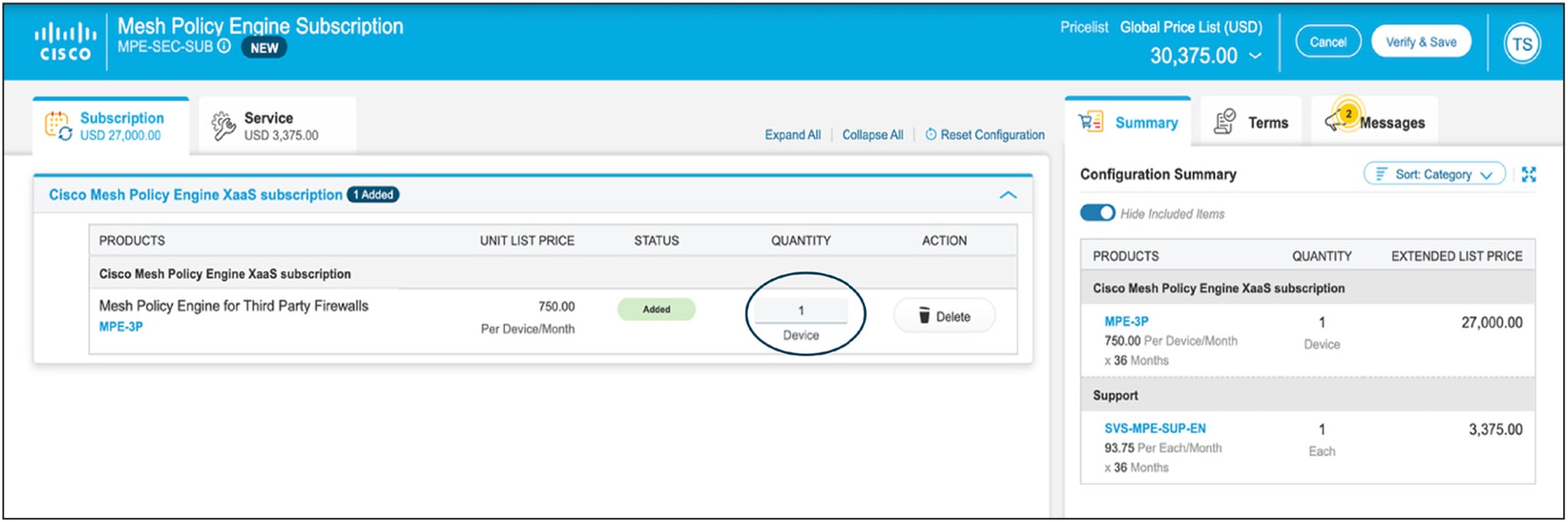
The next step is to add the product to the subscription (Mesh Policy Engine only has one). Here you will add the product SKU and quantity of third-party devices you want in Mesh Policy Engine.
Mesh Policy Engine for Third Party Firewalls SKU (MPE-3P)
This represents the per-third-party-device SKU for Mesh Policy Engine. This is where you enter the number of non-Cisco devices you want to bring into Mesh Policy Engine.
Step 3: Adding Service and Support SKUs
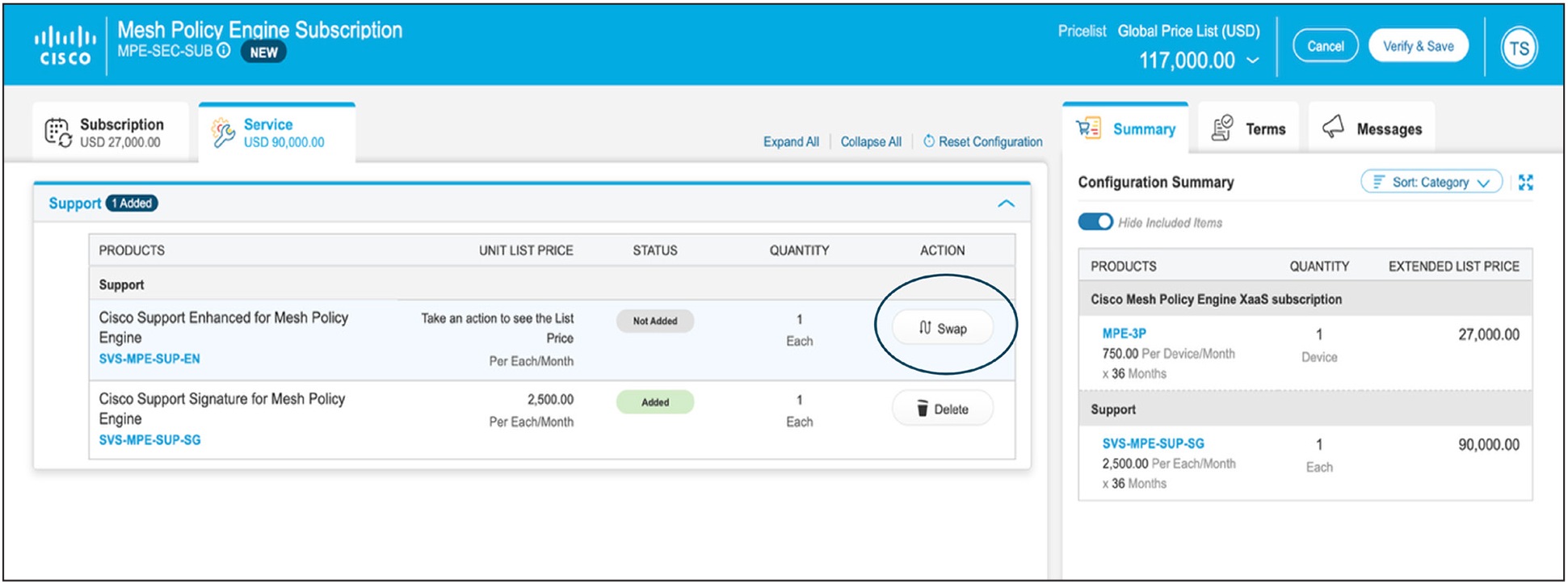
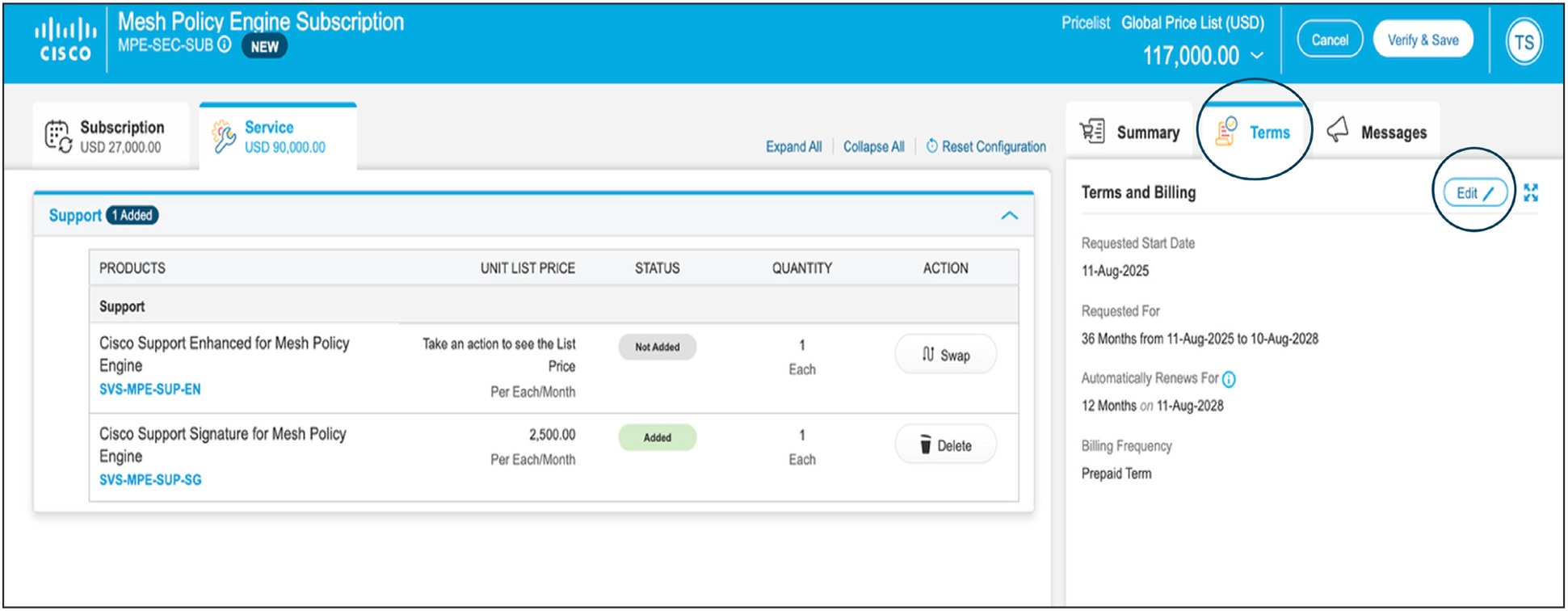
Click the Service Tab at the top, next to Subscription. There are two options here: Cisco Support Enhanced and Cisco Support Signature for Mesh Policy Engine.
When the product SKU is added, Cisco Support Enhanced is added by default. Click if you wish to instead use Cisco Support Signature. At least one support SKU needs to be selected.
Step 4: Modify Term Details
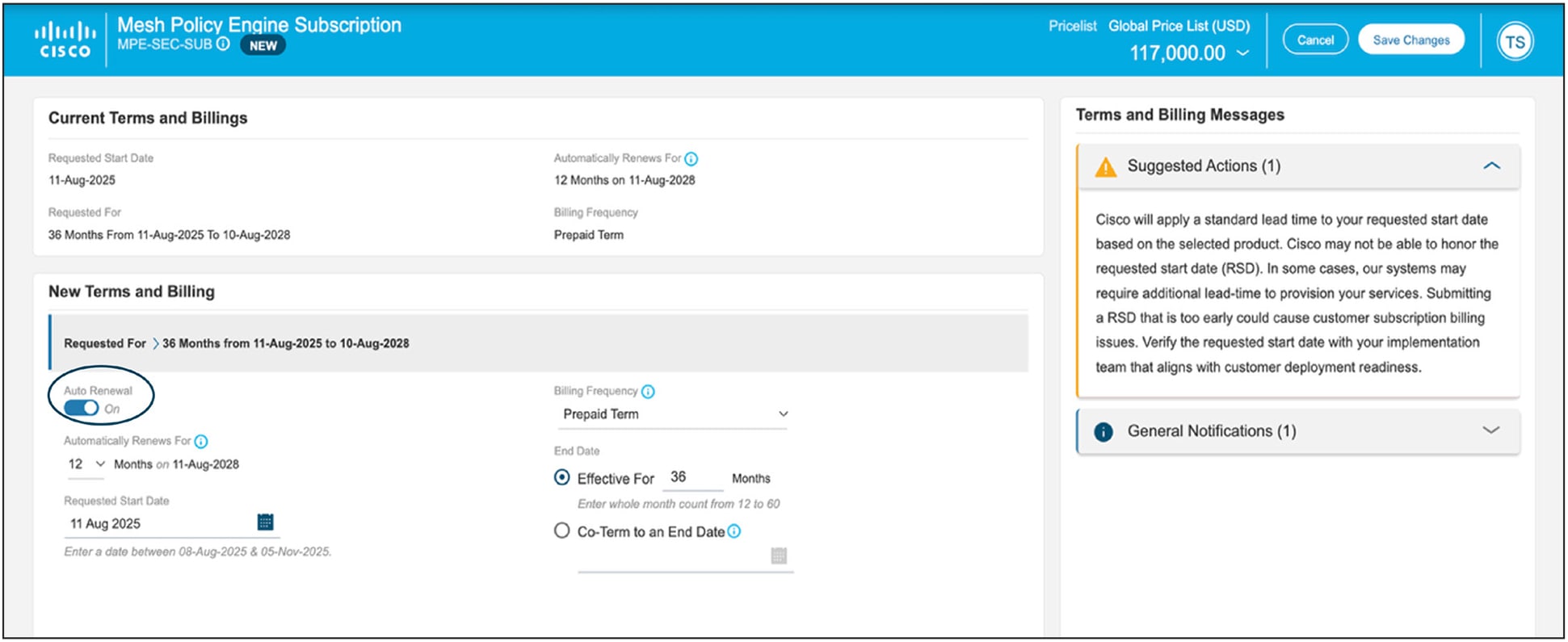
Click Terms Tab at the top right to view the details of the Terms. By default, it is 36 months. To adjust this, click the Edit button and make changes required to the subscription and renewal under New Terms and Billing and click Save Changes button.
At time of ordering, the subscription is set to auto-renew as a default, however, auto-renew can be turned off (toggle button on lower left as shown above) without triggering the deal to become non-standard.
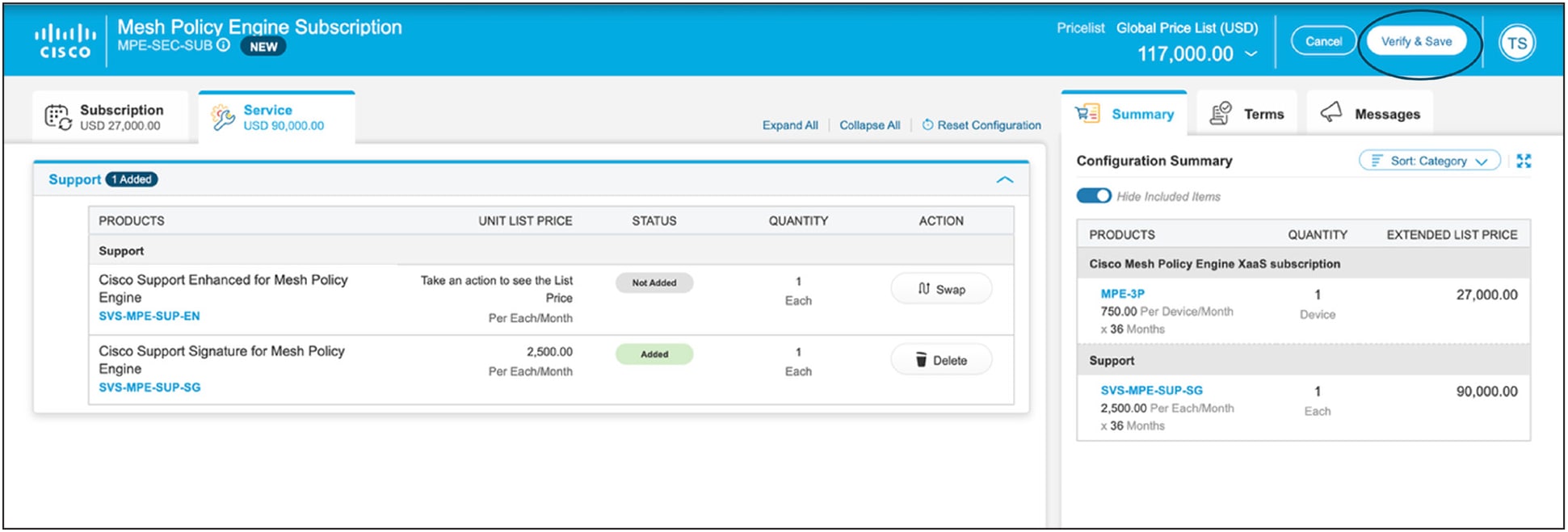
Step 5: Validate the order
Click the Summary tab at the top to ensure the order reflects the desired quantity and type of SKUs. Click Verify and Save to proceed with the order completion.
After the order has been placed, a claim code will be created for the end customer and emailed to the address specified above for subsequent provisioning. Refer to the Security Cloud Control user guide for details. Upon activation, the end-customer administrator will receive a welcome email with instructions to log in to the Security Cloud Control tenant to enable Mesh Policy Engine. When administrators have logged in to the dashboard, they will be aided by a setup guide as well as access to support resources to make sure their accounts are properly set up.
Subscription renewals, changes, and cancellations
At time of ordering, the subscription is set to auto-renew as a default, however, auto-renew can be turned off (toggle button on lower left as shown above) without triggering the deal to become nonstandard.
Subscription changes
Changes to the products, quantities, or terms of a subscription may be made at any time during the term of the subscription. To change the subscription, please refer to this Cisco Commerce Change Subscription Job Aide. Attempting to add products or quantities by creating a new subscription will result in an ordering error.
Subscription cancellations
Renewals may be cancelled up to 60 days before the start date of the new term. If the subscription is not cancelled, the subscription will automatically renew. Midterm cancellations of subscriptions for credit are not allowed.