Cisco Campus Gateway: Scaling Campus Wireless Networks Solution Overview
Available Languages
Bias-Free Language
The documentation set for this product strives to use bias-free language. For the purposes of this documentation set, bias-free is defined as language that does not imply discrimination based on age, disability, gender, racial identity, ethnic identity, sexual orientation, socioeconomic status, and intersectionality. Exceptions may be present in the documentation due to language that is hardcoded in the user interfaces of the product software, language used based on RFP documentation, or language that is used by a referenced third-party product. Learn more about how Cisco is using Inclusive Language.
The Cisco® Campus Gateway is a cutting-edge, cloud-native solution designed to simplify large-scale wireless networks managed through the user-friendly Cisco Meraki™ dashboard, which provides centralized control, real-time visibility, and remote management.
● Simplified network architecture
The Campus Gateway simplifies your network by centralizing data traffic using advanced overlay protocols like Quick UDP Internet Connections (QUIC) and VXLAN. This approach keeps client VLANs in the network core/distribution layer, reducing complexity and eliminating the need to extend them across access switches, resulting in a cleaner, more efficient network design. No need to redesign your underlay network.
● Uninterrupted connectivity for users
The Campus Gateway helps ensure a seamless and uninterrupted user experience by enabling smooth Layer 3 roaming across access points and domains. This is especially important for large campuses, where reliable connectivity and consistent performance are critical.
● Enterprise-grade performance and scalability
Designed for enterprise networks large and small the Campus Gateway supports up to 5,000 access points and 50,000 clients iwith the CW9800H1-MCG and up to 500 APs and 10,000 clients with the CW9800L-MCG. It delivers impressive performance, with throughput of up to 100 Gbps (10 Gbps for CW9800L-MCG) for standalone devices and up to 200 Gbps (20 Gbps for CW9800L-MCG) in a fully redundant high-availability cluster, providing both reliability and scalability to meet network demands.
● High availability made simple
The Campus Gateway uses an Active-Active High-Availability (HA) model, in which devices in a cluster actively share the load for improved reliability. Clusters can include two Campus Gateways for redundancy, with the Meraki dashboard automatically load-balancing supported access points among cluster members. The Campus Gateway offers a stateful redundancy solution in which client session information is synchronized across both members of the stack, helping ensure seamless failover and uninterrupted service. The centralized dashboard helps ensure that the configurations required to set up a high-availability cluster are simple and easy to manage.
● Scalable network services
The Campus Gateway implements key centralized network services that enhance scalability and simplify management. These include:
◦ mDNS gateway: The Campus Gateway can be configured as an mDNS gateway, enabling mDNS communication across centralized client VLANs, which is essential for service discovery in segmented networks.
◦ RADIUS proxy: Acting as a RADIUS client (network access server, or NAS), the Campus Gateway aggregates authentication requests from multiple access points. This means the Authentication, Authorization, and Accounting (AAA) server receives all RADIUS requests from a single NAS, greatly simplifying AAA server configuration.
◦ Centralized mobility: The Campus Gateway manages a centralized client mobility key database, supporting seamless client roaming and efficient key management. This enables the solution to scale reliably to tens of thousands of clients.
● Seamless and hassle-free firmware upgrade via dashboard
Upgrading your firmware is as easy as it has always been. The dashboard handles the process smoothly by first upgrading the Campus Gateway, followed by the access points. You can choose between two upgrade options based on your needs: Minimize Upgrade Time for faster updates or Minimize Client Downtime for minimal disruption to connected users during the upgrade process.
● Support for the latest Wi-Fi standards
The Campus Gateway supports all Wi-Fi 7 (802.11be), some Wi-Fi 6E, and select Wi-Fi 6 (802.11ax) cloud controlled access points via the Meraki dashboard, while maintaining compatibility with legacy standards such as 802.11ac and previous generations.
● No extra license needed for an easy licensing model
No separate license is needed for the Campus Gateway. Only access points require Enterprise/Essentials or Advanced/Advantage tier licenses.
The Campus Gateway is managed natively and directly from the cloud, just like any other Meraki device. It works together with the access points to manage both control and data paths efficiently. Responsibilities are logically distributed to help ensure scalability, high performance, and centralized cloud management. This architecture aligns with modern cloud-managed enterprise wireless networks, in which the cloud handles configuration, analytics, and non-real-time services such as AI-based Radio Resource Management (RRM) and rogue management. Meanwhile, real-time functions are retained locally to help ensure low latency and optimal performance.
The figure below illustrates how these functions are structured.
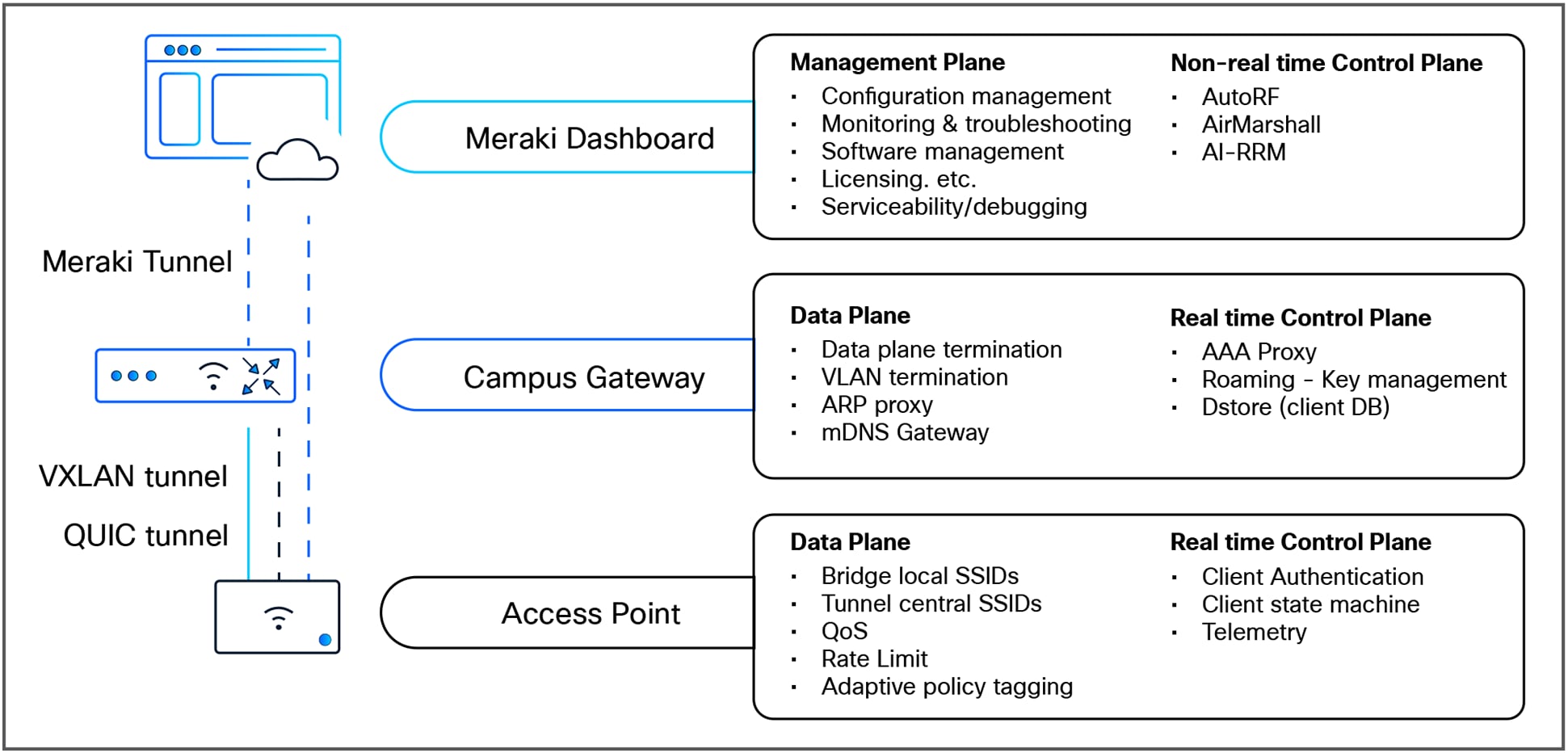
Allocation of functions with Campus Gateway
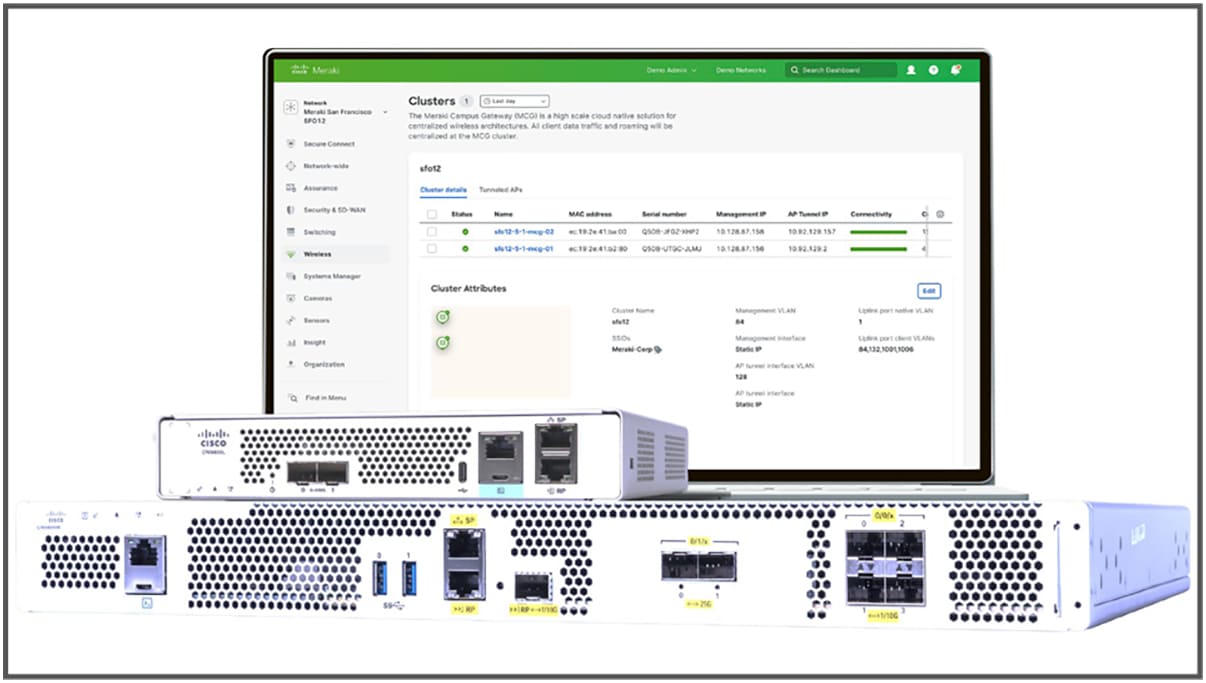
Campus Gateway appliances and Meraki dashboard configured for an active-active cluster
Campus Gateway cloud-managed architecture
The Campus Gateway simplifies and enhances IT operations by providing secure cloud connectivity through a TLS-based tunnel called nextunnel, enabling centralized management and visibility via the Meraki dashboard. It leverages modern programmability tools such as NETCONF for configuration deployment and telemetry.
The Campus Gateway supports automatic uplink detection to simplify connectivity to the Meraki dashboard. After the initial boot, the Campus Gateway uses automatic uplink detection logic to identify available VLANs on its trunk uplink ports, selects one with internet connectivity, and leverages Dynamic Host Configuration Protocol (DHCP) on the selected VLAN to obtain an IP address and automatically connect to the dashboard.
The conditions for this automatic uplink detection to function properly remain the same:
● The uplink switch must be configured with a port-channel and trunk.
● DHCP must be active on at least one VLAN, providing a default gateway and DNS servers.
● Connectivity to the Meraki dashboard must be allowed on the active VLAN.
The Cisco Campus Gateway's nextunnel feature provides dynamic and secure connectivity between the Campus Gateway nodes and the Meraki cloud. It simplifies communication by eliminating the need for manual VPN configurations. Nextunnel uses TLS 1.2 with Advanced Encryption Standard (AES)-256 encryption and enforces mutual TLS authentication to securely connect the Campus Gateway to the Meraki cloud infrastructure.
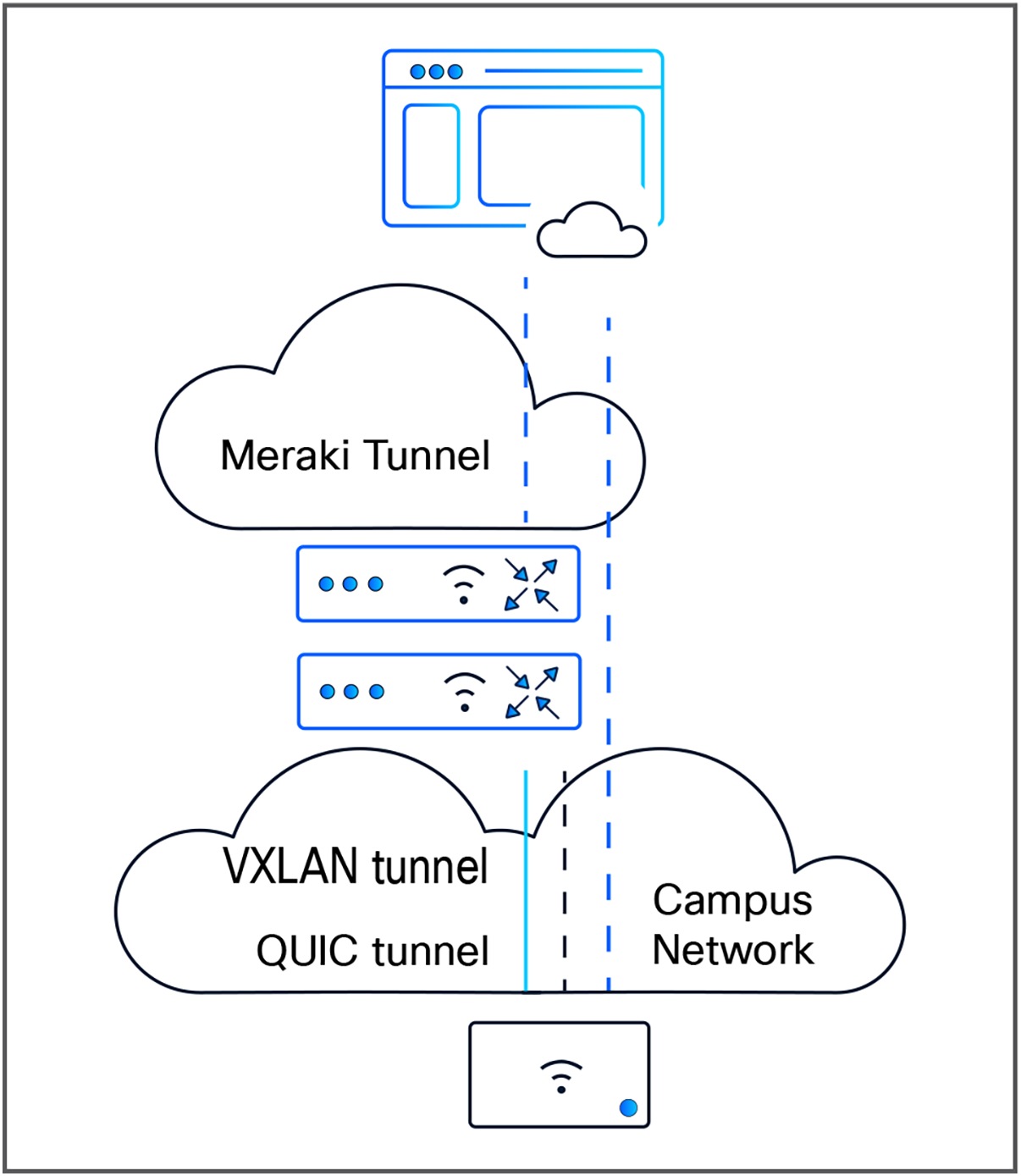
Communication between the Campus Gateway and access points in a cluster deployment
Communication between the Campus Gateway and access points uses the QUIC protocol on a UDP port for the control plane and VXLAN for the data plane.
Access point join using a QUIC tunnel
Unlike traditional wireless controllers that rely on the Control and Provisioning of Wireless Access Points (CAPWAP) protocol, the Campus Gateway uses the QUIC protocol on a UDP port for its control plane communication with the access points. This protocol choice enables efficient, low-latency, and secure control messaging between the Campus Gateway and the access points, supporting scalable and high-performance wireless network operation.
VXLAN tunneling for wireless client traffic
Wireless client data is encapsulated using VXLAN to provide secure, scalable traffic handling between Meraki MR access points and the Campus Gateway. Using VXLAN for the data plane to tunnel client traffic allows for seamless aggregation and forwarding of client data through the Campus Gateway cluster.
If, for any reason, the link between the Meraki dashboard and the Campus Gateway cannot be established automatically, Cisco provides the Local Status Page (LSP) as a reliable fallback. The LSP allows you to manually configure essential network parameters such as VLAN, IP address, gateway, and DNS to enable continued operation and management of the Campus Gateway.The LSP is available to help configure uplink parameters out-of-band if connectivity to the cloud dashboard is lost. Thishelps restore dashboard connectivity to resume central management.
Onboarding Campus Gateway
Adding a Campus Gateway to your network kicks off a straightforward onboarding process to set up the necessary cluster settings. Whether you're adding just one unit or more than one at the same time, the steps are the same. Simply connect the Campus Gateway(s) to your upstream switch and power them on. You'll know they're ready when the LED lights show they're connected to the dashboard. After you complete the onboarding steps, it takes about 5 minutes for the new settings to take effect-then you're good to go.
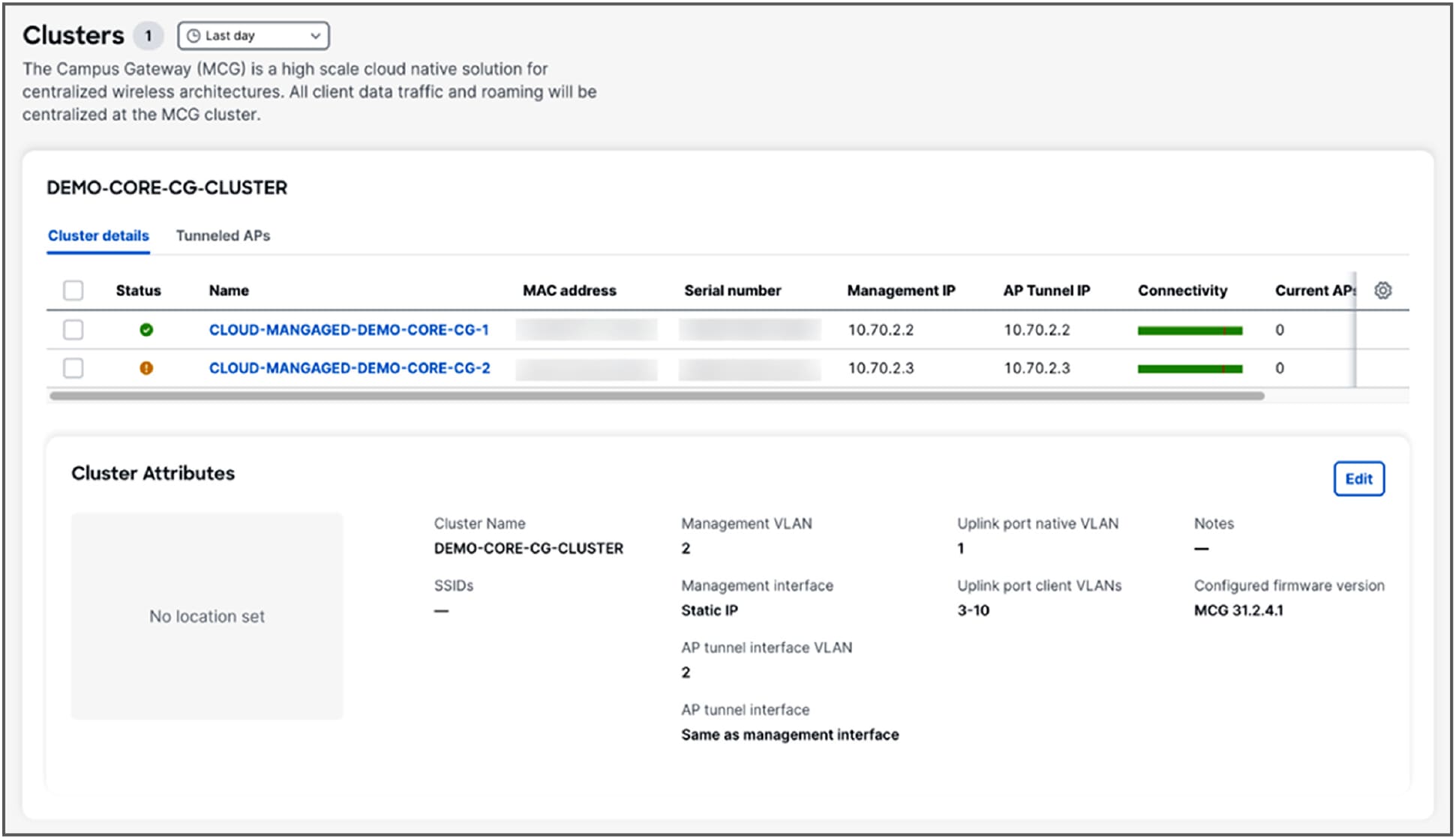
High availability made simple
The Campus Gateway uses an Active-Active HA model, in which devices in a cluster actively share the load for improved reliability. Clusters can include two Campus Gateways for redundancy, with the Meraki dashboard automatically load-balancing MR access points among cluster members. The Campus Gateway offers a stateful redundancy solution in which client session information is synchronized across the members of the stack, helping ensure seamless failover and uninterrupted service. The centralized dashboard helps ensure that configurations required to set up an HA cluster are simple and easy to manage.
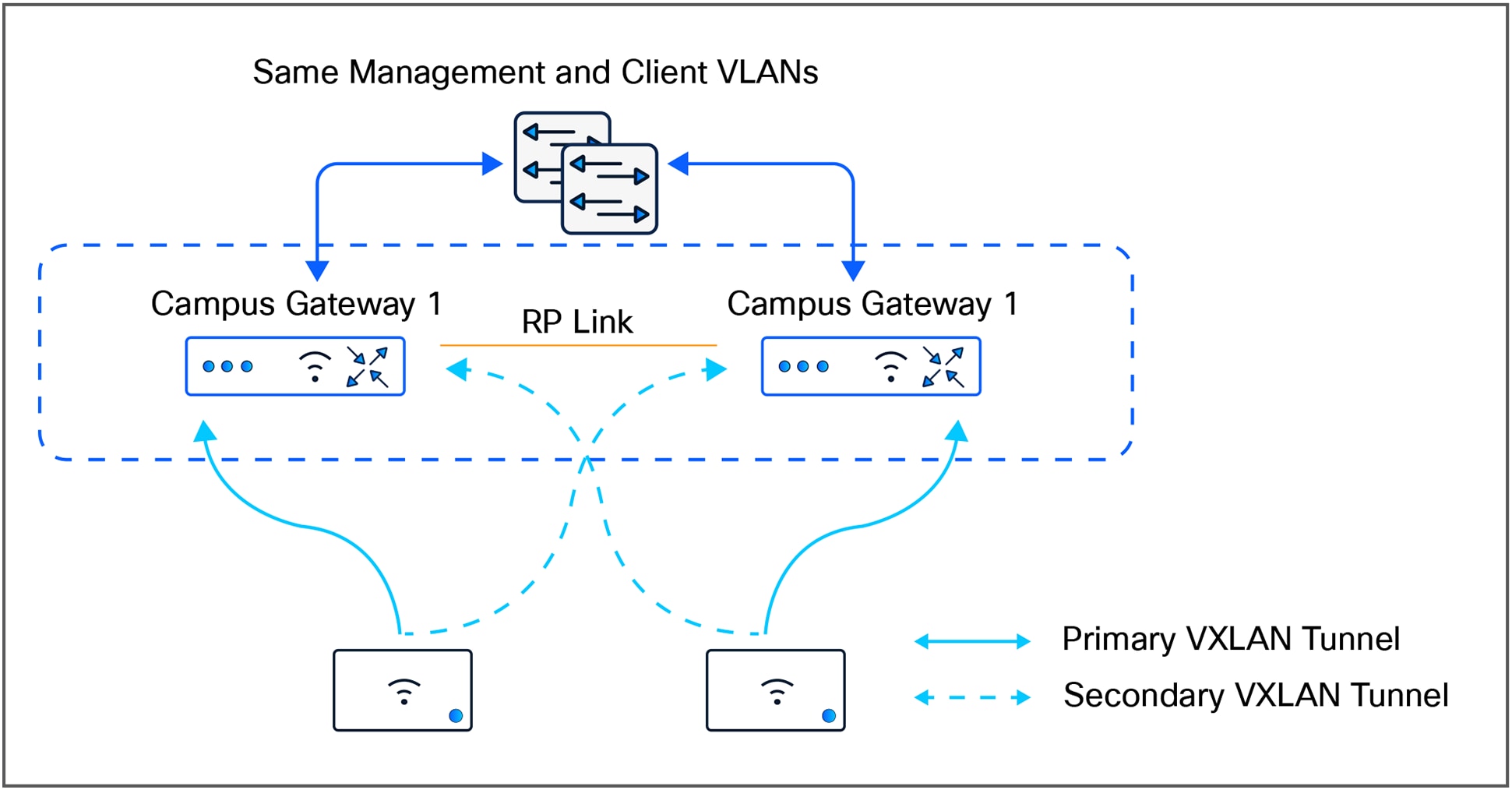
A high-availability cluster
● Large campus wireless networks requiring cloud management flexibility.
● Campuses transitioning from on-premises wireless controllers to cloud-managed. architecture and requiring minimal disruption.
● Deployment of centralized policy enforcement and infrastructure services in a cloud campus network architecture.
A complete solution for centralized campus networks
The Campus Gateway is the perfect addition to the Cisco enterprise cloud management portfolio, addressing the unique needs of large campus environments. It offers the scale, simplicity, and control required to extend Meraki's cloud-native approach, making managing enterprise wireless networks easier than ever.
Additional documentation links
● Campus Gateway Installation Guide (Cisco Meraki documentation).
● Campus Gateway Deployment Guide (Cisco Meraki documentation).