Cisco 8000 Series Secure Routers Ordering Guide
Available Languages
Bias-Free Language
The documentation set for this product strives to use bias-free language. For the purposes of this documentation set, bias-free is defined as language that does not imply discrimination based on age, disability, gender, racial identity, ethnic identity, sexual orientation, socioeconomic status, and intersectionality. Exceptions may be present in the documentation due to language that is hardcoded in the user interfaces of the product software, language used based on RFP documentation, or language that is used by a referenced third-party product. Learn more about how Cisco is using Inclusive Language.
1.1 Purpose, audience, and scope
This document describes the ordering process for the Cisco® 8000 Series Secure Routers.
Audience: Cisco Public
Scope: This guide describes the ordering for the following products:
● Cisco 8100 Series Secure Routers
● Cisco 8200 Series Secure Routers
● Cisco 8300 Series Secure Routers
● Cisco 8400 Series Secure Routers
● Cisco 8500 Series Secure Routers
● Cisco 8600 Series Secure Routers
For more detailed information on the Cisco 8000 Series Secure Routers, go to www.cisco.com.
The Cisco 8000 Series Secure Routers deliver the industry’s most complete secure networking experience, combining cutting-edge security, routing, assurance, and SD-WAN capabilities into a unified platform. Designed for diverse use cases—from branches and campuses to data centers— these secure routers empower businesses to adapt dynamically to evolving demands. The routers are powered by Cisco’s System-on-a-Chip (SoC), customized silicon that is built to handle high-bandwidth AI/ML workloads while reducing power consumption and operational costs. This next-generation family of secure WAN routers from Cisco delivers unmatched protection, high-speed performance, and scalability, supporting a multitude of encrypted throughput requirements.
The following tables provide the ordering information for Cisco 8000 Series Secure Routers. To place an order, visit the Cisco Ordering homepage. To download software, visit the Cisco Software Center.
| Platform class |
Product ID |
Description |
| Small |
C8130-G2 |
Cisco 8100 Secure Router with 6x1GE |
| C8130-VAI-G2 |
Cisco 8100 Secure Router with 5x1GE, 1xXGSPON/10G BASE-T and |
|
| C8130-VAP-G2 |
Cisco 8100 Secure Router with 5x1GE, 1xXGSPON/10G BASE-T and |
|
| C8130H-G2 |
Cisco 8100 Secure Router with 5x1GE, 1x10G BASE-T |
|
| C8131-G2 |
Cisco 8100 Secure Router with 6x1GE |
|
| C8140-G2 |
Cisco 8100 Secure Router with 10x1GE |
|
| C8151-G2 |
Cisco 8100 Secure Router with 10x1GE, and 1xPIM |
|
| C8151-CVAI-G2 |
Cisco 8100 Secure Router with 9x1GE, 1xXGSPON/10G BASE-T, |
|
| C8151-CVAP-G2 |
Cisco 8100 Secure Router with 9x1GE, 1xXGSPON/10G BASE-T, |
|
| C8151H-C-G2 |
Cisco 8100 Secure Router with 9x1GE, 1x10G BASE-T with |
|
| C8161-G2 |
Cisco 8100 Secure Router with 10x1GE with PoE+, and 1xPIM |
|
| Medium |
C8211-G2 |
Cisco 8200 Secure Router with 6x1GE |
| C8221L-G2 |
Cisco 8200 Secure Router with 2x10GE BASE-T, and 8x1GE |
|
| C8221-G2 |
Cisco 8200 Secure Router with 2x10GE, and 8x1GE |
|
| C8225-G2 |
Cisco 8200 Secure Router with 2x10GE, and 8x1GE |
|
| C8231-G2 |
Cisco 8200 Secure Router with 2x10GE, 4x2.5GE, and 4x1GE |
|
| C8235-G2 |
Cisco 8200 Secure Router with 2x10GE, 8x2.5GE, and 1xPIM |
|
| C8231-E-G2 |
Cisco 8200 Secure Router with 2x10GE, 2x2.5GE, 1xNIM, and 1x PIM |
|
| C8235-E-G2 |
Cisco 8200 Secure Router with 2x10GE, 2x2.5GE, 1xNIM, and 1x PIM |
|
| C8255-G2-UCSXE |
Cisco 8200 Secure Router (secure router node for Cisco UCS® XE9305 Chassis) |
|
| Large |
C8355-G2 |
Cisco 8300 Secure Router with 4x10GE, 4x5GE, 2x1GE, and 1xPIM |
| C8375-E-G2 |
Cisco 8300 Secure Router with 2x10GE, 4x2.5GE, 1xNIM, 1xSM, and 1xPIM |
|
| XLarge |
C8455-G2 |
Cisco 8400 Secure Router with 8x1GE, 2x10GE, 2x25GE |
| C8475-G2 |
Cisco 8400 Secure Router with 8x1GE, 8x10GE, 4x25GE |
|
| C8550-G2 |
Cisco 8500 Secure Router with 12x10GE |
|
| C8570-G2 |
Cisco 8500 Secure Router with 12x10GE, 2x40GE, 2x100GE |
|
| 2XL |
C8650-G2 |
Cisco 8600 Secure Router with 20x10GE, 6x100GE |
Note: C8130-G2, C8140-G2, C8130H-G2, C8130-VAI-G2, C8130-VAP-G2, C8131-G2, C8211-G2, C8221L-G2, C8221-G2, and C8225-G2 is shipped in Routing mode by default. To switch to controller mode, please refer here.
Table 2. Configurable options for the Cisco 8100 Series
| Configurable Options |
C8130-G2 |
C8140-G2 |
C8151-G2 |
C8161-G2 |
| Power Supply |
Default: AC: PWR-CC1-30WAC |
Default: AC: PWR-CC1-66WAC |
Default: AC: PWR-CC1-66WAC |
Default: AC: PWR-CC1-150WAC |
| Cellular Modules (PIM) |
NA |
NA |
Refer to Table 8 below on supported PIM Modules |
|
| Blanks |
NA |
NA |
C8100-PIM-BLANK* |
|
| Mounting Kit |
Options: Rack Mount Kit: C8130-G2-RM-19= DIN Rail Kit: ACS-1111-DRM= Under Desk Kit: ACS-1100-UDM= |
Options: Rack Mount Kit: C8140-G2-RM-19= DIN Rail Kit: ACS-1111-DRM= Under Desk Kit: ACS-1100-UDM= |
Options: Rack Mount Kit: C8151-G2-RM-19 DIN Rail Kit: ACS-1111-DRM Under Desk Kit: ACS-1100-UDM |
|
| Software Image# |
Minimum IOS-XE version for Routing: 17.18.1 Minimum IOS-XE version for SD-WAN: 26.2.1 (Note: Software image selection is not available during ordering) |
Minimum IOS-XE version for Routing: 17.18.1 Minimum IOS-XE version for SD-WAN: 26.2.1 (Note: Software image selection is not available during ordering) |
Minimum IOS-XE version for Routing & SD-WAN: 17.18.1 Options SC81G2UK9-1718 SC81G2NEK9-1718 |
Minimum IOS-XE version for Routing & SD-WAN: 17.18.1 Options SC81G2UK9-1718 SC81G2NEK9-1718 |
| Configurable Options |
C8131-G2 |
C8130H-G2/ C8130-VAI-G2 / C8130-VAP-G2 |
C8151H-C-G2/ C8151-CVAI-G2 / C8151-CVAP-G2 |
| Power Supply |
Default: AC: PWR-CC1-30WAC |
Default: AC: PWR-CC1-66WAC |
Default: AC: PWR-CC1-66WAC |
| Cellular Modules (PIM) |
NA |
NA |
Embedded 5G RedCap |
| Blanks |
NA |
||
| Mounting Kit |
Options: Rack Mount Kit: C8130-G2-RM-19= DIN Rail Kit: ACS-1111-DRM= Under Desk Kit: ACS-1100-UDM= |
Options: Rack Mount Kit: C8151-C-G2-RM-19 DIN Rail Kit: ACS-1111-DRM= Under Desk Kit: ACS-1100-UDM= |
|
| Software Image# |
Minimum IOS-XE version for Routing & SD-WAN: 26.1.1 (Note: Software image selection is not available during ordering) |
For C8130-VAI-G2/C8130-VAP-G2: Minimum IOS-XE version for Routing: 26.1.1 Minimum IOS-XE version for SD-WAN: 26.2.1 (Note: Software image selection is not available during ordering) |
For C8151-CVAI-G2/C8151-CVAP-G2: Minimum IOS-XE version for Routing & SD-WAN:26.1.1 Options SC81G2UK9-261 SC81G2NEK9-261 |
| For C8130H-G2: Minimum IOS-XE version for Routing: 26.1.2 Minimum IOS-XE version for SD-WAN: 26.2.1 (Note: Software image selection is not available during ordering) |
For C8151H-C-G2: Minimum IOS-XE version for Routing & SD-WAN: 26.1.2 Options SC81G2UK9-261 SC81G2NEK9-261 |
||
Table 3. Configurable options for the Cisco 8200 Series
| Configurable options |
C8235-E-G2 and |
C8231-G2 |
C8235-G2 |
C8225-G2, C8221-G2, and |
C8211-G2 |
C8255-G2-UCSXE (secure router node for Cisco UCS XE9305 Chassis) |
| Power supply |
Default: AC: 140W (Internal) Options: Secondary AC: PWR-ADPT-150WAC Secondary DC: PWR-ADPT-150WDC PoE: PWR-CC1-150WAC (C82G2-POE-DC is auto-included with this PSU) |
Default: AC: PWR-CC1-66WAC Options: AC + PoE: PWR-CC1-115WAC |
Default: AC: PWR-CC2-66WAC Options: AC + PoE: PWR-CC1-230WAC (C82G2-POE-DC-F is auto-included with this PSU) |
Default: AC: PWR-CC1-66WAC Options AC: PWR-CC1-66WAC= (Note: Secondary PSU available only as a spare, with power cords to purchased separately) |
Default: AC: PWR-CC1-30WAC Options AC: PWR-CC1-30WAC= (Note: Secondary PSU available only as a spare, with power cords to purchased separately) |
NA (Powered within the Cisco UCS XE9305 Chassis) |
| Memory |
16GB (Included) for C8235-E-G2 8GB (Included) for C8231-E-G2 |
8GB (Included) |
16GB (Included) |
16GB (Included) for C8225-G2 8GB (Included) for C8221-G2 and C8221L-G2 |
8GB (Included) |
16GB (Included) |
| Storage |
Options: SSD-E1SNVME-600G |
NA |
NA |
NA |
NA |
NA |
| Network Interface Modules (NIM) |
Refer to Table 6 below on supported NIM modules |
NA |
NA |
NA |
NA |
NA |
| Cellular Modules (PIM) |
Refer to Table 7 below on supported PIM modules |
NA |
Refer to Table 7 below on supported PIM modules |
NA |
NA |
NA |
| Blanks |
C8200-NIM-BLANK* C8200-PIM-BLANK* C-E1S-BLANK* C8200-FAN-BLANK* |
NA |
C8200-PIM-BLANK* |
NA |
NA |
NA |
| Mounting kit |
Default: 19” Rack Mount: C8200-RM-19-1R Options: Wall Mount: C8200-WM-1R |
Options: Rack Mount Kit: C8231-G2-RM-19 DIN Rail Kit: C82G2-DRM-F Under Desk Kit: C82G2-UDM-F |
Options: Rack Mount Kit: C8235-G2-RM-19 DIN Rail Kit: C82G2-DRM-F Under Desk Kit: C82G2-UDM-F |
Options: (Note: Mounting kits available only as a spare purchase) Rack Mount Kit: C8220—G2-RM-19= DIN Rail Kit: C82G2-DRM-F= Under Desk Kit: C82G2-UDM-F= |
Options: (Note: Mounting kits available only as a spare purchase) Rack Mount Kit: C8211—G2-RM-19= DIN Rail Kit: C82G2-DRM-F= Under Desk Kit: C82G2-UDM-F= |
NA |
| RFID |
Default: C-RFID- NONE Options: C-RFID-1R |
NA |
Default: C-RFID- NONE Options: C-RFID-2R |
NA |
NA |
NA |
| Other accessories |
Options: NEBS Fan Assembly: C82G2-FAN-1R |
NA |
NA |
NA |
NA |
NA |
| Software Image# |
Minimum Cisco IOS® XE version: 17.18.1 Options: SC82G2UK9-1718 SC82G2NEK9-1718 |
Minimum Cisco IOS® XE version: 17.18.1 Options: SC82G2UK9-1718 SC82G2NEK9-1718 |
Minimum Cisco IOS XE version: 17.18.1 Options: SC82G2UK9-1718 SC82G2NEK9-1718 |
Minimum Cisco IOS XE version: 26.1.2
(Note: Software image selection is not available during ordering) |
Minimum Cisco IOS XE version: 26.2.1
(Note: Software image selection is not available during ordering) |
Minimum Cisco IOS XE version: 26.2.1 |
Table 4. Configurable options for the Cisco 8300 Series
| Configurable options |
C8375-E-G2 |
C8355-G2 |
| Power supply |
Default: AC: PWR-CC1-400WAC Options: AC + PoE: PWR-CC1-760WAC DC: PWR-CC1-500WDC |
Default: AC: PWR-CC1-110WAC Options: AC + PoE: PWR-CC1-230WAC |
| Memory |
Default: MEM-C83G2-16GB Upgrades: MEM-C83G2-32GB |
16GB (Included) |
| Storage |
Options: M2USB-32G SSD-M2SED-600G SSD-M2SED-2T |
Options: M2USB-I-32G |
| Network Interface Modules (NIM) |
Refer to Table 6 below on supported NIM modules |
NA |
| Service Modules (SM) |
Refer to Table 6 below on supported SM modules |
NA |
| Cellular Modules (PIM) |
Refer to Table 7 below on supported PIM modules |
|
| Blanks |
C8300-NIM-BLANK* C8300-SM-BLANK* C8300-PIM-BLANK* C-M2-BLANK* |
C8300-PIM-BLANK* |
| Mounting kit |
Default: 19” Rack Mount: C8300-RM-19-1R Options: 23” Rack Mount: C8300-RM-23-1R 4 Post Rack Mount: C8300-RM-4PT-1R Wall Mount: C8300-WM-1R |
Default: 19” Rack Mount: C8300-RM-19-F Options: 23” Rack Mount: C8300-RM-23-F |
| RFID |
Default: C-RFID-NONE Options: C-RFID-1R |
Default: C-RFID- NONE Options: C-RFID-1R |
| Other accessories |
NA |
Options: Power Adapter Bracket: C83G2-ADPT-BRKT Chassis Top Cover: C83G2-TOP-PLATE |
| Software image# |
Minimum Cisco IOS XE version: 17.15.3 Options: SC83G2UK9-1715 SC83G2NEK9-1715 |
Minimum Cisco IOS XE version: 17.18.1 Options: SC83G2UK9-1718 SC83G2NEK9-1718 |
Table 5. Configurable options for the Cisco 8400 and 8500 Series
| Configurable options |
C8455-G2 |
C8475-G2 |
C8550-G2 |
C8570-G2 |
| Power supply |
Default: AC: PWR-CH1-250WAC Options: DC: PWR-CH1-400WDC HVDC: PWR-CC1-400WHV |
Default: AC: PWR-CH1-400WAC Options: DC: PWR-CH1-400WDC HVDC: PWR-CC1-400WHV |
Default: AC: PWR-CH1-750WACR Options: DC: PWR-CH1-950WDCR |
Default: AC: PWR-CH1-750WACR Options: DC: PWR-CH1-950WDCR |
| Memory |
Default: 32GB Upgrades: None |
Default: 32GB Upgrades: MEM-C84G2-64GB |
Default: 32GB Upgrades: MEM-C85G2-64GB |
Default: 32GB Upgrades: MEM-C85G2-64GB |
| Storage |
Default: 64GB Upgrades: SSD-M2SED-600G SSD-M2SED-2T |
Default: 64GB Upgrades: SSD-M2SED-600G SSD-M2SED-2T |
Default: 480GB Upgrades: None |
Default: 480GB Upgrades: None |
| Mounting kit |
Default: C84G2-ACCKIT-19 |
Default: C84G2-ACCKIT-19 Options: C84G2-4PT-KIT |
Default: C85G2-ACCKIT-19 Options: C85G2-4PT-KIT |
Default: C85G2-ACCKIT-19 Options: C85G2-4PT-KIT |
| RFID |
Default: C-RFID- NONE Options: C-RFID-1R |
Default: C-RFID-NONE Options: C-RFID-1R |
Default: C-RFID-NONE Options: C8500-RFID-1R |
Default: C-RFID-NONE Options: C8500-RFID-1R |
| Software image# |
Minimum Cisco IOS XE version: 17.15.3 Options: SC84G2UK9-1715 SC84G2NEK9-1715 SC84G2UNLK9-1715 SC84G2NELK9-1715 |
Minimum Cisco IOS XE version: 17.15.3 Options: SC84G2UK9-1715 SC84G2NEK9-1715 SC84G2UNLK9-1715 SC84G2NELK9-1715 |
Minimum Cisco IOS XE version: 17.15.4 Options: SC85G2UK9-1715 SC85G2NEK9-1715 SC85G2UNLK9-1715 SC85G2NELK9-1715 |
Minimum Cisco IOS XE version: 17.15.4 Options: SC85G2UK9-1715 SC85G2NEK9-1715 SC85G2UNLK9-1715 SC85G2NELK9-1715 |
Note: UK9 is the standard image; other software image options are for compliance.
Table 6. Configurable options for the Cisco 8600 Series
| Configurable options |
C8650-G2 |
| Power supply |
Default: AC: 3x PWR-CH1-1100WAC-D Options: DC Power supply: 3x PWR-CH1-950WDC-D |
| Add Power Supply |
AC: PWR-CH1-1100WAC DC Power supply: PWR-CH1-950WDCR |
| Memory |
Default: 64GB Upgrades: None |
| Storage |
Default: 480GB Upgrades: None |
| Mounting kit |
Default: C8500-ACCKIT3R-19 |
| RFID |
Default: C-RFID-NONE Options: C8500-RFID-3R |
| Software image# |
Minimum Cisco IOS XE version: 26.1.2 Options: SC8KAEPUK9-261 SC8KAEPNEK9-261 SC8KAEPUNLK9-261 SC8KAEPNELK9-261 |
Note: UK9 is the standard image; other software image options are for compliance.
Table 7. Supported NIM and SM modules on the C8300 and C8200 Series
| Product number |
Description |
| WAN modules |
|
| C-NIM-WAN-2X |
2-port 1/10 Gbps SFP/SFP+ WAN Module, NIM with WAN MACsec |
| C-NIM-WAN-4S |
4-port 1 Gbps SFP WAN Module, NIM with WAN MACsec |
| LAN modules |
|
| C-NIM-4X |
4-port 1/10Gbps SFP/SFP+ switch NIM, LAN/WAN MACSec and Optional L3 |
| C-NIM-8T |
8-port 100Mbps/1Gbps switch NIM, LAN/WAN MACSec and Optional L3 |
| C-NIM-8M |
8-port 100M/1/2.5Gbps switch NIM, UPoE+, LAN/WAN MACSec and Optional L3 |
| C-SM-16P4M2X |
Cisco 22-port Catalyst L2 switch module with UADP ASIC |
| Serial WAN interface |
|
| NIM-1T |
1-port serial high-speed WAN interface card |
| NIM-2T |
2-port serial high-speed WAN interface card |
| NIM-4T |
4-port serial high-speed WAN interface card |
| Async WAN interface |
|
| NIM-16A |
16-port Asynchronous Module |
| NIM-24A |
24-port Asynchronous Module |
| SM-X-64A |
64-port Asynchronous Module |
| NIM carrier adapter card |
|
| C-SM-NIM-ADPT |
Single-wide 2x NIM carrier module in SM-X form factor |
Note: Both NIM and SM Modules are supported on C8375-E-G2, whereas only NIM modules are supported on C8235-E-G2 and C8231-E-G2.
Table 8. Supported Cellular Modules on C8100, C8200, and C8300 Series
| Product number |
Description |
| Cellular modules |
|
| P-5GS6-R16SA-GL |
5G Sub-6 GHz Pluggable – 5G SA Global |
| P-LTEA7-NA |
CAT7 LTE Advanced Pluggable - North America |
| P-LTEA7-EAL |
CAT7 LTE Advanced Pluggable - EMEA, APAC, and LATAM |
| P-LTEA7-JP |
CAT7 LTE Advanced Pluggable - Japan |
Note: Cellular Modules are not supported on these platforms - C8130-G2, C8131-G2, C8130-VAI-G2, C8130-VAP-G2, C8130H-G2, C8140-G2, C8151-CVAI-G2, C8151-CVAP-G2, C8211-G2, C8221L-G2, C8221-G2, C8225-G2, C8231-G2, C8151H-C-G2
Cisco Software Licenses and Subscriptions
Perpetual OS Software
Each Cisco 8000 Series Secure Router comes preloaded with Cisco Routing OS Essentials, an embedded operating system software that delivers fundamental device functionality. An optional upgrade to OS Advantage perpetual license is also available under respective hardware SKU.
Subscription Software
You can choose a subscription license in addition to hardware with OS Essentials to suit your specific deployment use-case.
● Cisco Routing Advantage: Offers advanced routing capabilities for a traditional routing deployment.
● Cisco WAN Essentials/Advantage: Choose between Essentials and Advantage packages for
Cisco Catalyst™ SD-WAN deployment.
Note: Cisco Routing Advantage & OS Advantage provide the same license as term and perpetual entitlements respectively.
For a full list of features, visit the Cisco Routing and WAN Licensing Feature Matrix.
| Part number |
Description |
| R-OS-S-E R-OS-M-E R-OS-L-E R-OS-XL-E R-OS-2XL-E |
Cisco OS-Essentials embedded OS software pre-loaded to every |
| LIC-ROS-S-A LIC-ROS-M-A LIC-ROS-L-A LIC-ROS-XL-A LIC-ROS-2XL-A |
Cisco Routing Advantage |
| R-OS-S-A R-OS-M-A R-OS-L-A R-OS-XL-A R-OS-2XL-A |
Cisco OS Advantage perpetual licenses available as an upgrade to OS (Allows for factory pre-install when purchased within hardware configuration; |
| LIC-CSWAN-S-E LIC-CSWAN-M-E LIC-CSWAN-L-E LIC-CSWAN-XL-E LIC-CSWAN-2XL-E |
Cisco WAN Essentials |
| LIC-CSWAN-S-A LIC-CSWAN-M-A LIC-CSWAN-L-A LIC-CSWAN-XL-A LIC-CSWAN-2XL-A |
Cisco WAN Advantage |
Table 10. Management and feature licenses
| Part number |
Description |
Required base license |
| LIC-CSWAN-HCLD |
Cisco Hosted Cloud |
WAN Essentials/WAN Advantage |
| LIC-CSWAN-HCLDP-A |
Cisco Hosted Cloud Pro |
WAN Essentials/WAN Advantage |
| LIC-CSWAN-HCLDPRO |
Cisco Hosted Cloud Pro |
WAN Essentials/WAN Advantage |
| LIC-CSWAN-HCLDMSP |
Cisco Hosted Cloud for MSP*(Only for qualified Managed Service Providers) |
WAN Essentials/WAN Advantage |
| LIC-SEC-S-T |
Security licenses – Threat (Feature supported via CLI as well as SD-WAN manager) |
WAN Essentials/WAN Advantage/ |
| LIC-SEC-M-T |
||
| LIC-SEC-L-T |
||
| LIC-SEC-XL-T |
||
| LIC-SEC-S-C |
Security licenses – URL Filtering (Feature supported via SD-WAN manager) |
WAN Essentials/WAN Advantage/ + Threat Security Add-on |
| LIC-SEC-M-C |
||
| LIC-SEC-L-C |
||
| LIC-SEC-XL-C |
||
| LIC-SEC-S-M |
Security licenses – Malware Defense (Feature supported via SD-WAN manager) |
WAN Essentials/WAN Advantage/ + Threat Security Add-on |
| LIC-SEC-M-M |
||
| LIC-SEC-L-M |
||
| LIC-SEC-XL-M |
||
| LIC-R-OP-CC |
On-premises Catalyst Center |
Routing Advantage/OS Advantage |
| LIC-R-OP-SWM |
On-premises Secure WAN manager (Required for Security Add-ons with Routing Advantage/OS Advantage) |
Routing Advantage/OS Advantage |
*Note: Only managed service providers with Intermediate or Expert Level status in the Cisco 360 Managed Services Practice Maturity Program are eligible to order Cisco Hosted “CLOUD-MSP.” If you do not meet these requirements but place an order for Cisco Hosted "CLOUD-MSP,” your order will be provisioned with Cisco Hosted “CLOUD,” and you will be responsible for cancelling and placing a corrected order for Cisco Hosted "CLOUD. Read more on CLOUD vs Cloud PRO here.
The following models do not support Threat, URL Filtering, and Malware Defense add-on licenses:
● Select Cisco 8100 Series Secure Routers viz, C8130-G2, C8140-G2, C8130H-G2, C8130-VAI-G2, & C8130-VAP-G2
● Cisco 8500 Series Secure Routers
● Cisco 8600 Series Secure Routers
Ordering process for Cisco 8000 Series Secure Routers
The following steps will guide you through the process of ordering the hardware platforms and software subscriptions.
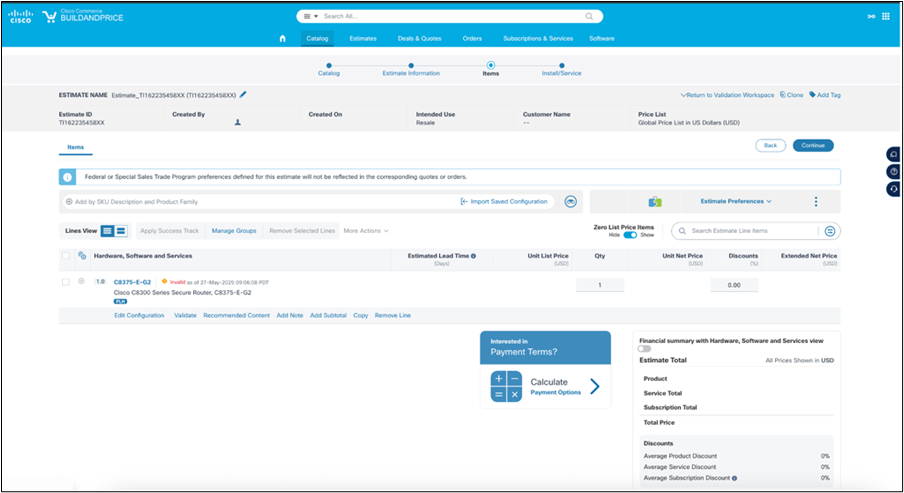
Step1: In Cisco Commerce (CCW), search for the desired Cisco 8000 Series Secure Router SKU, which will then take you through a “guided” buying experience.
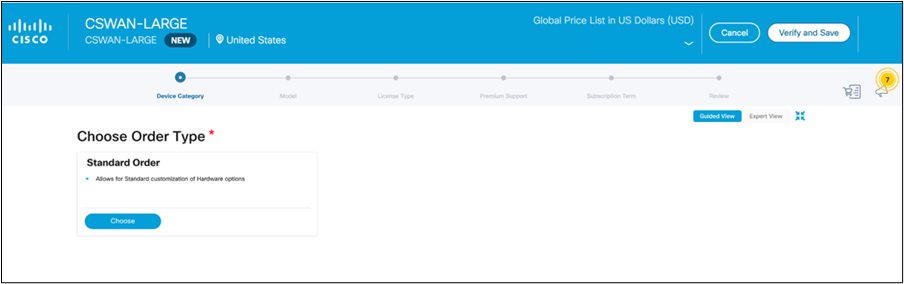
Step 2: Choose a device category:
● Standard order: Allows for standard customization of hardware options.
● TAA-compliant order: Special handling for customers requiring Trade Agreement Act (TAA) compliance.
Note: Device Category may be pre-selected based on the starting SKU, i.e. initiating with C8375-E-G2++ will result in TAA Compliant Order option pre-selected.
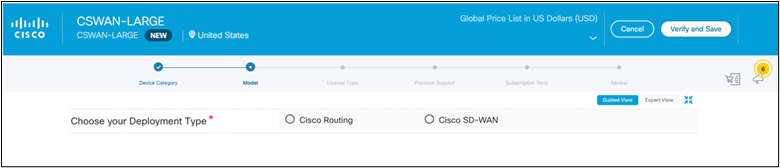
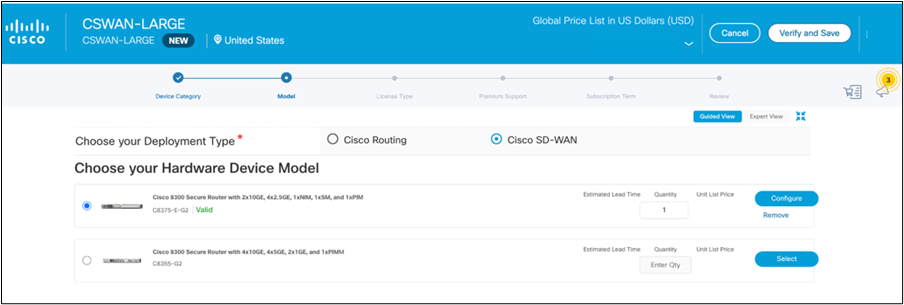
Step 3: Choose your deployment type:
● Cisco SD-WAN for SD-WAN deployment
● Cisco Routing for routing deployment
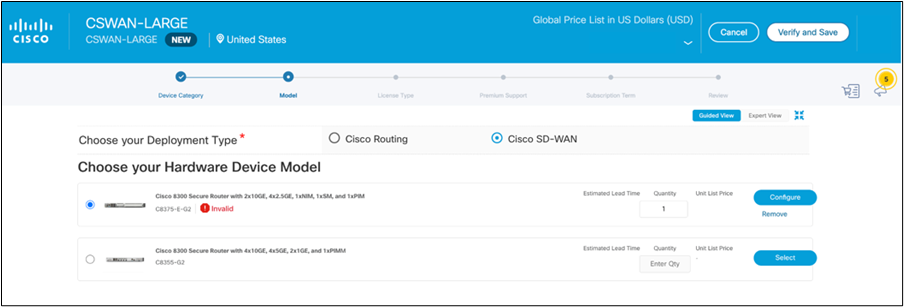
Step 4: Choose your hardware device model and select the quantity of devices.
Step 5: Configure the device with the required software image, power supply, modules, and other accessories.
Refer to Tables 2 through 7 for the different available options based on the platform chosen.
● Table 2 – Configurable options for the Cisco 8100 Series.
● Table 3 – Configurable options for the Cisco 8200 Series.
● Table 4 – Configurable options for the Cisco 8300 Series.
● Table 5 - Configurable options for the Cisco 8400 and 8500 Series.
● Table 6 – Supported NIM and SM modules on the Cisco 8300 Series.
● Table 7 – Supported Cellular modules on the Cisco 8100, 8200, and 8300 Series.
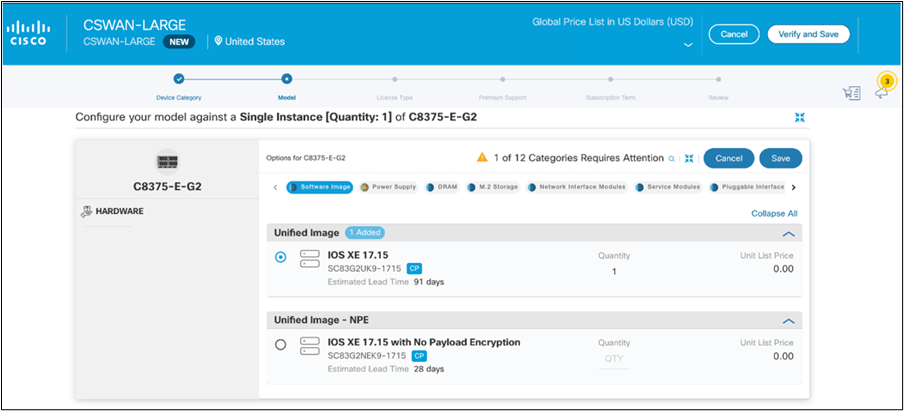
For each power supply, selecting a power cable is mandatory based on the specific country requirements. Alternatively, you may opt for the eco-friendly green option, which excludes power cables.
For supported optics, please refer to the Cisco Optics-to-Device Compatibility Matrix.
Save the configuration and verify that it is valid before proceeding. Click on Continue
Step 6: Select the Sales Motion: Resale vs Partner Branded.
Sales Motion determines who owns the service delivery, support, licensing model, and commercial relationship with the end customer.
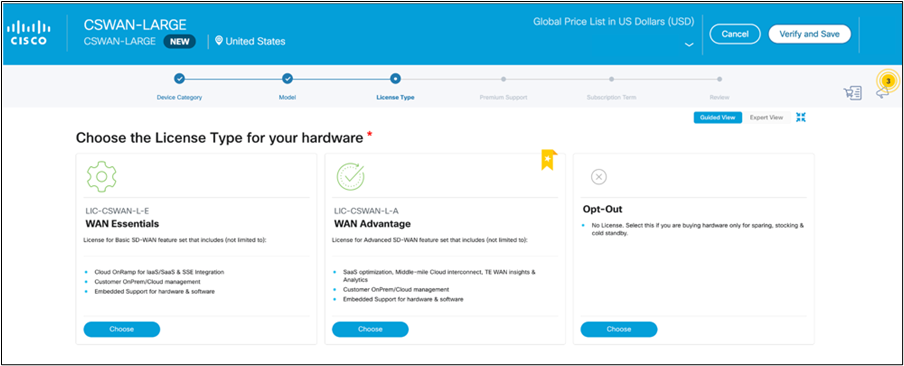
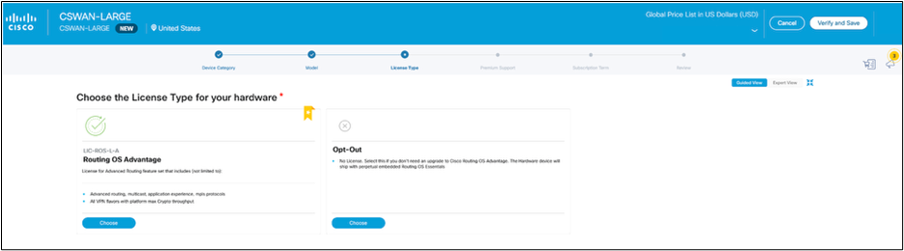
Step 7: Select the desired software license subscription. Refer to Table 9 for the available software license options.
A. If you selected Cisco SD-WAN in step 3, choose either the Essentials or Advantage feature tier here, or opt out if purchasing hardware only.
B. If you selected Cisco Routing in step 3, choose the Advantage feature tier here, or opt out if purchasing hardware only.
Step 8: Select the optional management and feature licenses. Refer to Table 8 for available license options.
For WAN Essentials and WAN Advantage, choose optional Cloud Management and feature licenses.
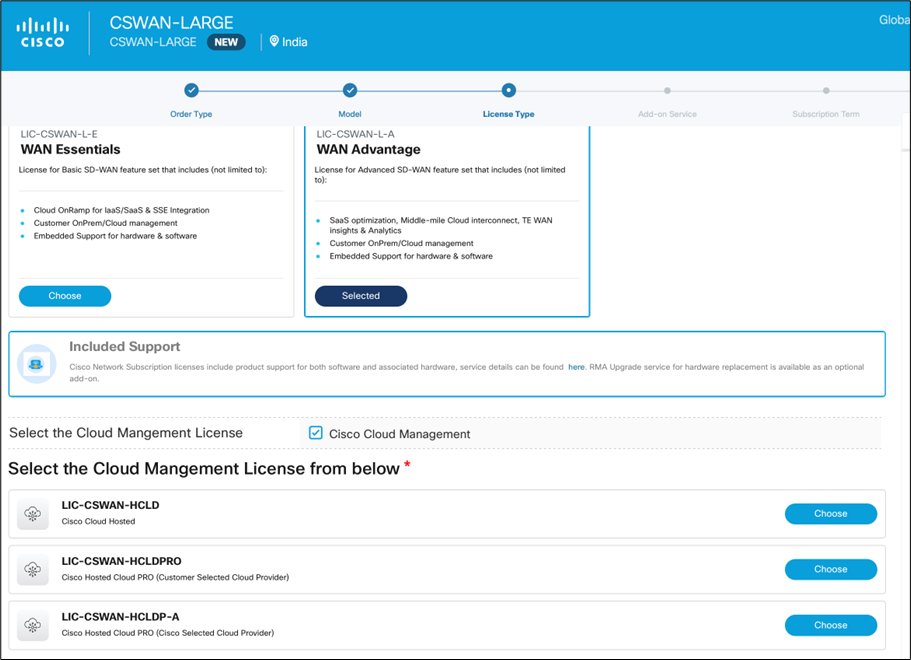
For Routing Advantage, choose optional On-Premises Management and feature licenses.
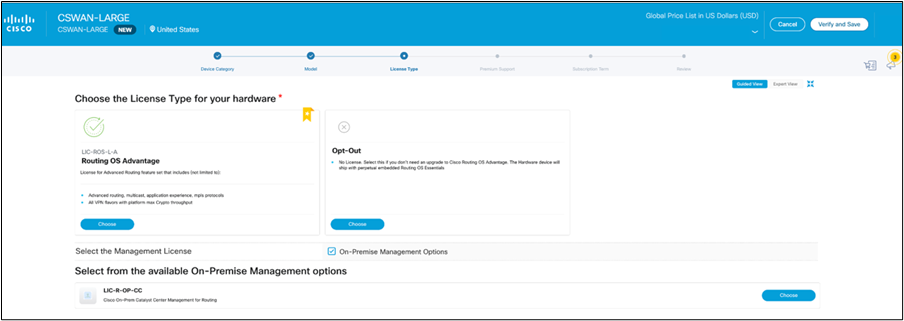
Security add-ons are available to be selected with Routing Advantage after the on-premises SD-WAN manager add-on is selected under On-Premises Management options.
Step 9: Select optional RMA Upgrade options.
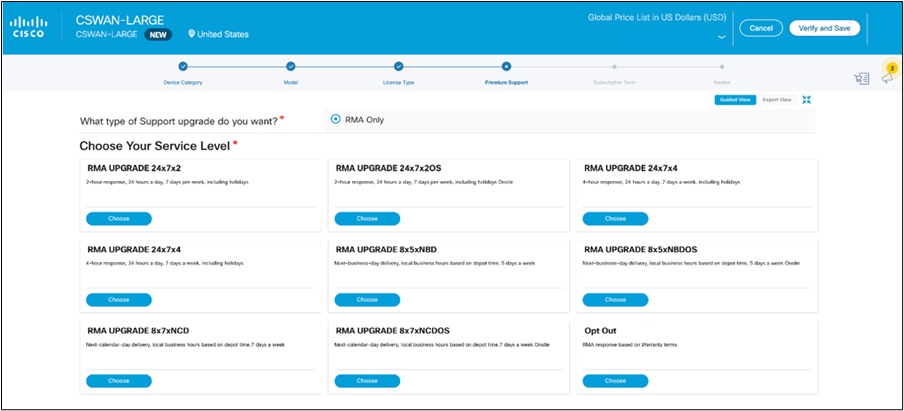
Step 10: Choose subscription details such as renewal date and billing frequency.
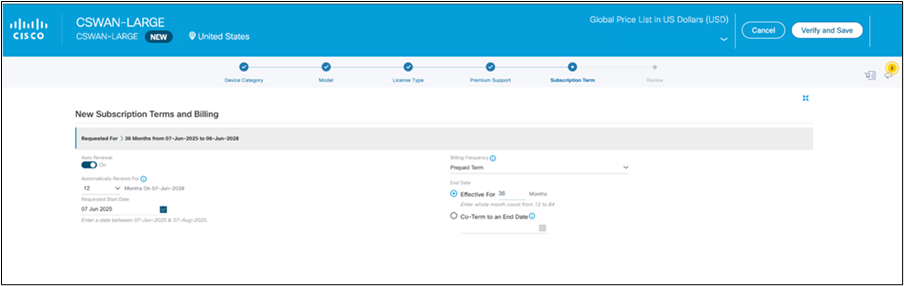
Step 11: Review the order details.
Cisco Support
Cisco Support is a suite of AI-powered and expert-led support designed to maximize uptime, performance, and resiliency of your IT environment for the AI era. With three tiers—Basic, Standard, and Signature—each level builds upon the previous one, combining trusted support, proactive insights, and tailored learning resources accessed through Cisco IQ, our unified digital interface. See Service Description for more details.
Cisco Support – Basic
The Cisco Network Subscription includes support benefits consistent with Cisco Support – Basic but excludes any RMA benefits. Each subscription, and devices linked to the subscription, are provided 24x7 TAC access, OS updates, and digital insights. If hardware RMA is needed, Cisco recommends the purchase of an RMA upgrade service level.
Cisco Support for Routing standalone offers
Support services for Cisco Standalone Routing offers, which provide support coverage for the router hardware and associated Routing SW licenses is available for purchase on the router. Cisco Support - Basic and Standard offers can be purchased with the router, providing support coverage of the router, the Cisco Essentials OS SW license as well as the Cisco Advantage term license.
Cisco Support – Standard
Cisco Support - Enhanced is the recommended support offer for the Cisco Networking Subscriptions and Wireless hardware. It includes centralized support for Cisco Solution Alliance Partner products in your infrastructure deployment to resolve complex issues faster, proactive AI insights, and RMA upgrade. This support offer is orderable on the hardware and provides coverage of both the hardware and associated Networking Subscription licenses Essentials and Advantage OS features.
Cisco Support – Signature
Signature is the most valued tier and includes personalized, expert-led support guidance tailored to your precise needs and AI insights for proactive operational excellence. It provides guaranteed restoration Service Level Agreements (SLAs), fastest response time, expert-led predictive disruption analysis and prevention, systematic root cause analysis, vulnerability assessments, asset management, and continuous optimization, certification training, and RMA upgrade.
Cisco RMA upgrade
This advanced replacement hardware service option is available for Cisco Network Subscription products. There are multiple service levels to choose from. The RMA upgrade service, combined with support included in the Cisco Network Subscription provides full alignment to the Cisco Support – Basic service level. See Service Description for more information.
Cisco Professional Services
Cisco Professional Services provides expert guidance in deploying, optimizing, and transforming your network infrastructure to get to business outcomes faster. Learn more at Cisco Professional Services Service Description for more information.
Online resources
Cisco End User License Agreement (EULA) - The Cisco EULA governing software use is available at: https://www.cisco.com/go/softwareterms.
Warranty online - Product warranty terms and other information applicable to Cisco products are available at: https://www.cisco.com/go/warranty.
Consult the above website or your Cisco sales and service representative for a complete
listing of Cisco products and applicable warranties.