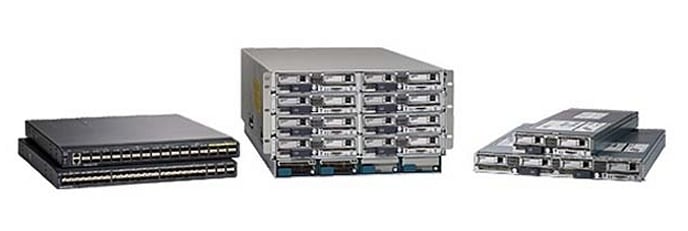
Cisco UCS B-Series Blade Servers
| Overview | Product Overview |
|---|---|
| Status |
End of Sale
EOL Details
|
| Series Release Date | 30-MAR-2009 |
| End-of-Sale Date | 31-DEC-2025 |
| End-of-Support Date | 31-DEC-2030 |
| Diagram | Visio Stencil (144 MB .zip file) |
|
This product is supported by Cisco, but is no longer sold.
Supported Models: - Cisco UCS B200 M5 Blade Server - Cisco UCS B200 M6 Blade Server - Cisco UCS B480 M5 Blade Server |
|


- US/Canada 800-553-2447
- Worldwide Support Phone Numbers
- All Tools
 Feedback
 Feedback
-
Top Search Results
Key Information
Customers Also Viewed
Saved Content
-
You can now save documents for easier access and future use. Saved documents for this product will be listed here, or visit the My Saved Content page to view and manage all saved content from across Cisco.com.
Log in to see your Saved Content.
Document Categories
-
Data Sheets and Product Information
- Cisco Intersight Data Sheet
- Cisco UCS Virtual Interface Card 1400/14000 Series Data Sheet
- Cisco UCS Virtual Interface Card 1400/14000 Series Data Sheet
- Cisco UCS C220/C240/B200 M5 Memory Guide (PDF)
- Cisco UCS 6400 Series Fabric Interconnect Spec Sheet (PDF)
- Cisco UCS B200 M4 Blade Server Spec Sheet (PDF)
- Cisco UCS B460 M4 E7 v4 Blade Server Spec Sheet (PDF)
- Cisco UCS C220/C240/B200 M5 Memory Guide Addendum (PDF)
- Cisco UCS B260 M4 E7 v4 Blade Server Spec Sheet (PDF)
- Cisco UCS B480 M5 Memory Guide (PDF)
- Cisco UCS 2408 Fabric Extender Data Sheet
- Cisco UCS 6300 Series Fabric Interconnect Spec Sheet (PDF)
- Cisco UCS B420 M4 Blade Server Spec Sheet (PDF)
- Cisco UCS 5108 Blade Server Chassis Spec Sheet (PDF)
- Cisco UCS B480 M5 Blade Server Spec Sheet (PDF)
Data Sheets
- End-of-Sale and End-of-Life Announcement for the Cisco UCS B200 M6 Blade Server and UCS 5108 Blade Server Chassis
- End-of-Sale and End-of-Life Announcement for the Cisco 5108 DC and HVDC Chassis
- End-of-Sale and End-of-Life Announcement for the Cisco UCS M5 Blade Server (B200 M5)
- End-of-Sale and End-of-Life Announcement for the Cisco Select Commvault, Veeam, VMWare Nvdia, MapR Software Resell
- End-of-Sale and End-of-Life Announcement for the Cisco Select UCS Promotional bundles
- End-of-Sale and End-of-Life Announcement for the Cisco UCS 6200 Series Fabric Interconnects And Select Unified Computing Systems Accessories
- End-of-Sale and End-of-Life Announcement for the Cisco Select UCS Accessories
- End-of-Sale and End-of-Life Announcement for the Cisco UCS M5 Blade Server (B480 M5)
- End-of-Sale and End-of-Life Announcement for the Cisco UCS Central Per Domain License
- End-of-Sale and End-of-Life Announcement for the Cisco Select Unified Computing System Products for Brazil
- End-of-Sale and End-of-Life Announcement for the Cisco Select Cisco Commvault, Veeam, VMWare Nvdia, MapR Software Resell
- End-of-Sale and End-of-Life Announcement for the Cisco Select UCS Memory Products
- End-of-Sale and End-of-Life Announcement for the Cisco UCS N20-6508 AC Power Supply
- End-of-Sale and End-of-Life Announcement for the Cisco Select Cisco Unified Computing System OEM Software
- End-of-Sale and End-of-Life Announcement for the Cisco Select Cisco RedHat and Cohesity SW Resell
End-of-Life and End-of-Sale Notices
-
Security Notices
-
Applicable to Multiple Models
- Field Notice: FN72187 - UCS 2408 IOM Upgrade/Downgrade Failure on Some Units Shipped in April 2021 - Replace on Failure
- Field Notice: FN - 72368 - Some DIMMs Might Fail Prematurely Due to a Manufacturing Deviation - Hardware Upgrade Available
- Field Notice: FN - 72225 - SSD Timeouts Might Cause IO Operations to Halt and Lead to Premature Failure of the Drive - BIOS/Firmware Upgrade Recommended
-
Cisco UCS B480 M5 Blade Server
- Field Notice: FN - 63472 - UCS B250 M2 Voltage Regulator Setting Causes Non-Recoverable Memory Errors - BIOS/Firmware Upgrade Recommended
Field Notices
- Cisco UCS B-Series Blade Servers Local Management CLI Arbitrary File Creation or CLI Parameter Injection Vulnerability
- Multiple Vulnerabilities in OpenSSL Affecting Cisco Products: September 2016
- Multiple Vulnerabilities in OpenSSL Affecting Cisco Products: January and February 2017
- Multiple Vulnerabilities in OpenSSL Affecting Cisco Products: March 2016
- Multiple Vulnerabilities in OpenSSL (January 2016) Affecting Cisco Products
- Multiple Vulnerabilities in OpenSSL (December 2015) Affecting Cisco Products
- Cisco UCS B-Series Blade Servers Denial of Service Vulnerability
- Multiple Vulnerabilities in OpenSSL (June 2015) Affecting Cisco Products
- Multiple Vulnerabilities in OpenSSL (January 2015) Affecting Cisco Products
Security Advisories, Responses and Notices
-
-
Multimedia
-
Install and Upgrade
- Cisco UCS 5108 Server Chassis Installation Guide
- Cisco UCS B200 M6 Blade Server Installation and Service Note
- Cisco UCS B22 Blade Server Installation and Service Note
- Cisco UCS B420 M3 High Performance Blade Server Installation and Service Note
- Cisco UCS B200 M3 Blade Server Installation and Service Note
- Cisco UCS B420 M4 Blade Server Installation and Service Note
- Statement of Volatility for Cisco UCS Hardware
- Cisco UCS B480 M5 Blade Server Installation and Service Note
- Cisco UCS B200 M5 Blade Server Installation and Service Note
- Cisco UCS B260 M4 and B460 M4 Blade Server Installation and Service Note for Servers with E7 v4 CPUs
- Cisco UCS B260 M4 and B460 M4 Blade Server Installation and Service Note for Servers with E7 v3 and E7 v2 CPUs
- Regulatory Compliance and Safety Information—Cisco UCS B-Series (PDF - 4 MB)
- Cisco UCS B-Series M5 Servers Upgrade Guide for Second Generation Intel Xeon Scalable Processors
- Cisco UCS B260 M4 and B460 M4 Blade Server Installation and Service Note for Servers with E7 v4 CPUs
- Replacing a CPU & Heatsink in Cisco UCS M5 Servers
Install and Upgrade Guides
-
Applicable to Multiple Models
- Upgrade Nutanix HCI Cluster Server Firmware without LCM via Intersight.
- Install UCS Driver for Common OS
- Migrating Cisco UCS Fabric Interconnect 6248 to 6332-16UP
Install and Upgrade TechNotes
-
Configuration
-
Cisco UCS B200 M5 Blade Server
- Configure Direct Attached Storage in Intersight Managed Mode Domain.
- Configure JBOD Drives to Unconfigured Good in UCS Servers
- Configure VMM Domain Integration with ACI and UCS B Series
- Installing Operating Systems (VMware, Windows) with M.2 SSD's on UCS B200 M5
- Configure DCPMM in Windows Server with AppDirect Mode
- Configure DCPMM in VMware ESXi for AppDirect Mode
- Configure Multicast on UCS
- Configure Virtual Machine on UCS Blade Server as SPAN Destination
- Configure an Ethernet traffic monitoring in Fabric Interconnect using GLC-T connector
- Utilizing SoL logging for Serial Redirect on UCS
- CIMC Inband Access on UCS-B Series Blades Configuration Example
- UCS IPv6 Management Configuration Example
Configuration Examples and TechNotes
-
Related Documentation
Configuration Guides
-
-
Troubleshooting
- Troubleshoot, Manage and Monitor Hard Disk Drive Medium Errors
- How do I determine which DIMM has triggered the fault LED on a UCS B-Series Blade Server?
Support FAQ
- Mitigate Microsoft Secure Boot Certificate Expiration
- Troubleshoot Memory Errors on UCS Servers
- Advanced Memory Features and Troubleshooting on UCS M7 and M8 Platforms
- Clear Transient DIMM UECC Errors on Cisco UCS
- Collect UCS Tech Support Files: UCS Server, UCS Central, and Intersight Appliance
- Troubleshoot "Invalid FRU" Errors in UCS Manager
- Troubleshoot DIMM Memory Issues in UCS
- Troubleshoot Network Connectivity, Drops and CRC Errors
- Ports on the Fabric-Interconnect Run More than 90 Days
- Configure and Claim a Standalone C-Series Server in Intersight after Motherboard Replacement
- Secure Endpoint FPGA Firmware on UCS 6400 Fabric Interconnects
- Identifying Power On Hours for SSD Drives
- Configure UCS B/C/X/S/HyperFlex-Series Team and Bond Options with the VIC Card Connected to Fabric Interconnects
- Managing Correctable Memory Errors on Cisco UCS Servers (PDF - 675 KB)
- UCS Fabric Interconnect Management Interfaces have Intermittent Connectivity Issues
Troubleshooting TechNotes
-
Literature
- Cisco Reference Architecture-Based Solution for Enterprise VDI Scale-Out (PDF - 353 KB)
Solution Overviews
- Cisco Compute Security Overview White Paper
- Performance Tuning Best Practices Guide for Cisco UCS M7 Platforms
- Performance Tuning Guide for Cisco UCS M6 Servers
- Deploy FlexPod Datacenter for Microsoft SQL Server 2019 with VMware 7.0 on Cisco UCS B200 M6 and NetApp ONTAP 9.8
- FlashStack with Oracle Database on Cisco UCS and Pure Storage for SAP Application Servers
- Performance Tuning Guide for Cisco UCS M5 Servers White Paper
- Deploy SAP Application Servers on FlexPod with SQL, Cisco UCS, and NetApp AFF Storage (PDF - 4 MB)
- Cisco USC fNIC Turables (PDF - 1 MB)
- Cisco UCS Infrastructure with Docker Datacenter for Container Management
- Cisco UCS and Dell PowerEdge 1000e: A Comparison (White Paper) (PDF - 1 MB)
- Cisco UCS, HP and IBM: A Blade Architecture Comparison (PDF - 6 MB)
- Cisco UCS and HP Blades: A Look at TCO (PDF - 3 MB)
- Virtualized Video Infrastructure with Harmonic VOS and Cisco UCS White Paper (PDF - 1 MB)
- Server Consolidation Using Cisco Unified Computing System and EMC CLARiiON Storage (PDF - 1 MB)
- SQL Server Consolidation on VMware Using Cisco Unified Computing System (PDF - 1 MB)
White Papers
-
Log in to see available downloads.
-
