![]() |
IP Mobility: Mobile Networks Configuration Guide, Cisco IOS Release 15M&T
|
|||||||||||||||||||||||||||||||||
MANET Enhancements to PPPoE for Router-to-Radio Links
![]() |
||||||||||||||||||||||||||||||||||
|
Contents
MANET Enhancements to PPPoE for Router-to-Radio LinksLast Updated: July 22, 2011
The MANET Enhancements to PPPoE for Router-to-Radio Links feature provides credit-based flow control and link-quality metrics over mobile radio links. Credit-based flow control provides in-band and out-of-band credit grants in each direction. Link-quality metrics report link performance statistics that are then used to influence routing in Mobile Ad Hoc Networks (MANETs).
Finding Feature InformationYour software release may not support all the features documented in this module. For the latest caveats and feature information, see Bug Search Tool and the release notes for your platform and software release. To find information about the features documented in this module, and to see a list of the releases in which each feature is supported, see the feature information table at the end of this module. Use Cisco Feature Navigator to find information about platform support and Cisco software image support. To access Cisco Feature Navigator, go to www.cisco.com/go/cfn. An account on Cisco.com is not required. Prerequisites for MANET Enhancements to PPPoE for Router-to-Radio LinksTo use the PPP over Ethernet (PPPoE) and virtual multipoint interface (VMI) features described in this document, a radio device that implements the PPPoE functionality enhancements described in the RFC 2516 and RFC 5578 is required. Open Shortest Path First (OSPF) enhancements are not tied to the PPPoE/VMI implementations, and do not require such radio devices. Restrictions for MANET Enhancements to PPPoE for Router-to-Radio LinksVirtual multipoint interfaces (VMIs) can be configured on routed ports on VLAN interfaces. Information About MANET Enhancements to PPPoE for Router-to-Radio Links
About MANETsMobile Ad Hoc Networks (MANETs) for device-to-radio communications address the challenges faced when merging IP routing and mobile radio communications in ad hoc networking applications:
Through the device-to-radio link, the radio can inform the device immediately when a node joins or leaves, and this enables the device to recognize topology changes more quickly than if it had to rely on timers. Without this link-status notification from the radio, the device would likely time out while waiting for traffic. The link-status notification from the radio enables the device to respond faster to network topology changes. Metric information regarding the quality of a link is passed between the device and radio, enabling the device to more intelligently decide on which link to use. With the link-status signaling provided by the device-to-radio link, applications such as voice and video work better because outages caused by topology changes are reduced or eliminated. Sessions are more stable and remain active longer. Cross-layer feedback for device-to-radio integration of Radio-Aware Routing (RAR) takes advantage of the functions defined in RFC 5578. The RFC 5578 is an Internet Engineering Task Force (IETF) standard that defines PPP over Ethernet (PPPoE) extensions for Ethernet-based communications between a device and a mobile radio, that operates in a variable-bandwidth environment and has limited buffering capabilities. These extensions provide a PPPoE session-based mechanism for sharing radio network status such as link-quality metrics and establishing flow control between a device and an RAR-compliant radio. An RAR-compliant radio initiates a Layer 2 PPPoE session with its adjacent device on behalf of every device and radio neighbor discovered in the network. These Layer 2 sessions are the means by which radio network status for each neighbor link is reported to the device. The radio establishes the correspondence between each PPPoE session and each link to a neighbor. Routing Challenges for MANETsMobile Ad Hoc Networks (MANETs) enable users deployed in areas with no fixed communications infrastructure to access critical voice, video, and data services. For example, soldiers in the field can employ unified communications, multimedia applications, and real-time information dissemination to improve situational awareness and respond quickly to changing battlefield conditions. Disaster managers can use video conferences, database access, and collaborative tools to coordinate multiagency responses within an Incident Command System (ICS) framework. For event planners and trade show managers, MANETs represent a cost-effective way to accommodate mobile end users on a short-term basis. In MANET environments, highly mobile nodes communicate with each other across bandwidth-constrained radio links. An individual node includes both a radio and a network device, with the two devices interconnected over an Ethernet. Because these nodes can rapidly join or leave the network, MANET routing topologies are highly dynamic. Fast convergence in a MANET becomes a challenge because the state of a node can change well before the event is detected by the normal timing mechanisms of the routing protocol. Radio link quality in a MANET can vary dramatically because it can be affected by a variety of factors such as noise, fading, interference, and power fluctuation. As a result, avoiding congestion and determining optimal routing paths also pose significant challenges for the device network. Directional radios that operate on a narrow beam tend to model the network as a series of physical point-to-point connections with neighbor nodes. This point-to-point model does not translate gracefully to multihop, multipoint device environments because it increases the size of each device's topology database and reduces routing efficiency. Effective networking in a MANET environment therefore requires mechanisms by which
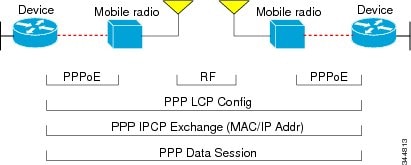
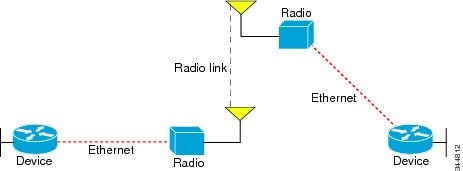
PPPoE Interfaces for Mobile Radio CommunicationsThe Mobile Ad Hoc Network (MANET) implementation uses PPP over Ethernet (PPPoE) sessions to enable intranodal communications between a device and its partner radio. Each radio initiates the PPPoE session as soon as the radio establishes a radio link to another radio. After the PPPoE sessions are active, a PPP session is established end-to-end (device-to-device). This is duplicated each time a radio establishes a new radio link. The virtual multipoint interface (VMI) on the device can aggregate multiple PPPoE sessions and multiplex them to look like a single interface to the routing processes. Underneath the VMI are virtual access interfaces that are associated with each of the PPP and PPPoE connections. A PPPoE session is established between a device and a radio on behalf of every other device and radio neighbor located in the MANET. These Layer 2 sessions are the means by which radio network status gets reported to the Layer 3 processes in the device. The figure below shows the PPPoE session exchange between mobile devices and directional radios in a MANET network. This capability requires that a Radio-Aware Routing (RAR)-compliant radio be connected to a device through Ethernet. The device always considers the Ethernet link to be up. If the radio side of the link goes down, the device waits until a routing update timeout occurs to declare the route down and then updates the routing table. The figure below shows a simple device-to-radio link topology. The routing protocols optimized for VMI PPPoE are Enhanced Interior Gateway Routing Protocol (EIGRP) (IPv4, IPv6) and Open Shortest Path First version 3 (OSPFv3) for IPv4 and IPv6. Benefits of Virtual Multipoint InterfacesThe virtual multipoint interface (VMI) provides services that map outgoing packets to the appropriate PPP over Ethernet (PPPoE) sessions based on the next-hop forwarding address for that packet. The VMI also provides a broadcast service that emulates a set of point-to-point connections as a point-to-multipoint interface with broadcast ability. When a packet with a multicast address is forwarded through the VMI in aggregate mode, VMI replicates the packet and sends it through the virtual access interfaces to each of its neighbors. Directional radios are frequently used in applications that require greater bandwidth, increased power-to-transmission range, or reduced probability of detection. These radios operate in a point-to-point mode and generally have no broadcast capability. However, the routing processes in Mobile Ad Hoc Networks (MANETs) operate most efficiently because the network link is treated as point-to-multipoint, with broadcast capability. For the device, modeling the MANET as a collection of point-to-point nodes has a dramatic impact on the size of its internal database. The VMI within the device can aggregate all of the per-neighbor PPPoE sessions from the radio Ethernet connection. The VMI maps the sessions to appear to Layer 3 routing protocols and applications as a single point-to-multipoint, multiaccess, broadcast-capable network. However, the VMI preserves the integrity of the PPPoE sessions on the radio side so that each point-to-point connection can have its own quality of service (QoS) queue. The VMI also relays the link-quality metric and neighbor up/down signaling from the radio to the routing protocols. The VMI signals are used by the Enhanced Interior Gateway Routing Protocol (EIGRP) for IPv4 and IPv6 neighbors and the Open Shortest Path First version 3 (OSPFv3) for IPv6 neighbors. IPv6 Address Support on VMIsYou can configure virtual multipoint interfaces (VMIs) with IPv6 addresses only, IPv4 addresses only, or both IPv4 and IPv6 addresses. IPv6 addresses are assigned to individual device interfaces and enable the forwarding of IPv6 traffic globally on the device. By default, IPv6 addresses are not configured and IPv6 routing is disabled. OSPFv3 Address FamiliesThe Open Shortest Path First version 3 9OSPFv3) address family feature is implemented according to RFC 5838 and enables the concurrent routing of IPv4 and IPv6 prefixes. When this feature is enabled with Mobile Ad Hoc Networks (MANETs), IPv6 packets are routed in mobile environments over OSPFv3 using IPv4 or IPv6 addresses. For configuration details, see the IP Routing: OSPF Configuration Guide. Neighbor Up and Down Signaling for OSFPv3 and EIGRPMobile Ad Hoc Networks (MANETs) are highly dynamic environments. Nodes might move into, or out of, radio range at a fast pace. Each time a node joins or leaves, the network topology must be logically reconstructed by the devices. Routing protocols normally use timer-driven hello messages or neighbor timeouts to track topology changes, but MANETs reliance on these mechanisms can result in unacceptably slow convergence. The neighbor up/down signaling capability provides faster network convergence by using link-status signals generated by the radio. The radio notifies the device each time a link to another neighbor is established or terminated by the creation and termination of PPP over Ethernet (PPPoE) sessions. In the device, the routing protocols (Open Shortest Path First version 3 [OSPFv3] or Enhanced Interior Gateway Routing Protocol [EIGRP]) respond immediately to these signals by expediting formation of a new adjacency (for a new neighbor) or tearing down an existing adjacency (if a neighbor is lost). For example, if a vehicle drives behind a building and loses its connection, the device immediately senses the loss and establishes a new route to the vehicle through neighbors that are not blocked. This high-speed network convergence is essential for minimizing dropped voice calls and disruptions to video sessions. When virtual multipoint interfaces (VMIs) with PPPoE are used and a partner node has left or a new one has joined, the radio informs the device immediately of the topology change. Upon receiving the signal, the device immediately declares the change and updates the routing tables. The signaling capability provides these advantages:
The messaging allows for flexible rerouting when necessary because of these factors:
The figure below shows the signaling sequence that occurs when radio links go up and down. PPPoE Credit-based and Metric-based Scaling and Flow ControlEach radio initiates a PPP over Ethernet (PPPoE) session with its local device as soon as the radio establishes a link to another radio. Once the PPPoE sessions are active for each node, a PPP session is then established end-to-end (device-to-device). This process is duplicated each time a radio establishes a new link. The carrying capacity of each radio link might vary due to location changes or environmental conditions, and many radio transmission systems have limited buffering capabilities. To minimize the need for packet queueing in the radio, PPPoE protocol extensions enable the device to control traffic buffering in congestion situations. Implementing flow-control on these device-to-radio sessions allows use of quality of service (QoS) features such as fair queueing. The flow-control solution utilizes a credit-granting mechanism documented in RFC 5578. When the PPPoE session is established, the radio can request a flow-controlled session. If the device acknowledges the request, all subsequent traffic must be flow controlled. If a flow-control session is requested and cannot be supported by the device, the session is terminated. Typically, both the radio and the device initially grant credits during session discovery. Once a device exhausts its credits, it must stop sending until additional credits are granted. Credits can be added incrementally over the course of a session. Metrics scaling is used with high-performance radios that require high-speed links. The radio can express the maximum and current data rates with different scaler values. Credit scaling allows a radio to change the default credit grant (or scaling factor) of 64 bytes to its default value. You can display the maximum and current data rates and the scalar value set by the radio in the show vmi neighbor detail command output. How to Configure MANET Enhancements to PPPoE for Router-to-Radio Links
Configuring a Subscriber Profile for PPPoE Service SelectionFor virtual multipoint interfaces (VMIs) to work, you must configure a subscriber profile for PPP over Ethernet (PPPoE) service selection. In this task, you configure the PPPoE service name, which is used by Radio-Aware Routing (RAR)-compliant radio PPPoE clients to connect to the PPPoE server. All PPPoE service names used for MANET implementations must begin with manet_radio for use with VMI and RFC 5578 features. Example service names are manet_radio and manet_radio_satellite. DETAILED STEPS Assigning the Subscriber Profile to a PPPoE ProfilePerform this required task to assign a subscriber profile to a PPP over Ethernet (PPPoE) profile. In this configuration, the BBA group name should match the subscriber profile name previously defined in the subscriber profile. In this case, the profile name used as the service name is manet_radio. DETAILED STEPS Enabling PPPoE Sessions on an Interface
SUMMARY STEPS
DETAILED STEPS Creating a Virtual Template for IPv4 and IPv6Perform this optional task to create a virtual template for IPv4 and IPv6. You use the virtual template interface to dynamically clone configurations for each virtual access interface created for a virtual multipoint interface (VMI) neighbor. Before You Begin
SUMMARY STEPS
Cisco recommends that, when using the virtual template, you turn off the PPP keepalive messages to make CPU usage more efficient and to help avoid the potential for the device to terminate the connection if PPP keepalive packets are missed over a lossy radio frequency (RF) link. DETAILED STEPS Creating a VMI for EIGRP IPv4Perform this optional task to create the VMI for the Enhanced Interior Gateway Routing Protocol for IPv4 (EIGRP IPv4) and associate it with the interface on which PPP over Ethernet (PPPoE is enabled). Before You Begin
SUMMARY STEPS
When you create a virtual multipoint interface (VMI), assign the IPv4 address to that VMI definition. The radio alerts the device with PADT messages that the Layer-2 radio frequency (RF) connection is no longer alive. Cisco recommends that you turn off the PPP keepalive messages to make CPU usage more efficient and to help avoid the potential for the device to terminate the connection if PPP keepalive packets are missed over a lossy RF link. This configuration includes quality of service (QoS) fair queueing and a service policy applied to the VMI. Make certain that any fair queueing left over from any previous configurations is removed before applying the new policy map to the virtual template in the VMI configuration.
DETAILED STEPS Creating a VMI for EIGRP IPv6Perform this optional task to create the VMI for the Enhanced Interior Gateway Routing Protocol for IPv6 (EIGRP IPv6) and associate it with the interface on which PPP over Ethernet (PPPoE) is enabled. Before You Begin
SUMMARY STEPS
When you create a virtual multipoint interface (VMI), assign the IPv6 address to that VMI definition. The radio alerts the device with PADT messages that the Layer-2 radio frequency (RF) connection is no longer alive. Cisco recommends that if you turn off the PPP keepalive messages to make CPU usage more efficient and help to avoid the potential for the device to terminate the connection if PPP keepalive packets are missed over a lossy RF link. This configuration includes quality of service (QoS) fair queueing and a service policy applied to the VMI. Make certain that any fair queueing left over from any previous configurations is removed before applying the new policy map to the virtual template in the VMI configuration.
DETAILED STEPS Configuration Examples for MANET Enhancements to PPPoE for Router-to-Radio Links
Example: Basic VMI PPPoE Configuration with EIGRP IPv4The following example shows the basic virtual multipoint interface (VMI) PPP over Ethernet (PPPoE) configuration with the Enhanced Interior Gateway Routing Protocol for IPv4 (EIGRP IPv4) as the routing protocol. This configuration includes one VMI. service timestamps debug datetime msec service timestamps log datetime msec no service password-encryption ! hostname host1 ! logging buffered 3000000 no logging console enable password test ! no aaa new-model clock timezone EST -5 ip cef ! no ip domain lookup subscriber authorization enable ! subscriber profile host1 pppoe service manet_radio ! subscriber profile test pppoe service manet_radio ! ! multilink bundle-name authenticated no virtual-template subinterface ! archive log config ! policy-map FQ class class-default fair-queue ! bba-group pppoe test virtual-template 1 service profile test ! bba-group pppoe VMI1 virtual-template 1 service profile host1 ! ! interface Loopback1 ip address 209.165.200.225 255.255.255.224 no ip proxy-arp load-interval 30 ! interface FastEthernet0/0 no ip address no ip mroute-cache load-interval 30 speed 100 full-duplex pppoe enable group VMI1 ! interface Serial1/0 no ip address no ip mroute-cache shutdown clock rate 2000000 ! interface Serial1/1 no ip address no ip mroute-cache shutdown clock rate 2000000 ! ! interface Serial1/2 no ip address no ip mroute-cache shutdown clock rate 2000000 ! interface Serial1/3 no ip address no ip mroute-cache shutdown clock rate 2000000 ! interface FastEthernet2/0 switchport access vlan 2 duplex full speed 100 ! interface FastEthernet2/1 switchport access vlan 503 load-interval 30 duplex full speed 100 ! interface FastEthernet2/2 shutdown ! interface FastEthernet2/3 shutdown ! interface Virtual-Template1 ip unnumbered vmi1 load-interval 30 no keepalive service-policy output FQ ! interface Vlan1 no ip address no ip mroute-cache shutdown ! interface Vlan2 ip address 209.165.200.226 255.255.255.224 no ip mroute-cache load-interval 30 ! interface Vlan503 ip address 209.165.200.226 255.255.255.224 load-interval 30 ! interface vmi1 ip address 209.165.200.226 255.255.255.224 no ip redirects no ip split-horizon eigrp 1 load-interval 30 dampening-change 50 physical-interface FastEthernet0/0 ! router eigrp 1 redistribute connected network 209.165.200.226 255.255.255.224 network 209.165.200.227 255.255.255.224 auto-summary ! no ip http server no ip http secure-server ! control-plane ! ! line con 0 exec-timeout 0 0 stopbits 1 line aux 0 line vty 0 4 login ! end Example: Basic VMI PPPoE Configuration with EIGRP IPv6The following example shows the basic requirements for configuring a virtual multipoint interface (VMI) that uses the Enhanced Interior Gateway Routing Protocol for IPv6 (EIGRP IPv6) as the routing protocol. It includes one VMI. service timestamps debug datetime msec service timestamps log datetime msec no service password-encryption ! hostname host1 ! logging buffered 3000000 no logging console enable password lab ! no aaa new-model clock timezone EST -5 ip cef ! ! ! ! no ip domain lookup ipv6 unicast-routing ipv6 cef subscriber authorization enable ! subscriber profile host1 pppoe service manet_radio ! subscriber profile test pppoe service manet_radio ! ! multilink bundle-name authenticated no virtual-template subinterface ! ! ! ! archive log config ! ! policy-map FQ class class-default fair-queue ! ! ! ! ! bba-group pppoe test virtual-template 1 service profile test ! bba-group pppoe VMI1 virtual-template 1 service profile host1 ! ! ! interface Loopback1 ip address 209.165.200.226 255.255.255.224 no ip proxy-arp load-interval 30 ipv6 address 2001:0DB8::/32 ipv6 enable ipv6 eigrp 1 ! interface FastEthernet0/0 no ip address no ip mroute-cache load-interval 30 speed 100 full-duplex pppoe enable group VMI1 ! interface Serial1/0 no ip address no ip mroute-cache shutdown clock rate 2000000 ! interface Serial1/1 no ip address no ip mroute-cache shutdown clock rate 2000000 ! interface Serial1/2 no ip address no ip mroute-cache shutdown clock rate 2000000 ! interface Serial1/3 no ip address no ip mroute-cache shutdown clock rate 2000000 ! interface FastEthernet2/0 switchport access vlan 2 duplex full speed 100 ! interface FastEthernet2/1 switchport access vlan 503 load-interval 30 duplex full speed 100 ! interface FastEthernet2/2 shutdown ! interface FastEthernet2/3 shutdown ! interface Virtual-Template1 no ip address load-interval 30 ipv6 enable no keepalive service-policy output FQ ! interface Vlan1 no ip address no ip mroute-cache shutdown ! interface Vlan2 ip address 209.165.200.225 255.255.255.224 no ip mroute-cache load-interval 30 ! interface Vlan503 ip address 209.165.200.225 255.255.255.224 load-interval 30 ipv6 address 2001:0DB8::/32 ipv6 enable ipv6 eigrp 1 ! interface vmi1 no ip address load-interval 30 ipv6 enable no ipv6 redirects ipv6 eigrp 1 no ipv6 split-horizon eigrp 1 physical-interface FastEthernet0/0 ! no ip http server no ip http secure-server ! ipv6 router eigrp 1 router-id 10.9.1.1 no shutdown redistribute connected ! control-plane ! line con 0 exec-timeout 0 0 stopbits 1 line aux 0 line vty 0 4 login ! end Example: VMI PPPoE Configuration with EIGRP for IPv4 and IPv6The following examples show how to configure the virtual multipoint interface (VMI) for PPP over Ethernet (PPPoE) using the Enhanced Interior Gateway Routing Protocol (EIGRP) as the IP routing protocol when you have both IPv4 and IPv6 addresses configured on the interface. This configuration includes one VMI. Though EIGRP allows you to use the same autonomous system (AS) number on an IPv4 EIGRP process and on an IPv6 process, we recommend using a unique AS number for each process for clarity. service timestamps debug datetime msec service timestamps log datetime msec no service password-encryption ! hostname host1 ! logging buffered 3000000 no logging console enable password lab ! no aaa new-model clock timezone EST -5 ip cef ! no ip domain lookup ipv6 unicast-routing ipv6 cef subscriber authorization enable ! subscriber profile host1 pppoe service manet_radio ! subscriber profile test pppoe service manet_radio ! ! multilink bundle-name authenticated no virtual-template subinterface ! archive log config ! policy-map FQ class class-default fair-queue ! bba-group pppoe test virtual-template 1 service profile test ! bba-group pppoe VMI1 virtual-template 1 service profile host1 ! ! interface Loopback1 ip address 209.165.200.225 255.255.255.224 no ip proxy-arp load-interval 30 ipv6 address 2001:0DB8::/32 ipv6 enable ipv6 eigrp 1 ! interface FastEthernet0/0 no ip address no ip mroute-cache load-interval 30 speed 100 full-duplex pppoe enable group VMI1 ! interface Serial1/0 no ip address no ip mroute-cache shutdown clock rate 2000000 ! interface Serial1/1 no ip address no ip mroute-cache shutdown clock rate 2000000 ! interface Serial1/2 no ip address no ip mroute-cache shutdown clock rate 2000000 ! interface Serial1/3 no ip address no ip mroute-cache shutdown clock rate 2000000 ! interface FastEthernet2/0 switchport access vlan 2 duplex full speed 100 ! interface FastEthernet2/1 switchport access vlan 503 load-interval 30 duplex full speed 100 ! interface FastEthernet2/2 shutdown ! interface FastEthernet2/3 shutdown ! interface Virtual-Template1 ip unnumbered vmi1 load-interval 30 ipv6 enable no keepalive service-policy output FQ ! interface Vlan1 no ip address no ip mroute-cache shutdown ! interface Vlan2 ip address 209.165.200.225 255.255.255.224 no ip mroute-cache load-interval 30 ! interface Vlan503 ip address 209.165.200.225 255.255.255.224 load-interval 30 ipv6 address 2001:0DB8::/32 ipv6 enable ipv6 eigrp 1 ! interface vmi1 ip address 209.165.200.225 255.255.255.224 no ip redirects no ip split-horizon eigrp 1 load-interval 30 ipv6 address 2001:0DB8::/32 ipv6 enable no ipv6 redirects ipv6 eigrp 1 no ipv6 split-horizon eigrp 10 dampening-interval 30 physical-interface FastEthernet0/0 ! router eigrp 1 redistribute connected network 209.165.200.225 255.255.255.224 network 209.165.200.226 255.255.255.224 auto-summary ! ! ! no ip http server no ip http secure-server ! ipv6 router eigrp 1 router-id 10.9.1.1 no shutdown redistribute connected ! control-plane ! ! line con 0 exec-timeout 0 0 stopbits 1 line aux 0 line vty 0 4 login ! end Example: VMI Configuration Using Multiple Virtual TemplatesThe following example shows how to configure the virtual multipoint interface (VMI) by using multiple virtual templates. This example shows two VMIs, each with a different service name. ! service timestamps debug datetime msec service timestamps log datetime msec no service password-encryption ! hostname router1 ! boot-start-marker boot-end-marker ! ! no aaa new-model ! resource policy ! clock timezone EST -5 ip cef no ip domain lookup ! ! subscriber authorization enable ! subscriber profile router1_ground pppoe service manet_radio_ground ! subscriber profile router1_satellite pppoe service manet_radio_satellite ! ipv6 unicast-routing policy-map FQ class class-default fair-queue ! ! ! bba-group pppoe router1_ground virtual-template 1 service profile router1_ground ! bba-group pppoe router1_satellite virtual-template 2 service profile router1_satellite ! ! interface Ethernet0/0 pppoe enable group router1_ground ! interface Ethernet0/1 pppoe enable group router1_satellite ! interface Ethernet0/2 no ip address shutdown ! interface Ethernet0/3 no ip address shutdown ! interface Ethernet1/0 no ip address shutdown ! interface Ethernet1/1 no ip address shutdown ! interface Ethernet1/2 no ip address shutdown ! interface Ethernet1/3 no ip address shutdown ! interface Serial2/0 no ip address shutdown serial restart-delay 0 ! interface Serial2/1 no ip address shutdown serial restart-delay 0 ! interface Serial2/2 no ip address shutdown serial restart-delay 0 ! interface Serial2/3 no ip address shutdown serial restart-delay 0 ! interface Serial3/0 no ip address shutdown serial restart-delay 0 ! interface Serial3/1 no ip address shutdown serial restart-delay 0 ! interface Serial3/2 no ip address shutdown serial restart-delay 0 ! interface Serial3/3 no ip address shutdown serial restart-delay 0 ! interface Virtual-Template1 ip unnumbered vmi1 load-interval 30 no peer default ip address no keepalive service-policy output FQ ! interface Virtual-Template2 ip unnumbered vmi1 load-interval 30 no peer default ip address no keepalive service-policy output FQ ! interface vmi1 description ground connection ip address 209.165.200.225 255.255.255.224 physical-interface Ethernet0/0 ! interface vmi2 description satellite connection ip address 209.165.200.225 255.255.255.224 physical-interface Ethernet0/1 ! router eigrp 1 network 209.165.200.225 255.255.255.224 network 209.165.200.227 255.255.255.224 auto-summary ! ! no ip http server ! ! ! ! ! control-plane ! ! line con 0 exec-timeout 0 0 logging synchronous line aux 0 line vty 0 4 login ! end Example: PPPoE ConfigurationIn the following example, the subscriber profile uses a predefined string manet_radio to determine whether an inbound PPP over Ethernet (PPPoE) session is coming from a device that supports the virtual multipoint interface (VMI). All IP definitions are configured on the VMI rather than on the Fast Ethernet or virtual-template interfaces; when those interfaces are configured, do not specify either an IP address or an IPv6 address. No IP address is specified, and IPv6 is enabled by default on the VMI: subscriber profile list1 pppoe service manet_radio subscriber authorization enable ! bba-group pppoe bba1 virtual-template 1 service profile list1 ! interface FastEthernet0/1 no ip address pppoe enable group bba1 ! interface Virtual-Template 1 no ip address no peer default ip-address ! interface vmi 1 no ip address physical-interface FastEthernet0/1 Example: Configuring Two VMIs and Two Virtual TemplatesThe following example shows a configuration that includes two virtual multipoint interfaces (VMIs), two virtual templates, and two service names. You can configure multiple virtual template interfaces for your VMI PPP over Ethernet (PPPoE) connections. The selection of which virtual template to use is predicated on the service name sent by the radio during PPPoE session establishment. In this example, any PPPoE request for a session (presentation of a PPPoE Active Discovery Initiate [PADI] packet) with the service name of "manet_radio_ground" uses Virtual-Template1 as the interface to be cloned. Conversely, any PADI presented by the radio with the service name of "manet_radio_satellite" uses Virtual-Template2. ! service timestamps debug datetime msec service timestamps log datetime msec no service password-encryption ! hostname router1 ! boot-start-marker boot-end-marker ! ! no aaa new-model ! resource policy ! clock timezone EST -5 ip cef no ip domain lookup ! ! subscriber authorization enable ! subscriber profile router1_ground pppoe service manet_radio_ground ! subscriber profile router1_satellite pppoe service manet_radio_satellite ! ipv6 unicast-routing policy-map FQ class class-default fair-queue ! ! ! bba-group pppoe router1_ground virtual-template 1 service profile router1_ground ! bba-group pppoe router1_satellite virtual-template 2 service profile router1_satellite ! ! interface Ethernet0/0 pppoe enable group router1_ground ! interface Ethernet0/1 pppoe enable group router1_satellite ! interface Ethernet0/2 no ip address shutdown ! interface Ethernet0/3 no ip address shutdown ! interface Ethernet1/0 no ip address shutdown ! interface Ethernet1/1 no ip address shutdown ! interface Ethernet1/2 no ip address shutdown ! interface Ethernet1/3 no ip address shutdown ! interface Serial2/0 no ip address shutdown serial restart-delay 0 ! interface Serial2/1 no ip address shutdown serial restart-delay 0 ! interface Serial2/2 no ip address shutdown serial restart-delay 0 ! interface Serial2/3 no ip address shutdown serial restart-delay 0 ! interface Serial3/0 no ip address shutdown serial restart-delay 0 ! interface Serial3/1 no ip address shutdown serial restart-delay 0 ! interface Serial3/2 no ip address shutdown serial restart-delay 0 ! interface Serial3/3 no ip address shutdown serial restart-delay 0 ! interface Virtual-Template1 ip unnumbered vmi1 load-interval 30 no peer default ip address no keepalive service-policy output FQ ! interface Virtual-Template2 ip unnumbered vmi2 load-interval 30 no peer default ip address no keepalive service-policy output FQ ! interface vmi1 description ground connection ip address 209.165.200.226 255.255.255.224 physical-interface Ethernet0/0 ! interface vmi2 description satellite connection ip address 209.165.200.227 255.255.255.224 physical-interface Ethernet0/1 ! router eigrp 1 network 209.165.200.226 255.255.255.224 network 209.165.200.227 255.255.255.224 auto-summary ! ! no ip http server ! ! ! ! ! control-plane ! ! line con 0 exec-timeout 0 0 logging synchronous line aux 0 line vty 0 4 login ! end Additional ReferencesRelated Documents
Technical Assistance
Feature Information for MANET Enhancements to PPPoE for Router-to-Radio LinksThe following table provides release information about the feature or features described in this module. This table lists only the software release that introduced support for a given feature in a given software release train. Unless noted otherwise, subsequent releases of that software release train also support that feature. Use Cisco Feature Navigator to find information about platform support and Cisco software image support. To access Cisco Feature Navigator, go to www.cisco.com/go/cfn. An account on Cisco.com is not required.
Cisco and the Cisco logo are trademarks or registered trademarks of Cisco and/or its affiliates in the U.S. and other countries. To view a list of Cisco trademarks, go to this URL: www.cisco.com/go/trademarks. Third-party trademarks mentioned are the property of their respective owners. The use of the word partner does not imply a partnership relationship between Cisco and any other company. (1110R) Any Internet Protocol (IP) addresses and phone numbers used in this document are not intended to be actual addresses and phone numbers. Any examples, command display output, network topology diagrams, and other figures included in the document are shown for illustrative purposes only. Any use of actual IP addresses or phone numbers in illustrative content is unintentional and coincidental. © 2007-2012 Cisco Systems, Inc. All rights reserved.
|
|||||||||||||||||||||||||||||||||
|
|