IP Mobility: Mobile Networks Configuration Guide, Cisco IOS Release 15M&T
Cisco Mobile Networks Asymmetric Link

Cisco Mobile Networks Asymmetric Link

Last Updated: December 2, 2012

An asymmetric link environment such as satellite communications, with a separate uplink and downlink, provides challenges for the mobile router and foreign agent. Because each unidirectional link provides only one way traffic, the inherent mapping in the foreign agent of the return path to the mobile router for incoming messages does not apply. The Cisco Mobile Networks--Asymmetric Link feature solves this problem by extending the use of mobile networks to networks where the mobile router has unidirectional links to the foreign agent. The foreign agent is able to transmit packets back to the mobile router over a different link than the one on which it receives packets from the mobile router.

Feature Specifications for the Cisco Mobile Networks: Asymmetric Link

Feature History

Release

Modification

12.2(13)T

This feature was introduced.

Supported Platforms

Refer to Feature Navigator as referenced below.

Finding Feature Information

Your software release may not support all the features documented in this module. For the latest caveats and feature information, see Bug Search Tool and the release notes for your platform and software release. To find information about the features documented in this module, and to see a list of the releases in which each feature is supported, see the feature information table at the end of this module.

Use Cisco Feature Navigator to find information about platform support and Cisco software image support. To access Cisco Feature Navigator, go to www.cisco.com/go/cfn. An account on Cisco.com is not required.

Restrictions for Cisco Mobile Networks Asymmetric Link

This feature can be used only on serial interfaces.

Information About Cisco Mobile Networks Asymmetric Link

Unidirectional Routing in Cisco Mobile Networks

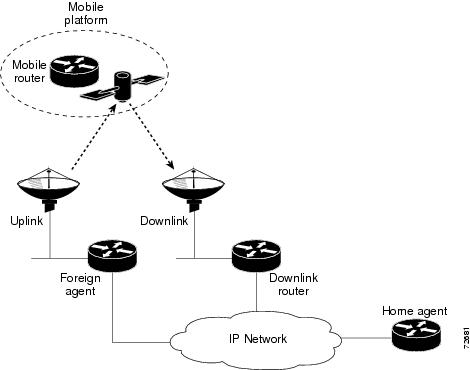
With unidirectional routing, registration requests from the mobile router travel a slightly different route than in bidirectional routing. The mobile router uses different interfaces to transmit and receive. Advertisements are received on the mobile router interface that is connected to the uplink equipment. This interface is configured to be receive-only (transmit-interface command) and another interface connected to the downlink traffic is configured to be transmit-only. When the mobile router receives an advertisement from the foreign agent on the uplink, it takes the care-of address advertised by that foreign agent to use in the registration request. However, the mobile router has been configured to send traffic to a downlink router even though it hears advertisements on the interface connected to the uplink equipment. The registration request is sent out the mobile router's downlink interface to the care-of address given in the the foreign agent's uplink interface.

The downlink router routes the registration request using normal routing to the foreign agent. When the foreign agent receives the registration request, it looks up the care-of address. If the care-of address is associated with an asymmetric interface, the foreign agent treats the mobile router as a visitor on that interface and forwards the registration request to the home agent. The home agent sends a registration reply to the foreign agent care-of address, which will then be forwarded to the mobile router through the uplink interface.

The figure below shows how packets are routed within the mobile network using unidirectional routing.

Figure 1Unidirectional Routing in an Asymmetric Communications Environment


How to Configure Mobile Networks in an Asymmetric Link Environment

Enabling Mobile Router Services for Unidirectional Interfaces

SUMMARY STEPS

1.    enable

2.    configure {terminal | memory | network}

3.    interface type number

4.    transmit-interface type number

5.    ip address ip-address mask

6.    ip mobile router-service roam

7.    exit

8.    interface type number

9.    ip address ip-address mask

10.    ip mobile router-service roam


DETAILED STEPS
 Command or ActionPurpose
Step 1
enable


Example:

Router> enable


Enables higher privilege levels, such as privileged EXEC mode.

Enter your password if prompted.

 
Step 2
configure {terminal | memory | network}


Example:

Router# configure terminal


Enters global configuration mode.

 
Step 3
interface type number


Example:

Router(config)# interface serial 1


Configures an interface type and enters interface configuration mode.

 
Step 4
transmit-interface type number


Example:

Router(config-if)# transmit-interface serial 2


Assigns a transmit interface to a receive-only interface.

  • This is the uplink (receive-only) interface.
  • In the example, this command specifies interface serial 2, connected to the downlink router, to be the transmit-only interface.
 
Step 5
ip address ip-address mask


Example:

Router(config-if)# ip-address 168.71.6.2 255.255.255.0


Sets a primary IP address for an interface.

  • This is the IP address of a roaming interface.
 
Step 6
ip mobile router-service roam


Example:

Router(config-if)# ip mobile router-service roam


Enables the mobile router to specify on which configured interface it will discover foreign agents.

 
Step 7
exit


Example:

Router(config-if)# exit


Returns to global configuration mode.

 
Step 8
interface type number


Example:

Router(config)# interface serial 2


Configures an interface type and enters interface configuration mode.

  • This is the downlink (transmit-only) interface that was specified in Step 4.
 
Step 9
ip address ip-address mask


Example:

Router(config-if)# ip-address 168.71.7.2 255.255.255.0


Sets a primary IP address for an interface.

  • This is the IP address of a roaming interface.
 
Step 10
ip mobile router-service roam


Example:

Router(config-if)# ip mobile router-service roam


Enables the mobile router to specify on which configured interface it will discover foreign agents.


Troubleshooting Tips

  • With back-to-back serial interfaces (DTE to DTE), you need to disable keepalives with the no keepalive interface configuration command.
  • The forwarding table will appear "normal." Use the debug ip packet and trace commands to display the packets that are being routed unidirectionally.

Enabling Foreign Agent Services for Unidirectional Interfaces

SUMMARY STEPS

1.    enable

2.    configure {terminal | memory | network}

3.    interface type number

4.    ip address ip-address mask

5.    ip irdp

6.    ip irdp maxadvertinterval seconds

7.    ip irdp minadvertinterval seconds

8.    ip irdp holdtime seconds

9.    ip mobile foreign-service

10.    exit

11.    router mobile

12.    exit

13.    ip mobile foreign-agent [care-of interface[interface-only transmit-only]]


DETAILED STEPS
 Command or ActionPurpose
Step 1
enable


Example:

Router> enable


Enables higher privilege levels, such as privileged EXEC mode.

Enter your password if prompted.

 
Step 2
configure {terminal | memory | network}


Example:

Router# configure terminal


Enters global configuration mode.

 
Step 3
interface type number


Example:

Router(config)# interface serial 1


Configures an interface and enters interface configuration mode.

 
Step 4
ip address ip-address mask


Example:

Router(config-if)# ip address 10.0.0.2 255.255.255.0


Sets a primary IP address of the interface.

 
Step 5
ip irdp


Example:

Router(config-if)# ip irdp


Enables IRDP processing on an interface.

 
Step 6
ip irdp maxadvertinterval seconds


Example:

Router(config-if)# ip irdp maxadvertinterval 4


(Optional) Specifies the maximum interval in seconds between advertisements.

 
Step 7
ip irdp minadvertinterval seconds


Example:

Router(config-if)# ip irdp minadvertinterval 3


(Optional) Specifies the minimum interval in seconds between advertisements.

 
Step 8
ip irdp holdtime seconds


Example:

Router(config-if)# ip irdp holdtime 10


(Optional) Length of time in seconds that advertisements are held valid.

  • Default is three times the maxadvertintervalperiod.
 
Step 9
ip mobile foreign-service


Example:

Router(config-if)# ip mobile foreign-service


Enables foreign agent service on an interface.

  • This command also appends Mobile IP information such as care-of address, lifetime, and service flags to the advertisement.
 
Step 10
exit


Example:

Router(config-if)# exit


Returns to global configuration mode.

 
Step 11
router mobile


Example:

Router(config)# router mobile


Enables Mobile IP on the router.

 
Step 12
exit


Example:

Router(config-router)# exit


Returns to global configuration mode.

 
Step 13
ip mobile foreign-agent [care-of interface[interface-only transmit-only]]


Example:

Router(config)# ip mobile foreign-agent care-of serial 1 interface-only transmit-only


Enables foreign agent service.

  • The interface-only keyword causes the interface type specified in the interface argument to advertise only its own address as the care-of address.
  • The transmit-only keyword informs Mobile IP that the interface acts as an uplink so for registration and reply purposes, treat registration requests received for this care-of address as having arrived on the transmit-only interface.
  • Any care-of address can be configured as interface only but only serial interfaces can be configured as transmit only.
 

Enabling Home Agent Services

There are no changes to the home agent configuration with the introduction of the Cisco Mobile Neworks--Asymmetric Link feature. Configure the home agent as described in the "Cisco Mobile Networks" feature document introduced in Cisco IOS Release 12.2(4)T.

Verifying Cisco Mobile Networks Asymmetric Link Configuration

SUMMARY STEPS

1.    show ip mobile visitor

2.    show ip mobile globals

3.    show ip mobile interface


DETAILED STEPS
 Command or ActionPurpose
Step 1
show ip mobile visitor


Example:

Router# show ip mobile visitor


Displays the table containing the visitor list of the foreign agent.

 
Step 2
show ip mobile globals


Example:

Router# show ip mobile globals


Displays global information for mobile agents.

  • Relevant fields in the display output will indicate interface-only and transmit-only status if configured.
  • See the display output following this table for an example.
 
Step 3
show ip mobile interface


Example:

Router# show ip mobile interface


Displays advertisement information for interfaces that are providing foreign agent service or are home links for mobile nodes.

 
What to Do Next

The following example shows interface-only and transmit-only configured on the foreign agent:

Router# show ip mobile globals
IP Mobility global information:
Home Agent is not enabled
Foreign Agent
   Pending registrations expire after 15 secs
   Care-of addresses advertised
    Serial4/0 (11.0.0.2) - up, interface-only, transmit-only

Configuration Examples for Cisco Mobile Networks Asymmetric Link

In the following examples, a home agent provides service for one mobile router. The mobile router detects the foreign agent advertisements on the uplink interface and sends the registration request on the downlink interface to the advertised care-of address of the foreign agent.

Mobile Router Example

The following example shows the mobile router configuration:

!
interface Loopback1
 ip address 20.0.4.1 255.255.255.0
!
interface Serial3/0
! Uplink interface 
 transmit-interface Serial3/1
  ip address 11.0.0.1 255.255.255.0
 ip mobile router-service roam
!
interface Serial3/1
! Downlink interface
 ip address 12.0.0.1 255.255.255.
 ip mobile router-service roam
! 
router mobile
!
ip mobile secure home-agent 43.0.0.3 spi 100 key hex 11223344556677881122334455667788
ip mobile router
address 20.0.4.1 255.255.255.0
home-agent 43.0.0.3

Foreign Agent Example

The following example shows the foreign agent configuration:

!
interface Serial4/0
! Uplink interface
 ip address 11.0.0.2 255.255.255.0
 ip irdp
 ip irdp maxadvertinterval 10
 ip irdp minadvertinterval 5
 ip irdp holdtime 30
 ip mobile foreign-service
!
router mobile
!
ip mobile foreign-agent care-of Serial4/0 interface-only transmit-only

Additional References

For additional information related to the Cisco Mobile Networks--Asymmetric Link feature, refer to the following sections:

Related Documents

Related Topic

Document Title

Mobile IP configuration tasks

"Configuring Mobile IP" chapter in theCisco IOS IP Configuration Guide,Release 12.2.

Mobile IP commands

"Mobile IP Commands" chapter in theCisco IOS IP Command Reference, Volume 1 of 3: Addressing and Services , Release 12.2.

Cisco Mobile Networks commands

"Cisco Mobile Networks" feature document, Release 12.2(4)T.

Standards

Standards

Title

No new or modified standards are supported by this feature, and support for existing standards has not been modified by this feature.

--

MIBs

MIBs

MIBs Link

No new or modified MIBs are supported by this feature, and support for existing MIBs has not been modified by this feature.

To obtain lists of supported MIBs by platform and Cisco IOS release, and to download MIB modules, go to the Cisco MIB website on Cisco.com at the following URL:

http://www.cisco.com/public/sw-center/netmgmt/cmtk/mibs.shtml

To locate and download MIBs for selected platforms, Cisco IOS releases, and feature sets, use Cisco MIB Locator found at the following URL:

http://tools.cisco.com/ITDIT/MIBS/servlet/index

If Cisco MIB Locator does not support the MIB information that you need, you can also obtain a list of supported MIBs and download MIBs from the Cisco MIBs page at the following URL:

http://www.cisco.com/public/sw-center/netmgmt/cmtk/mibs.shtml

To access Cisco MIB Locator, you must have an account on Cisco.com. If you have forgotten or lost your account information, send a blank e-mail to cco-locksmith@cisco.com. An automatic check will verify that your e-mail address is registered with Cisco.com. If the check is successful, account details with a new random password will be e-mailed to you. Qualified users can establish an account on Cisco.com by following the directions found at this URL:

http://www.cisco.com/register

RFCs

RFCs

Title

No new or modified RFCs are supported by this feature, and support for existing RFCs has not been modified by this feature.

--

Technical Assistance

Description

Link

Technical Assistance Center (TAC) home page, containing 30,000 pages of searchable technical content, including links to products, technologies, solutions, technical tips, tools, and lots more. Registered Cisco.com users can log in from this page to access even more content.

http://www.cisco.com/public/support/tac/home.shtml

Command Reference

The following commands are introduced or modified in the feature or features documented in this module. For information about these commands, see the Cisco IOS IP Mobility Command Reference at http://www.cisco.com/en/US/docs/ios/ipmobility/command/reference/imo_book.html. For information about all Cisco IOS commands, go to the Command Lookup Tool at http://tools.cisco.com/Support/CLILookup or to the Cisco IOS Master Commands List .

  • ip mobile foreign-agent
  • show ip mobile globals

Glossary

care-of address --The termination point of the tunnel to a mobile node or mobile router. This can be a colocated care-of address, by which the mobile node or mobile router acquires a local address and detunnels its own packets, or a foreign agent care-of address, by which a foreign agent detunnels packets and forwards them to the mobile node or mobile router.

foreign agent --A router on the visited network of a foreign network that provides routing services to the mobile node while registered. The foreign agent detunnels and delivers packets to the mobile node or mobile router that were tunneled by the home agent of the mobile node. For packets sent by a mobile node, the foreign agent may serve as a default router for registered mobile nodes.

home agent --A router that forwards packets to mobile nodes or the mobile router while they are away from home. It keeps current location information for registered mobile nodes called a mobility binding .

mobile router --A mobile node that is a router. It provides for the mobility of one or more entire networks moving together, perhaps on an airplane, a ship, a train, an automobile, a bicycle, or a kayak. The nodes connected to a network served by the mobile router may themselves be fixed nodes or mobile nodes or routers.

satellite communications --The use of geostationary orbiting satellites to relay information.

Note


Refer to the Internetworking Terms and Acronyms for terms not included in this glossary.

Cisco and the Cisco logo are trademarks or registered trademarks of Cisco and/or its affiliates in the U.S. and other countries. To view a list of Cisco trademarks, go to this URL: www.cisco.com/go/trademarks. Third-party trademarks mentioned are the property of their respective owners. The use of the word partner does not imply a partnership relationship between Cisco and any other company. (1110R)

Any Internet Protocol (IP) addresses and phone numbers used in this document are not intended to be actual addresses and phone numbers. Any examples, command display output, network topology diagrams, and other figures included in the document are shown for illustrative purposes only. Any use of actual IP addresses or phone numbers in illustrative content is unintentional and coincidental.

© 2012 Cisco Systems, Inc. All rights reserved.