This feature module describes the PPP over Ethernet (PPPoE) on ATM feature. The PPPoE on ATM feature provides the ability to connect a network of hosts over a simple bridging-access device to a remote access concentrator.
Your software release may not support all the features documented in this module. For the latest caveats and feature information, see
Bug Search Tool and the release notes for your platform and software release. To find information about the features documented in this module, and to see a list of the releases in which each feature is supported, see the feature information table at the end of this module.
Use Cisco Feature Navigator to find information about platform support and Cisco software image support. To access Cisco Feature Navigator, go to
www.cisco.com/go/cfn. An account on Cisco.com is not required.
Prerequisites for PPPoE on ATM
Before you can configure PPPoE on ATM, you need to specify a virtual template for the PPPoE sessions using the virtual-template command.
Restrictions for PPPoE on ATM
PPPoE is not supported on Frame Relay.
PPPoE over ATM AAl5Mux is not supported on ASR series 1000 routers. For more information, refer to the PPPoEoA over ATM AAL5Mux feature: http://www.cisco.com/en/US/docs/ios/bbdsl/configuration/guide/bba_pppoeoa_aal5mux.html
PPPoE is not supported on any other LAN interfaces such as FDDI and Token Ring.
Fast switching is supported. PPPoE over RFC 1483 fibswitching is supported for IP. All other protocols are switched over process switching.
Bridging is supported on the ATM permanent virtual connections (PVCs) running PPPoE.
PPPoE is supported on ATM PVCs compliant with RFC 1483 only.
Only dial-in mode is supported. Dial-out mode will not be supported.
Information About PPPoE on ATM
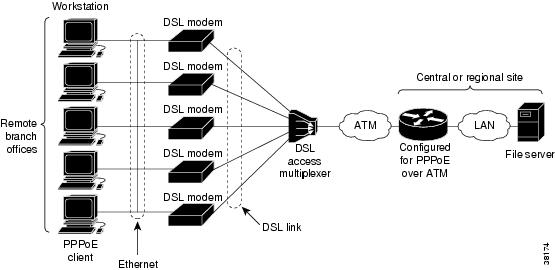
The PPPoE on ATM feature provides the ability to connect a network of
hosts over a simple bridging-access device to a remote access concentrator.
With this model, each host utilizes its own PPPoE stack and the user is
presented with a familiar user interface. Access control, billing and type of
service can be done on a per-user, rather than a per-site, basis. Before a
point-to-point connection over Ethernet can be provided, each PPP session must
learn the Ethernet address of the remote peer and establish a unique session
identifier. A unique session identifier is provided by the PPPoE Discovery
Stage protocol.
The figure below shows a sample network topology using PPPoE on ATM.
PPPoE has two distinct stage protocols. The stage protocols are listed and summarized in the table below.
Table 1 PPPoE Stage Protocols
Stage Protocols
Description
Discovery Stage protocol
Remains stateless until a PPPoE session is established. Once the PPPoE session is established, both the host and the access concentrator
must allocate the resources for a PPP virtual access interface.
PPP Session Stage protocol
Once the PPPoE session is established, sends PPPoE data as in any other PPP encapsulation.
There are four steps to the Discovery Stage:
Host broadcasts a PPPoE Active Discovery Initiation (PADI) packet.
When the access concentrator receives a PADI that it can serve, it replies by sending a PPPoE Active Discovery Offer (PADO) packet to the host.
Because the PADI was broadcast, the host may receive more than one PADO packet. The host looks through the PADO packets it receives and chooses one. The choice can be based on the AC name or the services offered. The host then sends a single PPPoE Active Discovery Request (PADR) packet to the access concentrator that it has chosen.
When the access concentrator receives a PADR packet, it prepares to begin a PPP session. It generates a unique SESSION_ID for the PPPoE session and replies to the host with a PPPoE Active Discovery Session-confirmation (PADS) packet.
When a host wishes to initiate a PPPoE session, it must first perform discovery to identify the Ethernet MAC address of the peer and establish a PPPOE SESSION_ID. Although PPP defines a peer-to-peer relationship, discovery is inherently a client/server relationship. In the discovery process, a host (the client) discovers an access concentrator (the server). Based on the network topology, there may be more than one access concentrator that the host can communicate with. The Discovery Stage allows the host to discover all access concentrators and then select one. When discovery is completed, both the host and the selected access concentrator have the information they will use to build their point-to-point connection over Ethernet.
Benefits of PPPoE on ATM
The PPPoE on ATM feature provides service-provider digital subscriber line (DSL) support. As service providers begin DSL deployments, two of their most significant goals are to ease and facilitate consumer end adoption and to preserve as much of the dialup model as possible. PPPoE serves to advance both of these goals by leveraging ethernet scale curves and embedded base (such as ATM NICs) and by preserving the point-to-point session used by internet service providers (ISPs) in today’s dialup model.
Using a PPPoE client (available from RouterWare), a PPP session can be initiated on an Ethernet connected client through a standard ADSL modem. The session is transported over the ATM DSL link via RFC 1483 Ethernet bridged frames and can terminate either in the LAN emulation client (LEC) central office or the ISP point of presence (POP). The termination device can be an aggregation box such as the Cisco 6400 or a router such as the Cisco 7200 series platforms.
As customers deploy asymmetric DSL (ADSL), they will encounter the need to enable users to access remote-access concentrators via simple bridges connecting Ethernet and ATM networks.
After you configure the Cisco router or access server for Ethernet encapsulation, you must configure the physical interface with the PVC and apply a virtual template with PPP encapsulation to the PVC that it applies to. To configure the physical interface that will carry the PPPoE session and link it to the appropriate virtual template interface, use the following commands:
Note
You can use the virtual-template, sessionsper-vc, and sessionsper-mac commands in any order.
Configures the PPPoE global profile with the maximum number of PPPoE sessions permitted on a router and sets the PPPoE session-count threshold at which an Simple Network Management Protocol (SNMP) trap will be generated.
Enables PPPoE sessions to be established on a PVC within a range.
or
Configures PPPoE autosense.
If a PPPoE profile is not assigned to the PVC by using the groupgroup-name option, the PVC will use the global PPPoE profile.
Step 13
createon-demand
Example:
Router(config-if-atm-range)# create on-demand
Configures ATM PVC autoprovisioning, which enables a range of PVCs to be created automatically on demand.
Step 14
end
Example:
Router(config-if-atm-range)# end
(Optional) Exits the ATM range configuration mode and returns to privileged EXEC mode.
Creating and Configuring a Virtual Template
Prior to configuring the ATM PVC for PPPoE on ATM, you typically create and configure a virtual template.
Other optional configuration commands can be added to the virtual template configuration. All PPP parameters are managed within the virtual template configuration. Configuration changes made to the virtual template are automatically propagated to the individual virtual access interfaces. Multiple virtual access interfaces can spawn from a single virtual template; hence, multiple PVCs can use a single virtual template.
Cisco IOS software supports up to 25 virtual template configurations. If greater numbers of tailored configurations are required, an authentication, authorization, and accounting (AAA) server may be employed.
If the parameters of the virtual template are not explicitly defined before the ATM PVC is configured, the PPP interface is brought up using default values from the virtual template identified. Some parameters (such as an IP address) take effect only if specified before the PPP interface comes up. Therefore, Cisco recommends that you explicitly create and configure the virtual template before configuring the ATM PVC to ensure such parameters take effect. Alternatively, if parameters are specified after the ATM PVC has already been configured, you should issue a shutdown command followed by anoshutdowncommand on the ATM subinterface to restart the interface; this restart will cause the newly configured parameters (such as an IP address) to take effect.
Network addresses for the PPP-over-ATM connections are not configured on the main ATM interface or subinterface. Instead, these connections are configured on the appropriate virtual template or obtained via AAA.
The virtual templates support all standard PPP configuration commands; however, not all configurations are supported by the PPP-over-ATM virtual access interfaces. These restrictions are enforced at the time the virtual template configuration is applied (cloned) to the virtual access interface. These restrictions are described in the following paragraphs.
Only standard first-in, first-out (FIFO) queueing is supported when applied to PPP-over-ATM virtual access interfaces. Other types of queueing that are typically configured on the main interface are not (for example, fair queueing). If configured, these configuration lines are ignored when applied to a PPP-over-ATM interface.
Although Cisco Express Forwarding (CEF) switching is supported, fast switching, flow, and optimum switching are not; these configurations are ignored on the PPP-over-ATM virtual access interface. CEF is enabled by default for IP. All other protocol traffic will be processed switched.
Note
The PPP reliable link that uses Link Access Procedure, Balanced (LAPB) is not supported.
Because an ATM PVC is configured for this feature, the following standard PPP features are not applicable and should not be configured:
Asynchronous interfaces
Dialup connections
Callback on PPP
To create and configure a virtual template, use the following commands:
Router(config-if)# ip unnumbered gigabitethernet0/0/0
Optionally, enables IP without assigning a specific IP address on the LAN.
Step 6
end
Example:
Router(config-if)# end
(Optional) Exits the interface configuration mode and returns to privileged EXEC mode.
Specifying an ATM Subinterface
After you create a virtual template for PPPoE on ATM, specify a multipoint or point-to-point subinterface per PVC connection. To specify an ATM multipoint subinterface, use the following commands:
Configures the ATM interface and enters subinterface configuration mode.
A multipoint subinterface is recommended for interface conservation. A point-to-point subinterface will greatly restrict the total number of PPPoE sessions you can have.
Step 4
end
Example:
Router(config-subif)# end
(Optional) Exits the subinterface configuration mode and returns to privileged EXEC mode.
Creating an ATM PVC
Creating an ATM PVC
After you create a virtual template and specify an ATM subinterface, you must create an ATM PVC.
The peak rate value is typically identical to the average rate or some suitable multiple thereof.
The average rate value should be set to the line rate available at the remote site, because the remote line rate will typically have the lowest speed of the connection.
For example, if the remote site has a T1 link, set the line rate to 1.536 Mbps. Because the average rate calculation on the ATM PVC includes the cell headers, a line rate value plus 10 or 15 percent may result in better remote line utilization.
The burst size depends on the number of cells that can be buffered by receiving ATM switches and is coordinated with the ATM network connection provider. If this value is not specified, the default, which is the equivalent to one maximum length frame on the interface, is used.
Operations, Administration and Maintenance (OAM) F5 cell loopback is provided by the remote AXIS shelf so OAM may be enabled. However, PPPoE on ATM is not typically an end-to-end ATM connection, and therefore enabling OAM is not recommended.
Once you configure the router for PPPoE on ATM, the PPP subsystem starts and the router attempts to send a PPP configure request to the remote peer. If the peer does not respond, the router periodically goes into a "listen" state and waits for a configuration request from the peer. After a timeout (typically 45 seconds), the router again attempts to reach the remote router by sending configuration requests.
Sets the maximum number of PPPoE sessions that will be permitted
on an ATM PVC, PVC range, VC class, or VLAN, and sets the PPPoE session-count
threshold at which an SNMP trap will be generated.
Step 6
protocolpppoe
Example:
Router(config-if-atm-vc)# protocol pppoe
Enables PPPoE sessions to be established on ATM PVCs.
Step 7
end
Example:
Router(config-if-atm-vc)# end
(Optional) Exits the ATM VC configuration mode and returns to
privileged EXEC mode.
The following example configures PPPoE on ATM to accept dial-in PPPoE sessions. The virtual access interface for the PPP session is cloned form virtual template interface 1. On subinterface ATM 2/0.1, ATM PVC with VPI 0 and VCI 60 is configured with Logical Link Control (LLC)/Subnetwork Access Protocol (SNAP) encapsulation and is configured to run PPPoE.
bba-group pppoe pppoe-group
virtual-template 1
sessions per-vc limit 1
sessions per-mac limit 4000
interface atm 2/0.1 multipoint
ip address 192.0.10.2 255.255.255.0 secondary
range pvc 1/100 1/202
pvc 0/60
dbs enable
encapsulation aal5snap
protocol pppoe group two
create on-demand
interface virtual-template 1
ip addr 10.0.1.2 255.255.255.0
mtu 1492
Where to Go Next
If you want to enable PPP authentication on the virtual template using the
pppauthenticationchap command, refer to the "Configuring Virtual Template Interfaces" chapter in the
Cisco IOS Dial Solutions Configuration Guide .
If you want to configure an authentication, authorization, and accounting (AAA) server, refer to the "Configuring per-User Configuration" chapter in the
Cisco IOS Dial Solutions Configuration Guide .
Additional References
The following sections provide references related to the PPPoE on ATM feature.
Cisco IOS Broadband Access Aggregation and DSL Command Reference
Enabling PPP authentication on the virtual template
Configuring Virtual Template Interfaces
Configuring an AAA server
Configuring per-User Configuration
Configuring Broadband and DSL
Cisco IOS XE Broadband Access Aggregation and DSL Configuration Guide
Standards
Standard
Title
None
--
MIBs
MIB
MIBs Link
To locate and download MIBs for selected platforms, Cisco IOS XE software releases, and feature sets, use Cisco MIB Locator found at the following URL:
Multiprotocol Encapsulation over ATM Adaptation Layer 5
RFC 2364
PPP over AAL5
RFC 2516
A Method for Transmitting PPP over Ethernet (PPPoE)
Technical Assistance
Description
Link
The Cisco Support website provides extensive online resources, including documentation and tools for troubleshooting and resolving technical issues with Cisco products and technologies.
To receive security and technical information about your products, you can subscribe to various services, such as the Product Alert Tool (accessed from Field Notices), the Cisco Technical Services Newsletter, and Really Simple Syndication (RSS) Feeds.
Access to most tools on the Cisco Support website requires a Cisco.com user ID and password.
The following table provides release information about the feature or features described in this module. This table lists only the software release that introduced support for a given feature in a given software release train. Unless noted otherwise, subsequent releases of that software release train also support that feature.
Use Cisco Feature Navigator to find information about platform support and Cisco software image support. To access Cisco Feature Navigator, go to
www.cisco.com/go/cfn. An account on Cisco.com is not required.
Table 2 Feature Information for PPPoE on ATM
Feature Name
Releases
Feature Information
PPPoE on ATM
Cisco IOS XE Release 2.5
This feature was introduced on Cisco ASR 1000 Series Aggregation Services Routers.
This feature module describes the PPP over Ethernet (PPPoE) on ATM feature. The PPPoE on ATM feature provides the ability to connect a network of hosts over a simple bridging-access device to a remote access concentrator.
The following commands were introduced or modified:
bba-group,protocol(VPDN),
virtual-template.