VXLAN BGP EVPN 中の DHCP リレー

この章は、次の内容で構成されています。

VXLAN BGP EVPN 中の DHCP リレーの概要

DHCP リレーは、ホストと DHCP サーバ間で DHCP パケットを転送するために使用されます。VXLAN VTEP は、マルチテナント VXLAN 環境で DHCP リレー サービスを提供することにより、リレー エージェントとして動作できます。

DHCP リレーを使用する場合、DHCP メッセージは同じスイッチ内を双方向に送信されることが必要です。DHCP リレーの GiAddr(ゲートウェイ IP アドレス)は一般に、スコープの選択と DHCP 応答メッセージに使用されます。分散 IP エニーキャスト ゲートウェイを備えた VXLAN ファブリックでは、DHCPメッセージは、それぞれのゲートウェイ IP アドレス(GiAddr)をホストする任意のスイッチに返すことができます。

ソリューションには、各スイッチのスコープ選択と一意の IP アドレスの異なる方法が必要です。スイッチごとの固有ループバック インターフェイスは、正しいスイッチに応答するための GiAddr になります。Option 82(dhcp option vpn)は、L2VNI に基づくスコープ選択に使用されます。

マルチテナント EVPN 環境で DHCP リレーは、オプション 82 の次のサブオプションを使用します。

  • サブオプション 151(0x97):仮想サブネットの選択(RFC#6607 で定義)

    MPLS-VPN および VXLAN EVPN マルチテナント環境中の DHCP サーバへの VRF 関連情報の伝達に使用されます。

  • サブオプション 11(0xb):サーバ IDに のオーバーライド(RFC#5107 で定義)

    サーバ識別子(サーバ ID)のオーバーライド サブオプションは、DHCP リレー エージェントによるサーバ ID オプションへの新しい値の指定を可能にし、これは DHCP サーバにより応答パケットに挿入されます。このサブオプションによって DHCP リレー エージェントは実際の DHCP サーバとして機能するようになり、たとえば renew 要求は DHCP サーバではなくリレー エージェントに直接届くようになります。サーバ ID オーバーライド サブオプションには着信インターフェイスの IP アドレスが含まれており、これはクライアントからアクセス可能なリレー エージェント上の IP アドレスです。この情報を使用して、DHCP クライアントは renew および release 要求パケットをすべてリレー エージェントへ送ります。リレー エージェントは適切なサブオプションをすべて付加した後、renew および release 要求パケットをオリジナルの DHCP サーバに転送します。この機能におけるシスコ独自の実装は、サブオプション 152(0x98)です。機能の制御には、ip dhcp relay sub-option type cisco コマンドを使用できます。

  • サブオプション 5(0x5):リンクの選択(RFC#3527 で定義)

    リンクの選択サブオプションが提供するのは、DHCP クライアントが存在するサブネット/リンクを、リレー エージェントとの通信に DHCP サーバが使用するゲートウェイ アドレス(giaddr)から分離するための機構です。リレー エージェントは正しいサブスクライバ サブネットにサブオプションを設定し、DHCP サーバはこの値を使用して giaddr 値ではなく IP アドレスを割り当てます。リレー エージェントは、giaddr を自身の IP アドレスに設定することで、DHCP メッセージがネットワーク上を転送できるようにします。この機能におけるシスコ独自の実装は、サブオプション 150(0x96)です。機能の制御には、ip dhcp relay sub-option type cisco コマンドを使用できます。

VXLAN BGP EVPN での DHCP リレーがサポートされているリリースとプラットフォーム

リリース

プラットフォーム

9.3(x)

Cisco Nexus 9300-FX3

VXLAN BGP EVPN 中の DHCP リレーの注意事項と制限事項

VXLAN BGP EVPN の DHCP リレーには、次の構成のガイドラインと制限があります。

  • VXLAN BGP EVPN 機能での DHCP リレーは、EoR スイッチではサポートされていません。

VXLAN BGP EVPN 中の DHCP リレーの例

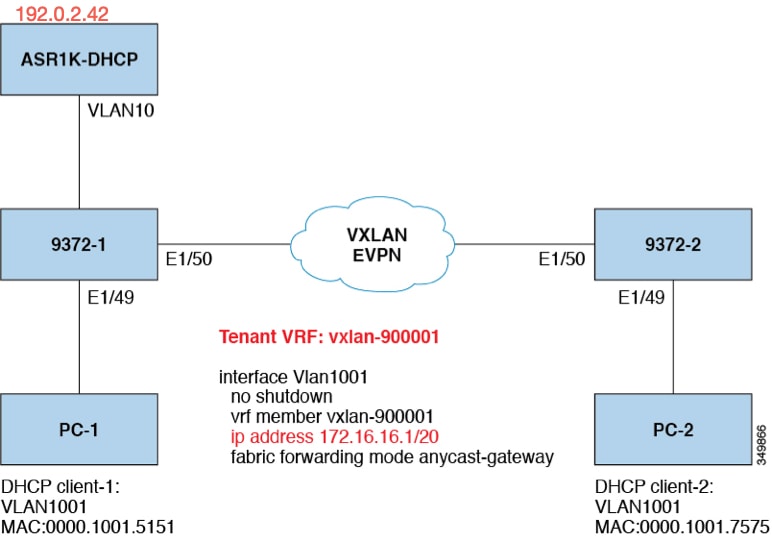
図 1. トポロジの例


トポロジの特性:

  • スイッチ 9372-1 と 9372-2 は、VXLAN ファブリックに接続された VTEP です。

  • client1 と client2 は、vlan1001 中の DHCP クライアントです。これらはテナント VRF vxlan-900001 に属します。

  • DHCP サーバは ASR1K であり、これは vlan10 に存在するルータです。

  • DHCP サーバ設定


    ip vrf vxlan900001
    ip dhcp excluded-address vrf vxlan900001 172.16.16.1 172.16.16.9
    ip dhcp pool one
     vrf vxlan900001
     network 172.16.16.0 255.240.0.0
     defaultrouter 172.16.16.1


VTEP の DHCP リレー

次に示したのは、一般的な展開シナリオです。

  • テナント VRF にあるクライアントと異なるレイヤ 3 デフォルト VRF にあるサーバ。

  • テナント VRF(SVI X)にあるクライアントと同じテナント VRF(SVI Y)にあるサーバ。

  • テナント VRF(VRF X)にあるクライアントと異なるテナント VRF(VRF Y)にあるサーバ。

  • テナント VRF にあるクライアントと非デフォルトの非 VXLAN VRF にあるサーバ。

次に示すのは、これとは異なるシナリオとして、vlan10 を別の VRF に移動させたものです。

テナント VRF にあるクライアントと異なるレイヤ 3 デフォルト VRF にあるサーバ

DHCP サーバ(192.0.2.42)をデフォルト VRF に設置して、9372-1 と 9372-2 の両方からデフォルト VRF を介してそこに到達可能であることを確認します。


9372-1# sh run int vl 10

!Command: show running-config interface Vlan10
!Time: Mon Aug 24 07:51:16 2018

version 7.0(3)I1(3)

interface Vlan10
  no shutdown
  ip address 192.0.2.25/24
  ip router ospf 1 area 0.0.0.0

9372-1# ping 192.0.2.42 cou 1

PING 192.0.2.42 (192.0.2.42): 56 data bytes
64 bytes from 192.0.2.42: icmp_seq=0 ttl=254 time=0.593 ms
- 192.0.2.42 ping statistics -
1 packets transmitted, 1 packets received, 0.00% packet loss
roundtrip min/avg/max = 0.593/0.592/0.593 ms

9372-2# ping 192.0.2.42 cou 1
PING 192.0.2.42 (192.0.2.42): 56 data bytes
64 bytes from 192.0.2.42: icmp_seq=0 ttl=252 time=0.609 ms
- 192.0.2.42 ping statistics -
1 packets transmitted, 1 packets received, 0.00% packet loss
round-trip min/avg/max = 0.609/0.608/0.609 ms

DHCP リレー設定

  • 9372-1


    9372—1# sh run dhcp
    
    !Command: show running—config dhcp
    !Time: Mon Aug 24 08:26:00 2018
    
    version 7.0(3) I1(3)
    feature dhcp
    
    service dhcp
    ip dhcp relay
    ip dhcp relay information option
    ip dhcp relay information option vpn
    ipv6 dhcp relay
    
    interface Vlanl001
      ip dhcp relay address 192.0.2.42 use—vrf default
    
    
  • 9372-2


    9372-2# sh run dhcp
    
    !Command: show running—config dhcp
    !Time: Mon Aug 24 08:26:16 2018
    
    version 7.0(3)11(3)
    feature dhcp
    
    service dhcp
    ip dhcp relay
    ip dhcp relay information option
    ip dhcp relay information option vpn
    ipv6 dhcp relay
    
    interfaoe Vlanl001
      ip dhcp relay address 192.0.2.42 use—vrf default


debug コマンドの出力例

  • 次に示すのは、DHCP のインタラクティブ シーケンスのパケット ダンプです。


    9372-1# ethanalyzer local interface inband display-filter
    "udp.srcport==67 or udp.dstport==67" limit-captured frames 0
    
    Capturing on inband
    20180824 08:35:25.066530 0.0.0.0 -> 255.255.255.0 DHCP DHCP Discover - Transaction ID 0x636a38fd
    20180824 08:35:25.068141 192.0.2.25 -> 192.0.2.42 DHCP DHCP Discover - Transaction ID 0x636a38fd
    20180824 08:35:27.069494 192.0.2.42 -> 192.0.2.25 DHCP DHCP Offer Transaction - ID 0x636a38fd
    20180824 08:35:27.071029 172.16.16.1 -> 172.16.16.11 DHCP DHCP Offer Transaction - ID 0x636a38fd
    20180824 08:35:27.071488 0.0.0.0 -> 255.255.255.0 DHCP DHCP Request Transaction - ID 0x636a38fd
    20180824 08:35:27.072447 192.0.2.25 -> 192.0.2.42 DHCP DHCP Request Transaction - ID 0x636a38fd
    20180824 08:35:27.073008 192.0.2.42 -> 192.0.2.25 DHCP DHCP ACK Transaction - ID 0x636a38fd
    20180824 08:35:27.073692 172.16.16.1 -> 172.16.16.11 DHCP DHCP ACK Transaction - ID 0x636a38fd


    (注)  


    Ethanalyzer はすべての DHCP パケットをキャプチャできない可能性がありますが、これは、フィルタ使用時のインバンドの解釈に問題があるためです。これは SPAN を使用することで回避できます。


  • DHCP Discover パケット 9372-1 は DHCP サーバに送信されています。

    giaddr は 192.0.2.25(vlan10 の IP アドレス)に設定され、それに応じてサブオプション 5/11/151 を設定します。


    Bootp flags: 0x0000 (unicast)
    client IP address: 0.0.0.0 (0.0.0.0)
    Your (client) IP address: 0.0.0.0 (0.0.0.0)
    Next server IP address: 0.0.0.0 (0.0.0.0)
    Relay agent IP address: 192.0.2.25 (192.0.2.25)
    client MAC address Hughes_01:51:51 (00:00:10:01:51:51)
    client hardware address padding: 00000000000000000000
    Server host name not given
    Boot file name not given
    Magic cookie: DHCP
    Option: (53) DHCP Message Type
      Length: 1
      DHCP: Discover (1)
    Option: (55) Parameter Request List
      Length: 4
      Parameter Request List Item: (1) Subnet Mask
      Parameter Request List Item: (3) Router 
      Parameter Request List Item: (58) Renewal Time Value
      Parameter Request List Item: (59) Rebinding Time Value
    Option: (61) client identifier
      Length: 7
      Hardware type: Ethernet (0x01)
      Client MAC address: Hughes_01:51:51 (00:00:10:01:51:51)
    Option: (82) Agent Information Option
      Length: 47
    Option 82 Suboption: (1) Agent Circuit ID
      Length: 10
      Agent Circuit ID: 01080006001e88690030
    Option 82 Suboption: (2) Agent Remote ID
      Length: 6
      Agent Remote ID: f8c2882333a5
    Option 82 Suboption: (151) VRF name/VPN ID
    Option 82 Suboption: (11) Server ID Override
      Length: 4 
      Server ID Override: 172.16.16.1 (172.16.16.1)
    Option 82 Suboption: (5) Link selection
      Length: 4
      Link selection: 172.16.16.0 (172.16.16.0)


    ASR1K-DHCP# sh ip dhcp bin
    Bindings from all pools not associated with VRF:
    IP address ClientID/ Lease expiration Type State Interface
             Hardware address/
             User name
    
    Bindings from VRF pool vxlan900001:
    IP address ClientID/ Lease expiration Type State Interface
             Hardware address/
             User name
    172.16.16.10 0100.0010.0175.75 Aug 25 2018 09:21 AM Automatic Active GigabitEthernet2/1/0
    172.16.16.11 0100.0010.0151.51 Aug 25 2018 08:54 AM Automatic Active GigabitEthernet2/1/0
    
    9372-1# sh ip route vrf vxlan900001
    IP Route Table for VRF "vxlan900001"
    '*' denotes best ucast nexthop
    '**' denotes best mcast nexthop
    '[x/y]' denotes [preference/metric]
    '%<string>' in via output denotes VRF <string>
    
    10.11.11.11/8, ubest/mbest: 2/0, attached
      *via 10.11.11.11, Lo1, [0/0], 18:31:57, local
      *via 10.11.11.11, Lo1, [0/0], 18:31:57, direct
    10.22.22.22/8, ubest/mbest: 1/0
      *via 1.2.2.2%default, [200/0], 18:31:57, bgp65535,internal, tag 65535 (evpn)segid: 900001 tunnelid: 0x2020202
    encap: VXLAN
    
    172.16.16.0/20, ubest/mbest: 1/0, attached
     *via 172.16.16.1, Vlan1001, [0/0], 18:31:57, direct
    172.16.16.1/32, ubest/mbest: 1/0, attached
     *via 172.16.16.1, Vlan1001, [0/0], 18:31:57, local
    172.16.16.10/32, ubest/mbest: 1/0
     *via 1.2.2.2%default, [200/0], 00:00:47, bgp65535,internal, tag 65535 (evpn)segid: 900001 tunnelid: 0x2020202
    encap: VXLAN
    
    172.16.16.11/32, ubest/mbest: 1/0, attached
     *via 172.16.16.11, Vlan1001, [190/0], 00:28:10, hmm
    
    9372-1# ping 172.16.16.11 vrf vxlan900001 count 1
    PING 172.16.16.11 (172.16.16.11): 56 data bytes
    64 bytes from 172.16.16.11: icmp_seq=0 ttl=63 time=0.846 ms
    - 172.16.16.11 ping statistics -
    1 packets transmitted, 1 packets received, 0.00% packet loss
    round-trip min/avg/max = 0.846/0.845/0.846 ms
    
    9372-1# ping 172.16.16.10 vrf vxlan900001 count 1
    PING 172.16.16.10 (172.16.16.10): 56 data bytes
    64 bytes from 172.16.16.10: icmp_seq=0 ttl=62 time=0.874 ms
    - 172.16.16.10 ping statistics -
    1 packets transmitted, 1 packets received, 0.00% packet loss
    round-trip min/avg/max = 0.874/0.873/0.874 ms


テナント VRF(SVI X)にあるクライアントと同じテナント VRF(SVI Y)にあるサーバ

DHCP サーバ(192.0.2.42)を vxlan-900001 の VRF に設置して、9372-1 と 9372-2 の両方から vxlan-900001 の VRF を介してそこに到達可能であることを確認します。


9372-1# sh run int vl 10

!Command: show running-config interface Vlan10
!Time: Mon Aug 24 09:10:26 2018

version 7.0(3)I1(3)

interface Vlan10
  no shutdown
  vrf member vxlan-900001
  ip address 192.0.2.25/24

172.16.16.1 はすべての VTEP に設定された vlan1001 のエニーキャスト アドレスであるため、DHCP サーバからの応答をオリジナルの DHCP リレー エージェントへ確実に配送させるためには、DHCP リレー パケットの送信元アドレスとして一意のアドレスをピック アップする必要があります。このシナリオでは、loopback1 を使用しており、loopback1 には VRF vxlan-900001 のどこからでも到達可能であることを確認する必要があります。


9372-1# sh run int lo1

!Command: show running-config interface loopback1
!Time: Mon Aug 24 09:18:53 2018

version 7.0(3)I1(3)

interface loopback1
  vrf member vxlan-900001
  ip address 10.11.11.11/8

9372-1# ping 192.0.2.42 vrf vxlan900001 source 10.11.11.11 cou 1
PING 192.0.2.42 (192.0.2.42) from 10.11.11.11: 56 data bytes
64 bytes from 192.0.2.42: icmp_seq=0 ttl=254 time=0.575 ms
- 192.0.2.42 ping statistics - 
1 packets transmitted, 1 packets received, 0.00% packet loss
round-trip min/avg/max = 0.575/0.574/0.575 ms

9372-2# sh run int lo1

!Command: show running-config interface loopback1
!Time: Mon Aug 24 09:19:30 2018

version 7.0(3)I1(3)

interface loopback1
  vrf member vxlan900001
  ip address 10.22.22.22/8

9372-2# ping 192.0.2.42 vrf vxlan-900001 source 10.22.22.22 cou 1
PING 192.0.2.42 (192.0.2.42) from 10.22.22.22: 56 data bytes
64 bytes from 192.0.2.42: icmp_seq=0 ttl=253 time=0.662 ms
- 192.0.2.42 ping statistics -
1 packets transmitted, 1 packets received, 0.00% packet loss
round-trip min/avg/max = 0.662/0.662/0.662 ms

DHCP リレー設定

  • 9372-1


    9372—1# sh run dhcp
    
    !Command: show running-config dhcp
    !Time: Mon Aug 24 08:26:00 2018
    
    version 7.0(3)11(3)
    feature dhcp
     
    service dhcp
    ip dhcp relay
    ip dhcp relay information option
    I4ip dhcp relay information option vpn
    ipv6 dhcp relay
    
    interface Vlanl00l
      ip dhcp relay address 192.0.2.42
      ip dhcp relay source—interface loopback1
    
    
  • 9372-2


    9372—2# sh run dhcp
    
    !Command: show running-config dhcp
    !Time: Mon Aug 24 08:26:16 2018
    
    version 7.0(3) 11(3)
    feature dhcp
    
    service dhcp
    ip dhcp relay
    ip dhcp relay information option
    ip dhcp relay information option vpn
    ipv6 dhcp relay
    
    interface Vlanl00l
      ip dhcp relay address 192.0.2.42
      ip dhcp relay source—interface loopback1


debug コマンドの出力例

  • 次に示すのは、DHCP のインタラクティブ シーケンスのパケット ダンプです。


    9372-1# ethanalyzer local interface inband display-filter
    "udp.srcport==67 or udp.dstport==67" limit-captured frames 0
    
    Capturing on inband
    20180824 09:31:38.129393 0.0.0.0 -> 255.255.255.0 DHCP DHCP Discover - Transaction ID 0x860cd13
    20180824 09:31:38.129952 10.11.11.11 -> 192.0.2.42 DHCP DHCP Discover - Transaction ID 0x860cd13
    20180824 09:31:40.130134 192.0.2.42 -> 10.11.11.11 DHCP DHCP Offer - Transaction ID 0x860cd13
    20180824 09:31:40.130552 172.16.16.1 -> 172.16.16.11 DHCP DHCP Offer - Transaction ID 0x860cd13
    20180824 09:31:40.130990 0.0.0.0 -> 255.255.255.0 DHCP DHCP Request - Transaction ID 0x860cd13
    20180824 09:31:40.131457 10.11.11.11 -> 192.0.2.42 DHCP DHCP Request - Transaction ID 0x860cd13
    20180824 09:31:40.132009 192.0.2.42 -> 10.11.11.11 DHCP DHCP ACK - Transaction ID 0x860cd13
    20180824 09:31:40.132268 172.16.16.1 -> 172.16.16.11 DHCP DHCP ACK - TransactionID 0x860cd13


    (注)  


    Ethanalyzer はすべての DHCP パケットをキャプチャできない可能性がありますが、これは、フィルタ使用時のインバンドの解釈に問題があるためです。これは SPAN を使用することで回避できます。


  • DHCP Discover パケット 9372-1 は DHCP サーバに送信されています。

    giaddr は 10.11.11.11(loopback1)に設定され、それに応じてサブオプション 5/11/151 を設定します。


    Bootstrap Protocol
      Message type: Boot Request (1)
      Hardware type: Ethernet (0x01)
      Hardware address length: 6
      Hops: 1
      Transaction ID: 0x0860cd13
      Seconds elapsed: O
      Bootp flags: 0x0000 (unicast)
      Client IP address: 0.0.0.0 (0.0.0.0)
      Your (client) IP address: 0.0.0.0 (0.0.0.0)
      Next server IP address: 0.0.0.0 (0.0.0.0)
      Relay agent iP address: 10.11.11.11 (10.11.11.11)
      Client MAC address: Hughes_01:51:51 (00:00:10:01:51:51)
      Client hardware address padding: 00000000000000000000
      Server host name not given
      Boot file name not given
      Magic cookie: DHCP
      Option: (53) DHCP Message Type
        Length: 1
        DHCP: Discover (1)
      Option: (55) Parameter Request List
      Option: (61) Client Identifier
      Option: (82) Agent Information Option
        Length: 47
      Option 82 suboption: (1) Aqent Circuit ID
      Option 82 suboption: (151) Agent Remote ID
      Option 82 suboption: (11) Server ID Override
        Length: 4
        Server ID override: 172.16.16.1 (172.16.16.1)
      Option 82 suboption: (5) Link selection
        Length: 4
        Link selection: 172.16.16.0 (172.16.16.0)


    ASR1K-DHCP# sh ip dhcp bin
    Bindings from all pools not associated with VRF:
    IP address ClientID/Lease expiration Type State Interface
             Hardware address/
             User name
    
    Bindings from VRF pool vxlan-900001:
    IP address ClientID/Lease expiration Type State Interface 
             Hardware address/
             User name
    
    172.16.16.10 0100.0010.0175.75 Aug 25 2018 10:02 AM Automatic Active GigabitEthernet2/1/0
    172.16.16.11 0100.0010.0151.51 Aug 25 2018 09:50 AM Automatic Active GigabitEthernet2/1/0
    
    9372-1# sh ip route vrf vxlan-900001
    IP Route Table for VRF "vxlan-900001"
    '*' denotes best ucast nexthop
    '**' denotes best mcast nexthop
    '[x/y]' denotes [preference/metric]
    '%<string>' in via output denotes VRF <string>
    
    10.11.11.11/8, ubest/mbest: 2/0, attached
      *via 10.11.11.11, Lo1, [0/0], 19:13:56, local
      *via 10.11.11.11, Lo1, [0/0], 19:13:56, direct
    10.22.22.22/8, ubest/mbest: 1/0
      *via 2.2.2.2%default, [200/0], 19:13:56, bgp65535,internal, tag 65535 (evpn)segid: 900001 tunnelid: 0x2020202
    encap: VXLAN
    172.16.16.0/20, ubest/mbest: 1/0, attached
      *via 172.16.16.1, Vlan1001, [0/0], 19:13:56, direct
    172.16.16.1/32, ubest/mbest: 1/0, attached
      *via 172.16.16.1, Vlan1001, [0/0], 19:13:56, local
    172.16.16.10/32, ubest/mbest: 1/0
      *via 2.2.2.2%default, [200/0], 00:01:27, bgp65535,
    internal, tag 65535 (evpn)segid: 900001 tunnelid: 0x2020202
    encap: VXLAN
    172.16.16.11/32, ubest/mbest: 1/0, attached
      *via 172.16.16.11, Vlan1001, [190/0], 00:13:56, hmm
    192.0.2.20/24, ubest/mbest: 1/0, attached
      *via 192.0.2.25, Vlan10, [0/0], 00:36:08, direct
    192.0.2.25/24, ubest/mbest: 1/0, attached
      *via 192.0.2.25, Vlan10, [0/0], 00:36:08, local
    9372-1# ping 172.16.16.10 vrf vxlan-900001 cou 1
    PING 172.16.16.10 (172.16.16.10): 56 data bytes
    64 bytes from 172.16.16.10: icmp_seq=0 ttl=62 time=0.808 ms
    - 172.16.16.10 ping statistics -
    1 packets transmitted, 1 packets received, 0.00% packet loss
    round-trip min/avg/max = 0.808/0.808/0.808 ms
    
    9372-1# ping 172.16.16.11 vrf vxlan-900001 cou 1
    PING 172.16.16.11 (172.16.16.11): 56 data bytes
    64 bytes from 172.16.16.11: icmp_seq=0 ttl=63 time=0.872 ms
    - 172.16.16.11 ping statistics -
    1 packets transmitted, 1 packets received, 0.00% packet loss
    round-trip min/avg/max = 0.872/0.871/0.872 ms


テナント VRF(VRF X)にあるクライアントと異なるテナント VRF(VRF Y)にあるサーバ

DHCP サーバは他のテナント VRF vxlan-900002 の中に置かれて、DHCP 応答パケットがオリジナルのリレー エージェントにアクセスできるようにされます。ここでは loopback2 を使用して、DHCP リレー パケットの送信元アドレスとされているエニーキャスト IP アドレスをすべて回避します。


9372-1# sh run int vl 10
!Command: show runningconfig interface Vlan10
!Time: Tue Aug 25 08:48:22 2018

version 7.0(3)I1(3)
interface Vlan10
  no shutdown
  vrf member vxlan900002
  ip address 192.0.2.40/24

9372-1# sh run int lo2
!Command: show runningconfig interface loopback2
!Time: Tue Aug 25 08:48:57 2018
version 7.0(3)I1(3)
interface loopback2
  vrf member vxlan900002
  ip address 10.33.33.33/8

9372-2# sh run int lo2
!Command: show runningconfig interface loopback2
!Time: Tue Aug 25 08:48:44 2018
version 7.0(3)I1(3)
interface loopback2
  vrf member vxlan900002
  ip address 10.44.44.44/8

9372-1# ping 192.0.2.42 vrf vxlan-900002 source 10.33.33.33 cou 1
PING 192.0.2.42 (192.0.2.42) from 10.33.33.33: 56 data bytes
64 bytes from 192.0.2.42: icmp_seq=0 ttl=254 time=0.544 ms
- 192.0.2.42 ping statistics -
1 packets transmitted, 1 packets received, 0.00% packet loss
round-trip min/avg/max = 0.544/0.544/0.544 ms

9372-2# ping 192.0.2.42 vrf vxlan-900002 source 10.44.44.44 count 1
PING 192.0.2.42 (192.0.2.42) from 10.44.44.44: 56 data bytes
64 bytes from 192.0.2.42: icmp_seq=0 ttl=253 time=0.678 ms
- 192.0.2.42 ping statistics -
1 packets transmitted, 1 packets received, 0.00% packet loss
round-trip min/avg/max = 0.678/0.678/0.678 ms

DHCP リレー設定

  • 9372-1


    9372—1# sh run dhcp
    
    !Command: show running—config dhcp
    !Time: Mon Aug 24 08:26:00 2018
    
    version 7.0(3) Ii (3)
    feature dhcp
    
    service dhcp
    ip dhcp relay
    ip dhcp relay information option
    ip dhcp relay information option vpn
    ipv6 dhcp relay
    
    interface VlanlOOl
      ip dhcp relay address 192.0.2.42 use—vrf vxlan—900002
      ip dhcp relay source—interface loopback2
    
    
  • 9372-2


    !Command: show running-config dhcp
    !Time: Mon Aug 24 08:26:16 2018
    
    version 7.0(3)11(3)
    feature dhcp
    
    service dhcp
    ip dhcp relay
    ip dhcp relay information option
    ip dhcp relay information option vpn
    ipv6 dhcp relay
    
    interface VlaniOOl
      ip dhcp relay address 192.0.2.42 use-vrf vxlan—900002
      ip dhcp relay source—interface loopback2


debug コマンドの出力例

  • 次に示すのは、DHCP のインタラクティブ シーケンスのパケット ダンプです。


    9372-1# ethanalyzer local interface inband display-filter "udp.srcport==67 or udp.dstport==67" limit-captured-frames 0
    Capturing on inband
    20180825 08:59:35.758314 0.0.0.0 -> 255.255.255.0 DHCP DHCP Discover - Transaction ID 0x3eebccae
    20180825 08:59:35.758878 10.33.33.33 -> 192.0.2.42 DHCP DHCP Discover - Transaction ID 0x3eebccae
    20180825 08:59:37.759560 192.0.2.42 -> 10.33.33.33 DHCP DHCP Offer - Transaction ID 0x3eebccae
    20180825 08:59:37.759905 172.16.16.1 -> 172.16.16.11 DHCP DHCP Offer - Transaction ID 0x3eebccae
    20180825 08:59:37.760313 0.0.0.0 -> 255.255.255.0 DHCP DHCP Request - Transaction ID 0x3eebccae
    20180825 08:59:37.760733 10.33.33.33 -> 192.0.2.42 DHCP DHCP Request - Transaction ID 0x3eebccae
    20180825 08:59:37.761297 192.0.2.42 -> 10.33.33.33 DHCP DHCP ACK - Transaction ID 0x3eebccae
    20180825 08:59:37.761554 172.16.16.1 -> 172.16.16.11 DHCP DHCP ACK - Transaction ID 0x3eebccae
    
    
  • DHCP Discover パケット 9372-1 は DHCP サーバに送信されています。

    giaddr は 10.33.33.33(loopback2)に設定され、それに応じてサブオプション 5/11/151 を設定します。


    Bootstrap Protocol
      Message type: Boot Request (1)
      Hardware type: Ethernet (0x01)
      Hardware address length: 6
      Hops: 1
      Transaction ID: Ox3eebccae
      Seconds elapsed: O
      Bootp flags: 0x0000 (unicast)
      Client IP address: 0.0.0.0 (0.0.0.0)
      Your (client) IP address: 0.0.0.0 (0.0.0.0)
      Next server IP address: 0.0.0.0 (0.0.0.0)
      Relay agent IP address: 10.33.33.33 (10.33.33.33)
      Client MAC address: i-iughes_01:51:51 (00:00:10:01:51:51)
      Client hardware address padding: 00000000000000000000
      Server host name not given
      Boot file name not given
      Magic cookie: DHCP
      Option: (53) DHCP Message Type
        Length: 1
        DHCP: Discover (1)
      Option: (55) Parameter Request List
      Option: (61) client identifier
      Option: (82) Agent Informatìon option
        Length: 47
      Option 82 Suboption: (1) Agent circuit W
      Option 82 suboption: (2) Agent Remote 10
      Option 82 suboption: (151) VRF name/VPN ID
      Option 82 Suboption: (11) Server ID Override
        Length: 4
        Server ID Override: 172.16.16.1 (172.16.16.1)
      Option 82 Suboption: (5) Link selection
        Length: 4
        Link selection: 172.16.16.0 (172.16.16.0)


テナント VRF にあるクライアントと非デフォルトの非 VXLAN VRF にあるサーバ

DHCP サーバは管理 VRF に配置され、M0 インターフェイスを介して到達可能です。それに応じて IP アドレスは 10.122.164.147 に変更されます。


9372-1# sh run int m0
!Command: show running-config interface mgmt0
!Time: Tue Aug 25 09:17:04 2018
version 7.0(3)I1(3)
interface mgmt0
  vrf member management
  ip address 10.122.165.134/8

9372-1# ping 10.122.164.147 vrf management cou 1
PING 10.122.164.147 (10.122.164.147): 56 data bytes
64 bytes from 10.122.164.147: icmp_seq=0 ttl=251 time=1.024 ms
- 10.122.164.147 ping statistics -
1 packets transmitted, 1 packets received, 0.00% packet loss
round-trip min/avg/max = 1.024/1.024/1.024 ms

9372-2# sh run int m0
!Command: show running-config interface mgmt0
!Time: Tue Aug 25 09:17:47 2018
version 7.0(3)I1(3)
interface mgmt0
  vrf member management
  ip address 10.122.165.148/8

9372-2# ping 10.122.164.147 vrf management cou 1
PING 10.122.164.147 (10.122.164.147): 56 data bytes
64 bytes from 10.122.164.147: icmp_seq=0 ttl=251 time=1.03 ms
- 10.122.164.147 ping statistics -
1 packets transmitted, 1 packets received, 0.00% packet loss
round-trip min/avg/max = 1.03/1.03/1.03 ms

DHCP リレー設定

  • 9372-1


    9372—1# sh run dhcp 9372—2# sh run dhcp
     
    !Command: show running-config dhcp 
    !Time: Mon Aug 24 08:26:00 2018
    
    version 7.0(3)11(3) 
    feature dhcp 
    
    service dhcp 
    ip dhcp relay 
    ip dhcp relay information option 
    ip dhcp relay information option vpn 
    ipv6 dhcp relay 
     
    interface VlanlOOl 
      ip dhcp relay address 10.122.164.147 use—vrf management 
    
    
  • 9372-2


    9372-2# sh run dhcp
    !Command: show running-config dhcp
    !Time: Tue Aug 25 09:17:47 2018
    
    version 7.0(3)11(3)
    feature dhcp
    
    service dhcp
    ip dhcp relay
    ip dhcp relay information option
    ip dhcp relay information option vpn
    ipv6 dhcp relay
    
    interface VlanlOOl
    ip dhcp relay address 10.122.164.147 use—vrf management


debug コマンドの出力例

  • 次に示すのは、DHCP のインタラクティブ シーケンスのパケット ダンプです。

    
    9372-1# ethanalyzer local interface inband display-filter "udp.srcport==67 or udp.dstport==67" limit-captured-frames 0
    Capturing on inband
    20180825 09:30:54.214998 0.0.0.0 -> 255.255.255.0 DHCP DHCP Discover - Transaction ID 0x28a8606d
    20180825 09:30:56.216491 172.16.16.1 -> 172.16.16.11 DHCP DHCP Offer - Transaction ID 0x28a8606d
    20180825 09:30:56.216931 0.0.0.0 -> 255.255.255.0 DHCP DHCP Request - Transaction ID 0x28a8606d
    20180825 09:30:56.218426 172.16.16.1 -> 172.16.16.11 DHCP DHCP ACK - Transaction ID 0x28a8606d
    
    9372-1# ethanalyzer local interface mgmt display-filter "ip.src==10.122.164.147 or ip.dst==10.122.164.147" limit-captured-frames 0
    Capturing on mgmt0
    20180825 09:30:54.215499 10.122.165.134 -> 10.122.164.147 DHCP DHCP Discover - Transaction ID 0x28a8606d
    20180825 09:30:56.216137 10.122.164.147 -> 10.122.165.134 DHCP DHCP Offer - Transaction ID 0x28a8606d
    20180825 09:30:56.217444 10.122.165.134 -> 10.122.164.147 DHCP DHCP Request - Transaction ID 0x28a8606d
    20180825 09:30:56.218207 10.122.164.147 -> 10.122.165.134 DHCP DHCP ACK - Transaction ID 0x28a8606d
    
  • DHCP Discover パケット 9372-1 は DHCP サーバに送信されています。

    giaddr は 10.122.165.134(mgmt0)に設定され、それに応じてサブオプション 5/11/151 を設定します。


    Bootstrap Protocol
      Message type: Boot Request (1)
      Hardware type: Ethernet (0x01)
      Hardware address length: 6
      Hops: 1
      Transaction ID: 0x28a8606d
      Seconds elapsed: O
      Bootp flags: 0x0000 (Unicast)
      Client IP address: 0.0.0.0 (0.0.0.0)
      Your (client) IP address: 0.0.0.0 (0.0.0.0)
      Next server IP address: 0.0.0.0 (0.0.0.0)
      Relay agent IP address: 10.122.165.134 (10.122.165.134)
      Client MAC address: Hughes_01:51:51 (00:00:10:01:51:51)
      Client hardware address padding: 00000000000000000000
      Server host name not given
      Boot file name not given
      Magic cookie: DHCP
      Option: (53) DHCP Message Type
        Length: 1
        DHCP: Discover (1)
      Option: (55) Parameter Request List
      Option: (61) Client identifier
      Option: (82) Agent Information Option
        Length: 47
        Option 82 Suboption: (1) Agent Circuit ID
        Option 82 Suboption: (2) Agent Remote ID
        Option 82 Suboption: (151) VRF name/VPN ID 
        Option 82 Suboption: (11) Server ID Override
          Length: 4
          Server ID Override: 172.16.16.1 (172.16.16.1)
        Option 82 Suboption: (5) Link selection
          Length: 4
          Link selection: 172.16.16.0 (172.16.16.0)


vPC ピアの設定例

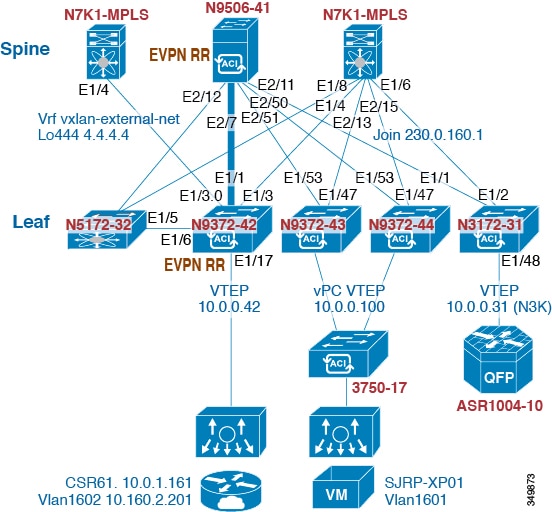
次の例では、DHCP リレー設定用のオーバーレイ VLAN にある vPC ピア間のルーティングを設定します。


  • DHCP サービスをイネーブルにします。

    
    service dhcp
    
    
  • DHCP リレーを設定します。

    
    ip dhcp relay
    ip dhcp relay information option        
    ip dhcp relay sub-option type cisco    
    ip dhcp relay information option vpn  
     
    
  • DHCP リレー サービスを必要とする VRF でループバックを作成します。

    
    interface loopback601
      vrf member evpn-tenant-kk1
      ip address 192.0.2.36/24
      ip router ospf 1 area 0     /* Only required for vPC VTEP. */ 
    
    
  • レイヤ 3 VRF BGP に LoX をアドバタイズします。

    
    Router bgp 2
    vrf X
       network 10.1.1.42/8
    
    
  • VRF で SVI に DHCP リレーを設定します。

    
    interface Vlan1601
      vrf member evpn-tenant-kk1
      ip address 10.160.1.254/8
      fabric forwarding mode anycast-gateway
      ip dhcp relay address 10.160.2.201 
      ip dhcp relay source-interface loopback601
    
    
  • レイヤ 3 VNI SVI を ip forward で設定します。

    
    interface Vlan1600
      vrf member evpn-tenant-kk1
        ip forward
    
    
  • vPC VRF のルーティング VLAN/SVI を作成します。


    (注)  


    vPC VTEP でのみ必要です。


    Vlan 1605
    interface Vlan1605
      vrf member evpn-tenant-kk1
      ip address 10.160.5.43/8
      ip router ospf 1 area 10.10.10.41
    
    
  • VRF ルーティングを作成します。


    (注)  


    vPC VTEP でのみ必要です。
    
    router ospf 1
    vrf evpn-tenant-kk1
        router-id 10.160.5.43


vPC VTEP DHCP リレーの設定例

vPC VLAN など、MCT/ピア リンク全体で許可される VLAN を設定する必要性に応えるため、SVI は VLAN に関連付けることが可能であり、テナント VRF 内部で作成されます。これが OSPF など、アンダーレイ プロトコル付きのアンダーレイ ピアリングとなりますが、これはルーティング プロセスでインスタンス化されるテナント VRF を必要とします。

あるいは、ルーティング プロトコル中への SVI の配置およびルーティング プロセス下でのテナント VRF のインスタンス化の代わりに、MCT 全体の vPC ピア間でスタティック ルートを使用することが可能です。このアプローチにより、サーバからの応答が正しい場所に返され、各 VTEP が GiAddr について異なるループバック インターフェイスを使用することが保証されます。

次に示すのは、これらの設定例です。

  • アンダーレイ ルーティング内での SVI の設定:

    
    /* vPC Peer-1 */
    
    router ospf UNDERLAY
    vrf tenant-vrf
    
    interface Vlan2000
      no shutdown
      mtu 9216
      vrf member tenant-vrf
      ip address 192.168.1.1/16
      ip router ospf UNDERLAY area 0.0.0.0
    
    
    /* vPC Peer-2 */
    
    router ospf UNDERLAY
    vrf tenant-vrf
    
    interface Vlan2000
      no shutdown
      mtu 9216
      vrf member tenant-vrf
      ip address 192.168.1.2/16
      ip router ospf UNDERLAY area 0.0.0.0
    
    
  • MCT 全体での vPC ピア間のスタティック ルートを使用した SVI 設定:

    
    /* vPC Peer-1 */
    
    interface Vlan2000
      no shutdown
      mtu 9216
      vrf member tenant-vrf
      ip address 192.168.1.1/16
    
    vrf context tenant-vrf
    ip route 192.168.1.2/16 192.168.1.1
    
    
    /* vPC Peer-2 */
    
    interface Vlan2000
      no shutdown
      mtu 9216
      vrf member tenant-vrf
      ip address 192.168.1.2/16
    
    vrf context tenant-vrf
    ip route 192.168.1.1/16 192.168.1.2