ファイアウォール脅威対策のモジュラポリシーフレームワークの設定

概要
このドキュメントでは、ファイアウォール脅威対策(FTD)モジュラポリシーフレームワーク(MPF)について説明します。
前提条件
要件
このドキュメントに関しては特定の要件はありません。
使用するコンポーネント
このドキュメントの情報は、次のソフトウェアとハードウェアのバージョンに基づくものです。
- Cisco Secure Firewall 3130 Threat Defenseバージョン10.0.0(ビルド140)
- Firewall Management Center(FMC)バージョン10.0.0(ビルド140)
このドキュメントの情報は、特定のラボ環境にあるデバイスに基づいて作成されました。このドキュメントで使用するすべてのデバイスは、初期(デフォルト)設定の状態から起動しています。本稼働中のネットワークでは、各コマンドによって起こる可能性がある影響を十分確認してください。
背景説明
FTDデータプレーンの概要
FTD は、2 つの主要なエンジンで構成される統合ソフトウェアイメージです。
- Datapath(LINAとも呼ばれる)
- Snortエンジン
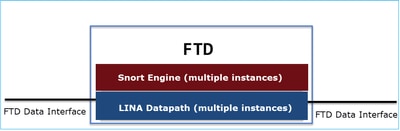
LINAデータパスとSnortエンジンは、FTDのデータプレーンの主要部分です。
MPF成分
MPFは次のコンポーネントを使用します。
- class-mapは対象トラフィックに一致します。
- policy-mapは、クラスマップに一致する対象トラフィックにアクションを適用します。
- service-policyは、ポリシーマップを(すべてのインターフェイスで)グローバルに、または特定のインターフェイスに適用します。
機能の方向性
機能の方向性については、次のASA設定ガイドを参照してください。
FTDに関連する次の機能が強調表示されています。

設定
トポロジ

デフォルトのMPF設定(10.0.0)
firewall# show run policy-map
!
!
policy-map type inspect dns preset_dns_map
 parameters
  message-length maximum client auto
  message-length maximum 512
  no tcp-inspection
policy-map type inspect ip-options UM_STATIC_IP_OPTIONS_MAP
 parameters
  eool action allow
  nop action allow
  router-alert action allow
policy-map global_policy
 class inspection_default
  inspect dns preset_dns_map
  inspect ftp
  inspect h323 h225
  inspect h323 ras
  inspect rsh
  inspect rtsp
  inspect sqlnet
  inspect skinny
  inspect sunrpc
  inspect sip
  inspect netbios
  inspect tftp
  inspect icmp
  inspect icmp error
  inspect ip-options UM_STATIC_IP_OPTIONS_MAP
 class class_snmp
  inspect snmp
 class class-default
  set connection advanced-options UM_STATIC_TCP_MAP

firewall# show run class-map
!
class-map inspection_default
 match default-inspection-traffic
class-map class_snmp
 match port udp eq 4161
!
firewall# show run service-policy
service-policy global_policy global
タスク 1.FTDでSIPインスペクションをグローバルに無効にする
このタスクの要件は、FTD LINAエンジンでSIPインスペクションを無効にすることです。その理由の1つとして、ポリシー要件や、中継トラフィックに影響を与えるSIPに関連するソフトウェア不具合が考えられます。
解決方法
SIPインスペクションを無効にする前に、まずSIPインスペクションが中継トラフィックに適用されていることを確認します。
firewall# packet-tracer input INSIDE udp 172.16.1.1 5060 172.16.3.1 5060
...
Phase: 8
Type: INSPECT
Subtype: inspect-sip
Result: ALLOW
Elapsed time: 34788 ns
Config:
class-map inspection_default
 match default-inspection-traffic
policy-map global_policy
 class inspection_default
  inspect sip
service-policy global_policy global
Additional Information:
...
Result:
input-interface: INSIDE(vrfid:0)
input-status: up
input-line-status: up
output-interface: OUTSIDE1(vrfid:0)
output-status: up
output-line-status: up
Action: allow
Time Taken: 326018 ns
SIPインスペクションをグローバルに無効にする方法は2つあります。
解決策1:FTD CLISH CLIからSIPを無効にする
> configure inspection sip disable
Building configuration...
Cryptochecksum: ef7528dc 7338986d 6714a3a2 4770528e

7818 bytes copied in 0.250 secs
[OK]
確認
> show running-config policy-map | include sip

>
解決策2:FlexConfigを使用してSIPを無効にする
FMCで、Devices > FlexConfigに移動し、FlexConfigオブジェクトを作成します。

policy-map global_policy
 class inspection_default
  no inspect sip
Apply FlexConfigポリシーを選択し、Preview Config を選択してプレビューします。

最後に、ポリシーを展開します。
確認
firewall# show run policy-map | include sip
firewall#
注:SIPインスペクションを行わずに接続を再確立するには、LINA接続テーブルから既存のSIP接続をクリアする必要があります。既存のSIP接続を確認するには、次のコマンドを使用できます。
firewall# show conn port 5060
タスク 2.特定のホストのSIPインスペクションを無効にする
この作業では、次のネットワーク間のトラフィックのSIPインスペクションを無効にする必要があります。
- 送信元:172.16.1.0/24
- 宛先:172.16.3.0/24
これを行う理由の1つは、中継トラフィックに影響を与えるSIPに関連するソフトウェアの不具合です
解決方法
FlexConfigを使用します。
手順 1
Objects > Access List > Extendedの順に移動し、対象トラフィックに一致する拡張アクセスリストを作成します。特定のトラフィックを除外することを目標としているため、ブロック操作を使用する必要があります。さらに、残りのトラフィックに一致する許可ルールを追加します。
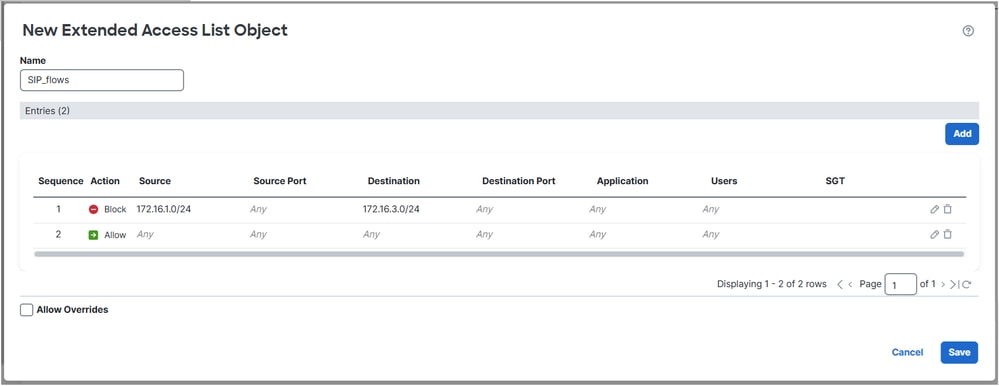

手順 2
SIPアクセスコントロールリスト(ACL)に一致するクラスマップを持つFlexConfigオブジェクトを作成し、global_policyに適用します。
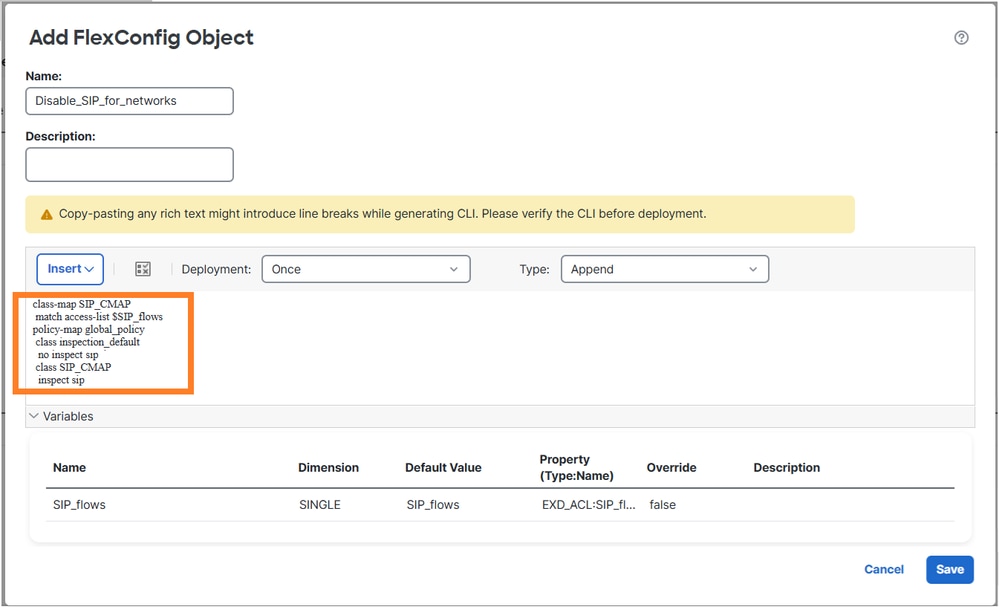
設定されたFlexConfigオブジェクト:
class-map SIP_CMAP
 match access-list $SIP_flows
policy-map global_policy
 class inspection_default
  no inspect sip
 class SIP_CMAP
  inspect sip
注記
permit ACLを設定するときは、CPUに影響を与える可能性を避けるために、できるだけ限定的に指定するようにしてください(たとえば、put protocol ports)。このタスクの例ではプロトコルポートを指定していないため、実稼働環境では避けることができます。
検証 1
firewall# show run policy-map | begin global
policy-map global_policy
 class inspection_default
  inspect dns preset_dns_map
  inspect ftp
  inspect h323 h225
  inspect h323 ras
  inspect rsh
  inspect rtsp
  inspect sqlnet
  inspect skinny
  inspect sunrpc
  inspect netbios
  inspect tftp
  inspect icmp
  inspect icmp error
  inspect ip-options UM_STATIC_IP_OPTIONS_MAP
 class class_snmp
  inspect snmp
 class SIP_CMAP
  inspect sip
 class class-default
  set connection advanced-options UM_STATIC_TCP_MAP

firewall# show run class-map
!
class-map SIP_CMAP
 match access-list SIP_flows
class-map inspection_default
 match default-inspection-traffic
class-map class_snmp
 match port udp eq 4161

firepower# show run access-list SIP_flows
access-list SIP_flows extended deny object-group ProxySG_ExtendedACL_150323855735 172.16.1.0 255.255.255.0 172.16.3.0 255.255.255.0
access-list SIP_flows extended permit object-group ProxySG_ExtendedACL_150323855739 any any

firepower# show access-list SIP_flows
access-list SIP_flows; 4 elements; name hash: 0xb2b7de4d
access-list SIP_flows line 1 extended deny object-group ProxySG_ExtendedACL_150323855735 172.16.1.0 255.255.255.0 172.16.3.0 255.255.255.0 (hitcnt=0) 0x7202f94c
access-list SIP_flows line 1 extended deny tcp 172.16.1.0 255.255.255.0 172.16.3.0 255.255.255.0 eq sip (hitcnt=0) 0xbe390e61
access-list SIP_flows line 1 extended deny udp 172.16.1.0 255.255.255.0 172.16.3.0 255.255.255.0 eq sip (hitcnt=0) 0x107eddd0
access-list SIP_flows line 2 extended permit object-group ProxySG_ExtendedACL_150323855739 any any (hitcnt=0) 0x2075af04
access-list SIP_flows line 2 extended permit tcp any any eq sip (hitcnt=0) 0x60e34fab
access-list SIP_flows line 2 extended permit udp any any eq sip (hitcnt=0) 0xdae62994
検証 2
SIPインスペクションによって検査されないトラフィックはdeny=trueになります。
firewall# packet-tracer input INSIDE udp 172.16.1.1 5060 172.16.3.1 5060 detail | begin INSPECT
Type: INSPECT
Subtype: inspect-sip
Result: ALLOW
Elapsed time: 37910 ns
Config:
class-map SIP_CMAP
 match access-list SIP_flows
policy-map global_policy
 class SIP_CMAP
  inspect sip
service-policy global_policy global
Additional Information:
 Forward Flow based lookup yields rule:
 in id=0x14af42cfa810, priority=70, domain=inspect-sip, deny=true
       hits=1, user_data=0x000014af4570bea0, cs_id=0x0, use_real_addr, flags=0x0, protocol=0
       src ip/id=172.16.1.0, mask=255.255.255.0, port=0, tag=any
       dst ip/id=172.16.3.0, mask=255.255.255.0, port=5060, tag=any,
       dscp=0x0, input_ifc=INSIDE(vrfid:0), output_ifc=any
...
SIPインスペクションによって検査されるトラフィックはdeny=false:
firewall# packet-tracer input INSIDE udp 172.16.2.1 5060 172.16.3.1 5060 detail | begin INSPECT
Type: INSPECT
Subtype: inspect-sip
Result: ALLOW
Elapsed time: 34788 ns
Config:
class-map SIP_CMAP
 match access-list SIP_flows
policy-map global_policy
 class SIP_CMAP
  inspect sip
service-policy global_policy global
Additional Information:
 Forward Flow based lookup yields rule:
 in id=0x14af459099d0, priority=70, domain=inspect-sip, deny=false
       hits=1, user_data=0x000014af4570bea0, cs_id=0x0, use_real_addr, flags=0x0, protocol=0
       src ip/id=0.0.0.0, mask=0.0.0.0, port=0, tag=any
       dst ip/id=0.0.0.0, mask=0.0.0.0, port=5060, tag=any,
...
検証 3
パケットがファイアウォールによって検査されると、「sip」検査カウンタが増加します。
firewall# show service-policy inspect sip

Global policy:
  Service-policy: global_policy
    Class-map: inspection_default
    Class-map: class_snmp
    Class-map: SIP_CMAP
      Inspect: sip , packet 2, lock fail 0, drop 0, reset-drop 0, 5-min-pkt-rate 0 pkts/sec, v6-fail-close 0 sctp-drop-override 0
               tcp-proxy: bytes in buffer 0, bytes dropped 0
...
firewall# packet-tracer input INSIDE udp 172.16.2.1 5060 172.16.3.1 5060

firewall#show service-policy inspect sip

Global policy:
  Service-policy: global_policy
    Class-map: inspection_default
    Class-map: class_snmp
    Class-map: SIP_CMAP
      Inspect: sip , packet 3, lock fail 0, drop 0, reset-drop 0, 5-min-pkt-rate 0 pkts/sec, v6-fail-close 0 sctp-drop-override 0
               tcp-proxy: bytes in buffer 0, bytes dropped 0
...
タスク 3.特定のホストのTCP状態バイパスを設定する
この作業の要件は、次のネットワーク間のトラフィックに対してTCP状態バイパスを有効にすることです。
- 送信元:172.16.2.0/24
- 宛先:172.16.3.0/24
一般に、TCP状態バイパスの使用は推奨されませんが、非対称フローを処理するための一時的な回避策として使用できます。
解決策 1
手順 1
対象トラフィックに一致する拡張ACLを作成します。

手順 2
FTDに割り当てられたアクセスコントロールポリシー(ACP)を編集し、Advanced Settingsタブを選択して、Threat Defense Service Policyを編集します。 Add Rule を選択し、Nextを選択します。
手順 3
拡張ACLを選択します。

手順 4
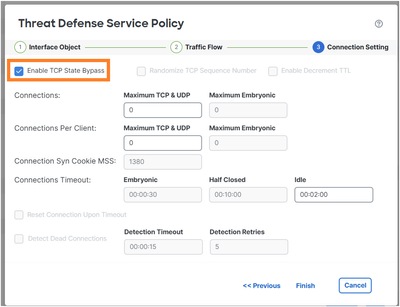
手順 5
Finish, OK, Save and Deployの順に選択します。
結果は、次のとおりです。
firewall# show run policy-map global_policy
!
policy-map global_policy
 class inspection_default
  inspect dns preset_dns_map
  inspect ftp
  inspect h323 h225
  inspect h323 ras
  inspect rsh
  inspect rtsp
  inspect sqlnet
  inspect skinny
  inspect sunrpc
  inspect netbios
  inspect tftp
  inspect icmp
  inspect icmp error
  inspect ip-options UM_STATIC_IP_OPTIONS_MAP
 class class_map_TCP_Bypass
  set connection random-sequence-number disable
  set connection advanced-options tcp-state-bypass
 class class_snmp
  inspect snmp
 class class-default
  set connection advanced-options UM_STATIC_TCP_MAP
注: 6.xなどの以前のFMCリリースでは、FlexConfigを使用してTCP状態バイパスを設定できます。新しいバージョンでは、これはサポートされていません。

確認
firewall# packet-tracer input INSIDE tcp 172.16.2.1 1111 172.16.3.1 80 detail | begin CONN
Type: CONN-SETTINGS
Subtype:
Result: ALLOW
Elapsed time: 334 ns
Config:
class-map class_map_TCP_Bypass
 match access-list TCP_Bypass
policy-map global_policy
 class class_map_TCP_Bypass
  set connection conn-max 0 embryonic-conn-max 0 random-sequence-number disable syn-cookie-mss 1380
  set connection advanced-options tcp-state-bypass
service-policy global_policy global
Additional Information:
 Forward Flow based lookup yields rule:
 in id=0x14af45906b70, priority=7, domain=conn-set, deny=false
       hits=1, user_data=0x000014af45906df0, cs_id=0x0, use_real_addr, flags=0x0, protocol=0
       src ip/id=172.16.2.0, mask=255.255.255.0, port=0, tag=any
       dst ip/id=172.16.3.0, mask=255.255.255.0, port=0, tag=any,
       dscp=0x0, input_ifc=INSIDE(vrfid:0), output_ifc=any
...
タスク 4.traceroute出力の変更
前提条件
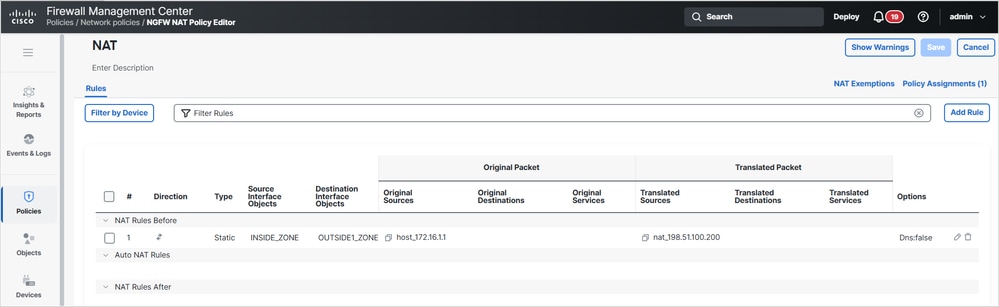
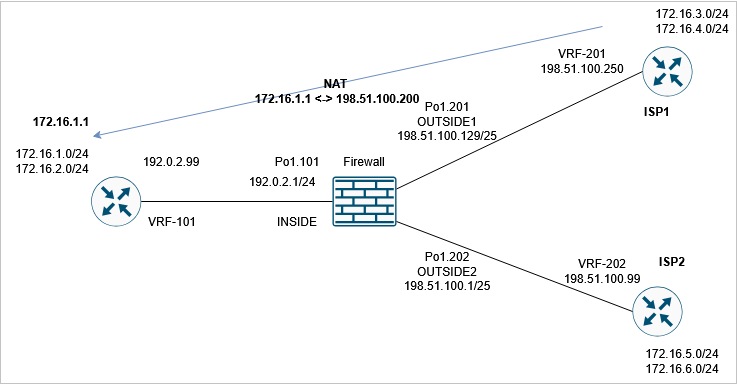
FTDでスタティックNATを設定し、INSIDEインターフェイスの背後にあるIP 172.16.1.1がOUTSIDE1ホストでは198.51.100.200と表示されるようにします。
次に、ISP1から198.51.100.200(ホスト172.16.1.1)にtracerouteを実行します。
router1# traceroute vrf VRF-201 198.51.100.200
Type escape sequence to abort.
Tracing the route to 198.51.100.200
VRF info: (vrf in name/id, vrf out name/id)
  1 192.0.2.99 1 msec 1 msec *
要件
tracerouteが次の出力に一致するように、FTDの設定を変更します。
router1# traceroute vrf VRF-201 198.51.100.200
Type escape sequence to abort.
Tracing the route to 198.51.100.200
VRF info: (vrf in name/id, vrf out name/id)
  1 198.51.100.129 1 msec 1 msec *
  2 198.51.100.200 1 msec 2 msec *
解決方法
このソリューションには、次の2つの設定手順が含まれます。
1. TTLを減分します。
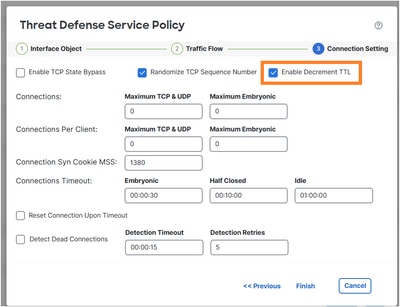
この変更後、tracerouteはファイアウォールホップを明らかにします。
router1# traceroute vrf VRF-201 198.51.100.200
Type escape sequence to abort.
Tracing the route to 198.51.100.200
VRF info: (vrf in name/id, vrf out name/id)
 1 198.51.100.129 1 msec 1 msec *
  2 192.0.2.99 1 msec 1 msec *
2. ICMPエラーインスペクションを無効にします。

policy-map global_policy
 class inspection_default
   no inspect icmp error
確認
tracerouteは、リモートホストの変換されたNAT IPアドレスとFTDインターフェイスのIPアドレスを示します。
router1# traceroute vrf VRF-201 198.51.100.200
Type escape sequence to abort.
Tracing the route to 198.51.100.200
VRF info: (vrf in name/id, vrf out name/id)
  1 198.51.100.129 1 msec 1 msec *
  2 198.51.100.200 1 msec 2 msec *
タスク 5.接続タイムアウトの設定
要件
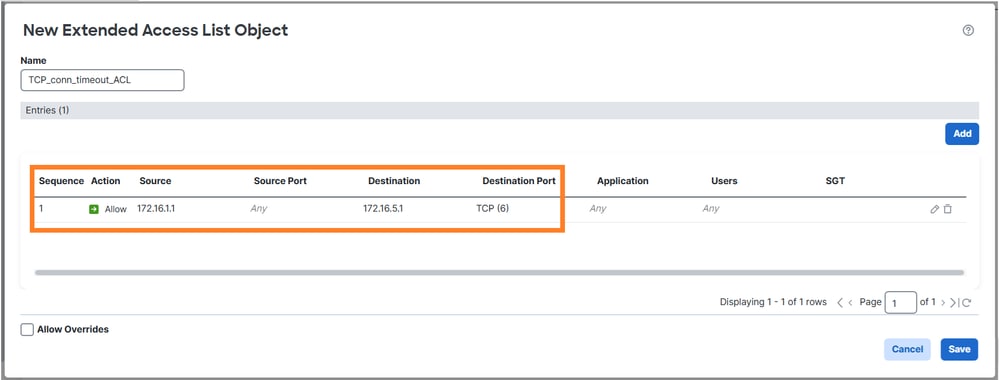
このフローのタイムアウトを1週間に変更します。
- プロトコル:TCP
- 送信元:172.16.1.1
- DST: 172.16.5.1
解決方法
フローごとにタイムアウトを設定するには、サービスポリシーを使用する必要があります。
手順 1
Objects > Access Listに移動し、対象トラフィックに一致する拡張ACLを作成します。
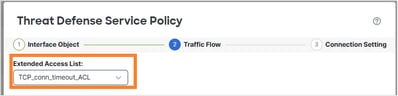
手順 2
手順1で作成されたACLを使用するMPFポリシーを設定します。
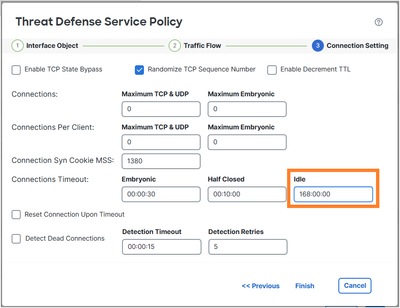
接続アイドルタイムアウトを設定します。
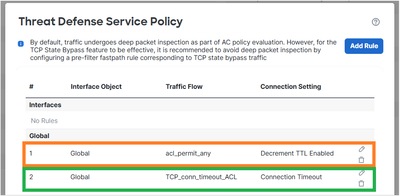
新しい要件と重複するため、前のタスクからルールを削除します。
確認
導入されたポリシーマップ設定は次のとおりです。
policy-map global_policy
 class inspection_default
  inspect dns preset_dns_map
  inspect ftp
  inspect h323 h225
  inspect h323 ras
  inspect rsh
  inspect rtsp
  inspect sqlnet
  inspect skinny
  inspect sunrpc
  inspect netbios
  inspect tftp
  inspect icmp
  inspect ip-options UM_STATIC_IP_OPTIONS_MAP
  inspect sip
 class class_map_TCP_conn_timeout_ACL
  set connection timeout idle 168:00:00
 class class_snmp
  inspect snmp
 class class-default
  set connection advanced-options UM_STATIC_TCP_MAP
172.16.1.1から172.16.5.1への新しいTCP接続を開始し、FTDの接続テーブルを確認します。
firewall# show conn long address 172.16.5.1
...
TCP OUTSIDE2: 172.16.5.1/23 (172.16.5.1/23) INSIDE: 172.16.1.1/29389 (172.16.1.1/29389), flags UIoN1N7, idle 5s, uptime 7s, timeout 7D0h, bytes 349, flow id 72, Snort id 6, rule id 268439559, Rx-RingNum 27, Internal-Data0/1
Initiator: 172.16.1.1, Responder: 172.16.5.1
Connection lookup keyid: 890
タスク 6.FTDを介したBGP認証
前提条件
FTDを介してBGPセッションを設定します。BGPセッションでは認証を使用する必要があります。
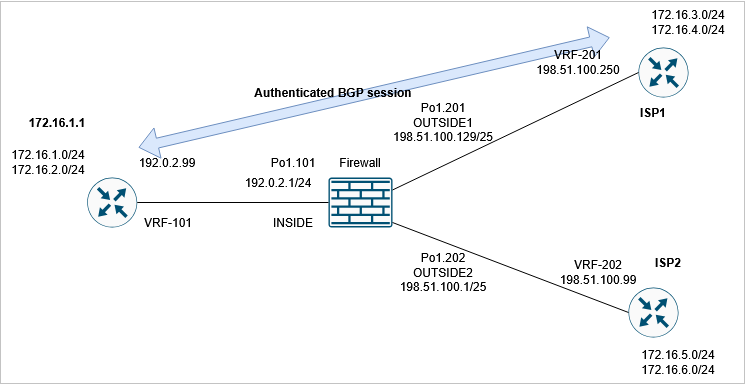
確認
デフォルトのFTD設定では、BGPセッションは確立されません。ルータでは次のように表示されます。
router1#
*May 21 07:51:23.595: %TCP-6-BADAUTH: Invalid MD5 digest from 192.0.2.99(24591) to 198.51.100.250(179) tableid - 3
*May 21 07:51:25.595: %TCP-6-BADAUTH: Invalid MD5 digest from 192.0.2.99(24591) to 198.51.100.250(179) tableid - 3
*May 21 07:51:29.595: %TCP-6-BADAUTH: Invalid MD5 digest from 192.0.2.99(24591) to 198.51.100.250(179) tableid - 3
FTDで、両側がBGP TCP接続を確立できないことがわかります(接続フラグは、TCP SYNパケットのみが受信されていることを示します)。
firewall# show conn port 179
3 in use, 16 most used
Inspect Snort:
        preserve-connection: 2 enabled, 0 in effect, 15 most enabled, 0 most in effect

TCP OUTSIDE1 198.51.100.250:41090 INSIDE 192.0.2.99:179, idle 0:00:00, bytes 0, flags aA N1
TCP OUTSIDE1 198.51.100.250:179 INSIDE 192.0.2.99:53629, idle 0:00:02, bytes 0, flags aA N1
解決方法
認証されたBGPセッションがFTDを通過できるようにするには、次の2つの条件を満たす必要があります。
- TCP MD5(オプション19)はFTD経由で許可される必要があります。
- TCPシーケンス番号のランダム化を無効にする必要がある
TCP MD5オプションはデフォルトで許可されています。

firewall# show run all tcp-map
!
tcp-map UM_STATIC_TCP_MAP
  no check-retransmission
  no checksum-verification
  exceed-mss allow
  queue-limit 0 timeout 4
  reserved-bits allow
  syn-data allow
  synack-data drop
  invalid-ack drop
  seq-past-window drop
  tcp-options range 6 7 allow
  tcp-options range 9 18 allow
  tcp-options range 20 255 allow
  tcp-options selective-ack allow
  tcp-options timestamp allow
  tcp-options window-scale allow
  tcp-options mss allow
  tcp-options md5 allow
  ttl-evasion-protection
  urgent-flag allow
  window-variation allow-connection
TCP初期シーケンス番号(ISN)のランダム化をグローバルに無効にします。
> configure tcp-randomization disable
Building configuration...
Cryptochecksum: f8ac5587 7ccc635e bff886a1 bcab820c

8284 bytes copied in 0.260 secs
[OK]
>
または(推奨される方法)BGP接続に一致する拡張アクセスリストを作成します。
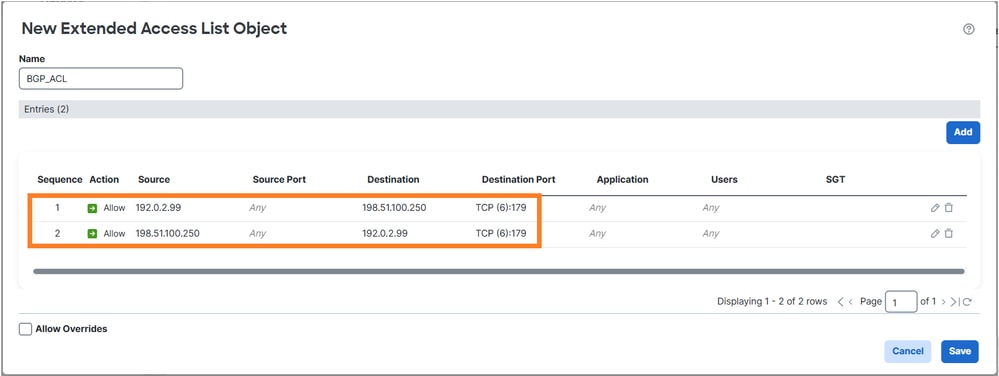
Threat Defense Service Policyを使用して、TCPシーケンス番号のランダム化を無効にします。

確認
導入されたポリシーマップ設定は次のとおりです。
policy-map global_policy
 class inspection_default
  inspect dns preset_dns_map
  inspect ftp
  inspect h323 h225
  inspect h323 ras
  inspect rsh
  inspect rtsp
  inspect sqlnet
  inspect skinny
  inspect sunrpc
  inspect netbios
  inspect tftp
  inspect icmp
  inspect ip-options UM_STATIC_IP_OPTIONS_MAP
  inspect sip
 class class_map_BGP_ACL
  set connection random-sequence-number disable
 class class_snmp
  inspect snmp
 class class-default
  set connection advanced-options UM_STATIC_TCP_MAP
FTDを介してBGPセッションが確立されます。
firewall# show conn long port 179
...
TCP OUTSIDE1: 198.51.100.250/49863 (198.51.100.250/49863) INSIDE: 192.0.2.99/179 (192.0.2.99/179), flags UIO N1N7, idle 44s, uptime 1m40s, timeout 1h0m, bytes 274, flow id 111, Snort id 3, rule id 268439559, Rx-RingNum 29, Internal-Data0/1
  Initiator: 198.51.100.250, Responder: 192.0.2.99
  Connection lookup keyid: 83487134
タスク 7.Dead Connection Detection(DCD;デッド接続検出)
要件
ホスト172.16.3.1を宛先とするTCPトラフィック用のFTDのDCDを設定します。
解決方法
DCDは次のリンクに記載されています。
1. Objects > Access-Listの順に移動し、対象トラフィックに一致するアクセスリストを作成します。
2. ファイアウォールに割り当てられているACPを編集し、Advancedオプションに移動して、Threat Defense Service Policyを選択し、DCDを有効にします。
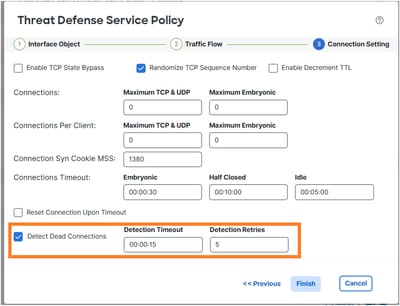
導入された設定は次のとおりです。
access-list DCD_ACL extended permit object-group ProxySG_ExtendedACL_81604390279 any host 172.16.3.1
!
class-map class_map_DCD_ACL
 match access-list DCD_ACL
policy-map global_policy
 class class_map_DCD_ACL
  set connection timeout dcd
動作の仕組み
バックエンドの動作を確認するためにFTDキャプチャを設定します。
firewall# capture CAPI interface INSIDE match tcp host 172.16.3.1 any
firewall# capture CAPO interface OUTSIDE1 match tcp host 172.16.3.1 any
ファイアウォール経由でTCP接続を確立します。
firewall# show conn long address 172.16.3.1 | begin 172.16.3.1
TCP OUTSIDE1: 172.16.3.1/23 (172.16.3.1/23) INSIDE: 192.0.2.99/23241 (192.0.2.99/23241), flags UIO N1N7, idle 1m18s, uptime 1m22s, timeout 5m0s, bytes 129, flow id 127, Snort id 4, rule id 268439559, Rx-RingNum 13, Internal-Data0/1
  Initiator: 192.0.2.99, Responder: 172.16.3.1
  DCD probes sent: Initiator 0, Responder 0 Connection lookup keyid: 76292550
最初は、ファイアウォールのキャプチャに示されているDCDパケットはありません。
firewall# show capture
capture CAPI type raw-data interface INSIDE [Capturing - 0 bytes]
  match tcp host 172.16.3.1 any
capture CAPO type raw-data interface OUTSIDE1 [Capturing - 0 bytes]
  match tcp host 172.16.3.1 any
アイドル接続がアイドルタイムアウトに達すると、FTDはスプーフィングされたTCP ACKメッセージを送信元と宛先に送信します。
firewall# show conn long address 172.16.3.1 | begin 172.16.3.1
TCP OUTSIDE1: 172.16.3.1/23 (172.16.3.1/23) INSIDE: 192.0.2.99/23241 (192.0.2.99/23241), flags UIO N1N7, idle 4m59s, uptime 5m3s, timeout 5m0s, bytes 129, flow id 127, Snort id 4, rule id 268439559, Rx-RingNum 13, Internal-Data0/1
  Initiator: 192.0.2.99, Responder: 172.16.3.1
  DCD probes sent: Initiator 0, Responder 0 Connection lookup keyid: 76292550

firewall# show conn long address 172.16.3.1 | begin 172.16.3.1
TCP OUTSIDE1: 172.16.3.1/23 (172.16.3.1/23) INSIDE: 192.0.2.99/23241 (192.0.2.99/23241), flags UIO N1N7, idle 0s, uptime 5m3s, timeout 15s, bytes 129, flow id 127, Snort id 4, rule id 268439559, Rx-RingNum 13, Internal-Data0/1
  Initiator: 192.0.2.99, Responder: 172.16.3.1
  DCD probes sent: Initiator 1, Responder 0 Connection lookup keyid: 76292550

firewall# show conn long address 172.16.3.1 | begin 172.16.3.1
TCP OUTSIDE1: 172.16.3.1/23 (172.16.3.1/23) INSIDE: 192.0.2.99/23241 (192.0.2.99/23241), flags UIO N1N7, idle 0s, uptime 5m4s, timeout 5m0s, bytes 129, flow id 127, Snort id 4, rule id 268439559, Rx-RingNum 13, Internal-Data0/1
  Initiator: 192.0.2.99, Responder: 172.16.3.1
  DCD probes sent: Initiator 1, Responder 1 Connection lookup keyid: 76292550
両方が応答する場合、アイドルタイマーをリセットします。
firewall# show capture CAPI

3 packets captured

1: 09:01:30.433952 802.1Q vlan#101 P0 172.16.3.1.23 > 192.0.2.99.23241: . ack 3271882019 win 32757
2: 09:01:30.434334 802.1Q vlan#101 P0 192.0.2.99.23241 > 172.16.3.1.23: . ack 1746306341 win 32746
3: 09:01:30.955654 802.1Q vlan#101 P0 172.16.3.1.23 > 192.0.2.99.23241: . ack 3271882019 win 32757
3 packets shown
firewall# show capture CAPO

3 packets captured

1: 09:01:30.434364 802.1Q vlan#201 P0 192.0.2.99.23241 > 172.16.3.1.23: . ack 111661490 win 32746
2: 09:01:30.955288 802.1Q vlan#201 P0 192.0.2.99.23241 > 172.16.3.1.23: . ack 111661490 win 32746
3: 09:01:30.955639 802.1Q vlan#201 P0 172.16.3.1.23 > 192.0.2.99.23241: . ack 3875469573 win 32757
3 packets shown

firewall# show conn long address 172.16.3.1 | begin 172.16.3.1
TCP OUTSIDE1: 172.16.3.1/23 (172.16.3.1/23) INSIDE: 192.0.2.99/23241 (192.0.2.99/23241), flags UIO N1N7, idle 1m29s, uptime 6m33s, timeout 5m0s, bytes 129, flow id 127, Snort id 4, rule id 268439559, Rx-RingNum 13, Internal-Data0/1
  Initiator: 192.0.2.99, Responder: 172.16.3.1
  DCD probes sent: Initiator 1, Responder 1 Connection lookup keyid: 76292550

注:DCDは、オフロードされた接続('o'フラグ)では機能しません。
関連情報
更新履歴
| 改定 | 発行日 | コメント |
|---|---|---|
1.0 |
22-May-2026
|
初版 |
 フィードバック