Overview
This chapter describes the role of the CMX Analytics service, that is supported on the Cisco mobility services engine (MSE).
About CMX Analytics Service
The CMX analytics is a system that provides a set of data analytic tools packaged for analyzing Wi-Fi device location that comes from the MSE. The CMX analytics service is part of advanced location service, which has been integrated into the MSE in Release 7.4.
When a wireless device is enabled in a network, it transmits probe request packets to identify the wireless network in its vicinity. Even after connecting to the access point in the WLAN, the client devices continue to transmit probe request packets to identify other access points for better quality of service. The access point gathers the request and the associated Receiver Signal Strength Indicator (RSSI) from the various wireless devices and forwards them to the Wireless LAN Controller (WLC). The controller then forwards this information to the MSE for analysis.
The basic data that is collected from various APs, when analyzed, produces information and knowledge about the movement and behavior patterns of people who are using Wi-Fi devices in the building. For example, the building can be an airport, shopping mall, city center, and so on.
The CMX analytics system provides the following benefits to the venue owners:
- Analyze business performance by measuring the in-venue activities and improve marketing.
- Improve the signage, make changes to the underutilized areas.
- Improve customer satisfaction though sufficient staffing during peak times.
The following table describes the steps to be followed while setting up the CMX analytics system.
See the Setting Up Prime Infrastructure for more information. |
|
See the Starting the Prime Infrastructure Server for more information. |
|
See the Logging into Prime Infrastructure User Interface for more information. |
|
See the Managing Licenses for more information. |
|
See the Adding a Mobility Services Engine to the Prime Infrastructure for more information. |
|
See the Configuring MSE Tracking and History Parameters for more information. |
|
7. Check if the Prime Infrastructure is showing clients in real time. |
See the Viewing Clients and Users for more information. |
8. Add floor areas to either a campus building or standalone building in the Prime Infrastructure |
See the Adding Floor Areas to a Campus Buildingand the Adding Floor Plans to a Standalone Building for more information. |
See the Defining Coverage Areafor more information. |
|
See the Adding a GPS Marker to a Floor Map for more information. |
|
See the Enabling CMX Analytics Service on the Mobility Services Engine for more information. |
|
| Note If there is data available in the MSE database, then you must wait for 15-20 minutes for sufficient data to get collected and uploaded to analytics. If the MSE is collecting data for first time, it takes more than an hour for sufficient data to get collected for analytics to take place. Once the data has started transferring from MSE to analytics database, it takes more than an hour to first become available for analytics. Points are assembled into path/visits and only the completed paths are written to the database. A path is closed if there are no new points that have appeared for over an hour. | |
See the Logging into CMX Analytics User Interface for more information. |
|
CMX Analytics Service Within the Cisco Unified Wireless Network
Cisco Unified Wireless Network (CUWN) solution ensures that your business achieves the highest level of network security and versatility. Cisco UWN solution empowers your network with the ability to offer secure wireless networking, either within your office for increased mobility or bridging between your office buildings. The following are the components of CUWN:
- Access Points—The Access point is the end point on the network side that provides the wireless access. The following access points are supported:
– Cisco Aironet 801, 802, 1000, 1040, 1100, 1130, 1140, 1200, 1230, 1240, 1250, 1260, 1310, 1500,
– 1524, 1552, 1600i, 1600e, 2600i, 2600e, 3500i, 3500e, 3500p, 3600i, and 3600e Series Lightweight Access Points.
– Cisco Aironet 1040, 1100, 1130, 1141, 1142, 1200, 1240, 1250, 1260, 2600i, and 2600e Autonomous Access Points.
– Cisco 600 Series OfficeExtend Access Points.
– Cisco Aironet Access Points running Lightweight Access Point Protocol (LWAPP) or Control and Provisioning of Wireless Access Points (CAPWAP) protocol.
- Wireless LAN Controllers—The WLAN controllers are highly scalable and flexible platforms that enables system wide services for mission-critical wireless in medium to large-sized enterprises and campus environments. Designed for 802.11n performance and maximum scalability, the WLAN controllers offer enhanced uptime with the ability to simultaneously manage from 5000 access points to 250 access points; superior performance for reliable streaming video and toll quality voice; and improved fault recovery for a consistent mobility experience in the most demanding environments.The controller actively manages these APs w.r.t what channel it operates, how does the client gets attach to it, what security types are supported and so on.
- Cisco Prime Infrastructure—With the Prime Infrastructure, network administrator have a single solution for RF prediction, policy provisioning, network optimization, troubleshooting, user tracking, security monitoring, and wired and wireless LAN systems management. Robust graphical interfaces make wired and wireless LAN deployment and operations simple and soft-effective. Detailed trending and analysis reports make the Prime Infrastructure vital to ongoing network operations.
- Mobility Services Engine—The Cisco MSE is an open platform that provides a new approach for delivery of the mobility services and applications. The MSE is managed by the Prime Infrastructure and supports various services.The Cisco 3300 Series Mobility Services Engine operates with CAS, which is a component of the CAM solution. There are two models of the mobility services engine:
– Cisco 3310 Mobility Services Engine
– Cisco 3355 Mobility Services Engine
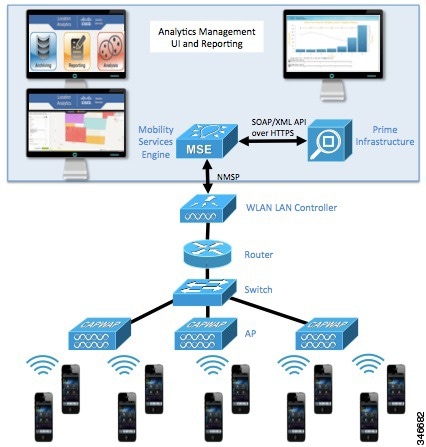
The following figure shows the overall architecture within which the CMX analytics system fits in. The CMX analytics system contains the following components:
Figure 1-1 CMX analytics Architecture
Getting Information on Your Network
The process of downloading and creating a database of devices or path information is automatic. If the installation is new, then the collection of data starts immediately and continues to download increments of data every 15 minutes. If you are upgrading to an existing MSE that has been collecting data, then the system downloads data from the previous 3 days or from the last successful download (whatever is shortest) before continuing every 15 minutes. The analytics is available immediately when the data is in the database.
 Feedback