- Introduction
- Design Overview
- Understanding ports on Cisco Aironet 1815t
- Software Features on Cisco Aironet AIR-AP1815T
- Configuring WLC
- Configuring Voice or Data WLAN Connectivity
- Configuring AP Authentication
- Configuring Cisco Aironet 1815T (Teleworker) Access Point
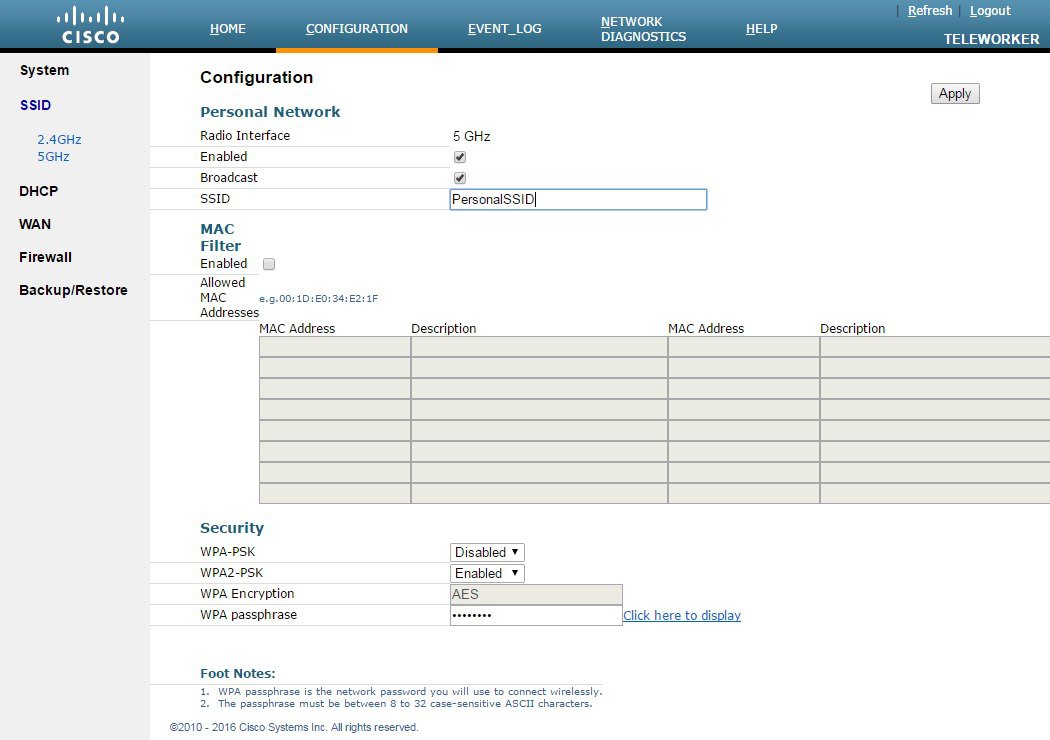
- Configuring Personal SSID on Cisco Aironet 1815 Teleworker Access Point
Configuring Personal
SSID on Cisco Aironet 1815 Teleworker Access Point
The Cisco Aironet 1815T (Teleworker) Access Point also supports Personal SSID. This enables local home client to use the same Cisco Aironet 1815 Teleworker Access Point to connect for local networking and internet connectivity. Please note that local client traffic is not tunneled back to the corporate Wireless LAN Controller.
To configure Personal SSID on Cisco Aironet 1815T (Teleworker) Access Point, perform the following steps:
 Feedback