Call Forwarding
Call Forwarding
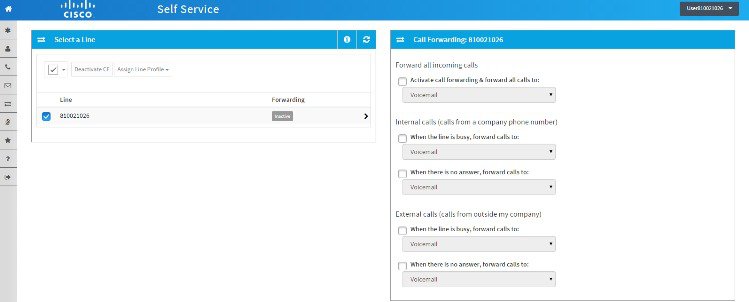
This screen displays the call forwarding status of your phone lines (Active = call forwarding enabled, Inactive = call forwarding disabled). The following figure shows a sample of the Call Forwarding screen and its options.
Activate and Manage a Line for Call Forwarding
 on the button bar. Your lines are displayed showing the call forwarding status
of each line.
on the button bar. Your lines are displayed showing the call forwarding status
of each line.
What to Do Next
To deactivate a line that currently has call forwarding activated, click the required ‘Active’ line, uncheck the check boxes, and click Save. Alternatively, you can check the relevant check boxes in the Select a Line area of the screen and click Deactivate CF.
To edit call forwarding settings for a line, click the required ‘Active’ line, change the settings as required, and click Save. Alternatively, you can apply the line settings for one of your lines to other lines by checking the relevant check boxes in the Select a Line area of the screen, clicking Assign Line Profile, choosing the line profile to copy from the dropdown list and clicking Save.
 Feedback