Prepare Environment for Webex Calling Workflow
The documentation set for this product strives to use bias-free language. For the purposes of this documentation set, bias-free is defined as language that does not imply discrimination based on age, disability, gender, racial identity, ethnic identity, sexual orientation, socioeconomic status, and intersectionality. Exceptions may be present in the documentation due to language that is hardcoded in the user interfaces of the product software, language used based on RFP documentation, or language that is used by a referenced third-party product. Learn more about how Cisco is using Inclusive Language.
Use the test results from CSCAN (along with documentation cited below) to reference any ports that need to be opened on your firewall to meet the Webex Calling network requirements.
| Step 1 |
Note the information in this Webex services network requirements document for the old Spark Call environment to remind yourself of the network and firewall requirements for that service. |
| Step 2 |
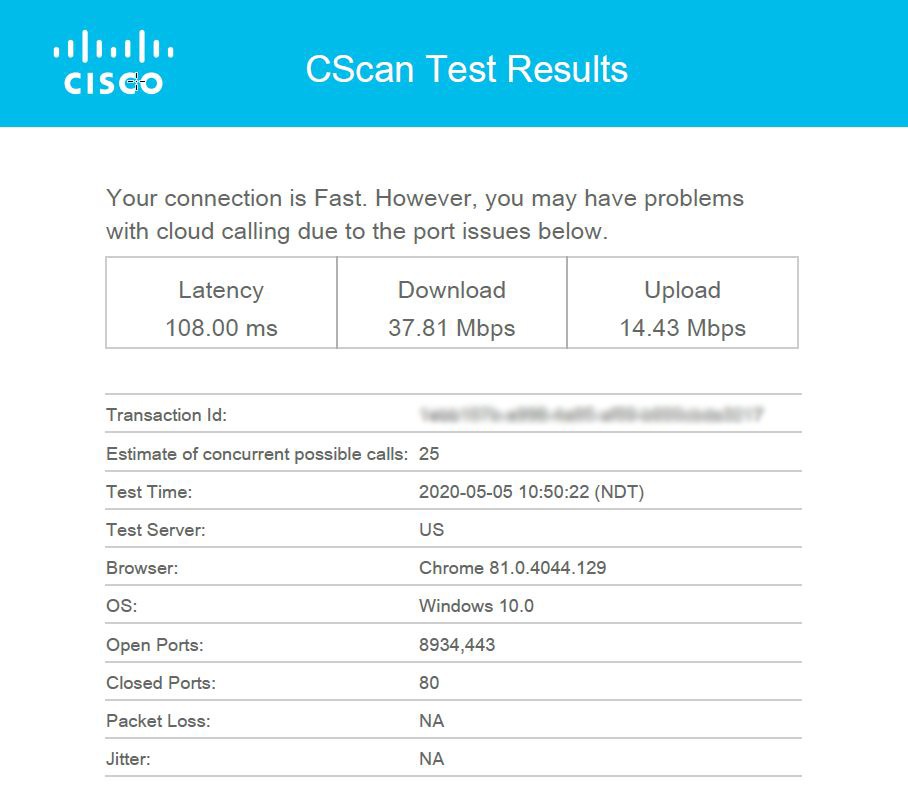
Note the information in this Webex Calling network requirements document for the new Webex Calling environment that you're migrating to. Open your CSCAN report (PDF file) for specific callouts. The CSCAN report PDF looks similar to this example:
These key destination port entries are shared between both services, so you likely have them open already for Spark Call and don't need to redo them for Webex Calling:
Note these deltas, but make sure you follow all of the network requirements in the Webex Calling network requirements document and any specific callouts that are covered in the CSCAN report. |
| Step 3 |
Ensure all phones requiring firmware upgrade are online. This step is required to prepare the phones for automatic firmware upgrades that you'll do later in this process. |
Your PSTN provider requires notice of migration plans to make the appropriate routing changes for your move to Webex Calling.
| Step 1 |
Work with your partner to notify your PSTN provider about your migration from Spark Call to Webex Calling. See this document for contact information for the Spark Call PSTN providers. Your partner or Cisco receive portal access to confirm the request. |
| Step 2 |
Order additional PSTN/DIDs if necessary. Each location requires 2 DIDs (the main DID and a voicemail DID). Additionally, Webex Calling does not support toll free numbers (TFNs), so any tFN on Spark Call requires an additional DID to be forwarded. |
 Feedback