Power Supply Installation
This chapter describes how to remove and install a new or replacement power supply. Your switch ships with at least one installed power-supply module (AC or DC, depending on your order).
The power-supply modules are field-replaceable units (FRUs) and are hot-swappable when deployed in non-hazardous locations.
For translations of the safety warnings in this chapter, see the Regulatory Compliance and Safety Information for the Cisco IE 5000 Switch on Cisco.com.
■ Installing the Power-Supply Module in the Switch
■Removing the Power-Supply Module
Power-Supply Modules
|
|
|
|---|---|
Low-voltage DC. For detailed specifications, see the IE 5000 Data Sheet. |
|
High-voltage AC or DC. For detailed specifications, see the IE 5000 Data Sheet. |
|
High-voltage AC or DC. For detailed specifications, see the IE 5000 Data Sheet. |
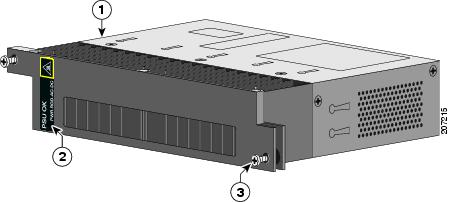
Figure 20 PWR-RGD-AC-DC-H Power-Supply Module
|
|
|
||
|
|
|
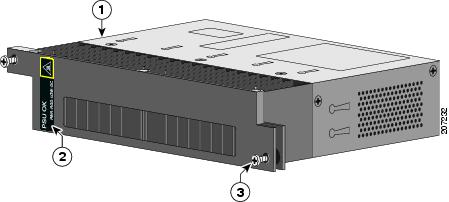
Figure 21 PWR-RGD-LOW-DC-H Power-Supply Module
|
|
|
||
|
|
|
For a description of the PSU OK LEDs, see the Power-Supply Module LEDs.
Power-Supply Module Installation
■Installing a Power-Supply Module
■Removing the Power-Supply Module
Installation Guidelines
Observe these guidelines when removing or installing a power-supply module:
A power-supply module that is only partially connected to the switch disrupts the system operation.
Warning: Blank faceplates and cover panels serve three important functions: they prevent exposure to hazardous voltages and currents inside the chassis; they contain electromagnetic interference (EMI) that might disrupt other equipment; and they direct the flow of cooling air through the chassis. Do not operate the system unless all cards, faceplates, front covers, and rear covers are in place.
Statement 1029
Warning: Do not reach into a vacant slot while installing or removing a module. Exposed circuitry is an energy hazard. Statement 206
Warning: Only trained and qualified personnel should be allowed to install, replace, or service this equipment. Statement 1030
Warning: Avoid using or servicing any equipment that has outdoor connections during an electrical storm. There may be a risk of electric shock from lightning. Statement 1088
Installing a Power-Supply Module
This procedure is for installing a power-supply module in the PSU1 or PSU2 slot.
Warning: The covers are an integral part of the safety design of the product. Do not operate the unit without the covers installed. Statement 1077
Warning: This unit might have more than one power supply connection. All connections must be removed to de-energize the unit. Statement 1028
Caution: Equipment installation must comply with local and national electrical codes.
Equipment That You Need
■Torque driver(s) capable of 5 to 35 in-lbs
■Ring, spade, or flanged spade terminal (terminals should be insulated)
–Ring terminal (such as Tyco part number 2-34158-1 for 16 – 14 AWG or 2-34852-1 for 12 – 10 AWG wire)
–Spade terminal (such as Tyco part number 54367-2 for 16 – 14 AWG wire)
–Flanged spade terminal (such as Tyco part number 2-324165-1 for 16 – 14 AWG wire or 1-324581-1 for 12 – 10 AWG wire)
■Use the 16-14 AWG wire and appropriate terminals for the AC or high-voltage DC power supply
■Use the12-10 AWG wire and appropriate terminals for the low-voltage DC power supply
■Crimping tool (such as Thomas & Bett part number WT2000, ERG-2001)
■12-AWG wire (minimum) for the low-voltage power-supply module and 16-AWG (minimum) wire for the high-voltage power-supply module
■For power source connections, use wires rated for at least 194°F (90°C).
■UL- and CSA-rated style 1007 or 1569 twisted-pair copper wire
■Wire-stripping tools for stripping 6-, 10-, 12-, 14-, and 16-gauge wires.
■Number-2 Phillips screwdriver
Obtain these necessary tools and equipment:
■Ratcheting torque screwdriver with a number-2 and a number-1 Phillips head that exerts up to 15 pound-force inches (lbf-in.) or 240 ounce-force inches (ozf-in.) of pressure.
■Panduit crimping tool with optional controlled-cycle mechanism (model CT-720, CT-920, CT-920CH, CT-930, or CT-940CH).
■12-gauge copper ground wire (insulated or noninsulated) when using the single-ground connection.
■6-gauge copper ground wire (insulated or noninsulated) when using the dual-ground connection.
■For the dual ground connection, also use the supplied dual-hole lug from the accessory kit.
Grounding the Switch
Follow the grounding procedures at your site and observe these warnings:
Warning: This equipment must be grounded. Never defeat the ground conductor or operate the equipment in the absence of a suitably installed ground conductor. Contact the appropriate electrical inspection authority or an electrician if you are uncertain that suitable grounding is available. Statement 1024
Warning: When installing or replacing the unit, the ground connection must always be made first and disconnected last. Statement 1046
Caution: Follow the grounding procedure instructions, and use an appropriately Listed or certified lug (included with the switch) for number-6 AWG wire and 10-32 ground-lug screws.
Note: You can use the grounding lug to attach a wrist strap for ESD protection during servicing.
Follow these steps to install a dual-hole lug on the switch. Be sure to follow any grounding requirements at your site.
1. Use a Phillips screwdriver or a ratcheting torque screwdriver with a Phillips head to remove the ground screw from the cable side of the switch. You need the screw in Step 4.
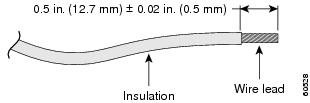
2. Strip the 6-gauge ground wire to 0.5 inch (12.7 mm) ± 0.02 inch (0.5 mm). See Figure 22. Stripping more than the recommended amount of wire can leave exposed wire from the connector.
Figure 22 Stripping the Ground Wire
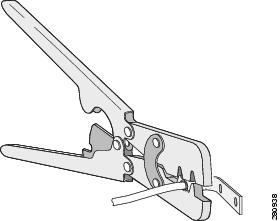
3. Insert the ground wire into the terminal lug, and crimp the terminal to the wire. (see Figure 23).
Figure 23 Crimping the Terminal Lug
4. Slide the ground screw from Step 1 through the terminal lug. Insert the ground screws into the opening on the cable side.
Figure 24 Attaching the Terminal Lug
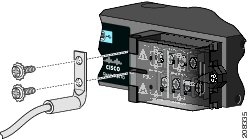
|
|
5. Use a ratcheting torque screwdriver to tighten the ground screws to 30 in-lb (± 2 in-lb).
6. Attach the other end of the ground wire to an appropriate ground.
Installing the Power-Supply Module in the Switch
1. Ensure that the power is off at the AC or DC circuits.
Locate the circuit breakers, turn them OFF, and lock out the circuit.
Warning: If the power is not off at the AC or DC circuit breaker, do not touch the power-input terminal.
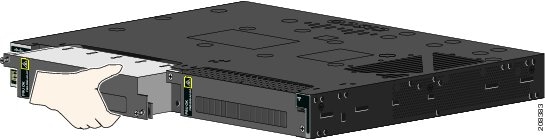
2. Use a Phillips screwdriver to loosen the two captive screws of the blank power-supply module and gently pull it out. See Figure 25 and Figure 26.
Figure 25 Loosen the Screws on the Power Supply Blank
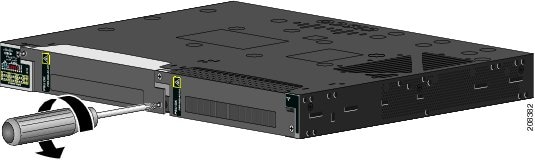
Figure 26 Remove the Power Supply Blank
3. Insert the power-supply module into the slot, and gently push it in. See Figure 27.
Note: Ensure that the power supply module is flush with the switch.
Installing the DC Power Supply in the Switch
To remove and install a DC-powered power supply module, follow these steps:
1. Turn off power at the DC circuits. To ensure that power is removed from the DC circuits, locate the circuit breakers for the DC circuits, switch the circuit breakers to the OFF position, and tape the circuit-breaker switches in the OFF position.
2. Use a number-2 Phillips screwdriver to remove the plastic safety cover from the power supply terminal blocks.
3. Use a number-1 Phillips screwdriver to remove the DC-input power wires from the power terminals.
Use a Phillips screwdriver to loosen the two captive screws at the lower edge that secure the power supply module to the switch chassis (Figure 27).
4. Remove the power supply module from the power slot by pulling on the extraction handle.
5. Insert the new power supply into the power supply slot, and gently apply pressure while pushing the module into the slot (Figure 27). When correctly inserted, the power supply is flush with the switch rear panel.
Figure 27 Insert the Power-Supply Module
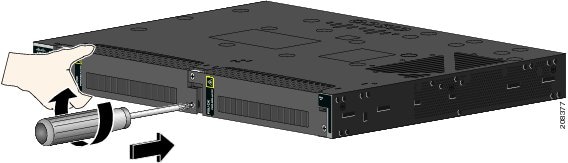
6. Use a ratcheting torque screwdriver to torque each screw to 8–10 in-lb (4-6.5 in-lb for 250 W PSU).
Wiring the Power Source
Before you wire the power source, review these warnings:
Warning: This product relies on the building’s installation for short-circuit (overcurrent) protection. Ensure that the protective device is rated not greater than:
AC: 10 A, DC: 15 A Statement 1005
Warning: A readily accessible two-poled disconnect device must be incorporated in the fixed wiring.
Statement 1022
Warning: Only trained and qualified personnel should be allowed to install or replace this equipment.
Statement 1030
Warning: Hazardous voltage or energy may be present on power terminals. Always replace cover when terminals are not in service. Be sure uninsulated conductors are not accessible when cover is in place. Statement 1086
1. Ensure that the power is off at the AC or DC circuits.
Locate the circuit breakers, turn them OFF, and lock out the circuit.
Warning: If the power is not off at the AC or DC circuit breaker, do not touch the power-input terminal.
2. Use a Phillips screwdriver to loosen the captive screw on the power-input terminal, and open the cover.
Figure 28 Opening the Power-Input Terminal Cover
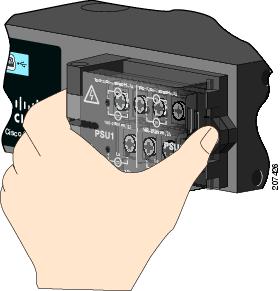
The terminal screws labels are on the power-input terminal cover. See Figure 29.
Figure 29 Power-Input Terminal
|
|
|
||
|
|
|
||
|
|
|
||
|
|
|
||
|
|
|
||
|
|
|
||
|
|
|
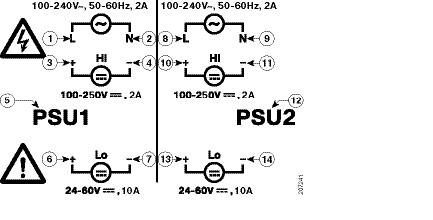
Note: The power-supply module 1 connection is labeled PSU1, and the power-supply module 2 connection is labeled PSU2. Make sure that you connect the wires to the correct terminal screws.
3. Use twisted-pair copper wire to connect from the power-input terminal to the power source.
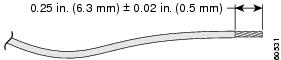
4. Strip each of the two wires to 0.25 inch (6.3 mm) ± 0.02 inch (0.5 mm).
Note: Do not strip more than 0.27 inch (6.8 mm) of insulation from the wire. Stripping more than the recommended amount of wire can leave exposed wire from the connector after installation.
Figure 30 Stripping the Input Power Source Wire
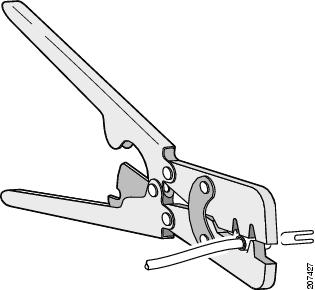
5. Insert the wire into a spade terminal, and crimp it to the wire.
You can also use a ring or flanged spade terminal as listed in Equipment That You Need.
Figure 31 Crimping the Spade Terminal Lug
6. Loosen the terminal screw, and slide the terminal under the screw and washer. See Figure 33.
Note: Use the appropriate terminal screws based on power supply type: high-voltage (AC or DC) or low-voltage (DC).
■Connect the line wire into the terminal screw labeled L and the neutral wire into the terminal screw labeled N to complete the AC connection.
Figure 32 Connecting the Wires to the High-Voltage AC Power (PSU1)
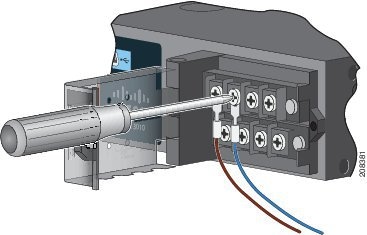
■Connect the positive wire into the terminal screw labeled “ +”, and the negative wire into the terminal screw labeled “ – ”.
Low-voltage DC Power-Supply Module
■Connect the wires to the terminals labeled Lo.
High-voltage DC Power-Supply Module
■Connect the wires to the terminals labeled Hi.
Note: Ensure that you cannot see any wire lead. Only wire with insulation should extend from the terminal screw.
Figure 33 Connecting the Wires to the Low-Voltage DC Power (PSU2)
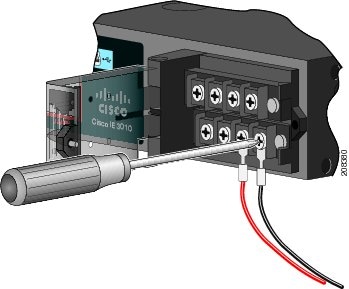
8. Torque the captive screws (above the wires) to 8.5 in-lb (± 0.5 in-lb).
9. Complete the power connection:
■Connect the other end of the line wire (the one connected to L) to the line terminal on the AC-power source, and connect the other end of the neutral wire (the one connected to N) to the neutral terminal on the AC power source.
■Connect the other end of the positive wire (the one connected to “ +”) to the positive terminal on the DC-power source, and connect the other end of the negative wire (the one connected to “ –”) to the negative terminal on the DC power source.
Note: Ensure that you cannot see any wire lead. Only wire with insulation should extend from the terminal screw.
If you have two power supplies, repeat steps 1 through 10.
10. Close the power-input terminal cover.
11. Use a ratcheting torque screwdriver to torque the screw to 7 in-lb (± 1 in-lb).
12. Turn on the power at the AC or DC circuit.
13. Verify that the PSU1 or PSU2 LED on the switch and PSU OK LED on the power-supply module are green.
See the switch software guide for information on how to configure the power supply settings.
Removing the Power-Supply Module
The power-supply modules are hot-swappable. By removing the power-supply modules, you can power off the switch without disconnecting the wiring from the power-input terminal.
1. Ensure that the power is off at the AC or DC circuits.
Locate the circuit breakers, turn them OFF, and lock out the circuit.
Warning: If the power is not off at the AC or DC circuit breaker, do not touch the power-input terminal.
2. Verify that the PSU LED and PSU OK LED is blinking red or is off.
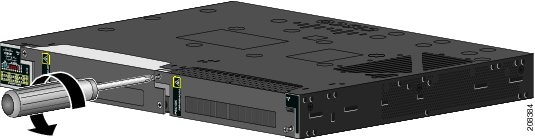
3. Use a Phillips screwdriver to loosen the captive screws that secure the power-supply module to the switch. See Figure 34.
Warning: Hot surface. Statement 1079
4. Remove the power-supply module from the power slot. The power-supply module might be hot. See Figure 35.
5. Install a new power-supply module or a blank cover.
Figure 35 Removing the Power-Supply Module
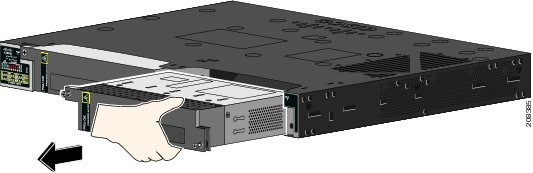
Caution: To prevent exposure to hazardous voltages and to contain electromagnetic interference (EMI), either a power-supply module or a blank cover must be in each power-supply module slot at all times.
 Feedback