L3NAT for IOx Applications

L3NAT in industrial networking

Layer3 Network Address Translation (L3NAT) for IOx applications is a feature that enables the use of the switch management IP as a proxy for all applications within the routed network, reducing the need for multiple public routable IP addresses.

  • Reduces the overhead and complexity of managing multiple public IP addresses for Industrial Ethernet (IE) devices.

  • Supported on the IE3x00 platform with the Cisco Cyber Vision (CCV) IOx application.

  • Cannot be used to NAT other Ethernet traffic from hosts connected to the switch's physical Ethernet ports.

L3NAT in industrial networking environment

In industrial networking environments, efficient communication between internal applications and external servers is essential for seamless operations. The requirement for each application to have a public routable IP address, in addition to the IP address for switch management, poses challenges for network administrators.

L3NAT-IOx

L3NAT-IOx is a networking feature that translates private IP addresses in an internal network to a public IP address at the network layer, using hardware components such as ASIC and FPGA.

  • Translates private IP addresses to public IP addresses before packets are sent to an external network.

  • Utilizes hardware components such as Application-Specific Integrated Circuit (ASIC) and Field-Programmable Gate Array (FPGA) for implementation.

  • Ensures seamless communication between internal applications and external servers by managing address translation in both directions.

How L3NAT-IOx enables secure communication

When a Cyber Sensor application communicates with the external CCV server, the NAT protocol translates the source private IP address of the Cyber Sensor application to the public IP address of the Management Switched Virtual Interface (SVI) of the switch. This translation allows the packets to navigate through the external network, giving the impression that they originate from the switch management SVI IP address. When the external CCV server communicates to the Cyber Sensor application, the NAT protocol reverses the translation. The incoming packets that are addressed to the public IP address of the switch management SVI are translated to the private IP address of the destination Cyber Sensor application. This ensures seamless communication between the application and external servers.

Guidelines and restrictions

  • The feature supports only the CCV application. It is not supported for any other IOx application.

  • Only static translation is supported.

  • Translation is limited to TCP and UDP packets only.

  • Users must create an additional SVI on IE for the private network used by the application. The IP assigned to the SVI will serve as the default gateway for the application.

  • This feature requires a Network Advantage license.

  • The L3NAT-IOx statistics cannot be fetched using YANG with Network Configuration Protocol (NETCONF).

Configure L3NAT-IOx

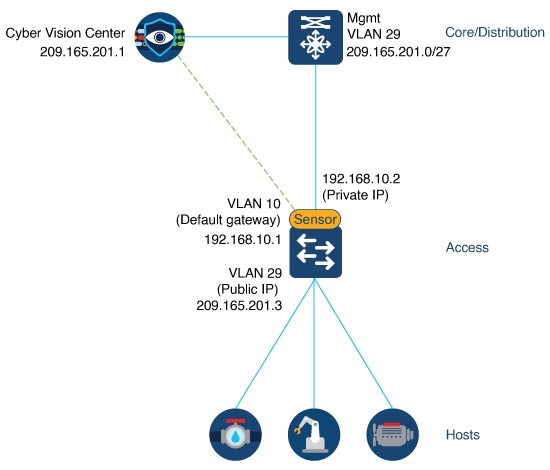
The configuration example is based on the CCV onboarding topology:

Figure 1. CCV onboarding

The figure CCV onboarding shows application hosting on the switch using a Private IP address. The CCV sensor application is installed on the access devices to which hosts are connected. The management public IP address is given to the devices located in the 209.165.201.0/27 network. The CCV sensor is installed using the private IP network 192.168.10.x.

Procedure


Step 1

Use the int vlan vlan_id command to create the SVI for the 192.168.10.x network with an IP address that serves as the default gateway for the application.

Switch(config)# int vlan 10
Switch(config-if)# ip address 192.168.10.1 255.255.255.224

Step 2

Use the int vlan vlan_id command to create the SVI for the 209.165.201.0/27 network with an IP address that serves as the public IP to reach CCV center.

Switch(config)# int vlan 29
Switch(config-if)# ip address 209.165.201.3 255.255.255.224

Step 3

Use the l3nat-iox command to configure the L3NAT-IOx.

Switch(config)# l3nat-iox

Step 4

Use the app-ip app_ip svi-ip svi_ipapp-name CCV-ONPREM server-ip server_ip command to map the private application IP to the public SVI IP, associating it with the specified application name and server IP for L3NAT translation.

Switch(config-iox-nat)# app-ip 192.168.10.2 svi-ip 209.165.201.3 app-name CCV-ONPREM server-ip 209.165.201.1

Step 5

Use the exit command to exit IOx NAT configuration mode.

Switch(config-iox-nat)# exit

Step 6

Use the exit command to exit configuration mode.

Switch(config)# exit

Step 7

Use the show ioxnat statistics command to view NAT statistics.

  • The statistics show the translated IP addresses and the count of egress and ingress translations between the private application IP address and the local SVI IP address.

    Switch# show ioxnat statistics
    TRANSLATED STATS for CCV-ONPREM (IN PACKETS)
    ===============================================================================
    DIRECTION SA/DA ORIGINAL IP     TRANSLATED IP   COUNT
    EGRESS    SA    192.168.10.2    209.165.201.5     107
    INGRESS   DA    209.165.201.5   192.168.10.2       91
  • When the configuration fails, this output is displayed.

    Switch# show ioxnat statistics
    ERROR STATS for (IN PACKETS)
    ===============================================================================
    EGRESS OVERFLOW STATS     0
    EGRESS CRC ERROR STATS    0
    INGRESS OVERFLOW STATS    0
    INGRESS CRC ERROR STATS   0
    

Feature history for L3NAT-IOx

This topic provides the feature history for L3NAT for IOx Applications, including release details and supported platforms.

Table 1. Feature history for L3NAT-IOx

Feature Name

Release

Description

L3NAT for IOx Applications

Cisco IOS XE 17.14.1

Initial support on IE3300, and IE3400/IE3400H series switches