LEDs

You can perform the following check on LEDs that assist you with the troubleshooting process:

Chassis LED

The LEDs indicate whether each type of module (supervisor modules, line cards, fabric modules, fan trays, and power supplies) is fully functional or have a fault condition.

Table 1. Chassis LED Descriptions
LED Color Status

ATTN (Attention)

Blue

The operator has activated this LED to identify this chassis.

Off

The chassis is not functional.

Port Status LEDs

Each port on N9K-X98900CD-A (only) has an LED. The following table describes port status LEDs.

Table 2. Port Status LEDs (One Per Port)

LED Color

Description

Off

Port is administratively shut down.

Green

Port is administratively enabled and the link is up.

Amber

Port is administratively enabled and the link is down.

Flashing Amber

Port is faulty and disabled.

Power Supply LEDs

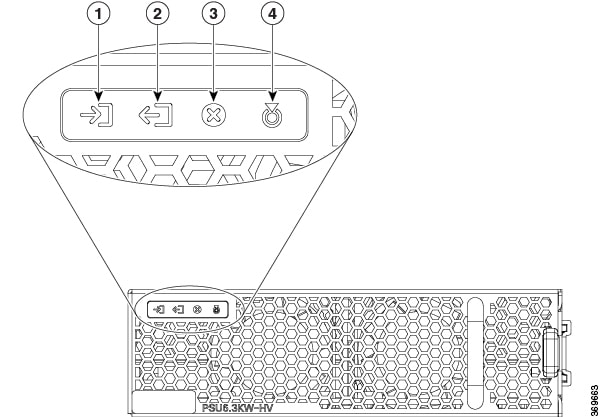
The power supply LEDs are located on the front portion of the module.

Figure 1. Power Supply LEDs

1

Input OK

3

Fault

2

Output OK

4

ATTN (Attention)

Table 3. Power Supply LED Descriptions

LED

Color

Status

Input OK

Green

Both input voltages are present.

Flashing Green

Only one input power is present.

Off

No input power is present.

Output OK

Green

Output power is enabled.

Flashing Green

Output power in power limit, or in overcurrent condition, or is in the sleep-mode.1

Off

Output disabled, or no inputs present, or firmware upgrade in-progress.

Fault

Red

Output voltage is out of the specified range, or a fan has failed, or internal fault.

Flashing red

Firmware upgrade in-progress.

ATTN (Attention)

Flashing blue

User configured action config hw-module attention-led location 0/PTx/PMy.

Off

No user configuration is set.

1 Sleep mode is not applicable for DC-60 power module.

Fan Tray LEDs

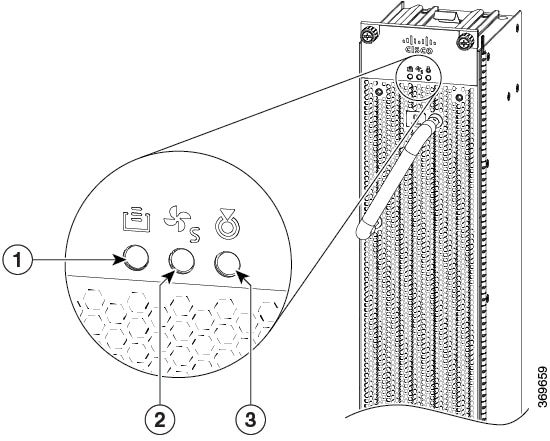
The fan tray LEDs are located on the top portion of the module.

Figure 2. Fan Tray LEDs

1

FC STS (Status)

3

ATTN (Attention)

2

FT STS (Status)

Table 4. Fan Tray LED Descriptions

LED

Color

Status

ATTN (Attention)

Flashing Blue

The operator has activated this LED to identify the fan tray in the chassis.

Off

The operator had not activated the LED to identify the fan tray in the chassis.

FT STS

Amber

The fan tray is powered on.

Green

The fan tray is operational.

Flashing amber

The module has minor alarm.

Flashing red

The module has active major or critical alarms.

Flashing green

FPD upgrade in-progress.

Off

No power to the fan tray.

FC STS

Amber

The fabric cards are powered on and is in one of the following states:

  • Either one or more fabric cards behind this fan tray is not operational.

  • Either one or more fabric cards behind this fan tray have minor, major or critical alarm.

Green

  • One of the fabric modules is operational and other one not present.

  • Both fabric cards behind this fan tray are operational.

Off

If both the fabric modules behind this fan tray are plugged out (or not present).

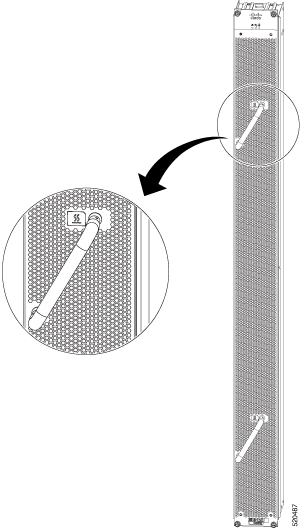
Temperature Warning Label

Every fan tray has a temperature warning label beside its handle. The temperature warning label is temperature sensitive. At normal operating temperatures (less than 55°C), the warning label has a black background with black edges. At temperatures above 55°C, the background color changes to white and the edges’ color changes to red.

Figure 3. Temperature Warning Label

Supervisor Module LEDs

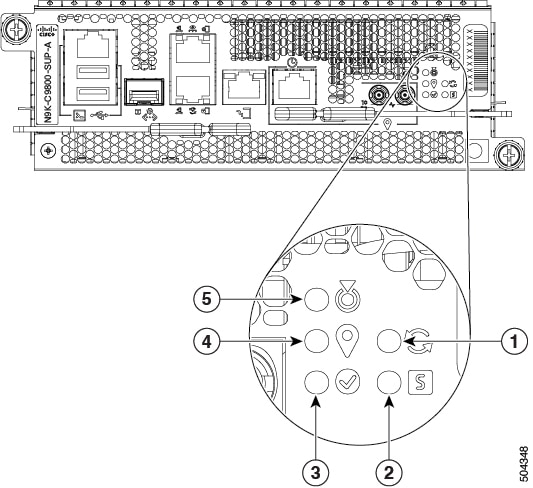
The Supervisor Module LEDs are located on the front of the module.

Figure 4. Supervisor Module LEDs

1

SYNC

4

GPS

2

STS (Status)

5

ATTN (Attention)

3

Active

Table 5. Supervisor Module LED Descriptions

LED

Color

Status

ATTN (Attention)

Flashing blue

The operator has activated this LED to identify this module in the chassis.

Off

This module is not being identified.

STS (Status)

Green

This module is operational with no issues.

Flashing green

The auto or manual FPD upgrade in-progress.

Flashing amber

The module has minor alarm.

Flashing red

The module has active major or critical alarms.

Amber

The module is in one of the following states:

  • Power cycle

  • Reload or reimage

  • Shutdown

Red

BIOS boot failure. Also, the ATTN LED remains blue.

Off

The module is not enabled.

ACT (Active)

Green

The module is in the Active state.

Off

The module is in the Standby state.

GPS

Green

The GPS interface is provisioned and frequency, time of day and phase inputs are all operating correctly.

Off

The GPS interface is not provisioned, or the GPS inputs are not working correctly.

SYNC

Green

The frequency, time, and phase are synchronized to an external interface. The external interface could be:

  • BITS

  • GPS

  • Recovered RX Clock

Amber

The system is running in holdover or free-run mode and it is not synchronized to an external interface.

Off

The centralized frequency or time and phase distribution is not enabled.

Fabric Module LEDs

The fabric modules are located behind the fan trays.


Note


The fabric modules are located behind the fan tray. Therefore, the fabric module LEDs are seen when the fan tray is removed.


Table 6. Fabric Module LED Descriptions

LED

Color

Status

ATTN (Attention)

Flashing blue

The operator has activated this LED to identify this module in the chassis.

Off

This module is not being identified.

STS

Green

The fabric module is operational with no issues.

Flashing green

Auto or manual FPD upgrade in-progress.

Amber

The module is in one of the following states:

  • Power cycle

  • Reload or reimage

  • Shutdown

Flashing red

The fabric module has major or critical alarms.

Flashing amber

The module has minor alarm.

Off

No power is going to the fabric card.

Line Card LEDs

The line card has LEDs located on the right of the front panel.

Table 7. Line Card LED Descriptions
LED Color Status

ATTN (Attention)

Flashing blue

The operator has activated this LED to identify this module in the chassis.

Off

The line card is not enabled.

STS (Status)

Amber

The module is in one of the following states:

  • Power cycle

  • Reload or reimage

  • Shutdown

Green

This module is operational with no issues.

Flashing green

The auto or manual FPD upgrade in-progress.

Flashing amber

The module has a minor alarm.

Flashing red

The module has active major or critical alarms.

Red

BIOS boot failure. Also, the ATTN LED remains blue.

Off

The module is not enabled.