Configuring FabricPath Forwarding

This chapter describes how to configure FabricPath forwarding on the Cisco NX-OS devices.

Finding Feature Information

Your software release might not support all the features documented in this module. For the latest caveats and feature information, see the Bug Search Tool at https://tools.cisco.com/bugsearch/ and the release notes for your software release. To find information about the features documented in this module, and to see a list of the releases in which each feature is supported, see the "New and Changed Information"chapter or the Feature History table in this chapter.

Information About FabricPath Forwarding


Note


You must have an F Series module in your chassis to run FabricPath.


FabricPath Forwarding Overview

FabricPath provides a multipath Layer 2 domain that does not require STP for a loop-free environment. Using the Intermediate System-to-Intermediate System (IS-IS) protocol, the device provides multiple paths for Layer 2 packets.

Each FabricPath interface can learn multiple parallel paths to the other nodes in the FabricPath network. Because you do not need to use STP, all the paths are available for forwarding traffic. The device assigns the optimal path per flow.

The flow for known unicast packets is determined by the hierarchical FabricPath outer destination address (ODA) and the outer source address (OSA) value (see “Configuring FabricPath Switching,” for more information about FabricPath hierarchical encapsulation). The system uses IS-IS Equal Cost Multipathing (ECMP) to choose the forwarding path for these flows using FabricPath Layer 2 IS-IS.

For multidestination traffic (unknown unicast, broadcast, and multicast), the FabricPath system creates two paths or trees. The broadcast and unknown unicast traffic flows through one of these trees. The system distributes the multicast traffic between the two trees based on a hash. The system load balances multicast traffic in the FabricPath network (see the “Forwarding Trees for Broadcast, Unknown Unicast, and Multicast Packets” section for more information).

FabricPath Layer 2 IS-IS defines the trees. The highest system ID is chosen for the root and the tree flows from that. The second tree is the same but with a different root priority. After the system chooses the root switch, the tree is built with that as the root for the first tree. Then, the root switch for the first tree elects the root of the second tree, again based on the system ID, and the second tree flows from that root switch. All of this information is advertised to the FabricPath network using Layer 2 IS-IS, so all the devices in the network have the same information.

The system assigns the path at ingress and encodes that path in the FTag portion of the FabricPath header. The system assigns one FTag per tree. Once decided and tagged, the packet uses the same tree throughout the entire FabricPath network. All the nodes in the FabricPath network forward traffic based on this same information because all nodes have the same information using Layer 2 IS-IS.

The FabricPath frame has a Reverse Path Forwarding (RPF) mechanism for multidestination packets, which verifies that the packet is arriving on an interface that leads to the source switch. RPF drops the packet if it is received from an interface that is not part of the tree.

The FabricPath Layer 2 IS-IS protocol floods the link-state information across the FabricPath network. Each device sends hello packets on each FabricPath link and discovers its neighbors. When a neighbor is discovered, the system creates an IS-IS adjacency. Each device also sends advertisements and updates to the link-state database through all the existing adjacencies.

FabricPath VLANs

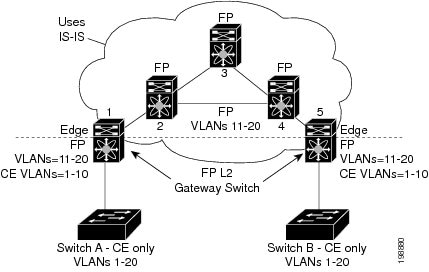
To interact with the Classical Ethernet (CE) network, you set VLANs to either CE or FabricPath (FP) mode. The CE VLANs carry traffic from the CE hosts to the FabricPath interfaces, and the FP VLANs carry traffic throughout the FabricPath topology. Only the active FP VLANs configured on a switch are advertised as part of the topology in the Layer 2 Intermediate System-to-Intermediate System (IS-IS) messages.

The system automatically assigns all FabricPath interfaces and FP VLANs to the topology. So, there is no added configuration required. (See Chapter 3, “Configuring FabricPath Interfaces,” for information about FabricPath interfaces.) All the FP VLANs and FabricPath interfaces belong to that same topology. All ports on the same device in the same topology must be in the same virtual device context (VDC).

Figure 1. Example FabricPath Topology and Classical Ethernet Hosts


The figure above shows a sample FabricPath topology with Classical Ethernet switches and FP/CE VLANs.

The default VLAN mode on the device is the CE VLAN mode. The FabricPath interfaces carry traffic only on the FP VLANs; the CE VLANs do not come up on these interfaces. The CE interfaces on the F Series modules carry traffic for both CE VLANs (traffic from the hosts) and FP VLANs.

You must exit the VLAN configuration mode for the VLAN mode change to take effect.


Note


Once you configure VLANs and interfaces, no further configuration is required. The system automatically creates and assigns the paths, as well as provides load balancing.


For best practices, consistent VLAN configuration within a FabricPath topology is a good practice because FabricPath does not perform topology calculations on a per-VLAN basis. Therefore, if a VLAN is not defined on a particular Cisco FabricPath switch that belongs to a specific topology, the control plane will not be aware of it and my try to forward traffic for this VLAN through this particular switch, with the result that the traffic is black-holed. Note that with Cisco FabricPath, core ports forward traffic only for VLANs that are defined in the switch. The loss of traffic that is caused by lack of the required VLANs in the VLAN database is especially difficult to troubleshoot.

Forwarding Known Unicast Packets Using ECMP

The system forwards unicast traffic per flow using the ODA field in the FabricPath header for known unicast traffic. The FabricPath-enabled system assigns the switch ID and the ODA for all encapsulated traffic at the ingress switch. (See “Configuring FabricPath Switching,” for more information about FabricPath encapsulation.)

Once the system assigns the ODA, the FabricPath device uses the FabricPath Layer 2 IS-IS ECMP to forward known unicast traffic. FabricPath, using Layer 2 IS-IS, has up to 16 active Layer 2 paths. This feature provides up to 16-way ECMP at Layer 2 for all known unicast packets. The Layer 2 IS-IS messages used by FabricPath are separate and distinct from the Layer 3 IS-IS messages used by the routing protocols and the Overlay Transport Virtualization (OTV).

The devices within the FabricPath network exchange topology information using IS-IS adjacencies and forward the traffic along those paths for known unicast traffic flows. Each node in the FabricPath network looks at the FabricPath header for each traffic flow and makes an ECMP forwarding choice based on the available next hops.

Forwarding Trees for Broadcast, Unknown Unicast, and Multicast Packets

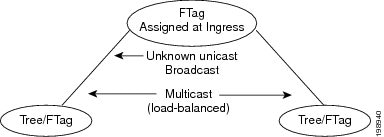
FabricPath introduces a new loop-free broadcast functionality that carries broadcast, unknown unicast, and multicast packets, or multidestination traffic. For each broadcast, unknown unicast, and multicast traffic flow, the system chooses the forwarding path from among multiple system-created paths or trees. The system creates two trees to forward the multidestination traffic for each topology.

For the FabricPath network, the system creates a broadcast tree that carries broadcast traffic, unknown unicast traffic, and multicast traffic through the FabricPath network. The system also creates a second tree; all the multicast traffic flows are load balanced across these two trees for each flow. Each tree is identified in the FabricPath network by a unique value or FTag. Within the FabricPath network, the system elects a root node that becomes root for the broadcast tree. That node also identifies another bridge to become root for the second multidestination tree, which load balances the multicast traffic.

The FTag is assigned by the ingress switch, along with the ODA and OSA, as part of the FabricPath encapsulation. The FTag determines which loopfree tree that the multidestination traffic flow follows through the FabricPath network. The system assigns the trees per flow.

The figure below shows these trees.

Figure 2. Trees for Forwarding Multidestination FabricPath Flows for a Given Flow


Each node in the FabricPath network shares the same view of the forwarding trees for a given FTag.

Forwarding Multicast Packets

Using FabricPath and an F Series module, you can configure Layer 2 multicast multipathing. FabricPath uses a hash-based system to assign each of the multicast flows to one of the two designated trees to ensure that the multicast traffic is load balanced.

The system uses FabricPath Layer 2 IS-IS and Classical Ethernet IGMP snooping to learn the multicast group information at the boundaries of the FabricPath/Classical Ethernet network. The system carries that information through the FabricPath network using a new Layer 2 IS-IS LSP called Group Membership LSP (GM-LSP). GM-LSPs carry multicast group/source membership information. This information is carried across the FabricPath network. All FabricPath switches maintain multicast routing information and forward multicast data packets only to switches that have interested receivers. Each node in each FabricPath topology shares the same view and has all the same information.

The multicast traffic uses the per-VLAN source, multicast group, and flow information to allocate traffic to one or the other of the two trees. This system constrains multicast based on the group IP address.

IGMP snooping and FabricPath IS-IS, using GM-LSP, work together to build per-VLAN multicast group-based trees across the FabricPath network. IGMP snooping on edge interfaces learns of receivers and routers and builds an edge-port multicast state. FabricPath Layer 2 IS-IS propagates this attached group information through the FabricPath network using GM LSPs, building a state in the FabricPath network. Devices at the edge of the FabricPath network that have multicast groups originate the GM-LSP.

Beginning with Cisco Release 5.2(1), you can add a configuration to assist the device to quickly work with multiple multicast groups. See the “Configuring FabricPath Increased Multicast Scalability (Optional)” section on for more information.

For Layer 2 multicast traffic, you do not need to run PIM when using FabricPath.

For Layer 3 multicast packets, the system sets the ODA to a special multicast group that identifies all IP routers for that group and forwards the traffic along the tree for that group.

High Availability

The FabricPath topologies retain their configuration through ISSU.

See the Cisco Nexus 7000 Series NX-OS High Availability and Redundancy Guide for more information on high availability.

Virtual Device Contexts

You must install the FabricPath feature set before you enable FabricPath on the switch. See Configuring Feature Set for FabricPath for information on installing the FabricPath feature set.

Because of the multiple forwarding engines (FEs) on the F Series modules, the table below lists the port pairs and port sets that must be in the same VDC.

Table 1. Port Pairs and Port Sets for F Series Modules

Port Pairs for F1 Modules

Port Sets for F2 Modules

Ports 1 and 2

Ports 1, 2, 3, 4

Ports 3 and 4

Ports 5, 6, 7, 8

Ports 5 and 6

Ports 9, 10, 11, 12

Ports 7 and 8

Ports 13, 14, 15, 16

Ports 9 and 10

Ports 17, 18, 19, 20

Ports 11 and 12

Ports 21, 22, 23, 24

Ports 13 and 14

Ports 25, 26, 27, 28

Ports 15 and 16

Ports 29, 30, 31, 32

Ports 17 and 18

Ports 33, 34, 35, 36

Ports 19 and 20

Ports 37, 38, 39, 40

Ports 21 and 22

Ports 41, 42, 43, 44

Ports 23 and 24

Ports 45, 46, 47, 48

Ports 25 and 26

Ports 27 and 28

Ports 29 and 30

Ports 31 and 32

See the Virtual Device Context Configuration Guide, Cisco DCNM for LAN, for more information about VDCs.

Load Balancing Using Port Channels

The Cisco NX-OS software load balances traffic across all operational interfaces in a port channel by hashing the addresses in the frame to a numerical value that selects one of the links in the channel. Port channels provide load balancing by default. Port-channel load-balancing uses MAC addresses, IP addresses, or Layer 4 port numbers to select the link. Port-channel load balancing uses either source or destination addresses or ports, or both source and destination addresses or ports.

See the Cisco Nexus 7000 Series NX-OS Interfaces Configuration Guide for more information about load balancing.

Unicast Static Routes in FabricPath

FabricPath uses Layer 2 Integrated Intermediate System-to-System (IS-IS) as a link state protocol to compute unicast topologies. You can configure unicast static routes in the forwarding tables to ensure a predictable operation of the network.

Prerequisites for FabricPath

FabricPath forwarding has the following prerequisites:

  • You should have a working knowledge of Classical Ethernet Layer 2 functionality.

  • You must install the FabricPath feature set in the default and nondefault VDC before you enable FabricPath on the switch. See the Configuring Feature Set for FabricPath for complete information on installing and enabling the FabricPath feature set.

  • The FabricPath feature set operation might cause the standby supervisor to reload if it is in an unstable state, such as following a service failure or powering up.

  • You are logged onto the device.

  • You are in the correct virtual device context (VDC). A VDC is a logical representation of a set of system resources. You can use the switchto vdc command with a VDC number.

  • You are working on the F Series module.

Guidelines and Limitations for FabricPath Forwarding

FabricPath switching has the following configuration guidelines and limitations:

  • FabricPath interfaces carry only FabricPath-encapsulated traffic.

  • You enable FabricPath on each device before you can view or access the commands. Enter the feature-set fabricpath command to enable FabricPath on each device. See Configuring Feature-Set for FabricPath for complete information on installing and enabling the FabricPath feature set.

  • The FabricPath feature set operation might cause the standby supervisor to reload if it is in an unstable state, such as following a service failure or powering up.

  • Starting from Cisco NX-OS Release 8.2(2), configure the no fabricpath load-balance multicast include-vlan command on any VDC in which FabricPath is configured along with both F2e-Series and F3-Series I/O modules.

  • STP does not run inside a FabricPath network.

  • The F Series modules do not support multiple SPAN destination ports or virtual SPAN. If a port on an F Series module is in a VDC and that VDC has multiple SPAN destination ports, that SPAN session is not brought up.

  • The following guidelines apply to private VLAN configuration when you are running FabricPath:

    • All VLANs in a private VLAN must be in the same VLAN mode; either CE or FabricPath. If you attempt to put different types of VLANs into a private VLAN, these VLANs will not be active in the private VLAN. The system remembers the configurations, and if you change the VLAN mode later, that VLAN becomes active in the specified private VLAN.

    • FabricPath ports cannot be put into a private VLAN.

  • The system does not support hierarchical static MAC addresses.

  • Because of a limitation with an ASIC on the 32-port 1/10-Gigabit Ethernet F1 Series module, a packet that egresses from that module through both ports in FabricPath VLAN mode has an incorrect outer source address (OSA) if the first port is configured as a FabricPath edge port and the second port is configured as a FabricPath core port. To work around this issue, configure the first port as a FabricPath core port and the second port as a FabricPath edge port.

  • Beginning with Cisco NX-OS Release 6.2(2), FabricPath supports unicast static routes. It does not support multicast static routes.

  • On the F Series modules, user-configured static MAC addresses are programmed on all forwarding engines (FEs) that have ports in that VLAN.

  • In order to have the VLAN mode take effect, you must exit the VLAN configuration mode after configuring the mode.

  • Multicast traffic sent to a group with no receivers present might not be constrained to the router port optimized multicast flooding (OMF) entry for a VLAN. The OMF entry is maintained on a per-VDC basis, not on a per-VLAN basis, which means that if multiple ports are members of the OMF entry, the ports that forward the FTag also forward the multicast traffic.

    • Use the show fabricpath mroute vdc-omf command to view all ports forwarding on the OMF entry.

    • Use the show fabricpath mroute omf resolved ftag [ftag] command to view all resolved OMF entries on a per-FTag basis.

  • When multicast routing is occurring on a FabricPath spine switch, the egress core ports towards the FabricPath leaf switches should not have a mix of F2e and F3 Series module ports. This may cause multicast traffic to be forwarded on both FTags, which can lead to duplicate multicast traffic received at the destination leaf switch, depending on the topology. This limitation only affects Layer-3 routed multicast traffic.

  • Extending the FabricPath VLANs over the VPLS infrastructure is not supported. Only regular Ethernet VLANs can be extended over VPLS.

Default Settings for FabricPath Forwarding

Table 2. Default FabricPath Parameters

Parameters

Default

FabricPath Topology

0

VLAN mode

CE

Configuring FabricPath Forwarding


Note


You must have FabricPath enabled on the F Series module and on all devices before you can see any of these commands.


Only those VLANs that are configured as FP VLANs can belong to the FabricPath topology. By default, all FP VLANs and interfaces are assigned to the FabricPath topology, FabricPath topo 0.

When you are using the default topology, you need only to set the VLAN mode for those VLANs that you want to traverse the FabricPath network to FP VLAN.

Because the system automatically creates the multiple paths once you specify the VLAN modes and interfaces, you are only required to configure these aspects of FabricPath.

See “Configuring FabricPath Interfaces,” for information on FabricPath interfaces.


Note


You must make these configurations on each switch that you want to participate in the FabricPath network.


Setting the VLAN Mode to FP or CE

The default VLAN mode is CE on the F Series modules.


Note


You must have already created the VLANs before you can set the VLAN mode using FP.


You designate those VLANs that you want to carry FabricPath traffic on the network by configuring them as FP VLANs. By default, all FP VLANs and FabricPath interfaces are added to the default FabricPath topology, topo 0.

Before you begin

Ensure that you are working on an F Series module.

Ensure that you have enabled the FabricPath feature.

Ensure that you have created the VLANs

Procedure

  Command or Action Purpose

Step 1

switch# configure terminal

Enters global configuration mode.

Step 2

(config)# vlan vlan-id

Enters the VLAN configuration mode and identifies those VLANs that you want to carry FabricPath traffic.

Step 3

switch(config-vlan)# mode [ce | fabricpath]

Configures the VLANs as FP VLANs. The default VLAN mode is CE.

Note


A VLAN must be either a CE or an FP VLAN on the FabricPath device.

Step 4

switch(config-vlan)# exit

Exits VLAN configuration mode.

Note


As with all VLANs, you must exit the VLAN configuration mode for the VLAN mode (CE or FP) to take effect.

Step 5

switch(config)# exit

Exits global configuration mode.

Step 6

(Optional) switch# show fabricpath topology vlans [active]

(Optional)

Displays information about all VLANs in the FabricPath topology.

Step 7

(Optional) switch# copy running-config startup-config

(Optional)

Copies the running configuration to the startup configuration.

Example

This example shows how to specify VLANs as FP VLANs:

switch# configure terminal
switch(config)# vlan 1-10
switch(config-vlan)# mode fabricpath
switch(config-vlan)# exit
switch(config)# exit

Configuring FabricPath Unicast Load Balancing (Optional)

The FabricPath network automatically balances unicast traffic when multiple paths are available. However, you can configure specific load balancing for the unicast traffic. The default is to use all options.

Before you begin

Ensure that you are working on an F Series module.

Ensure that you have enabled the FabricPath feature.

Procedure

  Command or Action Purpose

Step 1

switch# configure terminal

Enters global configuration mode.

Step 2

  • switch(config)# [no] fabricpath load-balance {source | source-destination | xor | destination | symmetric}
  • switch(config)# [no] port-channel load-balance [algorithm [module module]]

To configure source/destination/symmetric/src-dst algorithms for load-balancing FabricPath unicast traffic in vDCs that do not allow F2 resource types, use the fabricpath load-balance command.

To configure source/destination/symmetric/src-dst algorithms for load-balancing FabricPath unicast traffic in vDCs that allow F2 resource types, use the port-channel load-balance command.

Step 3

switch(config)# [no] fabricpath load-balance unicast [layer 3 | layer4 | mixed] [rotate-amount rot_amt] [include-vlan]

Configures options such as rotation-skew, VLAN inclusion, use of Layer 3/Layer 4 traffic parameters, for load-balancing FabricPath unicast traffic.

Note


To return to the default unicast load-balancing scheme, enter the no form of this command.

Step 4

switch(config)# exit

Exits global configuration mode.

Step 5

(Optional) switch# copy running-config startup-config

(Optional)

Copies the running configuration to the startup configuration.

Example

This example shows how to configure FabricPath unicast load balancing for VDCs that do not allow F2 resource types:

switch# configure terminal
switch(config)# fabricpath load-balance unicast layer3
switch(config)#

This example shows how to configure FabricPath unicast load balancing for VDCs that allow F2 resource types:


Note


The command in this example enables destination MAC-based selection for port-channel hash for ingress modules in the chassis.


switch# configure terminal
switch(config)# port-channel load-balance dst mac

switch(config)# show port-channel load-balance
  Port Channel Load-Balancing Configuration:
  System: dst mac
  Port Channel Load-Balancing Addresses Used Per-Protocol:
  Non-IP: dst mac
 IP: dst mac

Note


For FabricPath unicast traffic (ECMP selection)—These commands include a mixed preference of Layer 3 and Layer 4 parameters, a rotation of 14 bytes, a VLAN that is included in hash calculations, and a destination-based selection for all modules in the F2 FabricPath-enabled VDC


switch(config)# fabricpath load-balance unicast include-vlan
switch(config)# show fabricpath load-balance
   ECMP load-balancing configuration:
   L3/L4 Preference: Mixed
   Rotate amount: 14 bytes
   Use VLAN: TRUE
   Ftag load-balancing configuration:
   Rotate amount: 3 bytes
   Use VLAN: TRUE

This example shows how to configure F2 VDC FabricPath unicast load balancing:


Note


The command in this example enables source IP-VLAN and MAC-based selection for port-channel hash for ingress module 4. All other modules in the chassis retain destination MAC-based selection.

switch(config)# port-channel load-balance src ip-vlan module 4
switch(config)# show port-channel load-balance module 4
   Port Channel Load-Balancing Configuration:
   Module 4: src ip-vlan
   Port Channel Load-Balancing Addresses Used Per-Protocol:
   Non-IP: src mac
   IP: src ip-vlan

Note


For FabricPath unicast traffic (ECMP selection)—These commands include a mixed preference of Layer 3 and Layer 4 parameters, a rotation of 9 bytes, a VLAN that is excluded in hash calculation with source based selection for module 4, and a destination based selection for other modules in the F2 FabricPath-enabled VDC.


switch(config)# fabricpath load-balance unicast mixed rotate-amount 0x9
switch(config)# show fabricpath load-balance
   ECMP load-balancing configuration:
   L3/L4 Preference: Mixed
   Rotate amount: 9 bytes
   Use VLAN: FALSE
   Ftag load-balancing configuration:
   Rotate amount: 2 bytes
   Use VLAN: FALSE

This example shows how to configure FabricPath unicast load balancing for VDCs that allow F2 resource types:


Note


The command in this example enables source-destination IP-L4PORT-VLAN and MAC-based selection for port-channel hash for ingress module 4. All other modules in the chassis retain the destination MAC-based selection. For FabricPath unicast traffic (ECMP selection), these commands include a mixed preference of Layer 3 and Layer 4 parameters, a rotation of 9 bytes, and a VLAN that is excluded in the hash calculation with a source-based selection for module 4, source-destination based selection for module 10, and destination-based selection for other modules in the F2 FabricPath-enabled VDC.


switch(config)# port-channel load-balance src-dst ip-l4port-vlan module 10
switch(config)# show port-channel load-balance module 10
   Port Channel Load-Balancing Configuration:
   Module 10: src-dst ip-l4port-vlan
   Port Channel Load-Balancing Addresses Used Per-Protocol:
   Non-IP: src-dst mac
  IP: src-dst ip-l4port-vlan

Configuring FabricPath Multicast Load Balancing (Optional)

Although the network automatically load balances the traffic, you can configure specific load balancing for the multicast traffic.

Before you begin

Ensure that you are working on an F Series module.

Ensure that you have enabled the FabricPath feature.

Procedure

  Command or Action Purpose

Step 1

switch# configure terminal

Enters global configuration mode.

Step 2

  • switch(config)# [no] fabricpath load-balance {source | source-destination | xor | destination | symmetric}
  • switch(config)# [no] port-channel load-balance [algorithm [module module]]

To configure source/destination/symmetric/src-dst algorithms for load-balancing FabricPath multicast traffic in vDCs that do not allow F2 resource types, use the fabricpath load-balance command.

To configure source/destination/symmetric/src-dst algorithms for load-balancing FabricPath multicast traffic in vDCs that allow F2 resource types, use the port-channel load-balance command.

Step 3

switch(config)# [no] fabricpath load-balance multicast [rotate-amount rot_amt] [include-vlan]

Configures options such as rotation-skew, VLAN inclusion, use of Layer 3/Layer 4 traffic parameters, for load-balancing FabricPath multicast traffic.

Note


To return to the default unicast load-balancing scheme, enter the no form of this command.

Step 4

switch(config)# exit

Exits global configuration mode.

Step 5

(Optional) switch# copy running-config startup-config

(Optional)

Copies the running configuration to the startup configuration.

Example

This example shows how to configure FabricPath multicast load balancing:

switch# configure terminal
switch(config)# fabricpath load-balance multicast include-vlan
switch(config)#

This example shows how to configure FabricPath multicast load balancing for VDCs that allow F2 resource types:


Note


The command in this example enables destination MAC-based selection for port-channel hash for ingress modules in the chassis.


switch# configure terminal
switch(config)# port-channel load-balance dst mac

switch(config)# show port-channel load-balance
  Port Channel Load-Balancing Configuration:
  System: dst mac
  Port Channel Load-Balancing Addresses Used Per-Protocol:
  Non-IP: dst mac
 IP: dst mac

Note


For FabricPath unicast traffic (forwarding tree selection)—These commands include a rotation of 3 bytes and a VLAN that is included in hash calculations.


switch(config)# fabricpath load-balance multicast rotate-amount 0x3 include-vlan
switch(config)# show fabricpath load-balance
  ECMP load-balancing configuration:
  L3/L4 Preference: Mixed
  Rotate amount: 14 bytes
  Use VLAN: TRUE
  Ftag load-balancing configuration:
  Rotate amount: 3 bytes
  Use VLAN: TRUE

This example shows how to configure FabricPath multicast load balancing for VDCs that allow F2 resource types:


Note


The command in this example enables source IP-VLAN and MAC-based selection for port- channel hash as well as FabricPath unicast load balancing for ingress module 4. All other modules in the chassis retain destination MAC-based selection.

switch(config)# port-channel load-balance src ip-vlan module 4
switch(config)# show port-channel load-balance module 4
   Port Channel Load-Balancing Configuration:
   Module 4: src ip-vlan
   Port Channel Load-Balancing Addresses Used Per-Protocol:
   Non-IP: src mac
   IP: src ip-vlan

Note


For FabricPath multicast traffic (forwarding tree selection)—These commands include a rotation of 2 bytes, a VLAN that is excluded in hash calculation with source-based selection for module 4, and destination-based selection for other modules in F2 FabricPath-enabled VDC.


switch(config)# fabricpath load-balance multicast rotate-amount 0x2
switch(config)# show fabricpath load-balance
   ECMP load-balancing configuration:
   L3/L4 Preference: Mixed
   Rotate amount: 9 bytes
   Use VLAN: FALSE
   Ftag load-balancing configuration:
   Rotate amount: 2 bytes
   Use VLAN: FALSE

This example shows how to configure FabricPath multicast load balancing for VDCs that allow F2 resource types:


Note


The command in this example enables source-destination IP-L4PORT-VLAN, MAC-based selection for port-channel hash for ingress module 10, and Source IPVLAN and MAC-based selection for port-channel hash for ingress module 4. All other modules in the chassis retain destination MAC-based selection. For FabricPath multicast traffic (forwarding tree selection), these commands include a rotation of 2 bytes, a VLAN that is excluded in hash calculation with source-based selection for module 4, source-destination based selection for module 10, and destination-based selection for other modules in the F2 FabricPath-enabled VDC.


switch(config)# port-channel load-balance src-dst ip-l4port-vlan module 10
switch(config)# show port-channel load-balance module 10
   Port Channel Load-Balancing Configuration:
   Module 10: src-dst ip-l4port-vlan
   Port Channel Load-Balancing Addresses Used Per-Protocol:
   Non-IP: src-dst mac
   IP: src-dst ip-l4port-vlan

Configuring FabricPath Increased Multicast Scalability (Optional)

Beginning with Cisco Release 5.2(1), you can increase the FabricPath multicast scalability.

Before you begin

Ensure that you are working on an F Series module.

Ensure that you have enabled the FabricPath feature.

Procedure

  Command or Action Purpose

Step 1

switch# configure terminal

Enters global configuration mode.

Step 2

switch(config)# fabricpath multicast aggregate-routes [exclude ftag-id]

Increases FabricPath multicast scalability. The default is to not aggregate FTag routes. To find the multicast FTag used for a given traffic that you want to exclude, enter the show fabricpath load-balance multicast ftag-selected flow-type l3 dst-ip x.x.x.x src-ip x.x.x.x vlan vlan-id module mod-num command.

Note


The no version of this command does not include the exclude ftag argument.

Step 3

(Optional) switch(config)# show l2 multicast ftag ftag

(Optional)

Displays the configuration that you just applied to the FTag for route programming.

Step 4

switch(config)# exit

Exits global configuration mode.

Step 5

(Optional) switch# copy running-config startup-config

(Optional)

Copies the running configuration to the startup configuration.

Example

This example shows how to configure increased FabricPath multicast scalability:


switch# configure terminal
switch(config)# fabricpath multicast aggregate-routes

Configuring FabricPath Unicast Static Routes

You can configure unicast static routes to override the routes computed by dynamic protocols such as IS-IS in FabricPath. For example, you might want to route traffic to a particular device using a specific link to ensure better load balancing or to route traffic through a firewall in the network.

Before you begin

Ensure that you are working on an F Series module.

Ensure that you have enabled the FabricPath feature.

Procedure

  Command or Action Purpose

Step 1

switch# configure terminal

Enters global configuration mode.

Step 2

(Optional) switch(config)# fabricpath topology topology-number

(Optional)

Enters FabricPath topology configuration mode (config-fp-topology).

Note


Enter this command to configure unicast static routes for a specific FabricPath topology (other than the default). If you want to configure unicast static routes for the default topology, skip Step 2 and go to Step 3.

Step 3

[no] fabricpath route switch-id switch-id nh_if_range

Configures a unicast static route and specifies the device and interfaces through which to send the traffic. You can enter a range of Ethernet ports or port channels.

The interfaces specified must be in the same VDC where the FabricPath feature set is enabled.

This command can be run in two modes:

  • Within a specific FabricPath topology configuration mode (config-fp-topology).

  • Within the global configuration mode.

To delete the static route, enter the no form of the command specifying the static route switch ID. To delete the association between the interfaces and the static route, enter the no form of the command specifying the interface ranges.

When the last association is deleted, the static route is deleted.

Repeat this step to specify additional interfaces for the static route.

Step 4

switch(config)# exit

Exits global configuration mode.

Step 5

(Optional) switch# show fabricpath static route

(Optional)

Displays the static routes within the FabricPath configuration.

Step 6

(Optional) switch# copy running-config startup-config

(Optional)

Copies the running configuration to the startup configuration.

Example

This example shows how to configure a unicast static route for the default topology:


switch# configure terminal
switch(config)# fabricpath route switch-id 25 ethernet 1/2

This example shows how to configure a unicast static route for a specific topology:


switch# configure terminal
switch(config)# fabricpath topology 2
switch(config-fp-topology)# fabricpath route switch-id 221 ethernet 1/2
switch(config-fp-topology)# fabricpath route switch-id 221 port-channel 1

This example shows how to delete a unicast static route.


switch# configure terminal
switch(config)# no fabricpath route switch-id 221

Verifying the FabricPath Configuration

To display FabricPath switching information, perform one of the following tasks:

Command

Purpose

show feature-set

Displays whether FabricPath is enabled or not.

show {l2 | fabricpath} route [switchid switch-id] [detail] [hex]

Displays unicast routes.

show {l2 | fabricpath} mroute {[vdc_omf] | vlan vlan-id {{omf | flood | [source {srcaddr | v6srcaddr}] [group {groupaddr | v6grpaddr}]} [resolved] [ftag ftag-id] [hex]

Displays multicast routes.

show fabricpath topology [detail]

Displays information about all FabricPath topologies.

show fabricpath topology interface

Displays information about all FabricPath topology interfaces.

show fabricpath topology vlan [active]

Displays information about all FabricPath topology VLANs.

show fabricpath topology ftag [active] [multicast] [unicast]

Displays information about all FabricPath topology FTags.

show running-config fabricpath

Displays the running configuration for FabricPath.

show fabricpath load-balance unicast forwarding-path ftag ftag-id switchid switch-id flow-type {l2 {{dst-mac dst-mac | source-mac src-mac} ether-type ether-type}} | {l3 {dst-ip dst-ip | src-ip src-ip | dst-ipv6 dst-ipv6 | srcipv6 src-ipv6}} | {l4 {l4-src-port l4-src-port | l4-dst-port l4-dst-port | dst-ip dst-ip | src-ip src-ip | dst-ipv6 dst-ipv6 | srcipv6 src-ipv6}}} {vlan vlan-id} {module mod-no}

Displays FabricPath unicast load-balancing information.

show fabricpath load-balance multicast ftag-selected flow-type {l2 {{dst-mac dst-mac | source-mac src-mac} ether-type ether-type}} | {l3 {dst-ip dst-ip | src-ip src-ip | dst-ipv6 dst-ipv6 | srcipv6 src-ipv6}} | {l4 {l4-src-port l4-src-port | l4-dst-port l4-dst-port | dst-ip dst-ip | src-ip src-ip | dst-ipv6 dst-ipv6 | srcipv6 src-ipv6}}} {vlan vlan-id} {module mod-no}

Displays FabricPath multicast load-balancing information.

show vlan

Displays information on all FP and CE VLANs.

show fabricpath static route

Displays the static routes within the FabricPath configuration.

The following is sample output from the show fabricpath unicast load-balance command:


switch# show fabricpath load-balance unicast forwarding-path ftag 1 switchid 2231 flow-type l3 src-ip 1.1.1.1 dst-ip 1.1.1.2 module 4
128b Hash Key generated : 00001010102010101010000000000000
This flow selects interface Po100

The following is sample output from the show fabricpath multicast load-balance command:


switch(config)# show fabricpath load-balance multicast ftag-selected flow-type l3 src-ip 1.1.1.1 dst-ip 1.1.1.2 vlan 2 module 4
128b Hash Key generated : 00 00 10 10 10 20 00 00 00 00 02 00 00 00 00 00
0x3
        FTAG SELECTED IS : 1

Configuration Example for FabricPath Forwarding

To configure the basic FabricPath network with a default topology, you must accomplish the following tasks on each device after you have configured the FabricPath interfaces:

  • Enable the FabricPath feature set on each device.

  • Configure the FabricPath interfaces. (See “Configuring FabricPath Interfaces,” for information about configuring FabricPath interfaces.)

  • Configure the FP VLANs. The default is CE VLANs.

  • Enter the show running-config fabricpath command to make sure that your FabricPath configuration is correct.

To configure the default FabricPath topology, follow these steps:

Step 1: Enable the FabricPath feature set.


switch# configure terminal
switch(config)# feature-set fabricpath
switch(config)#

Note


See the Configuring Feature-Set for FabricPath for complete information on installing and enabling the FabricPath feature set.


Step 2: Set the VLAN modes for those VLANs that you want in the FabricPath topology to FP.


switch# configure terminal
switch(config)# vlan 11-20
switch(config-vlan)# mode fabricpath
switch(config-vlan)# exit
switch(config)

Step 3: Display the configuration to ensure that you have the correct configuration.


switch(config)# show running-config fabricpath
switch(config)#

Step 4: Save the configuration.


switch(config)# save running-config startup-config
switch(config)#

Feature History for Configuring FabricPath Forwarding

This table includes only the updates for those releases that have resulted in additions or changes to the feature.

Table 3. Feature History for FabricPath Forwarding

Feature Name

Release

Feature Information

Unicast static routes

6.2(2)

Unicast static routes were introduced.

Load Balancing Using Port Channels

6.0(1)

Load balancing to support F2 modules introduced.

Additional FabricPath topologies

5.2(1)

This feature was introduced.

FabricPath

5.1(1)

These features were introduced.