Configuring Cisco ACI QoS

This chapter contains the following sections:

QoS for L3Outs

To configure QoS policies for an L3Out, use the following guidelines:

  • To configure the QoS policy to be enforced on the border leaf where the L3Out is located, the VRF instance must be in egress mode (Policy Control Enforcement Direction must be "Egress").

  • To enable the QoS policy to be enforced, the VRF Policy Control Enforcement Preference must be "Enforced."

  • When configuring the contract governing communication between the L3Out and other EPGs, include the QoS class or target DSCP in the contract or subject.


    Note

    Only configure a QoS class or target DSCP in the contract, not in the external EPG (l3extInstP).


  • When creating a contract subject, you must choose a QoS priority level. You cannot choose Unspecified.

Configuring QoS for L3Outs Using the NX-OS Style CLI

QoS for L3Out is configured as part of the L3Out configuration.

Procedure


Step 1

When configuring the tenant and VRF, to support QoS priority enforcement on the L3Out, configure the VRF for egress mode and enable policy enforcement, using the following commands:

Example:

apic1# configure
apic1(config)# tenant t1
apic1(config-tenant)# vrf context v1
apic1(config-tenant-vrf)# contract enforce egress
apic1(config-tenant-vrf)# exit
apic1(congig-tenant)# exit
apic1(config)#
Step 2

When creating filters (access-lists), include the match dscp command, in this example with target DSCP level EF. When configuring contracts, include the QoS class, for example, level1, for traffic ingressing on the L3Out. Alternatively, it could define a target DSCP value. QoS policies are supported on either the contract or the subject.

Example:

apic1(config)# tenant t1
apic1(config-tenant)# access-list http-filter
apic1(config-tenant-acl)# match ip
apic1(config-tenant-acl)# match tcp dest 80
apic1(config-tenant-acl)# match dscp EF
apic1(config-tenant-acl)# exit
apic1(config-tenant)# contract httpCtrct 
apic1(config-tenant-contract)# scope vrf
apic1(config-tenant-contract)# qos-class level1
apic1(config-tenant-contract)# subject http-subject
apic1(config-tenant-contract-subj)# access-group http-filter both 
apic1(config-tenant-contract-subj)# exit
apic1(config-tenant-contract)# exit
apic1(config-tenant)# exit
apic1(config)#

Configuring QoS Directly on L3Out Using CLI

This section describes how to configure QoS directly on an L3Out. This is the preferred way of configuring L3Out QoS starting with Cisco APIC Release 4.0(1).

You can configure QoS for L3Out on one of the following objects:

  • Switch Virtual Interface (SVI)

  • Sub Interface

  • Routed Outside

Procedure


Step 1

Configure QoS priorities for a L3Out SVI.

Example:

interface vlan 19
    vrf member tenant DT vrf dt-vrf
    ip address 107.2.1.252/24
    description  'SVI19'
    service-policy type qos VrfQos006   // for custom QoS attachment
    set qos-class level6                // for set QoS priority
    exit
Step 2

Configure QoS priorities for a sub-interface.

Example:

interface ethernet 1/48.10
    vrf member tenant DT vrf inter-tentant-ctx2 l3out L4_E48_inter_tennant
    ip address 210.2.0.254/16
    service-policy type qos vrfQos002
    set qos-class level5
Step 3

Configure QoS priorities for a routed outside.

Example:

interface ethernet 1/37
    no switchport
    vrf member tenant DT vrf dt-vrf l3out L2E37
    ip address 30.1.1.1/24
    service-policy type qos vrfQos002
    set qos-class level5
    exit

CoS Preservation

Preserving 802.1P Class of Service Settings

APIC enables preserving 802.1P class of service (CoS) settings within the fabric. Enable the fabric global QoS policy dot1p-preserve option to guarantee that the CoS value in packets which enter and transit the ACI fabric is preserved.

802.1P CoS preservation is supported in single pod and multipod topologies.

In multipod topologies, CoS Preservation can be used where you want to preserve the QoS priority settings of 802.1P traffic entering POD 1 and egressing out of POD 2, but you are not concerned with preserving the CoS/DSCP settings in interpod network (IPN) traffic between the pods. To preserve CoS/DSCP settings when multipod traffic is transitting an IPN, use a DSCP policy. For more information, see Preserving QoS Priority Settings in a Multipod Fabric.

Observe the following 801.1P CoS preservation guidelines and limitations:

  • The current release can only preserve the 802.1P value within a VLAN header. The DEI bit is not preserved.

  • For VXLAN encapsulated packets, the current release will not preserve the 802.1P CoS value contained in the outer header.

  • 802.1P is not preserved when the following configuration options are enabled:

    • Multipod QoS (using a DSCP policy) is enabled.

    • Contracts are configured that include QoS.

    • Dynamic packet prioritization is enabled.

    • The outgoing interface is on a FEX.

    • Preserving QoS CoS priority settings is not supported when traffic is flowing from an EPG with isolation enforced to an EPG without isolation enforced.

    • A DSCP QoS policy is configured on a VLAN EPG and the packet has an IP header. DSCP marking can be set at the filter level on the following with the precedence order from the innermost to the outermost:

      • Contract

      • Subject

      • In Term

      • Out Term


      Note

      When specifying vzAny for a contract, external EPG DSCP values are not honored because vzAny is a collection of all EPGs in a VRF, and EPG specific configuration cannot be applied. If EPG specific target DSCP values are required, then the external EPG should not use vzAny.


Enable Class Of Service (CoS) Preservation Using NX-OS Style CLI

This section describes how to enable CoS preservation to ensure that QoS priority settings are handled the same for traffic entering and transiting a single-pod fabric as for traffic entering one pod and egressing another in a multipod fabric.


Note

Enabling CoS preservation applies a default CoS-to-DSCP mapping to the various traffic types.


Procedure


Step 1

Enter configuration mode.

Example:


apic1# configure
Step 2

Enables CoS preservation.

Example:


apic1(config)# qos preserve cos

Multipod QoS

Creating DSCP Translation Policy Using NX-OS Style CLI

This section describes how to create a DSCP translation policy to guarantee QoS Level settings across multiple PODs connected by an IPN.

Procedure


Step 1

Enters configuration mode.

Example:


apic1# configure
Step 2

Enters tenant configuration mode for the infra tenant.

Example:


apic1(config)# tenant infra
Step 3

Create the DSCP translation map.

Example:


apic1(config-tenant)# qos dscp-map default
Step 4

Configure the DSCP translation mappings.

Note 

All mappings must be unique within a DSCP translation map and you must not map any QoS level to CS6.

Example:

apic1(config-qos-cmap# set dscp-code control CS3
apic1(config-qos-cmap# set dscp-code span CS5
apic1(config-qos-cmap# set dscp-code level1 CS0
apic1(config-qos-cmap# set dscp-code level2 CS1
apic1(config-qos-cmap# set dscp-code level3 CS2
apic1(config-qos-cmap# set dscp-code level4 CS3
apic1(config-qos-cmap# set dscp-code level5 CS4
apic1(config-qos-cmap# set dscp-code level6 CS5
apic1(config-qos-cmap# set dscp-code policy CS4
apic1(config-qos-cmap# set dscp-code traceroute CS5
Step 5

Enable the DSCP translation.

Example:


apic1(config-qos-cmap)# no shutdown

Preserving QoS Priority Settings in a Multipod Fabric

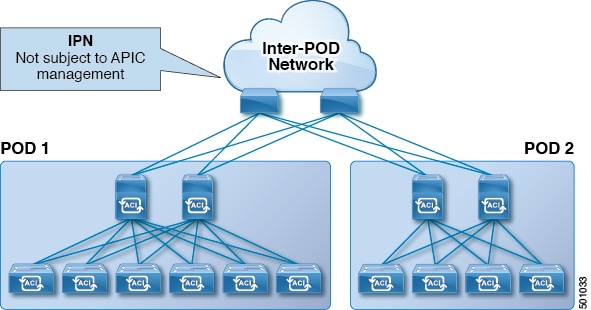
This topic describes how to guarantee QoS priority settings in a multipod topology, where devices in the interpod network are not under APIC management, and may modify 802.1P settings in traffic transitting their network.


Note

You can alternatively use CoS Preservation where you want to preserve the QoS priority settings of 802.1P traffic entering POD 1 and egressing out of POD 2, but you are not concerned with preserving the CoS/DSCP settings in interpod network (IPN) traffic between the pods. For more information, see Preserving 802.1P Class of Service Settings.


Figure 1. Multipod Topology

As illustrated in this figure, traffic between pods in a multipod topology passes through an IPN, which may not be under APIC management. When an 802.1P frame is sent from a spine or leaf switch in POD 1, the devices in the IPN may not preserve the CoS setting in 802.1P frames. In this situation, when the frame reaches a POD 2 spine or leaf switch, it has the CoS level assigned by the IPN device, instead of the level assigned at the source in POD 1. Use a DSCP policy to ensure that the QoS priority levels are preserved in this case.

Configure a DSCP policy to preserve the QoS priority settings in a multipod topology, where there is a need to do deterministic mapping from CoS to DSCP levels for different traffic types, and you want to prevent the devices in the IPN from changing the configured levels. With a DSCP policy enabled, APIC converts the CoS level to a DSCP level, according to the mapping you configure. When a frame is sent from POD 1 (with the PCP level mapped to a DSCP level), when it reaches POD 2, the mapped DSCP level is then mapped back to the original PCP CoS level.

Translating QoS Ingress Markings to Egress Markings

Translating QoS Ingress Markings to Egress Markings

APIC enables translating the 802.1P CoS field (Class of Service) based on the ingress DSCP value. 802.1P CoS translation is supported only if DSCP is present in the IP packet and dot1P is present in the Ethernet frames.

This functionality enables the ACI Fabric to classify the traffic for devices that classify the traffic based only on the CoS value. It allows mapping the dot1P CoS value based on the ingress dot1P value. It is mainly applicable for Layer 2 packets, which do not have an IP header.

Observe the following 802.1P CoS translation guidelines and limitations:

  • Enable the fabric global QoS policy dot1p-preserve option.

  • 802.1P CoS translation is not supported on external L3 interfaces.

  • 802.1P CoS translation is supported only if the egress frame is 802.1Q encapsulated.

802.1P CoS translation is not supported when the following configuration options are enabled:

  • Contracts are configured that include QoS.

  • The outgoing interface is on a FEX.

  • Multipod QoS using a DSCP policy is enabled.

  • Dynamic packet prioritization is enabled.

  • If an EPG is configured with intra-EPG endpoint isolation enforced.

  • If an EPG is configured with allow-microsegmentation enabled.

Creating Custom QoS Policy Using NX-OS Style CLI

This section describes how to create a custom QoS policy and associate it with an EPG using the NX-OS style CLI.

Before you begin

You must have created the tenant, application, and EPGs that will consume the custom QoS policy.

Procedure


Step 1

Enter configuration mode.

Example:

apic1# configure
Step 2

Enter tenant configuration mode.

Example:

apic1(config)# tenant <tenant-name>
Step 3

Create QoS policy.

Example:

apic1(config-tenant)# policy-map type qos <qos-policy-name>
Step 4

Set DCSP range and target QoS priority level.

Example:

Example:

apic1(config-tenant-pmap-qos)# match dscp AF23 AF31 set-cos 6
Step 5

Return to tenant configuration mode.

Example:

apic1(config-tenant-pmap-qos)# exit
Step 6

Create or edit an application profile.

Example:

apic1(config-tenant)# application <application-name>
Step 7

Create or edit an EPG in the application profile.

To create a normal EPG:

Example:

apic1(config-tenant-app)# epg <epg-name>

To create an external Layer-2 EPG:

Example:

apic1(config-tenant)# external-l2 epg <ext-l2-epg-name>
Step 8

Associate the QoS policy with the EPG.

The system prompt may be different depending on whether you create a normal EPG or an external EPG.

Example:

apic1(config-tenant-app-epg)# service-policy <qos-policy-name>
Step 9

Return to the tenant configuration mode.

Example:

apic1(config-tenant-app-epg)# exit