Configuring Layer 2 External Connectivity

Configuring Layer 2 External Connectivity

Layer 2 External Connectivity represents the switching network between the ACI leaf switches (aka border leaf) and an External Router. The VLAN representing the external L2 network is mapped to one of the bridge-domains within the fabric, which provides the Layer 2 extension for the bridge-domain and lets the EPGs using the bridge-domain talk to the outside network. The outside network is mapped to an EPG, which helps in realizing contracts between different internal applications and different L2 outside VLANs across nodes.


Caution

Do not mix the GUI and the CLI, when doing per-interface configuration on APIC. Configurations performed in the GUI, may only partially work in the NX-OS CLI.

For example, if you configure a switch port in the GUI at Tenants > tenant-name > Application Profiles > application-profile-name > Application EPGs > EPG-name > Static Ports > Deploy Static EPG on PC, VPC, or Interface

Then you use the show running-config command in the NX-OS style CLI, you receive output such as:

  leaf 102      
  interface ethernet 1/15       
  switchport trunk allowed vlan 201 tenant t1 application ap1 epg ep1       
   exit     
   exit

If you use these commands to configure a static port in the NX-OS style CLI, the following error occurs:

apic1(config)# leaf 102
apic1(config-leaf)# interface ethernet 1/15 
apic1(config-leaf-if)# switchport trunk allowed vlan 201 tenant t1 application ap1 epg ep1 
No vlan-domain associated to node 102 interface ethernet1/15 encap vlan-201

This occurs because the CLI has validations that are not performed by the APIC GUI. For the commands from the show running-config command to function in the NX-OS CLI, a vlan-domain must have been previously configured. The order of configuration is not enforced in the GUI.


The configuration for Layer2 external connectivity is similar to a static application EPG, where you map a VLAN on a node port to an EPG and map the EPG to a bridge-domain to provide/consume contracts.

Procedure

  Command or Action Purpose
Step 1

Access configuration mode.

Example:

apic1# configure
Step 2

Enter tenant configuration mode.

Example:

apic1(config)# tenant exampleCorp
Step 3

[no] external-l2 epg epg-name

Example:

apic1(config-tenant)# external-l2 epg extendBD1

Create (or delete ) an external layer 2 EPG.

Step 4

Assign a bridge domain to the EPG.

Example:

apic1(config-tenant-extl2epg)# bridge-domain member bd1
Step 5

Return to tenant configuration mode.

Example:

apic1(config-tenant-extl2epg)# exit
Step 6

Return to global configuration mode.

Example:

apic1(config-tenant)# exit
Step 7

Specify the leaf to be configured.

Example:

apic1(config)# leaf 101
Step 8

Specify a port for the external EPG.

Example:

apic1(config-leaf)# interface eth 1/2
Step 9

By default, a port is in Layer 2 trunk mode. If the port is in Layer 3 mode, convert it to Layer 2 trunk mode using this command.

Example:

apic1(config-leaf-if)# switchport
Step 10

Associate the interface with a VLAN domain.

Example:

apic1(config-leaf-if)# vlan-domain member dom1
Step 11

Assigns a VLAN on the leaf port and maps the VLAN to a layer 2 external EPG, with the switchport trunk allowed vlan vlan-id tenant tenant-name external-l2 epg epg-name command.

Example:

apic1(config-leaf-if)# switchport trunk allowed vlan 10 tenant exampleCorp external-l2 epg extendBD1
Note 

The interface must be associated with a VLAN domain or this command is rejected.

Step 12

Assign a VLAN on the leaf port and map the VLAN to an external SVI with the switchport {trunk allowed | trunk native | access} vlan vlan-id tenant tenant-name external-svi command.

Example:

apic1(config-leaf-if)# switchport trunk allowed vlan 10 tenant exampleCorp external-svi
Note 

The interface must be associated with a VLAN domain or this command is rejected.

Examples

This example shows how to deploy a layer 2 port for external connectivity.


apic1# configure
apic1(config)# tenant exampleCorp
apic1(config-tenant)# external-l2 epg extendBD1
apic1(config-tenant-extl2epg)# bridge-domain member bd1
apic1(config-tenant-extl2epg)# exit
apic1(config-tenant)# exit
			
apic1(config)# leaf 101
apic1(config-leaf)# interface eth 1/2
apic1(config-leaf-if)# switchport
apic1(config-leaf-if)# switchport mode trunk
apic1(config-leaf-if)# switchport trunk allowed vlan 10 tenant exampleCorp external-l2 epg extendBD1

This example shows how to deploy a layer 2 port channel or vPC for external connectivity.


...

apic1(config)# leaf 101
apic1(config-leaf)# interface port-channel po1
apic1(config-leaf-if)# switchport trunk allowed vlan 10 tenant exampleCorp external-l2 epg extendBD1

These examples show how to configure SVI on a layer 2 interface for external connectivity.


apic1(config)# leaf 101

pic1(config-leaf)# interface ethernet 1/5
apic1(config-leaf-if)# vlan-domain member dom1
apic1(config-leaf-if)# switchport trunk allowed vlan 10 tenant exampleCorp external-svi
apic1(config-leaf-if)# no switchport trunk allowed vlan 10 tenant exampleCorp external-svi

apic1(config-leaf)# interface ethernet 1/37 
apic1(config-leaf-if)# vlan-domain member dom1
apic1(config-leaf-if)# switchport access vlan 11 tenant exampleCorp external-svi
apic1(config-leaf-if)# no switchport access vlan 11 tenant exampleCorp external-svi

apic1(config-leaf)# interface port-channel po34
apic1(config-leaf-if)# vlan-domain member dom1
apic1(config-leaf-if)# switchport trunk native vlan 12 tenant exampleCorp external-svi
apic1(config-leaf-if)# no switchport trunk native vlan 12 tenant exampleCorp external-svi

Configuring VLAN Domains

About VLAN Domains

ACI fabric can be partitioned into groups of 4K VLANs to allow a large number of layer 2 domains across the fabric, which can be used by multiple tenants. A VLAN domain represents a set of VLANs that can be configured on group of nodes and ports. VLAN domains let multiple tenants share and independently manage common fabric resources such as nodes, ports, and VLANs. A tenant can be provided access to one or more VLAN domains. For more information about VLAN pools, see Endpoint Groups in the ACI Policy Model chapter in Cisco Application Centric Infrastructure Fundamentals.

VLAN domains can be static or dynamic. Static VLAN domains support static VLAN pools, while dynamic VLAN domains can support both static and dynamic VLAN pools. VLANs in static pools are managed by the user and are used for applications such as connectivity to bare metal hosts. VLANs in the dynamic pool are allocated and managed by the APIC without user intervention and are used for applications such as VMM. The default type for VLAN domains and VLAN pools within the domain is static.

The fabric administrator performs the following steps before tenants can start using the fabric resources for their L2/L3 configurations:

  1. Create VLAN domains and assign VLANs in each VLAN domain.

  2. Assign the external facing ports on the leaf switches to one or more VLAN domains.

  3. Convert a port to L2/L3 by using the [no] switchport command. The default state of a port is L2(switchport) in trunk mode.

  4. For an L2 port, set the scope of a VLAN on a port to be global or local. The default is global.

The fabric administrator can update any configuration in these steps even after VLAN domains are assigned to tenants and are in use by tenant applications.

A Note About Spanning Tree and VLAN Domains

Although the ACI fabric does not participate in spanning tree, it can partition a spanning tree domain based on access policy configuration. ACI does not rely on a bridge domain or its settings to determine spanning tree domains. Instead, leaf switches flood BPDUs within the same VLAN encapsulation, if a VLAN Pool is assigned to EPG domains. The VLAN pool assigned to EPG domains ultimately serves as the spanning tree domain.

Using multiple EPG domains tied to different VLAN Pools does not allow BPDUs to flood across endpoints properly, even if they are all using the same VLAN ID. The type of EPG domain, (physical or Layer 2 external), does not change this behavior.

Because the ACI Fabric floods all BPDUs from all devices within a spanning-tree domain, this may trigger behaviors on external devices that are verifying BPDU info, such as the MAC address per interface. An example of a feature that activates is "spanning-tree EtherChannel misconfig guard" found on IOS devices. These features should be taken into account when utilizing ACI as a Layer 2 Tunnel.


Note

Multiple Spanning Tree (MST) is not supported on interfaces configured with the Per Port VLAN feature (configuring multiple EPGs on a leaf switch using the same VLAN ID with localPort scope).


Basic VLAN Domain Configuration

Procedure

  Command or Action Purpose
Step 1

configure

Example:

apic1# configure

Enters global configuration mode.

Step 2

[no] vlan-domain domain-name [dynamic]

Example:


apic1(config)# vlan-domain dom2 dynamic

Creates a VLAN domain or edits an existing domain. Include the dynamic keyword to create a dynamic VLAN pool. The default is static.

Step 3

[no] vlan range [dynamic]

Example:

apic1(config-vlan)# vlan 1000-1999,4001

Assigns a range or a comma-separated list of VLANs to the VLAN domain.

A VLAN can be either static or dynamic. A static VLAN is configured by the user, such as for providing connectivity from a host to an external switched network, while VLANs in the dynamic range are configured internally by an APIC application, such as a VMM or L4-L7 services. The default type is static.

Note 

A static domain cannot contain dynamic VLANs.

A VLAN on a given port can map to only one vlan-domain. This is enforced during configuration.

Examples

This example shows how to configure basic VLAN domains.


apic1# configure
apic1(config)# vlan-domain dom1
apic1(config-vlan)# vlan 1000-1999,4001
apic1(config-vlan)# exit
apic1(config)# vlan-domain dom2 dynamic
apic1(config-vlan)# vlan 101-200
apic1(config-vlan)# vlan 301-400 dynamic

Advanced VLAN Domain Configuration

Procedure

  Command or Action Purpose
Step 1

configure

Example:

apic1# configure

Enters global configuration mode.

Step 2

[no] vlan-domain domain-name [dynamic] [type {phys | l2ext | l3ext}]

Example:


apic1(config)# vlan-domain dom1 type phys

Creates a VLAN domain or edits an existing domain. Include the dynamic keyword to create a dynamic VLAN pool. The default is static.

The type option is visible and mandatory if one or more of the following conditions exist:

  • If all three vlan-domain types are not present for this domain name

  • If the three vlan-domain types have different VLAN pools

  • If the three vlan-domain types share the same VLAN pool but if the pool name differs from the vlan-domain name

Step 3

[no] vlan-pool vlan-pool-name

Example:

apic1(config-leaf)# vlan-pool myVlanPool3

Creates a VLAN pool. This command is available only when the type option is present in the vlan-domain command. You must declare the VLAN pool before adding VLANs with the vlan command.

Step 4

[no] vlan range [dynamic]

Example:

apic1(config-vlan-domain)# vlan 1000-1999,4001

Assigns a range or a comma-separated list of VLANs to the VLAN domain.

A VLAN can be either static or dynamic. A static VLAN is configured by the user, such as for providing connectivity from a host to an external switched network, while VLANs in the dynamic range are configured internally by an APIC application, such as a VMM or L4-L7 services. The default type is static.

Note 

A static domain cannot contain dynamic VLANs.

A VLAN on a given port can map to only one vlan-domain. This is enforced during configuration.

Step 5

show vlan-domain [name domain-name] [vlan vlan-id] [leaf leaf-id]

Example:

apic1(config-vlan-domain)# show vlan-domain name dom1 vlan 1002 leaf 102

Displays vlan-domain usage for applications such as App-EPG, sub-interface, external SVI, and external-L2.

Examples

This example shows how to configure a VLAN domain with a VLAN pool.


apic1# configure
(config)# vlan-domain dom1 type phys  
(config-vlan-domain)# vlan-pool myVlanPool3 
(config-vlan-domain)# vlan 1000-1999, 4001 

Associating a VLAN Domain to a Port

Procedure

  Command or Action Purpose
Step 1

configure

Example:

apic1# configure

Enters global configuration mode.

Step 2

leaf node-id1-node-id2

Example:

apic1(config)# leaf 101-102

Specifies the pair of leafs to be configured.

Step 3

interface type

Example:

apic1(config-leaf)# int eth 1/1-24

Specifies a port or range of ports to be associated with the VLAN domain.

Step 4

[no] vlan-domain member domain-name

Example:

apic1(config-leaf-if)# vlan-domain member dom1

Assigns the specified ports to the VLAN domain.

Step 5

[no] switchport

Example:

apic1(config-leaf-if)# switchport

By default, a port is in Layer 2 trunk mode. If the port is in Layer 3 mode, it must be converted to Layer 2 trunk mode using this command.

Step 6

(Optional) [no] switchport vlan scope local

Example:

apic1(config-leaf-if)# switchport vlan scope local
(Optional)

By default, the scope of a VLAN is global to the node. One VLAN can be mapped to only one EPG in the node. When the VLAN scope is local to the port, the mapping from VLAN to EPG can be different for different ports on the same node.

To return the scope to global, use the no command prefix.

Step 7

show vlan-domain [name domain-name] [vlan vlan-id] [leaf leaf-id]

Example:

apic1(config-leaf-if)# show vlan-domain name dom1 vlan 1002 leaf 102

Displays vlan-domain usage for applications such as App-EPG, external SVI, and external-L2.

Examples

This example shows how to associate a VLAN domain to ports.


apic1# configure
(config) # leaf 101-102
(config-leaf) # int eth 1/1-24
(config-leaf-if) # vlan-domain member dom1

(config-leaf) # int eth 1/1-12
(config-leaf-if) # no switchport
(config-leaf) # int eth 1/13-24
(config-leaf-if) # switchport

(config) # leaf 101-102
(config-leaf) # int eth 1/1-12
(config-leaf-if) # switchport vlan scope local

(config-leaf) # int eth 1/13
(config-leaf-if) # no switchport vlan scope local

Associating a VLAN Domain to a Port-Channel

Procedure

  Command or Action Purpose
Step 1

configure

Example:

apic1# configure

Enters global configuration mode.

Step 2

leaf node-id1-node-id2

Example:

apic1(config)# leaf 101-102

Specifies the pair of leafs to be configured.

Step 3

interface port-channel port-channel-name

Example:

apic1(config-leaf)# int port-channel pc1

Specifies a port-channel to be associated with the VLAN domain.

Step 4

[no] vlan-domain member domain-name

Example:

apic1(config-leaf-if)# vlan-domain member dom1

Assigns the specified port-channel to the VLAN domain.

Examples


apic1# configure
apic1(config)# leaf 101-102  
apic1(config-leaf)# int port-channel pc1 
apic1(config-leaf-if)# vlan-domain member dom1

Associating a VLAN Domain to a Template Policy-Group

Procedure

  Command or Action Purpose
Step 1

configure

Example:

apic1# configure

Enters global configuration mode.

Step 2

template policy-group policy-group-name

Example:

apic1(config)# template policy-group myPolGp5

Specifies the template policy-group to be configured.

Step 3

[no] vlan-domain member domain-name

Example:

apic1(config-pol-grp-if)# vlan-domain member dom1

Assigns the specified template policy-group to the VLAN domain.

Examples


apic1# configure
apic1(config)# template policy-group myPolGp5
apic1(config-pol-grp-if)# vlan-domain member dom1

Associating a VLAN Domain to a Template Port-Channel

Procedure

  Command or Action Purpose
Step 1

configure

Example:

apic1# configure

Enters global configuration mode.

Step 2

template port-channel policy-group-name

Example:

apic1(config)# template port-channel myPC7

Specifies the template port-channel to be configured.

Step 3

[no] vlan-domain member domain-name

Example:

apic1(config-if)# vlan-domain member dom1

Assigns the specified template port-channel to the VLAN domain.

Examples


apic1# configure
apic1(config)# template port-channel myPC7
apic1(config-po-ch-if)# vlan-domain member dom1

Associating a VLAN Domain to a Virtual Port-Channel

Procedure

  Command or Action Purpose
Step 1

configure

Example:

apic1# configure

Enters global configuration mode.

Step 2

vpc context leaf node-id1 node-id2 [fex fex-id1 fex-id2]

Example:

apic1(config)# vpc context leaf 101 102

Specifies the VPC and leafs to be configured.

Step 3

interface vpc vpc-name [fex fex-id1 fex-id2]

Example:

apic1(config-vpc)# int vpc vpc1

Specifies a port-channel to be associated with the VLAN domain.

Step 4

[no] vlan-domain member domain-name

Example:

apic1(config-vpc-if)# vlan-domain member dom1

Assigns the specified VPC to the VLAN domain.

Examples


apic1# configure
apic1(config)# vpc context leaf 101 102  
apic1(config-vpc)# int vpc vpc1 
apic1(config-vpc-if)# vlan-domain member dom1

Configuring Q-in-Q Encapsulation Mapping for EPGs

Q-in-Q Encapsulation Mapping for EPGs

Using Cisco APIC, you can map double-tagged VLAN traffic ingressing on a regular interface, PC, or vPC to an EPG. When this feature is enabled, when double-tagged traffic enters the network for an EPG, both tags are processed individually in the fabric and restored to double-tags when egressing the ACI switch. Ingressing single-tagged and untagged traffic is dropped.

This feature is only supported on Nexus 9300-FX platform switches.

Both the outer and inner tag must be of EtherType 0x8100.

MAC learning and routing are based on the EPG port, sclass, and VRF, not on the access encapsulations.

QoS priority settings are supported, derived from the outer tag on ingress, and rewritten to both tags on egress.

EPGs can simultaneously be associated with other interfaces on a leaf switch, that are configured for single-tagged VLANs.

Service graphs are supported for provider and consumer EPGs that are mapped to Q-in-Q encapsulated interfaces. You can insert service graphs, as long as the ingress and egress traffic on the service nodes is in single-tagged encapsulated frames.

The following features and options are not supported with this feature:

  • Per-Port VLAN feature

  • FEX connections

  • Mixed Mode is not supported. For example, an interface in Q-in-Q encapsulation mode can have a static path binding to an EPG with double-tagged encapsulation only, not with regular VLAN encapsulation.

  • STP and the “Flood in Encapsulation” option

  • Untagged and 802.1p mode

  • Multi-pod and Multi-Site

  • Legacy bridge domain

  • L2Out and L3Out connections

  • VMM integration

  • Changing a port mode from routed to Q-in-Q encapsulation mode is not supported

  • Per-vlan MCP is not supported between ports in Q-in-Q encapsulation mode and ports in regular trunk mode.

  • When vPC ports are enabled for Q-in-Q encapsulation mode, VLAN consistency checks are not performed.

Mapping EPGs to Q-in-Q Encapsulated Leaf Interfaces Using the NX-OS Style CLI

Enable an interface for Q-in-Q encapsulation and associate the interface with an EPG.

Before you begin

Create the tenant, application profile, and application EPG that will be mapped with an interface configured for Q-in-Q mode.

Procedure

  Command or Action Purpose
Step 1

Configure

Example:

apic1# configure

Enters global configuration mode.

Step 2

leaf number

Example:

apic1(config)# leaf 101

Specifies the leaf to be configured.

Step 3

interface ethernet slot/port

Example:

apic1 (config-leaf)# interface ethernet 1/25

Specifies the interface to be configured.

Step 4

switchport mode dot1q-tunnel doubleQtagPort

Example:

apic1(config-leaf-if)# switchport mode dot1q-tunnel doubleQtagPort

Enables an interface for Q-in-Q encapsulation.

Step 5

switchport trunk qinq outer-vlan vlan-number inner-vlan vlan-number tenant tenant-name application application-name epg epg-name

Example:

apic1(config-leaf-if)# switchport trunk qinq outer-vlan 202 inner-vlan 203 tenant tenant64 application AP64 epg EPG64

Associates the interface with an EPG.

Example

The following example enables Q-in-Q encapsulation (with outer-VLAN ID 202 and inner-VLAN ID 203) on the leaf interface 101/1/25, and associates the interface with EPG64.

apic1(config)# leaf 101
apic1(config-leaf)# interface ethernet 1/25
apic1(config-leaf-if)#switchport mode dot1q-tunnel doubleQtagPort
apic1(config-leaf-if)# switchport trunk qinq outer-vlan 202 inner-vlan 203 tenant tenant64 application AP64 epg EPG64

Support Fibre Channel over Ethernet Traffic on the ACI Fabric

Supporting Fibre Channel over Ethernet Traffic on the ACI Fabric

Cisco ACI enables you to configure and manage support for Fibre Channel over Ethernet (FCoE) traffic on the ACI fabric.

FCoE is a protocol that encapsulates Fibre Channel (FC) packets within Ethernet packets, thus enabling storage traffic to move seamlessly between a Fibre Channel SAN and an Ethernet network.

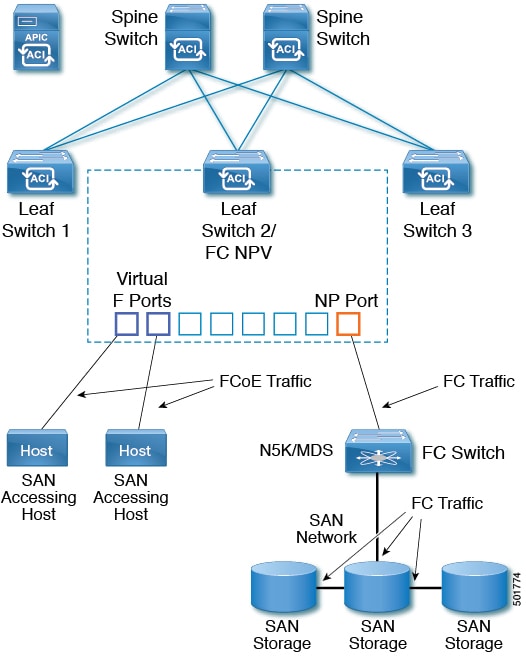
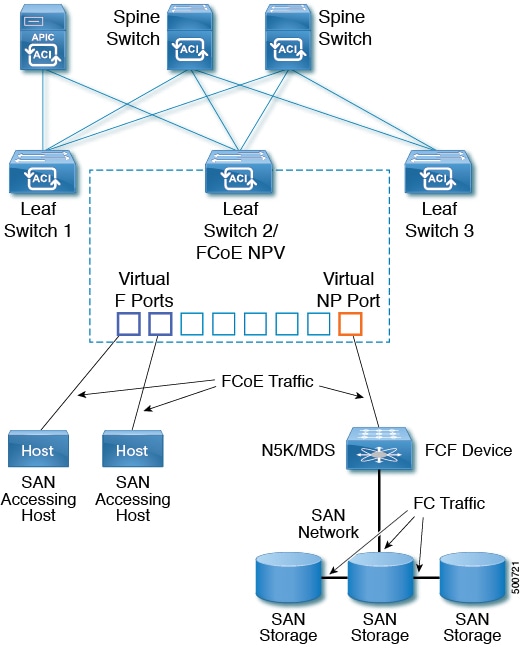
A typical implementation of FCoE protocol support on the ACI fabric enables hosts located on the Ethernet-based ACI fabric to communicate with SAN storage devices located on an FC network. The hosts are connecting through virtual F ports deployed on an ACI leaf switch. The SAN storage devices and FC network are connected through a Fibre Channel Forwarding (FCF) bridge to the ACI fabric through a virtual NP port, deployed on the same ACI leaf switch as is the virtual F port. Virtual NP ports and virtual F ports are also referred to generically as virtual Fibre Channel (vFC) ports.


Note

In the FCoE topology, the role of the ACI leaf switch is to provide a path for FCoE traffic between the locally connected SAN hosts and a locally connected FCF device. The leaf switch does not perform local switching between SAN hosts, and the FCoE traffic is not forwarded to a spine switch.


Topology Supporting FCoE Traffic Through ACI

The topology of a typical configuration supporting FCoE traffic over the ACI fabric consists of the following components:

Figure 1. ACI Topology Supporting FCoE Traffic


  • One or more ACI leaf switches configured through FC SAN policies to function as an NPV backbone.

  • Selected interfaces on the NPV-configured leaf switches configured to function as virtual F ports, which accommodate FCoE traffic to and from hosts running SAN management or SAN-consuming applications.

  • Selected interfaces on the NPV-configured leaf switches configured to function as virtual NP ports, which accommodate FCoE traffic to and from a Fibre Channel Forwarding (FCF) bridge.

The FCF bridge receives FC traffic from fibre channel links typically connecting SAN storage devices and encapsulates the FC packets into FCoE frames for transmission over the ACI fabric to the SAN management or SAN Data-consuming hosts. It receives FCoE traffic and repackages it back to FC for transmission over the fibre channel network.


Note

In the above ACI topology, FCoE traffic support requires direct connections between the hosts and virtual F ports and direct connections between the FCF device and the virtual NP port.


APIC servers enable an operator to configure and monitor the FCoE traffic through the APIC GUI, the APIC NX-OS style CLI, or through application calls to the APIC REST API.

Topology Supporting FCoE Initialization

In order for FCoE traffic flow to take place as described, you must also set up separate VLAN connectivity over which SAN Hosts broadcast FCoE Initialization protocol (FIP) packets to discover the interfaces enabled as F ports.

vFC Interface Configuration Rules

Whether you set up the vFC network and EPG deployment through the APIC GUI, NX-OS style CLI, or the REST API, the following general rules apply across platforms:

  • F port mode is the default mode for vFC ports. NP port mode must be specifically configured in the Interface policies.

  • The load balancing default mode is for leaf-switch or interface level vFC configuration is src-dst-ox-id.

  • One VSAN assignment per bridge domain is supported.

  • The allocation mode for VSAN pools and VLAN pools must always be static.

  • vFC ports require association with a VSAN domain (also called Fibre Channel domain) that contains VSANs mapped to VLANs.

FCoE Guidelines and Limitations

FCoE is supported on the following switches:

  • N9K-C93180LC-EX (When 40 Gigabit Ethernet (GE) ports are enabled as FCoE F or NP ports, they cannot be enabled for 40GE port breakout. FCoE is not supported on breakout ports.)

  • N9K-C93108TC-EX

  • N9K-C93180YC-EX

  • N9K-C93180LC-EX (FCoE support on FEX ports)

  • N9K-C93180YC-FX (FCoE support on FEX ports, 40G ports (1/49-54), and 4x10G breakout ports)

FCoE is supported on the following Nexus FEX devices:

  • N2K-C2348UPQ-10GE

  • N2K-C2348TQ-10GE

  • N2K-C2232PP-10GE

  • N2K-B22DELL-P

  • N2K-B22HP-P

  • N2K-B22IBM-P

  • N2K-B22DELL-P-FI

The vlan used for FCoE should have vlanScope set to Global. vlanScope set to portLocal is not supported for FCoE. The value is set via the L2 Interface Policy l2IfPol.

FCoE NX-OS Style CLI Configuration

Configuring FCoE Connectivity Without Policies or Profiles Using the NX-OS Style CLI

The following sample NX-OS style CLI sequences configure FCoE connectivity for EPG e1 under tenant t1 without configuring or applying switch-level and interface-level policies and profiles.

Procedure

  Command or Action Purpose
Step 1

Under the target tenant configure a bridge domain to support FCoE traffic.

Example:

apic1(config)# tenant t1
apic1(config-tenant)# vrf context v1
apic1(config-tenant-vrf)# exit
apic1(config-tenant)# bridge-domain b1
apic1(config-tenant-bd)# fc
apic1(config-tenant-bd)# vrf member v1
apic1(config-tenant-bd)# exit
apic1(config-tenant)# exit

The sample command sequence creates bridge domain b1 under tenant t1 configured to support FCoE connectivity.

Step 2

Under the same tenant, associate the target EPG with the FCoE-configured bridge domain.

Example:

apic1(config)# tenant t1
apic1(config-tenant)# application a1
apic1(config-tenant-app)# epg e1
apic1(config-tenant-app-epg)# bridge-domain member b1
apic1(config-tenant-app-epg)# exit
apic1(config-tenant-app)# exit
apic1(config-tenant)# exit

The sample command sequence creates EPG e1 and associates that EPG with the FCoE-configured bridge domain b1.

Step 3

Create a VSAN domain, VSAN pools, VLAN pools and VSAN to VLAN mapping.

Example:

A
apic1(config)# vsan-domain dom1
apic1(config-vsan)# vsan 1-10
apic1(config-vsan)# vlan 1-10
apic1(config-vsan)# fcoe vsan 1 vlan 1 loadbalancing src-dst-ox-id 
apic1(config-vsan)# fcoe vsan 2 vlan 2 

Example:

B
apic1(config)# template vsan-attribute pol1
apic1(config-vsan-attr)#  fcoe vsan 2 vlan 12 loadbalancing src-dst-ox-id
apic1(config-vsan-attr)#  fcoe vsan 3 vlan 13 loadbalancing src-dst-ox-id
apic1(config-vsan-attr)#  exit
apic1(config)#  vsan-domain dom1
apic1(config-vsan)# vsan 1-10
apic1(config-vsan)# vlan 1-10
apic1(config-vsan)# inherit vsan-attribute pol1
apic1(config-vsan)# exit

In Example A, the sample command sequence creates VSAN domain, dom1 with VSAN pools and VLAN pools, maps VSAN 1 to VLAN 1 and maps VSAN 2 to VLAN 2

In Example B, an alternate sample command sequence creates a reusable VSAN attribute template pol1 and then creates VSAN domain dom1, which inherits the attributes and mappings from that template.

Step 4

Create the physical domain to support the FCoE Initialization (FIP) process.

Example:


apic1(config)# vlan-domain fipVlanDom
apic1(config-vlan)# vlan 120
apic1(config-vlan)# exit

In the example, the command sequence creates a regular VLAN domain, fipVlanDom, which includes VLAN 120 to support the FIP process.

Step 5

Under the target tenant configure a regular bridge domain.

Example:

apic1(config)# tenant t1
apic1(config-tenant)# vrf context v2
apic1(config-tenant-vrf)# exit
apic1(config-tenant)# bridge-domain fip-bd 
apic1(config-tenant-bd)# vrf member v2
apic1(config-tenant-bd)# exit
apic1(config-tenant)# exit 

In the example, the command sequence creates bridge domain fip-bd.

Step 6

Under the same tenant, associate this EPG with the configured regular bridge domain.

Example:

apic1(config)# tenant t1
apic1(config-tenant)# application a1
apic1(config-tenant-app)# epg epg-fip 
apic1(config-tenant-app-epg)# bridge-domain member fip-bd 
apic1(config-tenant-app-epg)# exit
apic1(config-tenant-app)# exit
apic1(config-tenant)# exit

In the example, the command sequence associates EPG epg-fip with bridge domain fip-bd.

Step 7

Configure a VFC interface with F mode.

Example:

A
apic1(config)# leaf 101
apic1(config-leaf)# interface ethernet 1/2
apic1(config-leaf-if)# vlan-domain member fipVlanDom 
apic1(config-leaf-if)# switchport trunk native vlan 120 tenant t1 application a1 epg epg-fip 
apic1(config-leaf-if)# exit                            
apic1(config-leaf)# exit
apic1(config-leaf)# interface vfc 1/2
apic1(config-leaf-if)# switchport mode f
apic1(config-leaf-if)# vsan-domain member dom1 
apic1(config-leaf-if)# switchport vsan 2 tenant t1 application a1 epg e1 
apic1(config-leaf-if)# switchport trunk allowed vsan 3 tenant t1 application a1 epg e2
apic1(config-leaf-if)# exit

Example:

B
apic1(config)# vpc context leaf 101 102
apic1(config-vpc)# interface vpc vpc1
apic1(config-vpc-if)# vlan-domain member vfdom100
apic1(config-vpc-if)# vsan-domain member dom1 
apic1(config-vpc-if)# #For FIP discovery
apic1(config-vpc-if)# switchport trunk native vlan 120 tenant t1 application a1 epg epg-fip
apic1(config-vpc-if)# switchport vsan 2 tenant t1 application a1 epg e1
apic1(config-vpc-if)# exit
apic1(config-vpc)# exit
apic1(config)# leaf 101-102
apic1(config-leaf)# interface ethernet 1/3
apic1(config-leaf-if)# channel-group vpc1 vpc
apic1(config-leaf-if)# exit
apic1(config-leaf)# exit

Example:

C
apic1(config)# leaf 101 
apic1(config-leaf)# interface vfc-po pc1
apic1(config-leaf-if)# vsan-domain member dom1
apic1(config-leaf-if)# switchport vsan 2 tenant t1 application a1 epg e1
apic1(config-leaf-if)# exit
apic1(config-leaf)# interface ethernet 1/2
apic1(config-leaf-if)# channel-group pc1
apic1(config-leaf-if)# exit
apic1(config-leaf)# exit

In example A the command sequence enables interface 1/2 on leaf switch 101 to function as an F port and associates that interface with VSAN domain dom1.

Each of the targeted interfaces must be assigned one (and only one) VSAN in native mode. Each interface may be assigned one or more additional VSANs in regular mode.

The sample command sequence associates the target interface 1/2 with:

  • VLAN 120 for FIP discovery and associates it with EPG epg-fip and application a1 under tenant t1.

  • VSAN 2 as a native VSAN and associates it with EPG e1 and application a1 under tenant t1.

  • VSAN 3 as a regular VSAN.

In example B, the command sequence configures a vFC over a vPC with the same VSAN on both the legs. From the CLI you cannot specify different VSANs on each log. The alternate configuration can be carried out in the APIC advanced GUI.

Step 8

Configure a VFC interface with NP mode.

Example:

apic1(config)# leaf 101
apic1(config-leaf)# interface vfc 1/4
apic1(config-leaf-if)# switchport mode np
apic1(config-leaf-if)# vsan-domain member dom1
The sample command sequence enables interface 1/4 on leaf switch 101 to function as an NP port and associates that interface with VSAN domain dom1.
Step 9

Assign the targeted FCoE-enabled interfaces a VSAN.

Example:

apic1(config-leaf-if)# switchport trunk allowed vsan 1 tenant t1 application a1 epg e1
apic1(config-leaf-if)# switchport vsan 2 tenant t4 application a4 epg e4 

Each of the targeted interfaces must be assigned one (and only one) VSAN in native mode. Each interface may be assigned one or more additional VSANs in regular mode.

The sample command sequence assigns the target interface to VSAN 1 and associates it with EPG e1 and application a1 under tenant t1. "trunk allowed" assigns vsan 1 regular mode status. The command sequence also assigns the interface a required native mode VSAN 2. As this example shows, it is permissible for different VSANs to provide different EPGs running under different tenants access to the same interfaces.

Configuring FCoE Connectivity With Policies and Profiles Using the NX-OS Style CLI

The following sample NX-OS style CLI sequences create and use policies to configure FCoE connectivity for EPG e1 under tenant t1.

Procedure

  Command or Action Purpose
Step 1

Under the target tenant configure a bridge domain to support FCoE traffic.

Example:

apic1# configure 
apic1(config)# tenant t1
apic1(config-tenant)# vrf context v1
apic1(config-tenant-vrf)# exit
apic1(config-tenant)# bridge-domain b1 
apic1(config-tenant-bd)# fc
apic1(config-tenant-bd)# vrf member v1
apic1(config-tenant-bd)# exit
apic1(config-tenant)# exit
apic1(config)# 

The sample command sequence creates bridge domain b1 under tenant t1 configured to support FCoE connectivity.

Step 2

Under the same tenant, associate your target EPG with the FCoE configured bridge domain.

Example:

apic1(config)# tenant t1
apic1(config-tenant)# application a1 
apic1(config-tenant-app)# epg e1
apic1(config-tenant-app-epg)# bridge-domain member b1 
apic1(config-tenant-app-epg)# exit
apic1(config-tenant-app)# exit
apic1(config-tenant)# exit
apic1(config)# 

The sample command sequence creates EPG e1 associates that EPG with FCoE-configured bridge domain b1.

Step 3

Create a VSAN domain, VSAN pools, VLAN pools and VSAN to VLAN mapping.

Example:

A
apic1(config)# vsan-domain dom1
apic1(config-vsan)# vsan 1-10
apic1(config-vsan)# vlan 1-10
apic1(config-vsan)# fcoe vsan 1 vlan 1 loadbalancing 
                  src-dst-ox-id 
apic1(config-vsan)# fcoe vsan 2 vlan 2 

Example:

B
apic1(config)# template vsan-attribute pol1
apic1(config-vsan-attr)#  fcoe vsan 2 vlan 12 
                          loadbalancing src-dst-ox-id
apic1(config-vsan-attr)#  fcoe vsan 3 vlan 13 
                          loadbalancing src-dst-ox-id
apic1(config-vsan-attr)#  exit
apic1(config)#  vsan-domain dom1
apic1(config-vsan)#     inherit vsan-attribute pol1
apic1(config-vsan)#     exit

In Example A, the sample command sequence creates VSAN domain, dom1 with VSAN pools and VLAN pools, maps VSAN 1 VLAN 1 and maps VSAN 2 to VLAN 2

In Example B, an alternate sample command sequence creates a reusable vsan attribute template pol1 and then creates VSAN domain dom1, which inherits the attributes and mappings from that template.

Step 4

Create the physical domain to support the FCoE Initialization (FIP) process.

Example:

apic1(config)# vlan-domain fipVlanDom
apic1(config)# vlan-pool fipVlanPool

Step 5

Configure a Fibre Channel SAN policy.

Example:

apic1#
apic1# configure
apic1(config)# template fc-fabric-policy ffp1
apic1(config-fc-fabric-policy)# fctimer e-d-tov 1111
apic1(config-fc-fabric-policy)# fctimer r-a-tov 2222
apic1(config-fc-fabric-policy)# fcoe fcmap 0E:FC:01
apic1(config-fc-fabric-policy)# exit

The sample command sequence creates Fibre Channel SAN policy ffp1 to specify a combination of error-detect timeout values (EDTOV), resource allocation timeout values (RATOV), and the default FC map values for FCoE-enabled interfaces on a target leaf switch.

Step 6

Create a Fibre Channel node policy.

Example:

apic1(config)# template fc-leaf-policy flp1
apic1(config-fc-leaf-policy)# fcoe fka-adv-period 44
apic1(config-fc-leaf-policy)# exit

The sample command sequence creates Fibre Channel node policy flp1 to specify a combination of disruptive load-balancing enablement and FIP keep-alive values. These values also apply to all the FCoE-enabled interfaces on a target leaf switch.

Step 7

Create Node Policy Group.

Example:

apic1(config)# template leaf-policy-group lpg1
apic1(config-leaf-policy-group)# inherit fc-fabric-policy ffp1
apic1(config-leaf-policy-group)# inherit fc-leaf-policy flp1
apic1(config-leaf-policy-group)# exit
apic1(config)# exit
apic1#

The sample command sequence creates a Node Policy group, lpg1, which combines the values of the Fibre Channel SAN policy ffp1 and Fibre Channel node policy, flp1. The combined values of this node policy group can be applied to Node profiles configured later.

Step 8

Create a Node Profile.

Example:

apic1(config)# leaf-profile lp1
apic1(config-leaf-profile)# leaf-group lg1
apic1(config-leaf-group)# leaf 101 
apic1(config-leaf-group)# leaf-policy-group lpg1

The sample command sequence creates node profile lp1 associates it with node policy group lpg1, node group lg1, and leaf switch 101.

Step 9

Create an interface policy group for F port interfaces.

Example:

apic1(config)# template policy-group ipg1
apic1(config-pol-grp-if)# priority-flow-control mode auto
apic1(config-pol-grp-if)# switchport mode f
apic1(config-pol-grp-if)# slow-drain pause timeout 111
apic1(config-pol-grp-if)# slow-drain congestion-timeout count 55
apic1(config-pol-grp-if)# slow-drain congestion-timeout action log

The sample command sequence creates interface policy group ipg1 and assigns a combination of values that determine priority flow control enablement, F port enablement, and slow-drain policy values for any interface that this policy group is applied to.

Step 10

Create an interface policy group for NP port interfaces.

Example:

apic1(config)# template policy-group ipg2
apic1(config-pol-grp-if)# priority-flow-control mode auto
apic1(config-pol-grp-if)# switchport mode np
apic1(config-pol-grp-if)# slow-drain pause timeout 111
apic1(config-pol-grp-if)# slow-drain congestion-timeout count 55
apic1(config-pol-grp-if)# slow-drain congestion-timeout action log

The sample command sequence creates interface policy group ipg2 and assigns a combination of values that determine priority flow control enablement, NP port enablement, and slow-drain policy values for any interface that this policy group is applied to.

Step 11

Create an interface profile for F port interfaces.

Example:

apic1# configure
apic1(config)# leaf-interface-profile lip1
apic1(config-leaf-if-profile)#  description 'test description lip1'
apic1(config-leaf-if-profile)#  leaf-interface-group lig1
apic1(config-leaf-if-group)# description 'test description lig1'
apic1(config-leaf-if-group)# policy-group ipg1
apic1(config-leaf-if-group)# interface ethernet 1/2-6, 1/9-13

The sample command sequence creates an interface profile lip1 for F port interfaces, associates the profile with F port specific interface policy group ipg1, and specifies the interfaces to which this profile and its associated policies applies.

Step 12

Create an interface profile for NP port interfaces.

Example:

apic1# configure
apic1(config)#     leaf-interface-profile lip2
apic1(config-leaf-if-profile)#         description 'test description lip2'
apic1(config-leaf-if-profile)#         leaf-interface-group lig2
apic1(config-leaf-if-group)#           description 'test description lig2'
apic1(config-leaf-if-group)# policy-group ipg2
apic1(config-leaf-if-group)# interface ethernet 1/14

The sample command sequence creates an interface profile lip2 for NP port interfaces, associates the profile with NP port specific interface policy group ipg2, and specifies the interface to which this profile and its associated policies applies.

Step 13

Configure QoS Class Policy for Level 1.

Example:

apic1(config)# qos parameters level1
apic1(config-qos)# pause no-drop cos 3

The sample command sequence specifies the QoS level of FCoE traffic to which priority flow control policy might be applied and pauses no-drop packet handling for Class of Service level 3.

Configuring FCoE Over FEX Using NX-OS Style CLI

FEX ports are configured as port VSANs.

Procedure


Step 1

Configure Tenant and VSAN domain:

Example:

apic1# configure
apic1(config)#  tenant t1
apic1(config-tenant)#   vrf context v1
apic1(config-tenant-vrf)#     exit
apic1(config-tenant)#   bridge-domain b1
apic1(config-tenant-bd)#       fc
apic1(config-tenant-bd)#       vrf member v1
apic1(config-tenant-bd)#       exit
apic1(config-tenant)#   application a1
apic1(config-tenant-app)#      epg e1
apic1(config-tenant-app-epg)# bridge-domain member b1
apic1(config-tenant-app-epg)# exit
apic1(config-tenant-app)#      exit
apic1(config-tenant)# exit

apic1(config)#  vsan-domain dom1
apic1(config-vsan)# vlan 1-100
apic1(config-vsan)# vsan 1-100
apic1(config-vsan)# fcoe vsan 2 vlan 2 loadbalancing src-dst-ox-id
apic1(config-vsan)# fcoe vsan 3 vlan 3 loadbalancing src-dst-ox-id
apic1(config-vsan)# fcoe vsan 5 vlan 5
apic1(config-vsan)# exit
Step 2

Associate FEX to an interface:

Example:

apic1(config)#  leaf 101
apic1(config-leaf)#  interface ethernet 1/12
apic1(config-leaf-if)#  fex associate 111
apic1(config-leaf-if)#  exit
Step 3

Configure FCoE over FEX per port, port-channel, and VPC:

Example:

apic1(config-leaf)#  interface vfc 111/1/2
apic1(config-leaf-if)#  vsan-domain member dom1
apic1(config-leaf-if)#  switchport vsan 2 tenant t1 application a1 epg e1

apic1(config-leaf-if)# exit  
apic1(config-leaf)#  interface vfc-po pc1 fex 111
apic1(config-leaf-if)# vsan-domain member dom1
apic1(config-leaf-if)# switchport vsan 2 tenant t1 application a1 epg e1  
apic1(config-leaf-if)# exit
apic1(config-leaf)# interface ethernet 111/1/3
apic1(config-leaf-if)# channel-group pc1 
apic1(config-leaf-if# exit
apic1(config-leaf)# exit
apic1(config)# vpc domain explicit 12 leaf 101 102
apic1(config-vpc)# exit
apic1(config)# vpc context leaf 101 102
apic1(config-vpc)#     interface vpc vpc1 fex 111 111
apic1(config-vpc-if)#       vsan-domain member dom1
apic1(config-vpc-if)#       switchport vsan 2 tenant t1 application a1 epg e1
apic1(config-vpc-if)#       exit
apic1(config-vpc)#     exit
apic1(config)# leaf 101-102
apic1(config-leaf)# interface ethernet 1/2
apic1(config-leaf-if)# fex associate 111
apic1(config-leaf-if)# exit
apic1(config-leaf)# interface ethernet 111/1/2
apic1(config-leaf-if)# channel-group vpc1 vpc 
apic1(config-leaf-if)# exit
Step 4

Verify the configuration with the following command:

Example:

apic1(config-vpc)# show vsan-domain detail 
vsan-domain : dom1
 
vsan : 1-100
 
vlan : 1-100
 
Leaf          Interface         Vsan  Vlan  Vsan-Mode    Port-Mode  Usage               Operational State
------------  ----------------  ----  ----  -----------  ---------  --------------------------------------
101           vfc111/1/2       2       2    Native                  Tenant: t1           Deployed
                                                                     App: a1
                                                                     Epg: e1
 
101           PC:pc1           5       5    Native                Tenant: t1             Deployed
                                                                     App: a1
                                                                     Epg: e1
 
101           vfc111/1/3       3       3    Native       F          Tenant: t1           Deployed
                                                                     App: a1
                                                                     Epg: e1

Verifying FCoE Configuration Using the NX-OS Style CLI

The following show command verifies the FCoE configuration on your leaf switch ports.

Procedure


Use the show vsan-domain command to verify FCoE is enabled on the target switch.

The command example confirms FCoE enabled on the listed leaf switches and its FCF connection details.

Example:


ifav-isim8-ifc1# show vsan-domain detail 
vsan-domain : iPostfcoeDomP1
 
vsan : 1-20  51-52  100-102  104-110  200  1999  3100-3101  3133  
      2000                                                        
 
vlan : 1-20  51-52  100-102  104-110  200  1999  3100-3101  3133  
      2000                                                        
 
                                   Vsan    Port                    Operational
 Leaf  Interface       Vsan  Vlan  Mode    Mode  Usage             State         
 ----  ---------       ----  ----  ------- ----  ----------------  ------------
 101   vfc1/11         1     1     Regular  F    Tenant: iPost101  Deployed                  
                                                 App: iPost1                                     
                                                 Epg: iPost1                                     
                                                                                                                     
 101   vfc1/12         1     1     Regular  NP   Tenant: iPost101  Deployed                  
                                                 App: iPost1                                     
                                                 Epg: iPost1                                     
                                                                                                                     
 101   PC:infraAccBndl 4     4     Regular  NP   Tenant: iPost101  Deployed                  
          Grp_pc01                               App: iPost4                                     
                                                 Epg: iPost4                                     
                                                                                                                     
 101   vfc1/30         2000        Native        Tenant: t1        Not deployed     
                                                 App: a1           (invalid-path)                     
                                                 Epg: e1                            

Undeploying FCoE Elements Using the NX-OS Style CLI

Any move to undeploy FCoE connectivity from the ACI fabric requires that you remove the FCoE components on several levels.

Procedure


Step 1

List the attributes of the leaf port interface, set its mode setting to default, and then remove its EPG deployment and domain association.

The example sets the port mode setting of interface vfc 1/2 to default and then removes the deployment of EPG e1 and the association with VSAN Domain dom1 from that interface.

Example:


apic1(config)# leaf 101
apic1(config-leaf)# interface vfc 1/2    
apic1(config-leaf-if)# show run
# Command: show running-config leaf 101 interface vfc 1 / 2
# Time: Tue Jul 26 09:41:11 2016
  leaf 101 
    interface vfc 1/2
      vsan-domain member dom1
      switchport vsan 2 tenant t1 application a1 epg e1
      exit
    exit
apic1(config-leaf-if)# no switchport mode
apic1(config-leaf-if)# no switchport vsan 2 tenant t1 application a1 epg e1
apic1(config-leaf-if)# no vsan-domain member dom1
apic1(config-leaf-if)# exit
apic1(config-leaf)# exit
Step 2

List and remove the VSAN/VLAN mapping and the VLAN and VSAN pools.

The example removes the VSAN/VLAN mapping for vsan 2, VLAN pool 1-10, and VSAN pool 1-10 from VSAN domain dom1.

Example:

apic1(config)# vsan-domain dom1
apic1(config-vsan)# show run
# Command: show running-config vsan-domain dom1
# Time: Tue Jul 26 09:43:47 2016
  vsan-domain dom1
    vsan 1-10
    vlan 1-10
    fcoe vsan 2 vlan 2
    exit
apic1(config-vsan)# no fcoe vsan 2
apic1(config-vsan)# no vlan 1-10
apic1(config-vsan)# no vsan 1-10
apic1(config-vsan)# exit

#################################################################################
NOTE: To remove a template-based VSAN to VLAN mapping use an alternate sequence:
#################################################################################

apic1(config)# template vsan-attribute <template_name>
apic1(config-vsan-attr)# no fcoe vsan 2
Step 3

Delete the VSAN Domain.

The example deletes VSAN domain dom1.

Example:


apic1(config)# no vsan-domain dom1
Step 4

You can delete the associated tenant, EPG, and selectors if you do not need them.


Fibre Channel NPV

Fibre Channel Connectivity Overview

A switch is in NPV mode after enabling NPV. NPV mode applies to an entire switch. All end devices connected to a switch that are in NPV mode must log in as an N port to use this feature (loop-attached devices are not supported). All links from the edge switches (in NPV mode) to the NPV core switches are established as NP ports (not E ports), which are used for typical inter-switch links.

FC NPV Benefits

FC NPV provides the following:

  • Increased number of hosts that connect to the fabric without adding domain IDs in the fabric

  • Connection of FC and FCoE hosts and targets to SAN fabrics using FC interfaces

  • Automatic traffic mapping

  • Static traffic mapping

  • Disruptive automatic load balancing

FC NPV Mode

Feature-set fcoe-npv in ACI will be enabled automatically by default when first FCoE/FC configuration is pushed.

FC Topology

The topology of a typical configuration supporting FC traffic over the ACI fabric consists of the following components:

  • A Leaf can be connected to a FC switch by using FCoE NP port or native FC NP port.

  • An ACI Leaf can be directly connected with a server/Storage using FCoE links.

  • FC/FCoE traffic is not sent to fabric/spine. A Leaf switch does not do local switching for FCoE traffic. The switching is done by a core switch which is connected with a leaf switch via FC/FCoE NPV link.

  • Multiple FDISC followed by Flogi is supported with FCoE host and FC/FCoE NP links.

Fibre Channel N-Port Virtualization Guidelines and Limitations

When configuring Fibre Channel N-Port Virtualization (NPV), note the following guidelines and limitations:

  • Fibre Channel NP ports support trunk mode, but Fibre Channel F ports do not.

  • On a trunk Fibre Channel port, internal login happens on the highest VSAN.

  • On the core switch, the following features must be enabled:

    
    feature npiv
    feature fport-channel-trunk
    
  • To use an 8G uplink speed, you must configure the IDLE fill pattern on the core switch.


    Note

    Following is an example of configuring IDLE fill pattern on a Cisco MDS switch:

    
    Switch(config)# int fc2/3
    Switch(config)# switchport fill-pattern IDLE speed 8000
    Switch(config)# show run int fc2/3
    
    interface fc2/3
    switchport speed 8000
    switchport mode NP
    switchport fill-pattern IDLE speed 8000
    no shutdown


  • In the Cisco APIC 4.1(1) release and later, Fibre Channel NPV support is limited to the Cisco N9K-C93180YC-FX switch.

  • You can use ports 1 through 48 for Fibre Channel configuration. Ports 49 through 54 cannot be Fibre Channel ports.

  • If you convert a port from Ethernet to Fibre Channel or the other way around, you must reload the switch. Currently, you can convert only one contiguous range of ports to Fibre Channel ports, and this range must be a multiple of 4, ending with a port number that is a multiple of 4. For example, 1-4, 1-8, or 21-24.

  • Fibre Channel Uplink (NP) connectivity to Brocade Port Blade Fibre Channel 16-32 is not supported when a Cisco N9K-93180YC-FX leaf switch port is configured in 8G speed.

  • The selected port speed must be supported by the SFP. For example, because a 32G SFP supports 8/16/32G, a 4G port speed requires an 8G or 16G SFP. Because a 16G SFP supports 4/8/16G, a 32G port speed requires a 32G SFP.

  • Speed autonegotiation is supported. The default speed is 'auto'.

  • You cannot use Fibre Channel on 40G and breakout ports.

  • FEX cannot be directly connected to FC ports.

  • FEX HIF ports cannot be converted to FC.

Configuring FC Connectivity Without Policies or Profiles Using the NX-OS CLI

The sample command sequence below creates bridge domain b1 under tenant t1 configured to support FCoE connectivity.

Before you begin

  • Under the target tenant configure a bridge domain to support FCoE traffic.

Procedure


Step 1

To create a bridge domain for FCoE connectivity:

Example:

apic1(config)# tenant t1
apic1(config-tenant)# vrf context v1
apic1(config-tenant-vrf)# exit
apic1(config-tenant)# bridge-domain b1
apic1(config-tenant-bd)# fc
apic1(config-tenant-bd)# vrf member v1
apic1(config-tenant-bd)# exit
apic1(config-tenant)# exit
Step 2

Under the same tenant, associate the target EPG with the FCoE-configured bridge domain. The sample command sequence below creates EPG e1 and associates that EPG with the FCoE-configured bridge domain b1:

Example:

apic1(config)# tenant t1
apic1(config-tenant)# application a1
apic1(config-tenant-app)# epg e1
apic1(config-tenant-app-epg)# bridge-domain member b1
apic1(config-tenant-app-epg)# exit
apic1(config-tenant-app)# exit
apic1(config-tenant)# exit
Step 3

The following example creates vsan domain dom1 with vsans 1-10:

Example:

apic1(config)# vsan-domain dom1
apic1(config-vsan)# vsan 1-10
Step 4

Convert range of ports from Ethernet to FC mode. The following example converts port 1/1-4 on switch 101 to FC:

Example:

apic1# config
apic1(config)# leaf 101
apic1(config-leaf)# slot 1
apic1(config-leaf-slot)# port 1 4 type fc
apic1(config-leaf-slot)# exit
apic1(config-leaf)# exit
Note 

Port conversion from Ethernet to FC and vice versa requires reload of switch.

Step 5

Configure FC interface in NP mode. The following example sets various interface properties on interface fc 1/10 and associates that interface with VSAN domain dom1. Each of the targeted interfaces must be assigned one (and only one) VSAN in native mode. The sample command sequence associates the target interface 1/10 with VSAN 10 as a native VSAN and associates it with EPG e1 and application a1 under tenant t1.

Example:

apic1(config-leaf)# interface fc 1/10
apic1(config-leaf-fc-if)# switchport mode [f | np]
apic1(config-leaf-fc-if)# switchport rxbbcredit <16-64>
apic1(config-leaf-fc-if)# switchport speed [16G | 32G | 4G | 8G | auto | unknown]
apic1(config-leaf-fc-if)# vsan-domain member dom1
apic1(config-leaf-fc-if)# switchport vsan 10 tenant t1 application a1 epg e1
Step 6

Create traffic map to pin server ports to uplink ports. The following example creates Traffic map for vFC 1/47 server interface pinned to FC 1/7 uplink interface:

Example:

apic1# config
apic1(config)# leaf 101
apic1(config-leaf)# npv traffic-map server-interface vfc 1/47 label label1 tenant tenant1 application app1 epg epg1
apic1(config-leaf)# npv traffic-map external-interface fc 1/7 tenant tenant1 label label1

Configuring FC Connectivity With Policies or Profiles Using the NX-OS CLI

The sample command sequence below creates bridge domain b1 under tenant t1 configured to support FCoE connectivity.

Before you begin

  • Under the target tenant configure a bridge domain to support FCoE traffic.

Procedure


Step 1

To create a bridge domain for FCoE connectivity:

Example:

apic1(config)# tenant t1
apic1(config-tenant)# vrf context v1
apic1(config-tenant-vrf)# exit
apic1(config-tenant)# bridge-domain b1
apic1(config-tenant-bd)# fc
apic1(config-tenant-bd)# vrf member v1
apic1(config-tenant-bd)# exit
apic1(config-tenant)# exit
Step 2

Under the same tenant, associate the target EPG with the FCoE-configured bridge domain. The sample command sequence below creates EPG e1 and associates that EPG with the FCoE-configured bridge domain b1:

Example:

apic1(config)# tenant t1
apic1(config-tenant)# application a1
apic1(config-tenant-app)# epg e1
apic1(config-tenant-app-epg)# bridge-domain member b1
apic1(config-tenant-app-epg)# exit
apic1(config-tenant-app)# exit
apic1(config-tenant)# exit
Step 3

Create a VSAN domain. The following example creates vsan domain dom1 with vsans 1-10:

Example:

apic1(config)# vsan-domain dom1
apic1(config-vsan)# vsan 1-10
Step 4

Create an interface policy group for NP port interfaces. The sample command sequence creates FC interface policy group ipg2 and assigns a combination of values that determine values for any interface that this policy group is applied to:

Example:

apic1(config)# template fc-policy-group ipg1
apic1(config-fc-pol-grp-if)# switchport ?
 fill-pattern  Configure fill pattern for fc interface
 mode         Configure port mode for fc interface
 rxbbcredit   Configure rxBBCredit for fc interface
 speed        Configure speed for fc interface
 trunk-mode    Configure trunk-mode for fc interface
apic1(config-fc-pol-grp-if)# switchport fill-pattern [ARBFF | IDLE]
apic1(config-fc-pol-grp-if)# switchport mode [f | np]
apic1(config-fc-pol-grp-if)# switchport rxbbcredit <16-64>
apic1(config-fc-pol-grp-if)# switchport speed [16G | 32G | 4G | 8G | auto | unknown]
apic1(config-fc-pol-grp-if)# vsan-domain member dom1
Step 5

Create an interface profile for FC port interfaces. The sample command sequence creates an interface profile lip1 for FC port interfaces, associates the profile with FC interface policy group ipg1, and specifies the interfaces to which this profile and its associated policies applies:

Example:

apic1# configure
apic1(config)# leaf-interface-profile lip1 
apic1(config-leaf-if-profile)# description 'test description lip1'
apic1(config-leaf-if-profile)# leaf-interface-group lig1
apic1(config-leaf-if-group)# description 'test description lig1'
apic1(config-leaf-if-group)# fc-policy-group ipg1 
apic1(config-leaf-if-group)# interface fc 1/1-4
Step 6

Create a leaf profile, assign the leaf interface profile to the leaf profile, and assign the leaf IDs on which the profile will be applied:

Example:

apic1(config)# leaf-profile lp103
apic1(config-leaf-profile)# leaf-interface-profile lip1
apic1(config-leaf-profile)# leaf-group range
apic1(config-leaf-group)# leaf 103
apic1(config-leaf-group)#
Note 

After associating leaf interface profile to leaf, reload of leaf is required to bring up these ports as FC ports.


Configuring 802.1Q Tunnels

About ACI 802.1Q Tunnels

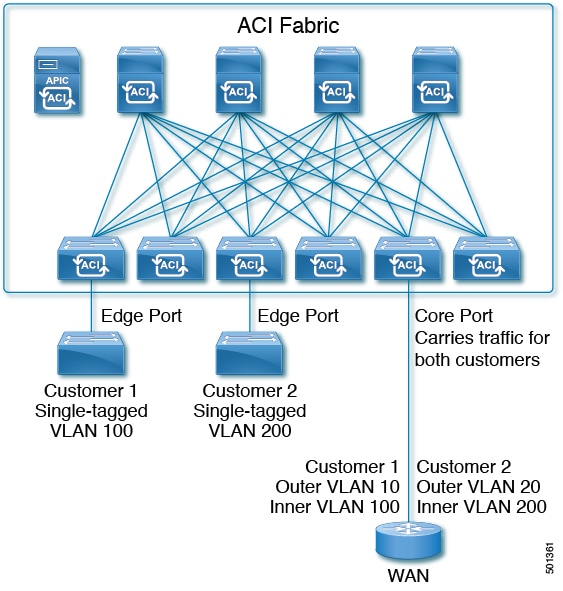
Figure 2. ACI 802.1Q Tunnels

With Cisco ACI and Cisco APIC Release 2.2(1x) and higher, you can configure 802.1Q tunnels on edge (tunnel) ports to enable point-to-multi-point tunneling of Ethernet frames in the fabric, with Quality of Service (QoS) priority settings. A Dot1q Tunnel transports untagged, 802.1Q tagged, and 802.1ad double-tagged frames as-is across the fabric. Each tunnel carries the traffic from a single customer and is associated with a single bridge domain. ACI front panel ports can be part of a Dot1q Tunnel. Layer 2 switching is done based on Destination MAC (DMAC) and regular MAC learning is done in the tunnel. Edge-port Dot1q Tunnels are supported on second-generation (and later) Cisco Nexus 9000 series switches with "EX" on the end of the switch model name.

With Cisco ACI and Cisco APIC Release 2.3(x) and higher, you can also configure multiple 802.1Q tunnels on the same core port to carry double-tagged traffic from multiple customers, each distinguished with an access encapsulation configured for each 802.1Q tunnel. You can also disable MAC Address Learning on 802.1Q tunnels. Both edge ports and core ports can belong to an 802.1Q tunnel with access encapsulation and disabled MAC Address Learning. Both edge ports and core ports in Dot1q Tunnels are supported on third-generation Cisco Nexus 9000 series switches with "FX" on the end of the switch model name.

Terms used in this document may be different in the Cisco Nexus 9000 Series documents.

Table 1. 802.1Q Tunnel Terminology

ACI Documents

Cisco Nexus 9000 Series Documents

Edge Port

Tunnel Port

Core Port

Trunk Port

The following guidelines and restrictions apply:

  • Layer 2 tunneling of VTP, CDP, LACP, LLDP, and STP protocols is supported with the following restrictions:

    • Link Aggregation Control Protocol (LACP) tunneling functions as expected only with point-to-point tunnels using individual leaf interfaces. It is not supported on port-channels (PCs) or virtual port-channels (vPCs).

    • CDP and LLDP tunneling with PCs or vPCs is not deterministic; it depends on the link it chooses as the traffic destination.

    • To use VTP for Layer 2 protocol tunneling, CDP must be enabled on the tunnel.

    • STP is not supported in an 802.1Q tunnel bridge domain when Layer 2 protocol tunneling is enabled and the bridge domain is deployed on Dot1q Tunnel core ports.

    • ACI leaf switches react to STP TCN packets by flushing the end points in the tunnel bridge domain and flooding them in the bridge domain.

    • CDP and LLDP tunneling with more than two interfaces flood packets on all interfaces.

    • With Cisco APIC Release 2.3(x) or higher, the destination MAC address of Layer 2 protocol packets tunneled from edge to core ports is rewritten as 01-00-0c-cd-cd-d0 and the destination MAC address of Layer 2 protocol packets tunneled from core to edge ports is rewritten with the standard default MAC address for the protocol.

  • If a PC or vPC is the only interface in a Dot1q Tunnel and it is deleted and reconfigured, remove the association of the PC/VPC to the Dot1q Tunnel and reconfigure it.

  • With Cisco APIC Release 2.2(x) the Ethertypes for double-tagged frames must be 0x9100 followed by 0x8100.

    However, with Cisco APIC Release 2.3(x) and higher, this limitation no longer applies for edge ports, on third-generation Cisco Nexus switches with "FX" on the end of the switch model name.

  • For core ports, the Ethertypes for double-tagged frames must be 0x8100 followed by 0x8100.

  • You can include multiple edge ports and core ports (even across leaf switches) in a Dot1q Tunnel.

  • An edge port may only be part of one tunnel, but a core port can belong to multiple Dot1q tunnels.

  • With Cisco APIC Release 2.3(x) and higher, regular EPGs can be deployed on core ports that are used in 802.1Q tunnels.

  • L3Outs are not supported on interfaces enabled for Dot1q Tunnels.

  • FEX interfaces are not supported as members of a Dot1q Tunnel.

  • Interfaces configured as breakout ports do not support 802.1Q tunnels.

  • Interface-level statistics are supported for interfaces in Dot1q Tunnels, but statistics at the tunnel level are not supported.

Configuring 802.1Q Tunnels Using the NX-OS Style CLI


Note

You can use ports, port-channels, or virtual port channels for interfaces included in a Dot1q Tunnel. Detailed steps are included for configuring ports. See the examples below for the commands to configure edge and core port-channels and virtual port channels.


Create a Dot1q Tunnel and configure the interfaces for use in the tunnel using the NX-OS Style CLI, with the following steps:


Note

Dot1q Tunnels must include 2 or more interfaces. Repeat the steps (or configure two interfaces together), to mark each interface for use in a Dot1q Tunnel. In this example, two interfaces are configured as edge-switch ports, used by a single customer.


Use the following steps to configure a Dot1q Tunnel using the NX-OS style CLI:

  1. Configure at least two interfaces for use in the tunnel.

  2. Create a Dot1q Tunnel.

  3. Associate all the interfaces with the tunnel.

Before you begin

Configure the tenant that will use the Dot1q Tunnel.

Procedure

  Command or Action Purpose
Step 1

configure

Example:

apic1# configure

Enters configuration mode.

Step 2

Configure two interfaces for use in an 802.1Q tunnel, with the following steps:

Step 3

leaf ID

Example:

apic1(config)# leaf 101

Identifies the leaf where the interfaces of the Dot1q Tunnel will be located.

Step 4

interface ethernet slot/port

Example:

apic1(config-leaf)# interface ethernet 1/13-14

Identifies the interface or interfaces to be marked as ports in a tunnel.

Step 5

switchport mode dot1q-tunnel {edgePort | corePort}

Example:

apic1(config-leaf-if)# switchport mode dot1q-tunnel edgePort
apic1(config-leaf-if)# exit
apic1(config-leaf)# exit
apic1(config)# exit

Marks the interfaces for use in an 802.1Q tunnel, and then leaves the configuration mode.

The example shows configuring some interfaces for edge port use. Repeat steps 3 to 5 to configure more interfaces for the tunnel.

Step 6

Create an 802.1Q tunnel with the following steps:

Step 7

leaf ID

Example:


apic1(config)# leaf 101

Returns to the leaf where the interfaces are located.

Step 8

interface ethernet slot/port

Example:


apic1(config-leaf)# interface ethernet 1/13-14

Returns to the interfaces included in the tunnel.

Step 9

switchport tenant tenant-name dot1q-tunnel tunnel-name

Example:


apic1(config-leaf-if)# switchport  tenant  tenant64  dot1q-tunnel  vrf64_edgetunnel
apic1(config-leaf-if)# exit

Associates the interfaces to the tunnel and exits the configuration mode.

Step 10

Repeat steps 7 to 10 to associate other interfaces with the tunnel.

Example: Configuring an 802.1Q Tunnel Using Ports with the NX-OS Style CLI

The example marks two ports as edge port interfaces to be used in a Dot1q Tunnel, marks two more ports to be used as core port interfaces, creates the tunnel, and associates the ports with the tunnel.

apic1# configure
apic1(config)# leaf 101
apic1(config-leaf)# interface ethernet 1/13-14
apic1(config-leaf-if)# switchport mode dot1q-tunnel edgePort
apic1(config-leaf-if)# exit
apic1(config-leaf)# exit
apic1(config)leaf 102
apic1(config-leaf)# interface ethernet 1/10, 1/21
apic1(config-leaf-if)# switchport mode dot1q-tunnel corePort
apic1(config-leaf-if)# exit
apic1(config-leaf)# exit

apic1(config)# tenant tenant64
apic1(config-tenant)# dot1q-tunnel vrf64_tunnel
apic1(config-tenant-tunnel)# l2protocol-tunnel cdp
apic1(config-tenant-tunnel)# l2protocol-tunnel lldp

apic1(config-tenant-tunnel)#  access-encap 200


apic1(config-tenant-tunnel)# mac-learning disable

apic1(config-tenant-tunnel)# exit
apic1(config-tenant)# exit
apic1(config)# leaf 101
apic1(config-leaf)# interface ethernet 1/13-14
apic1(config-leaf-if)# switchport tenant tenant64 dot1q-tunnel vrf64_tunnel
apic1(config-leaf-if)# exit
apic1(config-leaf)# exit
apic1(config)# leaf 102
apic1(config-leaf)# interface ethernet 1/10, 1/21
apic1(config-leaf-if)# switchport tenant tenant64 dot1q-tunnel vrf64_tunnel
apic1(config-leaf-if)# exit
apic1(config-leaf)# exit

Example: Configuring an 802.1Q Tunnel Using Port-Channels with the NX-OS Style CLI

The example marks two port-channels as edge-port 802.1Q interfaces, marks two more port-channels as core-port 802.1Q interfaces, creates a Dot1q Tunnel, and associates the port-channels with the tunnel.


apic1# configure
apic1(config)# tenant tenant64
apic1(config-tenant)# dot1q-tunnel vrf64_tunnel
apic1(config-tenant-tunnel)# l2protocol-tunnel cdp
apic1(config-tenant-tunnel)# l2protocol-tunnel lldp

apic1(config-tenant-tunnel)#  access-encap 200


apic1(config-tenant-tunnel)# mac-learning disable

apic1(config-tenant-tunnel)# exit
apic1(config-tenant)# exit
apic1(config)# leaf 101
apic1(config-leaf)# interface port-channel pc1
apic1(config-leaf-if)# exit
apic1(config-leaf)# interface ethernet 1/2-3
apic1(config-leaf-if)# channel-group pc1
apic1(config-leaf-if)# exit
apic1(config-leaf)# interface port-channel pc1
apic1(config-leaf-if)# switchport mode dot1q-tunnel edgePort
apic1(config-leaf-if)# switchport tenant tenant64 dot1q-tunnel vrf64_tunnel
apic1(config-tenant-tunnel)# exit
apic1(config-tenant)# exit

apic1(config)# leaf 102
apic1(config-leaf)# interface port-channel pc2
apic1(config-leaf-if)# exit
apic1(config-leaf)# interface ethernet 1/4-5
apic1(config-leaf-if)# channel-group pc2
apic1(config-leaf-if)# exit
apic1(config-leaf)# interface port-channel pc2
apic1(config-leaf-if)# switchport mode dot1q-tunnel corePort
apic1(config-leaf-if)# switchport tenant tenant64 dot1q-tunnel vrf64_tunnel


Example: Configuring an 802.1Q Tunnel Using Virtual Port-Channels with the NX-OS Style CLI

The example marks two virtual port-channels (vPCs) as edge-port 802.1Q interfaces for theDot1q Tunnel, marks two more vPCs as core-port interfaces for the tunnel, creates the tunnel, and associates the virtual port-channels with the tunnel.

apic1# configure
apic1(config)# vpc domain explicit 1 leaf 101 102
apic1(config)# vpc context leaf 101 102
apic1(config-vpc)# interface vpc vpc1
apic1(config-vpc-if)# switchport mode dot1q-tunnel edgePort
apic1(config-vpc-if)# exit
apic1(config-vpc)# exit
apic1(config)# vpc domain explicit 1 leaf 103 104
apic1(config)# vpc context leaf 103 104
apic1(config-vpc)# interface vpc vpc2
apic1(config-vpc-if)# switchport mode dot1q-tunnel corePort
apic1(config-vpc-if)# exit
apic1(config-vpc)# exit
apic1(config)# tenant tenant64
apic1(config-tenant)# dot1q-tunnel vrf64_tunnel
apic1(config-tenant-tunnel)# l2protocol-tunnel cdp
apic1(config-tenant-tunnel)# l2protocol-tunnel lldp

apic1(config-tenant-tunnel)#  access-encap 200


apic1(config-tenant-tunnel)# mac-learning disable

apic1(config-tenant-tunnel)# exit
apic1(config-tenant)# exit
apic1(config)# leaf 103
apic1(config-leaf)# interface ethernet 1/6
apic1(config-leaf-if)# channel-group vpc1 vpc
apic1(config-leaf-if)# exit
apic1(config-leaf)# exit
apic1(config)# leaf 104
apic1(config-leaf)# interface ethernet 1/6
apic1(config-leaf-if)# channel-group vpc1 vpc
apic1(config-leaf-if)# exit
apic1(config-leaf)# exit 
apic1(config-vpc)# interface vpc vpc1
apic1(config-vpc-if)# switchport tenant tenant64 dot1q-tunnel vrf64_tunnel 
apic1(config-vpc-if)# exit

Configuring Dynamic Breakout Ports

Configuration of Dynamic Breakout Ports

Breakout cables are suitable for very short links and offer a cost effective way to connect within racks and across adjacent racks.

Breakout enables a 40 Gigabit (Gb) port to be split into four independent and logical 10Gb ports or a 100Gb port to be split into four independent and logical 25Gb ports.

Before you configure breakout ports, connect a 40Gb port to four 10Gb ports or a 100Gb port to four 25Gb ports with one of the following cables:

  • Cisco QSFP-4SFP10G

  • Cisco QSFP-4SFP25G

The 40Gb to 10Gb dynamic breakout feature is supported on the access facing ports of the following switches:

  • N9K-C9332PQ

  • N9K-C93180LC-EX

  • N9K-C9336C-FX

The 100Gb to 25Gb breakout feature is supported on the access facing ports of the following switches:
  • N9K-C93180LC-EX

  • N9K-C9336C-FX2

Observe the following guidelines and restrictions:

  • In general, breakouts and port profiles (ports changed from uplink to downlink) are not supported on the same port.

  • Fast Link Failover policies are not supported on the same port with the dynamic breakout feature.

  • Breakout subports can be used in the same way other port types in the policy model are used.

  • When a port is enabled for dynamic breakout, other policies (expect monitoring policies) on the parent port are no longer valid.

  • When a port is enabled for dynamic breakout, other EPG deployments on the parent port are no longer valid.

  • A breakout sub-port can not be further broken out using a breakout policy group.

Configuring Dynamic Breakout Ports Using the NX-OS Style CLI

Use the following steps to configure a breakout port, verify the configuration, and configure an EPG on a sub port, using the NX-OS style CLI.

Before you begin

  • The ACI fabric is installed, APIC controllers are online, and the APIC cluster is formed and healthy.

  • An APIC fabric administrator account is available that will enable creating the necessary fabric infrastructure configurations.

  • The target leaf switches are registered in the ACI fabric and available.

  • The 40GE or 100GE leaf switch ports are connected with Cisco breakout cables to the downlink ports.

Procedure

  Command or Action Purpose
Step 1

configure

Example:

apic1# configure

Enters configuration mode.

Step 2

leaf ID

Example:

apic1(config)# leaf 101

Selects the leaf switch where the breakout port will be located and enters leaf configuration mode.

Step 3

interface ethernet slot/port

Example:

apic1(config-leaf)# interface ethernet 1/16

Identifies the interface to be enabled as a 40 Gigabit Ethernet (GE) breakout port.

Step 4

breakout 10g-4x | 25g-4x

Example:

apic1(config-leaf-if)# breakout 10g-4x

Enables the selected interface for breakout.

Note 

For switch support for the Dynamic Breakout Port feature, see Configuration of Dynamic Breakout Ports.

Step 5

show run

Example:

apic1(config-leaf-if)# show run
# Command: show running-config leaf 101 interface ethernet 1 / 16
# Time: Fri Dec  2 18:13:39 2016
  leaf 101 
    interface ethernet 1/16
      breakout 10g-4x
apic1(config-leaf-if)# exit
apic1(config-leaf)# exit

Verifies the configuration by showing the running configuration of the interface and returns to global configuration mode.

Step 6

tenant tenant-name

Example:

apic1(config)# tenant tenant64

Selects or creates the tenant that will consume the breakout ports and enters tenant configuration mode.

Step 7

vrf context vrf-name

Example:

apic1(config-tenant)# vrf context vrf64
apic1(config-tenant-vrf)# exit

Creates or identifies the Virtual Routing and Forwarding (VRF) instance associated with the tenant and exits the configuration mode.

Step 8

bridge-domain bridge-domain-name

Example:

apic1(config-tenant)# bridge-domain bd64

Creates or identifies the bridge-domain associated with the tenant and enters BD configuration mode.

Step 9

vrf member vrf-name

Example:

apic1(config-tenant-bd)# vrf member vrf64
apic1(config-tenant-bd)# exit

Associates the VRF with the bridge-domain and exits the configuration mode.

Step 10

application application-profile-name

Example:

apic1(config-tenant)# application app64

Creates or identifies the application profile associated with the tenant and the EPG.

Step 11

epg epg-name

Example:

apic1(config-tenant)# epg epg64

Creates or identifies the EPG and enters into EPG configuration mode.

Step 12

bridge-domain member bridge-domain-name

Example:

apic1(config-tenant-app-epg)# bridge-domain member bd64
apic1(config-tenant-app-epg)# exit
apic1(config-tenant-app)# exit
apic1(config-tenant)# exit

Associates the EPG with the bridge domain and returns to global configuration mode.

Configure the sub ports as desired, for example, use the speed command in leaf interface mode to configure a sub port.

Step 13

leaf leaf-name

Example:


apic1(config)# leaf 1017
apic1(config-leaf)# interface ethernet 1/13
apic1(config-leaf-if)# vlan-domain member dom1
apic1(config-leaf-if)# switchport trunk allowed vlan 20 tenant t1 application AP1 epg EPG1
Note 

The vlan-domain and vlan-domain member commands mentioned in the above example are a pre-requisite for deploying an EPG on a port.

Associates the EPG with a break-out port.

Step 14

speed interface-speed

Example:


apic1(config)# leaf 101
apic1(config-leaf)# interface ethernet 1/16/1
apic1(config-leaf-if)# speed 10G
apic1(config-leaf-if)# exit

Enters leaf interface mode, sets the speed of an interface, and exits the configuration mode.

Step 15

show run

Example:

apic1(config-leaf)# show run 

After you have configured the sub ports, entering this command in leaf configuration mode displays the sub port details.

The port on leaf 101 at interface 1/16 is confirmed enabled for breakout with sub ports 1/16/1, 1/16/2, 1/16/3, and 1/16/4.

Example

This example configures the port for breakout:

apic1# configure
apic1(config)# leaf 101
apic1(config-leaf)# interface ethernet 1/16
apic1(config-leaf-if)# breakout 10g-4x

This example configures the EPG for the sub ports.

apic1(config)# tenant tenant64
apic1(config-tenant)# vrf context vrf64
apic1(config-tenant-vrf)# exit
apic1(config-tenant)# bridge-domain bd64
apic1(config-tenant-bd)# vrf member vrf64
apic1(config-tenant-bd)# exit
apic1(config-tenant)# application app64
apic1(config-tenant-app)# epg epg64
apic1(config-tenant-app-epg)# bridge-domain member bd64
apic1(config-tenant-app-epg)# end

This example sets the speed for the breakout sub ports to 10G.

apic1(config)# leaf 101
apic1(config-leaf)# interface ethernet 1/16/1
apic1(config-leaf-if)# speed 10G
apic1(config-leaf-if)# exit                                                                          
apic1(config-leaf)# interface ethernet 1/16/2
apic1(config-leaf-if)# speed 10G
apic1(config-leaf-if)# exit
apic1(config-leaf)# interface ethernet 1/16/3
apic1(config-leaf-if)# speed 10G
apic1(config-leaf-if)# exit
apic1(config-leaf)# interface ethernet 1/16/4
apic1(config-leaf-if)# speed 10G
apic1(config-leaf-if)# exit

This example shows the four sub ports connected to leaf 101, interface 1/16.

apic1#(config-leaf)# show run
# Command: show running-config leaf 101
# Time: Fri Dec  2 00:51:08 2016
  leaf 101 
    interface ethernet 1/16/1
      speed 10G
      negotiate auto
      link debounce time 100
      exit
    interface ethernet 1/16/2
      speed 10G
      negotiate auto
      link debounce time 100
      exit
    interface ethernet 1/16/3
      speed 10G
      negotiate auto
      link debounce time 100
      exit
    interface ethernet 1/16/4
      speed 10G
      negotiate auto
      link debounce time 100
      exit
    interface ethernet 1/16
      breakout 10g-4x
      exit
    interface vfc 1/16

Configuring Port Profiles

Configuring Port Profiles

Prior to Cisco APIC, Release 3.1(1), conversion from uplink port to downlink port or downlink port to uplink port (in a port profile) was not supported on Cisco ACI leaf switches. Starting with Cisco APIC Release 3.1(1), uplink and downlink conversion is supported on Cisco Nexus 9000 series switches with names that end in EX or FX, and later (for example, N9K-C9348GC-FXP). A FEX connected to converted downlinks is also supported.

This functionality is supported on the following Cisco switches:

  • N9K-C9348GC-FXP

  • N9K-C93180LC-EX and N9K-C93180YC-FX

  • N9K-93180YC-EX, N9K-C93180YC-EX, and N9K-C93180YC-EXU

  • N9K-C93108TC-EX and N9K-C93108TC-FX

  • N9K-C9336C-FX2 (only downlink to uplink conversion supported)

Restrictions

Fast Link Failover policies and port profiles are not supported on the same port. If port profile is enabled, Fast Link Failover cannot be enabled or vice versa.

The last 2 uplink ports of supported TOR switches cannot be converted to downlink ports (they are reserved for uplink connections.)

Up to Cisco APIC Release 3.2, port profiles and breakout ports are not supported on the same ports.

Guidelines

In converting uplinks to downlinks and downlinks to uplinks, consider the following guidelines.

Subject

Guideline

Decommissioning nodes with port profiles

If a decommissioned node has the Port Profile feature deployed on it, the port conversions are not removed even after decommissioning the node. It is necessary to manually delete the configurations after decommission, for the ports to return to the default state. To do this, log onto the switch, run the setup-clean-config.sh script, and wait for it to run. Then, enter the reload command.

FIPS

When you enable or disable Federal Information Processing Standards (FIPS) on a Cisco ACI fabric, you must reload each of the switches in the fabric for the change to take effect. The configured scale profile setting is lost when you issue the first reload after changing the FIPS configuration. The switch remains operational, but it uses the default scale profile. This issue does not happen on subsequent reloads if the FIPS configuration has not changed.

FIPS is supported on Cisco NX-OS release 13.1(1) or later.

If you must downgrade the firmware from a release that supports FIPS to a release that does not support FIPS, you must first disable FIPS on the Cisco ACI fabric and reload all the switches in the fabric for the FIPS configuration change.

Maximum uplink port limit

When the maximum uplink port limit is reached and ports 25 and 27 are converted from uplink to downlink and back to uplink on Cisco 93180LC-EX switches:

On Cisco 93180LC-EX Switches, ports 25 and 27 are the native uplink ports. Using the port profile, if you convert port 25 and 27 to downlink ports, ports 29, 30, 31, and 32 are still available as four native uplink ports. Because of the threshold on the number of ports (which is maximum of 12 ports) that can be converted, you can convert 8 more downlink ports to uplink ports. For example, ports 1, 3, 5, 7, 9, 13, 15, 17 are converted to uplink ports and ports 29, 30, 31 and 32 are the 4 native uplink ports (the maximum uplink port limit on Cisco 93180LC-EX switches).

When the switch is in this state and if the port profile configuration is deleted on ports 25 and 27, ports 25 and 27 are converted back to uplink ports, but there are already 12 uplink ports on the switch (as mentioned earlier). To accommodate ports 25 and 27 as uplink ports, 2 random ports from the port range 1, 3, 5, 7, 9, 13, 15, 17 are denied the uplink conversion and this situation cannot be controlled by the user.

Therefore, it is mandatory to clear all the faults before reloading the leaf node to avoid any unexpected behavior regarding the port type. It should be noted that if a node is reloaded without clearing the port profile faults, especially when there is a fault related to limit-exceed, the port might not be in an expected operational state.

Breakout Limitations

Switch

Releases

Limitations

N9K-C9332PQ

Cisco APIC 2.2 (1n) and higher

  • 40Gb dynamic breakouts into 4X10Gb ports are supported.

  • Ports 13 and 14 do not support breakouts.

  • Port profiles and breakouts are not supported on the same port.

N9K-C93180LC-EX

Cisco APIC 3.1(1i) and higher

  • 40Gb and 100Gb dynamic breakouts are supported on ports 1 through 24 on odd numbered ports.

  • When the top ports (odd ports) are broken out, then the bottom ports (even ports) are error disabled.

  • Port profiles and breakouts are not supported on the same port.

N9K-C9336C-FX2

Cisco APIC 3.1(2m) and higher

  • 40Gb and 100Gb dynamic breakouts are supported on ports 1 through 30.

  • Port profiles and breakouts are not supported on the same port.

Port Profile Configuration Summary

The following table summarizes supported uplinks and downlinks for the switches that support port profile conversions from Uplink to Downlink and Downlink to Uplink.

Switch Model

Default Links

Max Uplinks (Fabric Ports)

Max Downlinks (Server Ports)

Release Supported

N9K-C9348GC-FXP

48 x 100M/1G BASE-T downlinks

4 x 10/25-Gbps SFP28 downlinks

2 x 40/100-Gbps QSFP28 uplinks

48 x 100M/1G BASE-T downlinks

4 x 10/25-Gbps SFP28 uplinks

2 x 40/100-Gbps QSFP28 uplinks

Same as default port configuration

3.1(1i)

N9K-C93180LC-EX

24 x 40-Gbps QSFP28 downlinks(1-24)

2 x 40/100-Gbps QSFP28 uplinks(25, 27)

4 x 40/100-Gbps QSFP28 uplinks(29-32)

Or

12 x 100-Gbps QSFP28 downlinks(odd number from 1-24)

2 x 40/100-Gbps QSFP28 uplinks(25, 27)

4 x 40/100-Gbps QSFP28 uplinks(29-32)

18 x 40-Gbps QSFP28 downlinks (from 1-24)

6 x 40-Gbps QSFP28 uplinks(from 1-24)

2 x 40/100-Gbps QSFP28 uplinks(25, 27)

4 x 40/100-Gbps QSFP28 uplinks(29-32)

Or

6 x 100-Gbps QSFP28 downlinks(odd number from 1-24)

6 x 100-Gbps QSFP28 uplinks(odd number from 1-24)

2 x 40/100-Gbps QSFP28 uplinks(25, 27)

4 x 40/100-Gbps QSFP28 uplinks(29-32)

24 x 40-Gbps QSFP28 downlinks(1-24)

2 x 40/100-Gbps QSFP28 downlinks(25, 27)

4 x 40/100-Gbps QSFP28 uplinks(29-32)

Or

12 x 100-Gbps QSFP28 downlinks(odd number from 1-24)

2 x 40/100-Gbps QSFP28 downlinks (25, 27)

4 x 40/100-Gbps QSFP28 uplinks(29-32)

3.1(1i)

N9K-C93180YC-EX

N9K-C93180YC-FX

48 x 10/25-Gbps fiber downlinks

6 x 40/100-Gbps QSFP28 uplinks

Same as default port configuration

48 x 10/25-Gbps fiber downlinks

4 x 40/100-Gbps QSFP28 downlinks

2 x 40/100-Gbps QSFP28 uplinks

3.1(1i)

48 x 10/25-Gbps fiber uplinks

6 x 40/100-Gbps QSFP28 uplinks

4.0(1)

N9K-C93108TC-EX

N9K-C93108TC-FX

48 x 10GBASE-T downlinks

6 x 40/100-Gbps QSFP28 uplinks

Same as default port configuration

48 x 10/25-Gbps fiber downlinks

4 x 40/100-Gbps QSFP28 downlinks

2 x 40/100-Gbps QSFP28 uplinks

3.1

N9K-C9336C-FX2

30 x 40/100-Gbps QSFP28 downlinks

6 x 40/100-Gbps QSFP28 uplinks

18 x 40/100-Gbps QSFP28 downlinks

18 x 40/100-Gbps QSFP28 uplinks

Same as default port configuration

3.2(1i)

18 x 40/100-Gbps QSFP28 downlinks

18 x 40/100-Gbps QSFP28 uplinks

34 x 40/100-Gbps QSFP28 downlinks

2 x 40/100-Gbps QSFP28 uplinks

3.2(3i)

36 x 40/100-Gbps QSFP28 uplinks

34 x 40/100-Gbps QSFP28 downlinks

2 x 40/100-Gbps QSFP28 uplinks

4.1

N9K-93240YC-FX2

48 x 10/25-Gbps fiber downlinks

12 x 40/100-Gbps QSFP28 uplinks

Same as default port configuration

48 x 10/25-Gbps fiber downlinks

10 x 40/100-Gbps QSFP28 downlinks

2 x 40/100-Gbps QSFP28 uplinks

4.0(1)

48 x 10/25-Gbps fiber uplinks

12 x 40/100-Gbps QSFP28 uplinks

4.1

N9K-C93216TC-FX2

96 x 10G BASE-T downlinks

12 x 40/100-Gbps QSFP28 uplinks

Same as default port configuration

96 x 10G BASE-T downlinks

10 x 40/100-Gbps QSFP28 downlinks

2 x 40/100-Gbps QSFP28 uplinks

4.1.2

N9K-C93360YC-FX2

96 x 10/25-Gbps SFP28 downlinks

12 x 40/100-Gbps QSFP28 uplinks

44 x 10/25Gbps SFP28 downlinks

52 x 10/25Gbps SFP28 uplinks

12 x 40/100Gbps QSFP28 uplinks

96 x 10/25-Gbps SFP28 downlinks

10 x 40/100-Gbps QSFP28 downlinks

2 x 40/100-Gbps QSFP28 uplinks

4.1.2

Configuring a Port Profile Using the NX-OS Style CLI

To configure a port profile using the NX-OS style CLI, perform the following steps:

Before you begin

  • The ACI fabric is installed, APIC controllers are online, and the APIC cluster is formed and healthy.

  • An APIC fabric administrator account is available that will enable creating or modifying the necessary fabric infrastructure configurations.

  • The target leaf switches are registered in the ACI fabric and available.

Procedure


Step 1

configure

Enters global configuration mode.

Example:

apic1# configure
Step 2

leaf node-id

Specifies the leaf or leaf switches to be configured.

Example:

apic1(config)# leaf 102
Step 3

interface type

Specifies the interface that you are configuring. You can specify the interface type and identity. For an Ethernet port, use ethernet slot / port.

Example:

apic1(config-leaf)# interface ethernet 1/2
Step 4

port-direction {uplink | downlink}

Determines the port direction or changes it. This example configures the port to be a downlink.

Note 

On the N9K-C9336C-FX switch, changing a port from uplink to downlink is not supported.

Example:

apic1(config-leaf-if)# port-direction downlink
Step 5

Log on to the leaf switch where the port is located and enter the setup-clean-config.sh -k command, then the reload command.


Verifying Port Profile Configuration and Conversion Using the NX-OS Style CLI

You can verify the configuration and the conversion of the ports using the show interface brief CLI command.


Note

Port profile can be deployed only on the top ports of a Cisco N9K-C93180LC-EX switch, for example, 1, 3, 5, 7, 9, 11, 13, 15, 17, 19, 21, and 23. When the top port is converted using the port profile, the bottom ports are hardware disabled. For example, if Eth 1/1 is converted using the port profile, Eth 1/2 is hardware disabled.


Procedure


Step 1

This example displays the output for converting an uplink port to downlink port. Before converting an uplink port to downlink port, the output is displayed in the example. The keyword routed denotes the port as uplink port.

Example:


switch# show interface brief
<snip>
Eth1/49          --      eth  routed  down   sfp-missing              100G(D)   --
Eth1/50          --      eth  routed  down   sfp-missing              100G(D)   --
<snip>

Step 2

After configuring the port profile and reloading the switch, the output is displayed in the example. The keyword trunk denotes the port as downlink port.

Example:


switch# show interface brief
<snip>
Eth1/49          0       eth  trunk   down   sfp-missing              100G(D)   --
Eth1/50          0       eth  trunk   down   sfp-missing              100G(D)   --
<snip>


Microsegmentation on Virtual Switches

Configuring Microsegmentation on Virtual Switches

Microsegmentation with the Cisco Application Centric Infrastructure (ACI) provides the ability to automatically assign endpoints to logical security zones called endpoint groups (EPGs) based on various network-based or virtual machine (VM)-based attributes. This section contains instructions for configuring microsegment (uSeg) EPGs on virtual switches.

Microsegmentation with Cisco ACI provides support for virtual endpoints attached to the following:

  • VMware vSphere Distributed Switch (VDS)

  • Cisco Application Virtual Switch (AVS)

  • Microsoft vSwitch

See the Cisco ACI Virtualization Guide for information about how Microsegmentation with Cisco ACI works, prerequisites, guidelines, and scenarios.

Configuring Microsegmentation with Cisco ACI Using the NX-OS-Style CLI

This section describes how to configure Microsegmentation with Cisco ACI for Cisco ACI Virtual Edge, Cisco AVS, VMware VDS or Microsoft Hyper-V Virtual Switch using VM-based attributes within an application EPG.

Procedure


Step 1

In the CLI, enter configuration mode:

Example:

apic1# configure
apic1(config)#
Step 2

Create the uSeg EPG:

Example:

This example is for an application EPG.
Note 
The command to allow microsegmentation in the following example is required for VMware VDS only.
apic1(config)# tenant cli-ten1
apic1(config-tenant)# application cli-a1
apic1(config-tenant-app)# epg cli-baseEPG1
apic1(config-tenant-app-epg)# bridge-domain member cli-bd1
apic1(config-tenant-app-epg)# vmware-domain member cli-vmm1 allow-micro-segmentation

Example:

(Optional) This example sets match EPG precedence for the uSeg EPG:
apic1(config)# tenant Coke
apic1(config-tenant)# application cli-a1
apic1(config-tenant-app)# epg cli-uepg1 type micro-segmented
apic1(config-tenant-app-uepg)# bridge-domain member cli-bd1
apic1(config-tenant-app-uepg)# match-precedence 10

Example:

This example uses a filter based on the attribute VM Name.

apic1(config)# tenant cli-ten1
apic1(config-tenant)# application cli-a1
apic1(config-tenant-app)# epg cli-uepg1 type micro-segmented
apic1(config-tenant-app-uepg)# bridge-domain member cli-bd1
apic1(config-tenant-app-uepg)# attribute-logical-expression ‘vm-name contains <cos1>’

Example:

This example uses a filter based on an IP address.

apic1(config)# tenant cli-ten1
apic1(config-tenant)# application cli-a1
apic1(config-tenant-app)# epg cli-uepg1 type micro-segmented
apic1(config-tenant-app-uepg)# bridge-domain member cli-bd1
apic1(config-tenant-app-uepg)# attribute-logical-expression ‘ip equals <FF:FF:FF:FF:FF:FF>’

Example:

This example uses a filter based on a MAC address.

apic1(config)# tenant cli-ten1
apic1(config-tenant)# application cli-a1
apic1(config-tenant-app)# epg cli-uepg1 type micro-segmented
apic1(config-tenant-app-uepg)# bridge-domain member cli-bd1
apic1(config-tenant-app-uepg)# attribute-logical-expression ‘mac equals <FF-FF-FF-FF-FF-FF>’

Example:

This example uses the operator AND to match all attributes and the operator OR to match any attribute.
apic1(config)# tenant cli-ten1
apic1(config-tenant)# application cli-a1
apic1(config-tenant-app)# epg cli-uepg1 type micro-segmented
apic1(config-tenant-app-uepg)# attribute-logical-expression 'hv equals host-123 OR (guest-os equals "Ubuntu Linux (64-bit)" AND domain contains fex)'

Example:

This example uses a filter based on the attribute VM-Custom Attribute.
apic1(config)# tenant cli-ten1
apic1(config-tenant)# application cli-a1
apic1(config-tenant-app)# epg cli-uepg1 type micro-segmented
apic1(config-tenant-app-uepg)# bridge-domain member cli-bd1
apic1(config-tenant-app-uepg)# attribute-logical-expression 'custom <Custom Attribute Name> equals <Custom Attribute value>'
Step 3

(Cisco ACI Virtual Edge only): Attach the uSeg EPG to a Cisco ACI Virtual Edge VMM domain, specifying the switching and encapsulation modes:

Example:

vmware-domain member AVE-CISCO
    switching-mode AVE
    encap-mode vxlan
    exit
Step 4

Verify the uSeg EPG creation:

Example:

The following example is for a uSeg EPG with a VM name attribute filter


apic1(config-tenant-app-uepg)# show running-config
# Command: show running-config tenant cli-ten1 application cli-a1 epg cli-uepg1 type micro-segmented # Time: Thu Oct 8 11:54:32 2015
  tenant cli-ten1
    application cli-a1
      epg cli-uepg1 type micro-segmented
        bridge-domain cli-bd1
        attribute-logical-expression ‘vm-name contains cos1 force’
        {vmware-domain | microsoft-domain} member cli-vmm1
        exit
     exit 
exit

Configuring Microsegmentation on Bare-Metal

Using Microsegmentation with Network-based Attributes on Bare Metal

You can use Cisco APIC to configure Microsegmentation with Cisco ACI to create a new, attribute-based EPG using a network-based attribute, a MAC address or one or more IP addresses. You can configure Microsegmentation with Cisco ACI using network-based attributes to isolate VMs or physical endpoints within a single base EPG or VMs or physical endpoints in different EPGs.

Using an IP-based Attribute

You can use an IP-based filter to isolate a single IP address, a subnet, or multiple of noncontiguous IP addresses in a single microsegment. You might want to isolate physical endpoints based on IP addresses as a quick and simply way to create a security zone, similar to using a firewall.

Using a MAC-based Attribute

You can use a MAC-based filter to isolate a single MAC address or multiple MAC addresses. You might want to do this if you have a server sending bad traffic int he network. By creating a microsegment with a MAC-based filter, you can isolate the server.

Configuring a Network-Based Microsegmented EPG in a Bare-Metal Environment Using the NX-OS Style CLI

This section describes how to configure microsegmentation with Cisco ACI using network-based attributes (IP address or MAC address) within a base EPG in a bare-metal environment.

Procedure

  Command or Action Purpose
Step 1

In the CLI, enter configuration mode:

Example:

apic1# configure
apic1(config)#
Step 2

Create the microsegment:

Example:

This example uses a filter based on an IP address.
apic1(config)# tenant cli-ten1
apic1(config-tenant)# application cli-a1
apic1(config-tenant-app)# epg cli-uepg1 type micro-segmented
apic1(config-tenant-app-uepg)# bridge-domain member cli-bd1
apic1(config-tenant-app-uepg)# attribute cli-upg-att match ip <X.X.X.X>
	#Schemes to express the ip
		 A.B.C.D      IP Address
		 A.B.C.D/LEN  IP Address and mask

Example:

This example uses a filter based on a MAC address.
apic1(config)# tenant cli-ten1
apic1(config-tenant)# application cli-a1
apic1(config-tenant-app)# epg cli-uepg1 type micro-segmented
apic1(config-tenant-app-uepg)# bridge-domain member cli-bd1
apic1(config-tenant-app-uepg)# attribute cli-upg-att match mac <FF-FF-FF-FF-FF-FF>
#Schemes to express the mac
E.E.E MAC address (Option 1)
EE-EE-EE-EE-EE-EE MAC address (Option 2)
EE:EE:EE:EE:EE:EE MAC address (Option 3)
EEEE.EEEE.EEEE MAC address (Option 4)

Example:

This example uses a filter based on a MAC address and enforces intra-EPG isolation between all members of this uSeg EPG:
apic1(config)# tenant cli-ten1
apic1(config-tenant)# application cli-a1
apic1(config-tenant-app)# epg cli-uepg1 type micro-segmented
apic1(config-tenant-app-uepg)# isolation enforced
apic1(config-tenant-app-uepg)# bridge-domain member cli-bd1
apic1(config-tenant-app-uepg)# attribute cli-upg-att match mac <FF-FF-FF-FF-FF-FF>
#Schemes to express the mac
E.E.E MAC address (Option 1)
EE-EE-EE-EE-EE-EE MAC address (Option 2)
EE:EE:EE:EE:EE:EE MAC address (Option 3)
EEEE.EEEE.EEEE MAC address (Option 4)
Step 3

Deploy the EPG.

Example:

This example deploys the EPG and bids to the leaf.
apic1(config)# leaf 101
apic1(config-leaf)# deploy-epg tenant cli-ten1 application cli-a1 epg cli-uepg1 type micro-segmented
Step 4

Verify the microsegment creation:

Example:

apic1(config-tenant-app-uepg)# show running-config 
# Command: show running-config tenant cli-ten1 application cli-app1 epg cli-uepg1 type micro-segmented
# Time: Thu Oct  8 11:54:32 2015
  tenant cli-ten1
    application cli-app1
      epg cli-esx1bu type micro-segmented
        bridge-domain cli-bd1
        attribute cli-uepg-att match mac 00:11:22:33:44:55
        exit
      exit
    exit

Configuring Layer 2 IGMP Snoop Multicast

About Cisco APIC and IGMP Snooping

IGMP snooping is the process of listening to Internet Group Management Protocol (IGMP) network traffic. The feature allows a network switch to listen in on the IGMP conversation between hosts and routers and filter multicasts links that do not need them, thus controlling which ports receive specific multicast traffic.

Cisco APIC provides support for the full IGMP snooping feature included on a traditional switch such as the N9000 standalone.

  • Policy-based IGMP snooping configuration per bridge domain

    APIC enables you to configure a policy in which you enable, disable, or customize the properties of IGMP Snooping on a per bridge-domain basis. You can then apply that policy to one or multiple bridge domains.

  • Static port group implementation

    IGMP static port grouping enables you to pre-provision ports, already statically-assigned to an application EPG, as the switch ports to receive and process IGMP multicast traffic. This pre-provisioning prevents the join latency which normally occurs when the IGMP snooping stack learns ports dynamically.

    Static group membership can be pre-provisioned only on static ports (also called, static-binding ports) assigned to an application EPG.

  • Access group configuration for application EPGs

    An “access-group” is used to control what streams can be joined behind a given port.

    An access-group configuration can be applied on interfaces that are statically assigned to an application EPG in order to ensure that the configuration can be applied on ports that will actually belong to the that EPG.

    Only Route-map-based access groups are allowed.


Note

You can use vzAny to enable protocols such as IGMP Snooping for all the EPGs in a VRF. For more information about vzAny, see Use vzAny to Automatically Apply Communication Rules to all EPGs in a VRF.

To use vzAny, navigate to Tenants > tenant-name > Networking > VRFs > vrf-name > EPG Collection for VRF.


Enabling IGMP Snooping Static Port Groups

IGMP static port grouping enables you to pre-provision ports, that were previously statically-assigned to an application EPG, to enable the switch ports to receive and process IGMP multicast traffic. This pre-provisioning prevents the join latency which normally occurs when the IGMP snooping stack learns ports dynamically.

Static group membership can be pre-provisioned only on static ports assigned to an application EPG.

Static group membership can be configured through the APIC GUI, CLI, and REST API interfaces.

Configuring and Assigning an IGMP Snooping Policy to a Bridge Domain using the NX-OS Style CLI

Before you begin

  • Create the tenant that will consume the IGMP Snooping policy.

  • Create the bridge domain for the tenant, where you will attach he IGMP Snooping policy.

Procedure

  Command or Action Purpose
Step 1

Create a snooping policy based on default values.

Example:


apic1(config-tenant)# template ip igmp snooping policy cookieCut1
apic1(config-tenant-template-ip-igmp-snooping)# show run all

# Command: show running -config all tenant foo template ip igmp snooping policy cookieCut1
# Time: Thu Oct 13 18:26:03 2016
  tenant t_10
    template ip igmp snooping policy cookieCut1 
      ip igmp snooping
      no ip igmp snooping fast-leave
      ip igmp snooping last-member-query-interval 1
      no ip igmp snooping querier
      ip igmp snooping query-interval 125
      ip igmp snooping query-max-response-time 10
      ip igmp snooping stqrtup-query-count 2
      ip igmp snooping startup-query-interval 31
      no description
    exit
  exit
apic1(config-tenant-template-ip-igmp-snooping)#

The example NX-OS style CLI sequence:

  • Creates an IGMP Snooping policy named cookieCut1 with default values.

  • Displays the default IGMP Snooping values for the policy cookieCut1.

Step 2

Modify the snooping policy as necessary.

Example:


apic1(config-tenant-template-ip-igmp-snooping)# ip igmp snooping query-interval 300
apic1(config-tenant-template-ip-igmp-snooping)# show run all

# Command: show running -config all tenant foo template ip igmp snooping policy cookieCut1
#Time: Thu Oct 13 18:26:03 2016
  tenant foo
    template ip igmp snooping policy cookieCut1 
      ip igmp snooping
      no ip igmp snooping fast-leave
      ip igmp snooping last-member-query-interval 1
      no ip igmp snooping querier
      ip igmp snooping query-interval 300
      ip igmp snooping query-max-response-time 10
      ip igmp snooping stqrtup-query-count 2
      ip igmp snooping startup-query-interval 31
      no description
    exit
  exit
apic1(config-tenant-template-ip-igmp-snooping)# exit
apic1(config--tenant)#

The example NX-OS style CLI sequence:

  • Specifies a custom value for the query-interval value in the IGMP Snooping policy named cookieCut1.

  • Confirms the modified IGMP Snooping value for the policy cookieCut1.

Step 3

Assign the policy to a bridge domain.

Example:


apic1(config-tenant)# int bridge-domain bd3
apic1(config-tenant-interface)# ip igmp snooping policy cookieCut1

The example NX-OS style CLI sequence:

  • Navigates to bridge domain, BD3. for the query-interval value in the IGMP Snooping policy named cookieCut1.

  • Assigns the IGMP Snooping policy with a modified IGMP Snooping value for the policy cookieCut1.

What to do next

You can assign the IGMP Snooping policy to multiple bridge domains.

Enabling IGMP Snooping and Multicast on Static Ports in the NX-OS Style CLI

You can enable IGMP snooping and multicast on ports that have been statically assigned to an EPG. Then you can create and assign access groups of users that are permitted or denied access to the IGMP snooping and multicast traffic enabled on those ports.

The steps described in this task assume the pre-configuration of the following entities:

  • Tenant: tenant_A

  • Application: application_A

  • EPG: epg_A

  • Bridge Domain: bridge_domain_A

  • vrf: vrf_A -- a member of bridge_domain_A

  • VLAN Domain: vd_A (configured with a range of 300-310)

  • Leaf switch: 101 and interface 1/10

    The target interface 1/10 on switch 101 is associated with VLAN 305 and statically linked with tenant_A, application_A, epg_A

  • Leaf switch: 101 and interface 1/11

    The target interface 1/11 on switch 101 is associated with VLAN 309 and statically linked with tenant_A, application_A, epg_A

Before you begin

Before you begin to enable IGMP snooping and multicasting for an EPG, complete the following tasks.
  • Identify the interfaces to enable this function and statically assign them to that EPG


    Note

    For details on static port assignment, see Deploying an EPG on a Specific Port with APIC Using the NX-OS Style CLI in the Cisco APIC Layer 2 Networking Configuration Guide.
  • Identify the IP addresses that you want to be recipients of IGMP snooping multicast traffic.

Procedure

Command or Action Purpose

On the target interfaces enable IGMP snooping and layer 2 multicasting

Example:

apic1# conf t
apic1(config)# tenant tenant_A
apic1(config-tenant)# application application_A
apic1(config-tenant-app)# epg epg_A
apic1(config-tenant-app-epg)# ip igmp snooping static-group 225.1.1.1 leaf 101 interface ethernet 1/10 vlan 305
apic1(config-tenant-app-epg)# end

apic1# conf t
apic1(config)# tenant tenant_A; application application_A; epg epg_A
apic1(config-tenant-app-epg)# ip igmp snooping static-group 227.1.1.1 leaf 101 interface ethernet 1/11 vlan 309
apic1(config-tenant-app-epg)# exit
apic1(config-tenant-app)# exit

The example sequences enable:

  • IGMP snooping on the statically-linked target interface 1/10 and associates it with a multicast IP address, 225.1.1.1

  • IGMP snooping on the statically-linked target interface 1/11 and associates it with a multicast IP address, 227.1.1.1

Enabling IGMP Snoop Access Groups

An “access-group” is used to control what streams can be joined behind a given port.

An access-group configuration can be applied on interfaces that are statically assigned to an application EPG in order to ensure that the configuration can be applied on ports that will actually belong to the that EPG.

Only Route-map-based access groups are allowed.

IGMP snoop access groups can be configured through the APIC GUI, CLI, and REST API interfaces.

Enabling Group Access to IGMP Snooping and Multicast using the NX-OS Style CLI

After you have enabled IGMP snooping and multicast on ports that have been statically assigned to an EPG, you can then create and assign access groups of users that are permitted or denied access to the IGMP snooping and multicast traffic enabled on those ports.

The steps described in this task assume the pre-configuration of the following entities:

  • Tenant: tenant_A

  • Application: application_A

  • EPG: epg_A

  • Bridge Domain: bridge_domain_A

  • vrf: vrf_A -- a member of bridge_domain_A

  • VLAN Domain: vd_A (configured with a range of 300-310)

  • Leaf switch: 101 and interface 1/10

    The target interface 1/10 on switch 101 is associated with VLAN 305 and statically linked with tenant_A, application_A, epg_A

  • Leaf switch: 101 and interface 1/11

    The target interface 1/11 on switch 101 is associated with VLAN 309 and statically linked with tenant_A, application_A, epg_A


Note

For details on static port assignment, see Deploying an EPG on a Specific Port with APIC Using the NX-OS Style CLI in the Cisco APIC Layer 2 Networking Configuration Guide.

Procedure

  Command or Action Purpose
Step 1

Define the route-map "access groups."

Example:

apic1# conf t
apic1(config)# tenant tenant_A; application application_A; epg epg_A
apic1(config-tenant)# route-map fooBroker permit
apic1(config-tenant-rtmap)# match ip multicast group 225.1.1.1/24
apic1(config-tenant-rtmap)# exit

apic1(config-tenant)# route-map fooBroker deny 
apic1(config-tenant-rtmap)# match ip multicast group 227.1.1.1/24
apic1(config-tenant-rtmap)# exit

The example sequences configure:

  • Route-map-access group "foobroker" linked to multicast group 225.1.1.1/24, access permited

  • Route-map-access group "foobroker" linked to multicast group 227.1.1.1/24, access denied

Step 2

Verify route map configurations.

Example:

apic1(config-tenant)# show running-config tenant test route-map fooBroker
# Command: show running-config tenant test route-map fooBroker
# Time: Mon Aug 29 14:34:30 2016
  tenant test
    route-map fooBroker permit 10
      match ip multicast group 225.1.1.1/24
      exit
    route-map fooBroker deny 20
      match ip multicast group 227.1.1.1/24
      exit
    exit
Step 3

Specify the access group connection path.

Example:

apic1(config-tenant)# application application_A
apic1(config-tenant-app)# epg epg_A
apic1(config-tenant-app-epg)# ip igmp snooping access-group route-map fooBroker leaf 101 interface ethernet 1/10 vlan 305
apic1(config-tenant-app-epg)# ip igmp snooping access-group route-map newBroker leaf 101 interface ethernet 1/10 vlan 305

The example sequences configure:

  • Route-map-access group "foobroker" connected through leaf switch 101, interface 1/10, and VLAN 305.

  • Route-map-access group "newbroker" connected through leaf switch 101, interface 1/10, and VLAN 305.

Step 4

Verify the access group connections.

Example:

apic1(config-tenant-app-epg)# show run
# Command: show running-config tenant tenant_A application application_A epg epg_A
# Time: Mon Aug 29 14:43:02 2016
  tenant tenent_A
    application application_A
      epg epg_A
        bridge-domain member bridge_domain_A
        
        ip igmp snooping access-group route-map fooBroker leaf 101 interface ethernet 1/10 vlan 305
        ip igmp snooping access-group route-map fooBroker leaf 101 interface ethernet 1/11 vlan 309
        ip igmp snooping access-group route-map newBroker leaf 101 interface ethernet 1/10 vlan 305
        ip igmp snooping static-group 225.1.1.1 leaf 101 interface ethernet 1/10 vlan 305
        ip igmp snooping static-group 225.1.1.1 leaf 101 interface ethernet 1/11 vlan 309
        exit
      exit
    exit

Deploying an EPG on a Specific Port with APIC Using the NX-OS Style CLI

Procedure


Step 1

Configure a VLAN domain:

Example:


apic1(config)# vlan-domain dom1
apic1(config-vlan)# vlan 10-100
Step 2

Create a tenant:

Example:


apic1# configure
apic1(config)# tenant t1
Step 3

Create a private network/VRF:

Example:


apic1(config-tenant)# vrf context ctx1
apic1(config-tenant-vrf)# exit
Step 4

Create a bridge domain:

Example:


apic1(config-tenant)# bridge-domain bd1
apic1(config-tenant-bd)# vrf member ctx1
apic1(config-tenant-bd)# exit
Step 5

Create an application profile and an application EPG:

Example:


apic1(config-tenant)# application AP1
apic1(config-tenant-app)# epg EPG1
apic1(config-tenant-app-epg)# bridge-domain member bd1 
apic1(config-tenant-app-epg)# exit
apic1(config-tenant-app)# exit
apic1(config-tenant)# exit
Step 6

Associate the EPG with a specific port:

Example:


apic1(config)# leaf 1017
apic1(config-leaf)# interface ethernet 1/13
apic1(config-leaf-if)# vlan-domain member dom1
apic1(config-leaf-if)# switchport trunk allowed vlan 20 tenant t1 application AP1 epg EPG1
Note 

The vlan-domain and vlan-domain member commands mentioned in the above example are a pre-requisite for deploying an EPG on a port.


Configuring Port Security

About Port Security and ACI

The port security feature protects the ACI fabric from being flooded with unknown MAC addresses by limiting the number of MAC addresses learned per port. The port security feature support is available for physical ports, port channels, and virtual port channels.

Port Security Guidelines and Restrictions

The guidelines and restrictions are as follows:

  • Port security is available per port.

  • Port security is supported for physical ports, port channels, and virtual port channels (vPCs).

  • Static and dynamic MAC addresses are supported.

  • MAC address moves are supported from secured to unsecured ports and from unsecured ports to secured ports.

  • The MAC address limit is enforced only on the MAC address and is not enforced on a MAC and IP address.

  • Port security is not supported with the Fabric Extender (FEX).

Port Security at Port Level

In the APIC, the user can configure the port security on switch ports. Once the MAC limit has exceeded the maximum configured value on a port, all traffic from the exceeded MAC addresses is forwarded. The following attributes are supported:

  • Port Security Timeout—The current supported range for the timeout value is from 60 to 3600 seconds.

  • Violation Action—The violation action is available in protect mode. In the protect mode, MAC learning is disabled and MAC addresses are not added to the CAM table. Mac learning is re-enabled after the configured timeout value.

  • Maximum Endpoints—The current supported range for the maximum endpoints configured value is from 0 to 12000. If the maximum endpoints value is 0, the port security policy is disabled on that port.

Configuring a Port Security Policy Group Template

Procedure

  Command or Action Purpose
Step 1

configure

Example:

apic1# 
configure
 

Enters configuration mode.

Step 2

[no] template policy-group policy-group-name

Example:

apic1(config)# 
template policy-group PortSecGrp1
 

Creates (or deletes) a policy group template.

Step 3

[no] switchport access vlan vlan-id tenant tenant-name application application-name epg epg-name

Example:


apic1(config-pol-grp-if)# switchport access vlan 4 tenant ExampleCorp application Web epg webEpg
Step 4

[no] switchport port-security maximum number-of-addresses

Example:

apic1(config-pol-grp-if)# 
switchport port-security maximum 1
 

Sets the maximum number of secure MAC addresses for the port. The range is 0 to 12000 addresses. The default is 1 address.

Step 5

[no] switchport port-security violation protect

Example:

apic1(config-pol-grp-if)# 
switchport port-security violation protect
 

Sets the action to be taken when a security violation is detected. The protect action drops packets with unknown source addresses until you remove a sufficient number of secure MAC addresses to drop below the maximum value.

Step 6

exit

Example:

apic1(config-pol-grp-if)# 
exit
 

Returns to global configuration mode.

Example

This example shows how to create a port security policy group template.


apic1# configure
apic1(config)# template policy-group PortSecGrp1
apic1(config-pol-grp-if)# switchport port-security maximum 20
apic1(config-pol-grp-if)# switchport port-security violation protect
apic1(config-pol-grp-if)# exit

What to do next

Apply the port security template to an interface.

Configuring Port Security on an Interface Using a Template

Before you begin

Create a port security policy group template.

Procedure

  Command or Action Purpose
Step 1

configure

Example:

apic1# configure

Enters configuration mode.

Step 2

leaf node-id

Example:

apic1(config)# leaf 101

Specifies the leaf to be configured.

Step 3

interface type-or-range

Example:

apic1(config-leaf)# interface eth 1/2-4

Specifies a port or a range of ports to be configure.

Step 4

[no] policy-group policy-group-name

Example:

apic1(config-leaf-if)# policy-group PortSecGrp1

Applies the policy group template to the port or range of ports.

Example

This example shows how to apply a port security policy group template to a range of Ethernet ports.


apic1# configure
apic1(config)# leaf 101
apic1(config-leaf)# interface eth 1/2-4
apic1(config-leaf-if)# policy-group PortSecGrp1

This example shows how to configure port security on a port channel using a template.


apic1# configure
apic1(config)# template port-channel po1
apic1(config-if)# switchport port-security maximum 10
apic1(config-if)# switchport port-security violation protect
apic1(config-if)# exit
apic1(config)# leaf 101
apic1(config-leaf)# interface eth 1/3-4
apic1(config-leaf-if)# channel-group po1
apic1(config-leaf-if)# exit
apic1(config-leaf)# exit

Configuring Port Security on an Interface Using Overrides

Procedure

  Command or Action Purpose
Step 1

configure

Example:

apic1# configure

Enters configuration mode.

Step 2

leaf node-id

Example:

apic1(config)# leaf 101

Specifies the leaf to be configured.

Step 3

interface type-or-range

Example:

apic1(config-leaf)# interface eth 1/2-4

Specifies an interface or a range of interfaces to be configured.

Step 4

[no] switchport port-security maximum number-of-addresses

Example:

apic1(config-leaf-if)# switchport port-security maximum 1

Sets the maximum number of secure MAC addresses for the interface. The range is 0 to 12000 addresses. The default is 1 address.

Step 5

[no] switchport port-security violation protect

Example:

apic1(config-leaf-if)# switchport port-security violation protect

Sets the action to be taken when a security violation is detected. The protect action drops packets with unknown source addresses until you remove a sufficient number of secure MAC addresses to drop below the maximum value.

Example

This example shows how to configure port security on an Ethernet interface.


apic1# configure
apic1(config)# leaf 101
apic1(config-leaf)# interface eth 1/2
apic1(config-leaf-if)# switchport port-security maximum 10
apic1(config-leaf-if)# switchport port-security violation protect

This example shows how to configure port security on a port channel.


apic1# configure
apic1(config)# leaf 101
apic1(config-leaf)# interface port-channel po2
apic1(config-leaf-if)# switchport port-security maximum 10
apic1(config-leaf-if)# switchport port-security violation protect

This example shows how to configure port security on a virtual port channel (VPC).


apic1# configure
apic1(config)# vpc domain explicit 1 leaf 101 102
apic1(config-vpc)# exit
apic1(config)# template port-channel po4
apic1(config-if)# exit
apic1(config)# leaf 101-102
apic1(config-leaf)# interface eth 1/11-12
apic1(config-leaf-if)# channel-group po4 vpc
apic1(config-leaf-if)# exit
apic1(config-leaf)# exit
apic1(config)# vpc context leaf 101 102
apic1(config-vpc)# interface vpc po4
apic1(config-vpc-if)# switchport port-security maximum 10
apic1(config-vpc-if)# switchport port-security violation protect

802.1x Port and Node Authentication

802.1x Port and Node Authentication

IEEE 802.1x is a port-based authentication mechanism to prevent unauthorized devices from gaining access to the network. You can configure 802.1x port and node authentication using the NX-OS style CLI.

Configuring a Port Authentication Policy

Procedure


Step 1

In the CLI, enter configuration mode:

Example:

apic1# configure
apic1(config)# 
Step 2

Create a policy group:

Example:

apic1(config)# template policy-group mypol 
Step 3

Configure port-level authentication policy in the policy group:

Example:

apic1(config-pol-grp-if)# switchport port-authentication mydot1x
Step 4

Configure host mode (two modes are supported: multi-host and single-host - single being the default setting):

Example:

apic1(config-port-authentication)# host-mode multi-host
Step 5

Enable this policy (policy is disabled by default):

Example:

apic1(config-port-authentication)# no shutdown
apic1(config-port-authentication)# exit
apic1(config-pol-grp-if)# exit
apic1(config)# 
Step 6

Configure the leaf interface profile:

Example:

apic1(config)#leaf-interface-profile myprofile
Step 7

Configure a policy group for the leaf switch interface profile:

Example:

apic1(config-leaf-if-profile)#leaf-interface-group mygroup
Step 8

Specify ports and/or interfaces for your interface group:

Example:

apic1(config-leaf-if-group)# interface ethernet 1/10-12 
Step 9

Apply the policy on your interface group:

Example:

apic1(config-leaf-if-group)# policy-group mypol
apic1(config-leaf-if-group)# exit
apic1(config-leaf-if-profile)# exit
Step 10

Configure the leaf profile :

Example:

apic1(config)#
apic1(config)# leaf-profile myleafprofile
Step 11

Configure the leaf policy group and specify leaf switch nodes for the group:

Example:

apic1(config-leaf-profile)# leaf-group myleafgrp
apic1(config-leaf-group)# leaf 101
apic1(config-leaf-group)# exit
Step 12

Apply an interface policy on the leaf switch profile:

Example:

apic1(config-leaf-profile)# leaf-interface-profile myprofile
apic1(config-leaf-group)# exit
apic1(config)# 

Configuring a Node Authentication Policy

Procedure


Step 1

In the CLI, enter configuration mode:

Example:

apic1# configure
apic1(config)# 

Step 2

Configure the radius authentication group:

Example:

apic1(config)# aaa group server radius myradiusgrp
 apic1(config-radius)#server 192.168.0.100 priority 1
apic1(config-radius)#exit
Step 3

Configure node level port authentication policy:

Example:

apic1(config)# policy-map type port-authentication mydot1x
apic1(config-pmap-port-authentication)#radius-provider-group myradiusgrp 
Step 4

[Optional] Override the defaul VLAN ID if authentication fails. :

Example:

apic1(config-pmap-port-authentication)#fail-auth-vlan 2001
Step 5

[Optional] Override defaul EPG if authentication fails:

Example:

apic1(config-pmap-port-authentication)#fail-auth-epg tenant tn1 application ap1 epg epg256
apic1(config)# exit
Step 6

Configure policy group and specify port authentication policy in the group:

Example:

apic1(config)#template leaf-policy-group lpg2 
apic1(config-leaf-policy-group)# port-authentication mydot1x 
apic1(config-leaf-policy-group)#exit
Step 7

Configure the leaf switch profile:

Example:

apic1(config)# leaf-profile mylp2
Step 8

Configure a group for the leaf switch profile and specify the policy group:

Example:

apic1(config-leaf-profile)#leaf-group mylg2 
apic1(config-leaf-group)#  leaf-policy-group lpg2
apic1(config-leaf-group)#exit

Configuring Proxy ARP

About Proxy ARP

Proxy ARP in Cisco ACI enables endpoints within a network or subnet to communicate with other endpoints without knowing the real MAC address of the endpoints. Proxy ARP is aware of the location of the traffic destination, and offers its own MAC address as the final destination instead.

To enable Proxy ARP, intra-EPG endpoint isolation must be enabled on the EPG see the following figure for details. For more information about intra-EPG isolation and Cisco ACI, see the Cisco ACI Virtualization Guide.

Figure 3. Proxy ARP and Cisco APIC

Proxy ARP within the Cisco ACI fabric is different from the traditional proxy ARP. As an example of the communication process, when proxy ARP is enabled on an EPG, if an endpoint A sends an ARP request for endpoint B and if endpoint B is learned within the fabric, then endpoint A will receive a proxy ARP response from the bridge domain (BD) MAC. If endpoint A sends an ARP request for endpoint B, and if endpoint B is not learned within the ACI fabric already, then the fabric will send a proxy ARP request within the BD. Endpoint B will respond to this proxy ARP request back to the fabric. At this point, the fabric does not send a proxy ARP response to endpoint A, but endpoint B is learned within the fabric. If endpoint A sends another ARP request to endpoint B, then the fabric will send a proxy ARP response from the BD MAC.

The following example describes the proxy ARP resolution steps for communication between clients VM1 and VM2:

  1. VM1 to VM2 communication is desired.

    Figure 4. VM1 to VM2 Communication is Desired.
    Table 2. ARP Table State

    Device

    State

    VM1

    IP = * MAC = *

    ACI fabric

    IP = * MAC = *

    VM2

    IP = * MAC = *

  2. VM1 sends an ARP request with a broadcast MAC address to VM2.

    Figure 5. VM1 sends an ARP Request with a Broadcast MAC address to VM2
    Table 3. ARP Table State

    Device

    State

    VM1

    IP = VM2 IP; MAC = ?

    ACI fabric

    IP = VM1 IP; MAC = VM1 MAC

    VM2

    IP = * MAC = *

  3. The ACI fabric floods the proxy ARP request within the bridge domain (BD).

    Figure 6. ACI Fabric Floods the Proxy ARP Request within the BD
    Table 4. ARP Table State

    Device

    State

    VM1

    IP = VM2 IP; MAC = ?

    ACI fabric

    IP = VM1 IP; MAC = VM1 MAC

    VM2

    IP = VM1 IP; MAC = BD MAC

  4. VM2 sends an ARP response to the ACI fabric.

    Figure 7. VM2 Sends an ARP Response to the ACI Fabric
    Table 5. ARP Table State

    Device

    State

    VM1

    IP = VM2 IP; MAC = ?

    ACI fabric

    IP = VM1 IP; MAC = VM1 MAC

    VM2

    IP = VM1 IP; MAC = BD MAC

  5. VM2 is learned.

    Figure 8. VM2 is Learned
    Table 6. ARP Table State

    Device

    State

    VM1

    IP = VM2 IP; MAC = ?

    ACI fabric

    IP = VM1 IP; MAC = VM1 MAC

    IP = VM2 IP; MAC = VM2 MAC

    VM2

    IP = VM1 IP; MAC = BD MAC

  6. VM1 sends an ARP request with a broadcast MAC address to VM2.

    Figure 9. VM1 Sends an ARP Request with a Broadcast MAC Address to VM2
    Table 7. ARP Table State

    Device

    State

    VM1

    IP = VM2 IP MAC = ?

    ACI fabric

    IP = VM1 IP; MAC = VM1 MAC

    IP = VM2 IP; MAC = VM2 MAC

    VM2

    IP = VM1 IP; MAC = BD MAC

  7. The ACI fabric sends a proxy ARP response to VM1.

    Figure 10. ACI Fabric Sends a Proxy ARP Response to VM1
    Table 8. ARP Table State

    Device

    State

    VM1

    IP = VM2 IP; MAC = BD MAC

    ACI fabric

    IP = VM1 IP; MAC = VM1 MAC

    IP = VM2 IP; MAC = VM2 MAC

    VM2

    IP = VM1 IP; MAC = BD MAC

Guidelines and Limitations

Consider these guidelines and limitations when using Proxy ARP:

  • Proxy ARP is supported only on isolated EPGs. If an EPG is not isolated, a fault will be raised. For communication to happen within isolated EPGs with proxy ARP enabled, you must configure uSeg EPGs. For example, within the isolated EPG, there could be multiple VMs with different IP addresses, and you can configure a uSeg EPG with IP attributes matching the IP address range of these VMs.

  • ARP requests from isolated endpoints to regular endpoints and from regular endpoints to isolated endpoints do not use proxy ARP. In such cases, endpoints communicate using the real MAC addresses of destination VMs.

Configuring Proxy ARP Using the Cisco NX-OS Style CLI

Before you begin

  • The appropriate tenant, VRF, bridge domain, application profile and EPG must be created.

  • Intra-EPG isolation must be enabled on the EPG where proxy ARP has to be enabled.

Procedure

  Command or Action Purpose
Step 1

configure

Example:

apic1# configure

Enters configuration mode.

Step 2

tenant tenant-name

Example:

apic1(config)# tenant Tenant1

Enters the tenant configuration mode.

Step 3

application application-profile-name

Example:


apic1(config-tenant)# application Tenant1-App

Creates an application profile and enters the application mode.

Step 4

epg application-profile-EPG-name

Example:


apic1(config-tenant-app)# epg Tenant1-epg1

Creates an EPG and enter the EPG mode.

Step 5

proxy-arp enable

Example:

apic1(config-tenant-app-epg)# proxy-arp enable

Enables proxy ARP.

Note 

You can disable proxy-arp with the no proxy-arp command.

Step 6

exit

Example:

apic1(config-tenant-app-epg)# exit

Returns to application profile mode.

Step 7

exit

Example:

apic1(config-tenant-app)# exit

Returns to tenant configuration mode.

Step 8

exit

Example:

apic1(config-tenant)# exit

Returns to global configuration mode.

Examples

This example shows how to configure proxy ARP.


apic1# conf t
apic1(config)# tenant Tenant1 
apic1(config-tenant)# application Tenant1-App 
apic1(config-tenant-app)# epg Tenant1-epg1                      
apic1(config-tenant-app-epg)# proxy-arp enable  
apic1(config-tenant-app-epg)# 
apic1(config-tenant)# 

Configuring Flood in Encapsulation

The configuration for Layer 2 external connectivity is similar to a static application EPG, where you map a VLAN on a node port to an EPG and map the EPG to a bridge-domain to provide/consume contracts.

Procedure

  Command or Action Purpose
Step 1

configure

Example:

apic1# configure

Enters configuration mode.

Step 2

tenant tenant-name

Example:

apic1(config)# tenant Tenant1

Enters the tenant configuration mode.

Step 3

application application-profile-name

Example:

apic1(config)# application Tenant1-App

Creates an application profile and enters the application mode.

Step 4

epg application-profile-EPG-name

Example:

apic1(config)# epg Tenant1-epg1

Creates an EPG and enter the EPG mode.

Step 5

flood-on-encapsulation enable

Example:

apic1(config-tenant-app-epg)#  flood-on-encapsulation enable

Enables flood-on-encapsulation.

Step 6

exit

Example:

apic1(config-tenant-app-epg)# exit

Returns to application profile mode.

Configuring Traffic Storm Control

About Traffic Storm Control

A traffic storm occurs when packets flood the LAN, creating excessive traffic and degrading network performance. You can use traffic storm control policies to prevent disruptions on Layer 2 ports by broadcast, unknown multicast, or unknown unicast traffic storms on physical interfaces.

By default, storm control is not enabled in the ACI fabric. ACI bridge domain (BD) Layer 2 unknown unicast flooding is enabled by default within the BD but can be disabled by an administrator. In that case, a storm control policy only applies to broadcast and unknown multicast traffic. If Layer 2 unknown unicast flooding is enabled in a BD, then a storm control policy applies to Layer 2 unknown unicast flooding in addition to broadcast and unknown multicast traffic.

Traffic storm control (also called traffic suppression) allows you to monitor the levels of incoming broadcast, multicast, and unknown unicast traffic over a one second interval. During this interval, the traffic level, which is expressed either as percentage of the total available bandwidth of the port or as the maximum packets per second allowed on the given port, is compared with the traffic storm control level that you configured. When the ingress traffic reaches the traffic storm control level that is configured on the port, traffic storm control drops the traffic until the interval ends. An administrator can configure a monitoring policy to raise a fault when a storm control threshold is exceeded.

Storm Control Guidelines

Configure traffic storm control levels according to the following guidelines and limitations:

  • Typically, a fabric administrator configures storm control in fabric access policies on the following interfaces:

    • A regular trunk interface.

    • A direct port channel on a single leaf switch.

    • A virtual port channel (a port channel on two leaf switches).

  • Beginning with the APIC Release 4.2(1), support is now available for triggering SNMP traps from Cisco ACI when storm control thresholds are met, with the following restrictions:

    • There are two actions associated with storm control: drop and shutdown. With the shutdown action, interface traps will be raised, but the storm control traps to indicate that the storm is active or clear is not determined by the shutdown action. Storm control traps with the shutdown action on the policy should therefore be ignored.

    • If the ports flap with the storm control policy on, clear and active traps are seen together when the stats are collected. Clear and active traps are typically not seen together, but this is expected behavior in this case.

  • For port channels and virtual port channels, the storm control values (packets per second or percentage) apply to all individual members of the port channel. Do not configure storm control on interfaces that are members of a port channel.


    Note

    On switch hardware starting with the APIC 1.3(x) and switch 11.3(x) release, for port channel configurations, the traffic suppression on the aggregated port may be up to two times the configured value. The new hardware ports are internally subdivided into these two groups: slice-0 and slice-1. To check the slicing map, use the vsh_lc command show platform internal hal l2 port gpd and look for slice 0 or slice 1 under the Sl column. If port-channel members fall on both slice-0 and slice-1, allowed storm control traffic may become twice the configured value because the formula is calculated based on each slice.
  • When configuring by percentage of available bandwidth, a value of 100 means no traffic storm control and a value of 0.01 suppresses all traffic.

  • Due to hardware limitations and the method by which packets of different sizes are counted, the level percentage is an approximation. Depending on the sizes of the frames that make up the incoming traffic, the actual enforced level might differ from the configured level by several percentage points. Packets-per-second (PPS) values are converted to percentage based on 256 bytes.

  • Maximum burst is the maximum accumulation of rate that is allowed when no traffic passes. When traffic starts, all the traffic up to the accumulated rate is allowed in the first interval. In subsequent intervals, traffic is allowed only up to the configured rate. The maximum supported is 65535 KB. If the configured rate exceeds this value, it is capped at this value for both PPS and percentage.

  • The maximum burst that can be accumulated is 512 MB.

  • On an egress leaf switch in optimized multicast flooding (OMF) mode, traffic storm control will not be applied.

  • On an egress leaf switch in non-OMF mode, traffic storm control will be applied.

  • On a leaf switch for FEX, traffic storm control is not available on host-facing interfaces.

  • Traffic storm control unicast/multicast differentiation is not supported on Cisco Nexus C93128TX, C9396PX, C9396TX, C93120TX, C9332PQ, C9372PX, C9372TX, C9372PX-E, or C9372TX-E switches.

  • SNMP traps for traffic storm control are not supported on Cisco Nexus C93128TX, C9396PX, C9396TX, C93120TX, C9332PQ, C9372PX, C9372TX, C9372PX-E, C9372TX-E switches.

  • Traffic storm control traps is not supported on Cisco Nexus C93128TX, C9396PX, C9396TX, C93120TX, C9332PQ, C9372PX, C9372TX, C9372PX-E, or C9372TX-E switches.

  • Storm Control Action is supported only on physical Ethernet interfaces and port-channel interfaces.

    Starting with release 4.1(1), Storm Control Shutdown option is supported. When the shutdown action is selected for an interface with the default Soak Instance Count, the packets exceeding the threshold are dropped for 3 seconds and the port is shutdown on the 3rd second. The default action is Drop. When Shutdown action is selected, the user has the option to specify the soaking interval. The default soaking interval is 3 seconds. The configurable range is from 3 to 10 seconds.

  • Starting with release 4.1(1), Error Disable Recovery option for storm-control is supported for the ports which are in-error-disabled state due to storm shutdown action.

Configuring a Traffic Storm Control Policy Using the NX-OS Style CLI

Procedure

  Command or Action Purpose
Step 1

Enter the following commands to create a PPS policy:

Example:

(config)# template policy-group pg1
(config-pol-grp-if)# storm-control pps 10000 burst-rate 10000
Step 2

Enter the following commands to create a percent policy:

Example:

(config)# template policy-group pg2
(config-pol-grp-if)# storm-control level 50 burst-rate 60
Step 3

Configure storm control on physical ports, port channels, or virtual port channels:

Example:

[no] storm-control [unicast|multicast|broadcast] level <percentage> [burst-rate <percentage>]
[no] storm-control [unicast|multicast|broadcast] pps <packet-per-second> [burst-rate <packet-per-second>]
 
sd-tb2-ifc1# configure terminal                           
sd-tb2-ifc1(config)# leaf 102                                     
sd-tb2-ifc1(config-leaf)# interface ethernet 1/19                      
sd-tb2-ifc1(config-leaf-if)# storm-control unicast level 35 burst-rate 45 
sd-tb2-ifc1(config-leaf-if)# storm-control broadcast level 36 burst-rate 36
sd-tb2-ifc1(config-leaf-if)# storm-control broadcast level 37 burst-rate 38
sd-tb2-ifc1(config-leaf-if)#

sd-tb2-ifc1# configure terminal                           
sd-tb2-ifc1(config)# leaf 102                                     
sd-tb2-ifc1(config-leaf)# interface ethernet 1/19                      
sd-tb2-ifc1(config-leaf-if)# storm-control broadcast pps 5000 burst-rate 6000
sd-tb2-ifc1(config-leaf-if)# storm-control unicast pps 7000 burst-rate 7000
sd-tb2-ifc1(config-leaf-if)# storm-control unicast pps 8000 burst-rate 10000
sd-tb2-ifc1(config-leaf-if)#

Configuring MACsec

About MACsec

MACsec is an IEEE 802.1AE standards based Layer 2 hop-by-hop encryption that provides data confidentiality and integrity for media access independent protocols.

MACsec, provides MAC-layer encryption over wired networks by using out-of-band methods for encryption keying. The MACsec Key Agreement (MKA) Protocol provides the required session keys and manages the required encryption keys.

The 802.1AE encryption with MKA is supported on all types of links, that is, host facing links (links between network access devices and endpoint devices such as a PC or IP phone), or links connected to other switches or routers.

MACsec encrypts the entire data except for the Source and Destination MAC addresses of an Ethernet packet. The user also has the option to skip encryption up to 50 bytes after the source and destination MAC address.

To provide MACsec services over the WAN or Metro Ethernet, service providers offer Layer 2 transparent services such as E-Line or E-LAN using various transport layer protocols such as Ethernet over Multiprotocol Label Switching (EoMPLS) and L2TPv3.

The packet body in an EAP-over-LAN (EAPOL) Protocol Data Unit (PDU) is referred to as a MACsec Key Agreement PDU (MKPDU). When no MKPDU is received from a participants after 3 hearbeats (each hearbeat is of 2 seconds), peers are deleted from the live peer list. For example, if a client disconnects, the participant on the switch continues to operate MKA until 3 heartbeats have elapsed after the last MKPDU is received from the client.

APIC Fabric MACsec

The APIC will be responsible for the MACsec keychain distribution to all the nodes in a Pod or to particular ports on a node. Below are the supported MACsec keychain and MACsec policy distribution supported by the APIC.

  • A single user provided keychain and policy per Pod

  • User provided keychain and user provided policy per fabric interface

  • Auto generated keychain and user provided policy per Pod

A node can have multiple policies deployed for more than one fabric link. When this happens, the per fabric interface keychain and policy are given preference on the affected interface. The auto generated keychain and associated MACsec policy are then given the least preference.

APIC MACsec supports two security modes. The MACsec must secure only allows encrypted traffic on the link while the should secure allows both clear and encrypted traffic on the link. Before deploying MACsec in must secure mode, the keychain must be deployed on the affected links or the links will go down. For example, a port can turn on MACsec in must secure mode before its peer has received its keychain resulting in the link going down. To address this issue the recommendation is to deploy MACsec in should secure mode and once all the links are up then change the security mode to must secure.


Note

Any MACsec interface configuration change will result in packet drops.


MACsec policy definition consists of configuration specific to keychain definition and configuration related to feature functionality. The keychain definition and feature functionality definitions are placed in separate policies. Enabling MACsec per Pod or per interface involves deploying a combination of a keychain policy and MACsec functionality policy.


Note

Using internal generated keychains do not require the user to specify a keychain.


APIC Access MACsec

MACsec is used to secure links between leaf switch L3out interfaces and external devices. APIC provides GUI and CLI to allow users to program the MACsec keys and MacSec configuration for the L3Out interfaces on the fabric on a per physical/pc/vpc interface basis. It is the responsibility of the user to make sure that the external peer devices are programmed with the correct MacSec information.

Guidelines and Limitations for MACsec

Configure MACsec according to the following guidelines and limitations:

  • Beginning with Cisco ACI Release 4.0, MACsec is supported on remote leaf switches.

  • Fex ports are not supported for MACsec.

  • Must-secure mode is not supported at Pod level.

  • A MACsec policy with name ‘default’ is not supported.

  • Auto key generation is only supported at the Pod level for fabric ports.

  • Do not clean reboot a node if the fabric ports of that node is running MACsec in must-secure mode.

  • Adding a new node to a Pod or stateless reboot of a node in a Pod which is running MACsec, must-secure mode requires changing the mode to should-secure in order for the node to join the Pod.

  • Upgrade/Downgrade should only be initiated if the fabric links are in should-secure mode. Once upgrade/downgrade has completed, then the mode can be changed to must-secure. Upgrading/Downgrading in must-secure mode will result in nodes losing connectivity to the fabric. Recovering from connectivity loss requires that the fabric links of the nodes visible to the APIC be configured to should-secure mode. If the fabric was downgraded to a version which does not support MACsec, then nodes which are out of fabric will need to be clean rebooted.

  • For PC/vPC interface, MACsec can be deployed via policy groups per PC/vPC interface. Port selectors are used to deploy the policies to a particular set of ports. Therefore, it is the user’s responsibility to create the right port selector corresponding to the L3Out interfaces.

  • It is recommended that MACsec polices be configured to should-secure mode before a configuration is exported.

  • All the links on a spine are considered fabric links. However, if a spine link is used for IPN connectivity, then this link will be treated as an access link. This means that MACsec access policy needs to be used to deploy MACsec on these links.

  • If a remote leaf fabric link is used for IPN connectivity, then this link will be treated as an access link. A MACsec access policy needs to be used to deploy MACsec on these links.

  • Improper deployment of must-secure mode on remote leaf fabric links can result in loss of connectivity to the fabric. Follow the instructions provided in Deploying must-secure mode to prevent such issues.

  • MACSEC Sessions may take up to a minute to form or tear down when a new key is added to an empty keychain or an active key is deleted from keychain.

Deploying must-secure mode

Incorrect deployment procedure of a policy that is configured for must-secure mode can result in a loss of connectivity. The procedure below should be followed in order to prevent such issues:

  • It is necessary to ensure that each link pair has their keychains before enabling MACsec must-secure mode. To ensure this, the recommendation is to deploy the policy in should-secure mode, and once MACsec sessions are active on the expected links, change the mode to must-secure.

  • Attempting to replace the keychain on a MACsec policy that is configured to must-secure can cause links to go down. The recommended procedure outlined below should be followed in this case:

    • Change MACsec policy that is using the new keychain to should-secure mode.

    • Verify that the affected interfaces are using should-secure mode.

    • Update MACsec policy to use new keychain.

    • Verify that relevant interfaces with active MACsec sessions are using the new keychain.

    • Change MACsec policy to must-secure mode.

  • The following procedure should be followed to disable/remove a MACsec policy deployed in must-secure mode:

    • Change the MACsec policy to should-secure.

    • Verify that the affected interfaces are using should-secure mode.

    • Disable/remove the MACsec policy.

Keychain Definition

  • There should be one key in the keychain with a start time of now. If must-secure is deployed with a keychain that doesn’t have a key that is immediately active then traffic will be blocked on that link until the key becomes current and a MACsec session is started. If should-secure mode is being used then traffic will be unencrypted until the key becomes current and a MACsec session has started.

  • There should be one key in the keychain with an end time of infinite. When a keychain expires, then traffic is blocked on affected interfaces which are configured for must-secure mode. Interfaces configured for should-secure mode transmit unencrypted traffic.

  • There should be overlaps in the end time and start time of keys that are used sequentially to ensure the MACsec session stays up when there is a transition between keys.

Configuring MACsec Using the NX-OS Style CLI

Procedure


Step 1

Configure MACsec Security Policy for access interfaces

Example:

apic1# configure
apic1(config)#   template macsec access security-policy accmacsecpol1 
apic1(config-macsec-param)#     cipher-suite gcm-aes-128
apic1(config-macsec-param)#     conf-offset offset-30
apic1(config-macsec-param)#     description 'description for mac sec parameters'
apic1(config-macsec-param)#     key-server-priority 1
apic1(config-macsec-param)#     sak-expiry-time 110
apic1(config-macsec-param)#     security-mode must-secure
aapic1(config-macsec-param)#     window-size 1
apic1(config-macsec-param)#     exit
apic1(config)# 
Step 2

Configure MACsec key chain for access interface:

PSK can be configured in 2 ways:

Note 
  • Inline with the psk-string command as illustrated in key 12ab below. The PSK is not secure because it is logged and exposed.

  • Entered separately in a new command Enter PSK string after the psk-string command as illustrated in key ab12. The PSK is secured because it is only echoed locally and is not logged.

Example:

apic1# configure
apic1(config)#   template macsec access keychain acckeychainpol1
apic1(config-macsec-keychain)#     description 'macsec key chain kc1'
apic1(config-macsec-keychain)#     key 12ab
apic1(config-macsec-keychain-key)#       life-time start 2017-09-19T12:03:15 end 2017-12-19T12:03:15
apic1(config-macsec-keychain-key)#       psk-string 123456789a223456789a323456789abc
apic1(config-macsec-keychain-key)#       exit
apic1(config-macsec-keychain)#     key ab12
apic1(config-macsec-keychain-key)#       life-time start now end infinite
apic1(config-macsec-keychain-key)# psk-string
Enter PSK string: 123456789a223456789a323456789abc
apic1(config-macsec-keychain-key)# exit
apic1(config-macsec-keychain)# exit
apic1(config)#
Step 3

Configure MACsec interface policy for access interface:

Example:

apic1# configure
apic1(config)#   template macsec access interface-policy accmacsecifpol1
apic1(config-macsec-if-policy)#     inherit macsec security-policy accmacsecpol1 keychain acckeychainpol1
apic1(config-macsec-if-policy)#     exit
apic1(config)#
Step 4

Associate MACsec interface policy to access interfaces on leaf (or spine):

Example:

apic1# configure
apic1(config)#   template macsec access interface-policy accmacsecifpol1
apic1(config-macsec-if-policy)#     inherit macsec security-policy accmacsecpol1 keychain acckeychainpol1
apic1(config-macsec-if-policy)#     exit
apic1(config)
Step 5

Configure MACsec Security Policy for fabric interfaces:

Example:

apic1# configure
apic1(config)#   template macsec fabric security-policy fabmacsecpol1
apic1(config-macsec-param)#     cipher-suite gcm-aes-xpn-128
apic1(config-macsec-param)#     description 'description for mac sec parameters'
apic1(config-macsec-param)#     window-size 1
apic1(config-macsec-param)#     sak-expiry-time 100
apic1(config-macsec-param)#     security-mode must-secure
apic1(config-macsec-param)#     exit
apic1(config)#
Step 6

Configure MACsec key chain for fabric interface:

PSK can be configured in 2 ways:

Note 
  • Inline with the psk-string command as illustrated in key 12ab below. The PSK is not secure because it is logged and exposed.

  • Entered separately in a new command Enter PSK string after the psk-string command as illustrated in key ab12. The PSK is secured because it is only echoed locally and is not logged.

Example:

apic1# configure
apic1(config)#   template macsec fabric security-policy fabmacsecpol1
apic1(config-macsec-param)#     cipher-suite gcm-aes-xpn-128
apic1(config-macsec-param)#     description 'description for mac sec parameters'
apic1(config-macsec-param)#     window-size 1
apic1(config-macsec-param)#     sak-expiry-time 100
apic1(config-macsec-param)#     security-mode must-secure
apic1(config-macsec-param)#     exit
apic1(config)#   template macsec fabric keychain fabkeychainpol1
apic1(config-macsec-keychain)#     description 'macsec key chain kc1'
apic1(config-macsec-keychain)#     key 12ab
apic1(config-macsec-keychain-key)#       psk-string 123456789a223456789a323456789abc
apic1(config-macsec-keychain-key)#       life-time start 2016-09-19T12:03:15 end 2017-09-19T12:03:15
apic1(config-macsec-keychain-key)#       exit
apic1(config-macsec-keychain)#     key cd78
apic1(config-macsec-keychain-key)# psk-string
Enter PSK string: 123456789a223456789a323456789abc
apic1(config-macsec-keychain-key)# life-time start now end infinite
apic1(config-macsec-keychain-key)# exit
apic1(config-macsec-keychain)# exit
apic1(config)#
Step 7

Associate MACsec interface policy to fabric interfaces on leaf (or spine):

Example:

apic1# configure
apic1(config)#   leaf 101
apic1(config-leaf)#     fabric-interface ethernet 1/52-53
apic1(config-leaf-if)#       inherit macsec interface-policy fabmacsecifpol2
apic1(config-leaf-if)#       exit
apic1(config-leaf)#