- Information About OSPFv2
- Configuring Filter Lists for Border Routers
- Configuring Stub Areas
- Configuring a Totally Stubby Area
- Configuring NSSA
- Configuring Virtual Links
- Configuring Route Summarization
- Configuring Stub Route Advertisements
- Modifying the Default Timers
- Configuring Graceful Restart
- Restarting an OSPFv2 Instance
Configuring OSPFv2
This chapter describes how to configure Open Shortest Path First version 2 (OSPFv2) for IPv4 networks on the Cisco 1000 Series Connected Grid Routers (hereafter referred to as the Cisco CG-OS router).
The system software for the router is identified as the Cisco CG-OS software.
This chapter includes the following sections:
• Guidelines and Limitations for OSPFv2
•Verifying the OSPFv2 Configuration
•Configuration Example for OSPFv2
Information About OSPFv2
OSPFv2 is an IETF link-state protocol (see Link-State Protocols) for IPv4 networks. An OSPFv2 router sends a special message, called a hello packet, out each OSPF-enabled interface to discover other OSPFv2 neighbor routers. Once a neighbor is discovered, the two routers compare information in the Hello packet to determine if the routers have compatible configurations. The neighbor routers try to establish adjacency, which means that the routers synchronize their link-state databases to ensure that they have identical OSPFv2 routing information. Adjacent routers share link-state advertisements (LSAs) that include information about the operational state of each link, the cost of the link, and any other neighbor information. The routers then flood these received LSAs out every OSPF-enabled interface so that all OSPFv2 routers eventually have identical link-state databases. When all OSPFv2 routers have identical link-state databases, the network is converged (see Convergence). Each router then uses Dijkstra's Shortest Path First (SPF) algorithm to build its route table.
You can divide OSPFv2 networks into areas. Routers send most LSAs only within one area, which reduces the CPU and memory requirements for an OSPF-enabled router.
OSPFv2 supports IPv4, while OSPFv3 supports IPv6. For more information, see Configuring OSPFv3.
This section includes the following topics:
Hello Packet
OSPFv2 routers periodically send Hello packets on every OSPF-enabled interface. The hello interval determines how frequently the router sends these Hello packets. You configure the hello interval on interfaces. OSPFv2 uses Hello packets for the following tasks:
•Neighbor discovery
•Keepalives
•Bidirectional communications
•Designated router election (see Designated Routers)
The Hello packet contains information about the originating OSPFv2 interface and router, including the assigned OSPFv2 cost of the link, the hello interval, and optional capabilities of the originating router. An OSPFv2 interface that receives these Hello packets determines if the settings are compatible with the receiving interface settings. Compatible interfaces are considered neighbors and are added to the neighbor table (see Neighbors).
Hello packets also include a list of router IDs for the routers that communicate with the originating interface. When the receiving interface sees its own router ID in this list, that state confirms that bidirectional communication between the two interfaces exists.
OSPFv2 uses Hello packets as a keepalive message to determine if a neighbor is still communicating. If a router does not receive a Hello packet by the configured dead interval (usually a multiple of the hello interval), then the router removes the neighbor from the local neighbor table.
Neighbors
An OSPFv2 interface must have a compatible configuration with a remote interface before the two can be considered neighbors. The two OSPFv2 interfaces must match the following criteria:
•Hello interval
•Dead interval
•Area ID (see Areas)
•Authentication
•Optional capabilities
When there is a match, the following information is entered into the neighbor table:
•Neighbor ID—The router ID of the neighbor.
•Priority—Priority of the neighbor, which is a component in designated router election (see Designated Routers).
•State—Indication of whether the neighbor has just been heard from, is in the process of setting up bidirectional communications, is sharing the link-state information, or has achieved full adjacency.
•Dead time—Indication of the time since the last Hello packet was received from this neighbor.
•IP Address—The IP address of the neighbor.
•Designated Router—Indication of whether the neighbor has been declared as the designated router or as the backup designated router (see Designated Routers).
•Local interface—The local interface that received the Hello packet for this neighbor.
Adjacency
Adjacency is the path from each router to its local designated router (DR). Not all neighbors establish adjacency. Depending on the network type and designated router establishment, some neighbors become fully adjacent and share LSAs with all their neighbors, while other neighbors do not. For more information, see Designated Routers.
Adjacency is established using Database Description packets, Link State Request packets, and Link State Update packets in OSPFv2. The Database Description packet includes just the LSA headers from the link-state database of the neighbor (see Link-State Database). The local router compares these headers with its own link-state database and determines which LSAs are new or updates. The local router sends a Link State Request packet for each LSA for which it needs new or updated information. The neighbor responds with a Link State Update packet. This exchange continues until both routers have the same link-state information.
Designated Routers
Networks with multiple routers present a unique situation for OSPFv2. When every router floods the network with LSAs, this results in multiple resources sending the same link-state information. Depending on the type of network, OSPFv2 might use a single router, the designated router (DR), to control the LSA floods and represent the network to the rest of the OSPFv2 area (see Areas). When the DR fails, OSPFv2 selects a backup designated router (BDR).
Network types are as follows:
•Point-to-point—A network that exists only between two routers. All neighbors on a point-to-point network establish adjacency and there is no DR.
•Broadcast—A network with multiple routers that can communicate over a shared medium that allows broadcast traffic such as Ethernet. OSPFv2 routers establish a DR and BDR that controls LSA flooding on the network. OSPFv2 uses the well-known IPv4 multicast addresses 224.0.0.5 and a MAC address of 0100.5300.0005 to communicate with neighbors.
OSPFv2 selects the DR and BDR based on the information in the Hello packet. When an interface sends a Hello packet, it sets the priority field and the DR and BDR field when it knows details on the DR and BDR. The routers follow an election procedure based on which routers declare themselves in the DR and BDR fields and the priority field in the Hello packet. As a final determinant, OSPFv2 chooses the router with the highest router IDs as the DR and BDR.
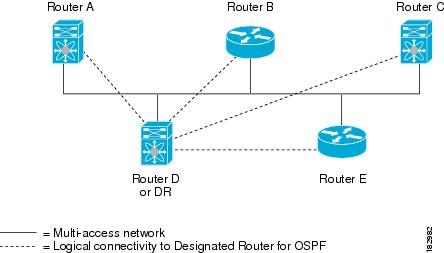
All other routers establish adjacency with the DR and the BDR and use the IPv4 multicast address 224.0.0.6 to send LSA updates to the DR and BDR. Figure 5-1 shows this adjacency relationship between all routers and the DR.
DRs are tied to router interfaces. A router might be the DR for one network and not for another network that it connects through a different interface.
Figure 5-1 Designated Router in Multi-Access Network
Areas
Figure 5-2 OSPFv2 Areas
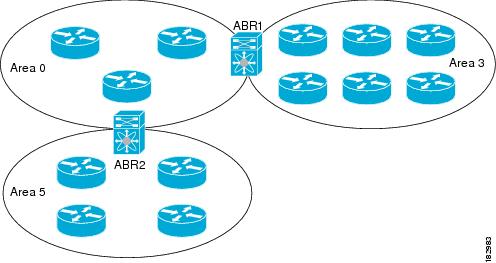
The ABR has a separate link-state database for each area to which it connects. The ABR sends Network Summary (type 3) LSAs (see Route Summarization) from one connected area to the backbone area. The backbone area sends summarized information about one area to another area. In Figure 5-2, Area 0 sends summarized information about Area 5 to Area 3.
OSPFv2 defines one other router type: the autonomous system boundary router (ASBR). This router connects an OSPFv2 area to another autonomous system. OSPFv2 can redistribute its routing information into another autonomous system or receive redistributed routes from another autonomous system. For more information, see Advanced Features.
Link-State Advertisements
OSPFv2 uses link-state advertisements (LSAs) to build its routing table.
This section includes the following topics:
•Flooding and LSA Group Pacing
LSA Types
Table 5-1 shows the LSA types supported by the Cisco CG-OS software.
|
|
|
|
|---|---|---|
1 |
Router LSA |
LSA sent by every router. This LSA includes the state and the cost of all links and a list of all OSPFv2 neighbors on the link. Router LSAs trigger an SPF recalculation. Router LSAs flood the local OSPFv2 area. |
2 |
Network LSA |
LSA sent by the DR. This LSA lists all routers in the multi-access network. Network LSAs trigger an SPF recalculation. See Designated Routers. |
3 |
Network Summary LSA |
LSA sent by the area border router to an external area for each destination in the local area. This LSA includes the link cost from the area border router to the local destination. See Areas. |
4 |
ASBR Summary LSA |
LSA sent by the area border router to an external area. This LSA advertises the link cost to the ASBR only. See Areas. |
5 |
AS External LSA |
LSA generated by the ASBR. This LSA includes the link cost to an external autonomous system destination. AS External LSAs flood the autonomous system. See Areas. |
7 |
NSSA External LSA |
LSA generated by the ASBR within a not-so-stubby area (NSSA). This LSA includes the link cost to an external autonomous system destination. NSSA External LSAs are flooded only within the local NSSA. See Areas. |
9-11 |
Opaque LSAs |
LSA used to extend OSPF. See Opaque LSAs. |
Link Cost
Each OSPFv2 interface has a link cost. The cost is an arbitrary number. By default, the Cisco CG-OS software assigns a cost that is the configured reference bandwidth divided by the interface bandwidth. By default, the reference bandwidth is 40 Gb/s. Each LSA update contains the link cost.
Flooding and LSA Group Pacing
When an OSPFv2 router receives an LSA, it forwards that LSA out every OSPF-enabled interface, flooding the OSPFv2 area with this information. This LSA flooding guarantees that all routers in the network have identical routing information. LSA flooding depends on the OSPFv2 area configuration (see Areas). The link-state refresh time (every 30 minutes by default) determines the frequency of LSA flooding within an area. Each LSA has its own link-state refresh time.
You can control the flooding rate of LSA updates in your network by using the LSA group pacing feature. LSA group pacing can reduce high CPU or buffer usage. This feature groups LSAs with similar link-state refresh times to allow OSPFv2 to pack multiple LSAs into an OSPFv2 Update message.
By default, LSAs with link-state refresh times within four minutes of each other are grouped together. You can lower this value for large link-state databases or raise it for smaller databases to optimize the OSPFv2 load on your network.
Link-State Database
Each router maintains a link-state database for the OSPFv2 network. This database contains all the collected LSAs, and includes information on all the routes through the network. OSPFv2 uses this information to calculate the best path to each destination and populates the routing table with these best paths.
The router removes LSAs from the link-state database when it does not receive an LSA update within a set interval (MaxAge). Routers flood a repeat of the LSA every 30 minutes to prevent accurate link-state information from aging out. The Cisco CG-OS software supports the LSA grouping feature to prevent all LSAs from refreshing at the same time. For more information, see Flooding and LSA Group Pacing.
Opaque LSAs
Opaque LSAs allow you to extend OSPF functionality. Opaque LSAs consist of a standard LSA header followed by application-specific information. This information might be used by OSPFv2 or by other applications. OSPFv2 uses Opaque LSAs to support OSPFv2 Graceful Restart capability. Three Opaque LSA types are defined as follows:
•LSA type 9—Flooded to the local network.
•LSA type 10—Flooded to the local area.
•LSA type 11—Flooded to the local autonomous system.
OSPFv2 and the Unicast RIB
OSPFv2 runs the Dijkstra shortest path first algorithm on the link-state database. This algorithm selects the best path to each destination based on the sum of all the link costs for each link in the path. The shortest path for each destination is then put in the OSPFv2 route table. When the OSPFv2 network is converged, this route table feeds into the unicast RIB. OSPFv2 communicates with the unicast RIB to do the following:
•Add or remove routes
•Provide convergence updates to remove stale OSPFv2 routes and for stub router advertisements
(see OSPFv2 Stub Router Advertisements).
OSPFv2 also runs a modified Dijkstra algorithm for fast recalculation for summary and external (type 3, 4, 5, and 7) LSA changes.
Authentication
You can configure authentication on OSPFv2 messages to prevent unauthorized or invalid routing updates in your network. The Cisco CG-OS software supports two authentication methods:
•Simple password authentication
•MD5 authentication digest
You can configure the OSPFv2 authentication for an OSPFv2 area or per interface.
Simple Password Authentication
Simple password authentication uses a simple clear-text password that the router sends as part of the OSPFv2 message. You must ensure that the receiving OSPFv2 router has the same clear-text password configured so that it accepts the OSPFv2 message as a valid route update. Because the password is in clear text, anyone who can watch traffic on the network can learn the password.
MD5 Authentication
Cisco recommends using MD5 authentication to authenticate OSPFv2 messages. With MD5 authentication, you configure a password that is shared by the local router and all remote OSPFv2 neighbors. For each OSPFv2 message, the Cisco CG-OS software creates an MD5 one-way message digest based on the message itself and the encrypted password. The interface sends this digest with the OSPFv2 message. The receiving OSPFv2 neighbor validates the digest using the same encrypted password. If the message has not changed, then the digest calculation is identical and the OSPFv2 message is considered valid.
MD5 authentication includes a sequence number with each OSPFv2 message to ensure that no message is replayed in the network.
Advanced Features
The Cisco CG-OS software supports advanced OSPFv2 features that enhance the usability and scalability of OSPFv2 in the network. This section includes the following topics:
•OSPFv2 Stub Router Advertisements
Stub Area
You can limit the amount of external routing information that floods an area by making it a stub area. A stub area is an area that does not allow AS External (type 5) LSAs (see Link-State Advertisements). These LSAs usually flood the local autonomous system to propagate external route information. Stub areas have the following requirements:
•All routers in the stub area must be stub routers. See Stub Routing.
•No ASBR routers exist in the stub area.
•You cannot configure virtual links in the stub area.
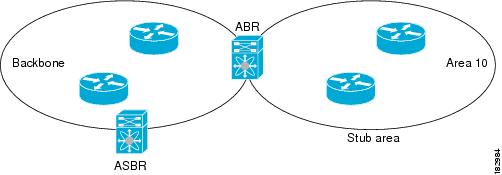
Figure 5-3 shows an example of an OSPFv2 autonomous system where all routers in area 0.0.0.10 have to go through the ABR to reach external autonomous systems. Area 0.0.0.10 can be configured as a stub area.
Figure 5-3 Stub Area
Stub areas use a default route for all traffic that must go through the backbone area to the external autonomous system. The default route is 0.0.0.0 for IPv4.
Not-So-Stubby Area
A Not-so-Stubby Area (NSSA) is similar to a stub area, except that an NSSA allows you to import autonomous system external routes within an NSSA by using redistribution. The NSSA ASBR redistributes these routes and generates NSSA External (type 7) LSAs that it floods throughout the NSSA. You can optionally configure the ABR that connects the NSSA to other areas to translate this NSSA External LSA to AS External (type 5) LSAs. The ABR then floods these AS External LSAs throughout the OSPFv2 autonomous system. The router supports summarization and filtering during the translation. See Link-State Advertisements for information about NSSA External LSAs.
You can, for example, use NSSA to simplify administration when you are connecting a central site using OSPFv2 to a remote site that is using a different routing protocol. Before NSSA, the connection between the corporate site border router and a remote router could not be run as an OSPFv2 stub area because routes for the remote site could not be redistributed into a stub area. With NSSA, you can extend OSPFv2 to cover the remote connection by defining the area between the corporate router and the remote router as an NSSA (see Configuring NSSA).
The backbone Area 0 cannot be an NSSA.
Virtual Links
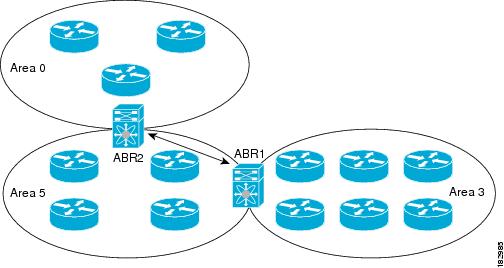
Virtual links allow you to connect an OSPFv2 area ABR to a backbone area ABR when a direct physical connection is not available. Figure 5-4 shows a virtual link that connects Area 3 to the backbone area through Area 5.
Figure 5-4 Virtual Links
You can also use virtual links to temporarily recover from a partitioned area, which occurs when a link within the area fails, isolating part of the area from reaching the designated ABR to the backbone area.
Route Summarization
Because OSPFv2 shares all learned routes with every OSPF-enabled router, you might want to use route summarization to reduce the number of unique routes that are flooded to every OSPF-enabled router. Route summarization simplifies route tables by replacing more-specific addresses with an address that represents all the specific addresses. For example, you can replace 10.1.1.0/24, 10.1.3.0/24, and 10.1.5.0/24 with one summary address, 10.1.0.0/24.
Typically, you would summarize at the boundaries of area border routers (ABRs). Although you could configure summarization between any two areas, it is better to summarize in the direction of the backbone so that the backbone receives all the aggregate addresses and injects them, already summarized, into other areas.
Inter-area route summarization
You configure inter-area route summarization on ABRs, summarizing routes between areas in the autonomous system. To take advantage of summarization, assign network numbers in areas in a contiguous way to be able to lump these addresses into one range.
Graceful Restart
OSPFv2 automatically restarts when the process experiences problems. After the restart, OSPFv2 initiates a graceful restart so that the platform is not taken out of the network topology. When you manually restart OSPF, it performs a graceful restart, which is similar to a stateful switchover. The router applies the running configuration in both cases.
A graceful restart, known as nonstop forwarding (NSF), allows OSPFv2 to remain in the data forwarding path through a process restart. When OSPFv2 needs to restart, it first sends a link-local opaque (type 9) LSA, called a grace LSA (see Opaque LSAs).
The grace LSA includes a grace period, which is a specified time that the neighbor OSPFv2 interfaces hold onto the LSAs from the restarting OSPFv2 interface. (Typically, OSPFv2 tears down the adjacency and discards all LSAs from a down or restarting OSPFv2 interface.) The participating neighbors, which are called NSF helpers, keep all LSAs that originate from the restarting OSPFv2 interface as if the interface were still adjacent.
When the restarting OSPFv2 interface is operational again, it rediscovers its neighbors, establishes adjacency, and starts sending its LSA updates again. At this point, the NSF helpers recognize that graceful restart has finished.

Note When the restarting OSPFv2 interface does not come back up before the end of the grace period, or if the network experiences a topology change, the OSPFv2 neighbors tear down adjacency with the restarting OSPFv2 and treat it as a normal OSPFv2 restart.
OSPFv2 Stub Router Advertisements
You can configure an OSPFv2 interface to act as a stub router using the OSPFv2 Stub Router Advertisements feature. Use this feature when you want to limit the OSPFv2 traffic through this router, such as when you want to introduce a new router to the network in a controlled manner or limit the load on a router that is already overloaded. You might also want to use this feature for various administrative or traffic engineering reasons.
OSPFv2 stub router advertisements do not remove the OSPFv2 router from the network topology, but they do prevent other OSPFv2 routers from using this router to route traffic to other parts of the network. Only the traffic that is destined for this router or directly connected to this router is sent.
OSPFv2 stub router advertisements mark all stub links (directly connected to the local router) to the cost of the local OSPFv2 interface. The router marks all remote links with the maximum cost (0xFFFF).
Multiple OSPFv2 Instances
The Cisco CG-OS software supports multiple instances of the OSPFv2 protocol that run on the same node. You cannot configure multiple instances over the same interface. By default, every instance uses the same system router ID. You must manually configure the router ID for each instance if the instances are in the same OSPFv2 autonomous system.
SPF Optimization
The Cisco CG-OS software optimizes the SPF algorithm in the following ways:
•Partial SPF for Network (type 2) LSAs, Network Summary (type 3) LSAs, and AS External (type 5) LSAs—When there is a change on any of these LSAs, the Cisco CG-OS software performs a faster partial calculation rather than running the whole SPF calculation.
•SPF timers—You can configure different timers for controlling SPF calculations. These timers include exponential backoff for subsequent SPF calculations. The exponential backoff limits the CPU load of multiple SPF calculations.
Prerequisites for OSPFv2
Your OSPFv2 network strategy and planning for your network is complete. For example, you must decide whether your network requires multiple areas.
You must be familiar with routing fundamentals to configure OSPFv2.
You are logged on to the router.
You have enabled the OSPFv2 feature on your router (see Enabling OSPFv2).
You have configured at least one interface for IPv4 that can communicate with a remote OSPFv2 neighbor.
Guidelines and Limitations for OSPFv2
The Cisco CG-OS software displays areas in dotted decimal notation regardless of whether you enter the area in decimal or dotted decimal notation.
All areas must connect to the backbone area either directly or through a virtual link.
You cannot add a virtual link or ASBRs to a stub area.
You cannot add a virtual link to a Not-So-Stubby-Area (NSSA).
You cannot add a NSSA in a backbone area.
Default Settings
Table 5-2 lists the default settings for OSPFv2 parameters.
Configuring Basic OSPFv2
Configure OSPFv2 after you design your OSPFv2 network.
This section includes the following topics:
•Configuring Optional Parameters on an OSPFv2 Instance
•Configuring Networks in OSPFv2
•Configuring Authentication for an Area
•Configuring Authentication for an Interface
Enabling OSPFv2
You must enable the OSPFv2 feature before you can configure OSPFv2.
BEFORE YOU BEGIN
No prerequisites.
DETAILED STEPS
EXAMPLE
This example shows how to enable OSPFv2 on the router.
router# configure terminal
router(config)# feature ospf
router(config)# copy running-config startup-config
To disable the OSPFv2 feature and remove all associated configuration, use the no feature ospf command in configuration mode.
Creating an OSPFv2 Instance
The first step in configuring OSPFv2 is to create an OSPFv2 instance; and, then to assign a unique instance tag for this OSPFv2 instance. The instance tag can be any string.
For more information about OSPFv2 instance parameters, see Configuring Advanced OSPFv2.
BEFORE YOU BEGIN
Enter the show feature command to verify that OSPFv2 is enabled (see Enabling OSPFv2).
Enter the show ip ospf command to verify that the instance tag is not in use.
Ensure that OSPFv2 can obtain a router identifier (router ID) such as a configured loopback address. If not, you must configure the router ID option as shown in the Detailed Steps section below.
DETAILED STEPS
EXAMPLE
This example shows how to create an OSPFv2 instance.
router# configure terminal
router(config)# router ospf 201
router(config-router)# copy running-config startup-config
To remove the OSPFv2 instance and all associated configuration, use the no router ospf instance-tag command in configuration mode.
Note When configured in the interface mode, the no router ospf instance-tag command does not remove the OSPF configuration. You must manually remove all OSPFv2 commands configured in interface mode.
Configuring Optional Parameters on an OSPFv2 Instance
You can configure optional parameters for OSPFv2.
For more information about OSPFv2 instance parameters, see Configuring Advanced OSPFv2.
BEFORE YOU BEGIN
Ensure that you have enabled the OSPFv2 feature on the router (see Enabling OSPFv2).
OSPFv2 must be able to obtain a router identifier (for example, a configured loopback address) or you must configure the router ID option.
OPTIONAL PARAMETERS
You can configure the following optional parameters for OSPFv2 in the router configuration mode by entering the router ospf instance-tag command.
Configuring Networks in OSPFv2
You can configure a network to OSPFv2 by associating it through the interface that the router uses to connect to that network (see Neighbors). You can add all networks to the default backbone area (Area 0), or you can create new areas using any decimal number or an IP address.
Note All areas must connect to the backbone area either directly or through a virtual link.
Note You must assign a valid IP address to an interface before you can enable OSPF on that interface.
BEFORE YOU BEGIN
Ensure that you have enabled OSPF on the router (see Enabling OSPFv2).
DETAILED STEPS
OPTIONAL COMMANDS
You can configure the following optional parameters for OSPFv2 in interface configuration mode.
|
|
|
|---|---|
ip ospf cost interface-cost |
Configures the OSPFv2 cost metric for this interface. The default is to calculate cost metric, based on the reference bandwidth and interface bandwidth. The range is from 1 to 65535. Use the no ip ospf cost interface-cost command to return to the default setting which is the reference. |
ip ospf dead-interval seconds |
Configures the OSPFv2 dead interval, in seconds. The range is from 1 to 65535. The default is four times the hello interval, in seconds. |
ip ospf hello-interval seconds |
Configures the OSPFv2 hello interval, in seconds. The range is from 1 to 65535. The default is 10 seconds. |
ip ospf mtu-ignore |
Configures OSPFv2 to ignore any IP MTU mismatch with a neighbor. The default is to not establish adjacency if the neighbor MTU does not match the local interface MTU. |
ip ospf passive-interface |
Suppresses routing updates on the interface. |
ip ospf priority number |
Configures the OSPFv2 priority, that the router uses to determine the DR for an area. The range is from 0 to 255. The default is 1. See Designated Routers. |
ip ospf shutdown |
Shuts down the OSPFv2 instance on this interface. |
EXAMPLE
This example shows how to add an interface into area 0.0.0.10 in OSPFv2 instance 201.
router# configure terminal
router(config)# interface ethernet 2/1
router(config-if)# ip address 192.0.2.1/16
router(config-if)# ip router ospf 201 area 0.0.0.10
router(config-if)# copy running-config startup-config
Use the show ip ospf interface command to verify the interface configuration. Use the show ip ospf neighbor command to see the neighbors for this interface.
To remove the area, use the no ip router ospf instance-tag area area-id command.
Configuring Authentication for an Area
You can configure authentication for all networks in an area or for individual interfaces in the area. Interface authentication configuration overrides area authentication.
BEFORE YOU BEGIN
Ensure that OSPFv2 is enabled on the router (see Enabling OSPFv2).
Ensure that all neighbors on an interface share the same authentication configuration, including the shared authentication key.
DETAILED STEPS
EXAMPLE
This example shows how to configure authentication for area 0.0.0.10 in OSPFv2 instance 201.
router# configure terminal
router(config)# router ospf 201
router(config-router)# area 0.0.0.10 authentication
router(config-router)# interface ethernet 2/1
router(config-if)# ip ospf authentication-key 0 mypass
router(config-if)# copy running-config startup-config
To terminate an OSPF routing process, use the no router ospf instance-tag command.
Configuring Authentication for an Interface
You can configure authentication for individual interfaces in an area.
Note Interface authentication configuration overrides area authentication settings.
BEFORE YOU BEGIN
Ensure that OSPFv2 is enabled on the router (see Enabling OSPFv2).
Ensure that all neighbors on an interface share the same authentication configuration, including the shared authentication key.
DETAILED STEPS
EXAMPLE
This example shows how to set an interface for simple, unencrypted passwords, and set the password for Ethernet interface 2/1.
router# configure terminal
router(config)# router ospf 201
router(config-router)# exit
router(config)# interface ethernet 2/1
router(config-if)# ip router ospf 201 area 0.0.0.10
router(config-if)# ip ospf authentication-key 0 ifpass
router(config-if)# copy running-config startup-config
To terminate an OSPF routing process, use the no router ospf instance-tag command.
Configuring Advanced OSPFv2
Configure OSPFv2 after you design your OSPFv2 network.
This section includes the following topics:
•Configuring Filter Lists for Border Routers
•Configuring a Totally Stubby Area
•Configuring Route Summarization
•Configuring Stub Route Advertisements
•Restarting an OSPFv2 Instance
Configuring Filter Lists for Border Routers
You can separate your OSPFv2 domain into a series of areas that contain related networks. All areas must connect to the backbone area through an area border router (ABR). OSPFv2 domains can connect to external domains through an autonomous system border router (ASBR). See Areas.
ABRs have the following optional configuration parameters:
•Area range—Configures route summarization between areas. See Configuring Route Summarization.
•Filter list—Filters the Network Summary (type 3) LSAs that are allowed in from an external area.
ASBRs also support filter lists.
BEFORE YOU BEGIN
Ensure that you have enabled the OSPF feature (see Enabling OSPFv2).
Create the route map that the filter list uses to filter IP prefixes in incoming or outgoing Network Summary (type 3) LSAs.
DETAILED STEPS
EXAMPLE
This example shows how to configure a filter list in area 0.0.0.10.
router# configure terminal
router(config)# router ospf 201
router(config-router)# area 0.0.0.10 filter-list route-map FilterLSAs in
router(config-router)# copy running-config startup-config
To terminate an OSPF routing process, use the no router ospf instance-tag command.
Configuring Stub Areas
You can configure a stub area for part of an OSPFv2 domain where external traffic is not necessary. Stub areas block AS External (type 5) LSAs and limit unnecessary routing to and from selected networks. (see Stub Area. You can optionally block all summary routes from going into the stub area.
BEFORE YOU BEGIN
Ensure that you have enabled the OSPF feature (see Enabling OSPFv2).
Ensure that there are no virtual links or ASBRs in the proposed stub area.
DETAILED STEPS
EXAMPLE
This example shows how to create a stub area within an OSPFv2 area.
router# configure terminal
router(config)# router ospf 201
router(config-router)# area 0.0.0.10 stub
router(config-router)# copy running-config startup-config
To terminate an OSPF routing process, use the no router ospf instance-tag command.
Configuring a Totally Stubby Area
You can create a totally stubby area and prevent all summary route updates from going into the stub area.
To create a totally stubby area, use the following command in router configuration mode.
|
|
|
|---|---|
area area-id stub no-summary |
Creates this area as a totally stubby area. |
Configuring NSSA
You can configure an NSSA for part of an OSPFv2 domain where limited external traffic is required. For information about NSSAs, see Not-So-Stubby Area. You can optionally translate this external traffic to an AS External (type 5) LSA and flood the OSPFv2 domain with this routing information. An NSSA can be configured with the following optional parameters:
•No redistribution—Redistributed routes bypass the NSSA and are redistributed to other areas in the OSPFv2 autonomous system. Use this option when the NSSA ASBR is also an ABR.
•Default information originate—Generates an NSSA External (type 7) LSA for a default route to the external autonomous system. Use this option on an NSSA ASBR if the ASBR contains the default route in the routing table. This option can be used on an NSSA ABR whether or not the ABR contains the default route in the routing table.
•Route map—Filters the external routes to limit those routes that the router floods throughout NSSA and other areas.
•Translate—Translates NSSA External LSAs to AS External LSAs for areas outside the NSSA. Use this command on an NSSA ABR to flood the redistributed routes throughout the OSPFv2 autonomous system. You can optionally suppress the forwarding address in these AS External LSAs. If you choose this option, the forwarding address is set to 0.0.0.0.
•No summary—Blocks all summary routes from flooding the NSSA. Use this option on the NSSA ABR.
BEFORE YOU BEGIN
Ensure that you have enabled the OSPF feature (see Enabling OSPFv2).
Ensure that there are no virtual links in the proposed NSSA and that it is not the backbone area.
DETAILED STEPS
EXAMPLE
This example shows how to create an NSSA that blocks all summary route updates.
router# configure terminal
router(config)# router ospf 201
router(config-router)# area 0.0.0.10 nssa no-summary
router(config-router)# copy running-config startup-config
This example shows how to create an NSSA that generates a default route.
router# configure terminal
router(config)# router ospf 201
router(config-router)# area 0.0.0.10 nssa default-info-originate
router(config-router)# copy running-config startup-config
This example shows how to create an NSSA that filters external routes and blocks all summary route updates.
router# configure terminal
router(config)# router ospf 201
router(config-router)# area 0.0.0.10 nssa route-map ExternalFilter no-summary
router(config-router)# copy running-config startup-config
This example shows how to create an NSSA that always translates NSSA External (type 5) LSAs to AS External (type 7) LSAs.
router# configure terminal
router(config)# router ospf 201
router(config-router)# area 0.0.0.10 nssa translate type 7 always
router(config-router)# copy running-config startup-config
To terminate an OSPF routing process, use the no router ospf instance-tag command.
Configuring Virtual Links
A virtual link connects an isolated area to the backbone area through an intermediate area. (see Virtual Links). You can configure the following optional parameters for a virtual link:
•Authentication—Sets a simple password or MD5 message digest authentication and associated keys.
•Dead interval—Sets the time that a neighbor waits for a Hello packet before declaring the local router as dead and tearing down adjacencies.
•Hello interval—Sets the time between successive Hello packets.
•Retransmit interval—Sets the estimated time between successive LSAs.
•Transmit delay—Sets the estimated time to transmit an LSA to a neighbor.
Note You must configure the virtual link on both routers involved before the link becomes active.
Note You cannot add a virtual link to a stub area.
BEFORE YOU BEGIN
Ensure that you have enabled OSPF (see Enabling OSPFv2).
DETAILED STEPS
OPTIONAL COMMANDS
You can configure the following optional commands in the virtual link configuration mode.
EXAMPLE
This example shows how to create a simple virtual link between two ABRs.
The configuration for ABR 1 (router ID 27.0.0.55) is as follows.
router# configure terminal
router(config)# router ospf 201
router(config-router)# area 0.0.0.10 virtual-link 10.1.2.3
router(config-router-vlink)# copy running-config startup-config
The configuration for ABR 2 (Router ID 10.1.2.3) is as follows.
router# configure terminal
router(config)# router ospf 101
router(config-router)# area 0.0.0.10 virtual-link 27.0.0.55
router(config-router-vlink)# copy running-config startup-config
Configuring Route Summarization
You can configure route summarization for inter-area routes by configuring an address range that is summarized. For more information, see Route Summarization.
BEFORE YOU BEGIN
Ensure that you have enabled OSPF (see Enabling OSPFv2).
DETAILED STEPS
EXAMPLE
This example shows how to create summary addresses between areas on an ABR.
router# configure terminal
router(config)# router ospf 201
router(config-router)# area 0.0.0.10 range 10.3.0.0/16
router(config-router)# copy running-config startup-config
This example shows how to create summary addresses on an ASBR.
router# configure terminal
router(config)# router ospf 201
router(config-router)# summary-address 10.5.0.0/16
router(config-router)# copy running-config startup-config
Configuring Stub Route Advertisements
Use stub route advertisements when you want to limit the OSPFv2 traffic through this router for a short time. For more information, see OSPFv2 Stub Router Advertisements.
Note When you configure the router for a graceful shutdown, do not save the running configuration because the router continues to advertise a maximum metric after it reloads.
BEFORE YOU BEGIN
Ensure that you have enabled OSPF on the router (see Enabling OSPFv2).
DETAILED STEPS
]
EXAMPLE
This example shows how to enable the stub router advertisements and advertise a maximum metric of 750 seconds at system startup only.
router# configure terminal
router(config)# router ospf 201
router(config-router)# max-metric router-lsa on-startup 750
router(config-router)# copy running-config startup-config
Modifying the Default Timers
OSPFv2 includes a number of timers that control the behavior of protocol messages and shortest path first (SPF) calculations. OSPFv2 includes the following optional timer parameters:
•LSA arrival time—Sets the minimum interval allowed between LSAs that arrive from a neighbor. LSAs that arrive faster than this time are dropped.
•Pacing LSAs—Sets the interval at which LSAs are collected into a group and refreshed, checksummed, or aged. This timer controls how frequently LSA updates occur and optimizes how many are sent in an LSA update message (see Flooding and LSA Group Pacing).
•Throttle LSAs—Sets the rate limits for generating LSAs. This timer controls how frequently LSAs are generated after a topology change occurs.
•Throttle SPF calculation—Controls how frequently the SPF calculation is run.
At the interface level, you can also control the following timers:
•Retransmit interval—Sets the estimated time between successive LSAs.
•Transmit delay—Sets the estimated time to transmit an LSA to a neighbor.
See Configuring Networks in OSPFv2 for information about the hello interval and dead timer.
BEFORE YOU BEGIN
Ensure that you have enabled OSPFv2 (see Enabling OSPFv2).
DETAILED STEPS
EXAMPLE
This example shows how to modify system defaults to control LSA flooding with the lsa-group-pacing and timers throttle lsa parameters.
router# configure terminal
router(config)# router ospf 201
router(config-router)# timers lsa-arrival 300
router(config-router)# timers lsa-group-pacing 2000
router(config-router)# timers throttle lsa 3000
router(config-router)# copy running-config startup-config
Configuring Graceful Restart
Graceful restart is enabled by default on the router. You can configure the following optional parameters for graceful restart in an OSPFv2 instance:
•Grace period—Configures how long neighbors must wait after a graceful restart before tearing down adjacencies.
•Helper mode disabled—Disables helper mode on the local OSPFv2 instance. OSPFv2 does not participate in the graceful restart of a neighbor.
•Planned graceful restart only—Configures OSPFv2 to support graceful restart only in the event of a planned restart.
BEFORE YOU BEGIN
Ensure that you have enabled OSPFv2 (see Enabling OSPFv2).
Ensure that all neighbors are configured for graceful restart with matching optional parameters set.
DETAILED STEPS
EXAMPLE
This example shows how to re-enable graceful restart on the router (after it was disabled on the router) and then set the grace period to 120 seconds.
router# configure terminal
router(config)# router ospf 201
router(config-router)# graceful-restart
router(config-router)# graceful-restart grace-period 120
router(config-router)# copy running-config startup-config
To disable graceful restart on the router, enter the no graceful-restart command in the router configuration mode.
Restarting an OSPFv2 Instance
You can restart an OSPFv2 instance. This action clears all neighbors for the instance.
To restart an OSPFv2 instance and remove all associated neighbors, use the following command.
|
|
|
|---|---|
restart ospf instance-tag |
Restarts the OSPFv2 instance and removes all neighbors. |
Verifying the OSPFv2 Configuration
To display the OSPFv2 configuration, enter any or all of the following commands.
Note The Cisco CG-OS software does not support the [vrf {vrf-name | all | default | management}] parameter in the commands listed below.
Monitoring OSPFv2 Statistics
To display OSPFv2 statistics, enter the following commands.
Configuration Example for OSPFv2
The following example shows how to configure OSPFv2.
feature ospf
router ospf 201
router-id 290.0.2.1
interface ethernet 2/1
ip router ospf 201 area 0.0.0.10
ip ospf authentication
ip ospf authentication-key 0 mypass
 Feedback