- About This Guide
- Introducing the Cisco Prime NAM 2300 Series Appliances
- Installing the Cisco Prime NAM 2300 Series Appliances
- Configuring the Cisco Prime NAM 2300 Series Appliances
- Installing and Configuring External Storage
- Maintaining the Cisco Prime NAM 2300 Series Appliances
- Upgrading NAM Software
- Troubleshooting
- Safety Guidelines
- Specifications for the 2300 series appliances
- Site Log
- Helper Utility
- Index
Introducing the Cisco Prime NAM 2300 Series Appliances
Cisco offers two appliance models, the Cisco Prime NAM 2320 and the Cisco Prime NAM 2304:
- The Cisco Prime NAM 2320 appliance includes two ten-Gigabit Ethernet monitoring interfaces for application monitoring in high-speed, high-density environments.
- The Cisco Prime NAM 2304 appliance includes four one-Gigabit Ethernet monitoring interfaces to meet diverse performance analysis needs in scalable multi-gigabit switching and routing environments.
About the Cisco Prime NAM 2300 Series Appliances
There are two models of the Cisco Prime NAM 2304 appliance (1RU form-factor):
- Cisco Prime NAM 2304 RJ-45—This model receives collected data over up to four GbE ports at a data rate of 1 Gb/s each and connects to the data collection devices (switches and routers) with RJ-45 connectors.
- Cisco Prime NAM 2304 SFP—This model receives collected data over up to four GbE ports at a data rate of 1 Gb/s each, uses fiber-optic cables, and connects to the data collection devices with SFP connectors.
There is one model of the Cisco Prime NAM 2320 appliance (2RU form-factor):
- Cisco Prime NAM 2320—This model receives collected data over up to two 10 GbE ports at a data rate of 10 Gb/s each, uses fiber-optic cables, and connects to the data collection devices with SFP+ connectors.
The Cisco Prime NAM 2300 series appliances come preloaded with Cisco Prime Network Analysis Module (NAM) software and are contained in a standard shelf-rack enclosure.
The following sections describe:
- Cisco Prime NAM 2304 Appliance Views and LEDs
- Cisco Prime NAM 2320 Appliance Views and LEDs
- Input/Output Ports and Connectors
- KVM Console
- AC Power Supplies
Cisco Prime NAM 2304 Appliance Views and LEDs
Figure 1-1 Cisco Prime NAM 2304 Appliance Front View
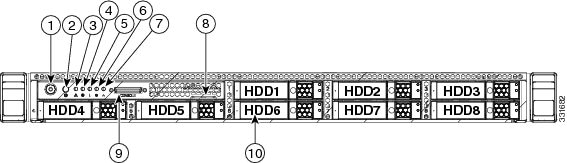
KVM connector (used with KVM cable that provides two USB, one VGA, and one serial connector) |
|||
For a description of the Cisco Prime NAM 2304 appliance front panel LEDs and their state definitions, see “Reading the LEDs” section.
Figure 1-2 Cisco Prime NAM 2304 Appliance Rear View
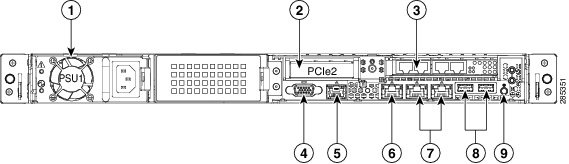
|
|
|
||
|
|
|
The left port, LAN1 (marked “1” on the appliance) is the NAM management port; the right port is not used |
|
|
|
|
||
|
|
|
||
|
|
|||
|
|
|
|---|---|
Cisco Prime NAM 2304 appliance rear panel LEDs and their state definitions |
|
Cisco Prime NAM 2320 Appliance Views and LEDs
Figure 1-3 Cisco Prime NAM 2320 Appliance Front View
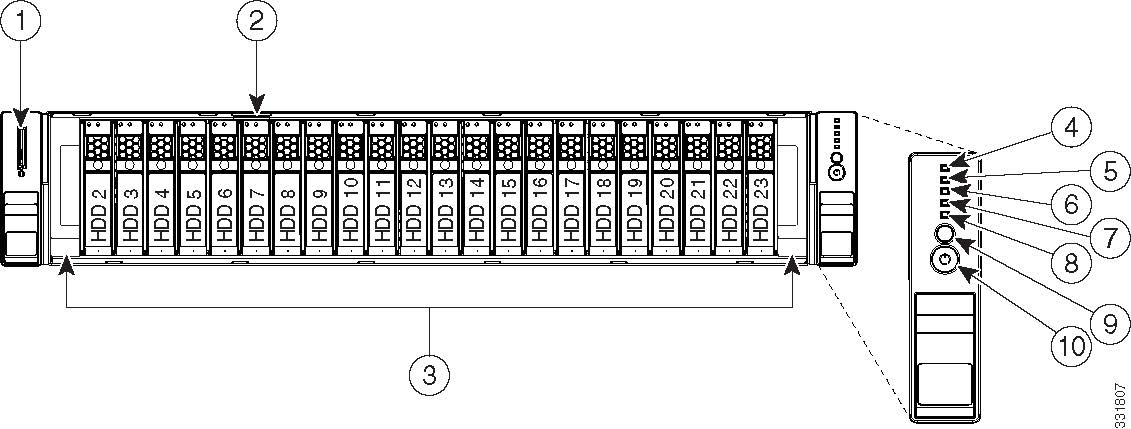
KVM connector (used with KVM cable that provides two USB_2.0, one VGA, and one serial connector) |
|||
Figure 1-4 Cisco Prime NAM 2320 Appliance Rear View
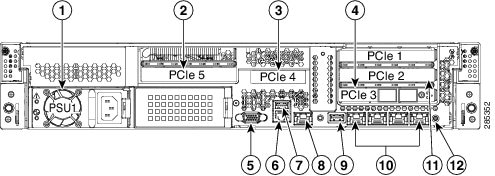
The left port, LAN1 (marked “1” on the appliance) is the NAM management port; the other ports are not used |
|||
| PCIe 1—full-height, half-length, x8 lane |
|||
|
|
|
|---|---|
Cisco Prime NAM 2320 appliance front panel LEDs and their state definitions |
|
Cisco Prime NAM 2320 appliance rear panel LEDs and their state definitions |
|
Input/Output Ports and Connectors
The Cisco Prime NAM 2300 series appliances support the following ports on the rear of the appliance:
- The video connector is not required for normal day-to-day operation of the NAM appliances.
- The built-in port labeled “M” is the Cisco Integrated Management Controller (CIMC) port.

Note Because this port is still being used as the UCS management port, do not use this port as the NAM management port; use the LAN 1 port instead.
The Cisco Prime NAM 2300 series appliances use the following connector types:
|
|
|
|
|
|---|---|---|---|
Single-mode fiber or multi-mode fiber. For SFP cabling specifications, see Installing the GBIC, SFP, SFP+, and XFP Optical Modules in Cisco CPT and Cisco ONS Platforms, SFP and SFP+ Description and Specifications. |
|||
Single-mode fiber, multi-mode fiber, or passive or Active TwinAx cables (except for 5M passive cable). For SFP+ cabling specifications, see Installing the GBIC, SFP, SFP+, and XFP Optical Modules in Cisco CPT and Cisco ONS Platforms, SFP and SFP+ Description and Specifications. |
NAM Management Port (LAN 1)
The Cisco Prime NAM 2300 series appliances use the LAN 1 port, an integrated Ethernet controller (10/100/1000 Mb/s), as the management port. When you connect this port to a gateway, you enable management and NAM application access to the Cisco Prime NAM 2300 series appliances.
Note Do not use the built-in port labeled “M”, which is the Cisco Integrated Management Controller (CIMC) port, as the management port; the LAN 1 port provides additional functionality.
Note We recommend that you use no less than a Category 5e (or better) unshielded twisted-pair (UTP) cable for the management port connection.
To access the Ethernet port, connect a Category 5e (or better) unshielded twisted-pair (UTP) cable to the RJ-45 connector on the back of the appliance. (See Table 1-2 ). The appliance comes with an Ethernet RJ-45-to-RJ-45 yellow cable.
Serial (Console) Port Connector and Cable
The Cisco Prime NAM 2300 series appliances use the RJ-45 serial port connector, which is located on the back of the appliance, to connect a console terminal (an ASCII terminal or PC running terminal-emulation software).
Use the thin, flat, RJ-45-to-RJ-45 rollover cable that comes with the appliance to connect the console port to an ASCII terminal or a PC running terminal-emulation software.
If you do not want to use the serial RJ-45 in the back, the NAM appliance comes with a KVM connector that hooks to the front (see Figure 1-1 and Figure 1-3). This connector splits off into two USB ports: a DB-9-male port and a DB15-female port.
Small Form-Factor Pluggable (SFP) Modules
The Cisco small form-factor pluggable (SFP) and SFP+ transceiver modules are hot-swappable input/output (I/O) devices that plug into module sockets. The transceiver connects the electrical circuitry of the module with the optical or copper network.
|
|
|
|---|---|
The transceiver types used by the SFP-based Cisco Prime NAM 2300 series appliances and their cable requirements |
|
Cisco SFP Optics for Packet-Over-Sonet/SDH and ATM Applications |
|
Cisco Small Form-Factor Pluggable Modules for Gigabit Ethernet Applications Data Sheet |
KVM Console
The KVM console is an interface accessible from the Cisco UCS Manager GUI or the KVM Launch Manager that emulates a direct KVM connection. The KVM console allows you to view the serial console remotely without any connection to a terminal server. It also provides the “Virtual Media” feature used for recovery/ISO install.
If you want to use the KVM console to access the NAM appliance, you must ensure that either the appliance or the service profile associated with the appliance is configured with a CIMC IP address. The KVM console uses the CIMC IP address assigned to an appliance or a service profile to identify and connect with the correct NAM appliance.
- If the management subnet you are connected to has a DHCP server deployed, the CIMC will automatically receive an IP address. This address will be displayed during initial bootup and can be seen from a serial console connection or a VGA screen.
- If the management subnet you are connected to does not have a DHCP server, you must enter a static IP address by entering the CIMC configuration setup during bootup. To do this, press <F8> during initial bootup. After the address is set, the CIMC GUI and ssh connections will be available.
For more information about the KVM console, see the Starting the KVM Console section in the Cisco UCS Manager GUI Configuration Guide.
AC Power Supplies
The Cisco Prime NAM 2300 series appliances are equipped with a wide input range AC power supply that supports both 110-V and 220-V. A baffle panel (see Figure 1-2 and Figure 1-4) covers the empty power supply slot in an appliance without a redundant power supply.
For more information about the power supplies shipped with the Cisco Prime NAM 2300 series appliances:
|
|
|
|---|---|
The Power Specifications section in the Cisco UCS C220 Server Installation and Service Guide. |
|
The Power Specifications section in the Cisco UCS C240 Server Installation and Service Guide. |
 To ensure proper cooling, the power supply must be in the right-hand slot and the power supply blank filler panel must be in the left-hand slot.

Warning Blank faceplates and cover panels serve three important functions: they prevent exposure to hazardous voltages and currents inside the chassis; they contain electromagnetic interference
(EMI) that might disrupt other equipment; and they direct the flow of cooling air through the chassis. Do not operate the system unless all cards, faceplates, front covers, and rear covers are in place. Statement 1029
Summary of Appliance Features
Cisco Prime NAM 2304 Features
The Cisco Prime NAM 2304 appliance, which is based on UCS C220 M3 server, includes these features:
Cisco Prime NAM 2320 Features
The Cisco Prime NAM 2320 appliance, which is based on UCS C240 M3 server, includes these features:
 Feedback