Cisco Crosswork Installation Requirements

This chapter contains the following topics:

Requirements Overview

Cisco Crosswork can be deployed in the following data centers:

  • VMware vCenter

  • Amazon Web Services Elastic Cloud Compute (AWS EC2)


Note


Starting with the Cisco Crosswork 4.4 release, Crosswork deployment is no longer supported for the Cisco CSP platform. For more information, see End-of-Life Announcement for the Cisco Cloud Services Platform Operating System.


This chapter explains the general installation requirements (such as VM requirements, port requirements, application requirements, etc.) that are common for all data centers along with the specific requirements needed for each data center to install Crosswork Infrastructure (cluster) and Crosswork Data Gateway.

The data center resources needed to operate other integrated components or applications (such as Cisco NSO, WAE, DHCP, and TFTP servers) are not addressed in this document. Please refer to the respective install documentation of those components for more details.

General Requirements (common for VMware and AWS)

The following requirements remain the same irrespective of the data center where you deploy Cisco Crosswork:

Host VM Requirements

This section explains the resource requirements per VM to deploy the Crosswork Cluster and Crosswork Data Gateway.

Crosswork Cluster VM Requirements

The Crosswork cluster consists of at least three VMs or nodes operating in a hybrid configuration. This is the minimum configuration necessary to support the applications in a standard network. Additional VMs or nodes (maximum up to 3 worker nodes) in a worker configuration can be added later to scale your deployment, as needed, to match the requirements of your network, or as other applications are introduced. Please consult with the Cisco Customer Experience team for guidance on your deployment to best meet your needs.

The following table shows the VM requirements for various use cases and combinations of applications:

Table 1. Deployment Profiles

Deployment Size

Use case

Number of Cluster Nodes needed

1

Large

Crosswork Network Controller Essentials package (Production environment)

3 Hybrid nodes + 1 Worker node

Crosswork Network Controller Advantage package (Production environment)

2

Advantage package: 3 Hybrid nodes + 2 Worker nodes

1 The number of nodes mentioned is only the minimum requirement. You can add more Worker nodes (maximum upto 3 worker nodes) as needed.
2 The cluster resource estimation is under the assumption that you are using all the applications in the Crosswork Network Controller Advantage package.

Important


A Crosswork cluster with only 3 Hybrid VM nodes (without any Worker VM nodes) is more prone to data loss. If one of the Hybrid VM fails, it will result in impaired system performance, as the remaining 2 Hybrid VMs struggle to support all the pods being migrated from the failed VM. Having sufficient worker nodes in your cluster ensures that the load on the Hybrid VMs remains less, therefore, ensuring more VM resiliency. For assistance in adjusting VM Memory and CPU configuration post-installation, please contact the Cisco Customer Experience team.


The resources required per VM such as CPU, Memory, and Storage vary based on the datacenter where you are deploying. For more information, see the following topics:


Note


For assistance in adjusting VM Memory and CPU configuration post installation, please contact the Cisco Customer Experience team.


The table below explains the network requirements per VM host:

Table 2. Network Requirements (per VM)

Requirement

Description

Network Connections

For production deployments, we recommend that you use dual interfaces, one for the Management network and one for the Data network.

For optimal performance, the Management and Data networks should use links configured at a minimum of 10 Gbps.

IP Addresses

2 IP subnets, one for the Management network and one for Data network, with one IP address (IPv4 or IPv6) for each node being deployed (Hybrid or Worker) and one additional IP address to be used as the Virtual IP (VIP) address.

When using single NIC: One IP address (IPv4 or IPv6) for each node being deployed (Hybrid or Worker) and one additional IP address to be used as the Virtual IP (VIP) address.

When using dual NICs (one for the Management network and one for the Data network): A management and data IP address (IPv4 or IPv6) for each node being deployed (Hybrid or Worker) and two additional IP addresses to be used as the Virtual IP (VIP) address (one for the Management network and one for the Data network).

For example, in the case of a 3 VM cluster with a single NIC, you need 4 IP addresses, and in the case of a 3 VM cluster with dual NIC, you need 8 IP addresses (4 for management network and 4 for data network).

Note

 
  • The IP addresses must be able to reach the gateway address for the network where Cisco Crosswork Data Gateway will be installed, or the installation will fail.

  • When deploying a IPv6 cluster, the installer needs to run on an IPv6 enabled container/VM.

  • At this time, your IP allocation is permanent and cannot be changed without re-deployment. For more information, contact the Cisco Customer Experience team.

NTP Servers

The IPv4 or IPv6 addresses or host names of the NTP servers you plan to use. If you want to enter multiple NTP servers, separate them with spaces. These should be the same NTP servers you use to synchronize the Crosswork application VM clock, devices, clients, and servers across your network.

Ensure that the NTP servers are reachable on the network before attempting installation. The installation will fail if the servers cannot be reached.

DNS Servers

The IPv4 or IPv6 addresses of the DNS servers you plan to use. These should be the same DNS servers you use to resolve host names across your network.

  • Ensure that the DNS servers are reachable on the network before attempting installation. The installation will fail if the servers cannot be reached.

DNS Search Domain

The search domain you want to use with the DNS servers, for example, cisco.com. You can have only one search domain.

Backup Server

Cisco Crosswork will back up the configuration of the system to an external server using SCP. The SCP server storage requirements will vary slightly but you must have at least 25 GB of storage.

  • Cisco Crosswork Infrastructure and applications are built to run as a distributed collection of containers managed by Kubernetes. The number of containers varies as applications are added or deleted.

  • Dual stack configuration is not supported in Crosswork Platform Infrastructure. Therefore, all addresses for the environment must be either IPv4 or IPv6.

Crosswork Data Gateway VM Requirements

This section provides information about the general guidelines and minimum requirements for installing Crosswork Data Gateway.

Mandatory deployment type for Crosswork Data Gateway

Cisco Crosswork Data Gateway supports the following on-premise deployment options:

  • On-Premise Standard (default): Collectors only.

  • On-Premise Extended: Collectors and offload services.


Attention


The On-Premise Standard with Extra Resources profile is available as a limited-availability feature and must not be used while deploying Crosswork Data Gateway in your data center. Please contact the Cisco Customer Experience team for assistance.


The following table lists the deployment profile that must be used for installing Crosswork Data Gateway in each Crosswork product:


Note


The VM resource requirements for Crosswork Data Gateway are different for each profile and cannot be modified. Therefore, if your requirements change, you must re-deploy the Crosswork Data Gateway to move from one profile to another. Ensure that you manually rollback any Data Gateway global parameter changes before attempting to redeploy the Crosswork Data Gateway in order to switch profiles.


Table 3. Mandatory deployment type for Crosswork Data Gateway

Cisco Crosswork Product

Crosswork Data Gateway Deployment

Crosswork Network Controller (combination of Crosswork Active Topology & Crosswork Optimization Engine)

On-Premise Standard

Crosswork Optimization Engine

On-Premise Standard

Crosswork Zero Touch Provisioning

On-Premise Standard

Crosswork Change Automation

On-Premise Extended

Crosswork Health Insights

On-Premise Extended

Crosswork Service Health (Automated Assurance)

On-Premise Extended

Crosswork Data Gateway VM Requirements

The VM requirements Crosswork Data Gateway are listed in the following table.

Table 4. Crosswork Data Gateway Requirements for on-premise applications

Requirement

Description

Data Center

VMware. See Installation Requirements in VMware vCenter.

Amazon EC2. See Installation Requirements in AWS EC2.

Interfaces

Minimum: 1

Maximum: 3

Cisco Crosswork Data Gateway can be deployed with either 1, 2, or 3 interfaces as per the combinations below:

Note


If you use one interface on your Crosswork cluster, you must use only one interface on the Crosswork Data Gateway. If you use two interfaces on your Crosswork Cluster, then you can use two or three interfaces on the Crosswork Data Gateway as per your network requirements.

No. of NICs

vNIC0

vNIC1

vNIC2

1
  • Management Traffic

  • Control/Data Traffic

  • Device Access Traffic

—

—

2
  • Management Traffic

  • Control/Data Traffic

  • Device Access Traffic

—

3
  • Management Traffic

  • Control/Data Traffic

  • Device Access Traffic

  • Management traffic: for accessing the Interactive Console and passing the Control/Data information between servers (for example, a Crosswork application to Crosswork Data Gateway).

  • Control/Data traffic: for data and configuration transfer between Cisco Crosswork Data Gateway and Crosswork applications and other external data destinations.

  • Device access traffic: for device access and data collection.

Note


Due to security policies, traffic from subnets of a vNIC received on other vNICs is dropped. For example, in a 3 vNIC model setup, all device traffic (incoming and outgoing) must be routed through vNIC2. Crosswork Data Gateway drops device traffic received over vNIC0 and vNIC1.

IP Addresses

1 or 2 IPv4 or IPv6 addresses based on the number of interfaces you choose to use. Including one additional IP address to be used as the Virtual IP (VIP) address. For more information, refer to the Interfaces section in the Table 1 table.

Note


Crosswork does not support dual stack configurations. Therefore, ALL addresses for the environment must be either IPv4 or IPv6.

In a 3- NIC deployment, you will need to provide an IP address for Management interface (vNIC0) and Control/Data interface (vNIC1) only during installation. A virtual IP address for Device Access Traffic (vNIC2) is assigned when you create a Crosswork Data Gateway pool as explained in the Section: Create a Crosswork Data Gateway Pool in the Cisco Crosswork Infrastructure 4.4 and Applications Administration Guide.

NTP Servers

The IPv4 or IPv6 addresses or host names of the NTP servers you plan to use. If you want to enter multiple NTP servers, separate them with spaces. These should be the same NTP servers you use to synchronize devices, clients, and servers across your network. Verify that the NTP IP address or host name is reachable on the network or installation will fail.

Also, the ESXi hosts that will run the Crosswork application and Cisco Crosswork Data Gateway VM must have NTP configured, or the initial handshake may fail with "certificate not valid" errors.

DNS Servers

The IPv4 or IPv6 addresses of the DNS servers you plan to use. These should be the same DNS servers you use to resolve host names across your network. Confirm that the DNS servers are reachable on the network before attempting installation. The installation will fail if the servers cannot be reached.

DNS Search Domain

The search domain you want to use with the DNS servers, for example, cisco.com. You can have only one search domain.

(optional) Proxy Server

URL of an optional management network proxy server if your environment.

If your environment requires an HTTP or HTTPS proxy in order to access URLs on the public Internet, you must configure a proxy server in order for the Cisco Crosswork Data Gateway to successfully connect to Cisco Crosswork

(optional) Syslog Sever

The hostname or IPv4 or IPv6 address of an external syslog server.

(optional) Auditd Server

The hostname or IPv4 or IPv6 address of an external auditd server.

Port requirements

Crosswork Cluster Port Requirements

The following ports are needed by the Crosswork Cluster to operate correctly.


Note


Crosswork cluster ports allow bidirectional flow of information.


Table 5. External Ports used by Crosswork Cluster
Port Protocol Used for

22

TCP

Remote SSH traffic

111

TCP/UDP

GlusterFS (port mapper)

179

TCP

Calico BGP (Kubernetes)

500

UDP

IPSec

2379/2380

TCP

Kubernetes etcd

4500

UDP

IPSec

6443

TCP

kube-apiserver (Kubernetes)

9100

TCP

Kubernetes metamonitoring

10250

TCP

kubelet (Kubernetes)

24007

TCP

GlusterFS

30603

TCP

User interface (NGINX server listens for secure connections on port 443)

30606

TCP

Docker Registry

30621

TCP

For FTP (available on data interface only). The additional ports used for file transfer are 31121 (TCP), 31122 (TCP), and 31123 (TCP).

This port is available only when the supported application is installed on Cisco Crosswork and the FTP settings are enabled.

30622

TCP

For SFTP (available on data interface only)

This port is available only when the supported application is installed on Cisco Crosswork and the SFTP settings are enabled.

49152:49370

TCP

GlusterFS

Table 6. Ports used by other Crosswork components
Port Protocol Used for

30602

TCP

to monitor the installation (Crosswork Network Controller)

30603

TCP

Crosswork Network Controller Web User interface (NGINX server listens for secure connections on port 443)

30607

TCP

Crosswork Data Gateway vitals collection

30608

TCP

Data Gateway gRPC channel with Data Gateway VMs

30649

TCP

To set up and monitor Crosswork Data Gateway collection status.

30650

TCP

astack gRPC channel with astack-client running on Data Gateway VMs

30993, 30994, 30995

TCP

Crosswork Data Gateway sending the collected data to Crosswork Kafka destination.

Table 7. Destination Ports used by Crosswork Cluster
Port Protocol Used for

7

TCP/UDP

Discover endpoints using ICMP

22

TCP

Initiate SSH connections with managed devices

53

TCP/UDP

Connect to DNS

123

UDP

Network Time Protocol (NTP)

830

TCP

Initiate NETCONF

2022

TCP

Used for communication between Crosswork and Cisco NSO (for NETCONF).

8080

TCP

REST API to SR-PCE

8888

TCP

Used for communication between Crosswork and Cisco NSO (for HTTPS).

20243

TCP

Used by the DLM Function Pack for communication between DLM and Cisco NSO

20244

TCP

Used to internally manage the DLM Function Pack listener during a Reload Packages scenario on Cisco NSO

Crosswork Data Gateway Port Requirements

The following tables show the minimum set of ports required for Crosswork Data Gateway to operate correctly.

Inbound: Crosswork Data Gateway listens on the specified ports.

Outbound: Crosswork Data Gateway connects to external destination IP on the specified ports.

Table 8. Ports to be Opened for Management Traffic

Port

Protocol

Used for

Direction

22

TCP

SSH server

Inbound

22

TCP

SCP client

Outbound

123

UDP

NTP Client

Outbound

53

UDP

DNS Client

Outbound

30607

TCP

Crosswork Controller

Outbound


Note


SCP port can be tuned.


Table 9. Ports to be Opened for Device Access Traffic

Port

Protocol

Used for

Direction

161

UDP

SNMP Collector

Outbound

1062

UDP

SNMP Trap Collector

Note


This is the default value. You can change this value after installation from the Cisco Crosswork UI. See Configure Crosswork Data Gateway Global Parameters for more information.

Inbound

9010

TCP

MDT Collector

Inbound

22

TCP

CLI Collector

Outbound

6514

TLS

Syslog Collector

This is the default value. You can change this value after installation from the Cisco Crosswork UI. See Configure Crosswork Data Gateway Global Parameters for more information.

Inbound

9898

TCP

9514

UDP

Site Specific

Default ports differ from XR, XE to vendor. Check platform-specific documentation.

TCP

gNMI Collector

Outbound

Table 10. Ports to be Opened for Control/Data Traffic

Port

Protocol

Used for

Direction

30649

TCP

Crosswork Controller

Outbound

30993

30994

30995

TCP

Crosswork Kafka

Outbound

Site Specific

Site Specific

Kafka and gRPC Destination

Outbound

IP Address Restrictions

Crosswork cluster uses the following IP ranges for internal communications. This cannot be changed. As a result, these subnets cannot be used for devices or other purposes within your network.

You are recommended to isolate your Crosswork cluster to ensure all the communications stay within the cluster. Please also ensure that address spaces do not overlap for any of the external integration points (e.g. connections to devices, connections to external servers that Crosswork is sending data to, connections to the NSO server, etc.).


Note


This is applicable for cluster installation and for adding a static route.


Table 11. Protected IP Subnets

IP Type

Subnet

Remarks

IPv4

172.17.0.0/16

Docker Subnet (Infrastructure)

169.254.0.0/16

Link local address block

127.0.0.0/8

Loopback address

192.88.99.0/24

Reserved, previously used for relay servers to do IPv6 over IPv4

240.0.0.0/4

Reserved for future use (previously class E block)

224.0.0.0/4

MCAST-TEST-NET

0.0.0.0/8

Current network, valid as source address only

IPv6

2001:db8:1::/64

Docker Subnet (Infrastructure)

fdfb:85ef:26ff::/48

Pod Subnet (Infrastructure)

fd08:2eef:c2ee::/110

Service Subnet (Infrastructure)

::1/128

Loopback address

fe80::/10

Link local

ff00::/8

IPv6 Multicast

2002::/16

Reserved, previously used for relay servers to do IPv6 over IPv4

2001:0000::/32

Terredo tunnel and relay

2001:20::/28

Used by ORCHID and not IPv6 routable

100::/64

Discard prefix, used in specific use-cases not applicable to Crosswork Zero Touch Provisioning

::/128

Unspecified address, cannot be assigned to hosts

::ffff:0:0/96

IPv4 mapped addresses

::ffff:0:0:0/96

IPv4 translated addresses

Integration Requirements for other Cisco Products

This section explains the requirements to integrate with other Cisco Products.

Integrated Components

Ensure that you have installed compatible versions of the integrated components such as Cisco NSO, Cisco NED, and Cisco SR-PCE.

Table 12. Integrated Components - compatible versions
Software/Driver Version

Cisco Network Services Orchestrator (Cisco NSO)

5.7.6 or higher 5.7.x version

For install instructions, see the relevant NSO documentation.

Additionally, for Cisco NSO LSA setup, see (Optional) Set up Cisco NSO Layered Service Architecture.

Cisco Network Element Driver (NED)

Note


Cisco NEDs must be installed only for the device types and versions that you are managing. For example, if you are using NETCONF, then you must install the NED that corresponds to your IOS XR version(s). Similarly, Cisco IOS CLI NED must be installed if you have IOS devices in the network.

Cisco IOS XR:

  • CLI: 7.40.1

  • NETCONF: 7.3.2, 7.315, 7.4.2, 7.5.2, 7.6, 7.7.1

Cisco IOS:

  • CLI: 6.77.9

Cisco Segment Routing Path Computation Element (SR-PCE)

Cisco IOS XR 7.7.1

For install instructions, see the Cisco IOS XRv 9000 Router Installation Guide..

Mandatory Function Packs

Depending on the Cisco Crosswork application or solution that you are using, there are mandatory Function Packs (FP) that must be installed on Cisco NSO to make the products compatible. The table below provides references to each FP installation procedure:

Table 13. List of mandatory Function Packs

Crosswork Product

Required Function Pack documentation

Crosswork Network Controller Essentials package

  • Crosswork Optimization Engine

  • Crosswork Active Topology

Crosswork Network Controller Advantage package (combination of Crosswork Active Topology & Crosswork Optimization Engine)

  • Crosswork Optimization Engine

  • Crosswork Active Topology

  • Cisco Crosswork Service Health

  • Cisco Crosswork Health Insights

  • Cisco Crosswork Change Automation

  • Crosswork Zero Touch Provisioning

  • Cisco Element Management System (EMS) Services

Crosswork Health Insights

Crosswork Change Automation

Crosswork Optimization Engine

(Optional) Set up Cisco NSO Layered Service Architecture

This section is applicable only when you have opted for Cisco NSO Layered Service Architecture (LSA) deployment.

Cisco NSO LSA allows you to add arbitrarily many device nodes for improved memory and provisioning throughput. Large service providers or enterprises use Cisco NSO to manage services for millions of subscribers or users, ranging over several hundred thousand managed devices. To achieve this, you can design your services in the layered fashion called LSA.

To position Cisco Crosswork Network Controller 4.0 for large customers, the solution is made compatible with the existing Cisco NSO LSA architecture.

Follow these steps to decide when to use Cisco NSO LSA:

  1. Check if the deployment is stand-alone or Cisco NSO LSA.

  2. If the deployment is stand-alone, check the maximum memory that may be utilised. If the maximum memory that may be utilised is more than the current memory state, Cisco NSO LSA needs to be deployed.


    Note


    Migration from stand-alone deployment to Cisco NSO LSA deployment is not currently supported.

To get a detailed information on Cisco NSO LSA and to set up Cisco NSO LSA, see NSO Layered Service Architecture.

Supported Web Browsers

To access the Crosswork UI after installing the infrastructure, we recommend using either of the browsers which have been validated:

Table 14. Supported Web Browsers
Browser Version

Google Chrome

(recommended)

92 or later

Mozilla Firefox

70 or later

The recommended display resolution: 1600 x 900 pixels or higher (minimum: 1366 x 768).

In addition to using a supported browser, all client desktops accessing geographical maps in the Crosswork applications must be able to reach the mapbox.com site. Customers not wishing to have Cisco Crosswork access an external site can choose to install the map files locally. For more information, see the Set Up Maps chapter in the Cisco Crosswork Infrastructure 4.4 and Applications Administration Guide.

Installation Requirements in VMware vCenter

VMware Resource Requirements

This section explains the resource requirements needed for each VM to deploy Crosswork in VMware.


Important


Ensure that you have installed compatible versions of Cisco NSO and Cisco SR-PCE, and have installed all mandatory Function Packs.


The following table shows the VM requirements for various use cases and combinations of applications:

Table 15. VM Requirements in VMware

Component

vCPU

Clock Freq (GHz)

Memory (RAM)

Network Interface Controller (NIC)

Storage (Boot disk + Data disk)

Crosswork Infrastructure

12

>= 2.20

96 GB

10 Gbps

Minimum clock reservation: 18 GHz

1 TB

CDG On-Premise Standard

12

>= 2.20

48 GB

10 Gbps

70 GB (50 GB + 20 GB)

CDG On-Premise Extended

20

>= 2.20

112 GB

10 Gbps

570 GB (50 GB + 520 GB)

Cisco NSO

3

16

>= 2.20

128 GB

10 Gbps

1 TB

Cisco SR-PCE

4

8

>= 2.20

24 GB

10 Gbps

70 GB

3 NSO footprint depends on the type of deployment, standalone or non-LSA
4 SR-PCE count will depend on the number of head-ends that need to be managed

Note


The disk requirements does not include RAID configuration as this may change based on your production requirements.


Things to note for Crosswork Infrastructure VMs:

  • In addition to the storage for each VM, additional space will be needed in the datacenter to store the build images, application packages, and backups.

  • Storage requirements vary based on factors such as the number of devices being supported and the type of deployment selected. However, 1 TB disk space should work for most deployments.

  • Due to their performance, solid state drives (SSD) are preferred over traditional hard disk drives (HDD).

  • If you are using HDD, the minimum speed should be over 10,000 RPM.

  • The VM data store(s) need to have disk access latency of < 10 ms.

  • Upgrade of the cluster temporarily requires double the total disk space used by the cluster.

  • Ensure you have configured a SCP server with sufficient storage (at least 25 GB) to make backups of Cisco Crosswork.

VMware Settings

The following requirements are mandatory if you are planning to install Cisco Crosswork using the cluster installer. If your vCenter data center does not meet these requirements, then the VMs have to be deployed individually, and connectivity has to be established manually between the VMs. For more information on manual installation, see Manual Installation of Cisco Crosswork using vCenter vSphere UI.

  • Hypervisor and vCenter supported:

    • VMware vSphere 6.7 or above.

    • VMware vCenter Server 7.0 and ESXi 7.0.

    • VMware vCenter Server 6.7 (Update 3g or later) and ESXi 6.7 (Update 1).

  • The machine where you run the installer must have network connectivity to the vCenter data center where you plan to install the cluster. If this mandatory requirement cannot be met, you must manually install the cluster. For more information on manual installation, see Manual Installation of Cisco Crosswork using vCenter vSphere UI.

  • Cisco Crosswork cluster VMs (Hybrid nodes and Worker nodes) must be hosted on hardware with Hyper Threading disabled.

  • Ensure that the host resources are not oversubscribed (in terms of CPU or memory). As Cisco Crosswork cluster nodes place high demands on the VMs, you must not oversubscribe CPU or memory resources on the machines hosting the nodes.

  • All the physical host machines must be organized within the same VMware Data Center, and while it is possible to deploy all the cluster nodes on a single physical host (provided it meets the requirements), it is recommended that the nodes be distributed across multiple physical hosts.

  • The networks required for the Crosswork Management and Data networks need to be built and configured in the data centers, and must allow low latency L2 communication.


    Note


    A single pair of network names is required for these networks to be used across all the physical host machines hosting the Crosswork VMs. The same network names must be used and configured on all the ESXi host machines.


  • To allow use of VRRP, DVS Port group needs to be set as follows:

    Property Value

    Promiscuous mode

    Reject

    MAC address changes

    Reject

    To edit the settings in vCenter, navigate to the Host > Configure > Networking > Virtual Switches, and select the virtual switch. In the virtual switch, select Edit > Security and confirm the settings as suggested. Repeat the process for each virtual switch used in the cluster.

  • Ensure the user account you use for accessing vCenter has the following privileges:

    • VM (Provisioning): Clone VM on the VM you are cloning.

    • VM (Provisioning): Customize on the VM or VM folder if you are customizing the guest operating system.

    • VM (Inventory): Create from the existing VM on the data center or VM folder.

    • VM (Configuration): Add new disk on the data center or VM folder.

    • Resource: Assign VM to resource pool on the destination host, cluster, or resource pool.

    • Datastore: Allocate space on the destination datastore or datastore folder.

    • Network: Assign network to which the VM will be assigned.

    • Profile-driven storage (Query): This permission setting needs to be allowed at the root of the data center tree level.

  • We also recommend you to enable vCenter storage control.

Supported Network Topology Models

This section introduces the different topology models, their corresponding network components that you can employ to deploy and use Cisco Crosswork in VMware. Each topology model has corresponding network components and connections that need to be installed in order to be functional.

Routed and Device Networks

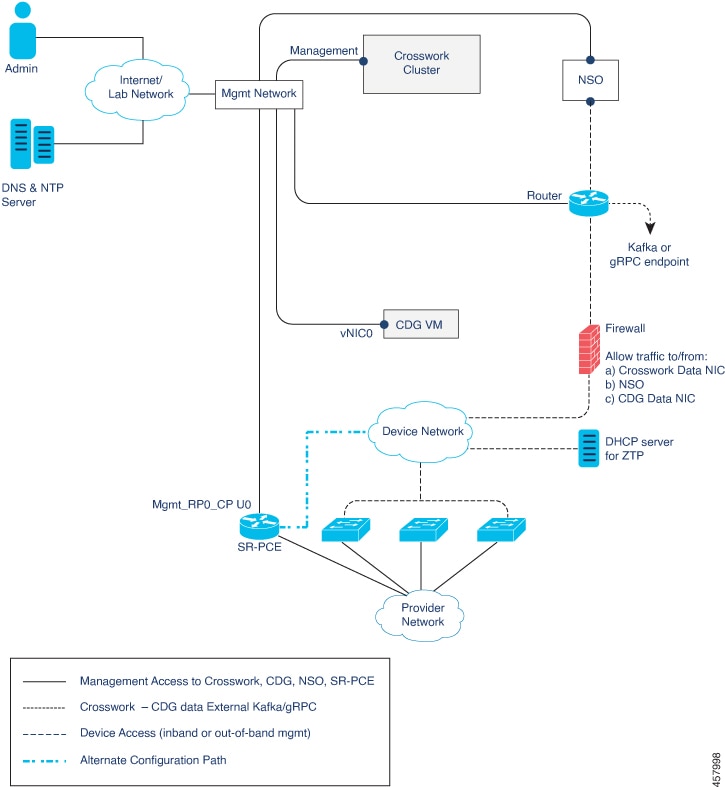
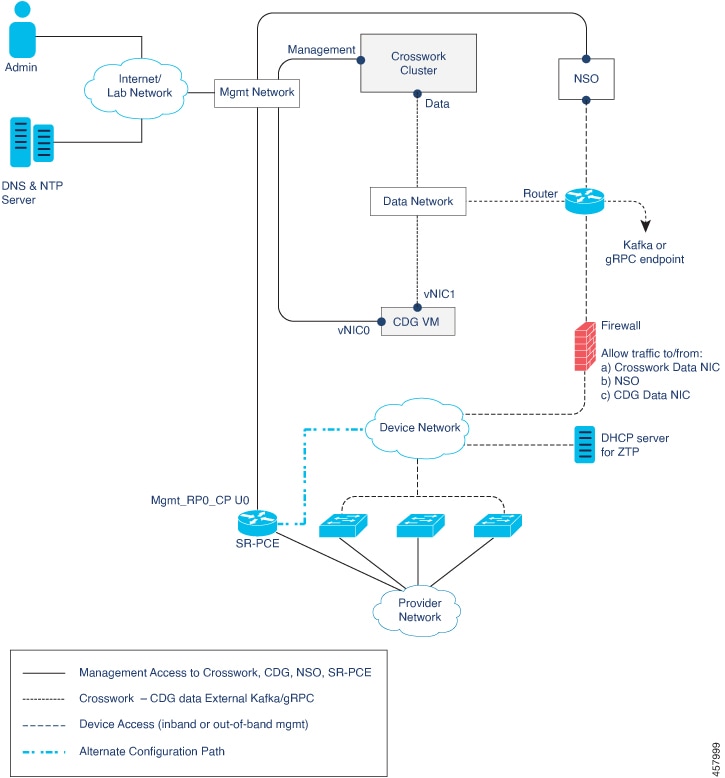
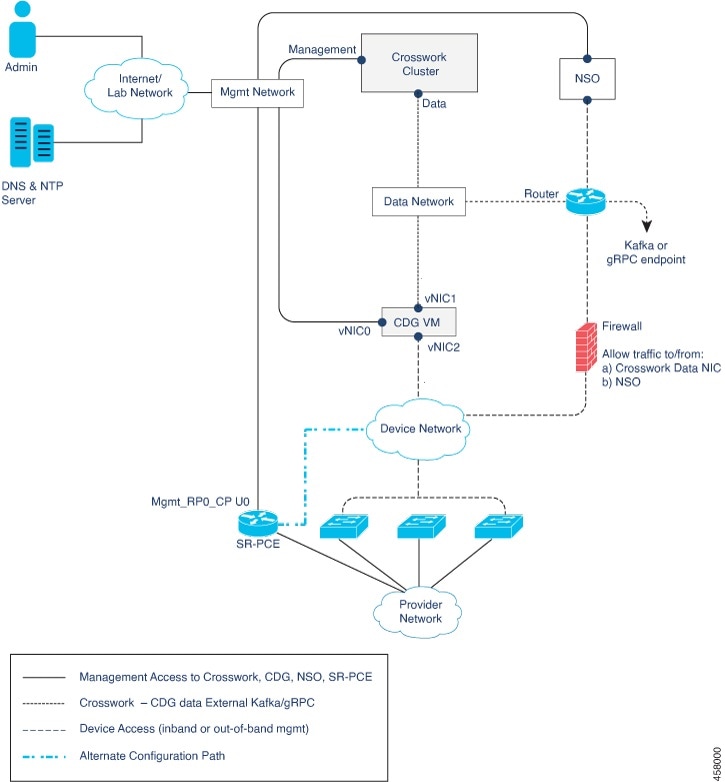
Connectivity between the various components should be accomplished via an external routing entity. The figures show various line styles suggesting possible routing domains within the routed network.

  • Solid - Management routing domain.

  • Dotted - Data/Control routing domain (information transferred between Cisco Crosswork and Cisco Crosswork Data Gateway, and other data destinations (external Kafka or gRPC)).

  • Dashes - Device access routing domain (from Cisco Crosswork Data Gateway and NSO).

  • Blue dashes - Alternate SR-PCE configuration path

The IP/subnet addressing scheme on each of these domains depends on the type of deployment.

Routing between domains is needed for Crosswork and NSO to reach the devices. However, proper firewall rules need to be in place to allow only select sources (for example, Crosswork and NSO) to reach the devices.

On the device network, devices can be reached in-band or using out-of-band management interfaces, depending on the local security policies of each deployment.

There are three types of traffic flowing between the network components, are explained below:

Figure 1. Cisco Crosswork - 1 NIC Network Topology
Figure 2. Cisco Crosswork - 2 NIC Network Topology
Figure 3. Cisco Crosswork - 3 NIC Network Topology
Table 16. Types of Network Traffic

Traffic

Description

Management

For accessing the UI and command line, and passing Data information between servers (for example, Cisco Crosswork to Crosswork Data Gateway or NSO)

Data

Data and configuration transfer between Crosswork Data Gateway and Cisco Crosswork, and other data destinations (external Kafka/gRPC).

Device Access

Device configuration and management, and telemetry data being forwarded to the Crosswork Data Gateway.

Cisco Crosswork Virtual Machine (VM)

The Cisco Crosswork VM has the following vNIC deployment options:

Table 17. Cisco Crosswork vNIC deployment modes

No. of vNICs

vNIC

Description

1

Management

Management, Data, and Device access passing through a single NIC

2

Management

Management

Data

Data and Device access

Cisco Crosswork Data Gateway VM

The Cisco Crosswork Data Gateway VM has the following vNIC deployment options:


Note


If you use one interface on your Crosswork cluster, you must use only one interface on the Crosswork Data Gateway. If you use two interfaces on your Crosswork Cluster, then you can use two or three interfaces on the Crosswork Data Gateway as per your network requirements.


Table 18. Cisco Crosswork Data Gateway vNIC deployment modes

No. of vNICs

vNIC

Description

1

vNIC0

Management, Data, and Device access passing through a single NIC

2

vNIC0

Management

vNIC1

Data and Device access

3

vNIC0

Management

vNIC1

Data

vNIC2

Device Access


Note


Preference for the number of vNICs can vary from one deployment to another. The number of vNICs can be dependent on the security and traffic isolation needs of the deployment. Crosswork Data Gateway and Crosswork accommodates this variability by introducing a variable number of vNICs.


SR-PCE Configuration

The Segment Routing Path Computation Element (SR-PCE) is both a device and a Software-Defined Networking (SDN) controller. Some deployments may want to treat an SR-PCE instance as a device, in which case they would need access via the device network. Some deployments may want to treat an SR-PCE instance as an SDN controller and access it on the Management routing domain. Crosswork supports both models. By default, Crosswork will use eth0 (Management) to access SR-PCE as an SDN controller on the Management domain (shown in the figures). For more information on enabling Crosswork access to an SR-PCE instance as a device on the device network (shown as alternate path in the figures), please refer to the Add Cisco SR-PCE Providers topic in the Cisco Crosswork Infrastructure 4.4 and Applications Administration Guide.

ZTP Requirements

If you plan to use Zero Touch Provisioning, the device network needs to be equipped with DHCP and TFTP servers (not provided with Cisco Crosswork). All ZTP options require DHCP, PNP also requires the TFTP server too.The devices must also have network connectivity to the Crosswork cluster as they will pull files (software and/or configuration) directly from the Crosswork cluster. For more information on Zero Touch Provisioning concepts and features, please refer to the Zero Touch Provisioning chapter in the Cisco Crosswork Infrastructure 4.4 and Applications Administration Guide.

Cisco Network Services Orchestrator (NSO) VM

The NSO VM has the following vNICs:

  • Management: Used for Crosswork applications to reach NSO.

  • Device Access: Used for NSO to reach devices or NSO Resource Facing Services (RFS).

Installation Requirements in AWS EC2

Amazon Web Services Elastic Compute Cloud (AWS EC2) is a web service that provides resizable computing capacity that you use to build and host Crosswork.

Crosswork can be deployed in AWS EC2 using the following methods:

  • Using CloudFormation: The CloudFormation process is faster and less error-prone than the manual procedure to build the cluster, however you must have the necessary skills to prepare a CloudFormation template with details of the cluster deployment.

  • Manually deploying each VM: The manual deployment process is simpler, but it takes time and must be repeated for each VM in your cluster. The manual process requires a smaller scripts ("user data") which must be created for each VM in your cluster.

AWS Resource Requirements

This section explains the resource requirements needed for each VM to deploy Crosswork in Amazon EC2.


Important


Ensure that you have installed compatible versions of Cisco NSO and Cisco SR-PCE, and have installed all mandatory Function Packs. For more information, see the Integration Requirements for other Cisco Products.


The following table shows the VM requirements for various use cases and combinations of applications:

Table 19. VM Requirements in Amazon

Component

vCPU

Memory (RAM)

Network Interface Controller (NIC)

Storage (Boot disk + Data Disk)

Crosswork Infrastructure

12

Minimum clock reservation: 18 GHz

96 GB

10 Gbps

1 TB

CDG On-Premise Standard

12

64 GB

10 Gbps

70 GB (50 GB + 20GB)

CDG On-Premise Extended

24

128 GB

10 Gbps

570 GB (50 GB + 520 GB)

Cisco NSO

5

16

128 GB

10 Gbps

1 TB

Cisco SR-PCE

6

8

24 GB

10 Gbps

70 GB

5 NSO footprint depends on the type of deployment, standalone or non-LSA
6 SR-PCE count will depend on the number of head-ends that need to be managed

Things to note for Crosswork Infrastructure VMs:

  • In addition to the storage for each VM, additional space will be needed in the datacenter to store the build images, application packages, and backups.

  • Storage requirements vary based on factors such as the number of devices being supported and the type of deployment selected. However, 1 TB disk space should work for most deployments.

  • Due to their performance, solid state drives (SSD) are preferred over traditional hard disk drives (HDD).

  • If you are using HDD, the minimum speed should be over 10,000 RPM.

  • One or more VM data stores need to have disk access latency of < 10 ms.

  • Upgrade of the cluster temporarily requires double the total disk space used by the cluster.

  • Ensure you have configured an SCP server with sufficient storage (at least 25 GB) to make backups of Cisco Crosswork.

AWS EC2 Settings

This section describes the settings that must be configured to install Crosswork cluster and Crosswork Data Gateway on AWS EC2.


Attention


Most of the requirements discussed in this section are AWS EC2 concepts and not imposed exclusively by Crosswork.


Requirement

Description

VPC & Subnets

VPC (Virtual Private Cloud) is created and configured with dedicated subnets for Crosswork interfaces (Management and Data) and Crosswork Data Gateway (Management, Data, and Device) interfaces. Ensure that you do not use any addresses mentioned in the IP Address Restrictions section.

Note


The Crosswork cluster does not support launching instances in multiple availability zones. Kindly ensure that your subnets are linked to the same availability zone.

Endpoints

An endpoint is created in your VPC with the following parameters:

  • Service name: EC2 service for the region (availability zone) where you are deploying.

  • Private DNS names: Enabled

  • Endpoint type: Interface

  • Under Subnets, specify the management subnet that you intend to use for the installation. If you are using different management subnets for the Crosswork VM and the Crosswork Data Gateway VM, ensure that you specify both the management subnets to ensure that the endpoint has access to the subnets.

IAM role

A role is created in Identity and Access Management (IAM) with relevant permission policies. An IAM role is an identity that has specific permissions with credentials that are valid for short durations. Roles can be assumed by entities that you trust.

Note

 
  • The minimum permissions required for a Crosswork role are ec2:AssignPrivateIpAddresses and ec2:UnassignPrivateIpAddresses.

  • The trust policy for your role must have the "Action": "sts:AssumeRole" condition.

Key pairs Key pairs (private keys used to log into the VMs) are created and configured.

Placement Groups

A placement group of Cluster strategy is created.

In a cluster placement group, instances are logically grouped in a single availability zone that benefit from low network latency and high network throughput.

This requirement is required only for launching the Crosswork cluster instances.

IP addresses

Crosswork cluster: 2 IP subnets, one for the Management network and one for Data network, with one IP address (IPv4 or IPv6) for each node being deployed (Hybrid or Worker) and one additional IP address to be used as the Virtual IP (VIP) address. If your deployment requires Worker nodes, you will need a Management and Data IP address for each Worker node.

When using single NIC, you require one IP address (IPv4 or IPv6) for each node being deployed (Hybrid or Worker) and one additional IP address to be used as the Virtual IP (VIP) address. When using dual NICs (one for the Management network and one for the Data network), you require a management and data IP address (IPv4 or IPv6) for each node being deployed (Hybrid or Worker) and two additional IP addresses to be used as the management and data Virtual IP (VIP) address.

For example, in the case of a 3 VM cluster with a single NIC, you need 4 IP addresses, and in the case of a 3 VM cluster with dual NIC, you need 8 IP addresses (4 for management network and 4 for data network).

Crosswork Data Gateway: IP addresses for Management Traffic and Data Traffic only. IP address for Device Access Traffic is assigned during Crosswork Data Gateway pool creation as explained in the Section: Create a Crosswork Data Gateway Pool in the Cisco Crosswork Infrastructure 4.4 and Applications Administration Guide.

  • The IP addresses must be able to reach the gateway address for the network where Cisco Crosswork Data Gateway will be installed, or the installation will fail.

  • At this time, your IP allocation is permanent and cannot be changed without re-deployment. For more information, contact the Cisco Customer Experience team.

Security group

A security group must be created and configured to specify which ports or traffic are allowed. For more info on the port requirements, see Port requirements.

Instance type

The resource profile for your instance deployment.

Crosswork Cluster:

  • Select m5.4xlarge for demos or lab deployments.

  • Select m5.8xlarge for production deployments.

Crosswork Data Gateway (production and lab deployments):

  • Standard - Select m5.4xlarge

  • Extended - Select m5.8xlarge

CloudFormation (CF) template

The CF template (.yaml) files for Crosswork cluster and Crosswork Data Gateway VMs that must be uploaded during the installation using CloudFormation templates procedure. For more information, see:

User data

The VM-specific parameters script that must be specified during the manual installation procedure. For more information, see: