Spectrum Capture

Hardware Compatibility Matrix for Cisco Remote PHY Device


Note


Unless otherwise specified, the hardware components introduced in a given Cisco Remote PHY Device Software Release are supported in all subsequent releases.
Table 1. Hardware Compatibility Matrix for the Cisco Remote PHY Device

Cisco HFC Platform

Remote PHY Device

Cisco GS7000 Super High Output Node

Cisco 1x2 / Compact Shelf RPD Software 2.1 and Later Releases

Cisco GS7000 Super High Output Intelligent Node (iNode)

Cisco 1x2 / Compact Shelf RPD Software 4.1 and Later Releases

Cisco Intelligent Remote PHY Device 1x2

  • PID—iRPD-1X2=

  • PID—iRPD-1X2-PKEY=


Note


The -PKEY suffix in the PID indicates units that enable the SCTE-55-2 Out-of-Band protocol support.

Upstream Dynamic Modulation Profile

Modulation profiles define how information is transmitted upstream from a cable modem to the Cable Modem Termination System (CMTS). Remote PHY Core supports upstream dynamic modulation profiles from Cisco IOS XE Gibraltar 16.12.1x version.

Dynamic modulation profile does not work when the upstream sharing is enabled in R-PHY. A warning message appears when you configure the dynamic modulation profile in R-PHY upstream controller profile. It does not appear when configuring it in the I-CMTS upstream controller profile.

Verify Modulation Profile

To view the modulation profile used by the upstream channel on the SUP card, run the following command:
Router#show controllers upstream-Cable 9/0/10 us-channel 0 

Controller RPD US Port List:

DevID  RPD ID          US Port  I/F       Name
------ --------------- -------- --------- ------------ 
  0    badb.ad13.417c     0     Te9/1/2   uscom3                        

USPHY OFDMA support: FULL 
 

Controller 9/0/10 upstream 0  AdminState:UP OpState: UP
  atdma mode enabled
  Frequency 10.000 MHz, Channel Width 6.400 MHz, Symbol Rate 5.120 Msps
  Modulation Profile Group 399
  Modulations (16-QAM) - A-short 16-QAM, A-long 16-QAM, A-ugs 16-QAM

  Mapped to connector 10 and receiver 0
To view the modulation profile used by the upstream channel on a line card, run the following command:
To view the hop history of the upstream channel on a SUP card, run the following command:
Router#show cable hop upstream-cable 9/0/10 us-channel 0 history 
F = Frequency Hop, M = Modulation Change, C = Channel Width Change

Upstream         Action        Chg  Chg    Chg    Action                            
Channel          Time          Code From   To     Reason                            
UC9/0/10:U0     Sep 24 07:26:10 M   399    398    Test command enforced
                           Sep 24 07:26:03 M   400    399    Test command enforced 
                           Sep 24 07:25:54 M   399    400    Test command enforced    
                           Sep 24 07:21:27 M   400    399    SNR 30>=25            
                           Sep 24 07:19:33 M   399    400    Test command enforced           
                           Sep 24 07:09:27 M   398    399    SNR 26<28                           
                           Sep 23 12:21:25 C    1.6      6.4    Configuration changed  

Spectrum Capture

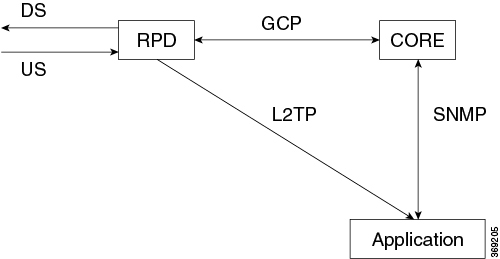
Upstream triggered spectrum analysis measurement provides a wideband spectrum analyzer function in the CCAP. You can trigger this function to examine specific upstream transmissions and underlying noise or interference during a quiet period. WBFFT stands for Wide Band Fast Fourier Transform. This feature allows all RPD US ports to enable an upstream spectrum analyzer built into the RPD’s front end. RPD supports FreeRunning trigger mode.

Figure 1. Spectrum Capture Workflow

Note


US PHY computes and directly sends US FFT data. RPD firmware does not handle this data. The firmware configures US PHY to send L2TP stream based on GCP TLV messages.


RPD 8.4 and following releases support Time IQ WBFFT Data on PNM upstream. You can now configure the poll interval and other parameters for free-run mode instead of fixed values in previous releases. All parameters can be configured by TLV41: UsSpectrumCapture.

Please see the following link for Cisco cBR-8 configuration of this feature:

https://www.cisco.com/c/en/us/td/docs/cable/cbr/configuration/guide/b_cbr_docsis_full_book_xe16_10/b_cbr_docsis_full_book_xe16_10_chapter_0100110.html


Note


  1. This feature provides a stream of raw spectrum data only.

  2. The application that interprets and presents the data in human readable format is not part of this feature.


Verifying Spectrum Capture Configuration

To verify if the spectrum capture is enabled, use show bcm-register wbfft config command as shown in the following example. The WBFFT Trigger Mode should be FreeRunning if this feature is enabled.

R-PHY#show bcm-register wbfft config
WBFFT Trigger Mode   : FreeRunning
Enable UTSC         : TRUE
Sample Num          : 4096
Session ID          : 44201020
PNM Dest IP         : 2001:30:84:0:1:0:66:1
PNM Dest Mac        : c414.3c16.d682
R-PHY#show bcm-register wbfft all 0
WBFFT Start Ctrl   [cc000000]     : 00000001
In Control         [cc000004]     : 00472F04
Out Control        [cc00000c]     : 0000009B
Timing Ctrl        [cc000010]     : 00000003
WBFFT FIRST WDW CF [cc000024]     : 00000920
WBFFT SCND WDW CF  [cc000028]     : 0000C660
WBFFT MIDL WDW CF  [cc00002c]     : 000061E0
WBFFT MAX CTL      [d0000048]     : 33800000
WBFFT Status       [cc000034]     : 00000000

WBFFTS In Ctrl     [d0000044]     : 00000100
WBFFT PKT BYTE                    : 004A0000
WBFFT PKT COUNT                   : 00004A00

Feature Information for Spectrum Management

The following table provides release information about the feature or features described in this module. This table lists only the software release that introduced support for a given feature in a given software release train. Unless noted otherwise, subsequent releases of that software release train also support that feature.

Use Cisco Feature Navigator to find information about platform support and Cisco software image support. To access Cisco Feature Navigator, go to https://cfnng.cisco.com/. An account on Cisco.com is not required.
Table 2. Feature Information for Spectrum Management

Feature Name

Releases

Feature Information

Upstream Dynamic Modulation Profile

Cisco 1x2 / Compact Shelf RPD Software 7.5

This feature was introduced in the Cisco Remote PHY Device.

Spectrum Capture

Cisco 1x2 / Compact Shelf RPD Software 6.4

This feature was integrated into the Cisco Remote PHY Device.