NOTE: This product is no longer being sold and might not be supported. View the End-of-Life Notice to learn:
|
Analog Phones Come Online
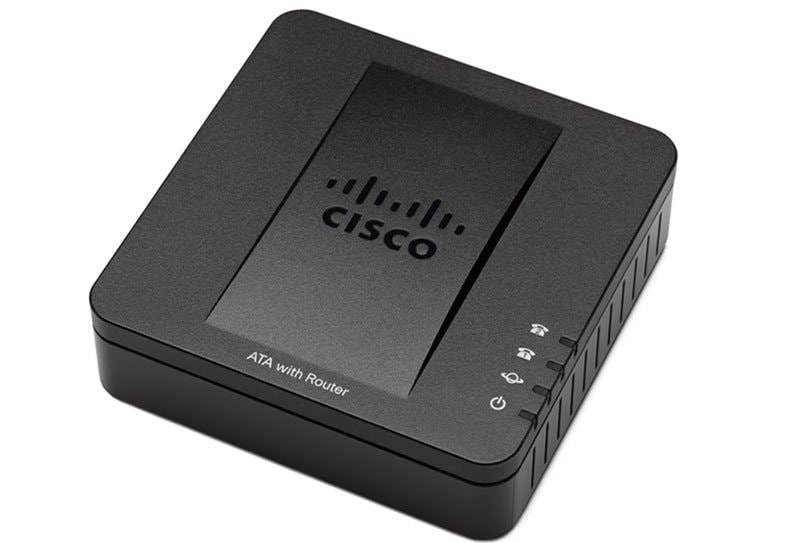
There's no need to replace your analog telephones just because you want to refresh your phone system. Part of Cisco Small Business Voice Gateways and ATAs, the SPA2102 phone adapter with router connects standard analog phones or fax machines to an IP-based data network.
With the SPA2102 users are able to protect and extend their investment in telephones, conference speakerphones, and fax machines, as well as control their migration to IP with an affordable and reliable solution. The enhanced and cost-effective benefits of voice over IP (VoIP) service require only a broadband connection to the Internet.
Additional features of the Cisco SPA2102 include:
- Dual ports to connect existing analog phones or fax machines, or to a PBX system
- Two 100BaseT RJ45 Ethernet interfaces (LAN-WAN) to connect to a home or office LAN, as well as an Ethernet connection for a broadband modem or router (WAN)
- Independent configuration of each line using software controlled by the service provider or the end user
- Strong security with reliable, encryption-based methods for communication, provisioning, and servicing
Additional Documentation
(All Cisco Small Business Voice Gateways and ATAs Data Sheets)
End-of-Life and End-of-Sale Notices
(All Cisco Small Business Voice Gateways and ATAs End-of-Life and End-of-Sale Notices)
Q&A
(All Cisco Small Business Voice Gateways and ATAs Q&A)
Accessing the SPA2100's Interactive Voice Response (IVR) Menu
Accessing the SPA2100's Web-Based Setup Page
Cascade (Connect) a Cisco Small Business Router to a VoIP Router
Change the Cisco Small Business VoIP Router Password
Change the VoIP Router's LAN IP Address
Change the Wireless Channel on a Cisco Small Business VoIP Router
Change the Wireless Network Name (SSID) on a Cisco Small Business VoIP Router
Check Phone Registration Status on the Cisco Small Business VoIP Router
Check the Cisco Small Business VoIP Router IP Address
Check the Wireless Settings on a Cisco Small Business VoIP Router
Connect a Wired Computer to a Cisco Small Business VoIP Router
Connect a Wireless Adapter to a Cisco Small Business VoIP Router
Connect a Wireless Computer to a Cisco Small Business VoIP Router
Connect Devices Together on a Cisco Small Business VoIP Router
Connecting Phone Extensions to SPA2100
Disable SSID Broadcast on a Cisco Small Business VoIP Router
Enable Remote Management on a Cisco Small Business VoIP Router
Enabling WAN Web Server on SPA2100
Experiencing Unreliable T.38 Fax Connection Using an SPA2100
HTTPS Based Remote Provisioning with the SPA2102, SPA3102, and SPA9000
Identifying Devices that Support the T.38 Fax Protocol
Identifying SPA model/s that Support T.38 Fax Protocol
Implement Access Restrictions for Computers Behind a Small Business VOIP Router
Observing Proper Power Cycle on the VOIP Gateway
Resetting SPA2100
Resolving IP Conflict Between SPA2100 and an Existing Router
Running a Syslog on SPA Devices
Set up 128-Bit WEP Wireless Security on a Cisco Small Business VoIP Router
Set up a Cisco Small Business VoIP Router Using DSL Internet Service
Set up a Cisco Small Business VoIP Router with a Static IP Account
Set up a PlayStation 2 with a Cisco Small Business VoIP Router
Set up an Xbox on a Cisco Small Business VOIP Router
Set up Servers Behind a Cisco Small Business VOIP Router
Set up the Wireless Settings on a Cisco Small Business VoIP Router
Set up Wireless Security on a Cisco Small Business VOIP Router
Set up WPA Wireless Security on a Cisco Small Business VoIP Router
Setting the SPA2100 to bridge mode
Small Business VOIP Router: Choppy Line when Making a Call
Small Business VOIP Router: Identify the Advanced Wireless Settings
Small Business VOIP Router: Intermittent Wired Connections
Small Business VOIP Router: Intermittent Wireless Connection
Small Business VoIP Router: Poor or No Signal
Small Business VoIP Router: Problems Making a Phone Call
Small Business VOIP Router: Problems with Access to Some Websites
Small Business VOIP Router: Problems with Connection to Online Servers
Small Business VoIP Router: Problems with Connection to Secured Websites
Small Business VOIP Router: Problems with Dial Tone
Small Business VoIP Router: Problems with Sending and/or Receiving Emails
Small Business VOIP Router: Reset to Factory Default
SPA3102 Firmware Upgrade
SPA Troubleshooting 56832 bytes attached
Understanding the SPA2100's LED Blinking Pattern