- Preparing for Broadband Access Aggregation
- Providing Protocol Support for Broadband Access Aggregation of PPPoE Sessions
- Providing Protocol Support for Broadband Access Aggregation of PPP over ATM Sessions
- Providing Connectivity Using ATM Routed Bridge Encapsulation over PVCs
- PPPoE Circuit-Id Tag Processing
- Providing Session Limit Support
- PPPoE Session Limit Local Override
- PPPoE - QinQ Support
- PPP-Max-Payload and IWF PPPoE Tag Support
- PPPoE Session Limiting on Inner QinQ VLAN
- PPPoE Agent Remote-ID and DSL Line Characteristics Enhancement
- Enabling PPPoE Relay Discovery and Service Selection Functionality
- Configuring Cisco Subscriber Service Switch Policies
- Per Session Queuing and Shaping for PPPoEoVLAN Using RADIUS
- 802.1P CoS Bit Set for PPP and PPPoE Control Frames
- PPPoE Smart Server Selection
- Monitoring PPPoE Sessions with SNMP
- PPPoE on ATM
- PPPoE on Ethernet
- PPP IP Unique Address and Prefix Detection
- Remote Access MPLS-VPNs
- Broadband High Availability Stateful Switchover
- Broadband High Availability In Service Software Upgrade
- Controlling Subscriber Bandwidth
- Offering PPPoE Clients a Selection of Services During Call Setup
- Finding Feature Information
- Contents
- Prerequisites for Providing Protocol Support for Broadband Access Aggregation of PPP over ATM Sessions
- Restrictions for Providing Protocol Support for Broadband Access Aggregation of PPP over ATM Sessions
- Information About Providing Protocol Support for Broadband Access Aggregation of PPP over ATM Sessions
- How to Provide Protocol Support for Broadband Access Aggregation of PPP over ATM Sessions
- Configuring IETF-Compliant MUX Encapsulated PPP over ATM on Point-to-Point Subinterface
- Configuring IETF-Compliant MUX Encapsulated PPP over ATM on a Multipoint Subinterface
- Configuring IETF-Compliant LLC Encapsulated PPP over ATM on a Point-to-point Subinterface
- Configuring IETF-Compliant LLC Encapsulated PPP over ATM on a Multipoint Subinterface
- Configuration Examples for PPP over ATM
Providing Protocol Support for Broadband Access Aggregation of PPP over ATM Sessions
Last Updated: March 14, 2011
PPP over ATM enables a high-capacity central site router with an ATM interface to terminate multiple remote PPP connections. PPP over ATM provides security validation per user, IP address pooling, and service selection capability.
Finding Feature Information
Your software release may not support all the features documented in this module. For the latest feature information and caveats, see the release notes for your platform and software release. To find information about the features documented in this module, and to see a list of the releases in which each feature is supported, see the "Feature Information for Providing Protocol Support for Broadband Access Aggregation of PPP over ATM Sessions" section.
Use Cisco Feature Navigator to find information about platform support and Cisco software image support. To access Cisco Feature Navigator, go to http://www.cisco.com/go/cfn. An account on Cisco.com is not required.
Contents
• How to Provide Protocol Support for Broadband Access Aggregation of PPP over ATM Sessions
•Configuration Examples for PPP over ATM
Prerequisites for Providing Protocol Support for Broadband Access Aggregation of PPP over ATM Sessions
Perform the preparation tasks in the "Preparing for Broadband Access Aggregation" module.
Restrictions for Providing Protocol Support for Broadband Access Aggregation of PPP over ATM Sessions
PPP over ATM cannot be configured on IETF-compliant Logical Link Control (LLC) encapsulated PPP over ATM.
Information About Providing Protocol Support for Broadband Access Aggregation of PPP over ATM Sessions
Virtual Access Interface
When you configure PPP over ATM, a logical interface known as a virtual access interface associates each PPP connection with an ATM VC. You can create this logical interface by configuring an ATM permanent virtual circuit (PVC) or switched virtual circuit (SVC). This configuration encapsulates each PPP connection in a separate PVC or SVC, allowing each PPP connection to terminate at the router ATM interface as if received from a typical PPP serial interface.
The virtual access interface for each virtual circuit (VC) obtains its configuration from a virtual interface template (virtual template) when the VC is created. Before you create the ATM VC, we recommend that you create and configure a virtual template as described in the "Preparing for Broadband Access Aggregation" module.
After you have configured the router for PPP over ATM, the PPP subsystem starts and the router attempts to send a PPP configuration request to the remote peer. If the peer does not respond, the router periodically goes into a listen state and waits for a configuration request from the peer.
The virtual access interface is associated with the VC after the completion of the LCP negotiation. When the PPP session goes down, the virtual access interface is no longer associated with the VC and is returned to the pool of free virtual-access interfaces.
If you set a keepalive timer of the virtual template on the interface, the virtual access interface uses the PPP echo mechanism to verify the existence of the remote peer.
The following two types of PPP over ATM connections are supported:
•IETF-compliant MUX encapsulated PPP over ATM
•IETF-compliant LLC encapsulated PPP over ATM
How to Provide Protocol Support for Broadband Access Aggregation of PPP over ATM Sessions
•Configuring IETF-Compliant MUX Encapsulated PPP over ATM on Point-to-Point Subinterface (required)
•Configuring IETF-Compliant MUX Encapsulated PPP over ATM on a Multipoint Subinterface (required)
•Configuring IETF-Compliant LLC Encapsulated PPP over ATM on a Point-to-point Subinterface (required)
•Configuring IETF-Compliant LLC Encapsulated PPP over ATM on a Multipoint Subinterface(required)
Configuring IETF-Compliant MUX Encapsulated PPP over ATM on Point-to-Point Subinterface
Internet Engineering Task Force (IETF)-compliant multiplexer (MUX) encapsulated PPP over ATM, also known as null encapsulation, allows you to configure PPP over ATM using a VC multiplexed encapsulation mode. This feature complies with IETF RFC 2364 entitled PPP over AAL5.
You can configure ATM PVCs for IETF-compliant MUX encapsulated PPP over ATM on either point-to-point or multipoint subinterfaces.
Perform this task to configure IETF-compliant MUX Encapsulated PPP over ATM point-to-point subinterface.
SUMMARY STEPS
1. enable
2. configure terminal
3. interface atm number.subinterface-number point-to-point
4. pvc [name] vpi/vci
or
range [range-name] pvc start-vpi/start-vci
end-vpi/end-vci
5. encapsulation aal5mux ppp virtual-template number
6. end
DETAILED STEPS
|
|
|
|
|---|---|---|
Step 1 |
enable Router> enable |
Enables privileged EXEC mode. • |
Step 2 |
configure terminal Router# configure terminal |
Enters global configuration mode. |
Step 3 |
interface atm number.subinterface-number point-to-point Router(config)# interface atm 1.0 point-to-point |
Specifies the ATM point-to-point subinterface using the appropriate form of the interface atm command1 and enters subinterface configuration mode. |
Step 4 |
pvc [name] vpi/vci or range [range-name] pvc start-vpi/start-vci end-vpi/end-vci Router(config-subif)# pvc cisco 0/5 or Router(config-subif)# range range1 pvc 1/200 1/299 |
Configures the PVC or a range of PVCs and enters ATM virtual circuit subinterface mode or ATM range subinterface configuration mode. |
Step 5 |
encapsulation aal5mux ppp virtual-template number Router(config-subif-atm-vc)# encapsulation aal5mux ppp virtual-template 3 or Router(config-subif-atm-range)# encapsulation aal5mux ppp virtual-template 3 |
Configures VC multiplexed encapsulation on a PVC or PVC range. |
Step 6 |
end Router(config-subif-atm-vc)# end or Router(config-subif-atm-range)# end |
Exits ATM virtual circuit range subinterface configuration mode. or Exits ATM range subinterface configuration mode. |
1 To determine the correct form of the interface atm command, consult your ATM shared port adapters documentation. |
Configuring IETF-Compliant MUX Encapsulated PPP over ATM on a Multipoint Subinterface
Multiple PVCs on multipoint subinterfaces significantly increase the maximum number of PPP-over-ATM sessions running on a router. You can configure IETF-compliant MUX encapsulated PPP over ATM on a single ATM PVC or an ATM PVC range.
Perform this task to configure IETF-compliant MUX Encapsulated PPP over ATM on a multipoint subinterface.
SUMMARY STEPS
1. enable
2. configure terminal
3. interface atm number.subinterface-number multipoint
4. pvc [name] vpi/vci
or
range [range-name] pvc start-vpi/start-vci end-vpi/end-vci
5. encapsulation aal5mux ppp virtual-template number
6. end
DETAILED STEPS
|
|
|
|
|---|---|---|
Step 1 |
enable Router> enable |
Enables privileged EXEC mode. • |
Step 2 |
configure terminal Router# configure terminal |
Enters global configuration mode. |
Step 3 |
interface atm number.subinterface-number multipoint Router(config)# interface atm 1/0/0.4 multipoint |
Specifies the ATM multipoint subinterface using the appropriate form of the interface atm command1 and enters subinterface configuration mode. |
Step 4 |
pvc [name] vpi/vci or range [range-name] pvc start-vpi/start-vci end-vpi/end-vci Router(config-subif)# pvc cisco 0/5 or Router(config-subif)# range range1 pvc 1/200 1/299 |
Configures the PVC or a range of PVCs and enters ATM virtual circuit subinterface mode or ATM range subinterface configuration mode. |
Step 5 |
encapsulation aal5mux ppp virtual-template number Router(config-subif-atm-vc)# encapsulation aal5mux ppp virtual-template 3 or Router(config-subif-atm-range)# encapsulation aal5mux ppp virtual-template 3 |
Configures VC multiplexed encapsulation on a PVC or PVC range. |
Step 6 |
end Router(config-subif-atm-vc)# end or Router(config-subif-atm-range)# end |
Exits ATM virtual circuit subinterface configuration mode. or Exits ATM range subinterface configuration mode. |
1 To determine the correct form of the interface atm command, consult your ATM shared port adapters documentation. |
Configuring IETF-Compliant LLC Encapsulated PPP over ATM on a Point-to-point Subinterface
IETF-compliant LLC encapsulated PPP over ATM allows you to configure PPP over ATM with LLC encapsulation. It accommodates Frame Relay-to-ATM service interworking (Frame Relay Forum standard FRF.8). There is no equivalent VC multiplexed encapsulation mode for Frame Relay; therefore, LLC encapsulation is required for Frame Relay-to-ATM networking. This version of PPP over ATM also enables you to carry multiprotocol traffic. For example, a VC will carry both PPP and IPX traffic.
Figure 2 shows Frame Relay-to-ATM interworking.
Figure 2 Frame Relay-to-ATM Interworking

You can configure ATM PVCs for IETF-compliant LLC encapsulated PPP over ATM on either point-to-point or multipoint subinterfaces. Multiple PVCs on multipoint subinterfaces significantly increase the maximum number of PPP-over-ATM sessions running on a router.
Perform this task to configure IETF-compliant LLC encapsulated PPP over ATM PVC or range of PVCs on a point-to-point interface.
SUMMARY STEPS
1. enable
2. configure terminal
3. interface atm number.subinterface-number point-to-point
4. pvc [name] vpi/vci
or
range [range-name] pvc start-vpi/end-vpi start-vci/end-vci
5. encapsulation aal15snap
6. protocol ppp virtual-template number
7. end
DETAILED STEPS
|
|
|
|
|---|---|---|
Step 1 |
enable Router> enable |
Enables privileged EXEC mode. • |
Step 2 |
configure terminal Router# configure terminal |
Enters global configuration mode. |
Step 3 |
interface atm number.subinterface-number point-to-point Router(config)# interface atm 6.200 point-to-point |
Specifies the ATM point-to-point or multipoint subinterface using the appropriate form of the interface atm command1 and enters subinterface configuration mode. |
Step 4 |
pvc [name] vpi/vci or range [range-name] pvc start-vpi/start-vci end-vpi/end-vci Router(config-subif)# pvc cisco 0/5 or Router(config-subif)# range range1 pvc 1/200 1/299 |
Configures the PVC or a range of PVCs and enters ATM virtual circuit subinterface mode or ATM range subinterface configuration mode. |
Step 5 |
encapsulation aal15snap Router(config-subif-atm-vc)# encapsulation aal15snap or Router(config-subif-atm-range)# encapsulation aal15snap |
Configures LLC SNAP encapsulation on the PVC or a range of PVCs.2 |
Step 6 |
protocol ppp virtual-template number Router(config-subif-atm-vc)# protocol ppp virtual-template 2 or Router(config-subif-atm-range)# protocol ppp virtual-template 2 |
Configures IETF PPP over ATM LLC encapsulation on the PVC or a range of PVCs. |
Step 7 |
end Router(config-subif-atm-vc)# end or Router(config-subif-atm-range)# end |
Exits ATM virtual circuit subinterface configuration mode. or Exits ATM range subinterface configuration mode. |
1 To determine the correct form of the interface atm command, consult your ATM shared port adapters documentation. 2 "SNAP encapsulation" is a misnomer here, since this encapsulation configures both LLC and SNAP encapsulation on the VC. If SNAP encapsulation is not configured at a lower inheritance level, or another type of encapsulation is configured at a lower inheritance level, you will have to configure both SNAP and the protocol ppp command to ensure that PPP over ATM with LLC encapsulation is configured on your VC. |
Configuring IETF-Compliant LLC Encapsulated PPP over ATM on a Multipoint Subinterface
Multiple PVCs on multipoint subinterfaces significantly increase the maximum number of PPP-over-ATM sessions running on a router.
Perform this task to configure IETF-compliant LLC encapsulated PPP over ATM PVC or a range of PVCs on a multipoint subinterface.
SUMMARY STEPS
1. enable
2. configure terminal
3. interface atm number.subinterface-number multipoint
4. pvc [name] vpi/vci
or
range [range-name] pvc start-vpi/end-vpi start-vci/end-vci
5. encapsulation aal15snap
6. protocol ppp virtual-template number
7. end
DETAILED STEPS
|
|
|
|
|---|---|---|
Step 1 |
enable Router> enable |
Enables privileged EXEC mode. • |
Step 2 |
configure terminal Router# configure terminal |
Enters global configuration mode. |
Step 3 |
interface atm number.subinterface-number multipoint Router(config)# interface atm 1/0/0.4 multipoint |
Specifies the ATM multipoint subinterface using the appropriate form of the interface atm command1 and enters subinterface configuration mode. |
Step 4 |
pvc [name] vpi/vci or range [range-name] pvc start-vpi/start-vci end-vpi/end-vci Router(config-subif)# pvc cisco 0/5 or Router(config-subif)# range range1 pvc 1/200 1/299 |
Configures the PVC or a range of PVCs and enters ATM virtual circuit subinterface mode or ATM range subinterface configuration mode. |
Step 5 |
encapsulation aal5mux ppp virtual-template number Router(config-subif-atm-vc)# encapsulation aal5mux ppp virtual-template 3 or Router(config-subif-atm-range)# encapsulation aal5mux ppp virtual-template 3 |
Configures VC multiplexed encapsulation on a PVC or PVC range. |
Step 6 |
protocol ppp virtual-template number Router(config-subif-atm-vc)# protocol ppp virtual-template 2 or Router(config-subif-atm-range)# protocol ppp virtual-template 2 |
Configures IETF PPP over ATM LLC encapsulation on the PVC or a range of PVCs. |
Step 7 |
end Router(config-subif-atm-vc)# end or Router(config-subif-atm-range)# end |
Exits ATM virtual circuit subinterface configuration mode. or Exits ATM range subinterface configuration mode. |
1 To determine the correct form of the interface atm command, consult your ATM shared port adapters documentation. |
Configuration Examples for PPP over ATM
This section provides the following configuration examples:
•IETF-Compliant MUX Encapsulated PPP over ATM Configuration
•IETF-Compliant LLC Encapsulated PPP over ATM Configuration
IETF-Compliant MUX Encapsulated PPP over ATM Configuration
This section provides the following examples for configuring IETF-compliant PPP over ATM:
•Example: ETF-Compliant PPP over ATM with Different Traffic-Shaping Parameters
•Example: Two Routers with Back-to-Back PVCs
•Example: Two Routers with Back-to-Back PVCs
•Example: Multiplexed Encapsulation Using VC Class
Example: ETF-Compliant PPP over ATM with Different Traffic-Shaping Parameters
PVCs with different PPP-over-ATM traffic-shaping parameters can be configured on the same subinterface. In the following example, three PVCs are configured for PPP over ATM on subinterface ATM 2/0.1. PVC 0/60 is configured with IETF-compliant PPP over ATM encapsulation. Its traffic-shaping parameter is an unspecified bit rate with peak cell rate at 500 kb/s. PVC 0/70 is also configured with IETF-compliant PPP over ATM encapsulation, but its traffic-shaping parameter is nonreal-time variable bit rate, with peak cell rate at 1 Mb/s, sustainable cell rate at 500 kb/s, and burst cell size of 64 cells. For further information, see the "Configuring IETF-Compliant MUX Encapsulated PPP over ATM on Point-to-Point Subinterface" section.
interface atm 2/0.1 multipoint
pvc 0/60
encapsulation aal5mux ppp virtual-template 3
ubr 500
exit
pvc 0/70
encapsulation aal5mux ppp virtual-template 3
vbr-nrt 1000 500 64
exit
Example: Two Routers with Back-to-Back PVCs
Figure 3 illustrates an ATM interface with two PPP sessions over two PVC session connections. The sample commands following Figure 3 establish the back-to-back router configuration. For further information, see the "Configuring IETF-Compliant MUX Encapsulated PPP over ATM on Point-to-Point Subinterface" section.
Figure 3 Two Routers with Back-to-Back PVCs
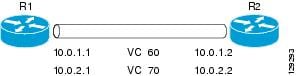
R1 Configuration
interface atm 2/0
atm clock internal
pvc 0/60
encapsulation aal5mux ppp virtual-template 1
ubr 90
exit
pvc 0/70
encapsulation aal5mux ppp virtual-template 2
vbr-nrt 90 50 1024
exit
interface virtual-template 1
ip address 10.0.1.1 255.255.255.0
interface virtual-template 2
ip address 10.0.2.1 255.255.255.0
exit
R2 Configuration
interface atm 2/0.1 multipoint
pvc 0/60
encapsulation aal5mux ppp virtual-template 1
ubr 90
exit
pvc 0/70
encapsulation aal5mux ppp virtual-template 2
vbr-nrt 90 50 1024
exit
exit
interface virtual-template 1
ip address 10.0.1.2 255.255.255.0
exit
interface virtual-template 2
ip address 10.0.2.2 255.255.255.0
Example: Multiplexed Encapsulation Using VC Class
In the following example, PVC 0/60 is configured on subinterface ATM 2/0.1 with a VC class attached to it. By rule of inheritance, PVC 0/60 runs with IETF-compliant PPP over ATM encapsulation using the configuration from interface virtual-template 1. Its parameter is an unspecified bit rate with peak cell at 90 kb/s.
interface atm 2/0/0.1
pvc 0/60
class-vc pvc-ppp
exit
exit
vc-class atm pvc-ppp
encapsulation aal5mux ppp virtual-template 1
ubr 90
exit
IETF-Compliant LLC Encapsulated PPP over ATM Configuration
This section provides the following examples for configuring IETF-compliant LLC encapsulated PPP over ATM:
•Example: Configuring IETF-Compliant PPP over ATM LLC Encapsulation
•Example: Overriding a Virtual Template for IETF-Compliant PPP over ATM
•Example: Disabling IETF-Compliant PPP over ATM LLC Encapsulation on a Specific VC
Example: Configuring IETF-Compliant PPP over ATM LLC Encapsulation
This example shows how to configure IETF PPP over ATM LLC encapsulation in the VC class called ppp-default. The VC class specifies virtual template 1 from which to spawn PPP interfaces, SNAP encapsulation (the default), and a UBR class traffic type at 256 kb/s. When the VC class ppp-default is configured on interface 0.1, PVC 0/70 inherits these properties. PVC 0/80 overrides virtual template 1 in the VC class and uses virtual template 2 instead. PVC 0/90 also overrides virtual template 1 and uses virtual template 3 instead. In addition, PVC 0/90 uses a VC multiplexed encapsulation and a UBR class traffic type at 500 kb/s. For further information, see the "IETF-Compliant LLC Encapsulated PPP over ATM Configuration" section.
interface atm 2/0/0.1 multipoint
class-int ppp-default
!
pvc 0/70
exit
!
pvc 0/80
protocol ppp virtual-template 2
exit
!
pvc 0/90
encapsulation aal5mux ppp virtual-template 3
ubr 500
exit
exit
!
vc-class atm ppp-default
protocol ppp virtual-template 1
ubr 256
exit
Example: Overriding a Virtual Template for IETF-Compliant PPP over ATM
This example illustrates how to use inheritance to override a virtual template configuration for muxppp encapsulation options. For PVC 5/505, since the encapsulation option at that level is ciscoppp virtual template 1, as specified in the VC class called muxppp, the protocol ppp virtual-template 2 command overrides only the virtual-template configuration. For further information, see the "IETF-Compliant LLC Encapsulated PPP over ATM Configuration" section.
interface atm 2/0/0.1
class-int muxppp
!
pvc 5/505
protocol ppp virtual-template 2
exit
!
muxppp
encapsulation aal5mux ppp virtual-template 1
exit
Example: Disabling IETF-Compliant PPP over ATM LLC Encapsulation on a Specific VC
This example shows how to limit the configuration of a particular LLC encapsulated protocol to a particular VC. First, we see that the VC class called ppp is configured with IETF PPP over ATM with LLC encapsulation and virtual template 1. This VC class is then applied to ATM interface 1/0/0. By configuring SNAP encapsulation by itself on PVC 0/32, you disable IETF PPP over ATM with LLC encapsulation on this particular PVC; PVC 0/32 will only carry IP. For further information, see the "IETF-Compliant LLC Encapsulated PPP over ATM Configuration" section.
interface atm 1/0/0
class-int ppp
exit
!
interface atm 1/0/0.100 point-to-point
description IP only VC
ip address 10.1.1.1 255.255.255.0
pvc 0/32
encapsulation aal5snap
exit
exit
!
vc-class atm ppp
encapsulation aal5snap
protocol ppp virtual-template 1
exit
Additional References
Related Documents
|
|
|
|---|---|
Cisco IOS commands |
|
Broadband and DSL commands |
|
Broadband access aggregation preparation tasks |
|
Configuring ATM |
Standards
|
|
|
|---|---|
Frame Relay Forum standard FRF.8 |
Frame Relay to ATM Internetworking |
MIBs
|
|
|
|---|---|
None |
To locate and download MIBs for selected platforms, Cisco IOS XE software releases, and feature sets, use Cisco MIB Locator found at the following URL: |
RFCs
|
|
|
|---|---|
RFC 2364 |
PPP over AAL5 |
Technical Assistance
Feature Information for Providing Protocol Support for Broadband Access Aggregation of PPP over ATM Sessions
Table 5 lists the release history for this feature.
Use Cisco Feature Navigator to find information about platform support and software image support. Cisco Feature Navigator enables you to determine which software images support a specific software release, feature set, or platform. To access Cisco Feature Navigator, go to http://www.cisco.com/go/cfn. An account on Cisco.com is not required.

Note Table 5 lists only the software release that introduced support for a given feature in a given software release train. Unless noted otherwise, subsequent releases of that software release train also support that feature.
|
|
|
|
|---|---|---|
PPP over ATM |
Cisco IOS XE Release 3.3S |
PPP over ATM provides support for the termination of multiple PPP connections on an ATM interface of a router. In Cisco IOS XE Release 3.3S, this feature was introduced on the Cisco ASR 1000 Series Aggregation Services Routers. The following sections provide information about this feature: • • The following commands were introduced or modified: encapsulation aal5mux ppp virtual-template, interface atm, protocol ppp virtual-template, pvc, range. |
 Feedback