디바이스가 기본 네트워크 설정을 갖추고 관리 플랫폼에 등록할 준비가 되었는지 확인하기 위해 수동 프로비저닝의 초기 설정 프로세스를 설명합니다.
초기 설정은 연결성 및 관리 등록을 활성화하기 위해 방화벽에서 기본 네트워크 설정을 설정하는 프로세스입니다.
Secure Firewall Device Manager 또는 CLI를 사용하여 방화벽의 초기 구성을 수행합니다.
Secure Firewall 200 Threat Defense 시작하기: 로컬 관리 네트워크의 Firewall Management Center
Is this content helpful?
Thank you for your feedback. Your response has been recorded.
AI responses are currently only available to logged in users. Log in
Only ask questions about this document. To ask questions about this product as a whole, go to Technical Documentation .
Suggestions
Sorry, we couldn't generate a response for this query.
Secure Firewall 200 Threat Defense 시작하기: 로컬 관리 네트워크의 Firewall Management Center
Updated: October 19, 2026
Want to summarize with AI?
Log in
디바이스가 기본 네트워크 설정을 갖추고 관리 플랫폼에 등록할 준비가 되었는지 확인하기 위해 수동 프로비저닝의 초기 설정 프로세스를 설명합니다.
초기 설정은 연결성 및 관리 등록을 활성화하기 위해 방화벽에서 기본 네트워크 설정을 설정하는 프로세스입니다.
Secure Firewall Device Manager 또는 CLI를 사용하여 방화벽의 초기 구성을 수행합니다.
이 방법을 사용하면 방화벽을 등록한 후 관리 인터페이스 외에도 다음 인터페이스가 사전 구성됩니다.
Ethernet 1/1— outside , DHCP의 IP 주소, IPv6 자동 구성
— inside , 192.168.95.1/24
기본 경로 - 외부 인터페이스에서 DHCP를 통해 얻음
추가 인터페이스 - Firewall Device Manager의 모든 인터페이스 구성이 유지됩니다.
내부의 DHCP 서버, 액세스 제어 정책 또는 보안 영역과 같은 기타 설정은 유지되지 않습니다.
컴퓨터를 내부 인터페이스에 연결합니다.
Firewall Device Manager에 로그인합니다.
https://192.168.95.1로 진행합니다.
사용자 이름 admin 및 기본 비밀번호 Admin123으로 로그인합니다.
일반 약관에 동의하고 관리자 비밀번호를 변경하라는 메시지가 표시됩니다.
설정 마법사를 사용합니다.
Note정확한 포트 구성은 모델에 따라 다릅니다.
외부 인터페이스와 관리 인터페이스를 구성합니다.
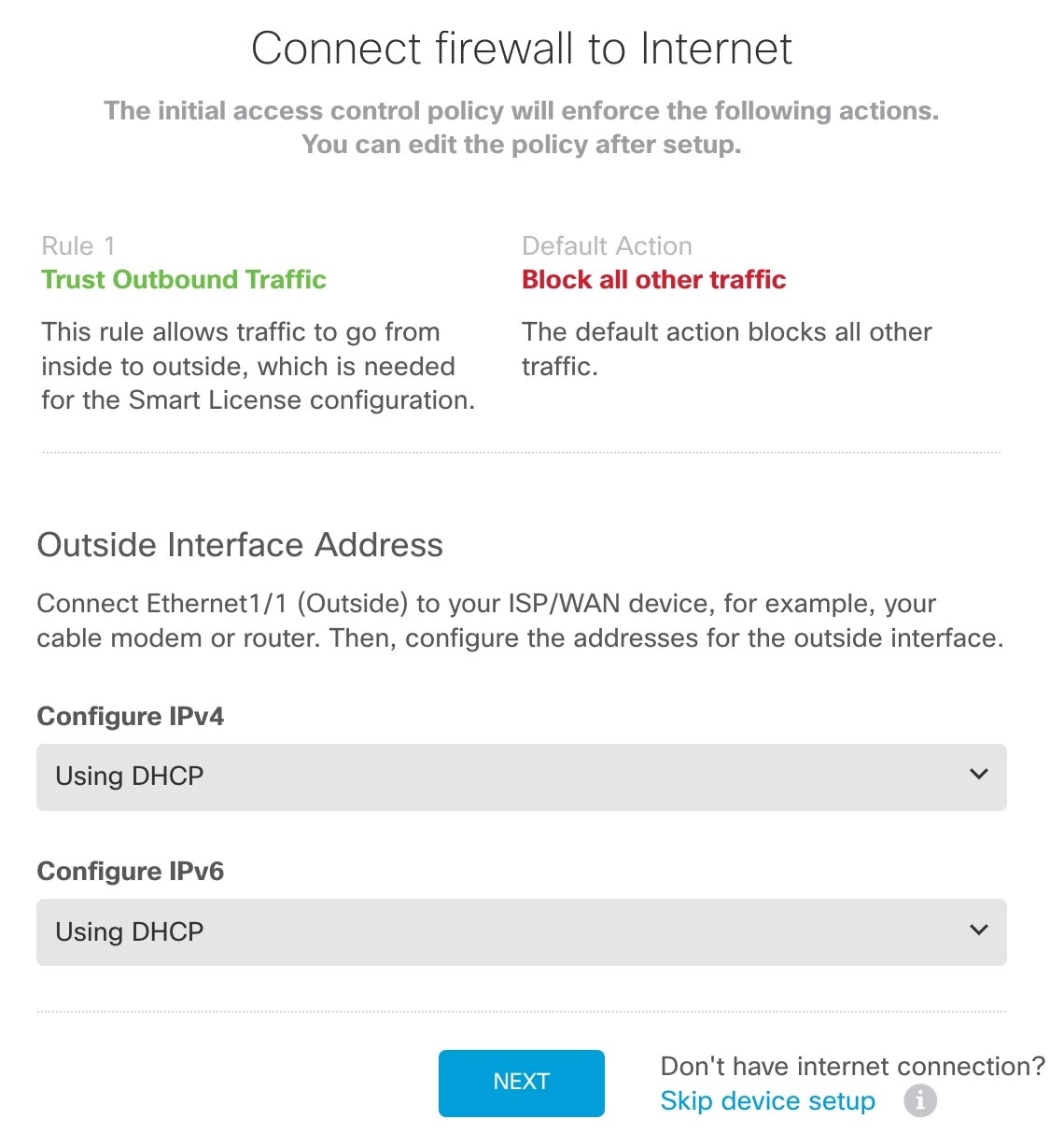
외부 인터페이스 주소 - 고가용성을 계획하는 경우 고정 IP 주소를 사용합니다. 설정 마법사를 사용하여 PPPoE를 구성할 수 없습니다. 마법사를 완료한 후 PPPoE를 구성할 수 있습니다.
관리 인터페이스 - 관리 인터페이스 IP 주소 설정은 설정 마법사의 일부는 아니지만 다음 옵션을 설정할 수 있습니다. 고정 IP 주소를 사용해야 하는 경우 4 단계를 참조하십시오.
DNS 서버 - 시스템 관리 주소용 DNS 서버를 지정합니다. 기본값은 OpenDNS 공개 DNS 서버입니다.
방화벽 호스트 이름
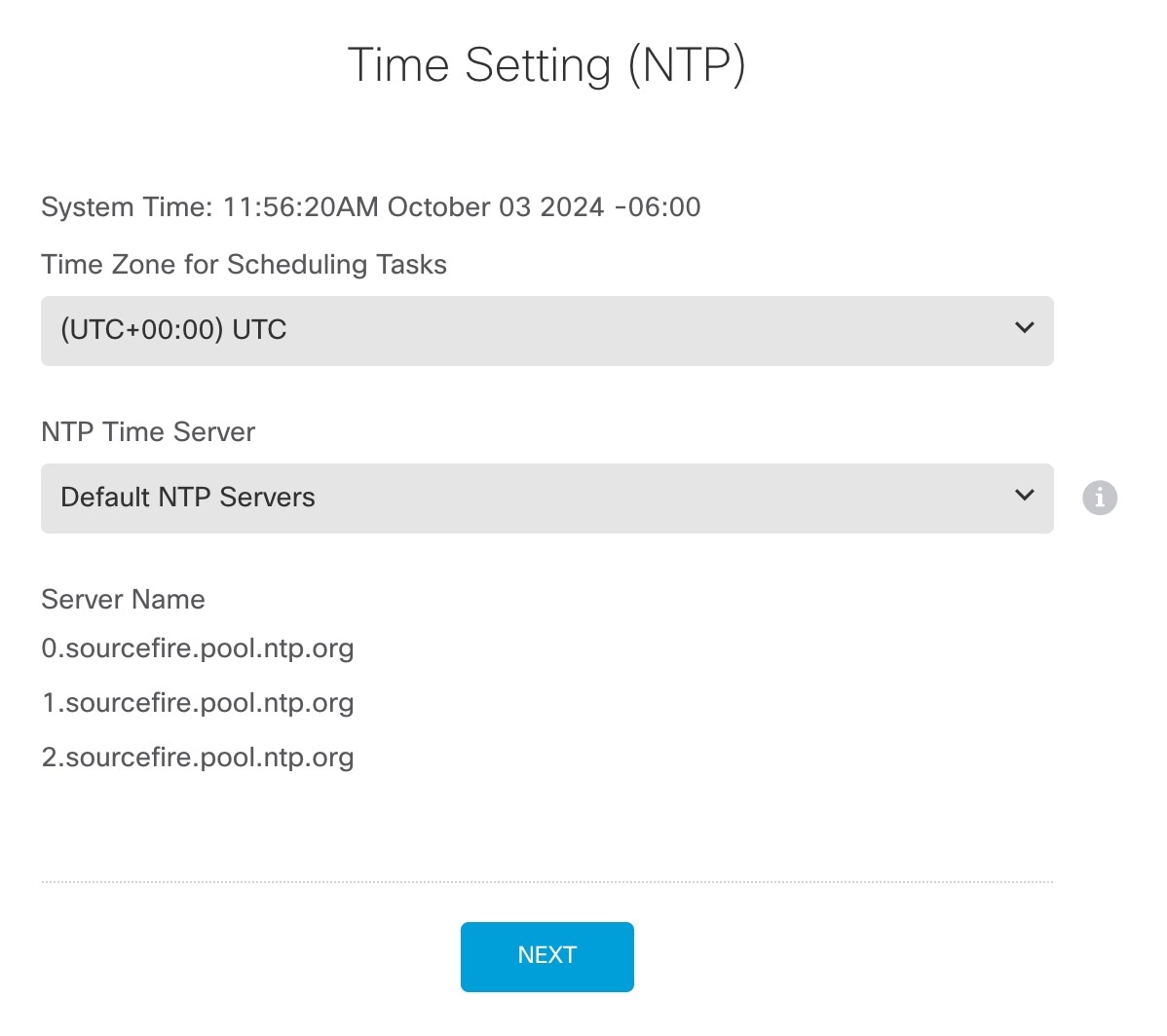
시간 설정(NTP)을 구성하고 Next(다음)를 클릭합니다.
Start 90 day evaluation period without registration(등록 없이 90일 평가 기간 시작)을 선택합니다.
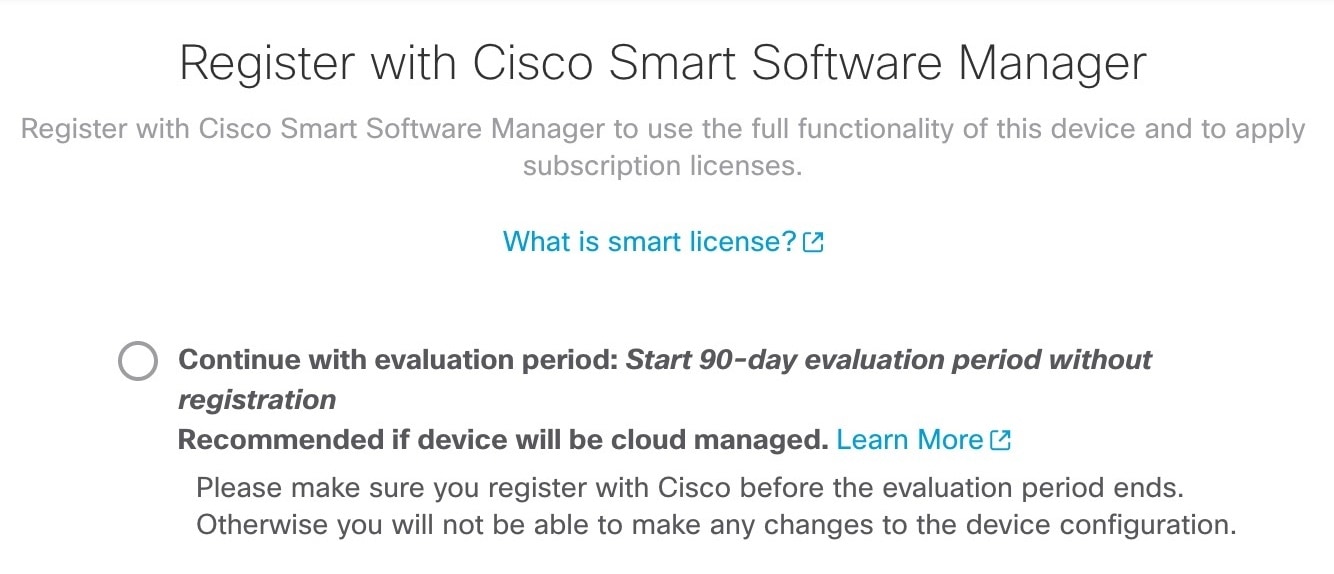
Firewall Threat Defense를 Smart Software Manager에 등록하지 마십시오. 모든 라이선싱은 방화벽 관리 센터 Security Cloud Control에서 수행됩니다.
Finish(마침)를 클릭합니다.
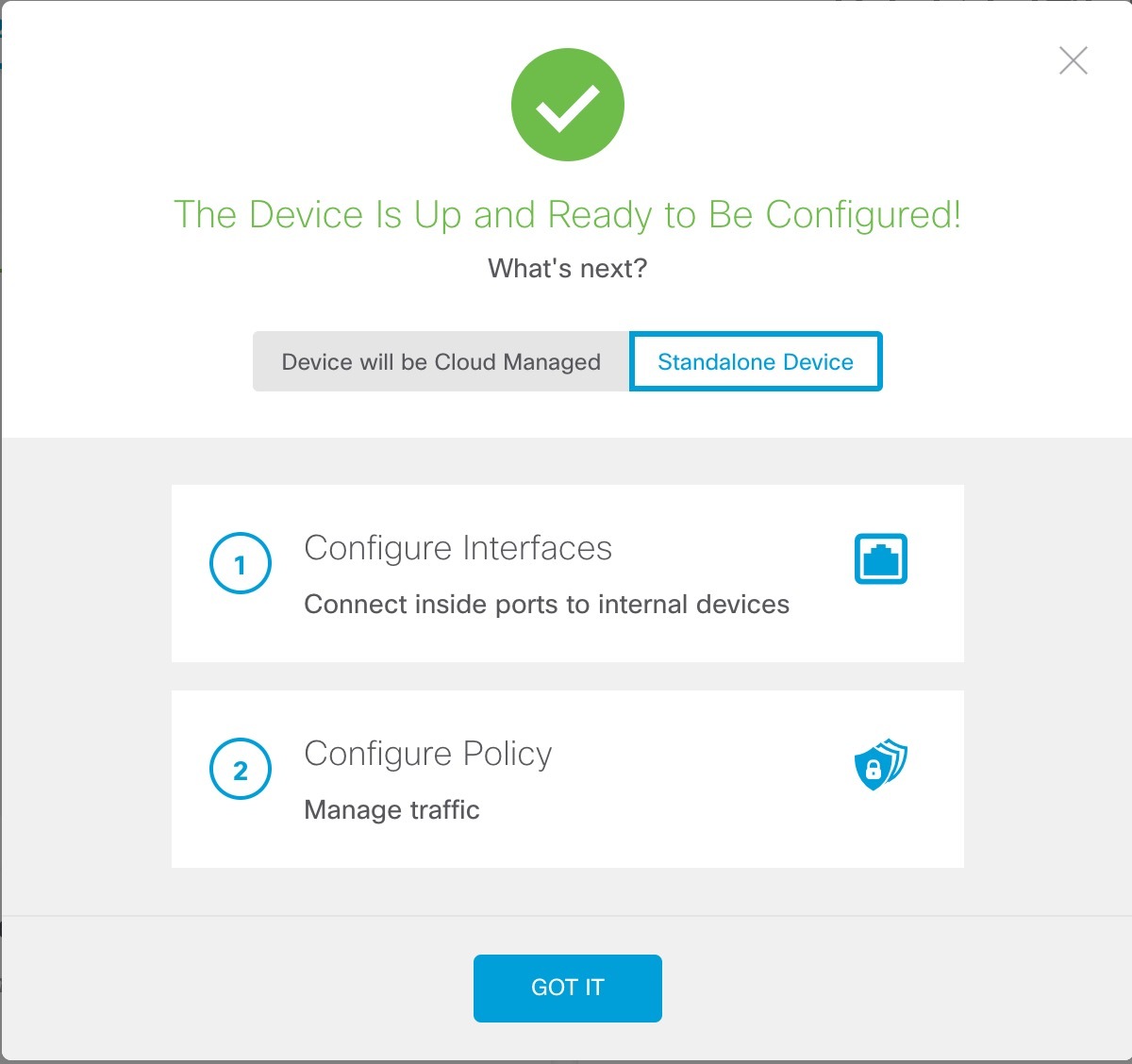
Standalone Device(독립형 디바이스)를 선택한 다음 Got It(확인)을 선택합니다.
디바이스의 관리 인터페이스에서 고정 IP 주소를 구성합니다. 디바이스 > 인터페이스의 관리 인터페이스를 참조하십시오.
추가 인터페이스를 구성하려면 Device(디바이스)를 선택한 다음 Interfaces(인터페이스) 요약의 링크를 클릭합니다.
Device(디바이스) > System Settings(시스템 설정) > Central Management(중앙 관리)를 선택하고 Proceed(진행)를클릭하여 방화벽 관리 센터 Security Cloud Control에 등록합니다
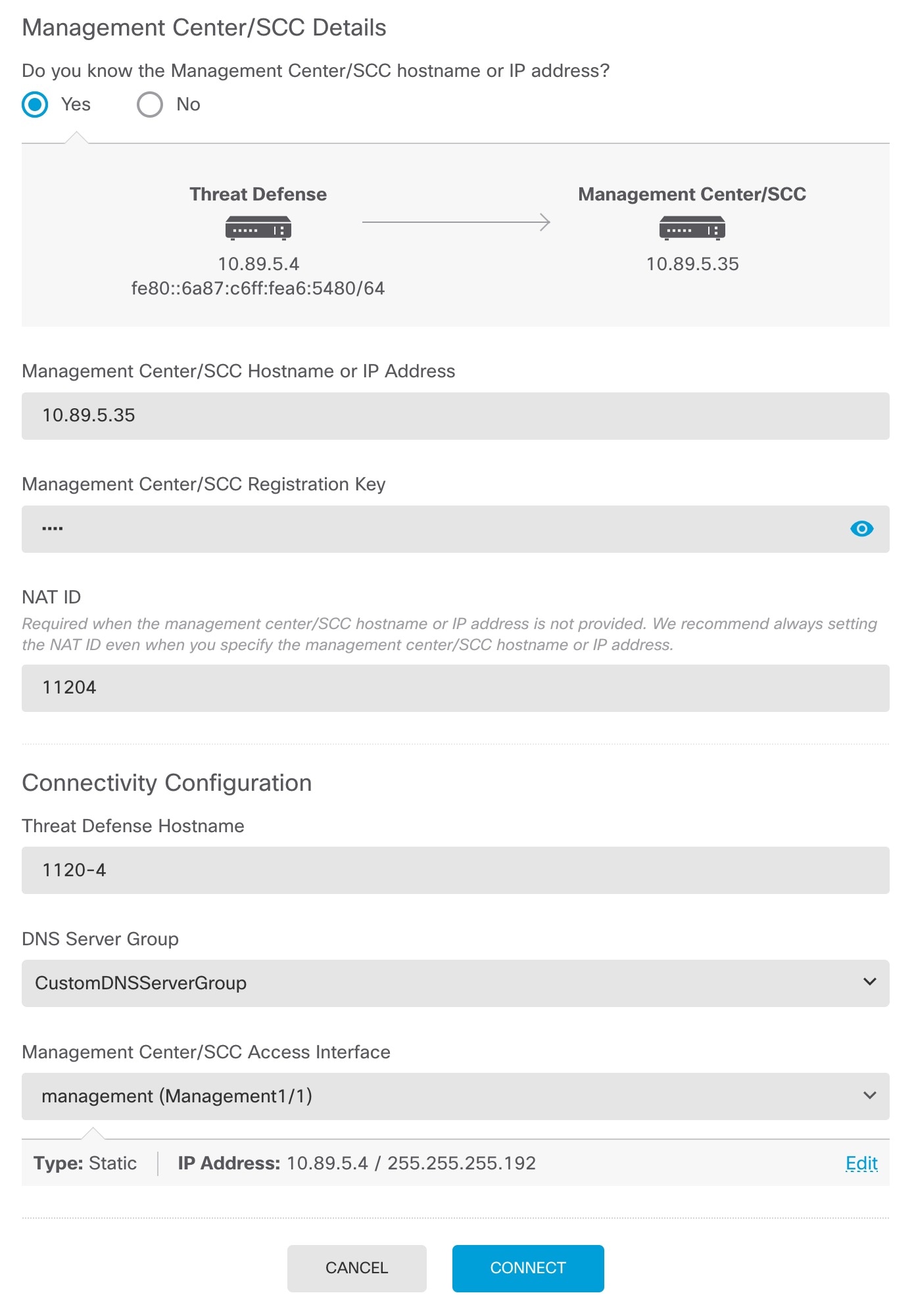
Management Center/SCC/세부 정보를 구성합니다.
Note이전 버전은 "SCC" 대신 "CDO"가 표시될 수 있습니다.
Management Center/SCC 호스트 이름 또는 IP 주소를 사용하여 방화벽 관리 센터에 연결할 수 있는 경우, Do you know the FMC hostname or IP address(FMC 호스트 이름 또는 IP 주소를 알고 있습니까)에서 Yes(예)를 클릭하고, 방화벽 관리 센터가 NAT 뒤에 있거나 퍼블릭 IP 주소 또는 호스트 이름이 없는 경우 No(아니요)를 클릭합니다.
Yes(예)를 선택한 경우 Management Center/SCC 호스트 이름/IP 주소를 입력합니다.
Management Center/SCC 등록 키를 지정합니다.
방화벽을 등록할 때 방화벽 관리 센터 에 지정할 일회용 등록 키도 지정합니다. 등록 키는 2~36자 사이여야 합니다. 영숫자(A~Z, a~z, 0~9)와 하이픈(-)을 사용할 수 있습니다. 이 ID는 방화벽 관리 센터 에 등록하는 여러 방화벽에 사용할 수 있습니다.
NAT ID를 지정합니다.
이 ID는 방화벽 관리 센터에서 지정할 고유한 일회성 문자열을 지정합니다. 두 디바이스의 IP 주소를 알고 있는 경우에도 NAT ID를 지정하는 것이 좋습니다. NAT ID는 2~36자여야 합니다. 영숫자(A~Z, a~z, 0~9)와 하이픈(-)을 사용할 수 있습니다. 이 ID는 방화벽 관리 센터 에 등록하는 다른 방화벽에 사용할 수 없습니다. NAT ID는 연결이 올바른 디바이스에서 오는지 확인하기 위해 IP 주소와 함께 사용됩니다. IP 주소/NAT ID 인증 후에만 등록 키가 확인됩니다.
연결성 설정을 구성합니다.
Threat Defense Hostname 호스트 이름을 지정합니다.
DNS 서버 그룹을 지정합니다.
이미 설정했더라도: 기존 그룹을 선택하거나 새로 생성합니다. 기본 DNS 그룹은 CiscoUmbrellaDNSServerGroup이며, 여기에는 OpenDNS 서버가 포함됩니다.
Management Center/SCC 액세스 인터페이스의 경우 Management Interface(관리 인터페이스)를 클릭합니다.
Connect(연결)를 클릭합니다.
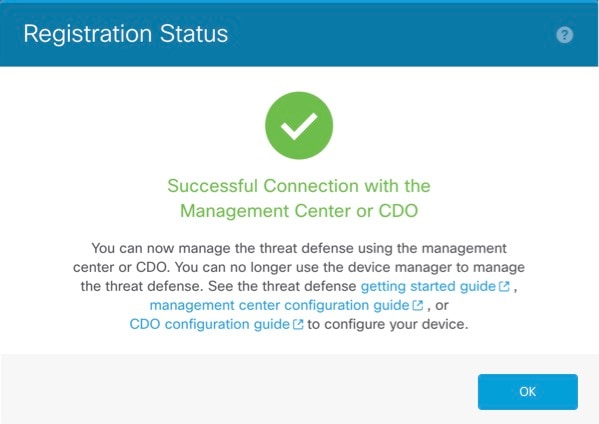
Registration Status(등록 상태) 대화 상자는 방화벽 관리 센터 Security Cloud Control 등록에 대한 현재 상태를 보여줍니다.
CLI 설정 스크립트를 사용하여 전용 관리 IP 주소, 게이트웨이 및 기타 기본 네트워킹 설정을 설정합니다.
Firewall Threat Defense 및 ASA CLI에 액세스하기 위해 콘솔 포트에 연결 Firewall Threat Defense CLI에 액세스의 내용을 참조하십시오.
그러면 관리 인터페이스 설정을 위한 CLI 설정 스크립트가 표시됩니다.
Note이미지 재설치 등을 통해 구성을 지우지 않으면 CLI 설정 스크립트를 반복할 수 없습니다. 그러나 이러한 모든 설정은 configure network 명령을 사용하여 CLI에서 나중에 변경할 수 있습니다. Cisco Secure Firewall Threat Defense 명령 참조의 내용을 참조하십시오.
You must accept the EULA to continue.
Press <ENTER> to display the EULA:
Cisco General Terms
[...]
Please enter 'YES' or press <ENTER> to AGREE to the EULA:
System initialization in progress. Please stand by.
You must configure the network to continue.
Configure at least one of IPv4 or IPv6 unless managing via data interfaces.
Do you want to configure IPv4? (y/n) [y]:
Do you want to configure IPv6? (y/n) [y]:
n
지침: 다음 주소 유형 중 하나 이상에 대해 y 를 입력합니다.
Configure IPv4 via DHCP or manually? (dhcp/manual) [manual]:
Enter an IPv4 address for the management interface [192.168.45.61]:
10.89.5.17
Enter an IPv4 netmask for the management interface [255.255.255.0]:
255.255.255.192
Enter the IPv4 default gateway for the management interface [data-interfaces]:
10.10.10.1
Enter a fully qualified hostname for this system [firepower]:
1010-3
Enter a comma-separated list of DNS servers or 'none' [208.67.222.222,208.67.220.220,2620:119:35::35]:
Enter a comma-separated list of search domains or 'none' []:
cisco.com
If your networking information has changed, you will need to reconnect.
Disabling IPv6 configuration: management0
Setting DNS servers: 208.67.222.222,208.67.220.220,2620:119:35::35
Setting DNS domains:cisco.com
Setting hostname as 1010-3
Setting static IPv4: 10.89.5.17 netmask: 255.255.255.192 gateway: data on management0
Updating routing tables, please wait...
All configurations applied to the system. Took 3 Seconds.
Saving a copy of running network configuration to local disk.
For HTTP Proxy configuration, run 'configure network http-proxy'
Manage the device locally? (yes/no) [yes]:
no
지침: 방화벽 관리 센터를 사용하려면 no 를 입력합니다.
Setting hostname as 1010-3
Setting static IPv4: 10.89.5.17 netmask: 255.255.255.192 gateway: data on management0
Updating routing tables, please wait...
All configurations applied to the system. Took 3 Seconds.
Saving a copy of running network configuration to local disk.
For HTTP Proxy configuration, run 'configure network http-proxy'
Configuring firewall mode ...
Device is in OffBox mode - disabling/removing port 443 from iptables.
Update policy deployment information
- add device configuration
- add network discovery
- add system policy
You can register the sensor to a Firepower Management Center and use the
Firepower Management Center to manage it. Note that registering the sensor
to a Firepower Management Center disables on-sensor Firepower Services
management capabilities.
When registering the sensor to a Firepower Management Center, a unique
alphanumeric registration key is always required. In most cases, to register
a sensor to a Firepower Management Center, you must provide the hostname or
the IP address along with the registration key.
'configure manager add [hostname | ip address ] [registration key ]'
However, if the sensor and the Firepower Management Center are separated by a
NAT device, you must enter a unique NAT ID, along with the unique registration
key.
'configure manager add DONTRESOLVE [registration key ] [ NAT ID ]'
Later, using the web interface on the Firepower Management Center, you must
use the same registration key and, if necessary, the same NAT ID when you add
this sensor to the Firepower Management Center.
>
방화벽 관리 센터를 식별합니다.
configure manager add {hostname | IPv4_address | IPv6_address | DONTRESOLVE} reg_key nat_id
DONTRESOLVE {hostname | ipv4_address | ipv6_address} —방화벽 관리 센터의 FQDN 또는 IP 주소를 지정합니다. 방화벽 관리 센터의 주소를 직접 지정할 수 없는 경우 DONTRESOLVE 를 사용합니다. 이 경우 방화벽에 연결 가능한 IP 주소 또는 호스트 이름이 있어야 합니다.
reg_key — Firewall Threat Defense 등록시 방화벽 관리 센터에 지정할 일회용 등록 키를 지정합니다. 등록 키는 2~36자 사이여야 합니다. 영숫자(A~Z, a~z, 0~9)와 하이픈(-)을 사용할 수 있습니다.
nat_id —방화벽 관리 센터에서 지정할 고유한 일회성 문자열을 지정합니다. NAT ID는 2~36자여야 합니다. 영숫자(A~Z, a~z, 0~9)와 하이픈(-)을 사용할 수 있습니다. 이 ID는 방화벽 관리 센터에 등록하는 다른 디바이스에 사용할 수 없습니다.
>
configure manager add fmc-1.example.com regk3y78 natid56
Manager successfully configured.
Need help?
(Requires a Cisco Service Contract)
The documentation set for this product strives to use bias-free language. For the purposes of this documentation set, bias-free is defined as language that does not imply discrimination based on age, disability, gender, racial identity, ethnic identity, sexual orientation, socioeconomic status, and intersectionality. Exceptions may be present in the documentation due to language that is hardcoded in the user interfaces of the product software, language used based on RFP documentation, or language that is used by a referenced third-party product. Learn more about how Cisco is using Inclusive Language.