MPLS InterAS オプション B の設定

MPLS VPN InterAS オプションに関する情報

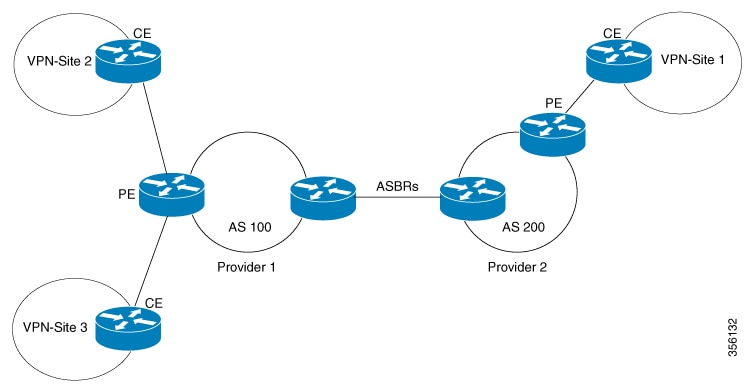
MPLS VPN InterAS オプションは、異なる MPLS VPN サービスプロバイダー間で VPN を相互接続するさまざまな方法を提供します。これにより、お客様のサイトを複数のキャリアネットワーク(自律システム)に存在させ、サイト間でのシームレスな VPN 接続が可能になります。

ASE および ASBR

自律システム(AS)とは、共通のシステム管理グループによって管理され、単一の明確に定義されたプロトコルを使用している単一のネットワークまたはネットワークのグループのことです。多くの場合、VPN は異なる地理的領域の異なる AS に拡張されます。一部の VPN は、複数のサービスプロバイダーにまたがって拡張する必要があり、それらはオーバーラッピング VPN と呼ばれます。VPN の複雑さや場所に関係なく、AS 間の接続はお客様に対してシームレスである必要があります。

AS 境界ルータ(ASBR)は、複数のルーティングプロトコルを使用して接続された AS 内のデバイスであり、外部ルーティングプロトコル(eBGP など)またはスタティックルートを使用するか、あるいは両方を使用して、他の ASBR とルーティング情報を交換します。

異なるサービスプロバイダーからの個別の AS は、VPN IP アドレスの形式で情報を交換することによって通信し、次のプロトコルを使用してルーティング情報を共有します。

  • AS 内では、ルーティング情報は iBGP を使用して共有されます。

    iBGP は、各 VPN および各 AS 内の IP プレフィックスのネットワーク層情報を配布します。

  • AS 間では、ルーティング情報は eBGP を使用して共有されます。

    eBGP を使用することで、サービスプロバイダーは別の AS 間でのルーティング情報のループフリー交換を保証するインタードメイン ルーティング システムを設定できます。eBGP の主な機能は、AS ルートのリストに関する情報を含む、AS 間のネットワーク到達可能性情報を交換することです。AS は、eBGP ボーダーエッジルータを使用してラベルスイッチング情報を含むルートを配布します。各ボーダー エッジ ルータでは、ネクスト ホップおよび MPLS ラベルが書き換えられます。

MPLS VPN InterAS オプションの設定はサポートされており、異なるボーダーエッジルータで接続されている 2 つ以上の AS を含む MPLS VPNで あるプロバイダー間 VPN を含めることができます。AS は eBGP を使用してルートを交換し、iBGP やルーティング情報は AS 間で交換されません。

MPLS VPN InterAS オプション

RFC4364 で定義されている次のオプションは、異なる AS 間の MPLS VPN 接続を提供します。

  • InterAS オプション B:このオプションは、ASBR 間の VPNv4 ルート配布を提供します。

ネクストホップセルフ方式

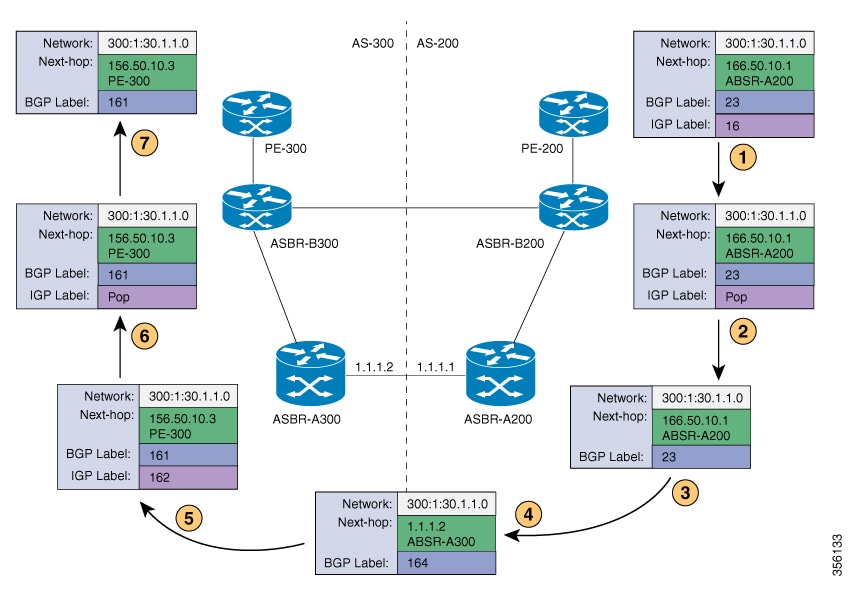
次の図に、ネクストホップセルフ方式のラベル転送パスを示します。パケットが AS 200 の PE-200 から AS 300 のPE-300 に到達するときに、ラベルがスタックにプッシュ、スワップ、およびポップされます。ステップ 5 で、ASBR-A300 はラベル付きフレームを受信し、ラベル 164 をラベル 161 に置き換え、IGP ラベル 162 をラベルスタックにプッシュします。

Redistribute Connected Subnet 方式

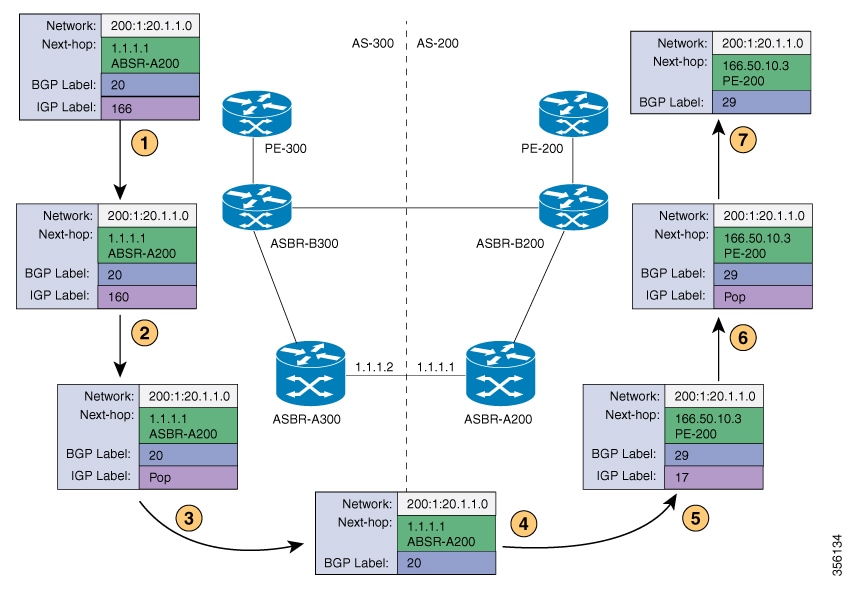
次の図に、Redistribute Connected Subnet 方式のラベル転送パスを示します。パケットが AS 300 の PE-300 から AS 200 の PE-200 に移動するときに、ラベルがスタックにプッシュ、スワップ、およびポップされます。ステップ 5 で、ASBR-A200 は BGP ラベル 20 のフレームを受信し、ラベル 29 と交換し、ラベル 17 をプッシュします。

MPLS VPN InterAS オプション B の設定

ネクストホップセルフ方式を使用した InterAS オプション B の設定

ネクストホップセルフ方式を使用して ASBR で InterAS オプション B を設定するには、次の手順を実行します。

手順

  コマンドまたはアクション 目的

ステップ 1

enable

例:


Device> enable

特権 EXEC モードを有効にします。

  • パスワードを入力します(要求された場合)。

ステップ 2

configure terminal

例:


Device# configure terminal

グローバル コンフィギュレーション モードを開始します。

ステップ 3

router ospf process-id

例:


Device(config)# router ospf 1

OSPF ルーティングプロセスを設定し、プロセス番号を割り当てます。

ステップ 4

router-id ip-address

例:


Device(config)# router-id 4.1.1.1

固定ルータ ID を指定します。

ステップ 5

nsr

例:


Device(config-router)# nsr

OSPF ノンストップルーティング(NSR)を設定します。

ステップ 6

nsf

例:


Device(config-router)# nsf

OSPF ノンストップ フォワーディング(NSF)を設定します。

ステップ 7

redistribute bgp autonomous-system-number

例:


Device(config-router)# redistribute bgp 200

BGP 自律システムからルートを OSPF ルーティングプロセスに再配布します。

ステップ 8

passive-interface interface-type interface-number

例:


Device(config-router)# passive-interface GigabitEthernet 1/0/10
Device(config-router)# passive-interface Tunnel0

インターフェイスの Open Shortest Path First(OSPF)ルーティングアップデートを無効にします。

ステップ 9

network ip-address wildcard-mask aread area-id

例:

Device(config-router)# network 4.1.1.0 0.0.0.0.255 area 0

OSPF を実行するインターフェイスを定義し、そのインターフェイスに対するエリア ID を定義します。

ステップ 10

exit

例:


Device(config-router)# exit

ルータ コンフィギュレーション モードを終了します。

ステップ 11

router bgp autonomous-system-number

例:


Device(config)# router bgp 200

BGP ルーティング プロセスを設定します。

ステップ 12

bgp router-id ip-address

例:


Device(config-router)# bgp router-id 4.1.1.1

BGP ルーティングプロセスの固定ルータ ID を設定します。

ステップ 13

bgp log-neighbor changes

例:


Device(config-router)# bgp log-neighbor changes

BGP ネイバー リセットのロギングを有効にします。

ステップ 14

no bgp default ipv4-unicast

例:


Device(config-router)# no bgp default ipv4-unicast

アドレスファミリ IPv4 のルーティング情報のアドバタイズメントを無効にします。

ステップ 15

no bgp default route-target filter

例:


Device(config-router)# no bgp default route-target filter

BGP の route-target コミュニティフィルタリングを無効にします。

ステップ 16

neighbor ip-address remote-as as-number

例:


Device(config-router)# neighbor 4.1.1.3 remote-as 200

エントリを BGP ネイバーテーブルに設定します。

ステップ 17

neighbor ip-address update-source interface-type interface-number

例:


Device(config-router)# neighbor 4.1.1.3 update-source Loopback0

Cisco IOS ソフトウェアで、BGP セッションによる TCP 接続の特定の動作インターフェイスを使用できるようになります。

ステップ 18

neighbor ip-address remote-as as-number

例:


Device(config-router)# neighbor 4.1.1.3 remote-as 300

エントリを BGP ネイバーテーブルに設定します。

ステップ 19

address-family ipv4

例:


Device(config-router)# address-family ipv4

標準 IP バージョン 4 アドレスプレフィックスを使用する BGP ルーティングセッションを設定するために、アドレス ファミリ コンフィギュレーション モードを開始します。

ステップ 20

neighbor ip-address activate

例:


Device(config-router-af)# neighbor 10.32.1.2 activate

BGP ネイバーとの情報交換を有効にします。

ステップ 21

neighbor ip-address send-label

例:


Device(config-router-af)# neighbor 10.32.1.2 send-label

隣接 BGP ルータに BGP ルートを含む MPLS ラベルを送信します。

ステップ 22

exit address-family

例:


Device(config-router-af)# exit address-family

BGP アドレス ファミリ サブモードを終了します。

ステップ 23

address-family vpnv4

例:


Device(config-router)# address-family vpnv4

アドレス ファミリ コンフィギュレーション モードでデバイスを設定して、標準 VPNv4 アドレスプレフィックスを使用する、BGP などのルーティングセッションを設定します。

ステップ 24

neighbor ip-address activate

例:


Device(config-router-af)# neighbor 4.1.1.3 activate

BGP ネイバーとの情報交換を有効にします。

ステップ 25

neighbor ip-address send-community extended

例:


Device(config-router-af)# neighbor 4.1.1.3 send-community extended

コミュニティ属性が BGP ネイバーに送信されるように指定します。

ステップ 26

neighbor ip-address next-hop-self

例:


Device(config-router-af)# neighbor 4.1.1.3 next-hop-self

ルータを BGP スピーキングネイバーのネクストホップとして設定します。これは、ネクストホップセルフ方式を実装するコマンドです。

ステップ 27

neighbor ip-address activate

例:


Device(config-router-af)# neighbor 10.30.1.2 activate

BGP ネイバーとの情報交換を有効にします。

ステップ 28

neighbor ip-address send-community extended

例:


Device(config-router-af)# neighbor 10.30.1.2 send-community extended

コミュニティ属性が BGP ネイバーに送信されるように指定します。

ステップ 29

exit address-family

例:


Device(config-router-af)# exit address-family

BGP アドレス ファミリ サブモードを終了します。

ステップ 30

bgp router-id ip-address

例:


Device(config-router)# bgp router-id 4.1.1.3

BGP ルーティングプロセスの固定ルータ ID を設定します。

ステップ 31

bgp log-neighbor changes

例:


Device(config-router)# bgp log-neighbor changes

BGP ネイバー リセットのロギングを有効にします。

ステップ 32

neighbor ip-address remote-as as-number

例:


Device(config-router)# neighbor 4.1.1.1 remote-as 200

エントリを BGP ネイバーテーブルに設定します。

ステップ 33

neighbor ip-address update-source interface-type interface-number

例:


Device(config-router)# neighbor 4.1.1.1 update-source Loopback0

Cisco IOS ソフトウェアで、BGP セッションによる TCP 接続の特定の動作インターフェイスを使用できるようになります。

ステップ 34

address-family vpnv4

例:


Device(config-router)# address-family vpnv4

アドレス ファミリ コンフィギュレーション モードでデバイスを設定して、標準 VPNv4 アドレスプレフィックスを使用する、BGP などのルーティングセッションを設定します。

ステップ 35

neighbor ip-address activate

例:


Device(config-router-af)# neighbor 4.1.1.1 activate

BGP ネイバーとの情報交換を有効にします。

ステップ 36

neighbor ip-address send-community extended

例:


Device(config-router-af)# neighbor 4.1.1.1 send-community extended

コミュニティ属性が BGP ネイバーに送信されるように指定します。

ステップ 37

exit address-family

例:


Device(config-router-af)# exit address-family

BGP アドレス ファミリ サブモードを終了します。

Redistribute Connected 方式を使用した InterAS オプション B の設定

Redistribute Connected 方式を使用して ASBR で InterAS オプション B を設定するには、次の手順を実行します。

手順

  コマンドまたはアクション 目的

ステップ 1

enable

例:


Device> enable

特権 EXEC モードを有効にします。

  • パスワードを入力します(要求された場合)。

ステップ 2

configure terminal

例:


Device# configure terminal

グローバル コンフィギュレーション モードを開始します。

ステップ 3

router ospf process-id

例:


Device(config)# router ospf 1

OSPF ルーティングプロセスを設定し、プロセス番号を割り当てます。

ステップ 4

router-id ip-address

例:


Device(config)# router-id 5.1.1.1

固定ルータ ID を指定します。

ステップ 5

nsr

例:


Device(config-router)# nsr

OSPF ノンストップルーティング(NSR)を設定します。

ステップ 6

nsf

例:


Device(config-router)# nsf

OSPF ノンストップ フォワーディング(NSF)を設定します。

ステップ 7

redistribute connected

例:


Device(config-router)# redistribute connected

リモート ASBR のネクストホップアドレスをローカル IGP に再配布します。これは、Redistribute Connected 方式を実装するコマンドです。

ステップ 8

passive-interface interface-type interface-number

例:


Device(config-router)# passive-interface GigabitEthernet 1/0/10
Device(config-router)# passive-interface Tunnel0

インターフェイスの Open Shortest Path First(OSPF)ルーティングアップデートを無効にします。

ステップ 9

network ip-address wildcard-mask aread area-id

例:

Device(config-router)# network 5.1.1.0 0.0.0.0.255 area 0

OSPF を実行するインターフェイスを定義し、そのインターフェイスに対するエリア ID を定義します。

ステップ 10

exit

例:


Device(config-router)# exit

ルータ コンフィギュレーション モードを終了します。

ステップ 11

router bgp autonomous-system-number

例:


Device(config)# router bgp 300

BGP ルーティング プロセスを設定します。

ステップ 12

bgp router-id ip-address

例:


Device(config-router)# bgp router-id 5.1.1.1

BGP ルーティングプロセスの固定ルータ ID を設定します。

ステップ 13

bgp log-neighbor changes

例:


Device(config-router)# bgp log-neighbor changes

BGP ネイバー リセットのロギングを有効にします。

ステップ 14

no bgp default ipv4-unicast

例:


Device(config-router)# no bgp default ipv4-unicast

アドレスファミリ IPv4 のルーティング情報のアドバタイズメントを無効にします。

ステップ 15

no bgp default route-target filter

例:


Device(config-router)# no bgp default route-target filter

BGP の route-target コミュニティフィルタリングを無効にします。

ステップ 16

neighbor ip-address remote-as as-number

例:


Device(config-router)# neighbor 5.1.1.3 remote-as 300

エントリを BGP ネイバーテーブルに設定します。

ステップ 17

neighbor ip-address update-source interface-type interface-number

例:


Device(config-router)# neighbor 4.1.1.3 update-source Loopback0

Cisco IOS ソフトウェアで、BGP セッションによる TCP 接続の特定の動作インターフェイスを使用できるようになります。

ステップ 18

neighbor ip-address remote-as as-number

例:


Device(config-router)# neighbor 10.30.1.2 remote-as 200

エントリを BGP ネイバーテーブルに設定します。

ステップ 19

address-family vpnv4

例:


Device(config-router)# address-family vpnv4

アドレス ファミリ コンフィギュレーション モードでデバイスを設定して、標準 VPNv4 アドレスプレフィックスを使用する、BGP などのルーティングセッションを設定します。

ステップ 20

neighbor ip-address activate

例:


Device(config-router-af)# neighbor 5.1.1.3 activate

BGP ネイバーとの情報交換を有効にします。

ステップ 21

neighbor ip-address send-community extended

例:


Device(config-router-af)# neighbor 5.1.1.3 send-community extended

コミュニティ属性が BGP ネイバーに送信されるように指定します。

ステップ 22

neighbor ip-address activate

例:


Device(config-router-af)# neighbor 10.30.1.1 activate

BGP ネイバーとの情報交換を有効にします。

ステップ 23

neighbor ip-address send-community extended

例:


Device(config-router-af)# neighbor 10.30.1.2 send-community extended

コミュニティ属性が BGP ネイバーに送信されるように指定します。

ステップ 24

exit address-family

例:


Device(config-router-af)# exit address-family

BGP アドレス ファミリ サブモードを終了します。

ステップ 25

mpls ldp router-id interface-id [force]

例:


Device(config-router)# mpls ldp router-id Loopback0 force

LDP ルータ ID を決定する優先インターフェイスを指定します。

MPLS VPN InterAS オプションの設定の確認

InterAS オプション B の設定情報を確認するには、次のいずれかの作業を行います。

コマンド

目的

ping ip-address source interface-type

デバイスのアクセシビリティをチェックします。ループバック インターフェイスを使用して CE1 と CE2 間の接続を確認するには、このコマンドを使用します。

show bgp vpnv4 unicast labels

着信および発信 BGP ラベルを表示します。

show mpls forwarding-table

MPLS ラベル転送情報ベースの内容を表示します。

show ip bgp

BGP ルーティング テーブル内のエントリを表示します。

show { ip | ipv6 } bgp [ vrf vrf-name ]

VRF での BGP に関する情報を表示します。

show ip route [ ip-address [ mask ]] [ protocol ] vrf vrf-name

ルーティング テーブルの現在の状態を表示します。ip-address 引数を使用して、CE1 に CE2 へのルートが含まれていることを確認します。CE1 から学習したルートを確認します。CE2 へのルートがリストされていることを確認します。

show { ip | ipv6 } route vrf vrf-name

VRF に関連付けられた IP ルーティング テーブルを表示します。ローカル CE ルータとリモート CE ルータのループバック アドレスが、PE ルータのルーティング テーブルに存在することを確認します。

show running-config bgp

BGP の実行コンフィギュレーションを表示します。

show running-config vrf vrf-name

VRF の実行コンフィギュレーションを表示します。

show vrf vrf-name interface interface-type interface-id

VRF に対して設定されるルート識別子(RD)およびインターフェイスを検証します。

trace destination [ vrf vrf-name ]

パケットがその宛先に送信されるときに取るルートを検出します。trace コマンドは、2 つのルータが通信できない場合に問題の箇所を分離するのに役立ちます。

MPLS VPN InterAS オプションの設定例

ネクストホップセルフ方式

図 1. ネクストホップセルフ方式を使用した InterAS オプション B のトポロジ

PE1 - P1 - ASBR1 の設定

PE1

P1

ASBR1

vrf definition Mgmt-vrf
!
address-family ipv4
exit-address-family
!
address-family ipv6
exit-address-family
!
vrf definition vrf1
rd 200:1
route-target export 200:1
route-target import 200:1
route-target import 300:1
!
address-family ipv4
exit-address-family
interface Loopback0
ip address 4.1.1.3 255.255.255.255
ip ospf 1 area 0
!
interface Loopback1
vrf forwarding vrf1
ip address 192.1.1.1 255.255.255.255
ip ospf 200 area 0
!
interface GigabitEthernet2/0/4
no switchport
ip address 10.10.1.1 255.255.255.0
ip ospf 1 area 0
mpls ip
mpls label protocol ldp
interface GigabitEthernet2/0/9
description to-IXIA-1:p8
no switchport
vrf forwarding vrf1
ip address 192.2.1.1 255.255.255.0
ip ospf 200 area 0
router ospf 200 vrf vrf1
router-id 192.1.1.1
nsr
nsf
redistribute connected
redistribute bgp 200
network 192.1.1.1 0.0.0.0 area 0
network 192.2.1.0 0.0.0.255 area 0
router ospf 1
router-id 4.1.1.3
nsr
nsf
redistribute connected
router bgp 200
bgp router-id 4.1.1.3
bgp log-neighbor-changes
neighbor 4.1.1.1 remote-as 200
neighbor 4.1.1.1 update-source Loopback0
!
address-family vpnv4
neighbor 4.1.1.1 activate
neighbor 4.1.1.1 send-community extended
exit-address-family
!
address-family ipv4 vrf vrf1
redistribute connected
redistribute ospf 200
maximum-paths ibgp 4
exit-address-family
interface Loopback0
ip address 4.1.1.2 255.255.255.255
ip ospf 1 area 0
interface GigabitEthernet1/0/4
no switchport
ip address 10.10.1.2 255.255.255.0
ip ospf 1 area 0
mpls ip
mpls label protocol ldp
!
interface GigabitEthernet1/0/23
no switchport
ip address 10.20.1.1 255.255.255.0
ip ospf 1 area 0
mpls ip
mpls label protocol ldp
interface Loopback0
ip address 4.1.1.1 255.255.255.255
ip ospf 1 area 0
interface GigabitEthernet1/0/10
no switchport
ip address 10.30.1.1 255.255.255.0
mpls bgp forwarding
interface GigabitEthernet1/0/23
no switchport
ip address 10.20.1.2 255.255.255.0
ip ospf 1 area 0
mpls ip
mpls label protocol ldp
router ospf 1
router-id 4.1.1.1
nsr
nsf
redistribute bgp 200
passive-interface GigabitEthernet1/0/10
passive-interface Tunnel0
network 4.1.1.0 0.0.0.255 area 0
router bgp 200
bgp router-id 4.1.1.1
bgp log-neighbor-changes
no bgp default ipv4-unicast
no bgp default route-target filter
neighbor 4.1.1.3 remote-as 200
neighbor 4.1.1.3 update-source Loopback0
neighbor 10.30.1.2 remote-as 300
!
address-family ipv4
neighbor 10.30.1.2 activate
neighbor 10.30.1.2 send-label
exit-address-family
!
address-family vpnv4
neighbor 4.1.1.3 activate
neighbor 4.1.1.3 send-community extended
neighbor 4.1.1.3 next-hop-self
neighbor 10.30.1.2 activate
neighbor 10.30.1.2 send-community extended
exit-address-family

ASBR2 – P2 – PE2 の設定

表 1.

PE2

P2

ASBR2

vrf definition vrf1
rd 300:1
route-target export 300:1
route-target import 300:1
route-target import 200:1
!
address-family ipv4
exit-address-family
interface Loopback0
ip address 5.1.1.3 255.255.255.255
ip ospf 1 area 0
!
interface Loopback1
vrf forwarding vrf1
ip address 193.1.1.1 255.255.255.255
ip ospf 300 area 0
interface GigabitEthernet1/0/1
no switchport
ip address 10.50.1.2 255.255.255.0
ip ospf 1 area 0
mpls ip
mpls label protocol ldp
!
interface GigabitEthernet1/0/2
no switchport
vrf forwarding vrf1
ip address 193.2.1.1 255.255.255.0
ip ospf 300 area 0
router ospf 300 vrf vrf1
router-id 193.1.1.1
nsr
nsf
redistribute connected
redistribute bgp 300
network 193.1.1.1 0.0.0.0 area 0
network 193.2.1.0 0.0.0.255 area 0
!
router ospf 1
router-id 5.1.1.3
nsr
nsf
redistribute connected
router bgp 300
bgp router-id 5.1.1.3
bgp log-neighbor-changes
neighbor 5.1.1.1 remote-as 300
neighbor 5.1.1.1 update-source Loopback0
!
address-family ipv4
neighbor 5.1.1.1 activate
neighbor 5.1.1.1 send-label
exit-address-family
!
address-family vpnv4
neighbor 5.1.1.1 activate
neighbor 5.1.1.1 send-community extended
exit-address-family
!
address-family ipv4 vrf vrf1
redistribute connected
redistribute ospf 300
maximum-paths ibgp 4
exit-address-family
interface Loopback0
ip address 5.1.1.2 255.255.255.255
ip ospf 1 area 0
interface GigabitEthernet1/0/1
no switchport
ip address 10.50.1.1 255.255.255.0
ip ospf 1 area 0
mpls ip
mpls label protocol ldp
interface GigabitEthernet2/0/3
no switchport
ip address 10.40.1.2 255.255.255.0
ip ospf 1 area 0
mpls ip
mpls label protocol ldp
interface Loopback0
ip address 5.1.1.1 255.255.255.255
ip ospf 1 area 0
!
interface GigabitEthernet1/0/37
no switchport
ip address 10.30.1.2 255.255.255.0
mpls bgp forwarding
interface GigabitEthernet1/0/47
no switchport
ip address 10.40.1.1 255.255.255.0
ip ospf 1 area 0
mpls ip
mpls label protocol ldp
router ospf 1
router-id 5.1.1.1
nsr
nsf
passive-interface GigabitEthernet1/0/37
passive-interface Tunnel0
network 5.1.1.0 0.0.0.255 area 0
!
router bgp 300
bgp router-id 5.1.1.1
bgp log-neighbor-changes
no bgp default ipv4-unicast
no bgp default route-target filter
neighbor 5.1.1.3 remote-as 300
neighbor 5.1.1.3 update-source Loopback0
neighbor 10.30.1.1 remote-as 200
!
address-family ipv4
neighbor 10.30.1.1 activate
neighbor 10.30.1.1 send-label
exit-address-family
!
address-family vpnv4
neighbor 5.1.1.3 activate
neighbor 5.1.1.3 send-community extended
neighbor 5.1.1.3 next-hop-self
neighbor 10.30.1.1 activate
neighbor 10.30.1.1 send-community extended
exit-address-family

IGP Redistribute Connected Subnet 方式

図 2. Redistribute Connected Subnet 方式を使用した InterAS オプション B のトポロジ

PE1 - P1 - ASBR1 の設定

PE1

P1

ASBR1

vrf definition Mgmt-vrf
!
address-family ipv4
exit-address-family
!
address-family ipv6
exit-address-family
!
vrf definition vrf1
rd 200:1
route-target export 200:1
route-target import 200:1
route-target import 300:1
!
address-family ipv4
exit-address-family
interface Loopback0
ip address 4.1.1.3 255.255.255.255
ip ospf 1 area 0
!
interface Loopback1
vrf forwarding vrf1
ip address 192.1.1.1 255.255.255.255
ip ospf 200 area 0
!
interface GigabitEthernet2/0/4
no switchport
ip address 10.10.1.1 255.255.255.0
ip ospf 1 area 0
mpls ip
mpls label protocol ldp
interface GigabitEthernet2/0/9
description to-IXIA-1:p8
no switchport
vrf forwarding vrf1
ip address 192.2.1.1 255.255.255.0
ip ospf 200 area 0
router ospf 200 vrf vrf1
router-id 192.1.1.1
nsr
nsf
redistribute connected
redistribute bgp 200
network 192.1.1.1 0.0.0.0 area 0
network 192.2.1.0 0.0.0.255 area 0
router ospf 1
router-id 4.1.1.3
nsr
nsf
redistribute connected
router bgp 200
bgp router-id 4.1.1.3
bgp log-neighbor-changes
neighbor 4.1.1.1 remote-as 200
neighbor 4.1.1.1 update-source
Loopback0
!
address-family vpnv4
neighbor 4.1.1.1 activate
neighbor 4.1.1.1 send-community extended
exit-address-family
!
address-family ipv4 vrf vrf1
redistribute connected
redistribute ospf 200
maximum-paths ibgp 4
exit-address-family
interface Loopback0
ip address 4.1.1.2 255.255.255.255
ip ospf 1 area 0
interface GigabitEthernet1/0/4
no switchport
ip address 10.10.1.2 255.255.255.0
ip ospf 1 area 0
mpls ip
mpls label protocol ldp
!
interface GigabitEthernet1/0/23
no switchport
ip address 10.20.1.1 255.255.255.0
ip ospf 1 area 0
mpls ip
mpls label protocol ldp
router ospf 1
router-id 4.1.1.1
nsr
nsf
redistribute connected
passive-interface GigabitEthernet1/0/10
passive-interface Tunnel0
network 4.1.1.0 0.0.0.255 area 0
router bgp 200
bgp router-id 4.1.1.1
bgp log-neighbor-changes
no bgp default ipv4-unicast
no bgp default route-target filter
neighbor 4.1.1.3 remote-as 200
neighbor 4.1.1.3 update-source
Loopback0
neighbor 10.30.1.2 remote-as 300
!
address-family vpnv4
neighbor 4.1.1.3 activate
neighbor 4.1.1.3 send-community extended
neighbor 10.30.1.2 activate
neighbor 10.30.1.2 send-community extended
exit-address-family
mpls ldp router-id Loopback0 force

ASBR2 – P2 – PE2 の設定

PE2

P2

ASBR2

vrf definition vrf1
rd 300:1
route-target export 300:1
route-target import 300:1
route-target import 200:1
!
address-family ipv4
exit-address-family
interface Loopback0
ip address 5.1.1.3 255.255.255.255
ip ospf 1 area 0
!
interface Loopback1
vrf forwarding vrf1
ip address 193.1.1.1 255.255.255.255
ip ospf 300 area 0
interface GigabitEthernet1/0/1
no switchport
ip address 10.50.1.2 255.255.255.0
ip ospf 1 area 0
mpls ip
mpls label protocol ldp
!
interface GigabitEthernet1/0/2
no switchport
vrf forwarding vrf1
ip address 193.2.1.1 255.255.255.0
ip ospf 300 area 0
router ospf 300 vrf vrf1
router-id 193.1.1.1
nsr
nsf
redistribute connected
redistribute bgp 300
network 193.1.1.1 0.0.0.0 area 0
network 193.2.1.0 0.0.0.255 area 0
!
router ospf 1
router-id 5.1.1.3
nsr
nsf
redistribute connected
router bgp 300
bgp router-id 5.1.1.3
bgp log-neighbor-changes
neighbor 5.1.1.1 remote-as 300
neighbor 5.1.1.1 update-source
Loopback0
!
address-family ipv4
neighbor 5.1.1.1 activate
neighbor 5.1.1.1 send-label
exit-address-family
!
address-family vpnv4
neighbor 5.1.1.1 activate
neighbor 5.1.1.1 send-community extended
exit-address-family
!
address-family ipv4 vrf vrf1
redistribute connected
redistribute ospf 300
maximum-paths ibgp 4
exit-address-family
interface Loopback0
ip address 5.1.1.2 255.255.255.255
ip ospf 1 area 0
interface GigabitEthernet1/0/1
no switchport
ip address 10.50.1.1 255.255.255.0
ip ospf 1 area 0
mpls ip
mpls label protocol ldp
interface GigabitEthernet2/0/3
no switchport
ip address 10.40.1.2 255.255.255.0
ip ospf 1 area 0
mpls ip
mpls label protocol ldp
router ospf 1
router-id 5.1.1.1
nsr
nsf
redistribute connected
passive-interface GigabitEthernet1/0/10
passive-interface Tunnel0
network 5.1.1.0 0.0.0.255 area 0
router bgp 300
bgp router-id 5.1.1.1
bgp log-neighbor-changes
no bgp default ipv4-unicast
no bgp default route-target filter
neighbor 5.1.1.3 remote-as 300
neighbor 5.1.1.3 update-source
Loopback0
neighbor 10.30.1.1 remote-as 200
!
address-family vpnv4
neighbor 5.1.1.3 activate
neighbor 5.1.1.3 send-community extended
neighbor 10.30.1.1 activate
neighbor 10.30.1.1 send-community extended
exit-address-family
mpls ldp router-id Loopback0 force

MPLS VPN InterAS オプションに関するその他の参考資料

関連資料

関連項目 マニュアル タイトル

この章で使用するコマンドの完全な構文および使用方法の詳細。

の「MPLS コマンド」の項を参照してください。Command Reference (Catalyst 9300 Series Switches)

MPLS VPN InterAS オプションの機能履歴

次の表に、このモジュールで説明する機能のリリースおよび関連情報を示します。

これらの機能は、特に明記されていない限り、導入されたリリース以降のすべてのリリースで使用できます。

.

リリース

機能

機能情報

Cisco IOS XE Gibraltar 16.11.1

MPLS VPN InterAS オプション B

InterAS オプションは、iBGP および eBGP ピアリングを使用して、異なる AS 内の VPN が相互に通信できるようにします。InterAS オプション B ネットワークでは、ASBR ポートは、MPLS トラフィックを受信できる 1 つ以上のインターフェイスによって接続されます。

Cisco Feature Navigator を使用すると、プラットフォームおよびソフトウェアイメージのサポート情報を検索できます。Cisco Feature Navigator には、http://www.cisco.com/go/cfn [英語] からアクセスします。