Cisco HCS Basic Call Flow Overview

Intra-Site Extension Dialing

Within a site, users can make calls to other users by dialing only the extension part of the directory number. Although the lines are provisioned as (ISP)+SLC+Extension number, when the user dials only a subset of these digits, the dial plan treats the call as an intra-site call, and prefixes the called number with the ISP+SLC to route the call.


Note

Intra-site calls can also be dialed as ISP+SLC+Extension.

Multi-Site Customer with ISP Included in SLC

The Intersite Prefix (ISP) is included as the first digit of the site code. Currently, Cisco Unified Communications Domain Manager does not support the ISP as a separate component for the Directory Number construction. Without ISP in the DN, a CTI application such as Corporate Directory feature has problems; the DN returned from the Corporate Directory must be manually manipulated before a call can be placed. To work around this issue, Cisco recommends that the ISP be included as the first digit of a Site Location Code (SLC).

Table 1. Multi-Site Customer with ISP in SLC
Dialing Format (A-Party) Display Format (B-Party) Notes
Intra-Site Dialing
  • Extension (for example, 4321)
  • Site Code + Extension (for example, 81134321
  • Extension
  • Site Code + Extension

Intra-Site Calls can be dialed as an extension or as Site Code + Extension. Similarly, the calling party number can be displayed either as an extension or as Site Code + Extension

Inter-Site Dialing

Site Code + Extension (for example, 82551234)

Site Code + Extension

The first part of the Site Code is an ISP

PSTN Dialing
  • PSTN Prefix + PSTN Number (for example, 919722221234
  • E.164 Number (for example, +19722221234
  • (PSTN Prefix) + NN
  • (PSTN Prefix) + Local Number
  • E.164 Number (+CC NN)

There are several alternatives for display. Some of the phones support E.164 dialing (including + sign). Some customers prefer to display the number as it would be dialed.

DN Format

Site Code + Extension (for example, 81134321)

The DN format applies to Cisco Unified Communications Manager, Cisco Unified IM and Presence Service, and Cisco Unity Connection

Multi-Site Customer with Extension Prefix and no ISP

In order to support Inter-Site calls without an Inter-Site Prefix (ISP), the first digit of site codes do not have match. The only requirement is that site codes should not conflict with extension or PSTN dialing. Customers use an extension prefix for intrasite calls.

Extension prefixes are useful when there is a conflict with PSTN Prefix or other Site Codes. They are also useful when you need to go from four- to five-digit dialing. This extension is still the last four digits of the E.164 number, but the last digit of an NXX code can be used as an extension prefix.

Table 2. Multi-Site Customer with Extension Prefix and no ISP
Dialing Format (A-Party) Display Format (B-Party) Notes
Intra-Site Dialing
  • Extension Prefix + Extension (for example, 51234)
  • Site Code + Extension (for example, 2551234
  • Site Code + Extension

Site Code = 255

Extension Prefix = 5

Number of extension digits = 4

Note 
Even though the extension is dialed, the calling party number is displayed as a DN. Displaying the extension causes issues during Call Forwarding.
Inter-Site Dialing

Site Code + Extension (for example, 2551234)

Site Code + Extension

DN Format

Site Code + Extension (for example, 2551234)

Single Site Customer

Since this is a single site customer, it does not require a Site Code.

Table 3. Single Site Customer
Dialing Format (A-Party) Display Format (B-Party) Notes
Intra-Site Dialing
  • Extension (subset of DID number) (for example, 4321 or 54321 if extension prefix is used)
  • Site Code + Extension (for example, 81134321
  • Extension

Even though a site code has been assigned, users are not aware of it.

Note 
Explicit extension prefix may not be required and it can be included as the first digit of the extension.
DN Format Extension (for example, 4321)

All extensions must be unique. If there are overlapping extensions, then the DN format of the extension only is not supported. Site Codes are required in this case. IPPBX configuration is done at the customer level.

Voice Mail Voice Mail Pilot number is also an extension (for example, 4000 or 54000 if using an extension prefix) The Voice Mail setup cannot be a child of another location; it must have its own site code. If the extensions for the VM are reserved in the location, then the Dial Plan can be used to prefix the VM extension with the SLC so the user only dials the extension

Customer (Single- or Multi-Site) Without PSTN Prefix

Most of the calls made by these customers are PSTN calls. The Cisco Unified Communications Manager interprets calls without any prefix as PSTN or off-net calls. To differentiate between PSTN and intra- or inter-site calls, a prefix is required.

Table 4. Single or Multi-Site Customer without PSTN Prefix
Dialing Format (A-Party) Display Format (B-Party) Notes
Intra-Site Dialing (single site only)
  • Extension Prefix + Extension (for example, *4321)
  • Extension Prefix + Extension

Since any digit 0-9 is treated as a PSTN call, extension prefix or ISP is limited to only * or #. For a single site customer, the dialing plan for intra-site calls is just an extension prefix + extension.

Intra-Site and Inter-Site Dialing (Multi-Site)

ISP + Site Code + Extension (for example, *2551234)

For a multi-site customer, it is recommended that extension dialing is not supported and all calls are dialed as ISP + Site Code + Extension.

Note 
ISP must not conflict with PSTN dialing and is therefore limited to * or #.
PSTN Dialing
  • PSTN Number (for example, 19197221234
  • E.164 Number (for example, +19728134321
  • NN
  • Local Number
  • E.164 Number (+CC NN)

There are several alternatives for display. Some of the phones support E.164 dialing (including + sign). Some customers prefer to display the number as it would be dialed.

DN Format
  • Extension(Single Site) (for example, 4321)
  • Site Code + Extension (Multi-Site) (for example, 2554321)

Multi-Site Customer with ISP

In some cases, customers may require an independent Inter-Site Prefix that is not included as the first digit of a Site Code. For example, for customers who wish to define ISPs per country.

Table 5. Multi-Site Customer with ISP
Dialing Format (A-Party) Display Format (B-Party) Notes
Intra-Site Dialing
  • Extension (for example, 4321 or 54321)
  • ISP + Site Code + Extension (for example, 82554321)
  • Extension
  • ISP + Site Code + Extension

Intra-Site Calls can be dialed as an extension or as an ISP+ Site Code + Extension. Similarly, the calling party number can be displayed either as an extension or as ISP + Code + Extension

Inter-Site Dialing

ISP + Site Code + Extension (for example, 81131234)

ISP + Site Code + Extension

Inter-Site– calls are dialed as ISP + Site Code + Extension

DN Format

Site Code + Extension (for example, 81134321OR ISP + Site Code + Extension (for example, 82554321)

Site Code + Extension

The DN can be constructed with or without ISP

On-Net Call Flows

Intra-Site On-Net Call

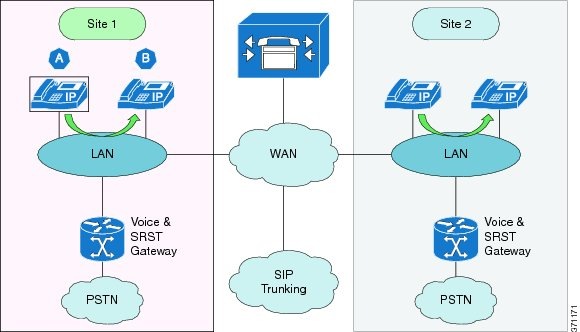
This call type occurs between two endpoints located at the same site. As shown in the following figure, media traffic is between the endpoints.

Figure 1. On-Net Call (Intra-Site)
Usage
  • Target numbering must follow the Numbering Plan described in this chapter
  • Target number can be a short code, extension, or ESP +Extension, DN or ISP + DN, depending on the enterprise internal numbering plan
  • Target number is used unless restricted by Class of Service
  • Codec is dynamically selected based on the endpoints used
Accessibility User can perform On-Net call from any endpoint registered with Cisco Unified Communications Manager
Default Configuration Available to all users
Configuration Choices
  • Feature availability cannot be changed
  • Codec preferences are configuration
Redundancy Available to users without restrictions
Survivability Available to users in fallback mode with the following exceptions:
  • Phone must be registered to the SRST Gateway
  • Users must be able to make On-Net calls only to the same site users connected to the same SRST Gateway
  • No COS is available during survivability mode
Endpoint Types Supported
  • Cisco IP phones
  • Cisco ATA
  • Cisco VG
Examples
Case 1: DN = ISP+SLC+Extension
Phone A (DN=8 300 4040)
Dial 4050 (Phone B extension)
as Phone A Connected Number shows 8 300 4040

Phone B (DN=8 300 4050)
On Answer, display shows 8 300 4040 -Calling Party Number
Case 2: DN = SLC+Extension; Extension Prefix is used for 
Extension dialing (for example 6)
Phone A (DN=300 4040)
Dial 6 4050 (Phone B extension)
Phone A Connected Number shows 300 4050

Phone B (DN=300 4050)
On Answer display shows 300 4040 -Calling Party Number
Case 3a: DN= Extension {Dialing with full DN}
Phone A (DN=40404040)
Dial 40404050 (Phone B extension)
Phone A Connected Number shows 40404050

Phone B (DN=40404050)
On Answer display shows 40404040 as the Calling
Party Number
Case 3b: DN=Extension {Dialing with Short Code}
Phone A (DN=40404040)
Dial *4050 (short code for Phone B)
Phone A Connected Number shows 40404050

Phone B (DN=40404050)
On Answer display shows 40404040 as the Calling
Party Number

Inter-Site On-Net Call

The Cisco HCS deployment model supports multiple sites with overlapping extensions and inter-site calling by dialing the Site Location Codes prefixed with an inter-site prefix, and supports the following dialing capabilities:
  • Inter-site dialing prefix
  • Variable length extensions between sites with no post-dialing delay (PDD) cause by timeout

When the user dials a directory number of another user, the leaf cluster first examines the site code, and determines if the site code is for a site on the same cluster or another cluster. If the site is on the same cluster, the call is routed to the correct location and delivered to the phone. If the site code is for a site on a different cluster, routing is as described in the following section.

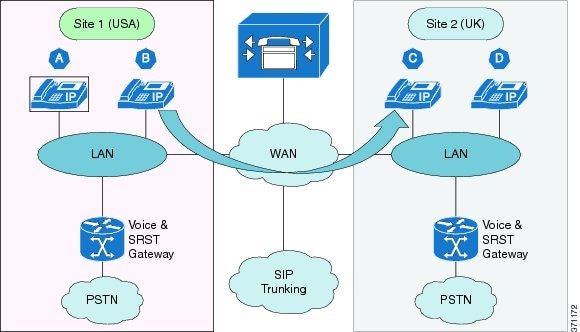
This call type occurs between two endpoints located on different sites. The sites can be on a different Cisco Unified Communications Manager that belongs to the same customer. As shown in the following figure, media traffic is between the endpoints.

Figure 2. On-Net Call (Inter-Site)
Usage
  • User can be located in the same or different countries (sites can be in different countries and or different Cisco Unified Communications Manager clusters)
  • Target numbering must follow the Numbering Plan described in this chapter
  • Target number can be either DN or ISP +DN depending on the enterprise internal numbering plan adopted. DN can be either just Extension for flat Dial Plan or SLC + Extension or ISP + SLC + Extension.
  • Any target number can be used unless restricted by Class of Service
  • Codec is dynamically selected based on the endpoints used
Accessibility User can perform On-Net call from any endpoint registered with Cisco Unified Communications Manager
Usage Example Reduces costs of Inter-site and International calls by sharing available bandwidth with Data Network
Default Configuration Available to all users
Configuration Choices
  • Feature availability cannot be changed
  • Codec preferences are configuration
Redundancy Available to users without restrictions
Survivability Not available to users in fallback mode
Endpoint Types Supported
  • Cisco IP phones
  • Cisco ATA
  • Cisco VG
Examples
Case 1: DN = ISP+SLC+Extension
Phone B (DN=8 100 2345)
Dial 8 200 6789 (for Phone C)
Phone B Connected Number shows 8 200 6789

Phone C (DN=8 200 6789)
On Answer, display shows 8 100 2345 -Calling Party Number
Case 2: DN = SLC+Extension; Extension Prefix is used for 
Extension dialing (for example 6)
Phone A (DN=300 4040)
Dial 300 4050 (Phone B extension)
Phone D Connected Number shows 300 4050

Phone D (DN=300 4050)
On Answer display shows 300 4040 -Calling Party Number
Case 3: DN= Extension {Dialing with full DN}
Phone A (DN=40404040)
Dial 40404050 (Phone D extension)
Phone A Connected Number shows 40404050

Phone D (DN=40404050)
On Answer display shows 40404040 as the Calling
Party Number

VoIP Trunking On-Net Call

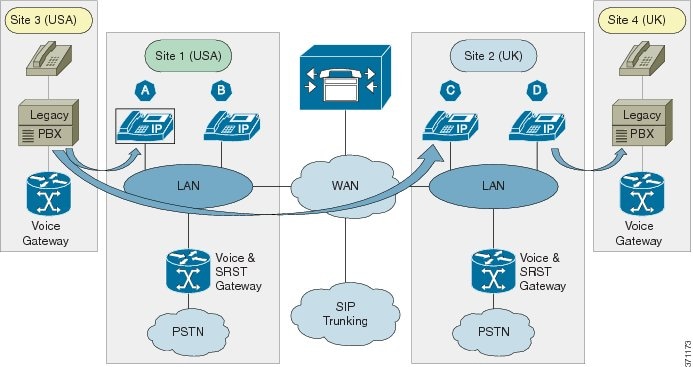
This call type occurs between endpoints connected to Cisco Unified Communications Manager and a Legacy PBX that is connected to a Voice Gateway. The call type includes:
  • SIP/SCCP signaling traffic between the endpoint and the Cisco Unified Communications Manager
  • SIP signaling traffic between the Voice Gateway and the Cisco Unified Communications Manager
  • TDM signaling traffic between the Legacy PBX and Voice Gateway
  • Media traffic between the endpoint and Voice Gateway
Figure 3. On-Net Call (VoIP Trunking)
Usage
  • Called number must follow the enterprise internal numbering plan requirement
  • Called number must be defined by ranges and not individual numbers
  • Called number can be either DN or ISP +DN depending on the enterprise internal numbering plan adopted. DN can be either just Extension for flat Dial Plan or SLC + Extension or ISP + SLC + Extension.
  • Voice codec used must be selected per site
  • Only voice calls can be made; video calls are not supported
  • Fax is supported as best effort only
  • MoH is provided in accordance with the site's MoH policy
  • Voice Gateway configuration is part of the solution
  • Voice Gateway redundant deployment is not supported
  • Enbloc signaling is between the Voice Gateway and Cisco Unified Communication Manager
  • Any target number can be used unless restricted by Class of Service
  • Codec is dynamically selected based on the endpoints used
  • Alternate call routing when the Legacy PBX or Voice Gateway is unreachable is not supported
Accessibility
  • User can perform On-Net call from any endpoint registered with Cisco Unified Communications Manager
  • Legacy PBX connected using a Voice Gateway is considered to be similar to an Inter-Site call
  • User uses the same dialing behavior as Inter-Site On-Net Call
Usage Example Enables the integration with the existing environment during the transition period of all users to the Cisco HCS solution
Default Configuration
  • Available to all users at all sites of the enterprise
  • Codec: Voice - G.729 and G.711
  • Codec: Sample Size - 20ms/20Bytes and 20ms/160Bytes
  • Bandwidth: 8kbps and 64kbps
Configuration Choices
  • Feature availability cannot be changed by site or user
  • Codec can be selected between G.711 and G.722 on a per-site basis
Redundancy Available to users without restrictions
Survivability Not available to users in fallback mode
Endpoint Types Supported
  • Cisco IP phones
  • Cisco ATA
  • Cisco VG
Example
Example: 
Phone D (DN=8 200 6100)
Dial 8 400 1234 to Legacy PBX
Connected Number shows 8 400 1234

Legacy PBX (Site 3)
Dial 8 100 2123 to Call A
Phone C (DN=8 100 2123)

Off-Net Call Flows

Local Gateway (LBO)

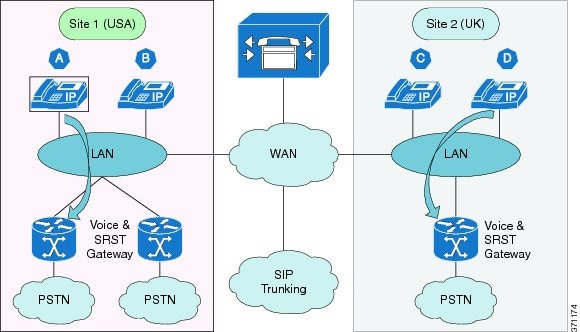
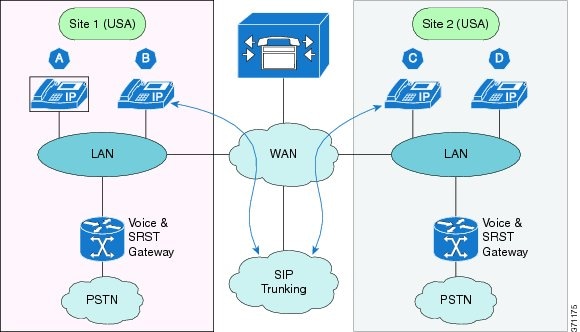
This call type occurs in the following situations for an endpoint in a site that has Local Gateway (Local Breakout):

  • When the endpoint places a call to reach a destination in the PSTN through the Local Gateway
  • When the endpoint receives a call from the PSTN through the Local Gateway

The Local Gateway is used to connect to the PSTN locally. In this case, it must be possible on a per-call basis to select the Local Gateway breakout and there must be selectable per-site routing through the Local Gateway (that is, International, National, Service, and so on).

The call type includes:

  • SIP/SCCP signaling traffic for the endpoint between the endpoint and Cisco Unified Communications Manager
  • SIP signaling traffic for the Local Gateway between the Local Gateway and Cisco Unified Communications Manager
  • Media traffic between the endpoint and Local Gateway
Figure 4. Off-Net Call (Local Gateway)
Usage
  • Called number follows the Numbering Plan requirements
  • Called number can include an access code if necessary
  • Any target number can be used, unless it is restricted by Class of Service
  • Off-net dialing can be completed in two ways:
    • When PDD is unavoidable, user can wait for interdigit timeout or press # without waiting for interdigit timeout
    • E.164 numbering format is supported with + as the first digit
  • The calling number is one of:
    • DDI of the DN
    • Site Published PSTN number if the DN does not have a DDI, or
    • Site Published PSTN number regardless of the availability of DN DDI
Accessibility User can perform Off-Net call from any endpoint registered with Cisco Unified Communications Manager
Usage Example User can dial any PSTN number from their phone
Default Configuration
  • Available to all users
  • DDI of the DN is sent if available; otherwise, Site Published PSTN number is sent
  • Codec depend on trunk bandwidth
Configuration Choices
  • Feature availability cannot be changed
  • Can be configured to send only the Site Published PSTN number as the Calling Number PRI, BRI, and so on
Redundancy Available to users without restrictions
Survivability Available to users in fallback mode, with the following restrictions:
  • Phone must be registered to the SRST gateway
  • No COS is available during survivability mode
Endpoint Types Supported
  • Cisco IP phones
  • Cisco ATA
  • Cisco VG
Examples
Case 1: Using Trunk Transformation CSS to convert DN to DDI
Phone A (DN=8 300 1234; External Mask=+14085289001)
Dial 9 12134225001
Local GW Trunk {uses Called, Calling, Redirecting and Connected 
Transformation CSS}
Outbound from CCM - CDPN = +12134225001; CGPN=+14085289001
Inbound Connected Number +12134225001

Aggregation (CBO)

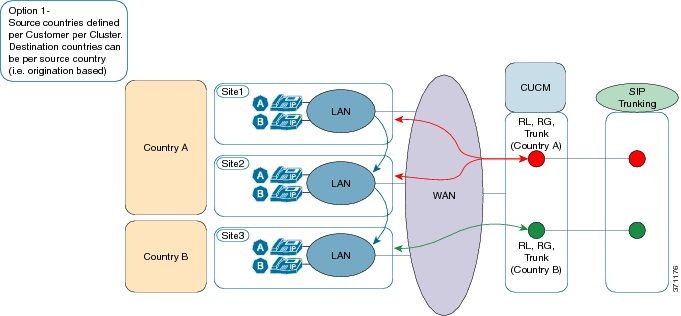
This call type occurs when an endpoint located in a Site in one country wants to reach a destination in any country through Aggregation (Central Breakout). The cluster in which the site is located must have the source country dial plan. Routing is based on the source country. It is not possible for sites in a cluster to be in different countries.

The call type includes:

  • SIP/SCCP signaling traffic for the endpoint between the endpoint and Cisco Unified Communications Manager
  • SIP signaling traffic for SIP trunking between the SIP trunking Session Border Controller (SBC) and Cisco Unified Communications Manager
  • Media traffic between the endpoint and SIP trunk SBC
Figure 5. Off-Net Call (Aggregation)
Usage
  • Called number follows the Numbering Plan requirements
  • Called number can include an access code if necessary
  • Any target number can be used, unless it is restricted by Class of Service
  • Off-net dialing can be completed in two ways:
    • When PDD is unavoidable, user can wait for interdigit timeout or press # without waiting for interdigit timeout
    • E.164 numbering format is supported with + as the first digit
  • Forced On-Net is supported and optional. A forced on-net call will not reach the Session Border Controller. It is either within the same cluster or cross cluster
  • As shown in the figure (Option 1), each source country has its own SIP trunk to the Session Border Controller. Otherwise, all source countries share the same SIP trunk to the SBC.
  • The calling number is one of:
    • DDI of the DN
    • Site Published PSTN number if the DN does not have a DDI, or
    • Site Published PSTN number regardless of the availability of DN DDI
  • MoH is supported
Accessibility User can perform Off-Net call from any endpoint registered with Cisco Unified Communications Manager
Usage Example User can dial any PSTN number from their phone
Default Configuration
  • Not available to all users; only by subscription to PSTN access
  • DDI of the DN is sent if available; otherwise, Site Published PSTN number is sent
  • Codec depend on trunk bandwidth
Configuration Choices
  • Available by subscription to PSTN access
  • Can be configured to send only the Site Published PSTN number as the Calling Number PRI, BRI, and so on
Redundancy Available to users without restrictions
Survivability Not available to users in fallback mode
Endpoint Types Supported
  • Cisco IP phones
  • Cisco ATA
  • Cisco VG
Examples
Case 1: Using Trunk Transformation CSS to convert DN to DDI
Phone A (DN=8 300 1222; External Mask=+14085289001)
Dial 9 12134225010
Aggregation Trunk {uses Called, Calling, Redirecting and Connected 
Transformation CSS}
Outbound from CCM - CDPN = +12134225010; CGPN=+14085289001
Inbound Connected Number +12134225010

VoIP

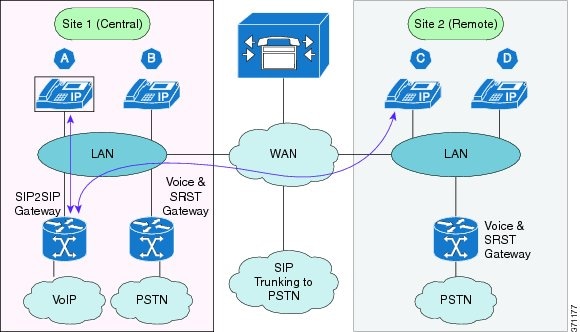
This call type occurs when an endpoint located in a site wants to reach a destination on the PSTN through the Voice over IP (VoIP) provider. The cluster in which the site is located provides the source country dial plan and routing is based on the source country.

The call type includes:

  • SIP/SCCP signaling traffic for the endpoint between the endpoint and Cisco Unified Communications Manager
  • SIP signaling traffic is used for the SIP Gateway to the VoIP network and Cisco Unified Communications Manager
  • SIP Gateway to the VoIP network can be PRI as well
  • VoIP network can be connected through the Session Border Controller (not shown in the diagram)
  • Media traffic between the endpoint and SIP trunk SBC
Figure 6. Off-Net Call (VoIP)
Usage
  • Called number follows the Numbering Plan requirements
  • Called number can include an access code if necessary; the access codes can be either the same PSTN access code or a different access code
  • Any target number can be used, unless it is restricted by Class of Service
  • Off-net dialing can be completed in two ways:
    • When PDD is unavoidable, user can wait for interdigit timeout or press # without waiting for interdigit timeout
    • E.164 numbering format is supported with + as the first digit
  • Forced On-Net is supported and optional.
  • The calling number is one of:
    • DDI of the DN
    • Site Published PSTN number if the DN does not have a DDI, or
    • Site Published PSTN number regardless of the availability of DN DDI
  • MoH is supported
Accessibility Users can perform Off-Net call from any endpoint registered with Cisco Unified Communications Manager through the VoIP network if they subscribe
Usage Example Billing consolidation between domestic and international outgoing calls
Default Configuration
  • Not available to all users; only by subscription to VoIP network access
  • DDI of the DN is sent if available; otherwise, Site Published PSTN number is sent
  • Codec preference depends on trunk bandwidth
Configuration Choices
  • Feature availability by subscription to VoIP network access
  • Can be configured to send only the Site Published PSTN number as the Calling Number
  • Access code cannot be chosen by the user; it is defined by the provider
  • Automatic rerouting is not supported
Redundancy Available to users without restrictions
Survivability Not available to users in fallback mode
Endpoint Types Supported
  • Cisco IP phones
  • Cisco ATA
  • Cisco VG
Examples
Case 1: Uses different PSTN Access Prefix and Trunk Transformation 
CSS to convert DN to DDI
Phone A (DN=8 300 1234; External Mask=+14085289001)
Dial 0 12134225001
SIP2SIP GW Trunk {uses Called, Calling, Redirecting and Connected 
Transformation CSS}
Outbound from CCM - CDPN = +12134225001; CGPN=+14085289001
Inbound Connected Number +12134225001

Emergency Call Handling

Cisco HCS supports two types of emergency calls:

  • Calls using Cisco Emergency Responder (CER)
  • Calls using standard Emergency Service

These call types are described in more detail in the sections that follow.

Non-CER Through Aggregation

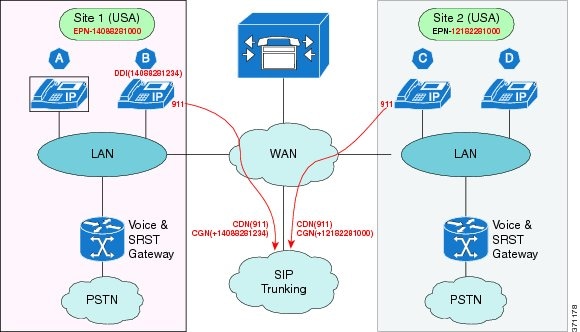
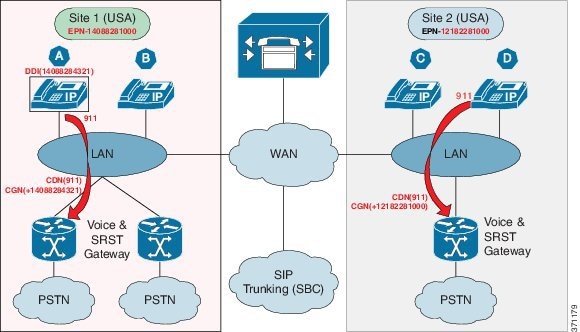
This call type is the standard enhanced emergency call to the Emergency Service Center (for example, US Enhanced 911 or 911). If configured, the call is routed through Aggregation. Emergency Calling is provided, regardless of the Class of Service, as long as the phone is registered.

Non-CER through aggregation includes:

  • SIP/SCCP signaling traffic for the endpoint is between the endpoint and Cisco Unified Communications Manager
  • SIP signaling traffic for SIP trunking is between the SIP trunking Session Border Controller (SBC) and Cisco Unified Communications Manager
  • Media traffic is between the endpoint and SIP trunk SBC
Figure 7. Emergency Call (Non-CER Through Aggregation)
Usage
  • The Emergency number follows the Numbering Plan requirements
  • The Emergency number can include an access code if necessary
  • The Calling Party Number is one of:
    • DDI of the Line or Site Emergency Published Number if the line does not have a DDI
    • Site Emergency Published Number
    • For Extension Mobility where a user logs in to a Remote Site, the Site Emergency Publish Number is used
  • Emergency Calls are based on the device and not the line
Accessibility User can perform Off-Net call from any endpoint registered with Cisco Unified Communications Manager
Usage Example User can dial any PSTN number from their phone
Default Configuration
  • Available to all registered phones
  • DDI of the DN is sent if available; otherwise, Site Emergency Publish Number is sent
Configuration Choices
  • Can be configured to send only the Site Emergency Publish Number for all emergency calls
Redundancy Available to users without restrictions
Survivability Not available to users in SRST fallback mode
Class of Service Available to all Classes of Service
Endpoint Types Supported
  • Cisco IP phones
  • Cisco ATA
  • Cisco VG

Non-CER Through Local Gateway

This call type is the standard enhanced emergency call to the Emergency Service Center (for example, US Enhanced 911 or 911). If configured, the call is routed through the Local Gateway. Emergency Calling is provided, regardless of the Class of Service, as long as the phone is registered.

Non-CER through Local Gateway includes:

  • SIP/SCCP signaling traffic for the endpoint is between the endpoint and Cisco Unified Communications Manager
  • SIP signaling traffic for SIP trunking is between the local gateway and Cisco Unified Communications Manager
  • Media traffic is between the endpoint and SIP trunk SBC
Figure 8. Emergency Call (Non-CER Through Local Gateway)
Usage
  • The Emergency number follows the Numbering Plan requirements
  • The Emergency number can include an access code if necessary
  • The Calling Party Number is one of:
    • DDI of the Line or Site Emergency Published Number if the line does not have a DDI
    • Site Emergency Published Number
    • For Extension Mobility where a user logs in to a Remote Site, the Site Emergency Publish Number is used
  • Emergency Calls are based on the device and not the line
  • Emergency Call is configured to be routed through the Local Gateway
Accessibility User can perform Off-Net call from any endpoint registered with Cisco Unified Communications Manager
Usage Example User can dial any PSTN number from their phone
Default Configuration
  • Available to all registered phones
  • DDI of the DN is sent if available; otherwise, Site Emergency Publish Number is sent
Configuration Choices
  • Can be configured to send only the Site Emergency Publish Number for all emergency calls
Redundancy Available to users without restrictions
Survivability Not available to users in SRST fallback mode
Class of Service Available to all Classes of Service
Endpoint Types Supported
  • Cisco IP phones
  • Cisco ATA
  • Cisco VG

Cisco Emergency Responder

This call type uses the Cisco Emergency Responder (CER) to manage the emergency call. If configured, the call is routed through Aggregation or the Local Gateway. Each cluster has its own CER server. Emergency Calling is provided, regardless of the Class of Service, as long as the phone is registered.

CER includes:

  • SIP/SCCP signaling traffic for the endpoint is between the endpoint and Cisco Unified Communications Manager
  • SIP signaling traffic for SIP trunking is between the SIP trunking Session Border Controller (SBC) and Cisco Unified Communications Manager
  • Media traffic is between the endpoint and SIP trunk SBC
Usage
  • The Emergency number follows the Numbering Plan requirements
  • The Emergency number can include an access code if necessary
  • The Calling Party Number is one of:
    • DDI of the Line or Site Emergency Published Number if the line does not have a DDI
    • Site Emergency Published Number
    • For Extension Mobility where a user logs in to a Remote Site, the Site Emergency Publish Number is used
  • Emergency Calls are based on the device and not the line
Accessibility User can perform Off-Net call from any endpoint registered with Cisco Unified Communications Manager
Usage Example User can dial any PSTN number from their phone
Default Configuration
  • Available to all registered phones
  • DDI of the DN is sent if available; otherwise, Site Emergency Publish Number is sent
Configuration Choices
  • Can be configured to send only the Site Emergency Publish Number for all emergency calls
Redundancy Available to users without restrictions
Survivability Not available to users in fallback mode
Class of Service Available to all Classes of Service
Endpoint Types Supported
  • Cisco IP phones
  • Cisco ATA
  • Cisco VG