Configure Calling in Cisco Webex using Unified CM

Calling Cisco Webex using Unified CM

The Calling in Cisco Webex (Unified CM) solution lets you register Cisco Webex directly to your Cisco Unified Communications Manager call control environment.

This solution enhances the calling experience for end users, allowing them to directly make calls in Cisco Webex through your Unified CM environment, use midcall features, and control their Unified CM registered desk phone from Cisco Webex.

When dialing from Cisco Webex, users can use the same dial strings or prefixes as they do on their desk phones; Cisco Webex functions like any other desk phone registered to your Unified CM. Unified CM calls that are established in Cisco Webex use the configuration that's in place for your Unified CM deployment (such as location, bandwidth settings, point to point media, and so on).

See Deployment Guide for Calling in Cisco Webex (Unified CM) for more information.

Cisco HCS Dedicated Architecture with Customer-owned Domain

Dedicated instance refers to the model of applications where there is a separate application instance (UC application) for each customer. In one B-Series/C-Series server there can be different customer instances based on how applications are distributed in the server. Any reference to a UC application such as Unified Communications Manager, Unified Communications Manager IM and Presence, Cisco Unity Connection, Cisco Emergency Responder, and CUAC, that does not include "Shared" or "Partitioned" as part of the title implies that it is a dedicated instance.

For more information, see:

Configure Calling in Cisco Webex using Unified CM in Dedicated Architecture

Before you begin

You must complete the following configuration before configuring calling in Cisco Webex:

  • Configure the DNS SRV record for Customer Owned service domain in the External/Internal DNS.

  • Make sure the installed client (Windows or MAC) with Cisco Webex has connectivity to Internet (direct or through Proxy) for Cisco Webex user authentication.

  • Enable feature toggle for desktop-ucm-ucprofile-enabled and mobile-ucm-ucprofile-enabled in Cisco Webex Control Hub.

See Configure Unified CM End Users for Calling in Cisco Webex (Unified CM) for more information.
Procedure


Step 1

Login to Unified CM as an administrator.

Step 2

Navigate to Settings > UC Manager Profiles in the Cisco Webex Control Hub window.

Note 

You must configure the UC Manager profiles to the dedicated instance Unified CM to enable calling service.

If the Voice Service domain of the Unified CM is same as the Cisco Webex Organization domain then, you can skip creation of UC Manager Profile and select Use my organization's domain default option to use your organization's domain configuration.

Step 3

Click Add Profile.

Step 4

Enter the Profile Name and Voice Service Domain Name.

Step 5

Click Save.

Step 6

Perform the following:

  1. To set the profile at organization level - Navigate to Settings > Calling Behavior

  2. To set the profile at user level - Navigate to Users, select the user for who you want to set the profile and navigate to Calling Behavior.

Step 7

Choose Calling in Cisco Webex (Unified CM) and Use a UC Manager Profile for Calling.

Step 8

From the Use a UC Manager Profile for Calling drop-down list, choose the profile created in Step 4. Note: If no UC manager profile is assigned to the user by the administrator on the administrator portal, the client uses the domain of the email address to perform service discovery of the VoiceServiceDomain.

Step 9

Click Save.


Cisco HCS Shared Architecture with Single Partner-owned Domain

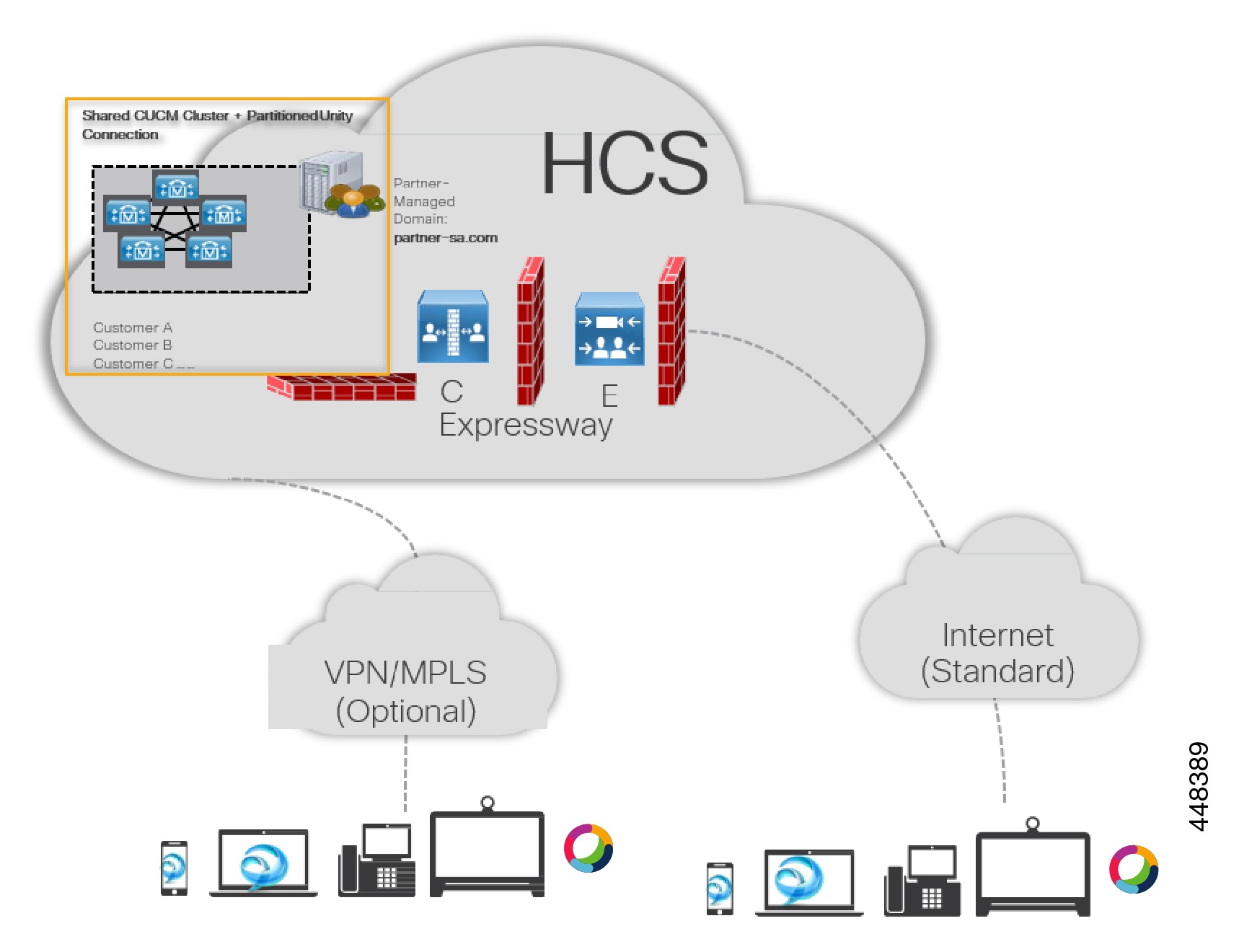
HCS Shared Architecture (SA) deployment enables partners to provide true UC as a Service (UCaaS) for customers with the best collaboration solution and at a more affordable price. HCS SA also leverages existing HCS access methods to deploy the Unified Communications (UC) solution securely with Over the Top (OTT) or private access of service with a managed network.

Cisco HCS partners can deploy this environment for customers with average of 10 users or more. You can provide full suites of collaboration offers from dial tone, video, and mobility to team collaboration.

With this deployment, the partners can provide the following TURNKEY solution –

  • Manage end users and their password for each customer through Partner-managed LDAP or AD.

  • Provide internet access (OTT or MRA), by default.

  • Manage day-to-day operation and upgrade (as needed) as any cloud services.

Configure Calling in Cisco Webex using Unified CM in Shared Architecture

Before you begin

You must complete the following configuration before configuring calling in Cisco Webex:

  • Configure the DNS SRV record for service domain in the external DNS.

  • Make sure the installed client (Windows or MAC) with Cisco Webex has connectivity to Internet (direct or through Proxy) for Cisco Webex user authentication.

  • Enable feature toggle for desktop-ucm-ucprofile-enabled and mobile-ucm-ucprofile-enabled in Cisco Webex Control Hub.

See Configure Unified CM End Users for Calling in Cisco Webex (Unified CM) for more information.

Procedure


Step 1

Login to Unified CM as an administrator.

Step 2

Navigate to Settings > UC Manager Profiles in the Cisco Webex Control Hub window.

Note 

You must configure the UC Manager profiles to the shared Unified CM to enable calling service.

Step 3

Click Add Profile.

Step 4

Enter the Profile Name and Voice Service Domain Name.

Step 5

Click Save.

Step 6

Perform the following:

  1. To set the profile at organization level - Navigate to Settings > Calling Behavior

  2. To set the profile at user level - Navigate to Users, select the user for who you want to set the profile and navigate to Calling Behavior.

Step 7

Choose Calling in Cisco Webex (Unified CM) and Use a UC Manager Profile for Calling.

Step 8

From the Use a UC Manager Profile for Calling drop-down list, choose the profile created in Step 4. Note: If no UC manager profile is assigned to the user by the administrator on the administrator portal, the client uses the domain of the email address to perform service discovery of the VoiceServiceDomain.

Step 9

Click Save.


Cisco Webex UDS Tested scenarios

The following scenarios have been validated in the Cisco HCS Shared Architecture deployment:

Cisco Webex Control Hub

Configuration

Deployment Type:

On Premises

Deployment Type:

MRA

SRV record is configured for customer domain and UC Profile with voice service domain is configured in Cisco Webex Control Hub

Supported:

Created ciscouds_tcp. <domain name> in the internal DNS Server.

Registered Cisco Webex client successfully to the Unified CM.

Supported:

Created collab-edge_tls.<domain name> in the External DNS Server.

Registered Cisco Webex client successfully to the Unified CM through Expressway.

SRV record isn’t configured for customer domain and UC Profile is configured in Cisco Webex Control Hub with User Data Services (UDS) server IP Address

Supported:

Registered Cisco Webex client successfully to the Unified CM.

Not Supported:

SRV record isn’t configured for customer domain and UC Profile is configured in Cisco Webex Control Hub with Fully Qualified Domain Name (FQDN).

Supported:

Registered Cisco Webex client successfully to the Unified CM.

Not Supported:

SRV record isn’t configured for customer domain and UC Profile isn’t configured in Cisco Webex Control Hub. Entered the IP address and credentials in the client manually.

Not Supported: Only works for Jabber

Not Supported: Only works for Jabber