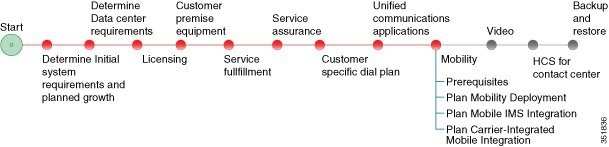
Mobility

Prerequisites

Before you plan the mobility deployment, make sure that you:
  • Review and have access to the Cisco Hosted Collaboration Solution, Release 10.6(1) Solution Reference Network Design Guide. Review these specific sections:

    • "Mobility" in the Applications chapter
    • "IMS network integration" in the Network infrastructure chapter
  • Complete the actions outlined in previous sections of this guide including:
    • Initial system requirements and planned growth
    • Data Center requirements
    • Licensing
    • Customer premise equipment
    • Service fulfillment
    • Service assurance
    • Unified Communications applications

Mobility Workflow

Plan the Mobility Deployment

Procedure
    Step 1   Determine which mobile networks that you will support. Cisco HCS offers the following network choices:
    • Carrier-integrated mobile
    • IP Multimedia Subsystem (IMS)
    • VoLTE and 4G
    • WiFi
    Step 2   Determine the mobility offerings for your Cisco HCS deployment model.
    • Determine how you want to implement mobility in your deployment.
    • Determine how Cisco HCS integrates with the mobile network. Different integrations have different ways of obtaining the call from the mobile network, for example, Intelligent Network trigger or routing configuration.
    Step 3   Determine the mobility endpoints that will be provisioned.
    • Jabber.

      Users will want a VPN when they are outside of the enterprise network.

    • Carrier-integrated mobile.
    • IMS clients.

      Cisco HCS integrates with the IMS network through the IMS phone types. The subscriber provisioned in the IMS network must be provisioned as an IMS client in HCS so that HCS can act as Application Server for the IMS subscribers.

    • WiFi.
    See the Cisco Hosted Collaboration Solution, Release 10.6(1) Features for Cisco Unified Communications Manager at http:/​/​www.cisco.com/​en/​US/​partner/​products/​ps11363/​prod_​maintenance_​guides_​list.html for more information on endpoints.
    Note   

    The Cisco Hosted Collaboration Solution, Release 10.6(1) Features for Cisco Unified Communications Manager does not include carrier-integrated mobile or IMS-supported endpoints.

    Step 4   Identify the UC application-based mobility features to be implemented.
    • Dial via Office Reverse Callback
    • Dial via Office Forward
    • Reroute Remote Destination Call to enterprise network
    • Mobile Connect
    • IVR
    • Enterprise Feature Access
    • Redial
    • Hand-in
    • Hand-out
    • Least Cost Routing with Dial via Office Reverse Callback
    • Least Cost Routing with Dial via Office Forward
    • Send Call to Mobile
    • Session Handoff
    Step 5   Identify the cloud-based collaboration applications to implement with Cisco HCS.

    Cisco WebEx, the Cisco Collaboration cloud-based infrastructure, is a collaboration solution that does not require any hardware deployment on the enterprise premises. All services (audio, video, and content sharing) are securely hosted in the Internet or the cloud. All the content, voice, and video traffic from every client traverses the Internet and is mixed and managed in the cloud at the WebEx data center.

    The Cisco Collaboration cloud infrastructure provides WebEx capabilities to mobile clients and devices. WebEx Meetings provides web-based voice and video conferencing with content sharing. WebEx Messenger provides XMPP-based IM and presence as well as point-to-point audio and video calling.

    Step 6   If you plan to integrate with IMS, see Plan Mobile IMS Integration.
    Step 7   If you plan to integrate with carrier-integrated mobile, Plan Carrier-Integrated Mobile Integration.

    Plan Mobile IMS Integration

    Procedure
      Step 1   Identify considerations for the Home Subscriber Server (HSS):
      • The public ID of the IMS client is provisioned in the HSS with the subscriber profiles.
      • The HSS provisioning should have Cisco HCS as the name of the application server.
      Step 2   See the Cisco HCS documentation for information on how to set up ISC trunks, the Cisco Unified Border Element-Service Provider (CUBE-SP or Perimeta SBC), and IMS clients on Cisco Unified Communications Manager. Setup considerations include:
      • IMS network operators must provision their equipment and provide the Cisco HCS administrator with all the required data to provision Cisco HCS.
      • The trunk between the S-CSCF and Cisco HCS should be configured in the IMS network with the DNS name of the CUBE-SP or Perimeta SBC.
      • When the CUBE-SP or Perimeta SBC resolves that name within the Cisco HCS internal network, it must point to Cisco Unified Communications Manager.
      Step 3   Identify any CUBE-SP or Perimeta SBC media anchoring requirements.
      Step 4   Determine if additional application servers must be included. If you are chaining together more than one application server, review the feature interaction.
      Step 5   Review Unified Mobility offerings and IMS client features for IMS clients. The IMS client features are:
      • Originating Identification Presentation
      • Terminating Identification Presentation
      • Originating Identification Restriction
      • Terminating Identification Restriction
      • Communication Diversion Unconditional
      • Communication Diversion on not Logged in
      • Communication Diversion on Busy
      • Communication Diversion on not Reachable
      • Communication Diversion on No Reply
      • Barring of All Incoming Calls
      • Barring of All Outgoing Calls
      • Barring of All Incoming Calls When Roaming
      • Barring of Outgoing International Calls
      • Communication Hold
      • Communication Retrieve
      • Call Forward All Activation
      • 3rd Party Registration
      • Message Waiting Indication
      • Communication Waiting
      • Ad-Hoc Multi Party Conference
      • Call Transfer
      Step 6   Determine the CDR Billing parameters. Consider the P-Charging-Vector support in Cisco HCS.
      Step 7   Determine the IMS licensing requirements.

      Plan Carrier-Integrated Mobile Integration

      Carrier-integrated mobile is a device type introduced in the Cisco Unified Communications Manager that extends mobility features outside of your UC network without the requirement to provision Cisco Jabber. This device sends and receives calls through the SIP trunk. The Unified Mobility features available in Unified Communications Manager are applicable to this device. This device type offers mobility in the same way as a remote destination offers mobility and uses fixed mobile convergence (FMC).

      Determine your mobility requirements for carrier integrated mobile.

      Procedure
        Step 1   Identify requirements for the Intelligent Network trigger. The call must be directed to the CUBE-SP or Perimeta SBC.
        Step 2   Identify requirements for SIP trunks. The P-Charging-Vector value must be set.
        Step 3   Identify any CUBE-SP or Perimeta SBC media anchoring requirements.
        Step 4   Determine if an application server will be included.
        Step 5   Review the Unified Mobility offerings for carrier-integrated mobile clients.
        Step 6   Determine the CDR Billing parameters.
        Step 7   Determine carrier-integrated mobile licensing requirements.