Expressway Fundamentals

Maintenance Mode on the Expressway

Maintenance mode on the Expressway has been enhanced so that you can bring an MRA system down in a managed way.

When you engage maintenance mode, the Expressway stops accepting new calls or proxy (MRA) traffic. Existing calls and chat sessions are not affected.

As users end their sessions normally, the system comes to a point when it is not processing any traffic of a certain type, and then it shuts that service down.

If users try to make new calls or start new chat sessions while the Expressway is in maintenance mode, the clients will receive a service unavailable response, and they might then choose to use another peer (if they are capable). This fail-over behavior depends on the client, but restarting the client should resolve any connection issues if there are active peers in the cluster.

The Unified Communications status pages also show (Maintenance Mode) in any places where MRA services are affected.
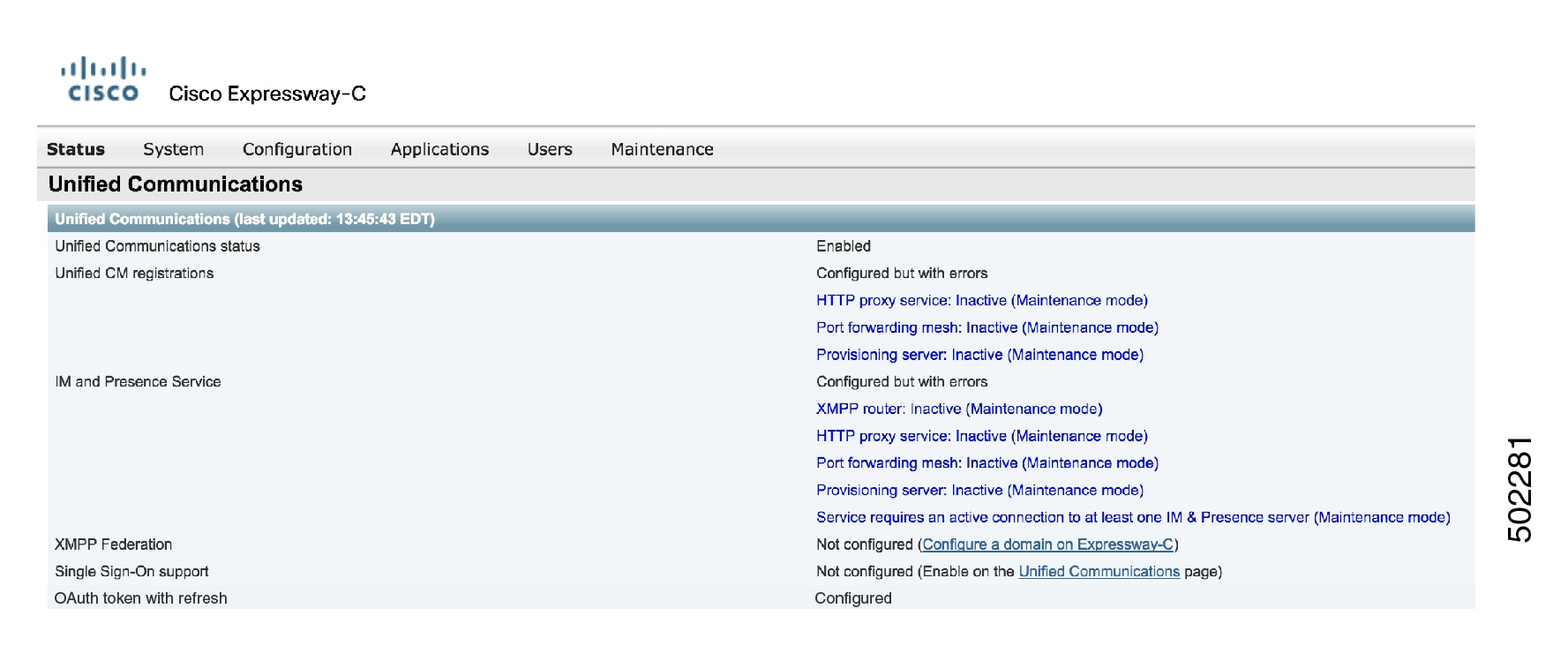
Figure 1. Maintenance Mode on Expressway-C

Limitation for CE endpoints

Maintenance mode is not supported over MRA for endpoints running CE software. The Expressway drops MRA calls from these endpoints when you enable maintenance mode.

Secure Communications Configuration

This deployment requires secure communications between the Expressway-C and the Expressway-E, and between the Expressway-E and endpoints located outside the enterprise. This involves the mandating of encrypted TLS communications for HTTP, SIP and XMPP, and, where applicable, the exchange and checking of certificates. Jabber endpoints must supply a valid username and password combination, which will be validated against credentials held in Unified CM. All media is secured over SRTP.

Expressway-C automatically generates non-configurable neighbor zones between itself and each discovered Unified CM node. A TCP zone is always created, and a TLS zone is created also if the Unified CM node is configured with a Cluster Security Mode (System > Enterprise Parameters > Security Parameters) of 1 (Mixed) (so that it can support devices provisioned with secure profiles). The TLS zone is configured with its TLS verify mode set to On if the Unified CM discovery had TLS verify mode enabled. This means that the Expressway-C will verify the CallManager certificate for subsequent SIP communications.


Note

Secure profiles are downgraded to use TCP if Unified CM is not in mixed mode.


The Expressway neighbor zones to Unified CM use the names of the Unified CM nodes that were returned by Unified CM when the Unified CM publishers were added (or refreshed) to the Expressway. The Expressway uses those returned names to connect to the Unified CM node. If that name is just the host name then:

  • It needs to be routable using that name.

  • This is the name that the Expressway expects to see in the Unified CM's server certificate.

If you are using secure profiles, ensure that the root CA of the authority that signed the Expressway-C certificate is installed as a CallManager-trust certificate (Security > Certificate Management in the Cisco Unified OS Administration application).

Media Encryption

Media encryption is enforced on the call legs between the Expressway-C and the Expressway-E, and between the Expressway-E and endpoints located outside the enterprise.

The encryption is physically applied to the media as it passes through the B2BUA on the Expressway-C.

Clustered Expressway Systems and Failover Considerations

You can configure a cluster of Expressway-Cs and a cluster of Expressway-Es to provide failover (redundancy) support as well as improved scalability.

Details about how to set up Expressway clusters are contained in Expressway Cluster Creation and Maintenance Deployment Guide and information about how to configure Jabber endpoints and DNS are contained in "Configure DNS for Cisco Jabber".

Note that when discovering Unified CM and IM and Presence Service servers on Expressway-C, you must do this on the primary peer.

Authorization Rate Control

The Expressway can limit the number of times that any user's credentials can be used, in a given configurable period, to authorize the user for collaboration services. This feature is designed to thwart inadvertent or real denial of service attacks, which can originate from multiple client devices authorizing the same user, or from clients that reauthorize more often than necessary.

Each time a client supplies credentials to authorize the user, the Expressway checks whether this attempt would exceed the Maximum authorizations per period within the previous number of seconds specified by the Rate control period.

If the attempt would exceed the chosen maximum, then the Expressway rejects the attempt and issues the HTTP error 429 "Too Many Requests".

The authorization rate control settings are configurable in the Advanced section of the Configuration > Unified Communications > Configuration page.

Credential Caching


Note

These settings do not apply to clients that are using SSO (common identity) for authenticating via MRA.


The Expressway caches endpoint credentials which have been authenticated by Unified CM. This caching improves overall performance because the Expressway does not always have to submit endpoint credentials to Unified CM for authentication.

The caching settings are configurable in the Advanced section of the Configuration > Unified Communications > Configuration page.

Credentials refresh interval specifies the lifetime of the authentication token issued by the Expressway to a successfully authenticated client. A client that successfully authenticates should request a refresh before this token expires, or it will need to re-authenticate. The default is 480 minutes (8 hours).

Credentials cleanup interval specifies how long the Expressway waits between cache clearing operations. Only expired tokens are removed when the cache is cleared, so this setting is the longest possible time that an expired token can remain in the cache. The default is 720 minutes (12 hours).

Expressway Automated Intrusion Protection

From X8.9 onwards, automated intrusion protection is enabled, by default, for the following categories:

  • http-ce-auth

  • http-ce-intrusion

  • sshpfwd-auth

  • sshpfwd-intrusion

  • xmpp-intrusion

This change affects new systems. Upgraded systems keep their existing protection configuration.

On Expressway-C

The Expressway-C receives a lot of inbound traffic from Unified CM and from the Expressway-E when it is used for Mobile and Remote Access.

If you want to use automated protection on the Expressway-C, you should add exemptions for all hosts that use the automatically created neighbor zones and the Unified Communications secure traversal zone. The Expressway does not automatically create exemptions for discovered Unified CM or related nodes.

On Expressway-E

You should enable the Automated protection service (System > System administration) if it is not yet running.

To protect against malicious attempts to access the HTTP proxy, you can configure automated intrusion protection on the Expressway-E (System > Protection > Automated detection > Configuration).

We recommend that you enable the following categories on the Expressway-E:

  • HTTP proxy authorization failure and HTTP proxy protocol violation. Do not enable the HTTP proxy resource access failure category.

  • XMPP protocol violation


Note

The Automated protection service uses Fail2ban software. It protects against brute force attacks that originate from a single source IP address.


MRA Registration Counts

From X12.6.1 onward, the Status > Overview page on Cisco Expressway-E lets you monitor up-to-date usage information for SIP devices that are registered over MRA. The Overview page contains the following fields:

MRA Registration:

  • Current—The total number of devices that are currently registered over MRA.

  • Peak—The peak count for MRA registrations since the last Expressway restart.