Application Level Interfaces

CTI Server Application Level Interfaces

Cisco has defined the following application level interfaces between the CTI Server and a CTI client.

Client Events

This service provides real-time call and agent state change, and status information related to a specific ACD agent position, to a CTI client.

All Events

This service provides real-time call and agent state change, and status information for all ACD calls and agent positions, to a CTI client.

Peripheral Monitor

This service lets a CTI client dynamically change the list of calls and devices that it wishes to receive call and agent state change messages for.

Client Monitor

This service lets a CTI client receive notifications whenever any other CTI Client session is opened or closed. This service also enables the CTI Client to monitor the activity of other CTI Client sessions.

Supervisor

This service lets a CTI client perform agent supervisory functions.

Call Data Update

This service lets a CTI client modify certain variable parts of the call state while a call is active.

Miscellaneous

This service informs CTI clients of significant Peripheral Gateway events.

Connection Monitor

This service monitors the CTI client connection and generates alarm events whenever the CTI client connection is established or terminated.

Client Control

This service permits direct control of agent state (such as the ACD sign-in and sign-out). It also controls of inbound and outbound calls from the CTI client application.

Server Service

This service enables the CTI Server to register a service that it wishes to provide.

You specify which levels you want in the ServicesRequested field of the OPEN_REQ message.

Client Events Service

The Client Events service is the heart of the CTI Interface. This service sends unsolicited messages to CTI clients when the peripheral reports that a call event or agent state change for the CTI client’s phone occurred. You receive these messages if you set the CTI_SERVICE_CLIENT_EVENTS bit in the ServicesRequested field of the OPEN_REQ message. There are no request or confirmation messages associated with unsolicited events.

Call Event messages are modeled after the CSTA messaging conventions. Call Events messages, in general, follow the CSTA naming conventions and event paradigms but use a simpler set of data types than those defined by CSTA.

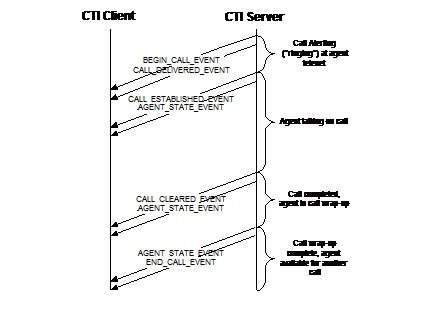
Every call is announced to the CTI client with an unsolicited BEGIN_CALL_EVENT message. The CTI Server sends this message when the CTI Server assigns the client to an incoming call. The message provides the initial call context data. More call and agent state events are then sent to the client as the call is handled. The events depend on the type of ACD involved and the treatment that the call receives. Finally, an END_CALL_EVENT message is sent to the CTI client when its association with a call is dissolved, as shown in this figure:

The content of most of the Call Event message is event-specific and, often, peripheral-specific. Some ACDs may not provide all these events.

For peripheral-specific Call Event message information, see the CTI OS Developer Guide for Cisco Unified ICM at https://www.cisco.com/c/en/us/support/customer-collaboration/computer-telephony-integration-option/products-programming-reference-guides-list.html.

The relative order of call event messages and any corresponding agent state change event messages is not specified. An agent state event message for an agent in the “talking” state, for example, can be sent before or after the corresponding call established event message.

This table lists the Client Events service messages.

Table 1. Client Events Service Messages

Message

When Sent to CTI Client

BEGIN_CALL_EVENT

When the CTI Server associates a call with the CTI client

END_CALL_EVENT

When CTI Server dissolves association between a call and the CTI Client

CALL_DATA_UPDATE_EVENT

When call context data changes

CALL_DELIVERED_EVENT

When a call arrives at the agent’s phone or when an inbound ACD trunk is seized and the client has the All Events service enabled

CALL_ESTABLISHED_EVENT

When a call is answered at the agent’s phone

CALL_HELD_EVENT

When a call is placed on hold at the agent’s phone

CALL_RETRIEVED_EVENT

When a call previously placed on hold at the agent’s phone is resumed

CALL_CLEARED_EVENT

When a call is terminated

CALL_CONNECTION_CLEARED_EVENT

When a party drops from a conference call

CALL_ORIGINATED_EVENT

Sent to CTI client upon initialization of a call from the peripheral

CALL_FAILED_EVENT

When a call cannot be completed

CALL_CONFERENCED_EVENT

When calls are joined into a conference call

CALL_TRANSFERRED_EVENT

When a call is transferred to another destination

CALL_DIVERTED_EVENT

When a call is removed from a previous delivery target

CALL_SERVICE_INITIATED_EVENT

When telecommunications service is initiated at the agent’s phone

AGENT_STATE_EVENT

When an agent’s state changes

CALL_REACHED_NETWORK_EVENT

When an outbound call is connected to another network

CALL_QUEUED_EVENT

When a call is placed in a queue pending the availability of a resource

CALL_DEQUEUED_EVENT

When a call is removed from a queue

AGENT_PRE_CALL_EVENT

When a call is routed to Enterprise Agent

AGENT_PRE_CALL_ABORT_EVENT

When a call that was previously announced through an AGENT_PRE_CALL_EVENT message cannot be routed as intended

RTP_STARTED_EVENT

Indicates that a Real Time Protocol (RTP) media stream has started.

RTP_STOPPED_EVENT

Indicates that a Real Time Protocol (RTP) media stream has stopped

NETWORK_RECORDING_STARTED_EVENT

This message will be sent by a CTI server to clients indicating start of recording at recording server.

NETWORK_RECORDING_ENDED_EVENT

This message will be sent by a CTI server to clients indicating recording ended at recording server.

Recording End is signaled either by Network Recording End event or by Call Cleared Event.

NETWORK_RECORDING_FAILED_EVENT

This message will be sent by a CTI server to clients indicating recording failed at recording server.

NETWORK_RECORDING_TARGET_INFO_EVENT

This message will be sent by a CTI server to recording initiator providing info about Recorder.

BEGIN_CALL_EVENT

When the CTI Server associates a call with the CTI client, it sends the client a BEGIN_CALL_EVENT message. This message provides the call ID and the initial call context data. The combination of ConnectionCallID, ConnectionDeviceIDType, and ConnectionDeviceID uniquely identify the call. This message always precedes any other event messages for that call. If any subsequent changes to the call context data occur, the CTI Server sends CALL_DATA_UPDATE_EVENT messages containing the changed call data to the CTI client. There can be multiple calls with the same ConnectionCallID value.

This table defines the format of the BEGIN_CALL_EVENT message.

Table 2. BEGIN_CALL_EVENT Message Format

Field Name

Value

Data Type

Byte Size

Fixed Part

MessageHeader

Standard message header. MessageType = 23.

MHDR

8

MonitorID

The Monitor ID of the device or call monitor that sent this message to the client. This is zero if there is no monitor associated with the event (All Events Service).

UINT

4

PeripheralID

The PeripheralID of the ACD where the call activity occurred.

UINT

4

PeripheralType

The type of the peripheral

USHORT

2

NumCTIClients

The number of CTI clients previously associated with this call. This value also indicates the number of CTI client signatures and time stamps in the floating part of the message.

USHORT

2

NumNamedVariables

The number of NamedVariable floating fields present in the floating part of the message.

USHORT

2

NumNamedArrays

The number of NamedArray floating fields present in the floating part of the message.

USHORT

2

CallType

The general classification of the call type

USHORT

2

ConnectionDeviceIDType

The type of device ID in the ConnectionDeviceID floating field

USHORT

2

ConnectionCallID

The Call ID value assigned to this call by the peripheral or Unified CCE.

UINT

4

CalledPartyDisposition

Indicates the disposition of the called party.

USHORT

2

Floating Part

ConnectionDeviceID

The device ID of the device associated with the connection.

STRING

64

ANI (optional)

The calling line ID of the caller.

STRING

40

UserToUserInfo (optional)

The ISDN user-to-user information element.

UNSPEC

131

DNIS (optional)

The DNIS provided with the call.

STRING

32

DialedNumber (optional)

The number dialed.

STRING

40

CallerEnteredDigits (optional)

The digits entered by the caller in response to IVR prompting.

STRING

40

RouterCallKeyDay

Together with the RouterCallKeyCallID field forms the unique 64-bit key for locating this call’s records in the Unified CCE. Only provided for Post-routed and Translation-routed calls.

UINT

4

RouterCallKeyCallID

The call key created by Unified CCE. Unified CCE resets this counter at midnight.

UINT

4

RouterCallKeySequenceNumber

Together with RouterCallKeyDay and RouterCallKeyCallID fields forms the TaskID

UINT

4

CallVariable1 (optional)

Call-related variable data.

STRING

41

CallVariable10 (optional)

Call-related variable data.

STRING

41

CallWrapupData (optional)

Call-related wrap up data.

STRING

40

NamedVariable (optional)

Call-related variable data that has a variable name defined in the Unified CCE. There may be an arbitrary number of NamedVariable and NamedArray fields in the message, subject to a combined total limit of 2000 bytes.

NAMED VAR

251

NamedArray (optional)

Call-related variable data that has an array variable name defined in the Unified CCE. There may be an arbitrary number of NamedVariable and NamedArray fields in the message, subject to a combined total limit of 2000 bytes.

NAMED ARRAY

252

CTIClientSignature

The Client Signature of a CTI client previously associated with this call. There may be more than one CTIClientSignature field in the message. (See NumCTIClients.)

STRING

64

CTIClientTimestamp (optional)

The date and time that the preceding CTIClientSignature was first associated with the call. There may be more than one CTIClientTimestamp field in the message. (See NumCTIClients.) This field always immediately follows the CTIClientSignature field to which it refers.

TIME

4

CallReferenceID (optional)

For Unified CCE systems where the Unified CM provides it, this is a unique call identifier.

UNSPEC

32

END_CALL_EVENT

The CTI Server sends an END_CALL_EVENT message to the CTI client when the association between a call and the CTI client is dissolved. This message does not necessarily indicate that the subject call has been terminated. The message indicates only that the CTI client is no longer responsible for processing the call and is receiving no further call event messages for the call.

This table defines the format of the END_CALL_EVENT message: defines the format of the END_CALL_EVENT message:

Table 3. END_CALL_EVENT Message Format

Field Name

Value

Data Type

Byte Size

Fixed Part

MessageHeader

Standard message header. MessageType = 24.

MHDR

8

MonitorID

The Monitor ID of the device or call monitor that sent this message to the client. It can also be zero if there is no monitor associated with the event (All Events Service).

UINT

4

PeripheralID

The PeripheralID of the ACD where the call activity occurred.

UINT

4

PeripheralType

The type of the peripheral.

USHORT

2

ConnectionDeviceIDType

The type of device ID in the ConnectionDeviceID floating field.

USHORT

2

ConnectionCallID

The Call ID value assigned to the call by the peripheral or Unified CCE.

UINT

4

Floating Part

ConnectionDeviceID

The device ID of the device associated with the connection.

STRING

64

CALL_AGENT_GREETING_EVENT

This message indicates if the agent greeting has started, finished, or failed after the Agent Greeting request has been made. This table defines the format of the message.

Table 4. CALL_AGENT_GREETING_EVENT Message Format

Fixed Part

Field Name

Value

Data Type

Byte Size

MessageHeader

Standard message header. MessageType = 248

MHDR

8

MonitorID

The Monitor ID of the device or call monitor that caused this message to be sent to the client, or zero if there is no monitor associated with the event (All Events Service).

UINT

4

PeripheralID

The Peripheral ID of the ACD where the device is located.

UINT

4

ConnectionDeviceIDType

The Call ID value assigned to this call by the peripheral. Agent's ACD call ID.

USHORT

2

ConnectionCallID

The Call ID value assigned to this call by the peripheral. Agent's ACD call ID.

UINT

4

EventCode

EventCode = 0, Greeting has started.

EventCode = 1, Greeting has ended with SUCCESS.

EventCode = 2, Failed to play the greeting for any reason.

USHORT

2

PeripheralErrorCode

Peripheral-specific error data, if EventCode = 2. Zero otherwise.

UINT

4

Floating Part

Field Name

Value

Data Type

Byte Size

ConnectionDeviceID (required)

The identifier of the connection between the call and the device.

STRING

64

AgentID (required)

The agent’s ACD login ID.

STRING

12

GreetingType (required)

The greeting type.

STRING

32

CALL_DATA_UPDATE_EVENT

The CTI Server sends a CALL_DATA_UPDATE_EVENT message to the CTI client when changes to the call context data occur. In general, this message contains only the items that have changed. But, the message always contains all ECC variables that are associated with the call. Each time a client receives this message, the client must replace any stored ECC variables with the ECC variables from this message.

ConnectionDeviceIDType/NewConnectionDeviceIDType and ConnectionDeviceID/NewConnectionDeviceID are reference connection details of the call and corresponds to any party who is on call. These details can be updated without dropping the party who is on call.

The initial call context is provided in the BEGIN_CALL_EVENT message. This table defines the CALL_DATA_UPDATE_EVENT message.

Table 5. CALL_DATA_UPDATE_EVENT Message Format

Fixed Part

Field Name

Value

Data Type

Byte Size

MessageHeader

Standard message header. MessageType = 25.

MHDR

8

MonitorID

The Monitor ID of the device or call monitor that caused this message to be sent to the client, or zero if there is no monitor associated with the event (All Events Service).

UINT

4

PeripheralID

The PeripheralID of the ACD where the call is located.

UINT

4

PeripheralType

The type of the peripheral.

USHORT

2

NumCTIClients

The number of CTI Clients associated with this call. This value also indicates the number of CTI Client signatures and timestamps that are present in the floating part of the message.

USHORT

2

NumNamedVariables

The number of NamedVariable floating fields present in the floating part of the message.

USHORT

2

NumNamedArrays

The number of NamedArray floating fields present in the floating part of the message.

USHORT

2

CallType

The general classification of the call type.

USHORT

2

ConnectionDevice IDType

Indicates the type of the connection identifier supplied in the ConnectionDeviceID floating field.

USHORT

2

ConnectionCallID

The Call ID value previously assigned to this call by the peripheral or Unified CCE.

UINT

4

NewConnectionDeviceIDType

Indicates the type of the connection identifier supplied in the NewConnectionDeviceID floating field.

USHORT

2

NewConnectionCallID

The new Call ID value assigned to this call by the peripheral or Unified CCE.

UINT

4

CalledPartyDisposition

Indicates the disposition of called party

USHORT

2

CampaignID

Campaign ID for value that appears in the Agent Real Time table. Set to zero if not used.

UINT

4

QueryRuleID

Query rule ID for value that appears in the Agent Real Time table. Set to zero if not used.

UINT

4

Floating Part

Field Name

Value

Data Type

Max. Size

ConnectionDeviceID (required)

The previous identifier of the call connection.

STRING

64

NewConnectionDeviceID (required)

The new identifier of call connection.

STRING

64

ANI (optional)

The calling line ID of the caller.

STRING

40

UserToUserInfo (optional)

The ISDN user-to-user information element.

UNSPEC

131

DNIS (optional)

The DNIS provided with the call.

STRING

32

DialedNumber (optional)

The number dialed.

STRING

40

CallerEnteredDigits (optional)

The digits entered by the caller in response to IVR prompting.

STRING

40

RouterCallKeyDay (optional)

Together with the RouterCallKeyCallID field forms the unique 64-bit key for locating this call’s records in the Unified CCE. Only provided for Post-routed and Translation-routed calls.

UINT

4

RouterCallKeyCallID (optional)

The call key created by Unified CCE. Unified CCE resets this counter at midnight.

UINT

4

RouterCallKey SequenceNumber

Together with RouterCallKeyDay and RouterCallKeyCallID fields forms the TaskID.

UINT

4

CallVariable1 (optional)

Call-related variable data.

STRING

41

CallVariable10 (optional)

Call-related variable data.

STRING

41

CallWrapupData (optional)

Call-related wrapup data.

STRING

40

NamedVariable (optional)

Call-related variable data that has a variable name defined in the Unified CCE. There may be an arbitrary number of Named Variable and NamedArray fields in the message, subject to a combined total limit of 2000 bytes.

NAMED VAR

251

NamedArray (optional)

Call-related variable data that has an array variable name defined in the Unified CCE. There may be an arbitrary number of Named Variable and NamedArray fields in the message, subject to a combined total limit of 2000 bytes.

NAMED ARRAY

252

CustomerPhoneNumber (optional)

Customer phone number for value that appears in the Agent Real Time table.

STRING

20

CustomerAccount Number (optional)

Customer Account Number for value that appears in the Agent Real Time table.

STRING

32

CTIClientSignature (optional)

The Client Signature of a CTI Client that was previously associated with this call. There may be more than one CTIClientSignature field in the message (see NumCTIClients).

STRING

64

CTIClientTimestamp (optional)

The date and time that the preceding CTI Client signature was first associated with the call. There may be more than one CTIClientTimestamp field in the message (see NumCTIClients). This field always immediately follows the CTIClientSignature field to which it refers.

TIME

4

CallReferenceID (optional)

For Unified CCE systems where the Unified CM provides it, this will be a unique call identifier.

UNSPEC

32

CALL_DELIVERED_EVENT

The CTI Server may send a CALL_DELIVERED_EVENT message to the CTI client in two cases:

  • A call arrives at the agent’s teleset.

  • An inbound ACD trunk is seized and the client has the All Events service enabled.

The LocalConnectionState field indicates which case applies. This table defines the CALL_DELIVERED_EVENT message.

Table 6. CALL_DELIVERED_EVENT Message Format

Fixed Part

Field Name

Value

Data Type

Byte Size

MessageHeader

Standard message header. MessageType = 9.

MHDR

8

MonitorID

The Monitor ID of the device or call monitor that caused this message to be sent to the client, or zero if there is no monitor associated with the event (All Events Service).

UINT

4

PeripheralID

The PeripheralID of the ACD where the call activity occurred.

UINT

4

PeripheralType

The type of the peripheral.

USHORT

2

ConnectionDevice IDType

The type of device ID in the ConnectionDeviceID floating field.

USHORT

2

ConnectionCallID

The Call ID value assigned to this call by the peripheral or Unified CCE.

UINT

4

LineHandle

When LocalConnectionState is LCS_ALERTING, this field identifies the alerting teleset line, if known. Otherwise this field is set to 0xffff.

USHORT

2

LineType

The type of the teleset line in the LineHandle field, if any. Otherwise this field is set to 0xffff.

USHORT

2

ServiceNumber

The service that the call is attributed to, as known to the peripheral. May contain the special value NULL_SERVICE when not applicable or not available.

UINT

4

ServiceID

The ServiceID of the service that the call is attributed to. May contain the special value NULL_SERVICE when not applicable or not available.

UINT

4

SkillGroupNumber

The number of the agent Skill Group the call is attributed to, as known to the peripheral. May contain the special value NULL_SKILL_GROUP when not applicable or not available. Some ACDs ignore this field and/or use the ACD default; see the list immediately following this table.

UINT

4

SkillGroupID

The SkillGroupID of the agent SkillGroup the call is attributed to. May contain the special value NULL_SKILL_GROUP when not applicable or not available.

UINT

4

SkillGroupPriority

The priority of the skill group, or 0 when skill group priority is not applicable or not available.

USHORT

2

AlertingDevice Type

The type of device ID in the AlertingDevic ID floating field.

USHORT

2

CallingDeviceType

The type of device ID in the CallingDeviceID floating field.

USHORT

2

CalledDeviceType

The type of device ID in the CalledDeviceID floating field.

USHORT

2

LastRedirect DeviceType

The type of device ID in the LastRedirectDeviceID floating field.

USHORT

2

LocalConnection State

The state of the local end of the connection. When a call is delivered to an agent teleset, the LocalConnectionState will be LCS_ALERTING.

USHORT

2

EventCause

A reason for the occurrence of the event.

USHORT

2

NumNamedVariables

The number of NamedVariable floating fields present in the floating part of the message.

USHORT

2

NumNamedArrays

The number of NamedArray floating fields present in the floating part of the message.

USHORT

2

Floating Part

Field Name

Value

Data Type

Max. Size

ConnectionDevice ID

The device ID of the device associated with the connection.

STRING

64

AlertingDeviceID (optional)

The device ID of the device that is alerting.

STRING

64

CallingDeviceID (optional)

The device ID of the calling device.

STRING

64

CalledDeviceID (optional)

The device ID of the originally called device.

STRING

64

LastRedirect Device ID (optional)

The device ID of the previously alerted device.

STRING

64

TrunkNumber (optional)

The number representing a trunk.

UINT

4

TrunkGroup Number (optional)

The number representing a trunk group.

UINT

4

SecondaryConnectionCallID

The ID of the consultation Call that Unified Contact Center Express (Unified CCX) placed from the CTI port to the agent device.

UINT

4

ANI (optional)

The calling line ID of the caller.

STRING

40

ANI_II (optional) (V11+)

ANI II (Intelligent Information) digits—Currently not populated.

STRING

2

UserToUserInfo (optional)

The ISDN user-to-user information element.

UNSPEC

131

DNIS (optional)

The DNIS provided with the call.

STRING

32

DialedNumber (optional)

The number dialed.

STRING

40

CallerEnteredDigits (optional)

The digits entered by the caller in response to IVR prompting.

STRING

40

CallVariable1 (optional)

Call-related variable data.

STRING

41

...

...

...

...

CallVariable10 (optional)

Call-related variable data.

STRING

41

CallWrapupData (optional)

Call-related wrapup data.

STRING

40

NamedVariable (optional)

Call-related variable data that has a variable name defined in the Unified CCE. There may be an arbitrary number of NamedVariable and NamedArray fields in the message, subject to a combined total limit of 2000 bytes.

NAMEDVAR

251

NamedArray (optional)

Call-related variable data that has an array variable name defined in the Unified CCE. There may be an arbitrary number of NamedVariable and NamedArray fields in the message, subject to a combined total limit of 2000 bytes.

NAMED ARRAY

252

Skill Group Number field

Following is a list of how various ACDs process the SkillGroupNumber field.

  • Enterprise Agent, Alcatel, and Avaya Communication Manager (ACM) (if not in EAS mode) require a valid SkillGroupNumber and use it

  • Avaya Aura ignores the SkillGroupNumber field altogether and uses the ACD default

  • ACM (in EAS mode) and Aspect process the SkillGroupNumber field in the following fashion:

    • Use a valid SkillGroupNumber if one is supplied

    • If SkillGroupNumber is omitted or set to –1, use the ACD defaults

    • Any other value for SkillGroupNumber results in a failure; in this case, use the last valid SkillGroupNumber for the agent

CALL_ESTABLISHED_EVENT

When a call is answered at the agent’s teleset, the CTI Server may send a CALL_ESTABLISHED_EVENT message to the CTI client. This table defines the CALL_ESTABLISHED_EVENT message:

Table 7. CALL_ESTABLISHED_EVENT Message Format

Fixed Part

Field Name

Value

Data Type

Byte Size

MessageHeader

Standard message header. MessageType = 10.

MHDR

8

MonitorID

The Monitor ID of the device or call monitor that caused this message to be sent to the client, or zero if there is no monitor associated with the event (All Events Service).

UINT

4

PeripheralID

The PeripheralID of the ACD where the call activity occurred.

UINT

4

PeripheralType

The type of the peripheral.

USHORT

2

ConnectionDevice IDType

The type of device ID in the ConnectionDeviceID floating field.

USHORT

2

ConnectionCallID

The Call ID value assigned to this call by the peripheral or Unified CCE.

UINT

4

LineHandle

Identifies the teleset line being used.

USHORT

2

LineType

The type of the teleset line.

USHORT

2

ServiceNumber

The service that the call is attributed to, as known to the peripheral. May contain the special value NULL_SERVICE when not applicable or not available.

UINT

4

ServiceID

The ServiceID of the service that the call is attributed to. May contain the special value NULL_ SERVICE when not applicable or not available.

UINT

4

SkillGroupNumber

The number of the agent Skill Group the call is attributed to, as known to the peripheral. May contain the special value NULL_SKILL_ GROUP when not applicable or not available. Some ACDs ignore this field and/or use the ACD default; see the list in the CALL_DELIVERED_EVENT section.

UINT

4

SkillGroupID

The SkillGroupID of the agent SkillGroup the call is attributed to. May contain the special value NULL_SKILL_GROUP when not applicable or not available.

UINT

4

SkillGroupPriority

The priority of the skill group, or 0 when skill group priority is not applicable or not available.

USHORT

2

AnsweringDevice Type

The type of device ID in the AnsweringDeviceID floating field.

USHORT

2

CallingDeviceType

The type of device ID in the CallingDeviceID floating field.

USHORT

2

CalledDeviceType

The type of device ID in the CalledDeviceID floating field.

USHORT

2

LastRedirect DeviceType

The type of device ID in the LastRedirect DeviceID floating field.

USHORT

2

LocalConnection State

The state of the local end of the connection.

USHORT

2

EventCause

A reason for the occurrence of the event.

USHORT

2

Floating Part

Field Name

Value

Data Type

Max. Size

ConnectionDevice ID

The device ID of the device associated with the connection.

STRING

64

AnsweringDevice ID (optional)

The device ID of the device that answered the call.

STRING

64

CallingDeviceID (optional)

The device ID of the calling device.

STRING

64

CalledDeviceID (optional)

The device ID of the originally called device.

STRING

64

LastRedirectDevice ID (optional)

The device ID of the previously alerted device.

STRING

64

TrunkNumber (optional)

The number representing a trunk.

UINT

4

TrunkGroup Number (optional)

The number representing a trunk group.

UINT

4

CALL_HELD_EVENT

The CTI Server may send a CALL_HELD_EVENT message to the CTI client when a call is placed on hold at the agent’s teleset. This table defines the CALL_HELD_EVENT message.

Table 8. CALL_HELD_EVENT Message Format

Fixed Part

Field Name

Value

Data Type

Byte Size

MessageHeader

Standard message header. MessageType = 11.

MHDR

8

MonitorID

The Monitor ID of the device or call monitor that caused this message to be sent to the client, or zero if there is no monitor associated with the event (All Events Service).

UINT

4

PeripheralID

The PeripheralID of the ACD where the call activity occurred.

UINT

4

PeripheralType

The type of the peripheral.

USHORT

2

ConnectionDevice IDType

The type of device ID in the ConnectionDeviceID floating field.

USHORT

2

ConnectionCallID

The Call ID value assigned to this call by the peripheral or Unified CCE.

UINT

4

HoldingDeviceType

The type of device ID in the HoldingDeviceID floating field.

USHORT

2

LocalConnection State

The state of the local end of the connection.

USHORT

2

EventCause

A reason for the occurrence of the event.

USHORT

2

Floating Part

Field Name

Value

Data Type

Max. Size

ConnectionDevice ID

The device ID of the device associated with the connection.

STRING

64

HoldingDeviceID (optional)

The device ID of the device that activated the hold.

STRING

64

CALL_RETRIEVED_EVENT

The CTI Server may send a CALL_RETRIEVED_EVENT message to the CTI client when a call previously placed on hold at the agent’s teleset is resumed.

Table 9. CALL_RETRIEVED_EVENT Message Format

Fixed Part

Field Name

Value

Data Type

Byte Size

MessageHeader

Standard message header. MessageType = 12.

MHDR

8

MonitorID

The Monitor ID of the device or call monitor that caused this message to be sent to the client, or zero if there is no monitor associated with the event (All Events Service).

UINT

4

PeripheralID

The PeripheralID of the ACD where the call activity occurred.

UINT

4

PeripheralType

The type of the peripheral.

USHORT

2

ConnectionDevice IDType

The type of device ID in the ConnectioDeviceID floating field.

USHORT

2

ConnectionCallID

The Call ID value assigned to this call by the peripheral or Unified CCE.

UINT

4

RetrievingDevice Type

The type of device ID in the RetrievingDeviceID floating field.

USHORT

2

LocalConnection State

The state of the local end of the connection.

USHORT

2

EventCause

A reason for the occurrence of the event.

USHORT

2

Floating Part

Field Name

Value

Data Type

Max. Size

ConnectionDevice ID

The device ID of the device associated with the connection.

STRING

64

RetrievingDevice ID (optional)

The device ID of the device that deactivated hold.

STRING

64

CALL_CLEARED_EVENT

The CTI Server sends a CALL_CLEARED_EVENT message to the CTI client when a call is terminated, usually when the last device disconnects from a call.

Table 10. CALL_CLEARED_EVENT Message Format

Fixed Part

Field Name

Value

Data Type

Byte Size

MessageHeader

Standard message header. MessageType = 13.

MHDR

8

MonitorID

The Monitor ID of the device or call monitor that caused this message to be sent to the client, or zero if there is no monitor associated with the event (All Events Service).

UINT

4

PeripheralID

The PeripheralID of the ACD where the call activity occurred.

UINT

4

PeripheralType

The type of the peripheral.

USHORT

2

ConnectionDevice IDType

The type of device ID in the ConnectionDeviceID floating field.

USHORT

2

ConnectionCallID

The Call ID value assigned to this call by the peripheral or Unified CCE.

UINT

4

LocalConnection State

The state of the local end of the connection.

USHORT

2

EventCause

A reason for the occurrence of the event.

USHORT

2

Floating Part

Field Name

Value

Data Type

Max. Size

ConnectionDevice ID

The device ID of the device associated with the cleared connection.

STRING

64

CALL_CONNECTION_CLEARED_EVENT

The CTI Server may send a CALL_CONNECTION_CLEARED_ EVENT message to the CTI client when a party drops from a conference call.

A conference call participant may be dropped when a call is queued in CVP and is redirected to an agent. When a call is redirected, an additional event message CALL_CONNECTION_CLEARED_EVENT with cause code 28 (CEC_REDIRECTED) occurs for the connection device that is released from CVP is sent from the CTI server to the CTI clients.

Table 11. CALL_CONNECTION_CLEARED_EVENT Message Format

Fixed Part

Field Name

Value

Data Type

Byte Size

MessageHeader

Standard message header. MessageType = 14.

MHDR

8

MonitorID

The Monitor ID of the device or call monitor that caused this message to be sent to the client, or zero if there is no monitor associated with the event (All Events Service).

UINT

4

PeripheralID

The PeripheralID of the ACD where the call activity occurred.

UINT

4

PeripheralType

The type of the peripheral.

USHORT

2

ConnectionDevice IDType

The type of device ID in the ConnectionDeviceID floating field.

USHORT

2

ConnectionCallID

The Call ID value assigned to this call by the peripheral or Unified CCE.

UINT

4

ReleasingDevice Type

The type of device ID in the ReleasingDeviceID floating field.

USHORT

2

LocalConnection State

The state of the local end of the connection.

USHORT

2

EventCause

A reason for the occurrence of the event.

USHORT

2

Floating Part

Field Name

Value

Data Type

Max. Size

ConnectionDevice ID

The device ID of the device associated with the cleared connection.

STRING

64

ReleasingDeviceID (optional)

The device ID of the device that cleared the connection.

Note


For Contact Center Enterprise, this field does not reliably indicate which party hung up first.

STRING

64

CALL_ORIGINATED_EVENT

The CTI Server may send a CALL_ORIGINATED_EVENT message to the CTI client when the peripheral initiates an outbound call.

Table 12. CALL_ORIGINATED_EVENT Message Format

Fixed Part

Field Name

Value

Data Type

Byte Size

MessageHeader

Standard message header. MessageType = 15.

MHDR

8

MonitorID

The Monitor ID of the device or call monitor that caused this message to be sent to the client, or zero if there is no monitor associated with the event (All Events Service).

UINT

4

PeripheralID

The PeripheralID of the ACD where the call activity occurred.

UINT

4

PeripheralType

The type of the peripheral.

USHORT

2

ConnectionDevice IDType

The type of device ID in the ConnectionDeviceID floating field.

USHORT

2

ConnectionCallID

The Call ID value assigned to this call by the peripheral or Unified CCE.

UINT

4

LineHandle

Identifies the teleset line being used.

USHORT

2

LineType

The type of the teleset line.

USHORT

2

ServiceNumber

The service that the call is attributed to, as known to the peripheral. May contain the special value NULL_SERVICE when not applicable or not available.

UINT

4

ServiceID

The ServiceID of the service that the call is attributed to. May contain the special value NULL_ SERVICE when not applicable or not available.

UINT

4

SkillGroupNumber

The number of the agent SkillGroup the call is attributed to, as known to the peripheral. May contain the special value NULL_SKILL_ GROUP when not applicable or not available. Some ACDs ignore this field and/or use the ACD default; see the list in the CALL_DELIVERED_EVENT section.

UINT

4

SkillGroupID

The SkillGroupID of the agent SkillGroup the call is attributed to. May contain the special value NULL_SKILL_GROUP if not applicable or not available.

UINT

4

SkillGroupPriority

The priority of the skill group, or 0 when skill group priority is not applicable or not available.

USHORT

2

CallingDeviceType

The type of device ID in the CallingDeviceID floating field.

USHORT

2

CalledDeviceType

The type of device ID in the CalledDeviceID floating field.

USHORT

2

LocalConnection State

The state of the local end of the connection.

USHORT

2

EventCause

A reason for the occurrence of the event.

USHORT

2

Floating Part

Field Name

Value

Data Type

Max. Size

ConnectionDevice ID

The device ID of the device associated with the connection.

STRING

64

CallingDeviceID (optional)

The device ID of the calling device.

STRING

64

CalledDeviceID (optional)

The device ID of the originally called device.

STRING

64

CALL_FAILED_EVENT

The CTI Server may send a CALL_FAILED_EVENT message to the CTI client when a call cannot be completed.

Table 13. CALL_FAILED_EVENT Message Format

Fixed Part

Field Name

Value

Data Type

Byte Size

MessageHeader

Standard message header. MessageType = 16.

MHDR

8

MonitorID

The Monitor ID of the device or call monitor that caused this message to be sent to the client, or zero if there is no monitor associated with the event (All Events Service).

UINT

4

PeripheralID

The PeripheralID of the ACD where the call activity occurred.

UINT

4

PeripheralType

The type of the peripheral.

USHORT

2

ConnectionDevice IDType

The type of device ID in the ConnectionDeviceID floating field.

USHORT

2

ConnectionCallID

The Call ID value assigned to this call by the peripheral or Unified CCE.

UINT

4

FailingDeviceType

The type of device ID in the FailingDeviceID floating field.

USHORT

2

CalledDeviceType

The type of device ID in the CalledDeviceID floating field.

USHORT

2

LocalConnection State

The state of the local end of the connection.

USHORT

2

EventCause

A reason for the occurrence of the event.

USHORT

2

Floating Part

Field Name

Value

Data Type

Max. Size

ConnectionDevice ID

The device ID of the device associated with the connection.

STRING

64

FailingDeviceID (optional)

The device ID of the failing device.

STRING

64

CalledDeviceID (optional)

The device ID of the called device.

STRING

64

CALL_CONFERENCED_EVENT

The CTI Server may send a CALL_CONFERENCED_EVENT message to the CTI client when calls are joined into a conference call.

Table 14. CALL_CONFERENCED_EVENT Message Format

Fixed Part

Field Name

Value

Data Type

Byte Size

MessageHeader

Standard message header. MessageType = 17.

MHDR

8

MonitorID

The Monitor ID of the device or call monitor that caused this message to be sent to the client, or zero if there is no monitor associated with the event (All Events Service).

UINT

4

PeripheralID

The PeripheralID of the ACD where the call activity occurred.

UINT

4

PeripheralType

The type of the peripheral.

USHORT

2

PrimaryDeviceIDType

The type of device ID in the PrimaryDeviceID floating field.

USHORT

2

PrimaryCallID

The Call ID value assigned to the primary call by the peripheral or Unified CCE.

UINT

4

LineHandle

The teleset line being used.

USHORT

2

LineType

The type of the teleset line.

USHORT

2

SkillGroupNumber

The number of the agent SkillGroup the call is attributed to, as known to the peripheral. May contain the special value NULL_SKILL_ GROUP when not applicable or not available. Some ACDs ignore this field and/or use the ACD default; see the list in the CALL_DELIVERED_EVENT section.

UINT

4

SkillGroupID

The SkillGroupID of the agent SkillGroup the call is attributed to. May contain the special value NULL_SKILL_ GROUP when not applicable or not available.

UINT

4

SkillGroupPriority

The priority of the skill group, or 0 when skill group priority is not applicable or not available.

USHORT

2

NumParties

The number of active connections associated with this conference call, up to a maximum of 16. This value also indicates the number of ConnectedParty CallID, ConnectedParty DeviceIDType, and ConnectedPartyDeviceID floating fields in the floating part of the message.

USHORT

2

SecondaryDevice IDType

The type of device ID in the SecondaryDeviceID floating field.

USHORT

2

SecondaryCallID

The Call ID value assigned to the secondary call by the peripheral or Unified CCE.

UINT

4

ControllerDeviceType

The type of device ID in the ControllerDeviceID floating field.

USHORT

2

AddedPartyDeviceType

The type of device ID in the AddedPartyDeviceID floating field.

USHORT

2

LocalConnectionState

The state of the local end of the connection.

USHORT

2

EventCause

A reason for the occurrence of the event.

USHORT

2

Floating Part

Field Name

Value

Data Type

Max. Size

PrimaryDeviceID

The device ID of the device associated with the primary call connection.

STRING

64

SecondaryDeviceID

The device ID of the device associated with the secondary call connection.

STRING

64

ControllerDeviceID (optional)

The device ID of the conference controller device.

STRING

64

AddedPartyDeviceID (optional)

The device ID of the device added to the call.

STRING

64

ConnectedPartyCallID (optional)

The Call ID value assigned to one of the conference call parties. There may be more than one Connected Party CallID field in the message (see NumParties).

UINT

4

ConnectedPartyDevice IDType (optional)

The type of device ID in the following ConnectedParty DeviceID floating field. There may be more than one Connected PartyDevice IDType field in the message (see NumParties). This field always immediately follows the corresponding Connected PartyCallID field.

USHORT

2

ConnectedParty DeviceID (optional)

The device identifier of one of the conference call parties. There may be more than one ConnectedParty DeviceID field in the message (see NumParties). This field always immediately follows the corresponding Connected PartyDeviceIDType field.

STRING

64

CALL_TRANSFERRED_EVENT

The CTI Server may send a CALL_TRANSFERRED_EVENT message to the CTI client when a call is transferred to another destination.

Table 15. CALL_TRANSFERRED_EVENT Message Format

Fixed Part

Field Name

Value

Data Type

Byte Size

MessageHeader

Standard message header. MessageType = 18.

MHDR

8

MonitorID

The Monitor ID of the device or call monitor that caused this message to be sent to the client, or zero if there is no monitor associated with the event (All Events Service).

UINT

4

PeripheralID

The Unified CCE PeripheralID of the ACD where the call activity occurred.

UINT

4

PeripheralType

The type of the peripheral.

USHORT

2

PrimaryDeviceIDType

The type of device ID in the PrimaryDeviceID floating field.

USHORT

2

PrimaryCallID

The Call ID value assigned to the primary call by the peripheral or Unified CCE.

UINT

4

LineHandle

Identifies the teleset line being used.

USHORT

2

LineType

The type of the teleset line.

USHORT

2

SkillGroupNumber

The number of the agent Skill Group the call is attributed to, as known to the peripheral. May contain the special value NULL_SKILL_GROUP when not applicable or not available. Some ACDs ignore this field and/or use the ACD default; see the list in the CALL_DELIVERED_EVENT section.

UINT

4

SkillGroupID

The SkillGroupID of the agent SkillGroup the call is attributed to. May contain the special value NULL_SKILL_ GROUP when not applicable or not available.

UINT

4

SkillGroupPriority

The priority of the skill group, or 0 when skill group priority is not applicable or not available.

USHORT

2

NumParties

The number of active connections associated with this conference call, up to a maximum of 16. This value also indicates the number of ConnectedParty CallID, ConnectedParty DeviceID Type, and ConnectedParty DeviceID floating fields in the floating part of the message.

USHORT

2

SecondaryDevice IDType

The type of device ID in the SecondaryDeviceID floating field.

USHORT

2

SecondaryCallID

The Call ID value assigned to the secondary call by the peripheral or Unified CCE.

UINT

4

TransferringDeviceType

The type of device ID in the TransferringDeviceID floating field.

USHORT

2

TransferredDeviceType

The type of device ID in the TransferredDeviceID floating field.

USHORT

2

LocalConnectionState

The state of the local end of the connection.

USHORT

2

EventCause

A reason for the occurrence of the event.

USHORT

2

Floating Part

Field Name

Value

Data Type

Max. Size

PrimaryDeviceID

The device ID of the device associated with the primary call connection.

STRING

64

SecondaryDeviceID

The device ID of the device associated with the secondary call connection.

STRING

64

TransferringDeviceID (optional)

The device ID of the device that transferred the call.

STRING

64

TransferredDeviceID (optional)

The device ID of the device to which the call was transferred.

STRING

64

ConnectedPartyCallID (optional)

The Call ID value assigned to one of the call parties. There may be more than one ConnectedPartyCallID field in the message (see NumParties).

UINT

4

ConnectedPartyDevice IDType (optional)

The type of device ID in the following ConnectedParty DeviceID floating field. There may be more than one ConnectedParty DeviceIDType field in the message (see NumParties). This field always immediately follows the corresponding Connected PartyCallID field.

USHORT

2

ConnectedParty DeviceID (optional)

The device identifier of one of the call parties. There may be more than one ConnectedParty Device ID field in the message (see NumParties). This field always immediately follows the corresponding Connected PartyDevice IDType field.

STRING

64

CALL_DIVERTED_EVENT

The CTI Server may send a CALL_DIVERTED_EVENT message to the CTI client when a call is removed from a previous delivery target.

Table 16. CALL_DIVERTED_EVENT Message Format

Fixed Part

Field Name

Value

Data Type

Byte Size

MessageHeader

Standard message header. MessageType = 19.

MHDR

8

MonitorID

The Monitor ID of the device or call monitor that caused this message to be sent to the client, or zero if there is no monitor associated with the event (All Events Service).

UINT

4

PeripheralID

The Unified CCE PeripheralID of the ACD where the call activity occurred.

UINT

4

PeripheralType

The type of the peripheral.

USHORT

2

ConnectionDevice IDType

The type of device ID in the ConnectionDeviceID floating field.

USHORT

2

ConnectionCallID

The Call ID value assigned to this call by the peripheral or Unified CCE.

UINT

4

ServiceNumber

The service that the call is attributed to, as known to the peripheral. May contain the special value NULL_ SERVICE when not applicable or not available.

UINT

4

ServiceID

The ServiceID of the service that the call is attributed to. May contain the special value NULL_ SERVICE when not applicable or not available.

UINT

4

DivertingDeviceType

The type of device ID in the DivertingDeviceID floating field.

USHORT

2

CalledDeviceType

The type of device ID in the CalledDeviceID floating field.

USHORT

2

LocalConnectionState

The state of the local end of the connection.

USHORT

2

EventCause

A reason for the occurrence of the event.

USHORT

2

Floating Part

Field Name

Value

Data Type

Max. Size

ConnectionDeviceID

The device ID of the device associated with the connection.

STRING

64

DivertingDeviceID (optional)

The device ID of the device from which the call was diverted.

STRING

64

CalledDeviceID (optional)

The device ID of the device to which the call was diverted.

STRING

64

CALL_SERVICE_INITIATED_EVENT

The CTI Server may send a CALL_SERVICE_INITIATED_EVENT message to the CTI client upon the initiation of telecommunications service (“dial tone”) at the agent’s teleset.

Table 17. CALL_SERVICE_INITIATED_EVENT Message Format

Fixed Part

Field Name

Value

Data Type

Byte Size

MessageHeader

Standard message header. MessageType = 20.

MHDR

8

MonitorID

The Monitor ID of the device or call monitor that caused this message to be sent to the client, or zero if there is no monitor associated with the event (All Events Service).

UINT

4

PeripheralID

The Unified CCE PeripheralID of the ACD where the call activity occurred.

UINT

4

PeripheralType

The type of the peripheral.

USHORT

2

ConnectionDevice IDType

The type of device ID in the ConnectionDeviceID floating field.

USHORT

2

ConnectionCallID

The Call ID value assigned to this call by the peripheral or Unified CCE.

UINT

4

LineHandle

Identifies the teleset line being used.

USHORT

2

LineType

The type of the teleset line.

USHORT

2

ServiceNumber

The service that the call is attributed to, as known to the peripheral. May contain the special value NULL_SERVICE when not applicable or not available.

UINT

4

ServiceID

The ServiceID of the service that the call is attributed to. May contain the special value NULL_SERVICE when not applicable or not available.

UINT

4

SkillGroupNumber

The number of the agent SkillGroup the call is attributed to, as known to the peripheral. May contain the special value NULL_SKILL_GROUP when not applicable or not available. Some ACDs ignore this field and/or use the ACD default; see the list in the CALL_DELIVERED_EVENT section.

UINT

4

SkillGroupID

The SkillGroupID of the agent SkillGroup the call is attributed to. May contain the special value NULL_ SKILL_ GROUP when not applicable or not available.

UINT

4

SkillGroupPriority

The priority of the skill group, or 0 when skill group priority is not applicable or not available.

USHORT

2

CallingDeviceType

The type of the device identifier supplied in the CallingDevice ID floating field.

USHORT

2

LocalConnectionState

The state of the local end of the connection.

USHORT

2

EventCause

A reason for the occurrence of the event.

USHORT

2

Floating Part

Field Name

Value

Data Type

Max. Size

ConnectionDeviceID

The device ID of the device associated with the connection.

STRING

64

CallingDeviceID (optional)

The device ID of the calling device.

STRING

64

CallReferenceID (optional)

For Unified CCE systems where the Unified CM provides it, this will be a unique call identifier.

UNSPEC

32

COCConnectionCallID (optional)

If specified, indicates that this call is a call on behalf of a consult call.

UINT

4

COCCallConnection DeviceIDType (optional)

If specified, indicates the type of connection identifier specified in the ConnectionDeviceID floating field for the original call.

USHORT

2

AGENT_STATE_EVENT

An agent state change (such as logging on or becoming available to handle incoming calls) generates an AGENT_STATE_EVENT message to the CTI client.

Table 18. AGENT_STATE_EVENT Message Format

Fixed Part

Field Name

Value

Data Type

Byte Size

MessageHeader

Standard message header. MessageType = 30.

MHDR

8

MonitorID

The Monitor ID of the device or call monitor that caused this message to be sent to the client, or zero if there is no monitor associated with the event (All Events Service).

UINT

4

PeripheralID

The PeripheralID of the ACD where the call activity occurred.

UINT

4

SessionID

The CTI client SessionID of the Client_Events session associated with this agent, or zero if no such CTI session is currently open.

UINT

4

PeripheralType

The type of the peripheral.

USHORT

2

SkillGroupState

An AgentState value representing the current state of the associated agent with respect to the indicated Agent Skill Group.

USHORT

2

StateDuration

The number of seconds since the agent entered this state (typically 0).

UINT

4

SkillGroupNumber

The number of the agent SkillGroup affected by the state change, as known to the peripheral. May contain the special value NULL_SKILL_ GROUP if not applicable or not available. Some ACDs ignore this field and/or use the ACD default; see the list in the CALL_DELIVERED_EVENT section.

USINT

4

SkillGroupID

The SkillGroupID of the agent SkillGroup affected by the state change. May contain the special value NULL_SKILL_ GROUP when not applicable or not available.

UINT

4

SkillGroupPriority

The priority of the skill group, or 0 when skill group priority is not applicable or not available.

USHORT

2

AgentState

An AgentState value representing the current overall state of the associated agent.

USHORT

2

EventReasonCode

A peripheral-specific code indicating the reason for the state change.

Note


EventReasonCode is supported only for the Not Ready and Logged Off agent states.

USHORT

2

MRDID

Media Routing Domain ID as configured in Unified CCE and the ARM client.

INT

4

NumTasks

The number of tasks currently assigned to the agent – this is the number that Unified CCE compares to the MaxTaskLimit to decide if the agent is available to be assigned additional tasks. This includes active tasks as well as those that are offered, paused, and in wrapup.

UINT

4

AgentMode

The mode that the agent will be in when the login completes. ROUTABLE = 1, NOT ROUTABLE = 0

USHORT

2

MaxTaskLimit

The maximum number of tasks that the agent can be simultaneously working on.

UINT

4

ICMAgentID

The Unified CCE Skill Target ID, a unique agent identifier for Unified CCE.

INT

4

AgentAvailability Status

An agent is Available, or eligible to be assigned a task in this Media Routing Domain if the agent meets all of these conditions:

  • The agent is not in Not Ready state for the Media Routing Domain.

  • The agent is not working on a non-interruptible task in another Media Routing Domain.

  • The agent has not reached the maximum task limit for this Media Routing Domain.

An available agent is eligible to be assigned a task. Who can assign a task to the agent is determined by whether or not the agent is Routable.

An agent is ICMAvailable in MRD X if he is available in X and Routable with respect to X. An agent is ApplicationAvailable in MRD X if he is available in X and not Routable with respect to X. Otherwise an agent is NotAvailable in MRD X.

The values are:

  • NOT AVAILABLE = 0

  • ICM AVAILABLE = 1

  • APPLICATION AVAILABLE = 2

UINT

4

NumFltSkillGroups

If information for more than one skill group is passed this should be non-zero and indicate the number of floating FltSkillGroupNumber, FltSkillGroupID, FltSkillGroupPriority, and FltSkillGroupState floating fields present in the floating part of the message (up to 99). If 0, a single set of those entities is specified in the fixed part of the message.

USHORT

2

DepartmentID

Department ID of the Agent

INT

4

Floating Part

Field Name

Value

Data Type

Max. Size

CTIClientSignature (optional)

The Client Signature of the CTI client associated with this agent.

STRING

64

AgentID (optional)

The agent’s ACD login ID.

STRING

12

AgentExtension (optional)

The agent’s ACD teleset extension.

STRING

16

ActiveTerminal

The selected terminal device name, if any.

STRING

64

AgentInstrument (optional)

The agent’s ACD instrument number.

STRING

64

Duration (optional)

If present specifies in seconds the anticipated time in the state specified. This useful for work states to estimate the time before going ready or not ready.

UINT

4

NextAgentState

The next agent state (if known).

USHORT

2

Direction

The direction of the call the agent is currently working on:

  • 0 = None

  • 1 = In

  • 2 =Out

  • 3 = Other In

  • 4 = Other Out

  • 5 = OutboundReserve

  • 6 = OutboundPreview

  • 7 = OutboundPredictiv

UINT

4

FltSkillGroupNumber

The number of an agent SkillGroup queue that the call has been added to, as known to the peripheral. May contain the special value NULL_SKILL_GROUP when not applicable or not available. There may be more than one SkillGroupNumber field in the message (see NumSkillGroups).

INT

4

FltSkillGroupID

The Unified CCE SkillGroupID of the agent SkillGroup queue that the call has been added to. May contain the special value NULL_SKILL_GROUP when not applicable or not available. There may be more than one SkillGroupID field in the message (see NumSkillGroups). This field always immediately follows the corresponding SkillGroupNumber field.

UINT

4

FltSkillGroup Priority

The priority of the skill group, or 0 when skill group priority is not applicable or not available. There may be more than one SkillGroupPriority field in the message (see NumSkillGroups). This field always immediately follows the corresponding SkillGroupID field.

USHORT

2

FltSkillGroupState

An AgentState value representing the current state of the associated agent with respect to the skill group. There may be more than one SkillGroupState field in the message (see NumSkillGroups). This field always immediately follows the corresponding SkillGroupPriority field.

USHORT

2

MaxBeyondTaskLimit

The maximum number of tasks that the agent can simultaneously be working on after reaching maximum task limit.

UINT

4

CALL_REACHED_NETWORK_EVENT

The CTI Server may send a CALL_REACHED_NETWORK_EVENT message to the CTI client when an outbound call is connected to another network.

Table 19. CALL_REACHED_NETWORK_EVENT Message Format

Fixed Part

Field Name

Value

Data Type

Byte Size

MessageHeader

Standard message header. MessageType = 34.

MHDR

8

MonitorID

The Monitor ID of the device or call monitor that caused this message to be sent to the client, or zero if there is no monitor associated with the event (All Events Service).

UINT

4

PeripheralID

The Unified CCE PeripheralID of the ACD where the call activity occurred.

UINT

4

PeripheralType

The type of the peripheral.

USHORT

2

ConnectionDevice IDType

The type of device ID in the ConnectionDeviceID floating field.

USHORT

2

ConnectionCallID

The Call ID value assigned to this call by the peripheral or Unified CCE.

UINT

4

LineHandle

This field identifies the teleset line used, if known. Otherwise this field is set to 0xffff.

USHORT

2

LineType

Indicates the type of the teleset line given in the LineHandle field.

USHORT

2

TrunkUsedDevice Type

The type of device ID in the TrunkUsedDeviceID floating field.

USHORT

2

CalledDeviceType

The type of device ID in the CalledDeviceID floating field.

USHORT

2

LocalConnectionState

The state of the local end of the connection.

USHORT

2

EventCause

A reason for the occurrence of the event.

USHORT

2

Floating Part

Field Name

Value

Data Type

Max. Size

ConnectionDeviceID

The device ID of the device associated with the connection.

STRING

64

TrunkUsedDeviceID (optional)

The device ID of the selected trunk.

STRING

64

CalledDeviceID (optional)

The device ID of the called device.

STRING

64

TrunkNumber (optional)

The number representing a trunk.

UINT

4

TrunkGroup Number (optional)

The number representing a trunk group.

UINT

4

CALL_QUEUED_EVENT

The CTI Server may send a CALL_QUEUED_EVENT message to the CTI client when a call is placed in a queue pending the availability of some resource.

Table 20. CALL_QUEUED_EVENT Message Format

Fixed Part

Field Name

Value

Data Type

Byte Size

MessageHeader

Standard message header. MessageType = 21.

MHDR

8

MonitorID

The Monitor ID of the device or call monitor that caused this message to be sent to the client, or zero if there is no monitor associated with the event (All Events Service).

UINT

4

PeripheralID

The Unified CCE PeripheralID of the ACD where the call activity occurred.

UINT

4

PeripheralType

The type of the peripheral.

USHORT

2

ConnectionDevice IDType

The type of device ID in the ConnectionDeviceID floating field.

USHORT

2

ConnectionCallID

The Call ID value assigned to this call by the peripheral or Unified CCE.

UINT

4

ServiceNumber

The service that the call is attributed to, as known to the peripheral. May contain the special value NULL_SERVICE when not applicable or not available.

UINT

4

ServiceID

The ServiceID of the service that the call is attributed to. May contain the special value NULL_SERVICE when not applicable or not available.

UINT

4

QueueDeviceType

The type of device ID in the QueueDeviceID floating field.

USHORT

2

CallingDeviceType

The type of device ID in the CallingDeviceID floating field.

USHORT

2

CalledDeviceType

The type of device ID in the CalleDeviceID floating field.

USHORT

2

LastRedirect DeviceType

The type of device ID in the LastRedirectDeviceID floating field.

USHORT

2

NumQueued

The number of calls in the queue for this service.

USHORT

2

NumSkillGroups

The number of Skill Group queues that the call has queued to, up to a maximum of 20. This value also indicates the number of Skill GroupNumber, Skill GroupID, and SkillGroupPriority floating fields in the floating part of the message.

USHORT

2

LocalConnection State

The state of the local end of the connection.

USHORT

2

EventCause

A reason for the occurrence of the event.

USHORT

2

Floating Part

Field Name

Value

Data Type

Max. Size

ConnectionDevice ID

The device ID of the device associated with the connection.

STRING

64

QueueDeviceID (optional)

The device ID of the queuing device.

STRING

64

CallingDeviceID (optional)

The device ID of the calling device.

STRING

64

CalledDeviceID (optional)

The device ID of the called device.

STRING

64

LastRedirectDevice ID (optional)

The device ID of the redirecting device.

STRING

64

SkillGroupNumber

The number of an agent SkillGroup queue that the call has been added to, as known to the peripheral. May contain the special value NULL_SKILL_GROUP when not applicable or not available. There may be more than one SkillGroup Number field in the message (see NumSkillGroups). Some ACDs ignore this field and/or use the ACD default; see the list in the CALL_DELIVERED_EVENT section.

INT

4

SkillGroupID

The Unified CCE SkillGroupID of the agent SkillGroup queue that the call has been added to. May contain the special value NULL_SKILL_ GROUP when not applicable or not available. There may be more than one SkillGroupID field in the message (see NumSkill Groups). This field always immediately follows the corresponding SkillGroupNumber field.

UINT

4

SkillGroupPriority

The priority of the skill group, or 0 when skill group priority is not applicable or not available. There may be more than one SkillGroup Priority field in the message (see NumSkillGroups). This field always immediately follows the corresponding SkillGroupID field.

USHORT

2

CALL_DEQUEUED_EVENT

The CTI Server may send a CALL_DEQUEUED_EVENT message to the CTI client when a call is removed from a queue.

Table 21. CALL_DEQUEUED_EVENT Message Format

Fixed Part

Field Name

Value

Data Type

Byte Size

MessageHeader

Standard message header. MessageType = 86.

MHDR

8

MonitorID

The Monitor ID of the device or call monitor that caused this message to be sent to the client, or zero if there is no monitor associated with the event (All Events Service).

UINT

4

PeripheralID

The Unified CCE PeripheralID of the ACD where the call activity occurred.

UINT

4

PeripheralType

The type of the peripheral.

USHORT

2

ConnectionDevice IDType

The type of device ID in the ConnectionDeviceID floating field.

USHORT

2

ConnectionCallID

The Call ID value assigned to this call by the peripheral or Unified CCE.

UINT

4

QueueDeviceType

Indicates the type of device identifier supplied in the QueueDeviceID floating field.

USHORT

2

ServiceNumber

The service that the call is attributed to, as known to the peripheral. May contain the special value NULL_SERVICE when not applicable or not available.

UINT

4

ServiceID

The ServiceID of the service that the call is attributed to. May contain the special value NULL_ SERVICE when not applicable or not available.

UINT

4

NumQueued

The number of calls remaining in the queue for this service.

USHORT

2

NumSkillGroups

The number of Skill Group queues that the call has been removed from, up to a maximum of 20. This value also indicates the number of SkillGroupNumber, Skill GroupID, and SkillGroup Priority floating fields in the floating part of the message. A zero value indicates that the call has been implicitly removed from all queues.

USHORT

2

LocalConnection State

The state of the local end of the connection.

USHORT

2

EventCause

A reason for the occurrence of the event.

USHORT

2

Floating Part

Field Name

Value

Data Type

Max. Size

Connection DeviceID

The device ID of the device associated with the connection.

STRING

64

SkillGroup Number

The number of an agent Skill Group queue that the call has been removed from, as known to the peripheral. May contain the special value NULL_SKILL_GROUP when not applicable or not available. There may be more than one SkillGroupNumber field in the message (see NumSkillGroups). Some ACDs ignore this field and/or use the ACD default; see the list in the CALL_DELIVERED_EVENT section.

UINT

4

SkillGroupID

The SkillGroupID of the agent SkillGroup queue that the call has been removed from. May contain the special value NULL_SKILL_GROUP when not applicable or not available. There may be more than one SkillGroupID field in the message (see NumSkill Groups). This field always immediately follows the corresponding SkillGroup Number field.

UINT

4

SkillGroupPriority

The priority of the skill group, or 0 when skill group priority is not applicable or not available. There may be more than one SkillGroup Priority field in the message (see NumSkillGroups). This field always immediately follows the corresponding SkillGroupID field.

USHORT

2

CALL_ATTRIBUTE_CHANGE_EVENT

Changes to certain key attributes of the call will generate a CALL_ATTRIBUTE_CHANGE_EVENT to the client.

Table 22. CALL_ATTRIBUTE_CHANGE_EVENT Message Format

Fixed Part

Field Name

Value

Data Type

Byte Size

MessageHeader

Standard message header.

MHDR

8

MonitorID

Always 0

UINT

4

PeripheralID

(CRS_PERIPHERAL_ID for ICD)

The ICM PeripheralID of the ACD where the call is located.

UINT

4

PeripheralType

(PT_CRS or PT_IPCC)

The type of the peripheral.

USHORT

2

ConnectionDeviceIDType

Indicates the type of the connection identifier supplied in the ConnectionDeviceID floating field.

USHORT

4

CallTypeID

The ICM call type of the call. May be 0 if not changed.

UINT

4

ServiceNumber

The Peripheral Number of Service of the call. May be 0 if not changed.

UINT

4

Floating Part

Field Name

Value

Data Type

Max. Size

ConnectionDeviceID

(Optional)

The identifier of the connection between the call and the device.

STRING

64

AGENT_PRE_CALL_EVENT

An AGENT_PRE_CALL_EVENT message is generated when a call or task is routed to Enterprise Agent. The message contains the call context data that is assigned to the call after it arrives at the agent’s desktop. Unlike the translation route event message, which is only sent to All Event clients, the AGENT_PRE_CALL_ EVENT message is also sent to the targeted Client Events client, if any. Typically, the AGENT_PRE_CALL_EVENT message is received before the BEGIN_ CALL_EVENT announcing the arrival of the call at the agent’s device. Application developers should note that it is possible, but not typical, for the call to arrive at the agent and to receive a BEGIN_CALL_EVENT message and other call event messages for the call before the AGENT_PRE_CALL_EVENT message is received.

Table 23. AGENT_PRE_CALL_EVENT Message Format

Fixed Part

Field Name

Value

Data Type

Byte Size

MessageHeader

Standard message header. MessageType = 105.

MHDR

8

MonitorID

The Monitor ID of the device monitor that caused this message to be sent to the client, or zero if there is no monitor associated with the event (All Events Service).

UINT

4

NumNamed Variables

The number of NamedVariable floating fields present in the floating part of the message.

USHORT

2

NumNamedArrays

The number of NamedArray floating fields present in the floating part of the message.

USHORT

2

ServiceNumber

The service that the call is attributed to, as known to the peripheral. May contain the special value NULL_SERVICE when not applicable or not available.

UINT

4

ServiceID

The Unified CCE ServiceID of the service that the call is attributed to. May contain the special value NULL_ SERVICE when not applicable or not available.

UINT

4

SkillGroupNumber

The number of the agent Skill Group the call is attributed to, as known to the peripheral. May contain the special value NULL_ SKILL_GROUP when not applicable or not available. Some ACDs ignore this field and/or use the ACD default; see the list in the CALL_DELIVERED_EVENT section.

UINT

4

SkillGroupID

The SkillGroupID of the agent SkillGroup the call is attributed to. May contain the special value NULL_SKILL_ GROUP when not applicable or not available.

UINT

4

SkillGroupPriority

The priority of the skill group, or 0 when skill group priority is not applicable or not available.

USHORT

2

MRDID

Media Routing Domain ID as configured in Unified CCE and the ARM client.

INT

4

AgentSkillTargetID

The skill target ID of the agent to whom the task or call will be routed.

UINT

4

Floating Part

Field Name

Value

Data Type

Max. Size

AgentInstrument

The agent instrument that the call will be routed to.

STRING

64

RouterCallKeyDay

Together with the RouterCallKeyCallID field forms the unique 64-bit key for locating this call’s records in the Unified CCE.

UINT

4

RouterCallKey CallID

The call key created by Unified CCE. Unified CCE resets this counter at midnight.

UINT

4

RouterCallKey SequenceNumber

Together with RouterCallKeyDay and RouterCallKeyCallID fields forms the TaskID.

UINT

4

ANI (optional)

The calling line ID of the caller.

STRING

40

UserToUserInfo (optional)

The ISDN user-to-user information element.

UNSPEC

131

DialedNumber (optional)

The number dialed.

STRING

40

CallerEnteredDigits (optional)

The digits entered by the caller in response to IVR prompting.

STRING

40

FltCallTypeID (optional)

If present, shows the call type of the call.

UINT

4

PreCallInvokeID (optional)

If present, specifies the invoke of the PreCall related to this event.

UNIT

4

CallVariable1 (optional)

Call-related variable data.

STRING

41

CallVariable10 (optional)

Call-related variable data.

STRING

41

NamedVariable (optional)

Call-related variable data that has a variable name defined in the Unified CCE. There may be an arbitrary number of Named Variable and NamedArray fields in the message, subject to a combined total limit of 2000 bytes.

NAMED VAR

251

NamedArray (optional)

Call-related variable data that has an array variable name defined in the Unified CCE. There may be an arbitrary number of Named Variable and NamedArray fields in the message, subject to a combined total limit of 2000 bytes.

NAMED ARRAY

252

AgentID (optional)

The agent ID of the agent to whom the task or call will be routed.

STRING

12

ProtocolReferenceGUID (Optional)

Protocol Call Reference GUID for Agent Services

STRING

40

NumOfEnabledServices (Optional)

The number of services enabled for this call.

USHORT

2

FltEnabledServices (Optional)

List of services enabled for the agent. The size of it is determined by the NumOfEnabledServices.

service types are:-

  1. 01 - Agent_Answers

  2. 02 - Agent_Call_Transcription

USHORT

*NumOfEnabledServices

2* NumOfEnabledServices

CcaiConfigId (Optional)

The config ID created by the AI service

STRING

40

AGENT_PRE_CALL_ABORT_EVENT

An AGENT_PRE_CALL_ABORT_EVENT message is generated when a call or task that was previously announced via an AGENT_PRE_CALL_EVENT cannot be routed as intended (due to a busy or other error condition detected during call routing) to Enterprise Agent. The AGENT_PRE_CALL_ABORT_ EVENT message is sent to the to ALL_EVENTS client.

Table 24. AGENT_PRE_CALL_ABORT_EVENT Message Format

Fixed Part

Field Name

Value

Data Type

Max. Size

MessageHeader

Standard message header. MessageType = 106.

MHDR

8

MonitorID

The Monitor ID of the device monitor that caused this message to be sent to the client, or zero if there is no monitor associated with the event (All Events Service).

UINT

4

MRDID

Media Routing Domain ID as configured in Unified CCE and the ARM client.

INT

4

Floating Part

Field Name

Value

Data Type

Max. Size

AgentInstrument

The agent instrument that the call was to have been routed to.

STRING

64

RouterCallKeyDay

Together with the RouterCall KeyCallID field forms the unique 64-bit key for locating this call’s records in the Unified CCE.

UINT

4

RouterCallKey CallID

The call key created by Unified CCE. Unified CCE resets this counter at midnight.

UINT

4

RouterCallKey SequenceNumber

Together with RouterCallKeyDay and RouterCallKeyCallID fields forms the TaskID.

UINT

4

RTP_STARTED_EVENT

The RTP_STARTED_EVENT message indicates that an RTP media stream has been started. There are two media streams for audio media so there will be two RTP Started events, one indicating the input has started (i.e. the phone is listening) and the other that the output has started (i.e. the outgoing media from the agent phone has begun).

The RTP_STARTED_EVENT message will generally come up at the same time as the established event. It also occurs when a call is retrieved from being on hold, and when the transfer or conference operations are completed.

There is no guarantee of order of the RTP started events in relationship to the established and retrieved events. The RTP started events may occur before or after the established event.

Table 25. RTP_STARTED_EVENT Message Format

Fixed Part

Field Name

Value

Data Type

Byte Size

MessageHeader

Standard message header. MessageType = 116.

MHDR

8

MonitorID

The Monitor ID of the device or call monitor that caused this message to be sent to the client, or zero if there is no monitor associated with the event (All Events Service).

UINT

4

PeripheralID

The PeripheralID of the ACD where the device is located.

UINT

4

ClientPort

The TCP/IP port number of the CTI Client connection.

UINT

4

Direction

The direction of the event. One of the following values:

0: Input;

1: Output;

2: Bi-directional.

USHORT

2

RTPType

The type of the event. One of the following values:

0: Audio;

1: Video;

2: Data.

USHORT

2

BitRate

The media bit rate, used for g.723 payload only.

UINT

4

EchoCancellation

on/off

USHORT

2

PacketSize

In milliseconds.

UINT

4

PayloadType

The audio codec type.

USHORT

2

ConnectionDevice IDType

Indicates the type of the connection identifier supplied in the ConnectionDeviceID floating field.

USHORT

2

ConnectionCallID

The Call ID value assigned to this call by the peripheral or Unified CCE.

UINT

4

Floating Part

Field Name

Value

Data Type

Max. Size

Connection DeviceID

The identifier of the connection between the call and the device.

STRING

64

ClientAddress

The IP address of the CTI client.

STRING

64

AgentID (optional)

The agent’s ACD login ID.

STRING

12

AgentExtension (optional)

The agent’s ACD teleset extension.

STRING

16

AgentInstrument (optional)

The agent’s ACD instrument number.

STRING

64

SendingAddress

The IP Address that the client is sending the RTP stream to.

STRING

64

SendingPort

The UDP port number that the client is sending the RTP Stream to.

UINT

4

RTP_STOPPED_EVENT

The RTP_STOPPED_EVENT message indicates that an RTP media has been stopped. There are two media streams for audio media so there will be two RTP Stopped events, one indicating the input has started (i.e. the phone is not listening) and the other that the output has started (i.e. the outgoing media from the agent phone has stopped).

The RTP_STOPPED_EVENT will be received when the call is placed on hold, and when the call disconnects.

Table 26. RTP_STOPPED_EVENT Message Format

Fixed Part

Field Name

Value

Data Type

Byte Size

MessageHeader

Standard message header. MessageType = 117.

MHDR

8

MonitorID

The Monitor ID of the device or call monitor that caused this message to be sent to the client, or zero if there is no monitor associated with the event (All Events Service).

UINT

4

PeripheralID

The Unified CCE PeripheralID of the ACD where the device is located.

UINT

4

ClientPort

The TCP/IP port number of the CTI Client connection that was closed.

UINT

4

Direction

The direction of the event.

One of the following values:

0: Input;

1: Output;

2: Bi-directional.

USHORT

2

ConnectionDevice IDType

Indicates the type of the connection identifier supplied in the ConnectionDeviceID floating field.

USHORT

2

ConnectionCallID

The Call ID value assigned to this call by the peripheral or Unified CCE.

UINT

4

Floating Part

Field Name

Value

Data Type

Max. Size

ConnectionDevice ID

The identifier of the connection between the call and the device.

STRING

64

ClientAddress

The IP address of the CTI client.

STRING

64

AgentID (optional)

The agent’s ACD login ID.

STRING

12

AgentExtension (optional)

The agent’s ACD teleset extension.

STRING

16

AgentInstrument (optional)

The agent’s ACD instrument number.

STRING

64

SendingAddress

The IP Address that the client is sending the RTP stream to.

STRING

64

SendingPort

The UDP port number that the client is sending the RTP Stream to.

UINT

4

NETWORK_RECORDING_STARTED_EVENT

This message will be sent by a CTI server to clients indicating start of recording at recording server.

Table 27. NETWORK_RECORDING_STARTED_EVENT

Field Name

Value

Data Type

Byte Size

Fixed Part

MessageHeader

Standard message header. MessageType = 272.

MHDR

8

MonitorID

The Monitor ID of the device or call monitor that sent this message to the client. It can also be zero if there is no monitor associated with the event (All Events Service).

UINT

4

PeripheralID

The PeripheralID of the ACD where the call is located.

UINT

4

ConnectionCallID

The Call ID value assigned to this call by the peripheral or Unified CCE.

UINT

4

ConnectionDeviceIDType

Indicates the type of the connection identifier supplied in the ConnectionDeviceID floating field.

USHORT

2

RecordingDeviceType

The type of device ID in the RecordingDeviceID floating field.

USHORT

2

Floating Part

ConnectionDeviceID

The identifier of the connection between the call and the device

STRING

64

RecordingDeviceID (Optional)

The device ID of the device on which recording is started.

STRING

64

NETWORK_RECORDING_ENDED_EVENT

This message will be sent by a CTI server to clients indicating recording ended at recording server.

Recording End is signaled either by Network Recording End event or by Call Cleared Event

Table 28. NETWORK_RECORDING_ENDED_EVENT

Field Name

Value

Data Type

Byte Size

Fixed Part

MessageHeader

Standard message header. MessageType = 273.

MHDR

8

MonitorID

The Monitor ID of the device or call monitor that sent this message to the client. It can also be zero if there is no monitor associated with the event (All Events Service).

UINT

4

PeripheralID

The PeripheralID of the ACD where the call is located.

UINT

4

ConnectionCallID

The Call ID value assigned to this call by the peripheral or Unified CCE.

UINT

4

ConnectionDeviceIDType

Indicates the type of the connection identifier supplied in the ConnectionDeviceID floating field.

USHORT

2

RecordingDeviceType

The type of device ID in the RecordingDeviceID floating field.

USHORT

Floating Part

ConnectionDeviceID

The identifier of the connection between the call and the device.

STRING

64

RecordingDeviceID (Optional)

The device ID of the device on which recording is ended.

STRING

64

NETWORK_RECORDING_FAILED_EVENT

This message will be sent by a CTI server to clients indicating recording failed at recording server.

Table 29. NETWORK_RECORDING_FAILED_EVENT

Field Name

Value

Data Type

Byte Size

Fixed Part

MessageHeader

Standard message header. MessageType = 274.

MHDR

8

MonitorID

The Monitor ID of the device or call monitor that sent this message to the client. It can also be zero if there is no monitor associated with the event (All Events Service).

UINT

4

PeripheralID

The PeripheralID of the ACD where the call is located.

UINT

4

ConnectionCallID

The Call ID value assigned to this call by the peripheral or Unified CCE.

UINT

4

ConnectionDeviceIDType

Indicates the type of the connection identifier supplied in the ConnectionDeviceID floating field.

USHORT

2

RecordingDeviceType

The type of device ID in the RecordingDeviceID floating field.

USHORT

2

RecordFailureCause

A Status Code value specifying the reason of failure. This would be pass-thorugh as received from CUCM on JTAPI.

USHORT

2

Floating Part

ConnectionDeviceID

The identifier of the connection between the call and the device.

STRING

64

RecordingDeviceID

(Optional)

The device ID of the device on which recording is failed.

STRING

64

NETWORK_RECORDING_TARGET_INFO_EVENT

This message will be sent by a CTI server to recording initiator providing info about Recorder.

Table 30. NETWORK_RECORDING_TARGET_INFO_EVENT

Field Name

Value

Data Type

Byte Size

Fixed Part

MessageHeader

Standard message header. MessageType = 275.

MHDR

8

MonitorID

The Monitor ID of the device or call monitor that sent this message to the client. It can also be zero if there is no monitor associated with the event (All Events Service).

UINT

4

PeripheralID

The PeripheralID of the ACD where the call is located.

UINT

4

ConnectionCallID

The Call ID value assigned to this call by the peripheral or Unified CCE.

UINT

4

ConnectionDeviceIDType

Indicates the type of the connection identifier supplied in the ConnectionDeviceID floating field.

USHORT

2

RecordingDeviceType

The type of device ID in the RecordingDeviceID floating field.

USHORT

2

RecordingType

The recording type can be:

  • 0: CALL_RECORDING_TYPE_NONE

  • 1: CALL_RECORDING_TYPE_AUTOMATIC

  • 2: CALL_RECORDING_TYPE_APPLICATION_INITIATED_SILENT

  • 3: CALL_RECORDING_TYPE_USER_INITIATED_FROM_DEVICE

  • 4: CALL_RECORDING_TYPE_USER_INITIATED_FROM_APPLICATION

USHORT

2

MediaForkingDeviceType

Media Forking Device Type for Gateway Recording. The forking device type can be:

  • 0: CALL_RECORDING_MEDIA_FORKING _DEVICE_TYPE_NONE

  • 1: CALL_RECORDING_MEDIA_FORKING _DEVICE_TYPE_PHONE

  • 2: CALL_RECORDING_MEDIA

    _FORKING_DEVICE_TYPE_GW

USHORT

2

Floating Part

ConnectionDeviceID

The identifier of the connection between the call and the device.

STRING

64

RecordingDeviceID (Optional)

The device ID of the device on which recording is started.

STRING

64

RecorderAddress

Recorder address.

STRING

64

TerminalName

Terminal name of the recording device

STRING

64

MediaForkingDeviceName

Forking Device Name for Gateway Recording

STRING

64

ProtocolReferenceGUID

Protocol Call Reference GUID for Gateway Recording

STRING

64

MediaForkingClusterID

Forking Cluster ID for Gateway Recording

STRING

64

RecorderURI (Optional)

URI of the MultiForking first recorder giving preference to mandatory recorder. Supported from CUCM Release 12.5(1)

STRING

64

RecorderErrorMsg (Optional)

Error message of the MultiForking first recorder giving preference to mandatory recorder. Supported from CUCM Release 12.5(1)

STRING

64

RecorderType(Optional)

Integer which denotes the type of recorder. The recorder type can be:

  • 0: CALL_RECORDING_MEDIA_FORKING _RECORDER_TYPE_UNKNOWN

  • 1: CALL_RECORDING_MEDIA_FORKING _RECORDER_TYPE_OPTIONAL_RECORDER

  • 2: CALL_RECORDING_MEDIA_FORKING _RECORDER_TYPE_MANDATORY_RECORDER

Supported from CUCM Release 12.5(1)

USHORT

2

RecorderStatus (Optional)

Integer which denotes the type of recorder. The recorder type can be:

  • 0: CALL_RECORDING_MEDIA_FORKING _RECORDER_STATUS_UNKNOWN

  • 1: CALL_RECORDING_MEDIA_FORKING _RECORDER_STATUS_SUCCESS

  • 2: CALL_RECORDING_MEDIA_FORKING _RECORDER_STATUS_FAILURE

Supported from CUCM Release 12.5(1)

USHORT

2

All Events Service

All Events Service

The All Events service is conceptually similar to the Client Events service, and uses many of the same messages. Unlike the Client Events service, however, the CTI client that has been granted All Events service is associated with a CTI Bridge application. Such a CTI Client receives messages for all call events, not just those associated with a specific teleset. Also, because there is no specific teleset association, this CTI client may receive call events that occur before any agent has been chosen by the peripheral for the call. The following messages describe these additional events.

Table 31. All Events Service Messages

Message

When Sent to CTI Client

CALL_DELIVERED_EVENT

When an inbound ACD trunk is seized.

CALL_TRANSLATION_ ROUTE_ EVENT

When a call is routed to a peripheral monitored by the PG via a translation route.

CALL_DELIVERED_EVENT

In addition to the Client Events service CALL_DELIVERED_EVENT message, a CTI client with the All Events service may also receive a CALL_DELIVERED_EVENT message when an inbound ACD trunk is seized. The same message format is used in both cases; the LocalConnectionState field distinguishes between the two cases. In this case, the LocalConnectionState is set to LCS_INITIATE.

CALL_TRANSLATION_ROUTE_EVENT

The CTI Server sends a CALL_TRANSLATION_ROUTE_EVENT message to the CTI client when a call is routed to a peripheral monitored by the PG via a translation route. The message contains the call context data that will be assigned to the call after it arrives at the peripheral.

Table 32. CALL_TRANSLATION_ROUTE_EVENT Message Format

Fixed Part

Field Name

Value

Data Type

Byte Size

MessageHeader

Standard message header. MessageType = 22.

MHDR

8

NumNamedVariables

The number of Named Variable floating fields present in the floating part of the message.

USHORT

2

NumNamedArrays

The number of NamedArray floating fields present in the floating part of the message.

USHORT

2

Floating Part

Field Name

Value

Data Type

Max. Size

ANI (optional)

The calling line ID of the caller.

STRING

40

UserToUserInfo (optional)

The ISDN user-to-user information element.

UNSPEC

131

DNIS

The DNIS of the expected call.

STRING

32

DialedNumber (optional)

The number dialed.

STRING

40

CallerEnteredDigits (optional)

The digits entered by the caller in response to VRU prompting.

STRING

40

RouterCallKeyDay

Together with the RouterCallKey CallID field forms the unique 64-bit key for locating this call’s records in the Unified CCE.

UINT

4

RouterCallKeyCallID

The call key created by Unified CCE. Unified CCE resets this counter at midnight.

UINT

4

RouterCallKey SequenceNumber

Together with RouterCallKeyDay and RouterCallKeyCallID fields forms the TaskID.

UINT

4

CallVariable1 (optional)

Call-related variable data.

STRING

41

CallVariable10 (optional)

Call-related variable data.

STRING

41

NamedVariable (optional)

Call-related variable data that has a variable name defined in the Unified CCE. There may be an arbitrary number of Named Variable and NamedArray fields in the message, subject to a combined total limit of 2000 bytes.

NAMED VAR

251

NamedArray (optional)

Call-related variable data that has an array variable name defined in the Unified CCE. There may be an arbitrary number of Named Variable and NamedArray fields in the message, subject to a combined total limit of 2000 bytes.

NAMED ARRAY

252

Peripheral Monitor Service

Peripheral Monitor service is similar to All Events service, and uses many of the same messages. Unlike All Events service, however, the CTI client that has been granted Peripheral Monitor service must specify for which devices and/or calls it wishes to receive events. The CTI client does this by establishing a separate monitor for each device (Trunk, Trunk Group, or Agent Device) or call. The CTI client can add or remove monitors at any time after it opens the session without closing and re-opening the session or affecting any other established monitors. When a Peripheral Monitor client has multiple monitors that are relevant to an event message, the client receives a corresponding number of event messages. The MonitorID in each event message indicates which monitor is associated with that message. Peripheral Monitor service clients also receive the CALL_TRANSLATION_ROUTE event described in Table 5-28 CALL_TRANSLATION_ROUTE_EVENT Message Format.

Monitors are not preserved across CTI Server failures or client session failures. All monitors that a CTI client creates are automatically terminated when the session is terminated. In addition, call monitors are automatically terminated when the corresponding call ends. CTI clients must re-create monitors when opening a new CTI session following a failure or loss of connection. No messages are received for any events that may have occurred during the intervening time interval.

Table 33. Peripheral Monitor Service Messages

Message

When Sent to CTI Client

MONITOR_START_REQ

When a new monitor is created for a call or device.

MONITOR_STOP_REQ

When a call or device monitor is terminated.

CHANGE_MONITOR_MASK_ REQ

When a call and agent state event mask is changed.

MONITOR_START_REQ

Use this message to create a new monitor for the given call or device.

This figure depicts the Monitor Start message flow.

Figure 1. Monitor Start Message Flow

This table defines the MONITOR_START_REQ Message Format.

Table 34. MONITOR_START_REQ Message Format

Fixed Part

Field Name

Value

Data Type

Byte Size

MessageHeader

Standard message header. MessageType = 93.

MHDR

8

InvokeID

An ID for this request message that will be returned in the corresponding confirm message.

UINT

4

PeripheralID

The PeripheralID of the ACD where the call or device to be monitored is located.

UINT

4

Connection CallID

The Call ID value of the call to be monitored. Set this field to zero when creating a monitor for a device.

UINT

4

CallMsgMask

A bitwise combination of the Unsolicited Call Event Message Masks listed in that the CTI client wishes to receive from this monitor.

UINT

4

AgentStateMask

A bitwise combination of Agent State Masks that the CTI client wishes to receive from this monitor.

UINT

4

Connection DeviceIDType

Indicates the type of the device identifier supplied in the ConnectionDeviceID floating field when creating a monitor for a call. Set this field to CONNECTION_ID_NONE when creating a monitor for a device.

USHORT

2

MonitoredDeviceType

Indicates the type of the device identifier supplied in the MonitoredDeviceID floating field when creating a monitor for a device. Set this field to DEVID_NONE when creating a monitor for a call.

USHORT

2

Floating Part

Field Name

Value

Data Type

Max. Size

ConnectionDeviceID (required for call monitor)

The device identifier of the device associated with the connection.

STRING

64

MonitoredDevice ID (required for device monitor)

The device identifier of the device to be monitored.

STRING

64

When the requested device or call monitor has been created, the CTI Server responds to the CTI client with the MONITOR_START_CONF message.

Table 35. MONITOR_START_CONF Message Format

Field Name

Value

Data Type

Byte Size

MessageHeader

Standard message header. MessageType = 94.

MHDR

8

InvokeID

Set to the same value as the InvokeID from the corresponding request message.

UINT

4

MonitorID

The Monitor ID of the new device or call monitor.

UINT

4

MONITOR_STOP_REQ

Use this message to terminate a call or device monitor. This figure depicts the Monitor Stop message flow.

Figure 2. Monitor Stop Message Flow

The following tables define the MONITOR_STOP_REQ and MONITOR_STOP_CONF messages.

Table 36. MONITOR_STOP_REQ Message Format

Field Name

Value

Data Type

Byte Size

MessageHeader

Standard message header. MessageType = 95.

MHDR

8

InvokeID

An ID for this request message, returned in the corresponding confirm message.

UINT

4

MonitorID

The Monitor ID of the device or call monitor to be terminated.

UINT

4

When the requested device or call monitor has been terminated, the CTI Server responds to the CTI client with the MONITOR_STOP_CONF message.

Table 37. MONITOR_STOP_CONF Message Format

Field Name

Value

Data Type

Byte Size

MessageHeader

Standard message header. MessageType = 96.

MHDR

8

InvokeID

Set to the same value as the InvokeID from the corresponding request message.

UINT

4

CHANGE_MONITOR_MASK_REQ

Use this message to change the call and agent state change event masks used to filter messages from the given call or device monitor. This figure depicts the Change Monitor Mask message flow.

Figure 3. Change Monitor Mask Message Flow
Table 38. CHANGE_MONITOR_MASK_REQ Message Format

Field Name

Value

Data Type

Byte Size

MessageHeader

Standard message header. MessageType = 97.

MHDR

8

InvokeID

An ID for this request message that will be returned in the corresponding confirm message.

UINT

4

MonitorID

The Monitor ID of the device or call monitor whose call and agent state change event masks are to be changed.

UINT

4

CallMsgMask

A bitwise combination of the Unsolicited Call Event Message Masks in that the CTI client wishes to receive from this monitor.

UINT

4

AgentStateMask

A bitwise combination of Agent State Masks that the CTI client wishes to receive from this monitor.

UINT

4

When the requested device or call monitor masks have been updated, the CTI Server responds to the CTI client with the CHANGE_MONITOR_MASK_CONF message.

Table 39. CHANGE_MONITOR_MASK_CONF Message Format

Field Name

Value

Data Type

Byte Size

MessageHeader

Standard message header. MessageType = 98.

MHDR

8

InvokeID

Set to the same value as the InvokeID from the corresponding request message.

UINT

4

Client Monitor Service

The CTI client that has been granted Client Monitor service receives notifications when any other CTI client session is opened or closed. The client may then monitor the activity of any other CTI client session.

Table 40. Client Monitor Service Messages

Message

When Sent to CTI Client

CLIENT_SESSION_OPENED_ EVENT

When a new client session opens.

CLIENT_SESSION_CLOSED_ EVENT

When a client session closes.

SESSION_MONITOR_START_ REQ

When monitoring of a client session starts.

SESSION_MONITOR_STOP_ REQ

When monitoring of a client session ends.

CLIENT_SESSION_OPENED_EVENT

This message indicates that a new CTI client session has been opened. One of these messages is sent for each existing CTI client session to the newly opened session, as if those CTI clients had just opened their sessions.

Table 41. CLIENT_SESSION_OPENED_EVENT Message Format

Fixed Part

Field Name

Value

Data Type

Byte Size

MessageHeader

Standard message header. MessageType = 99.

MHDR

8

SessionID

A value that uniquely identifies the newly opened CTI session.

UINT

4

PeripheralID

If the session was opened for Client Events Service, this field contains the PeripheralID of the ACD specified by the opening client. Otherwise, this field contains the special value 0xFFFFFFFF.

UINT

4

ServicesGranted

A bitwise combination of the CTI Services that the opening client has been granted.

UINT

4

CallMsgMask

A bitwise combination of Unsolicited Call Event Message Masks that were specified by the opening client.

UINT

4

AgentStateMask

A bitwise combination of Agent State Masks that were specified by the opening client.

UINT

4

ClientPort

The TCP/IP port number of the opening CTI client connection.

UINT

4

Floating Part

Field Name

Value

Data Type

Max. Size

ClientAddress

The IP address of the opening CTI client.

STRING

64

ClientID

The ClientID of the opening CTI client.

STRING

64

ClientSignature

The ClientSignature of the opening CTI client.

STRING

64

AgentExtension (optional)

The AgentExtension specified by the opening client, if any.

STRING

16

AgentID (optional)

The AgentID specified by the opening client, if any.

STRING

12

AgentInstrument (optional)

The AgentInstrument specified by the opening client, if any.

STRING

64

CLIENT_SESSION_CLOSED_EVENT

This message indicates that a CTI client session has been terminated.

Table 42. CLIENT_SESSION_CLOSED_EVENT Message Format

Fixed Part

Field Name

Value

Data Type

Byte Size

MessageHeader

Standard message header. MessageType = 100.

MHDR

8

SessionID

A value that uniquely identified the CTI session that was closed.

UINT

4

PeripheralID

If the session was opened for Client Events Service, this field contains the peripheral ID of the ACD specified by the other client when the session was opened. Otherwise, this field contains the special value 0xFFFFFFFF.

UINT

4

Status

A status code indicating the reason for termination of the session.

UINT

4

ClientPort

The TCP/IP port number of the opening CTI client connection.

UINT

4

Floating Part

Field Name

Value

Data Type

Max. Size

ClientAddress

The IP address of the other CTI client.

STRING

64

ClientID

The ClientID of the other CTI client.

STRING

64

ClientSignature

The ClientSignature of the other CTI client.

STRING

64

AgentExtension (optional)

The AgentExtension specified by the other CTI client when the session was opened, if any.

STRING

16

AgentID (optional)

The AgentID specified by the other CTI client when the session was opened, if any.

STRING

12

AgentInstrument (optional)

The AgentInstrument specified by the other CTI client when the session was opened, if any.

STRING

64

SESSION_MONITOR_START_REQ

Use this message to initiate monitoring of the given CTI client session. This figure depicts the Session Monitor Start message flow. The SESSION_MONITOR_START_REQ and SESSION_MONITOR_START_CONF messages formats are defined in the tables given in the following.

Figure 4. Session Monitor Start message flow
Table 43. SESSION_MONITOR_START_REQ Message Format

Field Name

Value

Data Type

Byte Size

MessageHeader

Standard message header. MessageType =101.

MHDR

8

InvokeID

An ID for this request message that will be returned in the corresponding confirm message.

UINT

4

SessionID

A value that uniquely identifies the CTI session to be monitored.

UINT

4

When the requested session monitor has been created, the CTI Server responds to the CTI client with the SESSION_MONITOR_START_CONF message.

Table 44. SESSION_MONITOR_START_CONF Message Format

Field Name

Value

Data Type

Byte Size

MessageHeader

Standard message header. MessageType = 102.

MHDR

8

InvokeID

Set to the same value as the InvokeID from the corresponding request message.

UINT

4

MonitorID

The Monitor ID of the CTI client session monitor that was created.

UINT

4

SESSION_MONITOR_STOP_REQ

Use this message to terminate monitoring of a CTI client session. This figure depicts the Session Monitor stop message flow.

Figure 5. Session Monitor Stop Message Flow
Table 45. SESSION_MONITOR_STOP_REQ Message Format

Field Name

Value

Data Type

Byte Size

MessageHeader

Standard message header. MessageType =103.

MHDR

8

InvokeID

An ID for this request message that will be returned in the corresponding confirm message.

UINT

4

MonitorID

The Monitor ID of the CTI client session monitor to be terminated.

UINT

4

When the requested CTI client session monitor terminates, the CTI Server responds to the CTI client with the SESSION_MONITOR_STOP_CONF message.

Table 46. SESSION_MONITOR_STOP_CONF Message Format

Field Name

Value

Data Type

Byte Size

MessageHeader

Standard message header. MessageType =104.

MHDR

8

InvokeID

Set to the same value as the InvokeID from the corresponding request message.

UINT

4

Supervisor Service

The Supervisor service requests supervisor services when the client opens a CTI session. CTI_SERVICE_SUPERVISOR service type will be used in addition to the existing Service types, and requires CTI_SERVICE_CLIENT_EVENTS to be specified as well.

Supervisor services rely on the configuration of Agent Teams in the Unified CCE. When an agent opens a session with CTI_SERVICE_SUPERVISOR service type requested, the CTI Server will check to see if the agent is configured as a supervisor. If the agent is a supervisor, the CTI Server will open the session and send the OPEN_CONF to the agent. Otherwise, the FAILURE_CONF message with the status code set to E_CTI_FUNCTION_NOT_AVAILABLE will be sent to the requesting client.

The CTI Client that has been granted Supervisor Service receives notifications whenever agent team clients request supervisor assistance or indicate that they are handling an emergency call. The following messages are used by Supervisor Service clients to provide these notifications and to perform agent supervisory functions.

Table 47. Supervisor Service Messages

Message

When Sent to CTI Client

SUPERVISE_CALL_REQ

When a supervisor requests to barge in or intercept a call.

EMERGENCY_CALL_EVENT

When the CTI Server is handling the current call as an emergency call.

AGENT_TEAM_CONFIG_ EVENT

When a supervisor adds or changes the list of agent team members.

LIST_AGENT_TEAM_REQ

When a supervisor requests a list of associated agent teams.

MONITOR_AGENT_TEAM_ START_REQ

When a supervisor starts monitoring an agent team.

MONITOR_AGENT_TEAM_ STOP_REQ

When a supervisor stops monitoring an agent team.

SUPERVISE_CALL_REQ

At any time, for monitoring quality of service, training, etc., a supervisor CTI client may send a SUPERVISE_CALL_REQ message to the CTI Server to request barge-in or interception of a call. At end of such call supervision, a supervisor CTI client should send SUPERVISE_CALL_REQ message with SUPERVISOR_CLEAR as the SupervisorAction value to disconnect the supervisor’s device from the call.

The SUPERVISE_CALL_REQ message allows a supervisor CTI Client to supervise an agent’s call, either through barge-in or interception. The client may select a specific agent call connection, or may select an agent’s currently active call by specifying only the agent:

Table 48. SUPERVISE_CALL_REQ Message Format

Fixed Part

Field Name

Value

Data Type

Byte Size

MessageHeader

Standard message header. MessageType = 124.

MHDR

8

InvokeID

An ID for this request message that will be returned in the corresponding confirm message.

UINT

4

PeripheralID

The PeripheralID of the ACD where the call is located.

UINT

4

AgentConnection CallID

The Call ID value assigned to the call by the peripheral or Unified CCE. May contain the special value 0xffffffff when selecting the agent’s currently active call.

UINT

4

SupervisorConnection CallID

The Call ID value of the supervisor. If there is no supervisor call, this field must be set to 0xffffffff.

UINT

4

AgentConnection DeviceIDType

Indicates the type of the connection identifier supplied in the AgentConnection DeviceID floating field.

USHORT

2

SupervisorConnection DeviceIDType

Indicates the type of the connection identifier supplied in the SupervisorConnection DeviceID floating field.

USHORT

2

SupervisoryAction

A SupervisoryAction value specifying the desired call supervision operation.

USHORT

2

Floating Part

Field Name

Value

Data Type

Max. Size

AgentConnection DeviceID

The identifier of the connection of the agent call and the agent’s device. Either ConnectionCallID and ConnectionDeviceID, or one of AgentExtension, AgentID, or AgentInstrument must be provided.

STRING

64

Supervisor Connection DeviceID

The identifier of the connection of the supervisor call and the supervisor’s device. Either Connection CallID and Connection DeviceID, or one of Agent Extension, AgentID, or Agent Instrument must be provided.

STRING

64

AgentExtension

The agent’s ACD teleset extension. Either Connection CallID and ConnectionDevice ID, or one of AgentExtension, AgentID, or AgentInstrument must be provided.

STRING

16

AgentID

The agent’s ACD login ID. Either ConnectionCallID and ConnectionDeviceID, or one of AgentExtension, AgentID, or AgentInstrument must be provided.

STRING

12

AgentInstrument

The agent’s ACD instrument number. Either Connection CallID and ConnectionDevice ID, or one of AgentExtension, AgentID, or AgentInstrument must be provided.

STRING

64

Supervisor Instrument

The supervisor’s ACD instrument number. This field is required for clients with ALL EVENTS or PERIPHERAL MONITOR service.

STRING

64

Table 49. SupervisoryAction Values

SupervisoryAction

Description

Value

SUPERVISOR_CLEAR

The supervisor device is to be disconnected from the call.

0

SUPERVISOR_MONITOR

The supervisor device is to be connected to the call for silent monitoring. This allows the supervisor to hear all parties participating in the call.

A field SilentMonitorWarning in the Agent_Desk_Settings table determines if a warning message box will be prompted on agent desktop when silent monitor starts.

A field SilentMonitorASudible Indication in the Agent_Desk_Settings table determines if an audible click will be played to the call at beginning of the silent monitor.

1

SUPERVISOR_WHISPER

The supervisor device is to be connected to the call for training or whisper. This allows the supervisor to talks to the agent and the customer will not hear the call.

2

SUPERVISOR_BARGE_IN

The supervisor device is to be connected to the call as an active participant. This allows the supervisor to speak to all parties participating in the call, as in a conference.

3

SUPERVISOR_INTERCEPT

The supervisor device is to be connected to the call as an active participant and the agent connection will be dropped.

4

SUPERVISE_CALL_CONF Message Format

The CTI Server responds to the CTI Client with the SUPERVISE_CALL_CONF message.

Table 50. SUPERVISE_CALL_CONF Message Format

Fixed Part

Field Name

Value

Data Type

Byte Size

MessageHeader

Standard message header. MessageType = 125.

MHDR

8

InvokeID

Set to the same value as the InvokeID from the corresponding request message.

UINT

4

ConnectionCallID

The Call ID value assigned to the call by the peripheral or Unified CCE.

UINT

4

ConnectionDeviceIDType

Indicates the type of the connection identifier supplied in the ConnectionDeviceID floating field.

USHORT

2

Floating Part

Field Name

Value

Data Type

Max. Size

ConnectionDevice ID

The identifier of the connection between the call and the agent device that is being supervised.

STRING

64

EMERGENCY_CALL_REQ

The EMERGENCY_CALL_REQ message indicates that a CTI Client is handling the indicated call as an emergency call:

Table 51. EMERGENCY_CALL_REQ Message Format

Fixed Part

Field Name

Value

Data Type

Byte Size

MessageHeader

Standard message header. MessageType = 121.

MHDR

8

InvokeID

An ID for this request message that will be returned in the corresponding confirm message.

UINT

4

PeripheralID

The PeripheralID of the ACD where the call is located.

UINT

4

ConnectionCallID

The Call ID value of the call that the agent needs assistance with. May contain the special value 0xffffffff when there is no related call.

UINT

4

ConnectionDevice IDType

Indicates the type of the connection identifier supplied in the ConnectionDeviceID floating field.

USHORT

2

Floating Part

Field Name

Value

Data Type

Max. Size

ConnectionDevice ID

The identifier of the connection between the call and the agent’s device.

STRING

64

AgentExtension

The agent’s ACD teleset extension. For clients with ALL EVENTS or PERIPHERAL MONITOR service, at least one of AgentExtension, AgentID, or AgentInstrument must be provided.

STRING

16

AgentID

The agent’s ACD login ID. For clients with ALL EVENTS or PERIPHERAL MONITOR service, at least one of AgentExtension, AgentID, or AgentInstrument must be provided.

STRING

12

AgentInstrument

The agent’s ACD instrument number. For clients with ALL EVENTS or PERIPHERAL MONITOR service, at least one of AgentExtension, AgentID, or AgentInstrument must be provided.

STRING

64

EMERGENCY_CALL_CONF Message Format

The CTI Server responds to the CTI Client with the EMERGENCY_CALL_CONF message:

Table 52. EMERGENCY_CALL_CONF Message Format

Fixed Part

Field Name

Value

Data Type

Byte Size

MessageHeader

Standard message header. MessageType = 122.

MHDR

8

InvokeID

Set to the same value as the InvokeID from the corresponding request message.

UINT

4

ConnectionCallID

The Call ID value assigned to the resulting EmergencyAssist call by the peripheral or Unified CCE.

UINT

4

ConnectionDevice IDType

Indicates the type of the connection identifier supplied in the ConnectionDeviceID floating field.

USHORT

2

LineHandle

This field identifies the teleset line used, if known. Otherwise this field is set to 0xffff.

USHORT

2

LineType

Indicates the type of the teleset line given in the LineHandle field.

USHORT

2

Floating Part

Field Name

Value

Data Type

Max. Size

ConnectionDevice ID

The identifier of the device connection associated with the new call.

STRING

64

EMERGENCY_CALL_EVENT

The EMERGENCY_CALL_EVENT message, defined below, notifies bridge clients that an agent is handling the indicated call as an emergency call:

Table 53. EMERGENCY_CALL_EVENT Message Format

Fixed Part

Field Name

Value

Data Type

Byte Size

MessageHeader

Standard message header. MessageType = 123.

MHDR

8

PeripheralID

The PeripheralID of the ACD where the call is located.

UINT

4

ConnectionCallID

The Call ID value assigned to the call by the peripheral or Unified CCE.

UINT

4

ConnectionDevice IDType

Indicates the type of the connection identifier supplied in the ConnectionDeviceID floating field.

USHORT

2

SessionID

The CTI client SessionID of the CTI client making the notification.

UINT

4

Floating Part

Field Name

Value

Data Type

Max. Size

ConnectionDevice ID

The identifier of the connection between the call and the agent’s device.

STRING

64

ClientID

The ClientID of the client making the notification.

STRING

64

ClientAddress

The IP address of the client making the notification.

STRING

64

AgentExtension

The agent’s ACD teleset extension.

STRING

16

AgentID

The agent’s ACD login ID.

STRING

12

AgentInstrument

The agent’s ACD instrument number.

STRING

64

AGENT_TEAM_CONFIG_EVENT

Once a supervisor CTI client session is opened, the CTI Server sends one or more AGENT_TEAM_CONFIG_EVENT messages with the list of team members for that supervisor.

The CTI Server also sends out the AGENT_TEAM_CONFIG_EVENT when any change is made to the agent team configuration.

The AGENT_TEAM_CONFIG_EVENT message contains the list of team members for a supervisor or changes to the team configuration.

Table 54. AGENT_TEAM_CONFIG_EVENT Message Format

Fixed Part

Field Name

Value

Data Type

Byte Size

MessageHeader

Standard message header. MessageType = 128.

MHDR

8

PeripheralID

The PeripheralID of the CTI Server where the team is located.

UINT

4

TeamID

The agent Team ID.

UINT

4

NumberOfAgents

The number of AgentID, AgentFlag, AgentState, and StateDuration fields present in the floating part of the message, up to a maximum of 64.

USHORT

2

ConfigOperation

The type of agent team configuration change to perform. One of the following values:

0: Restore Permanent Configuration

1: Add Agent

2: Remove Agent

USHORT

2

DepartmentID

Department ID of the Team

INT

4

Floating Part

Field Name

Value

Data Type

Max. Size

AgentTeamName

Name of the agent team.

STRING

32

AtcAgentID (optional)

The AgentID of a member of the agent team, or SupervisorID of the agent team. There may be more than one AgentID field in the messages (see NumberOfAgents).

STRING

12

AgentFlags (optional)

A set of flags indicating the attributes of the corresponding AgentID. Possible values are:

0x0001: Primary Supervisor;

0x0002: Temporary Agent;

0x0004: Supervisor.

(0 flag is for regular agent)

There may be more than one AgentFlags field in the message (see NumberOfAgents).

USHORT

2

AtcAgentState

An AgentState value representing the current overall state of the associated agent.

USHORT

2

AtcStateDuration

The number of seconds since the agent entered this state.

UINT

4

LIST_AGENT_TEAM_REQ

A CTI Supervisor Client could use the LIST_AGENT_TEAM_REQ message to obtain the list of associated agent teams. Once the list of agent teams is obtained, the supervisor could use MONITOR_AGENT_TEAM_START_REQ to start monitoring agent teams. The agent states of the agent team will be send to the requesting supervisor session until a MONITOR_AGENT_TEAM_STOP_REQ is received.

When any change is made to the agent team configuration, an AGENT_TEAM_CONFIG_EVENT will be sending out. If agent team and supervisor mapping are changed (add or remove), an AGENT_TEAM_CONFIG_EVENT will be sending out with AgentFlags set to 0x0004 for supervisor.

The LIST_AGENT_TEAM_REQ message allows a CTI Supervisor Client to obtain the list of agent team that the supervisor can monitor. The list should be pre-configured in the Agent Team Supervisor Table.

Table 55. LIST_AGENT_TEAM_REQ Message Format

Field Name

Value

Data Type

Byte Size

MessageHeader

Standard message header. MessageType = 133.

MHDR

8

InvokeID

An ID for this request message that will be returned in the corresponding confirm message.

UINT

4

SupervisorID

Skill target ID of the requesting supervisor.

UINT

4

The LIST_AGENT_TEAM_CONF message contains the list of agent teams that associated with the requesting supervisor.

Table 56. LIST_AGENT_TEAM_CONF Message Format

Fixed Part

Field Name

Value

Data Type

Byte Size

MessageHeader

Standard message header. MessageType = 134.

MHDR

8

InvokeID

Same ID as the request message.

UINT

4

NumberOfAgent Teams

The number of TeamID present in the floating part of the message, up to a maximum of 64.

USHORT

2

Segment Number

Indicates the segment number of this message.

USHORT

2

More

Indicates if this message is the last confirmation. (More than one confirmations are sent out if more than 64 Agent Teams are associated with the supervisor).

0: last message;

1: more messages to follow;

USHORT

2

Floating Part

Field Name

Value

Data Type

Max. Size

TeamID

The agent team ID. There may be more than one TeamID field in the message (see NumberOf AgentTeams).

UINT

4

MONITOR_AGENT_TEAM_START_REQ

The MONITOR_AGENT_TEAM_START_REQ allows a CTI Supervisor Client to start monitoring agent team.

Table 57. MONITOR_AGENT_TEAM _START_REQ Message Format

Field Name

Value

Data Type

Byte Size

MessageHeader

Standard message header. MessageType = 135.

MHDR

8

InvokeID

Set to the same value as the InvokeID from the corresponding request message.

UINT

4

TeamID

The agent team ID.

UINT

4

When the request has been received, the CTI Server responds to the CTI Client with the MONITOR_AGENT_TEAM_START_CONF message.

Table 58. MONITOR_AGENT_TEAM _START_CONF Message Format

Field Name

Value

Data Type

Byte Size

MessageHeader

Standard message header. MessageType = 136.

MHDR

8

InvokeID

Set to the same value as the InvokeID from the corresponding request message.

UINT

4

MonitorID

The Monitor ID.

UINT

4

MONITOR_AGENT_TEAM_STOP_REQ

The MONITOR_AGENT_TEAM_STOP_REQ message allows a CTI Supervisor Client to stop monitoring agent teams.

Table 59. MONITOR_AGENT_TEAM_STOP_REQ Message Format

Field Name

Value

Data Type

Byte Size

MessageHeader

Standard message header. MessageType = 137.

MHDR

8

InvokeID

Set to the same value as the InvokeID from the corresponding request message.

UINT

4

MonitorID

The Monitor ID.

UINT

4

When the request has been received, the CTI Server responds to the CTI Client with the MONITOR_AGENT_TEAM_STOP_CONF message.

Table 60. MONITOR_AGENT_TEAM _STOP_CONF Message Format

Field Name

Value

Data Type

Byte Size

MessageHeader

Standard message header. MessageType = 138.

MHDR

8

InvokeID

Set to the same value as the InvokeID from the corresponding request message.

UINT

4

Call Data Update Service

Unified CCE maintains a set of call variables for each call. Each variable is capable of storing a null terminated string of up to 40 characters (40 variable characters + null termination character = 41 bytes, STRING [41]). When Unified CCE pre-routes a call, it initializes each call variable to either a peripheral-determined value or a null string prior to executing the routing script. Post-routed calls initialize all call variables to peripheral-determined values.

Unified CCE can use the values of the call variables to make routing decisions. The variables may contain additional information about the caller, such as result of a host database query. While routing a call, the Unified CCE routing script may update one or more of the call variables.

A CTI client associated with the call may also set the call variables by using the SET_CALL_DATA_REQ message. When a call terminates, the final values of the call are recorded in the Unified CCE’s central database and are available for use in historical reports. CTI clients with the Call Data Update service enabled may set an additional variable, CallWrapupData, for recording additional call information in the Unified CCE’s central database. The CTI client has a small amount of time (configurable during Web setup, default is 2 minutes) after the completion of a call to provide the call wrapup data before the call termination record is logged in the Unified CCE.

When one or more call variables are determined by the peripheral, an Unified CCE Peripheral Configuration entry, CallControlVariableMap, determines if a CTI client may override the peripheral-determined setting of each call variable. You can set the value of CallControlVariableMap for each peripheral in Configure Unified CCE. For example, the setting “/CTI = ynnnyyyyyy” allows a CTI client to set call variable 1 and call variables 5 through 10 while preserving the peripheral-determined values of call variables 2 through 4.

Table 61. Call Data Update Service Messages

Message

When Sent to CTI Server

SET_CALL_DATA_REQ

To set call variables and/or call wrapup data.

RELEASE_CALL_REQ

To indicate that you are finished with a call and that all call variable and call wrapup updates have been made.

SET_DEVICE_ATTRIBUTES_REQ

To set the default service, skill group, and call type information associated with a calling device that is defined in the Unified CCE Dialer_Port_Map database table.

SET_CALL_DATA_REQ

Send this message to the CTI Server to set one or more call variables and/or call wrapup data. The combination of ConnectionCallID, ConnectionDeviceIDType, and ConnectionDeviceID uniquely identify the call to be operated upon. Variables not provided in the message are not affected. This figure depicts the Set Call Data message flow

Table 62. SET_CALL_DATA_REQ Message Format

Fixed Part

Field Name

Value

Data Type

Byte Size

MessageHeader

Standard message header. MessageType = 26.

MHDR

8

InvokeID

An ID for this request message that will be returned in the corresponding confirm message.

UINT

4

PeripheralID

The PeripheralID of the ACD where the call is located.

UINT

4

ConnectionDevice IDType

Indicates the type of the connection identifier supplied in the ConnectionDeviceID floating field.

USHORT

2

ConnectionCallID

The Call ID value assigned to the call by the peripheral or Unified CCE.

UINT

4

NumNamed Variables

The number of NamedVariable floating fields present in the floating part of the message.

USHORT

2

NumNamedArrays

The number of NamedArray floating fields present in the floating part of the message.

USHORT

2

CallType

The general classification of the call type.

USHORT

2

CalledParty Disposition

Indicates the disposition of called party.

USHORT

2

CampaignID

Campaign ID for value that appears in the Agent Real Time table. Set to zero if not used.

UINT

4

QueryRuleID

Query rule ID for value that appears in the Agent Real Time table. Set to zero if not used.

UINT

4

Floating Part

Field Name

Value

Data Type

Max. Size

ConnectionDevice ID

The identifier of the connection between the call and the device.

STRING

64

ANI (optional)

The calling line ID of the caller.

STRING

40

UserToUserInfo (optional)

The ISDN user-to-user information element.

UNSPEC

131

CallerEnteredDigits (optional)

The digits entered by the caller in response to IVR prompting.

STRING

40

CallVariable1 (optional)

Call-related variable data.

STRING

41

CallVariable10 (optional)

Call-related variable data.

STRING

41

CallWrapupData (optional)

Call-related wrapup data.

STRING

40

NamedVariable (optional)

Call-related variable data that has a variable name defined in the Unified CCE. There may be an arbitrary number of Named Variable and NamedArray fields in the message, subject to a combined total limit of 2000 bytes.

NAMED VAR

251

NamedArray (optional)

Call-related variable data that has an array variable name defined in the Unified CCE. There may be an arbitrary number of Named Variable and NamedArray fields in the message, subject to a combined total limit of 2000 bytes.

NAMED ARRAY

252

CustomerPhone Number (optional)

Customer phone number for value that appears in the Agent Real Time table.

STRING

20

CustomerAccount Number (optional)

Customer Account Number for value that appears in the Agent Real Time table.

STRING

32

RouterCallKeyDay (optional)

If specified, allows setting of the router call keyday.

UINT

4

RouterCallKey CallID

If specified, allows setting of theRouterCallKeyID.

UINT

4

RouterCallKey SequenceNumber

If specified, allows setting of the RouterCallKeySequenceNumber.

UINT

4

CallOriginated From

Dialer Only ‘D’. Tags a call as being originated from the dialer.

UCHAR

1

When the requested call variables have been updated and the new values are guaranteed to remain set should the CTI session be abnormally terminated, the CTI Server responds to the CTI client that requested the update with the SET_CALL_DATA_CONF message.

Table 63. SET_CALL_DATA_CONF Message Format

Field Name

Value

Data Type

Byte Size

MessageHeader

Standard message header. MessageType = 27.

MHDR

8

InvokeID

Set to the value of the InvokeID from the corresponding request message.

UINT

4

RELEASE_CALL_REQ

Send this message to the CTI Server to indicate that you are finished with a call and that all call variable and call wrapup data updates have been made. This message does not disconnect the call. The combination of ConnectionCallID, ConnectionDeviceIDType, and ConnectionDeviceID uniquely identify the call to be operated upon. CTI clients with Call Data Update Service should use this message to let the call termination record be logged in the Unified CCE central database prior to the expiration of the call wrapup data timer (default value 2 minutes).

Figure 6. Release Call Message Flow
Table 64. RELEASE_CALL_REQ Message Format

Fixed Part

Field Name

Value

Data Type

Byte Size

MessageHeader

Standard message header. MessageType = 28.

MHDR

8

InvokeID

An ID for this request message, returned in the corresponding confirm message.

UINT

4

PeripheralID

The PeripheralID of the ACD where the call is located.

UINT

4

Connection DeviceIDType

The type of device ID in the ConnectionDevice ID floating field.

USHORT

2

Connection CallID

The Call ID value assigned to the call by the peripheral or Unified CCE.

UINT

4

Floating Part

Field Name

Value

Data Type

Byte Size

Connection DeviceID

The device ID of the device associated with the connection.

STRING

64

The CTI Server responds to the CTI client with the RELEASE_CALL_CONF message.

Table 65. RELEASE_CALL_CONF Message Format

Field Name

Value

Data Type

Byte Size

MessageHeader

Standard message header. MessageType = 29.

MHDR

8

InvokeID

Set to the value of the InvokeID from the corresponding request message.

UINT

4

SET_DEVICE_ATTRIBUTES_REQ

This message is sent by a CTI Client to set the default service, skill group, and call type information associated with a calling device that is defined in the Unified CCE Dialer_Port_Map database table. The default attributes are initially assigned to all subsequent calls that originate from that device, although the service, skill group, and call type of any call may be modified during subsequent call handling. These tables define the SET_DEVICE_ATTRIBUTES_REQ and SET_DEVICE_ATTRIBUTES_CONF messages.

Table 66. SET_DEVICE_ATTRIBUTES_REQ Message Format

Fixed Part

Field Name

Value

Data Type

Byte Size

MessageHeader

Standard message header. MessageType = 141.

MHDR

8

InvokeID

An ID for this request message that will be returned in the corresponding confirm message.

UINT

4

PeripheralID

The PeripheralID of the ACD where the call is located.

UINT

4

ServiceNumber

The service that the call is attributed to, as known to the peripheral. May contain the special value NULL_SERVICE when not applicable or not available.

UINT

4

ServiceID

The ServiceID of the service that the call is attributed to. May contain the special value NULL_SERVICE when not applicable or not available.

UINT

4

SkillGroupNumber

The number of the agent SkillGroup the call is attributed to, as known to the peripheral. May contain the special value NULL_SKILL_GROUP when not applicable or not available.Some ACDs ignore this field and/or use the ACD default; see the list in the CALL_DELIVERED_EVENT section.

UINT

4

SkillGroupID

The SkillGroupID of the agent SkillGroup the call is attributed to. May contain the special value NULL_SKILL_ GROUP when not applicable or not available.

UINT

4

SkillGroupPriority

The priority of the skill group, or 0 when skill group priority is not applicable or not available.

USHORT

2

CallType

The general classification of the call type. May contain the special value NULL_CALLTYPE.

USHORT

2

CallingDeviceType

Indicates the type of the device identifier supplied in the CallingDeviceID floating field.

USHORT

2

Floating Part

Field Name

Value

Data Type

Max. Size

CallingDeviceID (required)

The device identifier of the calling device.

STRING

64

When the requested default settings have been updated the CTI Server responds to the CTI Client that requested the update with the SET_DEVICE_ATTRIBUTES_CONF message. A FAILURE_CONF message is returned if the provided Service or SkillGroup values are invalid, or if the CallingDevice is not configured in the Unified CCE Dialer_Port_Map database table.

Table 67. SET_DEVICE_ATTRIBUTES_CONF Message Format

Field Name

Value

Data Type

Byte Size

MessageHeader

Standard message header. MessageType = 142.

MHDR

8

InvokeID

Set to the value of the InvokeID from the corresponding request message.

UINT

4

Miscellaneous Service

The Miscellaneous service is provided to all connected CTI clients. This service consists of a variety of unsolicited event messages and request/response paired messages.

Table 68. Miscellaneous Service Messages

Message

When Sent by CTI Server

SYSTEM_EVENT

To report current PG status or to provide the CTI client with event data.

CLIENT_EVENT_REPORT_REQ

To report significant events through the Unified CCE Alarm subsystem.

USER_MESSAGE_REQ

To send a message to a specified client, the client agent’s supervisor, all clients in the client agent’s team, or all clients connected to the CTI Server.

USER_MESSAGE_EVENT

To deliver a message that was sent from another CTI Server client.

QUERY_AGENT_STATISTICS_ REQ

To obtain the current call handling statistics for the client’s agent.

QUERY_SKILL_GROUP_ STATISTICS_REQ

To obtain the current call handling statistics for one of the client agent’s skill groups.

REGISTER_VARIABLES_REQ

To allow a CTI Client to register the call context variables that it will use.

SET_APP_DATA_REQ

Sent by CTI Client when it sets one of more application variables.

START_RECORDING_REQ

Sent by CTI Client on requesting the CTI Server to start recording a call.

STOP_RECORDING_REQ

Sent by CTI Client on requesting the CTI Server to stop recording a call.

AGENT_DESK_SETTINGS_REQ

To obtain current agent desk settings.

SYSTEM_EVENT

System event messages include the current PG Status as well as data related to the specific event that has occurred. You can use the PG Status as a general indication of the operational health of the PG. Normally you need not be aware of any specific codes; a non-zero value indicates a component failure or data link outage that prevents normal CTI operations.

Table 69. SYSTEM_EVENT Message Format

Fixed Part

Field Name

Value

Data Type

Byte Size

MessageHeader

Standard message header. MessageType = 31.

MHDR

8

PGStatus

The current operational status of the Peripheral Gateway. A non-zero value indicates a component failure or communication outage that prevents normal CTI operations.

UINT

4

ICMCentral ControllerTime

The current Central Controller date and time.

TIME

4

SystemEventID

A value that enumerates the specific system event that occurred (SystemEventID Values).

UINT

4

SystemEventArg1

An argument value specific to the system event being reported. Not used by all system events.

UINT

4

SystemEventArg2

A second argument value specific to the system event being reported. Not used by all system events.

UINT

4

SystemEventArg3

A third argument value specific to the system event being reported. Not used by all system events.

UINT

4

EventDeviceType

Indicates the type of the device identifier supplied in the EventDeviceID floating field. Should be DEVID_NONE if no floating field is provided.

USHORT

2

Floating Part

Field Name

Value

Data Type

Max. Size

Text (optional)

A text message associated with the provided SystemEperiphventID.

STRING

255

EventDeviceID

A text value of the device ID if reported. Initially only used by Unified CCX for an SYS_DEVICE_IN_SERVICE, and SYS_DEVICE_OUT_OF_ SERVICE message.

STRING

64

CLIENT_EVENT_REPORT_REQ

Send the CLIENT_EVENT_REPORT_REQ message to report significant events through the Unified CCE Alarm subsystem. The Unified CCE Alarm subsystem allows simple textual event reports as well as an object-oriented model that tracks the current state of named objects. The Unified CCE Alarm subsystem can also forward these events as SNMP traps.

A CTI client that elects to report events with named objects should initialize the objects in the Unified CCE Alarm subsystem soon after establishing its session with the CTI Server by reporting the current state of each named object. The object name given uniquely identifies the alarm object. Therefore, CTI client applications that wish to create multiple instances of an alarm object must include some instance-identifying characters (such as ClientID or ACD extension) in the object name.

For example, if a CTI client “A” and a CTI client “B” both report events on an object named “C”, there will be one Unified CCE Alarm object “C” that is manipulated by both clients. If, on the other hand, the Client ID were included in the object name, then two Unified CCE Alarm objects would result; object “A:C” being manipulated by client “A” and object “B:C” being independently manipulated by client “B”.

Table 70. CLIENT_EVENT_REPORT_REQ Message Format

Fixed Part

Field Name

Value

Data Type

Byte Size

MessageHeader

Standard message header. MessageType = 32.

MHDR

8

InvokeID

An ID for this request message, returned in the corresponding confirm message.

UINT

4

State

One of the following values indicating the seriousness of the event and the state of the named object, if present. 0: normal (green), 1: warning (yellow), 2: error (red).

USHORT

2

Floating Part

Field Name

Value

Data Type

Max. Size

ObjectName (optional)

The name of the Unified CCE Alarm object affected by this event. The object is created if it does not already exist.

STRING

128

Text

A text message associated with the event being reported.

STRING

255

The CTI Server responds to the CTI client with the CLIENT_EVENT_REPORT_CONF message:

Table 71. CLIENT_EVENT_REPORT_CONF Message Format

Field Name

Value

Data Type

Byte Size

MessageHeader

Standard message header. Message Type = 33.

MHDR

8

InvokeID

Set to the value of the InvokeID from the corresponding request message.

UINT

4

USER_MESSAGE_REQ

The USER_MESSAGE_REQ message allows a CTI Client to send a message to a specified client, the client agent’s supervisor, all clients in the client agent’s team, or all clients connected to the CTI Server.

Table 72. USER_MESSAGE_REQ Message Format

Fixed Part

Field Name

Value

Data Type

Byte Size

MessageHeader

Standard message header. MessageType = 107.

MHDR

8

InvokeID

An ID for this request message, returned in the corresponding confirm message.

UINT

4

PeripheralID

The PeripheralID of the ACD where the agent indicated by Agent Extension, AgentID, or Agent Instrument is located. For clients with All Events or Peripheral Monitor service, this value must be provided if the Distribution field specifies DISTRIBUTE_TO_ SUPERVISOR or DISTRIBUTE_ TO_TEAM.

UINT

4

Distribution

A Message Distribution value specifying the desired distribution of this message.

USHORT

2

Floating Part

Field Name

Value

Data Type

Byte Size

ClientID (optional)

The clientid of the intended message recipient. Required if the distribution field specifies DISTRIBUTE_TO_ CLIENT.

STRING

64

AgentExtension

The agent’s ACD teleset extension. For clients with ALL EVENTS or PERIPHERAL MONITOR service, at least one of Agent Extension, AgentID, or Agent Instrument must be provided if the Distribution field specifies DISTRIBUTE_TO_ SUPERVISOR or DISTRIBUTE_ TO_TEAM.

STRING

16

AgentID

The agent’s ACD login ID. For clients with ALL EVENTS or PERIPHERAL MONITOR service, at least one of AgentExtension, AgentID, or AgentInstrument must be provided if the Distribution field specifies DISTRIBUTE_TO_ SUPERVISOR or DISTRIBUTE_ TO_TEAM.

STRING

12

AgentInstrument

The agent’s ACD instrument number. For clients with ALL EVENTS or PERIPHERAL MONITOR service, at least one of AgentExtension, AgentID, or AgentInstrument must be provided if the Distribution field specifies DISTRIBUTE_TO_ SUPERVISOR or DISTRIBUTE_ TO_TEAM.

STRING

64

Text

The text of the message to be sent.

STRING

255

CTIOSCILClient ID

Unique ID for use by CTI OS to identify CIL Client

STRING

64

Table 73. Message Distribution Values

Distribution Code

Description

Value

DISTRIBUTE_TO_ CLIENT

The message is to be sent to the client indicated by the ClientID field.

0

DISTRIBUTE_TO_ SUPERVISOR

The message is to be sent to the agent team supervisor.

1

DISTRIBUTE_TO_ TEAM

The message is to be sent to all clients in the same agent team.

2

DISTRIBUTE_TO_ ALL

The message is to be sent to all CTI Server clients.

3

The CTI Server responds to the CTI Client with the USER_MESSAGE_CONF message:

Table 74. USER_MESSAGE_CONF Message Format

Field Name

Value

Data Type

Byte Size

MessageHeader

Standard message header. Message Type = 108.

MHDR

8

InvokeID

Set to the value of the InvokeID from the corresponding request message.

UINT

4

USER_MESSAGE_EVENT

The USER_MESSAGE_EVENT message delivers a message that was sent from another CTI Server client:

Table 75. USER_MESSAGE_EVENT Message Format

Fixed Part

Field Name

Value

Data Type

Byte Size

MessageHeader

Standard message header. MessageType = 109.

MHDR

8

ICMCentral ControllerTime

The current Central Controller date and time.

TIME

4

Distribution

A Message Distribution value specifying the desired distribution of this message.

USHORT

2

Floating Part

Field Name

Value

Data Type

Max. Size

ClientID

The ClientID of the message sender.

STRING

64

Text

The text of the message to be sent.

STRING

255

QUERY_AGENT_STATISTICS_REQ

The QUERY_AGENT_STATISTICS_REQ message allows a CTI Client to obtain the current call handling statistics for the client’s agent. To avoid impacting system performance, clients should not request agent statistics too frequently. Depending upon the needs of the client application, updating agent statistics after each call is handled my be appropriate.

Table 76. QUERY_AGENT_STATISTICS_REQ Message Format

Fixed Part

Field Name

Value

Data Type

Byte Size

MessageHeader

Standard message header. MessageType = 112.

MHDR

8

InvokeID

An ID for this request message that will be returned in the corresponding confirm message.

UINT

4

PeripheralID

The PeripheralID of the ACD where the agent is located.

UINT

4

Floating Part

Field Name

Value

Data Type

Max. Size

AgentExtension

The agent’s ACD teleset extension. For clients with ALL EVENTS or PERIPHERAL MONITOR service, at least one of AgentExtension, AgentID, or AgentInstrument must be provided.

STRING

16

AgentID

The agent’s ACD login ID. For clients with ALL EVENTS or PERIPHERAL MONITOR service, at least one of AgentExtension, AgentID, or AgentInstrument must be provided.

STRING

12

AgentInstrument

The agent’s ACD instrument number. For clients with ALL EVENTS or PERIPHERAL MONITOR service, at least one of AgentExtension, AgentID, or AgentInstrument must be provided.

STRING

64

The CTI Server responds to the CTI Client with the QUERY_AGENT_STATISTICS_CONF message. “Session” values represent statistics accumulated since the agent logged in. “Today” values represent statistics accumulated since midnight. Call counts and times are updated when any after-call work for the call is completed (calls currently in progress are not included in the statistics):

Table 77. QUERY_AGENT_STATISTICS_CONF Message Format

Fixed Part

Field Name

Value

Data Type

Byte Size

MessageHeader

Standard message header. MessageType = 113.

MHDR

8

InvokeID

Set to the same value as the InvokeID from the corresponding request message.

UINT

4

PeripheralID

The PeripheralID of the ACD where the agent is located.

UINT

4

AvailTime Session

Total time, in seconds, the agent was in the Available state for any skill group.

UINT

4

LoggedOnTime Session

Total time, in seconds, the agent has been logged on.

UINT

4

NotReadyTime Session

Total time, in seconds, the agent was in the Not Ready state for all skill groups.

UINT

4

ICMAvailable TimeSession

Total time, in seconds, the agent was in the Unified CCE Available state.

UINT

4

RoutableTime Session

Total time, in seconds, the agent was in the Routable state for all skill groups.

UINT

4

AgentOutCalls Session

Total number of completed outbound ACD calls made by agent.

UINT

4

AgentOutCalls TalkTimeSession

Total talk time, in seconds, for completed outbound ACD calls handled by the agent. The value includes the time spent from the call being initiated by the agent to the time the agent begins after call work for the call. The time includes hold time associated with the call.

UINT

4

AgentOutCalls Time Session

Total handle time, in seconds, for completed outbound ACD calls handled by the agent. The value includes the time spent from the call being initiated by the agent to the time the agent completes after call work time for the call. The time includes hold time associated with the call.

UINT

4

AgentOutCalls Held Session

The total number of completed outbound ACD calls the agent has placed on hold at least once.

UINT

4

AgentOutCalls HeldTime Session

Total number of seconds outbound ACD calls were placed on hold.

UINT

4

HandledCalls Session

The number of inbound ACD calls handled by the agent.

UINT

4

HandledCalls TalkTime Session

Total talk time in seconds for Inbound ACD calls counted as handled by the agent. Includes hold time associated with the call.

UINT

4

HandledCalls AfterCall TimeSession

Total after call work time in seconds for Inbound ACD calls counted as handled by the agent.

UINT

4

HandledCalls Time Session

Total handle time, in seconds, for inbound ACD calls counted as handled by the agent. The time spent from the call being answered by the agent to the time the agent completed after call work time for the call. Includes hold time associated with the call.

UINT

4

IncomingCalls Held Session

The total number of completed inbound ACD calls the agent placed on hold at least once.

UINT

4

IncomingCalls HeldTime Session

Total number of seconds completed inbound ACD calls were placed on hold.

UINT

4

InternalCallsSession

Number of internal calls initiated by the agent.

UINT

4

InternalCalls TimeSession

Number of seconds spent on internal calls initiated by the agent.

UINT

4

InternalCalls RcvdSession

Number of internal calls received by the agent.

UINT

4

InternalCalls RcvdTime Session

Number of seconds spent on internal calls received by the agent.

UINT

4

InternalCalls HeldSession

The total number of internal calls the agent placed on hold at least once.

UINT

4

InternalCalls HeldTime Session

Total number of seconds completed internal calls were placed on hold.

UINT

4

AutoOutCalls Session

Total number of AutoOut (predictive) calls completed by the agent.

UINT

4

AutoOutCalls TalkTime Session

Total talk time, in seconds, of AutoOut (predictive) calls completed by the agent. The value includes the time spent from the call being initiated by the agent to the time the agent begins after call work for the call. The time includes hold time associated with the call.

UINT

4

AutoOutCalls Time Session

Total handle time, in seconds, for AutoOut (predictive) calls completed by the agent. The value includes the time spent from the call being initiated by the agent to the time the agent completes after call work time for the call. The time includes hold time associated with the call.

UINT

4

AutoOutCalls Held Session

The total number of completed AutoOut (predictive) calls the agent has placed on hold at least once.

UINT

4

AutoOutCalls HeldTime Session

Total number of seconds AutoOut (predictive) calls were placed on hold.

UINT

4

PreviewCalls Session

Total number of outbound Preview calls completed by the agent.

UINT

4

PreviewCalls TalkTime Session

Total talk time, in seconds, of outbound Preview calls completed by the agent. The value includes the time spent from the call being initiated by the agent to the time the agent begins after call work for the call. The time includes hold time associated with the call.

UINT

4

PreviewCalls TimeSession

Total handle time, in seconds, outbound Preview calls completed by the agent. The value includes the time spent from the call being initiated by the agent to the time the agent completes after call work time for the call. The time includes hold time associated with the call.

UINT

4

PreviewCalls HeldSession

The total number of completed outbound Preview calls the agent has placed on hold at least once.

UINT

4

PreviewCalls HeldTime Session

Total number of seconds outbound Preview calls were placed on hold.

UINT

4

Reservation CallsSession

Total number of agent reservation calls completed by the agent.

UINT

4

Reservation CallsTalk TimeSession

Total talk time, in seconds, of agent reservation calls completed by the agent. The value includes the time spent from the call being initiated by the agent to the time the agent begins after call work for the call. The time includes hold time associated with the call.

UINT

4

Reservation CallsTime Session

Total handle time, in seconds, agent reservation calls completed by the agent. The value includes the time spent from the call being initiated by the agent to the time the agent completes after call work time for the call. The time includes hold time associated with the call.

UINT

4

Reservation CallsHeld Session

The total number of completed agent reservation calls the agent has placed on hold at least once.

UINT

4

Reservation CallsHeld TimeSession

Total number of seconds agent reservation calls were placed on hold.

UINT

4

BargeInCalls Session

Total number of supervisor call barge-ins completed.

UINT

4

InterceptCalls Session

Total number of supervisor call intercepts completed.

UINT

4

MonitorCalls Session

Total number of supervisor call monitors completed.

UINT

4

WhisperCalls Session

Total number of supervisor whisper calls completed.

UINT

4

EmergencyCallsSession

Total number of emergency calls.

UINT

4

AvailTimeToday

Total time, in seconds, the agent was in the Available state for any skill group.

UINT

4

LoggedOnTime Today

Total time, in seconds, the agent has been logged on.

UINT

4

NotReadyTime Today

Total time, in seconds, the agent was in the Not Ready state for all skill groups.

UINT

4

ICMAvailable TimeToday

Total time, in seconds, the agent was in the Unified CCE Available state.

UINT

4

RoutableTime Today

Total time, in seconds, the agent was in the Routable state for all skill groups.

UINT

4

AgentOutCalls Today

Total number of completed outbound ACD calls made by agent.

UINT

4

AgentOutCalls TalkTime Today

Total talk time, in seconds, for completed outbound ACD calls handled by the agent. The value includes the time spent from the call being initiated by the agent to the time the agent begins after call work for the call. The time includes hold time associated with the call.

UINT

4

AgentOutCalls Time Today

Total handle time, in seconds, for completed outbound ACD calls handled by the agent. The value includes the time spent from the call being initiated by the agent to the time the agent completes after call work time for the call. The time includes hold time associated with the call.

UINT

4

AgentOutCalls HeldToday

The total number of completed outbound ACD calls the agent has placed on hold at least once.

UINT

4

AgentOutCalls HeldTime Today

Total number of seconds outbound ACD calls were placed on hold.

UINT

4

HandledCalls Today

The number of inbound ACD calls handled by the agent.

UINT

4

HandledCalls TalkTime Today

Total talk time in seconds for Inbound ACD calls counted as handled by the agent. Includes hold time associated with the call.

UINT

4

HandledCalls AfterCall TimeToday

Total after call work time in seconds for Inbound ACD calls counted as handled by the agent.

UINT

4

HandledCalls TimeToday

Total handle time, in seconds, for inbound ACD calls counted as handled by the agent. The time spent from the call being answered by the agent to the time the agent completed after call work time for the call. Includes hold time associated with the call.

UINT

4

IncomingCalls HeldToday

The total number of completed inbound ACD calls the agent placed on hold at least once.

UINT

4

IncomingCalls HeldTime Today

Total number of seconds completed inbound ACD calls were placed on hold.

UINT

4

InternalCalls Today

Number of internal calls initiated by the agent.

UINT

4

InternalCalls TimeToday

Number of seconds spent on internal calls initiated by the agent.

UINT

4

InternalCalls RcvdToday

Number of internal calls received by the agent.

UINT

4

InternalCalls RcvdTime Today

Number of seconds spent on internal calls received by the agent.

UINT

4

InternalCalls HeldToday

The total number of internal calls the agent placed on hold at least once.

UINT

4

InternalCalls HeldTime Today

Total number of seconds completed internal calls were placed on hold.

UINT

4

AutoOutCalls Today

Total number of AutoOut (predictive) calls completed by the agent.

UINT

4

AutoOutCalls TalkTime Today

Total talk time, in seconds, of AutoOut (predictive) calls completed by the agent. The value includes the time spent from the call being initiated by the agent to the time the agent begins after call work for the call. The time includes hold time associated with the call.

UINT

4

AutoOutCalls TimeToday

Total handle time, in seconds, for AutoOut (predictive) calls completed by the agent. The value includes the time spent from the call being initiated by the agent to the time the agent completes after call work time for the call. The time includes hold time associated with the call.

UINT

4

AutoOutCalls HeldToday

The total number of completed AutoOut (predictive) calls the agent has placed on hold at least once.

UINT

4

AutoOutCalls HeldTime Today

Total number of seconds AutoOut (predictive) calls were placed on hold.

UINT

4

PreviewCalls Today

Total number of outbound Preview calls completed by the agent.

UINT

4

PreviewCalls TalkTimeToday

Total talk time, in seconds, of outbound Preview calls completed by the agent. The value includes the time spent from the call being initiated by the agent to the time the agent begins after call work for the call. The time includes hold time associated with the call.

UINT

4

PreviewCalls TimeToday

Total handle time, in seconds, outbound Preview calls completed by the agent. The value includes the time spent from the call being initiated by the agent to the time the agent completes after call work time for the call. The time includes hold time associated with the call.

UINT

4

PreviewCalls HeldToday

The total number of completed outbound Preview calls the agent has placed on hold at least once.

UINT

4

PreviewCalls HeldTimeToday

Total number of seconds outbound Preview calls were placed on hold.

UINT

4

Reservation CallsToday

Total number of agent reservation calls completed by the agent.

UINT

4

Reservation CallsTalk TimeToday

Total talk time, in seconds, of agent reservation calls completed by the agent. The value includes the time spent from the call being initiated by the agent to the time the agent begins after call work for the call. The time includes hold time associated with the call.

UINT

4

Reservation CallsTimeToday

Total handle time, in seconds, agent reservation calls completed by the agent. The value includes the time spent from the call being initiated by the agent to the time the agent completes after call work time for the call. The time includes hold time associated with the call.

UINT

4

Reservation CallsHeldToday

The total number of completed agent reservation calls the agent has placed on hold at least once.

UINT

4

Reservation CallsHeld TimeToday

Total number of seconds agent reservation calls were placed on hold.

UINT

4

BargeInCalls Today

Total number of supervisor call barge-ins completed.

UINT

4

InterceptCalls Today

Total number of supervisor call intercepts completed.

UINT

4

MonitorCalls Today

Total number of supervisor call monitors completed.

UINT

4

WhisperCalls Today

Total number of supervisor whisper calls completed.

UINT

4

EmergencyCalls Today

Total number of emergency calls.

UINT

4

Floating Part

Field Name

Value

Data Type

Max. Size

AgentExtension

The agent’s ACD teleset extension.

STRING

16

AgentID

The agent’s ACD login ID.

STRING

12

AgentInstrument

The agent’s ACD instrument number.

STRING

64

QUERY_SKILL_GROUP_STATISTICS_REQ

The QUERY_SKILL_GROUP_STATISTICS_REQ message allows a CTI Client to obtain the current call handling statistics for one of the client agent’s skill groups. To avoid impacting system performance, clients should not request skill group statistics too frequently. Depending upon the needs of the client application, updating skill group statistics after each call is handled my be appropriate.

Table 78. QUERY_SKILL_GROUP_STATISTICS_REQ Message Format

Field Name

Value

Data Type

Byte Size

MessageHeader

Standard message header. MessageType = 114.

MHDR

8

InvokeID

An ID for this request message that will be returned in the corresponding confirm message.

UINT

4

PeripheralID

The PeripheralID of the ACD where the skill group is located.

UINT

4

SkillGroupNumber

The number of the desired agent SkillGroup, as known to the peripheral. May contain the special value NULL_SKILL_GROUP when SkillGroupID is supplied. Some ACDs ignore this field and/or use the ACD default; see the list in the CALL_DELIVERED_EVENT section.

UINT

4

SkillGroupID

The SkillGroupID of the desired agent SkillGroup. May contain the special value NULL_SKILL_GROUP when SkillGroupNumber is supplied.

UINT

4

The CTI Server responds to the CTI Client with the QUERY_SKILL_GROUP_STATISTICS_CONF message. “ToHalf” values represent statistics accumulated in the current half hour period. “Today” values represent statistics accumulated since midnight. Call counts and times are updated when any after-call work for the call is completed (calls currently in progress are not included in the statistics):

Table 79. QUERY_SKILL_GROUP_STATISTICS_CONF Message Format

Field Name

Value

Data Type

Byte Size

MessageHeader

Standard message header. MessageType = 115.

MHDR

8

InvokeID

Set to the same value as the InvokeID from the corresponding request message.

UINT

4

PeripheralID

The PeripheralID of the ACD where the skill group is located.

UINT

4

SkillGroupNumber

The number of the desired agent SkillGroup, as known to the peripheral. May contain the special value NULL_SKILL_GROUP when SkillGroupID is supplied. Some ACDs ignore this field and/or use the ACD default; see the list in the CALL_DELIVERED_EVENT section.

UINT

4

SkillGroupID

The SkillGroupID of the desired agent SkillGroup. May contain the special value NULL_SKILL_GROUP when not available.

UINT

4

Real-Time Statistics

AgentsLoggedOn

Number of agents that are currently logged on to the skill group.

UINT

4

AgentsAvail

Number of agents for the skill group in Available state.

UINT

4

AgentsNotReady

Number of agents in the Not Ready state for the skill group.

UINT

4

AgentsReady

Number of agents in the Ready state for the skill group.

UINT

4

AgentsTalkingIn

Number of agents in the skill group currently talking on inbound calls.

UINT

4

AgentsTalkingOut

Number of agents in the skill group currently talking on outbound calls.

UINT

4

AgentsTalkingOther

Number of agents in the skill group currently talking on internal (not inbound or outbound) calls.

UINT

4

AgentsWorkNot Ready

Number of agents in the skill group in the Work Not Ready state.

UINT

4

AgentsWorkReady

Number of agents in the skill group in the Work Ready state.

UINT

4

AgentsBusyOther

Number of agents currently busy with calls assigned to other skill groups.

UINT

4

AgentsReserved

Number of agents for the skill group currently in the Reserved state.

UINT

4

AgentsHold

Number of calls to the skill group currently on hold.

UINT

4

AgentsICM Available

Number of agents in the skill group currently in the Unified CCE Available state.

UINT

4

AgentsApplication Available

Number of agents in the skillgroup currently in the Application Available state.

UINT

4

AgentsTalkingAutoOut

Number of calls to the skill group currently talking on AutoOut (predictive) calls.

UINT

4

AgentsTalking Preview

Number of calls to the skill group currently talking on outbound Preview calls.

UINT

4

AgentsTalking Reservation

Number of calls to the skill group currently talking on agent reservation calls.

UINT

4

RouterCallsQNow

The number of calls currently queued by the Unified CCE call router for this skill group. This field is set to 0xFFFFFFFF when this value is unknown or unavailable.

UINT

4

LongestRouterCallQNow

The queue time, in seconds, of the currently Unified CCE call router queued call that has been queued to the skill group the longest. This field is set to 0xFFFFFFFF when this value is unknown or unavailable.

UINT

4

CallsQNow

The number of calls currently queued to the skill group. This field is set to 0xFFFFFFFF when this value is unknown or unavailable.

UINT

4

CallsQTimeNow

The total queue time, in seconds, of calls currently queued to the skill group. This field is set to 0xFFFFFFFF when this value is unknown or unavailable.

UINT

4

LongestCallQNow

The queue time, in seconds, of the currently queued call that has been queued to the skill group the longest. This field is set to 0xFFFFFFFF when this value is unknown or unavailable.

UINT

4

AvailTimeTo5

Total seconds agents in the skill group were in the Available state.

UINT

4

LoggedOnTimeTo5

Total time, in seconds, agents in the skill group were logged on.

UINT

4

NotReadyTimeTo5

Total seconds agents in the skill group were in the Not Ready state.

UINT

4

AgentOutCallsTo5

Total number of completed outbound ACD calls made by agents in the skill group.

UINT

4

AgentOutCallsTalk TimeTo5

Total talk time, in seconds, for completed outbound ACD calls handled by agents in the skill group. The value includes the time spent from the call being initiated by the agent to the time the agent begins after call work for the call. The time includes hold time associated with the call.

UINT

4

AgentOutCallsTimeTo5

Total handle time, in seconds, for completed outbound ACD calls handled by agents in the skill group. The value includes the time spent from the call being initiated by the agent to the time the agent completes after call work time for the call. The time includes hold time associated with the call.

UINT

4

AgentOutCallsHeldTo5

The total number of completed outbound ACD calls agents in the skill group have placed on hold at least once.

UINT

4

AgentOutCallsHeldTimeTo5

Total number of seconds outbound ACD calls were placed on hold by agents in the skill group.

UINT

4

HandledCallsTo5

The number of inbound ACD calls handled by agents in the skill group.

UINT

4

HandledCallsTalk TimeTo5

Total talk time in seconds for Inbound ACD calls counted as handled by agents in the skill group. Includes hold time associated with the call.

UINT

4

HandledCallsAfter CallTimeTo5

Total after call work time in seconds for Inbound ACD calls counted as handled by agents in the skill group.

UINT

4

HandledCallsTime To5

Total handle time, in seconds, for inbound ACD calls counted as handled by agents in the skill group. The time spent from the call being answered by the agent to the time the agent completed after call work time for the call. Includes hold time associated with the call.

UINT

4

IncomingCallsHeldTo5

The total number of completed inbound ACD calls agents in the skill group placed on hold at least once.

UINT

4

IncomingCallsHeldTimeTo5

Total number of seconds completed inbound ACD calls were placed on hold by agents in the skill group.

UINT

4

InternalCallsRcvdTo5

Number of internal calls received by agents in the skill group.

UINT

4

InternalCallsRcvd TimeTo5

Number of seconds spent on internal calls received by agents in the skill group.

UINT

4

InternalCallsHeldTo5

The total number of internal calls agents in the skill group placed on hold at least once.

UINT

4

InternalCallsHeld TimeTo5

Total number of seconds completed internal calls were placed on hold by agents in the skill group.

UINT

4

AutoOutCallsTo5

Total number of AutoOut (predictive) calls completed by agents in the skill group.

UINT

4

AutoOutCallsTalk TimeTo5

Total talk time, in seconds, for completed AutoOut (predictive) calls handled by agents in the skill group. The value includes the time spent from the call being initiated to the time the agent begins after call work for the call. The time includes hold time associated with the call.

UINT

4

AutoOutCallsTime To5

Total handle time, in seconds, for completed AutoOut (predictive) calls handled by agents in the skill group. The value includes the time spent from the call being initiated to the time the agent completes after call work time for the call. The time includes hold time associated with the call.

UINT

4

AutoOutCallsHeld To5

The total number of completed AutoOut (predictive) calls that agents in the skill group have placed on hold at least once.

UINT

4

AutoOutCallsHeld TimeTo5

Total number of seconds AutoOut (predictive) calls were placed on hold by agents in the skill group.

UINT

4

PreviewCallsTo5

Total number of outbound Preview calls completed by agents in the skill group.

UINT

4

PreviewCallsTalk TimeTo5

Total talk time, in seconds, for completed outbound Preview calls handled by agents in the skill group. The value includes the time spent from the call being initiated to the time the agent begins after call work for the call. The time includes hold time associated with the call.

UINT

4

PreviewCallsTime To5

Total handle time, in seconds, for completed outbound Preview calls handled by agents in the skill group. The value includes the time spent from the call being initiated to the time the agent completes after call work time for the call. The time includes hold time associated with the call.

UINT

4

PreviewCallsHeld To5

The total number of completed outbound Preview calls that agents in the skill group have placed on hold at least once.

UINT

4

PreviewCallsHeld TimeTo5

Total number of seconds outbound Preview calls were placed on hold by agents in the skill group.

UINT

4

ReservationCallsTo5

Total number of agent reservation calls completed by agents in the skill group.

UINT

4

ReservationCalls TalkTimeTo5

Total talk time, in seconds, for completed agent reservation calls handled by agents in the skill group. The value includes the time spent from the call being initiated to the time the agent begins after call work for the call. The time includes hold time associated with the call.

UINT

4

ReservationCalls TimeTo5

Total handle time, in seconds, for completed agent reservation calls handled by agents in the skill group. The value includes the time spent from the call being initiated to the time the agent completes after call work time for the call. The time includes hold time associated with the call.

UINT

4

ReservationCalls HeldTo5

The total number of agent reservation calls that agents in the skill group have placed on hold at least once.

UINT

4

ReservationCalls HeldTimeTo5

Total number of seconds agent reservation calls were placed on hold by agents in the skill group.

UINT

4

BargeInCallsTo5

Total number of supervisor call barge-ins completed in the skill group.

UINT

4

InterceptCallsTo5

Total number of supervisor call intercepts completed in the skill group.

UINT

4

MonitorCallsTo5

Total number of supervisor call monitors completed in the skill group.

UINT

4

WhisperCallsTo5

Total number of supervisor call whispers completed by agents in the skill group.

UINT

4

EmergencyCallsTo5

Total number of emergency calls completed by agents in the skill group.

UINT

4

CallsQ5

The number of calls queued to the skill group during the current five-minute. This field is set to 0xFFFFFFFF when this value is unknown or unavailable.

UINT

4

CallsQTime5

The total queue time, in seconds, of calls queued to the skill group during the current five-minute. This field is set to 0xFFFFFFFF when this value is unknown or unavailable.

UINT

4

LongestCallQ5

The longest queue time, in seconds, of all calls queued to the skill group during the current five-minute. This field is set to 0xFFFFFFFF when this value is unknown or unavailable.

UINT

4

AvailTimeToHalf

Total seconds agents in the skill group were in the Available state.

UINT

4

LoggedOnTime ToHalf

Total time, in seconds, agents in the skill group were logged on.

UINT

4

NotReadyTime ToHalf

Total seconds agents in the skill group were in the Not Ready state.

UINT

4

AgentOutCallsTo Half

Total number of completed outbound ACD calls made by agents in the skill group.

UINT

4

AgentOutCallsTalk TimeToHalf

Total talk time, in seconds, for completed outbound ACD calls handled by agents in the skill group. The value includes the time spent from the call being initiated by the agent to the time the agent begins after call work for the call. The time includes hold time associated with the call.

UINT

4

AgentOutCallsTimeToHalf

Total handle time, in seconds, for completed outbound ACD calls handled by agents in the skill group. The value includes the time spent from the call being initiated by the agent to the time the agent completes after call work time for the call. The time includes hold time associated with the call.

UINT

4

AgentOutCallsHeldToHalf

The total number of completed outbound ACD calls agents in the skill group have placed on hold at least once.

UINT

4

AgentOutCallsHeldTimeToHalf

Total number of seconds outbound ACD calls were placed on hold by agents in the skill group.

UINT

4

HandledCallsToHalf

The number of inbound ACD calls handled by agents in the skill group.

UINT

4

HandledCallsTalk TimeToHalf

Total talk time in seconds for Inbound ACD calls counted as handled by agents in the skill group. Includes hold time associated with the call.

UINT

4

HandledCallsAfter CallTimeToHalf

Total after call work time in seconds for Inbound ACD calls counted as handled by agents in the skill group.

UINT

4

HandledCallsTime ToHalf

Total handle time, in seconds, for inbound ACD calls counted as handled by agents in the skill group. The time spent from the call being answered by the agent to the time the agent completed after call work time for the call. Includes hold time associated with the call.

UINT

4

IncomingCallsHeldToHalf

The total number of completed inbound ACD calls agents in the skill group placed on hold at least once.

UINT

4

IncomingCallsHeldTimeToHalf

Total number of seconds completed inbound ACD calls were placed on hold by agents in the skill group.

UINT

4

InternalCallsRcvdToHalf

Number of internal calls received by agents in the skill group.

UINT

4

InternalCallsRcvd TimeToHalf

Number of seconds spent on internal calls received by agents in the skill group.

UINT

4

InternalCallsHeldToHalf

The total number of internal calls agents in the skill group placed on hold at least once.

UINT

4

InternalCallsHeld TimeToHalf

Total number of seconds completed internal calls were placed on hold by agents in the skill group.

UINT

4

AutoOutCallsToHalf

Total number of AutoOut (predictive) calls completed by agents in the skill group.

UINT

4

AutoOutCallsTalk TimeToHalf

Total talk time, in seconds, for completed AutoOut (predictive) calls handled by agents in the skill group. The value includes the time spent from the call being initiated to the time the agent begins after call work for the call. The time includes hold time associated with the call.

UINT

4

AutoOutCallsTime ToHalf

Total handle time, in seconds, for completed AutoOut (predictive) calls handled by agents in the skill group. The value includes the time spent from the call being initiated to the time the agent completes after call work time for the call. The time includes hold time associated with the call.

UINT

4

AutoOutCallsHeld ToHalf

The total number of completed AutoOut (predictive) calls that agents in the skill group have placed on hold at least once.

UINT

4

AutoOutCallsHeld TimeToHalf

Total number of seconds AutoOut (predictive) calls were placed on hold by agents in the skill group.

UINT

4

PreviewCallsToHalf

Total number of outbound Preview calls completed by agents in the skill group.

UINT

4

PreviewCallsTalk TimeToHalf

Total talk time, in seconds, for completed outbound Preview calls handled by agents in the skill group. The value includes the time spent from the call being initiated to the time the agent begins after call work for the call. The time includes hold time associated with the call.

UINT

4

PreviewCallsTime ToHalf

Total handle time, in seconds, for completed outbound Preview calls handled by agents in the skill group. The value includes the time spent from the call being initiated to the time the agent completes after call work time for the call. The time includes hold time associated with the call.

UINT

4

PreviewCallsHeldToHalf

The total number of completed outbound Preview calls that agents in the skill group have placed on hold at least once.

UINT

4

PreviewCallsHeld TimeToHalf

Total number of seconds outbound Preview calls were placed on hold by agents in the skill group.

UINT

4

ReservationCallsToHalf

Total number of agent reservation calls completed by agents in the skill group.

UINT

4

ReservationCalls TalkTimeToHalf

Total talk time, in seconds, for completed agent reservation calls handled by agents in the skill group. The value includes the time spent from the call being initiated to the time the agent begins after call work for the call. The time includes hold time associated with the call.

UINT

4

ReservationCalls TimeToHalf

Total handle time, in seconds, for completed agent reservation calls handled by agents in the skill group. The value includes the time spent from the call being initiated to the time the agent completes after call work time for the call. The time includes hold time associated with the call.

UINT

4

ReservationCalls HeldToHalf

The total number of agent reservation calls that agents in the skill group have placed on hold at least once.

UINT

4

ReservationCalls HeldTimeToHalf

Total number of seconds agent reservation calls were placed on hold by agents in the skill group.

UINT

4

BargeInCallsToHalf

Total number of supervisor call barge-ins completed in the skill group.

UINT

4

InterceptCallsTo Half

Total number of supervisor call intercepts completed in the skill group.

UINT

4

MonitorCallsToHalf

Total number of supervisor call monitors completed in the skill group.

UINT

4

WhisperCallsToHalf

Total number of supervisor call whispers completed by agents in the skill group.

UINT

4

EmergencyCalls ToHalf

Total number of emergency calls completed by agents in the skill group.

UINT

4

CallsQHalf

The number of calls queued to the skill group during the current half hour. This field is set to 0xFFFFFFFF when this value is unknown or unavailable.

UINT

4

CallsQTimeHalf

The total queue time, in seconds, of calls queued to the skill group during the current half hour. This field is set to 0xFFFFFFFF when this value is unknown or unavailable.

UINT

4

LongestCallQHalf

The longest queue time, in seconds, of all calls queued to the skill group during the current half hour. This field is set to 0xFFFFFFFF when this value is unknown or unavailable.

UINT

4

AvailTimeToday

Total seconds agents in the skill group were in the Available state.

UINT

4

LoggedOnTime Today

Total time, in seconds, agents in the skill group were logged on.

UINT

4

NotReadyTime Today

Total seconds agents in the skill group were in the Not Ready state.

UINT

4

AgentOutCalls Today

Total number of completed outbound ACD calls made by agents in the skill group.

UINT

4

AgentOutCallsTalk TimeToday

Total talk time, in seconds, for completed outbound ACD calls handled by agents in the skill group. The value includes the time spent from the call being initiated by the agent to the time the agent begins after call work for the call. The time includes hold time associated with the call.

UINT

4

AgentOutCallsTimeToday

Total handle time, in seconds, for completed outbound ACD calls handled by agents in the skill group. The value includes the time spent from the call being initiated by the agent to the time the agent completes after call work time for the call. The time includes hold time associated with the call.

UINT

4

AgentOutCallsHeldToday

The total number of completed outbound ACD calls agents in the skill group have placed on hold at least once.

UINT

4

AgentOutCallsHeldTimeToday

Total number of seconds outbound ACD calls were placed on hold by agents in the skill group.

UINT

4

HandledCallsToday

The number of inbound ACD calls handled by agents in the skill group.

UINT

4

HandledCallsTalk TimeToday

Total talk time in seconds for Inbound ACD calls counted as handled by agents in the skill group. Includes hold time associated with the call.

UINT

4

HandledCallsAfter CallTimeToday

Total after call work time in seconds for Inbound ACD calls counted as handled by agents in the skill group.

UINT

4

HandledCallsTime Today

Total handle time, in seconds, for inbound ACD calls counted as handled by agents in the skill group. The time spent from the call being answered by the agent to the time the agent completed after call work time for the call. Includes hold time associated with the call.

UINT

4

IncomingCallsHeldToday

The total number of completed inbound ACD calls agents in the skill group placed on hold at least once.

UINT

4

IncomingCallsHeldTimeToday

Total number of seconds completed inbound ACD calls were placed on hold by agents in the skill group.

UINT

4

InternalCallsRcvd Today

Number of internal calls received by agents in the skill group.

UINT

4

InternalCallsRcvd TimeToday

Number of seconds spent on internal calls received by agents in the skill group.

UINT

4

InternalCallsHeld Today

The total number of internal calls agents in the skill group placed on hold at least once.

UINT

4

InternalCallsHeld TimeToday

Total number of seconds completed internal calls were placed on hold by agents in the skill group.

UINT

4

AutoOutCallsToday

Total number of AutoOut (predictive) calls completed by agents in the skill group.

UINT

4

AutoOutCallsTalk TimeToday

Total talk time, in seconds, for completed AutoOut (predictive) calls handled by agents in the skill group. The value includes the time spent from the call being initiated to the time the agent begins after call work for the call. The time includes hold time associated with the call.

UINT

4

AutoOutCallsTime Today

Total handle time, in seconds, for completed AutoOut (predictive) calls handled by agents in the skill group. The value includes the time spent from the call being initiated to the time the agent completes after call work time for the call. The time includes hold time associated with the call.

UINT

4

AutoOutCallsHeld Today

The total number of completed AutoOut (predictive) calls that agents in the skill group have placed on hold at least once.

UINT

4

AutoOutCallsHeld TimeToday

Total number of seconds AutoOut (predictive) calls were placed on hold by agents in the skill group.

UINT

4

PreviewCallsToday

Total number of outbound Preview calls completed by agents in the skill group.

UINT

4

PreviewCallsTalk TimeToday

Total talk time, in seconds, for completed outbound Preview calls handled by agents in the skill group. The value includes the time spent from the call being initiated to the time the agent begins after call work for the call. The time includes hold time associated with the call.

UINT

4

PreviewCallsTime Today

Total handle time, in seconds, for completed outbound Preview calls handled by agents in the skill group. The value includes the time spent from the call being initiated to the time the agent completes after call work time for the call. The time includes hold time associated with the call.

UINT

4

PreviewCallsHeld Today

The total number of completed outbound Preview calls that agents in the skill group have placed on hold at least once.

UINT

4

PreviewCallsHeld TimeToday

Total number of seconds outbound Preview calls were placed on hold by agents in the skill group.

UINT

4

ReservationCalls Today

Total number of agent reservation calls completed by agents in the skill group.

UINT

4

ReservationCalls TalkTimeToday

Total talk time, in seconds, for completed agent reservation calls handled by agents in the skill group. The value includes the time spent from the call being initiated to the time the agent begins after call work for the call. The time includes hold time associated with the call.

UINT

4

ReservationCalls TimeToday

Total handle time, in seconds, for completed agent reservation calls handled by agents in the skill group. The value includes the time spent from the call being initiated to the time the agent completes after call work time for the call. The time includes hold time associated with the call.

UINT

4

ReservationCalls HeldToday

The total number of agent reservation calls that agents in the skill group have placed on hold at least once.

UINT

4

ReservationCalls HeldTimeToday

Total number of seconds agent reservation calls were placed on hold by agents in the skill group.

UINT

4

BargeInCallsToday

Total number of supervisor call barge-ins completed in the skill group.

UINT

4

InterceptCallsToday

Total number of supervisor call intercepts completed in the skill group.

UINT

4

MonitorCallsToday

Total number of supervisor call monitors completed in the skill group.

UINT

4

WhisperCallsToday

Total number of supervisor call whispers completed by agents in the skill group.

UINT

4

EmergencyCalls Today

Total number of emergency calls completed by agents in the skill group.

UINT

4

CallsQToday

The number of calls queued to the skill. This field is set to 0xFFFFFFFF when this value is unknown or unavailable.

UINT

4

CallsQTimeToday

The total queue time, in seconds, of calls queued to the skill group. This field is set to 0xFFFFFFFF when this value is unknown or unavailable.

UINT

4

LongestCallQToday

The longest queue time, in seconds, of all calls queued to the skill group. This field is set to 0xFFFFFFFF when this value is unknown or unavailable.

UINT

4

REGISTER_VARIABLES_REQ

The REGISTER_VARIABLES_REQ message allows a CTI Client to register the call context variables that it will use. By default, a CTI Client that does not explicitly register variables will receive all call and ECC variables. If a CTI Client does not want to receive all possible variables, it must explicitly register for each variable that it wants.

Table 80. REGISTER_VARIABLES_REQ Message Format

Fixed Part

Field Name

Value

Data Type

Byte Size

MessageHeader

Standard message header. MessageType = 110.

MHDR

8

InvokeID

Set to the value of the InvokeID from the corresponding request message.

UINT

4

CallVariable Mask

A bitwise combination of Call Variable Masks corresponding to the call variables that the client wishes to receive.

USHORT

2

NumNamed Variables

The number of NamedVariable floating fields present in the floating part of the message.

USHORT

2

NumNamed Arrays

The number of NamedArray floating fields present in the floating part of the message.

USHORT

2

Floating Part

Field Name

Value

Data Type

Max. Size

NamedVariable (optional)

A variable name defined in the Unified CCE that the CTI Client wishes to use. There may be an arbitrary number of Named Variable and NamedArray fields in the message, up to a combined total limit of 2000 bytes. The variable value provided is ignored in this request.

NAMED VAR

251

NamedArray (optional)

An array variable name defined in the Unified CCE that the CTI Client wishes to use. There may be an arbitrary number of Named Variable and NamedArray fields in the message, up to a combined total limit of 2000 bytes. The array index and value provided are ignored in this request.

NAMED ARRAY

252

If any specified Named Variable or Named Array is subsequently removed from the Unified CCE while the CTI Client session is still open, the CTI Server will send a FAILURE_EVENT message to the CTI Client.

Table 81. Call Variable Masks

Mask Name

Description

Value

CALL_VAR_1_MASK

CallVariable1

0x0001

CALL_VAR_2_MASK

CallVariable2

0x0002

CALL_VAR_3_MASK

CallVariable3

0x0004

CALL_VAR_4_MASK

CallVariable4

0x0008

CALL_VAR_5_MASK

CallVariable5

0x0010

CALL_VAR_6_MASK

CallVariable6

0x0020

CALL_VAR_7_MASK

CallVariable7

0x0040

CALL_VAR_8_MASK

CallVariable8

0x0080

CALL_VAR_9_MASK

CallVariable9

0x0100

CALL_VAR_10_MASK

CallVariable10

0x0200

If any specified Named Variable or Named Array is not currently configured in the Unified CCE, the CTI Server responds to the CTI Client with a FAILURE_CONF message. Otherwise, the CTI Server responds with a REGISTER_VARIABLES_CONF message:

Table 82. REGISTER_VARIABLES_CONF Message Format

Field Name

Value

Data Type

Byte Size

MessageHeader

Standard message header. MessageType = 118.

MHDR

8

InvokeID

An ID for this request message that will be returned in the corresponding confirm message.

UINT

4

SET_APP_DATA_REQ

This message is sent by a CTI Client to set one or more application variables. Variables not provided in the message are not affected.

Table 83. SET_APP_DATA_REQ Message Format

Fixed Part

Field Name

Value

Data Type

Byte Size

MessageHeader

Standard message header. MessageType = 129.

MHDR

8

InvokeID

An ID for this request message that will be returned in the corresponding confirm message.

UINT

4

Floating Part

Field Name

Value

Data Type

Max. Size

ApplicationPathID

The ID of the ApplicationPath which the variables belong.

INT

4

CallVariable1 (optional)

Call-related variable data.

STRING

41

CallVariable10 (optional)

Call-related variable data.

STRING

41

FltCallTypeID (optional)

If present, shows the call type of the call.

UINT

4

PreCallInvokeID (optional)

If present, specifies the invoke of the PreCall related to this event.

UNIT

4

When the requested call variables have been updated, and the new values are guaranteed to remain set in the event that the CTI session is abnormally terminated, the CTI Server responds to the CTI Client that requested the update with the SET_APP_DATA_CONF message:

Table 84. SET_APP_DATA_CONF Message Format

Field Name

Value

Data Type

Byte Size

MessageHeader

Standard message header. MessageType = 130.

MHDR

8

InvokeID

Set to the same value as the InvokeID from the corresponding request message.

UINT

4

START_RECORDING_REQ

A CTI client may send a START_RECORDING_REQ message, requesting CTI server to start recording a call. Upon receiving the START_RECORDING_REQ, CTI server will try to find an available recording server to satisfy the recording request. The recording server will return START_RECORDING_CONF to CTI Server. Upon receipt of the START_RECORDING_CONF from the recording server, it will send START_RECORDING_CONF to the requesting CTI client.

Table 85. START_RECORDING_REQ Message Format

Fixed Part

Field Name

Value

Data Type

Byte Size

MessageHeader

Standard message header. MessageType = 147.

MHDR

8

InvokeID

An ID for this request message that will be returned in the corresponding confirm message.

UINT

4

PeripheralID

The PeripheralID of the ACD where the call is located.

UINT

4

ConnectionCallID

The Call ID value assigned to this call by the peripheral or Unified CCE.

UINT

4

ClientPort

The TCP/IP port number of the VoIP media stream.

UINT

4

BitRate

The media bit rate, used for g.723 payload only.

UINT

4

PacketSize

In milliseconds.

UINT

4

ConnectionDevice IDType

Indicates the type of the connection identifier supplied in the ConnectionDeviceID floating field.

USHORT

2

Direction

The direction of the event. One of the following values:

0: Input;

1: Output;

2: Bi-directional.

USHORT

2

RTPType

The type of the event.

One of the following values:

0: Audio;

1: Video;

2: Data.

USHORT

2

EchoCancellation

on/off

USHORT

2

PayloadType

The audio codec type.

USHORT

2

Floating Part

Field Name

Value

Data Type

Max. Size

ConnectionDevice ID

The identifier of the connection between the call and the device.

STRING

64

ClientID (server only)

The ClientID of the CTI client requesting call recording, provided by CTIServer when this message is sent to a server application.

STRING

64

ClientAddress (server only)

The IP address of the CTI client requesting call recording, provided by CTIServer when this message is sent to a server application.

STRING

64

AgentExtension

The agent’s ACD teleset extension. For requesting clients with ALL EVENTS or PERIPHERAL MONITOR service, at least one of AgentExtension, AgentID, or AgentInstrument must be provided.

STRING

16

AgentID

The agent’s ACD login ID. For requesting clients with ALL EVENTS or PERIPHERAL MONITOR service, at least one of AgentExtension, AgentID, or AgentInstrument must be provided.

STRING

12

AgentInstrument

The agent’s ACD instrument number. For requesting clients with ALL EVENTS or PERIPHERAL MONITOR service, at least one of AgentExtension, AgentID, or AgentInstrument must be provided.

STRING

64

The CTIServer forwards the START_RECORDING_REQ message to one or more servers applications that have registered the “Cisco:CallRecording” service. The recording server will return the START_RECORDING_CONF message when call recording has been activated. Upon receipt of the START_RECORDING_CONF, the CTI Server forwards the response to the requesting CTI Client:

Table 86. START_RECORDING _CONF Message Format

Fixed Part

Field Name

Value

Data Type

Byte Size

MessageHeader

Standard message header. MessageType = 148.

MHDR

8

InvokeID

Set to the same value as the InvokeID from the corresponding request message.

UINT

4

SessionID

A value that uniquely identifies the server application session providing the call recording service that should be supplied by the client in the STOP_RECORDING_REQ message that terminates this recording. Server applications should set this field to 0xffffffff if the subsequent STOP_ RECORDING_REQ should be sent only to that server, or set to zero if the STOP_RECORDING_REQ may be sent to any registered server.

UINT

4

ServerData

An ID or other server value associated with this call recording that should be supplied by the client in the STOP_RECORDING_REQ message that terminates this recording.

UINT

4

Floating Part

Field Name

Value

Data Type

Max. Size

ClientID (client only)

The ClientID of the server application providing the call recording service, provided by CTIServer when this message is sent to a client application.

STRING

64

ClientAddress (client only)

The IP address of the server application providing the call recording service, provided by CTIServer when this message is sent to a client application.

STRING

64

STOP_RECORDING_REQ

This table defines the format of the STOP_RECORDING_REQ message:

Table 87. STOP_RECORDING_REQ Message Format

Fixed Part

Field Name

Value

Data Type

Byte Size

MessageHeader

Standard message header. MessageType = 149.

MHDR

8

InvokeID

An ID for this request message that will be returned in the corresponding confirm message.

UINT

4

PeripheralID

The PeripheralID of the ACD where the call is located.

UINT

4

ConnectionCallID

The Call ID value assigned to this call by the peripheral or Unified CCE.

UINT

4

ClientPort

The TCP/IP port number of the VoIP media stream.

UINT

4

SessionID

A value that uniquely identifies the server application session providing the call recording service that was returned to the client in the START_RECORDING_CONF message that initiated this recording. A zero value indicates that the request may be directed to any registered server.

UINT

4

ServerData

The ID or other server value associated with this call recording that was returned to the client in the START_RECORDING_CONF message that initiated this recording.

UINT

4

ConnectionDevice IDType

Indicates the type of the connection identifier supplied in the ConnectionDeviceID floating field.

USHORT

2

Direction

The direction of the event. One of the following values:

0: Input;

1: Output;

2: Bi-directional.

USHORT

2

Floating Part

Field Name

Value

Data Type

Max. Size

ConnectionDevice ID

The identifier of the connection between the call and the device.

STRING

64

ClientID (server only)

The ClientID of the CTI client making this request, provided by CTIServer when this message is sent to a server application.

STRING

64

ClientAddress (server only)

The IP address of the CTI making this request, provided by CTIServer when this message is sent to a server application.

STRING

64

AgentExtension

The agent’s ACD teleset extension. For requesting clients with ALL EVENTS or PERIPHERAL MONITOR service, at least one of AgentExtension, AgentID, or AgentInstrument must be provided.

STRING

16

AgentID

The agent’s ACD login ID. For requesting clients with ALL EVENTS or PERIPHERAL MONITOR service, at least one of AgentExtension, AgentID, or AgentInstrument must be provided.

STRING

12

AgentInstrument

The agent’s ACD instrument number. For requesting clients with ALL EVENTS or PERIPHERAL MONITOR service, at least one of AgentExtension, AgentID, or AgentInstrument must be provided.

STRING

64

The CTIServer forwards the STOP_RECORDING_REQ message to the server application with session SessionID if non-zero, or if SessionID is zero to one or more server applications that have registered the “Cisco:CallRecording” service. The recording server will return the STOP_RECORDING_CONF message when call recording has been terminated. Upon receipt of the STOP_RECORDING_CONF, the CTI Server forwards the response to the requesting CTI Client:

Table 88. STOP_RECORDING_CONF Message Format

Fixed Part

Field Name

Value

Data Type

Byte Size

MessageHeader

Standard message header. MessageType= 150.

MHDR

8

InvokeID

Set to the same value as the InvokeID from the corresponding request message.

UINT

4

Floating Part

Field Name

Value

Data Type

Max. Size

ClientID (client only)

The ClientID of the server application terminating the call recording service, provided by CTIServer when this message is sent to a client application.

STRING

64

ClientAddress (client only)

The IP address of the server application terminating the call recording service, provided by CTIServer when this message is sent to a client application.

STRING

64

AGENT_DESK_SETTINGS_REQ

This table defines the format of the AGENT_DESK_SETTINGS_REQ message:

Table 89. AGENT_DESK_SETTINGS_REQ Message Format

Fixed Part

Field Name

Value

Data Type

Byte Size

MessageHeader

Standard message header. MessageType = 131.

MHDR

8

InvokeID

Set to the same value as the InvokeID from the corresponding request message.

UINT

4

PeripheralID

The PeripheralID of the ACD where the device is located.

UINT

4

Floating Part

Field Name

Value

Data Type

Max. Size

AgentID (optional)

The agent’s ACD login ID.

STRING

12

Table 90. AGENT_DESK_SETTINGS_CONF Message Format

Fixed Part

Field Name

Value

Data Type

Byte Size

MessageHeader

Standard message header. MessageType = 132.

MHDR

8

InvokeID

Set to the same value as the InvokeID from the corresponding request message.

UINT

4

PeripheralID

The PeripheralID of the ACD where the device is located.

UINT

4

DeskSettingsMask

A bitwise combination of the Boolean desk setting Masks listed in following table.

UINT

4

WrapupData IncomingMode

Indicates whether the agent is allowed or required to enter wrap-up data after an inbound call: 0=Required, 1=Optional, 2=Not allowed, 3 = Required With WrapupData.

UINT

4

WrapupData OutgoingMode

Indicates whether the agent is allowed or required to enter wrap-up data after an outbound call: 0=Required, 1=Optional, 2=Not allowed.

UINT

4

LogoutNonActivityTime

Number of seconds on non-activity at the desktop after which the Unified CCE automatically logs out the agent.

UINT

4

QualityRecording Rate

Indicates how frequently calls to the agent are recorded.

UINT

4

RingNoAnswer Time

Number of seconds a call may ring at the agent’s station before being redirected.

UINT

4

SilentMonitor WarningMessage

Set when a warning message box will prompt on agent desktop when silent monitor starts.

UINT

4

SilentMonitor AudibleIndication

Set for an audio click at beginning of the silent monitor.

UINT

4

SupervisorAssist CallMethod

Set for Unified CCE PIM will create a blind conference call for supervisor assist request; otherwise will create consultative call.

UINT

4

EmergencyCall Method

Set for Unified CCE PIM will create a blind conference call for emergency call request; otherwise create a consultative call.

UINT

4

AutoRecordOn Emergency

Set for automatically record when emergency call request.

UINT

4

RecordingMode

Set for the recording request go through Unified CM/PIM.

UINT

4

WorkModeTimer

Auto Wrap-up time out.

UINT

4

RingNoAnswerDN

The dialed number identifier for new re-route destination in the case of ring no answer.

UINT

4

Floating Part

Field Name

Value

Data Type

Max. Size

DefaultDevicePort Address

Optional value to override the default port address for the agent telephony device.

STRING

32

PlayZipTone

1 - ZipTone is enabled on auto answer

0 - ZipTone is disabled on auto answer

UINT

4

ACDSharedLineUsage

1 - Agent is permitted to use shared lines

0 - Agent is prohibited from using shared lines

UINT

4

Table 91. Boolean Desk Settings Masks

Mask Name

Description

Value

DESK_AVAIL_AFTER_ INCOMING_MASK

Set for automatically consider the agent available after handling an incoming call.

0x00000001

DESK_AVAIL_AFTER_ OUTGOING_MASK

Set for automatically consider the agent available after handling an outbound call.

0x00000002

DESK_AUTO_ANSWER_ ENABLED_MASK

Set when calls to the agent are automatically answered.

0x00000004

DESK_IDLE_REASON_ REQUIRED_MASK

Set when the agent must enter a reason before entering the Idle state.

0x00000008

DESK_LOGOUT_REASON_ REQUIRED_MASK

Set when the agent must enter a reason before logging out.

0x00000010

DESK_SUPERVISOR_CALLS_ALLOWED_MASK

Set when the agent can initiate supervisor assisted calls.

0x00000020

DESK_AGENT_TO_AGENT_ CALLS_ALLOWED

Set when calls to other agents are allowed.

0x00000040

DESK_OUTBOUND_ACCESS_INTERNATIONAL_MASK

Set when the agent can initiate international calls.

0x00000080

DESK_OUTBOUND_ACCESS_PUBLIC_NET_ MASK

Set when the agent can initiate calls through the public network.

0x00000100

DESK_OUTBOUND_ACCESS_PRIVATE_NET_ MASK

Set when the agent can initiate calls through the private network.

0x00000200

DESK_OUTBOUND_ACCESS_OPERATOR_ ASSISTED_MASK

Set when the agent can initiate operator assisted calls.

0x00000400

DESK_OUTBOUND_ACCESS_PBX_MASK

Set when the agent can initiate outbound PBX calls.

0x00000800

DESK_NON_ACD_CALLS_ ALLOWED_MASK

Set when the agent can place or handle non-ACD calls.

0x00001000

DESK_AGENT_CAN_SELECT_GROUP_MASK

Set when the agent can select which groups they are logged in to.

0x00002000

SET_AGENT_SERVICE_DATA_REQ

This event is used to get the feedback from agent on agent answers suggestion provided by Google (or any Answer Service). The agent selects thumbs-up or thumbs-down for each suggestion. This number is passed using SET_AGENT_SERVICE_DATA_REQ event.

Table 92. SET_AGENT_SERVICE_DATA_REQ Message Format

Fixed Part

Field Name

Value

Data Type

Byte Size

MessageHeader

Standard message header. MessageType = 283.

MHDR

8

InvokeID

An ID for this request message that will be returned in the corresponding confirm message.

UINT

4

RouterCallKeyDay

If specified, allows the setting of the router call key day

UINT

4

RouterCallKey

If specified, allows the setting of the RouterCallKeySequenceNumber

UINT

4

RouterCallKeySequenceNumber

The RouterCallKeyDay and RouterCallKeyCallID fields together form the TaskID

UINT

4

AgentSkillTargetID

The skill target ID of the agent to whom the task or the call will be routed.

UINT

4

Floating Part

NumOfEnabledServices (Optional)

Number of services invoked by the Agent Desktop for the agent. If no services are invoked it will be 0.

The message with 0 services enabled, is sent when the all services are disabled.

USHORT

2

FltEnabledServices (Optional)

List of features invoked by the agent desktop.

The size of it is determined by the NumOfEnabledServices.

The feature types are:

  1. Agent Assist

  2. Transcript

  3. Recording

USHORT

(NumOfEnabledServices)

2*

(NumOfEnabledServices)

TotalAnswersSuggestion (Optional)

Indicates the total number of suggestions presented to Agent by Google or any other answer provider.

USHORT

2

NumPositiveAnswersSuggestions (Optional)

Number of positive suggestion accepted by the agent.

USHORT

2

NumNegativeAnswersSuggestions (Optional)

Number of negative suggestions accepted by the agent

USHORT

2

Table 93. SET_AGENT_SERVICE_DATA_CONF Message Format

Fixed Part

Field Name

Value

Data Type

Byte Size

MessageHeader

Standard message header. MessageType = 284.

MHDR

8

NumInvokeID

Set to the value of the InvokeID from the corresponding request message.

UINT

4

Status

The status code indicating the cause of the failure.

The possible status codes are defined in the Failure Indication Message status code table.

UINT

4

Connection Monitor Service

The Connection Monitor service generates Unified CCE Alarm Events whenever a CTI client session that has been granted this service is established or is terminated. The alarm messages contain the ClientID, Client Signature, and IP address of the CTI client and indicate whether the session was established, terminated normally (i.e. a CTI client CLOSE_REQ), or terminated abnormally. You can use these alarms to notify administrative personnel when, for example, an unattended CTI Bridge Server client may need attention. This service has no CTI client messages.

Client Control Service

The Client Control service lets CTI client applications request changes to agent states, establish, answer, control, and terminate calls on behalf of a specified agent position, and manipulate telephone features associated with a desktop telephone device. The Client Control service permits a CTI client with Client Events service to control the associated agent device and rejects attempts to control any other devices. CTI clients with All Events service may attempt to control any agent device (subject to any limitations imposed by the peripheral).

Client Control service messages that initiate new calls contain a boolean PostRoute field. When this field is set to TRUE, the value in the DialedNumber field of the message and the accumulated call context data is presented to Unified CCE r as a Post-Route request from the peripheral’s routing client. The label returned in the Unified CCE’s route response then initiates the call instead of the given dialed number. This enables the CTI client to harness the power of the Unified CCE to find the most appropriate destination for the call.

The Client Control service consists of paired request/response messages. The CTI client sends a request message for the desired control action, and the CTI Server response indicates the outcome of the request. Depending on the specifics of the request, 10 to 15 seconds may elapse before the CTI Server returns the response message.

Receipt of the request is indicated by the corresponding control action confirmation message. If a request is unsuccessful, the CTI server instead sends a CONTROL_FAILURE_CONF message to indicate that the requested control service function identified by the given InvokeID was unsuccessful.

Table 94. CONTROL_FAILURE_CONF Message Format

Field Name

Value

Data Type

Byte Size

MessageHeader

Standard message header. MessageType = 35.

MHDR

8

InvokeID

Set to the value of the InvokeID from the corresponding request message.

UINT

4

FailureCode

A Status Code value specifying the reason that the request failed.

GENERIC__UNSPECIFIED_REJECTION (70)

USHORT

2

PeripheralError Code

A peripheral error code indicating the cause of the failure.

UINT

4

The CTI client may receive unsolicited call or agent event messages that are caused by the request before or after the request confirmation message.

This figure illustrates the general Client Control message flow (using the messages to control agent state, described later in this section):

This table summarizes the Client Control service messages:

Table 95. Client Control Service Messages

Message

Action Requested

Server Response Message

QUERY_AGENT_STATE_ REQ

Retrieve the current state of an agent at a specified device.

QUERY_AGENT_STATE_ CONF

SET_AGENT_STATE_ REQ

Change an ACD agent’s state.

SET_AGENT_STATE_ CONF

ALTERNATE_CALL_REQ

Place an active call on hold and then retrieve a previously held call or answer an alerting call at the same device.

ALTERNATE_CALL_CONF

ANSWER_CALL_REQ

Connect an alerting call at the device that is alerting.

ANSWER_CALL_CONF

CLEAR_CALL_REQ

Release all devices from the specified call.

CLEAR_CALL_CONF

CLEAR_CONNECTION_ REQ

Release a specific device connection from the designated call.

CLEAR_CONNECTION_ CONF

CONFERENCE_CALL_ REQ

Conference an existing held call with another active call.

CONFERENCE_CALL_ CONF

CONSULTATION_CALL_REQ

Place an active call on hold and then make a new call.

CONSULTATION_CALL_ CONF

DEFLECT_CALL_REQ

Move an alerting call from a known device to another device.

DEFLECT_CALL_CONF

HOLD_CALL_REQ

Place an existing call connection into the held state.

HOLD_CALL_CONF

MAKE_CALL_REQ

Initiate a call between two devices.

MAKE_CALL_CONF

RECONNECT_CALL_ REQ

Clear an active call and retrieve an existing held call.

RECONNECT_CALL_CONF

RETRIEVE_CALL_REQ

Retrieve an existing held connection.

RETRIEVE_CALL_CONF

TRANSFER_CALL_REQ

Transfer a held call to another active call at the same device.

TRANSFER_CALL_CONF

QUERY_DEVICE_INFO_ REQ

Retrieve general information about a specified device.

QUERY_DEVICE_INFO_ CONF

SNAPSHOT_CALL_REQ

Retrieve information about a specified call.

SNAPSHOT_CALL_CONF

SNAPSHOT_DEVICE_ REQ

Retrieve information about a specified device.

SNAPSHOT_DEVICE_CONF

SEND_DTMF_SIGNAL_ REQ

Transmit a series of DTMF tones.

SEND_DTMF_SIGNAL_ CONF

SUPERVISOR_ASSIST_ REQ

Assistance from a supervisor.

SUPERVISOR_ASSIST_ CONF

EMERGENCY_CALL_ REQ

Emergency call to supervisor.

EMERGENCY_CALL_ CONF

BAD_CALL_REQ

Indicate a bad line condition.

BAD_CALL_CONF

START_NETWORK_RECORDING_REQ

Start recording the call.

START_NETWORK_RECORDING_CONF

STOP_NETWORK_RECORDING_REQ

Stop recording the call

STOP_NETWORK_RECORDING_CONF

QUERY_AGENT_STATE_REQ

Send this message to retrieve the current state of an agent at a specified device.

Table 96. QUERY_AGENT_STATE_REQ Message Format

Fixed Part

Field Name

Value

Data Type

Byte Size

MessageHeader

Standard message header. MessageType = 36.

MHDR

8

InvokeID

An ID for this request message, returned in the corresponding confirm message.

UINT

4

PeripheralID

The PeripheralID of the ACD where the device is located.

UINT

4

MRDID

Media Routing Domain ID as configured in Unified CCE and the ARM client. MRDID and one of ICMAgentID, AgentExtension, AgentID, or AgentInstrument must be provided.

INT

4

ICMAgentID

The Skill Target ID, a unique agent identifier for Unified CCE. At least one of ICMAgentID, AgentExtension, AgentID, or AgentInstrument must be provided.

INT

4

Floating Part

Field Name

Value

Data Type

Max. Size

AgentExtension

The agent’s ACD teleset extension. At least one of ICMAgentID, AgentExtension, AgentID, or AgentInstrument must be provided.

STRING

16

AgentID

The agent’s ACD login ID. At least one of ICMAgentID, AgentExtension, AgentID, or AgentInstrument must be provided.

STRING

12

AgentInstrument

The agent’s ACD instrument number. At least one of ICMAgentID, AgentExtension, AgentID, or AgentInstrument must be provided.

STRING

64

The CTI Server sends the QUERY_AGENT_STATE CONF message as the query response:

Table 97. QUERY_AGENT_STATE_CONF Message Format

Fixed Part

Field Name

Value

Data Type

Byte Size

MessageHeader

Standard message header. MessageType = 37.

MHDR

8

InvokeID

Set to the value of the InvokeID from the corresponding request message.

UINT

4

AgentState

An AgentState value representing the current state of the associated agent.

USHORT

2

NumSkillGroups

The number of Skill Groups that the agent is currently associated with, up to a maximum of 20. This value also indicates the number of SkillGroup Number, SkillGroupID, SkillGroup Priority, and Skill GroupState floating fields in the floating part of the message.

USHORT

2

MRDID

Media Routing Domain ID as configured in Unified CCE and the ARM client.

INT

4

NumTasks

The number of tasks currently assigned to the agent – this is the number that Unified CCE compares to the MaxTaskLimit to decide if the agent is available to be assigned additional tasks. This includes active tasks as well as those that are offered, paused, and in wrapup.

UINT

4

AgentMode

The mode that the agent will be in when the login completes. ROUTABLE = 1, NOT ROUTABLE = 0

USHORT

2

MaxTaskLimit

The maximum number of tasks that the agent can be simultaneously working on.

UINT

4

ICMAgentID

The Skill Target ID, a unique agent identifier for Unified CCE.

INT

4

Agent Availability Status

An agent is available to work on a task in this Media Routing Domain if the agent meets all of these conditions:

• The agent is routable for this Media Routing Domain

• The agent is not in Not Ready state for skill groups in other Media Routing Domain

• The agent is temp routable, meaning that the agent is not in Reserved, Active, Work-Ready, or Work-Not Ready state on a non-interruptible task in another Media Routing Domain.

• The agent has not reached the maximum task limit for this Media Routing Domain

An available agent is eligible to be assigned a task. Who can assign a task to the agent is determined by whether or not the agent is Routable.

An agent is ICMAvailable in MRD X if he is available in X and Routable with respect to X. An agent is ApplicationAvailable in MRD X if he is available in X and not Routable with respect to X. Otherwise an agent is NotAvailable in MRD X.

NOT AVAILABLE = 0,

ICM AVAILABLE = 1,

APPLICATION AVAILABLE=2

UINT

4

DepartmentID

Department ID of the Agent

INT

4

Floating Part

Field Name

Value

Data Type

Max Size

AgentID (optional)

The agent’s ACD login ID, if an agent is logged into the specified device.

STRING

12

AgentExtension (optional)

The agent’s ACD teleset extension, if an agent is logged into the specified device.

STRING

16

AgentInstrument (optional)

The agent’s ACD instrument number, if an agent is logged into the specified device.

STRING

64

SkillGroup Number

The number of an agent Skill Group queue that the call has been added to, as known to the peripheral. May contain the special value NULL_SKILL_GROUP when not applicable or not available. There may be more than one SkillGroupNumber field in the message (see NumSkillGroups).

UINT

4

SkillGroupID

The SkillGroupID of the agent SkillGroup queue that the call has been added to. May contain the special value NULL_SKILL_ GROUP when not applicable or not available. There may be more than one SkillGroup ID field in the message (see Num SkillGroups). This field always immediately follows the corresponding SkillGroupNumber field.

UINT

4

SkillGroup Priority

The priority of the skill group, or 0 when skill group priority is not applicable or not available. There may be more than one SkillGroup Priority field in the message (see NumSkillGroups). This field always immediately follows the corresponding SkillGroupID field.

USHORT

2

SkillGroupState

One of the values from representing the current state of the associated agent with respect to the skill group. There may be more than one SkillGroupState field in the message (see NumSkillGroups). This field always immediately follows the corresponding SkillGroupPriority field.

USHORT

2

InternalAgentState

A value representing the agent's internal state. All the transitional states the agent goes through are part of agent internal states values. Cisco reserved this tag for internal use only.

USHORT

2

MaxBeyondTaskLimit

The maximum number of tasks that the agent can simultaneously be working on after reaching maximum task limit.

UINT

4

SET_AGENT_STATE_REQ

Use this message to change an ACD agent state to one of the values defined below.


Note


For Remote Agent login, use “;” to separate the instrument and agent phone number in the AgentInstrument field. Use RA_CALL_BY_CALL or RA_NAILED_CONNECTION in the AgentWorkMode field for the Remote Agent login mode.


Table 98. SET_AGENT_STATE_REQ Message Format

Fixed Part

Field Name

Value

Data Type

Byte Size

MessageHeader

Standard message header. MessageType = 38.

MHDR

8

InvokeID

An ID for this request message, returned in the corresponding confirm message.

UINT

4

PeripheralID

The PeripheralID of the ACD where the device is located.

UINT

4

AgentState

An AgentState value representing the desired state of the associated agent.

USHORT

2

AgentWorkMode

An AgentWorkMode value representing the desired work mode of the associated agent.

USHORT

2

NumSkillGroups

The number of SkillGroup Number and SkillGroup Priority fields in the floating part of the message, up to a maximum of 10.

USHORT

2

EventReasonCode

A peripheral-specific code indicating the reason for the state change.

USHORT

2

ForcedFlag

The CTI Server is requested to force this state change regardless of its validity. Used only with AGENT_STATE_LOGIN or AGENT_STATE_LOGOFF:

0 = FALSE

1 = TRUE

2 = Agent authentication only. No agent state change. Use with AGENT_STATE_LOGIN. Note that this parameter is not used in CTI Server and is reserved for future use.

UCHAR

1

AgentServiceReq

BitMask indicates what services the agent expects.

UINT

4

Floating Part

Field Name

Value

Data Type

Max. Size

AgentInstrument

The agent’s ACD instrument number.

STRING

64

ActiveTerminal

The selected terminal device name, if any.

STRING

64

AgentID (optional)

The agent’s ACD login ID. This field is required when AgentState is AGENT_ STATE_LOGIN or AGENT_ STATE_LOGOUT.

STRING

12

AgentPassword (optional)

The password that allows an agent to log into or out of an agent SkillGroup. This field is required when AgentState is AGENT_STATE_LOGIN or AGENT_ STATE_LOGOUT and the SSOEnabled element is not set to 1.

STRING

64

PositionID (optional)

Required by some peripherals when AgentState is AGENT_ STATE_LOGIN.

STRING

12

SupervisorID (optional)

Required by some peripherals when AgentState is AGENT_ STATE_LOGIN.

STRING

12

SSOEnabled (optional)

When AgentState is AGENT_ STATE_LOGIN, this field indicates the agent's SSO configuration at the client:

  • 0 = SSO disabled

  • 1 = SSO enabled

SkillGroupNumber (optional)

When AgentState is AGENT_ STATE_LOGIN or AGENT_ STATE_LOGOUT, this field may be required by some peripherals and specifies the number (as known to the peripheral) of the agent Skill Group that the agent will be logged into or out of. There may be more than one Skill GroupNumber field in the message (see NumSkill Groups). If AgentState is AGENT_ STATE_LOGOUT and no SkillGroupNumber fields are provided, the agent will be logged out of ALL currently logged-in skill groups. Some ACDs ignore this field and/or use the ACD default; see the list in the CALL_DELIVERED_EVENT section.

INT

4

SkillGroupPriority

The priority of the skill group, or 0 when skill group priority is not applicable or not available. There may be more than one SkillGroup Priority field in the message (see NumSkill Groups). This field always immediately follows the corresponding SkillGroup Number field.

USHORT

2

The CTI Server sends the SET_AGENT_STATE_CONF message to confirm receipt of the request:

Table 99. SET_AGENT_STATE_CONF Message Format

Field Name

Value

Data Type

Byte Size

MessageHeader

Standard message header. MessageType = 39.

MHDR

8

InvokeID

Set to the value of the InvokeID from the corresponding request message.

UINT

4

ALTERNATE_CALL_REQ

Use this message to alternate between calls. This message requests the compound action of placing an active call on hold and then either retrieving a previously held call or answering an alerting call at the same device.

Table 100. ALTERNATE_CALL_REQ Message Format

Fixed Part

Field Name

Value

Data Type

Byte Size

MessageHeader

Standard message header. MessageType = 40.

MHDR

8

InvokeID

An ID for this request message, returned in the corresponding confirm message.

UINT

4

PeripheralID

The PeripheralID of the ACD where the calls are located.

UINT

4

ActiveConnection CallID

The Call ID value assigned to the currently active call by the peripheral or Unified CCE.

UINT

4

OtherConnection CallID

The Call ID value assigned to the other call by the peripheral or Unified CCE.

UINT

4

ActiveConnection DeviceIDType

The type of device ID in the ActiveConnectionDeviceID floating field.

USHORT

2

OtherConnection DeviceIDType

The type of device ID in the Other ConnectionDeviceID floating field.

USHORT

2

Floating Part

Field Name

Value

Data Type

Max. Size

ActiveConnection DeviceID

The device ID of the device associated with the currently active connection.

STRING

64

OtherConnection Device ID

The device ID of the device associated with the other connection.

STRING

64

AgentInstrument (optional)

The agent’s ACD instrument number.

STRING

64

The CTI Server sends the ALTERNATE_CALL_CONF message to confirm receipt of the request:

Table 101. ALTERNATE_CALL_CONF Message Format

Field Name

Value

Data Type

Byte Size

MessageHeader

Standard message header. MessageType = 41.

MHDR

8

InvokeID

Set to the value of the InvokeID from the corresponding request message.

UINT

4

ANSWER_CALL_REQ

Use this message upon delivery of an alerting call, to connect the alerting call at the device that is alerting. The ANSWER_CALL_REQ message is defined in this table:

Table 102. ANSWER_CALL_REQ Message Format

Fixed Part

Field Name

Value

Data Type

Byte Size

MessageHeader

Standard message header. MessageType = 42.

MHDR

8

InvokeID

An ID for this request message, returned in the corresponding confirm message.

UINT

4

PeripheralID

The PeripheralID of the ACD where the call is located.

UINT

4

ConnectionCallID

The Call ID value assigned to the call by the peripheral or Unified CCE. May contain the special value 0xffffffff if the alerting Call ID value is not provided.

UINT

4

ConnectionDevice IDType

The type of device ID in the ConnectionDeviceID floating field.

USHORT

2

Floating Part

Field Name

Value

Data Type

Max. Size

ConnectionDevice ID

The device ID of the device associated with the connection.

STRING

64

AgentInstrument (optional)

The ACD instrument number of the instrument that should answer the call.

STRING

64

The CTI Server sends the ANSWER_CALL_CONF message to confirm receipt of the request:

Table 103. ANSWER_CALL_CONF Message Format

Field Name

Value

Data Type

Byte Size

MessageHeader

Standard message header. Message Type = 43.

MHDR

8

InvokeID

Set to the value of the InvokeID from the corresponding request message.

UINT

4

CLEAR_CALL_REQ

Use this message on hanging up a call, to release all devices from the specified call.

Table 104. CLEAR_CALL_REQ Message Format

Fixed Part

Field Name

Value

Data Type

Byte Size

MessageHeader

Standard message header. MessageType = 44.

MHDR

8

InvokeID

An ID for this request message, returned in the corresponding confirm message.

UINT

4

PeripheralID

The PeripheralID of the ACD where the call is located.

UINT

4

ConnectionCallID

The Call ID value assigned to the call by the peripheral or Unified CCE.

UINT

4

ConnectionDevice IDType

The type of device ID in the ConnectionDeviceID floating field.

USHORT

2

Floating Part

Field Name

Value

Data Type

Max. Size

ConnectionDevice ID

The device ID of the device associated with the connection.

STRING

64

AgentInstrument (optional)

The agent’s ACD instrument number.

STRING

64

The CTI Server sends the CLEAR_CALL_CONF message to confirm receipt of the request:

Table 105. CLEAR_CALL_CONF Message Format

Field Name

Value

Data Type

Byte Size

MessageHeader

Standard message header. Message Type = 45.

MHDR

8

InvokeID

Set to the value of the InvokeID from the corresponding request message.

UINT

4

CLEAR_CONNECTION_REQ

Use this message on hanging up a specific phone, to release the device connection from the designated call.

Table 106. CLEAR_CONNECTION_REQ Message Format

Fixed Part

Field Name

Value

Data Type

Byte Size

MessageHeader

Standard message header. MessageType = 46.

MHDR

8

InvokeID

An ID for this request message, returned in the corresponding confirm message.

UINT

4

PeripheralID

The PeripheralID of the ACD where the call is located.

UINT

4

ConnectionCallID

The Call ID value assigned to the call by the peripheral or Unified CCE.

UINT

4

ConnectionDevice IDType

The type of device ID in the ConnectionDeviceID floating field.

USHORT

2

RequestingDevice IDType (optional)

Indicates the type of the device identifier supplied in the RequestingDeviceID field. NONE is an acceptable value.

USHORT

2

Floating Part

Field Name

Value

Data Type

Max. Size

ConnectionDeviceID

The device ID of the device connection that is to be released.

STRING

64

AgentInstrument (optional)

The ACD instrument number of the instrument with device connection that is to be released.

STRING

64

CTIOSCILClientID

Unique ID for use by CTI OS to identify the CIL Client.

STRING

64

RequestingDeviceID (optional)

Optionally specifies the controller device requesting the clear operation.

STRING

64

The CTI Server sends the CLEAR_CONNECTION_CONF message to confirm receipt of the request:

Table 107. CLEAR_CONNECTION_CONF Message Format

Field Name

Value

Data Type

Byte Size

MessageHeader

Standard message header. MessageType = 47.

MHDR

8

InvokeID

Set to the value of the InvokeID from the corresponding request message.

UINT

4

CONFERENCE_CALL_REQ

Use this message to conference an existing held call with another active call. The two calls are merged and the two connections at the conferencing device are in the connected state.

Table 108. CONFERENCE_CALL_REQ Message Format

Fixed Part

Field Name

Value

Data Type

Byte Size

MessageHeader

Standard message header. MessageType = 48.

MHDR

8

InvokeID

An ID for this request message, returned in the corresponding confirm message.

UINT

4

PeripheralID

The PeripheralID of the ACD where the call is located.

UINT

4

HeldConnection CallID

The Call ID value assigned to the held call by the peripheral or Unified CCE.

UINT

4

ActiveConnection CallID

The Call ID value assigned to the active call by the peripheral or Unified CCE.

UINT

4

HeldConnection DeviceIDType

The type of device ID in the HeldConnectionDeviceID floating field.

USHORT

2

ActiveConnection DeviceIDType

The type of device ID in the ActiveConnectionDevice ID floating.

USHORT

2

CallPlacementType

A CallPlacementType value specifying how the call is to be placed.

USHORT

2

CallMannerType

A CallMannerType value specifying additional call processing options.

USHORT

2

AlertRings

The maximum amount of time that the call’s destination will remain alerting, specified as an approximate number of rings. A zero value indicates that the peripheral default (typically 10 rings) should be used.

USHORT

2

CallOption

A CallOption value specifying additional peripheral-specific call options.

USHORT

2

FacilityType

A FacilityType value indicating the type of facility to be used.

USHORT

2

AnsweringMachine

An AnsweringMachine value specifying the action to be taken if the call is answered by an answering machine.

USHORT

2

Priority

Set to TRUE if the call should receive priority handling.

BOOL

2

PostRoute1

When this field is set to TRUE and a DialedNumber is provided instead of a held call (single step conference), the Unified ICM post-routing capabilities determine the new call destination.

BOOL

2

NumNamed Variables

The number of NamedVariable floating fields present in the floating part of the message.

USHORT

2

NumNamed Arrays

The number of NamedArray floating fields present in the floating part of the message.

USHORT

2

Floating Part

Field Name

Value

Data Type

Max. Size

ActiveConnection DeviceID

The device ID of the device associated with the active connection.

STRING

64

HeldConnection Device ID

The device ID of the device associated with the held connection.

STRING

64

AgentInstrument (optional)

The agent’s ACD instrument number.

STRING

64

DialedNumber (optional)

The number to be dialed to effect a single step conference of the active call. Either a HeldConnection DeviceID or DialedNumber is required.

STRING

40

UserToUserInfo (optional)

The ISDN user-to-user information.

UNSPEC

131

CallVariable1 (optional)

Call-related variable data.

STRING

41

CallVariable10 (optional)

Call-related variable data.

STRING

41

CallWrapupData (optional)

Call-related wrapup data.

STRING

40

NamedVariable (optional)

Call-related variable data that has a variable name defined in the Unified CCE. There may be an arbitrary number of NamedVariable and NamedArray fields in the message, subject to a combined total limit of 2000 bytes.

NAMEDVAR

251

NamedArray (optional)

Call-related variable data that has an array variable name defined in the Unified CCE. There may be an arbitrary number of Named Variable and NamedArray fields in the message, subject to a combined total limit of 2000 bytes.

NAMED ARRAY

252

FacilityCode (optional)

A trunk access code, split extension, or other data needed to access the chosen facility.

STRING

40

Authorization Code (optional)

An authorization code needed to access the resources required to initiate the call.

STRING

40

AccountCode (optional)

A cost-accounting or client number used by the peripheral for charge-back purposes.

STRING

40

1 The PostRoute flag is not supported in Unified CCE environments when integrating with CUCM or UCCE System peripheral gateway. When a call is placed from an Agent's desktop in UCCE environment, a post route request is implicitly triggered by the PG, instead of a new call originating via the Unified Communications Manager.

The CTI Server sends the CONFERENCE_CALL_CONF message to confirm receipt of the request:

Table 109. CONFERENCE_CALL_CONF Message Format

Fixed Part

Field Name

Value

Data Type

Byte Size

MessageHeader

Standard message header. MessageType = 49.

MHDR

8

InvokeID

Set to the value of the InvokeID from the corresponding request message.

UINT

4

NewConnection CallID

The Call ID value assigned to the resulting conference call by the peripheral or Unified CCE.

UINT

4

NewConnection DeviceIDType

The type of device ID in the NewConnectionDeviceID floating field.

USHORT

2

NumParties

The number of active connections associated with this conference call, up to a maximum of 16. This value also indicates the number of Connected PartyCallID, ConnectedParty DeviceIDType, and Connected PartyDeviceID floating fields in the floating part of the message.

USHORT

2

LineHandle

This field identifies the teleset line used, if known. Otherwise this field is set to 0xffff.

USHORT

2

LineType

The type of the teleset line in the LineHandle field.

USHORT

2

Floating Part

Field Name

Value

Data Type

Max. Size

NewConnection DeviceID

The device ID of the device associated with the connection.

STRING

64

ConnectedParty CallID (optional)

The Call ID value assigned to one of the conference call parties. There may be more than one ConnectedParty CallID field in the message (see NumParties).

UINT

4

ConnectedParty DeviceIDType (optional)

The type of device ID in the following ConnectedParty DeviceID floating field. There may be more than one ConnectedPartyDevice IDType field in the message (see NumParties). This field always immediately follows the corresponding Connected PartyCallID field.

USHORT

2

ConnectedParty DeviceID (optional)

The device identifier of one of the conference call parties. There may be more than one ConnectedParty DeviceID field in the message (see NumParties). This field always immediately follows the corresponding Connected PartyDeviceIDType field.

STRING

64

CONSULTATION_CALL_REQ

Use this message to request the combined action of placing an active call on hold and then making a new call. By default, the CTI Server uses the call context data of the active call to initialize the context data of the consultation call. You can override some or all of this original call context in the consultation call by providing the desired values in this request.

Because this request includes putting the call on hold, you cannot use it for a call that is already on hold. If you use this in a third-party desktop, the desktop must disable any options that make use of this call when the active call is on hold.

Table 110. CONSULTATION_CALL_REQ Message Format

Fixed Part

Field Name

Value

Data Type

Byte Size

MessageHeader

Standard message header. MessageType = 50.

MHDR

8

InvokeID

An ID for this request message, returned in the corresponding confirm message.

UINT

4

PeripheralID

The Unified CCE PeripheralID of the ACD where the call is located.

UINT

4

ActiveConnectionCallID

The Call ID value assigned to the active call by the peripheral or Unified CCE.

UINT

4

ActiveConnectionDeviceIDType

The type of device ID in the ActiveConnectionDeviceID floating field.

USHORT

2

CallPlacementType

A CallPlacementType value specifying how the call is to be placed.

USHORT

2

CallMannerType

A CallMannerType value specifying additional call processing options.

USHORT

2

ConsultType

A ConsultType value indicating the reason for initiating the consult call.

USHORT

2

AlertRings

The maximum amount of time that the call’s destination will remain alerting, specified as an approximate number of rings. A zero value indicates that the peripheral default (typically 10 rings) should be used.

USHORT

2

CallOption

A CallOption value specifying additional peripheral-specific call options.

USHORT

2

FacilityType

A FacilityType Value indicating the type of facility to be used.

USHORT

2

Answering Machine

An AnsweringMachine value specifying the action to be taken if the call is answered by an answering machine.

USHORT

2

Priority

Set this field to TRUE if the consultation call should receive priority handling.

BOOL

2

PostRoute2

When TRUE, the Unified ICM post-routing capabilities determine the new call destination.

BOOL

2

NumNamed Variables

The number of NamedVariable floating fields present in the floating part of the message.

USHORT

2

NumNamed Arrays

The number of NamedArray floating fields present in the floating part of the message.

USHORT

2

Floating Part

Field Name

Value

Data Type

Max. Size

ActiveConnection DeviceID

The device ID of the device associated with the active connection.

STRING

64

DialedNumber

The number to be dialed to establish the new call.

STRING

40

AgentInstrument (optional)

The ACD instrument number of the instrument that should initiate the new call. This field may be required for some peripheral types.

STRING

64

UserToUserInfo (optional)

The ISDN user-to-user information element that should be used in place of the corresponding data from the active call.

UNSPEC

131

CallVariable1 (optional)

Call-related variable data that should be used in place of the corresponding variable from the active call.

STRING

41

CallVariable10 (optional)

Call-related variable data that should be used in place of the corresponding variable from the active call.

STRING

41

CallWrapupData (optional)

Call-related wrapup data that should be used in place of the corresponding data from the active call.

STRING

40

NamedVariable (optional)

Call-related variable data that has a variable name defined in the Unified CCE. There may be an arbitrary number of Named Variable and NamedArray fields in the message, subject to a combined total limit of 2000 bytes.

NAMEDVAR

251

NamedArray (optional)

Call-related variable data that has an array variable name defined in the Unified CCE. There may be an arbitrary number of Named Variable and NamedArray fields in the message, subject to a combined total limit of 2000 bytes.

NAMEDARRAY

252

FacilityCode (optional)

A trunk access code, split extension, or other data needed to access the chosen facility.

STRING

40

Authorization Code (optional)

An authorization code needed to access the resources required to initiate the call.

STRING

40

AccountCode (optional)

A cost-accounting or client number used by the peripheral for charge-back purposes.

STRING

40

2 The PostRoute flag is not supported in Unified CCE environments when integrating with CUCM or UCCE System peripheral gateway. When a call is placed from an Agent's desktop in UCCE environment, a post route request is implicitly triggered by the PG, instead of a new call originating via the Unified Communications Manager.

The CTI Server sends the CONSULTATION_CALL_CONF message to confirm receipt of the request:

Table 111. CONSULTATION_CALL_CONF Message Format

Fixed Part

Field Name

Value

Data Type

Byte Size

MessageHeader

Standard message header. MessageType = 51.

MHDR

8

InvokeID

Set to the value of the InvokeID from the corresponding request message.

UINT

4

NewConnection CallID

The Call ID value assigned to the resulting new call by the peripheral or Unified CCE.

UINT

4

NewConnection DeviceIDType

The type of device ID in the NewConnectionDeviceID floating field.

USHORT

2

LineHandle

This field identifies the teleset line used, if known. Otherwise this field is set to 0xffff.

USHORT

2

LineType

The type of the teleset line in the LineHandle field.

USHORT

2

Floating Part

Field Name

Value

Data Type

Max. Size

NewConnection DeviceID

The device ID of the device associated with the new call.

STRING

64

DEFLECT_CALL_REQ

Use this message during a call forward operation, to take an alerting call from a known device and move it to another device.

Table 112. DEFLECT_CALL_REQ Message Format

Fixed Part

Field Name

Value

Data Type

Byte Size

MessageHeader

Standard message header. MessageType = 52.

MHDR

8

InvokeID

An ID for this request message, returned in the corresponding confirm message.

UINT

4

PeripheralID

The PeripheralID of the ACD where the call is located.

UINT

4

ConnectionCallID

The Call ID value assigned to the alerting call by the peripheral or Unified CCE.

UINT

4

ConnectionDevice IDType

The type of device ID in the ConnectionDeviceID floating field.

USHORT

2

CalledDevice Type

The type of device ID in the Called DeviceID floating field.

USHORT

2

Floating Part

Field Name

Value

Data Type

Max. Size

ConnectionDeviceID

The device ID of the device associated with the alerting connection.

STRING

64

CalledDeviceID

The destination device address identifying where the call is to be deflected.

STRING

64

AgentInstrument (optional)

The agent’s ACD instrument number.

STRING

64

The CTI Server sends the DEFLECT_CALL_CONF message to confirm receipt of the request:

Table 113. DEFLECT_CALL_CONF Message Format

Field Name

Value

Data Type

Byte Size

MessageHeader

Standard message header. MessageType = 53.

MHDR

8

InvokeID

Set to the value of the InvokeID from the corresponding request message.

UINT

4

HOLD_CALL_REQ

Use this message to place an existing call connection into the held state.

Table 114. HOLD_CALL_REQ Message Format

Fixed Part

Field Name

Value

Data Type

Byte Size

MessageHeader

Standard message header. MessageType = 54.

MHDR

8

InvokeID

An ID for this request message, returned in the corresponding confirm message.

UINT

4

PeripheralID

The PeripheralID of the ACD where the call is located.

UINT

4

ConnectionCallID

The Call ID value assigned to the call by the peripheral or Unified CCE.

UINT

4

ConnectionDevice IDType

The type of device ID in the ConnectionDeviceID floating field.

USHORT

2

Reservation

TRUE to reserve the facility for reuse by the held call. Not appropriate for most non-ISDN telephones.

BOOL

2

Floating Part

Field Name

Value

Data Type

Max. Size

ConnectionDevice ID

The device ID of the device associated with the connection.

STRING

64

AgentInstrument (optional)

The agent’s ACD instrument number.

STRING

64

The CTI Server sends the HOLD_CALL_CONF message to confirm receipt of the request.

Table 115. HOLD_CALL_CONF Message Format

Field Name

Value

Data Type

Byte Size

MessageHeader

Standard message header. MessageType = 55.

MHDR

8

InvokeID

Set to the value of the InvokeID from the corresponding request message.

UINT

4

MAKE_CALL_REQ

Use this message to initiate a call between two devices. This request attempts to create a new call and establish a connection between the calling device (originator) and the called device (destination).

Table 116. MAKE_CALL_REQ Message Format

Fixed Part

Field Name

Value

Data Type

Byte Size

MessageHeader

Standard message header. MessageType = 56.

MHDR

8

InvokeID

An ID for this request message, returned in the corresponding confirm message.

UINT

4

PeripheralID

The PeripheralID of the ACD where the devices are located.

UINT

4

CallPlacementType

A CallPlacementType value specifying how the call is to be placed.

USHORT

2

CallMannerType

A CallMannerType specifying additional call processing options.

USHORT

2

AlertRings

The maximum amount of time that the call’s destination will remain alerting, specified as an approximate number of rings. A zero value indicates to use the peripheral default (typically 10 rings).

USHORT

2

CallOption

A CallOption value specifying additional peripheral-specific call options.

USHORT

2

FacilityType

A FacilityType value indicating the type of facility to be used.

USHORT

2

AnsweringMachine

An AnsweringMachine value specifying the action to be taken if the call is answered by an answering machine.

USHORT

2

Priority

Set this field to TRUE if the call should receive priority handling.

BOOL

2

PostRoute3

When TRUE, the Unified ICM post-routing capabilities determine the new call destination.

BOOL

2

NumNamed Variables

The number of NamedVariable floating fields present in the floating part of the message.

USHORT

2

NumNamedArrays

The number of NamedArray floating fields present in the floating part of the message.

USHORT

2

SkilGroupNumber

The peripheral number of the skill group to make the call on behalf of. May be NULL_SKILL_GROU P if default is desired.

UINT

4

Floating Part

Field Name

Value

Data Type

Max. Size

AgentInstrument

The agent’s ACD instrument number

STRING

64

DialedNumber

The number to be dialed to establish the new call.

STRING

40

UserToUserInfo (optional)

The ISDN user-to-user information.

UNSPEC

131

CallVariable1 (optional)

Call-related variable data.

STRING

41

CallVariable10 (optional)

Call-related variable data.

STRING

41

CallWrapupData (optional)

Call-related wrapup data.

STRING

40

NamedVariable (optional)

Call-related variable data that has a variable name defined in the Unified CCE. There may be an arbitrary number of Named Variable and NamedArray fields in the message, subject to a combined total limit of 2000 bytes. .

NAMED VAR

251

NamedArray (optional)

Call-related variable data that has an array variable name defined in the Unified CCE. There may be an arbitrary number of Named Variable and NamedArray fields in the message, subject to a combined total limit of 2000 bytes.

NAMED ARRAY

252

FacilityCode (optional)

A trunk access code, split extension, or other data needed to access the chosen facility.

STRING

40

AuthorizationCode (optional)

An authorization code needed to access the resources required to initiate the call.

STRING

40

AccountCode (optional)

A cost-accounting or client number used by the peripheral for charge-back purposes.

STRING

40

CCT (optional)

Call control table, required for Aspect PIM unless Call Placement Type is CPT_OUTBOUND.

STRING

4

3 The PostRoute flag is not supported in Unified CCE environments when integrating with CUCM or UCCE System peripheral gateway. When a call is placed from an Agent's desktop in UCCE environment, a post route request is implicitly triggered by the PG, instead of a new call originating via the Unified Communications Manager.

The CTI Server sends the MAKE_CALL_CONF message to confirm receipt of the request.

Table 117. MAKE_CALL_CONF Message Format

Fixed Part

Field Name

Value

Data Type

Byte Size

MessageHeader

Standard message header. MessageType = 57.

MHDR

8

InvokeID

Set to the value of the InvokeID from the corresponding request message.

UINT

4

NewConnection CallID

The Call ID value assigned to the call by the peripheral or Unified CCE.

UINT

4

NewConnection DeviceIDType

The type of device ID in the NewConnection Device ID floating field.

USHORT

2

LineHandle

This field identifies the teleset line used, if known. Otherwise this field is set to 0xffff.

USHORT

2

LineType

The type of the teleset line in the LineHandle field.

USHORT

2

Floating Part

Field Name

Value

Data Type

Max. Size

NewConnection DeviceID

The device ID of the device associated with the connection.

STRING

64

MAKE_PREDICTIVE_CALL_REQ

Use this message to request the initiation of a call between a group of devices and a logical device on behalf of a calling device (originating). The request creates a new call and establishes a connection with the called device (terminating).

Table 118. MAKE_PREDICTIVE_CALL_REQ Message Format

Fixed Part

Field Name

Value

Data Type

Byte Size

MessageHeader

Standard message header. MessageType = 58.

MHDR

8

InvokeID

An ID for this request message that will be returned in the corresponding confirm message.

UINT

4

PeripheralID

The PeripheralID of the ACD where the devices are located.

UINT

4

CallPlacementType

A CallPlacementType value specifying how the call is to be placed.

USHORT

2

CallMannerType

A CallMannerType value specifying additional call processing options.

USHORT

2

AlertRings

The maximum amount of time that the call’s destination will remain alerting, specified as an approximate number of rings. A zero value indicates that the peripheral default (typically 10 rings) should be used.

USHORT

2

CallOption

A CallOption value specifying additional peripheral-specific call options.

USHORT

2

FacilityType

A FacilityType value indicating the type of facility to be used.

USHORT

2

AnsweringMachine

An AnsweringMachine value specifying the action to be taken if the call is answered by an answering machine.

USHORT

2

Priority

Set this field to TRUE if the call should receive priority handling.

BOOL

2

AllocationState

An AllocationState value indicating the destination connection state that should cause the call to be connected to the originating device.

USHORT

2

DestinationCountry

A DestinationCountry value specifying the country of the destination of the call.

USHORT

2

AnswerDetectMode

An AnswerDetectMode value specifying the mode of operation of the answering machine detection equipment.

USHORT

2

AnswerDetectTime

The time interval, in seconds, allotted for answering machine detection. A zero value indicates that the peripheral default should be used.

USHORT

2

AnswerDetect Control1

A peripheral-specific value used to control the operation of answering machine detection equipment. Set this field to zero when not used or not applicable.

ULONG

4

AnswerDetect Control2

A peripheral-specific value used to control the operation of answering machine detection equipment. Set this field to zero when not used or not applicable.

ULONG

4

NumNamed Variables

The number of NamedVariable floating fields present in the floating part of the message.

USHORT

2

NumNamedArrays

The number of NamedArray floating fields present in the floating part of the message.

USHORT

2

Floating Part

Field Name

Value

Data Type

Max. Size

OriginatingDevice ID

The ACD device (CCT, VDN, etc.) that will originate the call.

STRING

64

DialedNumber

The number to be dialed to establish the new call.

STRING

40

UserToUserInfo (optional)

The ISDN user-to-user information.

UNSPEC

131

CallVariable1 (optional)

Call-related variable data.

STRING

41

CallVariable10 (optional)

Call-related variable data.

STRING

41

CallWrapupData (optional)

Call-related wrapup data.

STRING

40

NamedVariable (optional)

Call-related variable data that has a variable name defined in the Unified CCE. There may be an arbitrary number of Named Variable and NamedArray fields in the message, subject to a combined total limit of 2000 bytes.

NAMEDVAR

251

NamedArray (optional)

Call-related variable data that has an array variable name defined in the Unified CCE. There may be an arbitrary number of Named Variable and NamedArray fields in the message, subject to a combined total limit of 2000 bytes.

NAMED ARRAY

252

FacilityCode (optional)

A trunk access code, split extension, or other data needed to access the chosen facility.

STRING

40

AuthorizationCode (optional)

An authorization code needed to access the resources required to initiate the call.

STRING

40

AccountCode (optional)

A cost-accounting or client number used by the peripheral for charge-back purposes.

STRING

40

OriginatingLineID (optional)

The originating line ID to be used for the call (not supported by all ACDs and trunk types).

STRING

40

CCT (optional)

Call control table, required for Aspect PIM unless Call Placement Type is CPT_OUTBOUND.

STRING

4

The MAKE_PREDICTIVE_CALL_CONF message confirms receipt of the request.

Table 119. MAKE_PREDICTIVE_CALL_CONF Message Format

Fixed Part

Field Name

Value

Data Type

Byte Size

MessageHeader

Standard message header. MessageType = 59.

MHDR

8

InvokeID

Set to the same value as the InvokeID from the corresponding request message.

UINT

4

NewConnectionCallID

The Call ID value assigned to the call by the peripheral or Unified CCE.

UINT

4

NewConnectionDeviceIDType

Indicates the type of the device identifier supplied in the NewConnectionDeviceID floating field.

USHORT

2

LineHandle

This field identifies the teleset line used, if known. Otherwise this field is set to 0xffff.

USHORT

2

LineType

Indicates the type of the teleset line given in the LineHandle field.

USHORT

2

Floating Part

Field Name

Value

Data Type

Max. Size

NewConnectionDeviceID

The device identifier of the device associated with the connection.

STRING

64

RECONNECT_CALL_REQ

Use this message to request the combined action of clearing an active call and then retrieving an existing held call.

Table 120. RECONNECT_CALL_REQ Message Format

Fixed Part

Field Name

Value

Data Type

Byte Size

MessageHeader

Standard message header. MessageType = 60.

MHDR

8

InvokeID

An ID for this request message, returned in the corresponding confirm message.

UINT

4

PeripheralID

The PeripheralID of the ACD where the calls are located.

UINT

4

ActiveConnectionCallID

The Call ID value assigned to the currently active call by the peripheral or Unified CCE.

UINT

4

HeldConnectionCallID

The Call ID value assigned to the held call by the peripheral or Unified CCE.

UINT

4

ActiveConnectionDevice IDType

The type of device ID in the ActiveConnection DeviceID floating field.

USHORT

2

HeldConnectionDevice IDType

The type of device ID in the HeldConnectionDeviceID.

USHORT

2

Floating Part

Field Name

Value

Data Type

Max. Size

ActiveConnection DeviceID

The device ID of the device associated with the currently active connection.

STRING

64

HeldConnectionDevice ID

The device ID of the device associated with the held connection.

STRING

64

AgentInstrument (optional)

The agent’s ACD instrument number.

STRING

64

The CTI Server sends the RECONNECT_CALL_CONF message to confirm receipt of the request:

Table 121. RECONNECT_CALL_CONF Message Format

Field Name

Value

Data Type

Byte Size

MessageHeader

Standard message header. Message Type = 61.

MHDR

8

InvokeID

Set to the value of the InvokeID from the corresponding request message.

UINT

4

RETRIEVE_CALL_REQ

Use this message to retrieve an existing held connection.

Table 122. RETRIEVE_CALL_REQ Message Format

Fixed Part

Field Name

Value

Data Type

Byte Size

MessageHeader

Standard message header. MessageType = 62.

MHDR

8

InvokeID

An ID for this request message, returned in the corresponding confirm message.

UINT

4

PeripheralID

The PeripheralID of the ACD where the call is located.

UINT

4

HeldConnection CallID

The Call ID value assigned to the held call by the peripheral or Unified CCE.

UINT

4

HeldConnection DeviceIDType

The type of device ID in the HeldConnectionDeviceID floating field.

USHORT

2

Floating Part

Field Name

Value

Data Type

Max. Size

HeldConnection DeviceID

The device ID of the device associated with the held connection.

STRING

64

AgentInstrument (optional)

The agent’s ACD instrument number.

STRING

64

The CTI Server sends the RETRIEVE_CALL_CONF message to confirm receipt of the request.

Table 123. RETRIEVE_CALL_CONF Message Format

Field Name

Value

Data Type

Byte Size

MessageHeader

Standard message header. MessageType = 63.

MHDR

8

InvokeID

Set to the value of the InvokeID from the corresponding request message.

UINT

4

TRANSFER_CALL_REQ

Use this message to transfer a held call to an active call. The two calls must have connections to a single common device. Upon transfer, both of the connections with the common device become NULL and their connection identifiers are released.

You can also use this message to transfer an active call to another number (single step or blind transfer).

Table 124. TRANSFER_CALL_REQ Message Format

Fixed Part

Field Name

Value

Data Type

Byte Size

MessageHeader

Standard message header. MessageType = 64.

MHDR

8

InvokeID

An ID for this request message, returned in the corresponding confirm message.

UINT

4

PeripheralID

The PeripheralID of the ACD where the calls are located.

UINT

4

ActiveConnection CallID

The Call ID value assigned to the currently active call by the peripheral or Unified CCE.

UINT

4

HeldConnectionCallID

The Call ID value assigned to the held call by the peripheral or Unified CCE. If there is no held call (single step transfer), this field must be set to 0xffffffff.

UINT

4

ActiveConnection DeviceIDType

The type of device ID in the ActiveConnectionDeviceID floating field.

USHORT

2

HeldConnectionDevice IDType

The type of device ID in the HeldConnectionDeviceID floating field. If there is no held call (single step transfer), this field must be set to CONNECTION_ ID_NONE and no Held Connection DeviceID floating field is needed.

USHORT

2

CallPlacementType

A CallPlacementType value specifying how the call is to be placed.

USHORT

2

CallMannerType

A CallMannerType value specifying additional call processing options.

USHORT

2

AlertRings

The maximum amount of time that the call’s destination will remain alerting, specified as an approximate number of rings. A zero value indicates to use the peripheral default (typically 10 rings).

USHORT

2

CallOption

A CallOption value specifying additional peripheral-specific call options.

USHORT

2

FacilityType

A FacilityType value indicating the type of facility to be used.

USHORT

2

AnsweringMachine

An AnsweringMachine value specifying the action to be taken if the call is answered by an answering machine.

USHORT

2

Priority

Set this field to TRUE if the call should receive priority handling.

BOOL

2

PostRoute4

When TRUE and a DialedNumber is provided instead of a held call (single step transfer), the Unified ICM post-routing capabilities determine the new call destination.

BOOL

2

NumNamed Variables

The number of NamedVariable floating fields present in the floating part of the message.

USHORT

2

NumNamedArrays

The number of NamedArray floating fields present in the floating part of the message.

USHORT

2

Floating Part

Field Name

Value

Data Type

Max. Size

ActiveConnection DeviceID

The device ID of the device associated with the currently active connection.

STRING

64

HeldConnectionDevice ID (optional)

The device ID of the device associated with the held connection. Either a Held ConnectionDeviceID or DialedNumber is required.

STRING

64

AgentInstrument (optional)

The agent’s ACD instrument number.

STRING

64

DialedNumber (optional)

The number to be dialed to effect a single step transfer of the active call. Either a HeldConnectionDeviceID or DialedNumber is required.

STRING

40

UserToUserInfo (optional)

The ISDN user-to-user information.

UNSPEC

131

CallVariable1 (optional)

Call-related variable data.

STRING

41

CallVariable10 (optional)

Call-related variable data.

STRING

41

CallWrapupData (optional)

Call-related wrapup data.

STRING

40

NamedVariable (optional)

Call-related variable data that has a variable name defined in the Unified CCE. There may be an arbitrary number of Named Variable and NamedArray fields in the message, subject to a combined total limit of 2000 bytes.

NAMED VAR

251

NamedArray (optional)

Call-related variable data that has an array variable name defined in the Unified CCE. There may be an arbitrary number of Named Variable and NamedArray fields in the message, subject to a combined total limit of 2000 bytes.

NAMED ARRAY

252

FacilityCode (optional)

A trunk access code, split extension, or other data needed to access the chosen facility.

STRING

40

AuthorizationCode (optional)

An authorization code needed to access the resources required to initiate the call.

STRING

40

AccountCode (optional)

A cost-accounting or client number that the peripheral uses for charge-back purposes.

STRING

40

4 The PostRoute flag is not supported in Unified CCE environments when integrating with CUCM or UCCE System peripheral gateway. When a call is placed from an Agent's desktop in UCCE environment, a post route request is implicitly triggered by the PG, instead of a new call originating via the Unified Communications Manager.

The CTI Server sends the TRANSFER_CALL_CONF message to confirm receipt of the request.

Table 125. TRANSFER_CALL_CONF Message Format

Fixed Part

Field Name

Value

Data Type

Byte Size

MessageHeader

Standard message header. MessageType = 65.

MHDR

8

InvokeID

Set to the value of the InvokeID from the corresponding request message.

UINT

4

NewConnectionCallID

The Call ID value assigned to the resulting transferred call by the peripheral or Unified CCE.

UINT

4

NewConnection DeviceIDType

The type of device ID in the NewConnectionDeviceID floating field.

USHORT

2

NumParties

The number of active connections associated with this conference call, up to a maximum of 16 (Special Values). This value also indicates the number of ConnectedPartyCall ID, ConnectedPartyDevice IDType, and ConnectedParty DeviceID floating fields in the floating part of the message.

USHORT

2

LineHandle

This field identifies the teleset line used, if known. Otherwise this field is set to 0xffff.

USHORT

2

LineType

The type of the teleset line in the LineHandle field.

USHORT

2

Floating Part

Field Name

Value

Data Type

Max. Size

NewConnection DeviceID

The device ID of the device associated with the connection.

STRING

64

ConnectedPartyCallID (optional)

The Call ID value assigned to one of the conference call parties. There may be more than one ConnectedParty CallID field in the message (see NumParties).

UINT

4

ConnectedPartyDeviceIDType (optional)

The type of device ID in the following ConnectedParty DeviceID floating field. There may be more than one Connected PartyDeviceID Type field in the message (see NumParties). This field always immediately follows the corresponding Connected PartyCallID field.

USHORT

2

ConnectedPartyDeviceID (optional)

The device identifier of one of the conference call parties. There may be more than one ConnectedPartyDeviceID field in the message (see NumParties). This field always immediately follows the corresponding Connected PartyDeviceIDType field.

STRING

64

QUERY_DEVICE_INFO_REQ

Use this message to retrieve general information about a specified device.

Table 126. QUERY_DEVICE_INFO_REQ Message Format

Fixed Part

Field Name

Value

Data Type

Byte Size

MessageHeader

Standard message header. MessageType = 78.

MHDR

8

InvokeID

An ID for this request message, returned in the corresponding confirm message.

UINT

4

PeripheralID

The PeripheralID of the ACD where the device is located.

UINT

4

Reserved

Reserved for internal use, set this field to zero.

USHORT

2

Floating Part

Field Name

Value

Data Type

Max. Size

AgentInstrument

The device instrument number.

STRING

64

QUERY_DEVICE_INFO_CONF Message Format

The CTI Server sends the QUERY_DEVICE_INFO_CONF message as the query response.

Table 127. QUERY_DEVICE_INFO_CONF Message Format

Fixed Part

Field Name

Value

Data Type

Byte Size

MessageHeader

Standard message header. MessageType = 79.

MHDR

8

InvokeID

Set to the value of the InvokeID from the corresponding request message.

UINT

4

PeripheralType

The type of the peripheral.

USHORT

2

TypeOfDevice

A TypeOfDevice value specifying the type of the device.

USHORT

2

ClassOfDevice

A ClassOfDevice value specifying the class(es) of the device.

USHORT

2

NumLines

The number of LineHandle and LineType fields in the floating part of the message, up to a maximum of 10.

USHORT

2

Reserved

Reserved for internal use.

USHORT

2

MaxActiveCalls

The maximum number of concurrent calls that can be active at the device. Set to 0xFFFF if unknown or unavailable.

USHORT

2

MaxHeldCalls

The maximum number of concurrent calls that can be held at the device. Set to 0xFFFF if unknown or unavailable.

USHORT

2

MaxDevicesIn Conference

The maximum number of devices that may participate in conference calls at the device. Set to 0xFFFF if unknown or unavailable.

USHORT

2

MakeCallSetup

A bitwise combination of Agent State Masks in which a MAKE_CALL_REQ may be initiated.

UINT

4

TransferConference Setup

A bitwise combination of the Transfer Conference Setup Masks that represent all of the valid ways that the device may be set up for a transfer or conference.

UINT

4

CallEventsSupported

A bitwise combination of the Unsolicited Call Event Message Masks that may be generated by calls at the device.

UINT

4

CallControlSupported

A bitwise combination of the Call Control Masks that represent all of the valid call control requests supported by the device.

UINT

4

OtherFeaturesSupported

A bitwise combination of the Other Feature Masks that represent the other features supported by the device.

UINT

4

Floating Part

Field Name

Value

Data Type

Max. Size

LineHandle

This field identifies the “handle” that is used by the Unified CCE for this teleset line. There may be more than one LineHandle field in the message (see NumLines).

USHORT

2

LineType

The type of the teleset line in the preceding Line Handle field. There may be more than one LineHandle field in the message (see NumLines). This field always immediately follows the corresponding LineHandle field.

USHORT

2

Transfer Conference Setup Masks

Table 128. Transfer Conference Setup Masks

MaskName

Description

Value

CONF_SETUP_CONSULT_SPECIFIC

ACD call and consultation call that was initiated with a specific transfer or conference CallType.

0x00000001

CONF_SETUP_CONSULT_ANY

ACD call and consultation call that was initiated with any CallType.

0x00000002

CONF_SETUP_CONN_ HELD

Any connected call and any held call.

0x00000004

CONF_SETUP_ANY_ TWO_CALLS

Any two call appearances.

0x00000008

CONF_SETUP_SINGLE_ ACD_CALL

A single ACD call (blind conference).

0x00000010

TRANS_SETUP_SINGLE_ACD_CALL

A single ACD call (blind transfer).

0x00000020

CONF_SETUP_ANY_ SINGLE_CALL

Any single connected call (blind conference).

0x00000040

TRANS_SETUP_ANY_ SINGLE_CALL

Any single connected call (blind transfer).

0x00000080

Call Control Masks

This table lists the Call Control Masks.

Table 129. Call Control Masks

Mask Name

Client Control Requests

Value

CONTROL_QUERY_ AGENT_STATE

QUERY_AGENT_STATE

0x00000001

CONTROL_SET_AGENT_STATE

SET_AGENT_STATE

0x00000002

CONTROL_ ALTERNATE_CALL

ALTERNATE_CALL

0x00000004

CONTROL_ANSWER_ CALL

ANSWER_CALL

0x00000008

CONTROL_CLEAR_ CALL

CLEAR_CALL

0x00000010

CONTROL_CLEAR_ CONNECTION

CLEAR_CONNECTION

0x00000020

CONTROL_ CONFERENCE_CALL

CONFERENCE_CALL

0x00000040

CONTROL_ CONSULTATION_CALL

CONSULTATION_CALL

0x00000080

CONTROL_DEFLECT_ CALL

DEFLECT_CALL

0x00000100

CONTROL_HOLD_CALL

HOLD_CALL

0x00000200

CONTROL_MAKE_CALL

MAKE_CALL

0x00000400

CONTROL_MAKE_ PREDICTIVE_CALL

MAKE_PREDICTIVE_CALL

0x00000800

CONTROL_ RECONNECT_CALL

RECONNECT_CALL

0x00001000

CONTROL_RETRIEVE_ CALL

RETRIEVE_CALL

0x00002000

CONTROL_TRANSFER_ CALL

TRANSFER_CALL

0x00004000

CONTROL_QUERY_ DEVICE_INFO

QUERY_DEVICE_INFO

0x00008000

CONTROL_SNAPSHOT_CALL

SNAPSHOT_CALL

0x00010000

CONTROL_SNAPSHOT_DEVICE

SNAPSHOT_DEVICE

0x00020000

CONTROL_SEND_ DTMF_SIGNAL

SEND_DTMF_SIGNAL

0x00040000

Other Feature Masks

This table lists the Other Feature Masks.

Table 130. Other Feature Masks

Mask Name

Description

Value

FEATURE_POST_ROUTE

Unified CCE Post Routing feature available.

0x00000001

FEATURE_UNIQUE_ CONSULT_CALLID

Consultation call CallIDs are unique.

0x00000002

SNAPSHOT_CALL_REQ

Use this message to retrieve information about a specified call, including a list of the associated devices and the connection state for each device.

Table 131. SNAPSHOT_CALL_REQ Message Format

Fixed Part

Field Name

Value

Data Type

Byte Size

MessageHeader

Standard message header. MessageType = 82.

MHDR

8

InvokeID

An ID for this request message, returned in the corresponding confirm message.

UINT

4

PeripheralID

The Unified CCE PeripheralID of the ACD where the call is located.

UINT

4

ConnectionCallID

The Call ID value assigned to the call by the peripheral or Unified CCE.

UINT

4

ConnectionDevice IDType

The type of device ID in the ConnectionDeviceID floating field.

USHORT

2

Floating Part

Field Name

Value

Data Type

Max. Size

ConnectionDevice ID

The device ID of the device associated with the connection.

STRING

64

The CTI Server sends the SNAPSHOT_CALL_CONF message to provide the requested data.

Table 132. SNAPSHOT_CALL_CONF Message Format

Fixed Part

Field Name

Value

Data Type

Byte Size

MessageHeader

Standard message header. MessageType = 83.

MHDR

8

InvokeID

Set to the value of the InvokeID from the corresponding request message.

UINT

4

CallType

The general classification of the call type.

USHORT

2

NumCTIClients

The current number of CTI clients associated with this call. This value also indicates the number of CTI client signatures and timestamps in the floating part of the message.

USHORT

2

NumCallDevices

The number of active devices associated with this call, up to a maximum of 16. This value also indicates the number of CallConnectionCall ID, CallConnectionDeviceID Type, CallConnectionDevice ID, CallDeviceType, Call DeviceID, and CallDevice ConnectionState floating fields in the floating part of the message.

USHORT

2

NumNamed Variables

The number of NamedVariable floating fields present in the floating part of the message.

USHORT

2

NumNamedArrays

The number of NamedArray floating fields present in the floating part of the message.

USHORT

2

CalledParty Disposition

Indicates the disposition of the called party.

USHORT

2

Floating Part

Field Name

Value

Data Type

Max. Size

ANI (optional)

The calling line ID of the caller.

STRING

40

UserToUserInfo (optional)

The ISDN user-to-user information element.

UNSPEC

131

DNIS (optional)

The DNIS provided with the call.

STRING

32

DialedNumber (optional)

The number dialed.

STRING

40

CallerEnteredDigits (optional)

The digits entered by the caller in response to VRU prompting.

STRING

40

RouterCallKeyDay

Together with the RouterCall KeyCallID field forms the unique 64-bit key for locating this call’s records in the Unified CCE. Only provided for Post-routed and Translation-routed calls.

UINT

4

RouterCallKey CallID

The call key created by Unified CCE. Unified CCE resets this counter at midnight.

UINT

4

CallVariable1 (optional)

Call-related variable data.

STRING

41

CallVariable10 (optional)

Call-related variable data.

STRING

41

CallWrapupData (optional)

Call-related wrapup data.

STRING

40

NamedVariable (optional)

Call-related variable data that has a variable name defined in the Unified CCE. There may be an arbitrary number of Named Variable and NamedArray fields in the message, subject to a combined total limit of 2000 bytes.

NAMED VAR

251

NamedArray (optional)

Call-related variable data that has an array variable name defined in the Unified CCE. There may be an arbitrary number of Named Variable and NamedArray fields in the message, subject to a combined total limit of 2000 bytes.

NAMED ARRAY

252

CTIClientSignature

The Client Signature of a CTI client previously associated with this call. There may be more than one CTIClient Signature field in the message (see NumCTIClients).

STRING

64

CTIClient Timestamp

The date and time that the preceding CTIClient signature was first associated with the call. There may be more than one CTIClientTimestamp field in the message (see NumCTI Clients). This field always immediately follows the CTIClientSignature field to which it refers.

TIME

4

CallConnection CallID (optional)

The Call ID value assigned to one of the call device connections. There may be more than one CallConnection CallID field in the message (see NumCallDevices).

UINT

4

CallConnection DeviceIDType (optional)

The type of device ID in the following CallConnection DeviceID floating field. There may be more than one CallConnection DeviceIDType field in the message (see NumCallDevices). This field always immediately follows the corresponding CallConnection CallID field.

USHORT

2

CallConnection DeviceID (optional)

The device identifier of one of the call device connections. There may be more than one CallConnection DeviceID field in the message (see Num CallDevices). This field always immediately follows the corresponding CallConnection DeviceIDType field.

STRING

64

CallDeviceType (optional)

The type of device ID in the following CallDeviceID floating field. There may be more than one CallDeviceIDType field in the message (see NumCall Devices). This field always immediately follows the corresponding CallConnection DeviceID field.

USHORT

2

CallDeviceID (optional)

The device ID of the subject device. There may be more than one CallDeviceID field in the message (see NumCall Devices). This field always immediately follows the corresponding CallDevice IDType field.

STRING

64

CallDevice Connection State (optional)

The local connection state of one of the call device connections. There may be more than one Call DeviceConnection State field in the message (see NumCall Devices). This field always immediately follows the corresponding CallDeviceID field.

USHORT

2

CallReferenceID (optional)

For Unified CCE systems where the Unified CM provides it, this will be a unique call identifier.

UNSPEC

32

COCConnectionCallID (optional)

If specified, indicates that this call is a call on behalf of a consult call.

UINT

4

COCCallConnection DeviceIDType (optional)

If specified, indicates the type of connection identifier specified in the ConnectionDeviceID floating field for the original call.

USHORT

2

COCCallConnection DeviceID (optional)

If specified, indicates the device portion of the connection identifier of the original call.

STRING

64

ProtocolReferenceGUID (Optional)

Protocol Call Reference GUID for NBR or Agent Services

STRING

40

CcaiConfigId(Optional)

The config ID created by the AI service.

STRING

40

NumOfEnabledServices (Optional)

Number of services enabled for an agent. If no features are enabled it will be 0.

USHORT

2

FltEnabledServices (Optional)

List of features enabled for an agent. The size of it is determined by the NumOfEnabledServices.

The feature types are:

  1. Agent_Assist

  2. Transcript

USHORT

NumOfEnabledServices

2*

NumOfEnabledServices

SNAPSHOT_DEVICE_REQ

Use this message to retrieve information on a specified device, including a list of the calls associated with the device and the current state of each call. The CTI Client must be granted both Client Control and All Events services to look at all devices.


Note


If the SERVICE_ACD_LINE_ONLY service is requested, the SNAPSHOT_DEVICE_REQ includes the calls in the confirmation that are on the primary (ACD) line but not the calls on a secondary line.


Table 133. SNAPSHOT_DEVICE_REQ Message Format

Fixed Part

Field Name

Value

Data Type

Byte Size

MessageHeader

Standard message header. MessageType = 84.

MHDR

8

InvokeID

An ID for this request message, returned in the corresponding confirm message.

UINT

4

PeripheralID

The Unified CCE PeripheralID of the ACD where the device is located.

UINT

4

SnapshotDeviceType

For non-agent devices this indicates the type of the device specified in the DeviceIDType Values table supplied in the following AgentInstrument floating field.

USHORT

2

Floating Part

Field Name

Value

Data Type

Max. Size

AgentInstrument

The device instrument number

STRING

64

The CTI Server sends the SNAPSHOT_DEVICE_CONF message to provide the requested data.

Table 134. SNAPSHOT_DEVICE_CONF Message Format

Fixed Part

Field Name

Value

Data Type

Byte Size

MessageHeader

Standard message header. MessageType = 85.

MHDR

8

InvokeID

The value of the InvokeID from the corresponding request message.

UINT

4

NumCalls

The number of active calls associated with this device, up to a maximum of 16. This value also indicates the number of CallConnection CallID, CallConnectionDevice IDType, CallConnection DeviceID, and CallState floating fields in the floating part of the message.

USHORT

2

Floating Part

Field Name

Value

Data Type

Max. Size

CallConnectionCallID (optional)

The CallID value assigned to one of the calls. There may be more than one Call ConnectionCallID field in the message (see NumCalls).

UINT

4

CallConnectionDevice IDType (optional)

The type of device ID in the following CallConnectionDeviceID floating field. There may be more than one CallConnection DeviceID Type field in the message (see NumCalls). This field always immediately follows the corresponding Call ConnectionCallID field.

USHORT

2

CallConnection DeviceID (optional)

The device identifier of one of the call connections. There may be more than one Call ConnectionDeviceID field in the message (see NumCalls). This field always immediately follows the corresponding CallConnectionDeviceIDType field.

STRING

64

CallState (optional)

The active state of the call. There may be more than one CallState field in the message (see NumCalls). This field always immediately follows the corresponding Call ConnectionDeviceID field.

USHORT

2

SilentMonitorStatus (optional)

The silent monitor status for the call:

0: normal call (not silent monitor call)

1: monitor initiator of silent monitor call. This call was the result of a supervisor silently monitoring an agent.

2: monitor target of silent monitor call. This call was the result of an agent being silently monitored.

There may be more than one SilentMonitorStatus field in the message (see NumCalls). This field always immediately follows the corresponding CallState field.

USHORT

2

SEND_DTMF_SIGNAL_REQ

Use this message to request that the ACD transmits a sequence of DTMF tones on behalf of a call party.

Table 135. SEND_DTMF_SIGNAL_REQ Message Format

Fixed Part

Field Name

Value

Data Type

Byte Size

MessageHeader

Standard message header. MessageType = 91.

MHDR

8

InvokeID

An ID for this request message, returned in the corresponding confirm message.

UINT

4

PeripheralID

The Unified CCE PeripheralID of the ACD where the device is located.

UINT

4

ConnectionCallID

The Call ID value assigned to the call by the peripheral or Unified CCE.

UINT

4

ConnectionDevice IDType

The type of device ID in the Connection DeviceID floating field.

USHORT

2

ToneDuration

Specifies the duration in milliseconds of DTMF digit tones. Use 0 to take the default. May be ignored if the peripheral is unable to alter the DTMF tone timing.

USHORT

2

PauseDuration

Specifies the duration in milliseconds of DTMF interdigit spacing. Use 0 to take the default. May be ignored if the peripheral is unable to alter the DTMF tone timing.

UINT

4

Floating Part

Field Name

Value

Data Type

Max. Size

ConnectionDevice ID

The device ID of the device associated with the connection.

STRING

64

DTMFString

The sequence of tones to be generated.

STRING

32

AgentInstrument (optional)

The agent’s ACD instrument number.

STRING

64

CTIOSCILClientID

Unique ID for use by CTI OS to identify CIL Client.

STRING

64

The CTI Server sends the SEND_DTMF_SIGNAL_CONF message to confirm receipt of the request.

Table 136. SEND_DTMF_SIGNAL_CONF Message Format

Field Name

Value

Data Type

Byte Size

MessageHeader

Standard message header. MessageType = 92.

MHDR

8

InvokeID

Set to the value of the InvokeID from the corresponding request message.

UINT

4

SUPERVISOR_ASSIST_REQ

When an agent needs supervisor assistance, an agent may send a SUPERVISOR_ASSIST_REQ message to the CTI server asking for assistance from a team supervisor. The message will be forwarded to the PIM, who will first check the team’s primary supervisor. If the primary supervisor is not available, the PIM will initiate a post-route request to the Unified CCE CallRouter using the team’s configured DialedNumber to find an available supervisor in the supervisor group. Once an available supervisor is found, a call with calltype SUPERVISOR_ASSIST is initiated, and a SUPERVISOR_ASSIST_CONF will be sent to the requesting client. If no supervisor can be found a FAILURE_CONF response is returned to the requesting client.

The SUPERVISOR_ASSIST_REQ message allows a CTI Client to notify the client agent’s supervisor that assistance with the indicated call is required.

Table 137. SUPERVISOR_ASSIST_REQ Message Format

Fixed Part

Field Name

Value

Data Type

Byte Size

MessageHeader

Standard message header. MessageType = 118.

MHDR

8

InvokeID

An ID for this request message that will be returned in the corresponding confirm message.

UINT

4

PeripheralID

The Unified CCE PeripheralID of the ACD where the call is located.

UINT

4

ConnectionCallID

The Call ID value of the call that the agent needs assistance with. May contain the special value 0xffffffff when there is no related call.

UINT

4

ConnectionDevice IDType

Indicates the type of the connection identifier supplied in the ConnectionDeviceID floating field.

USHORT

2

Floating Part

Field Name

Value

Data Type

Max. Size

ConnectionDevice ID

The identifier of the connection between the call and the agent’s device.

STRING

64

AgentExtension

The agent’s ACD teleset extension. For clients with ALL EVENTS or PERIPHERAL MONITOR service, at least one of AgentExtension, AgentID, or AgentInstrument must be provided.

STRING

16

AgentID

The agent’s ACD login ID. For clients with ALL EVENTS or PERIPHERAL MONITOR service, at least one of AgentExtension, AgentID, or AgentInstrument must be provided.

STRING

12

AgentInstrument

The agent’s ACD instrument number. For clients with ALL EVENTS or PERIPHERAL MONITOR service, at least one of AgentExtension, AgentID, or AgentInstrument must be provided.

STRING

64

When a supervisor CTI client has been notified the CTI Server responds to the CTI Client with the SUPERVISOR_ASSIST_CONF message.

Table 138. SUPERVISOR_ASSIST_CONF Message Format

Fixed Part

Field Name

Value

Data Type

Byte Size

MessageHeader

Standard message header. MessageType = 119.

MHDR

8

InvokeID

Set to the same value as the InvokeID from the corresponding request message.

UINT

4

ConnectionCallID

The Call ID value assigned to the resulting SupervisorAssist call by the peripheral or Unified CCE.

UINT

4

ConnectionDevice IDType

Indicates the type of the connection identifier supplied in the ConnectionDeviceID floating field.

USHORT

2

LineHandle

This field identifies the teleset line used, if known. Otherwise this field is set to 0xffff.

USHORT

2

LineType

Indicates the type of the teleset line given in the LineHandle field.

USHORT

2

Floating Part

Field Name

Value

Data Type

Max. Size

ConnectionDevice ID

The identifier of the device connection associated with the new call.

STRING

64

EMERGENCY_CALL_REQ

When an agent needs to declare an emergency situation to their supervisor, an agent may send EMERGENCY_CALL_REQ to the CTI server to notify an agent team supervisor. Like the Supervisor Assist Request, the message will be forwarded to the PIM, who will first check the team’s primary supervisor. If the primary supervisor is not available, the PIM will initiate a post-route request to the Unified CCE CallRouter using the team’s configured DialedNumber to find an available supervisor in the supervisor group. Once an available supervisor is found, a call with calltype EMERGENCY_ASSIST is initiated and an EMERGENCY_CALL_CONF will be sent to the requesting client. If no supervisor can be found a FAILURE_CONF response is returned to the requesting client. In addition, an EMERGENCY_CALL_EVENT will be sent to all bridge applications, even if no supervisor was found. At same time, an EMERGENCY_CALL_EVENT will be sent to recording servers. Emergency Call requests will always cause an Unified CCE event to be reported whether or not a supervisor was found to satisfy the request.

The EMERGENCY_CALL_REQ message allows a CTI Client to notify the client agent’s supervisor that an emergency call is in progress and generate a corresponding Unified CCE Alarm.

Table 139. EMERGENCY_CALL_REQ Message Format

Fixed Part

Field Name

Value

Data Type

Byte Size

MessageHeader

Standard message header. MessageType = 121.

MHDR

8

InvokeID

An ID for this request message that will be returned in the corresponding confirm message.

UINT

4

PeripheralID

The Unified CCE PeripheralID of the ACD where the call is located.

UINT

4

ConnectionCallID

The Call ID value of the call that the agent needs assistance with. May contain the special value 0xffffffff when there is no related call.

UINT

4

ConnectionDevice IDType

Indicates the type of the connection identifier supplied in the Connection DeviceID floating field.

USHORT

2

Floating Part

Field Name

Value

Data Type

Max. Size

ConnectionDevice ID

The identifier of the connection between the call and the agent’s device.

STRING

64

AgentExtension

The agent’s ACD teleset extension. For clients with ALL EVENTS or PERIPHERAL MONITOR service, at least one of AgentExtension, AgentID, or AgentInstrument must be provided.

STRING

16

AgentID

The agent’s ACD login ID. For clients with ALL EVENTS or PERIPHERAL MONITOR service, at least one of AgentExtension, AgentID, or AgentInstrument must be provided.

STRING

12

AgentInstrument

The agent’s ACD instrument number. For clients with ALL EVENTS or PERIPHERAL MONITOR service, at least one of AgentExtension, AgentID, or AgentInstrument must be provided.

STRING

64

EMERGENCY_CALL_CONF Message Format

The CTI Server responds to the CTI Client with the EMERGENCY_CALL_CONF message.

Table 140. EMERGENCY_CALL_CONF Message Format

Fixed Part

Field Name

Value

Data Type

Byte Size

MessageHeader

Standard message header. MessageType = 122.

MHDR

8

InvokeID

Set to the same value as the InvokeID from the corresponding request message.

UINT

4

ConnectionCallID

The Call ID value of the call that the agent needs assistance with. Contains the special value 0xffffffff if there is no related call.

UINT

4

ConnectionDevice IDType

Indicates the type of the connection identifier supplied in the Connection DeviceID floating field.

USHORT

2

LineHandle

This field identifies the teleset line used, if known. Otherwise this field is set to 0xffff.

USHORT

2

LineType

Indicates the type of the teleset line given in the LineHandle field.

USHORT

2

Floating Part

Field Name

Value

Data Type

Max. Size

ConnectionDevice ID

The identifier of the connection between the call and the agent’s device.

STRING

64

EMERGENCY_CALL_EVENT Message Format

The EMERGENCY_CALL_EVENT message notifies bridge clients that an agent is handling the indicated call as an emergency call.

Table 141. EMERGENCY_CALL_EVENT Message Format

Fixed Part

Field Name

Value

Data Type

Byte Size

MessageHeader

Standard message header. MessageType = 123.

MHDR

8

PeripheralID

The Unified CCE PeripheralID of the ACD where the call is located.

UINT

4

ConnectionCallID

The Call ID value assigned to the call by the peripheral or Unified CCE.

UINT

4

ConnectionDevice IDType

Indicates the type of the connection identifier supplied in the ConnectionDeviceID floating field.

USHORT

2

SessionID

The CTI client SessionID of the CTI client making the notification.

UINT

4

Floating Part

Field Name

Value

Data Type

Max. Size

ConnectionDevice ID

The identifier of the connection between the call and the agent’s device.

STRING

64

ClientID

The ClientID of the client making the notification.

STRING

64

ClientAddress

The IP address of the client making the notification.

STRING

64

AgentExtension

The agent’s ACD teleset extension.

STRING

16

AgentID

The agent’s ACD login ID.

STRING

12

AgentInstrument

The agent’s ACD instrument number.

STRING

64

BAD_CALL_REQ

The agent or supervisor can click on a Bad Call Line button on their desktop to initiate this feature. A record would capture the information of the trunk, gateways, and other devices used in the connection. This information is intended to aid troubleshooting by service personnel.

When a line condition is in poor quality, an agent could send the BAD_CALL_REQ message to mark the bad line.

Table 142. BAD_CALL_REQ Message Format

Fixed Part

Field Name

Value

Data Type

Byte Size

MessageHeader

Standard message header. MessageType = 139.

MHDR

8

InvokeID

An ID for this request message that will be returned in the corresponding confirm message.

UINT

4

PeripheralID

The Unified CCE PeripheralID of the ACD where the call is located.

UINT

4

ConnectionDevice IDType

Indicates the type of the connection identifier supplied in the Connection DeviceID floating field.

USHORT

2

ConnectionCallID

The Call ID value of the call that the agent needs to mark to bad line call.

UINT

4

Floating Part

Field Name

Value

Data Type

Max. Size

Connection DeviceID

The identifier of the connection between the call and the agent’s device.

STRING

64

AgentID

The AgentID.

STRING

12

When the request has been processed, the CTI Server responds to the CTI Client with the BAD_CALL_CONF message.

Table 143. BAD_CALL_CONF Message Format

Field Name

Value

Data Type

Byte Size

MessageHeader

Standard message header. MessageType = 140.

MHDR

8

InvokeID

Set to the same value as the InvokeID from the corresponding request message.

UINT

4

AGENT_GREETING_CONTROL_REQ

The AGENT_GREETING_CONTROL_REQ allows the agent to stop the greeting while the greeting is playing and allows the agent to enable or disable the playing of the greeting during a login sesssion.

Table 144. AGENT_GREETING_CONTROL_REQ Message Format

Fixed Part

Field Name

Value

Data Type

Byte Size

MessageHeader

Standard message header.

MessageType = 249

MHDR

8

InvokeID

An ID for this request message that will be returned in the corresponding confirm message.

UINT

4

PeripheralID

The ICR PeripheralID of the ACD where the call is located.

UINT

4

AgentAction

0 = stop the greeting that is currently being played.

1 = disable Agent Greeting for this login session.

2 = enable Agent Greeting for this login session.

Notes:

AgentAction = 0 stops the playing of the Agent Greeting for the current call.

Agent Action = disables Agent Greeting feature for the rest of login session but does not stop the greeting that currently playing for the current call.

USHORT

2

Floating Part

Field Name

Value

Data Type

Byte Size

AgentID (required)

The agent’s ACD login ID.

String

12

The CTI Server responds to the CTI Client with the AGENT GREETING_CONTROL_CONF message.

Table 145. AGENT_GREETING_CONTROL_CONF Message Format

Fixed Part

Field Name

Value

Data Type

Byte Size

MessageHeader

Standard message header. MessageType = 250.

MHDR

8

InvokeID

Set to the same value as the InvokeID from the corresponding request message.

UINT

4

START_NETWORK_RECORDING_REQ

This message will be sent by the client requesting CTI server to start recording a call. Clients need to ensure that the call is connected before initiating this request.

Table 146. START_NETWORK_RECORDING_REQ

Field Name

Value

Data Type

Byte Size

Fixed Part

MessageHeader

Standard message header. MessageType = 268.

MHDR

8

InvokeID

An ID for this request message that will be returned in the corresponding confirm or failure message.

UINT

4

PeripheralID

The PeripheralID of the ACD where the call is located.

UINT

4

ConnectionCallID

The Call ID value assigned to this call by the peripheral or Unified CCE.

UINT

4

ConnectionDeviceIDType

Indicates the type of the connection identifier supplied in the ConnectionDeviceID floating field.

USHORT

2

Floating Part

PlayToneDirection

Specifies whether to play a tone or not. Valid values are:

  • 0: Play Local only

  • 1: Play Remote Only

  • 2: Play both Local and Remote

  • 3: Do not play tone

If this field is not supplied then Do not Play tone would be assumed.

USHORT

2

InvocationType

Specifies whether call recording status would be reflected on the Cisco IP device display. Valid values are:

  1. Silent Recording (Status would not reflect on device).

  2. User Recording (Status would reflect on device).

If this field is not supplied then Silent Recording would be assumed.

USHORT

2

ConnectionDeviceID

The identifier of the connection between the call and the device.

STRING

64

AgentInstrument (Optional)

The agent’s ACD instrument number.

STRING

64

This message will be sent by CTI server to clients acknowledging receipt of the request. This response will not indicate actual recording start.

Table 147. START_NETWORK_RECORDING_CONF

Field Name

Value

Data Type

Byte Size

Fixed Part

MessageHeader

Standard message header. MessageType = 269.

MHDR

8

InvokeID

Set to the same value as the InvokeID from the corresponding request message.

UINT

4

STOP_NETWORK_RECORDING_REQ

This message will be sent by a client requesting CTI server to stop recording a call. Clients need to ensure that call is connected before initiating this request.

Table 148. STOP_NETWORK_RECORDING_REQ

Field Name

Value

Data Type

Byte Size

Fixed Part

MessageHeader

Standard message header. MessageType = 270.

MHDR

8

InvokeID

An ID for this request message that will be returned in the corresponding confirm or failure message.

UINT

4

PeripheralID

The PeripheralID of the ACD where the call is located.

UINT

4

ConnectionCallID

The Call ID value assigned to this call by the peripheral or Unified CCE.

UINT

4

ConnectionDeviceIDType

Indicates the type of the connection identifier supplied in the ConnectionDeviceID floating field.

USHORT

2

Floating Part

InvocationType

Specifies whether call recording status would be reflected on the Cisco IP device display. Valid values are:

  1. Silent Recording (Status would not reflect on device).

  2. User Recording (Status would reflect on device).

If this field is not supplied then Silent Recording would be assumed.

If Client attempts to stop an active recording, but specifies a recording type other than the recording type that the recording was invoked with, the request would fail.

USHORT

2

ConnectionDeviceID

The identifier of the connection between the call and the device.

STRING

64

AgentInstrument(Optional)

The agent’s ACD instrument number.

STRING

64

This message will be sent by CTI server to the clients, acknowledging the receipt of the request. This response will not indicate actual recording that is to "Stop".

Table 149. STOP_NETWORK_RECORDING_CONF

Field Name

Value

Data Type

Byte Size

Fixed Part

MessageHeader

Standard message header. MessageType = 271.

MHDR

8

InvokeID

Set to the same value as the InvokeID from the corresponding request message.

UINT

4

Server Service

Server Service

A server application specifies the new service type CTI_SERVICE_SERVER to identify itself as server application. The server application then registers each service that it wishes to provide by sending a new message, REGISTER_SERVICE_REQ, to the CTI Server. When a CTI client application requests a service that is provided by a server application, such as CallRecording, the CTIServer selects a registered server application and forwards the client request to the server application. If no server is registered for the desired service the client request is refused with an E_CTI_NO_SERVER_FOR_REQUEST error.

The server service optionally allows multiple server applications to supply the same service. The ServerMode registration parameter determines how a server is selected to handle a given request. All server applications that wish to provide the same service must use the same ServerMode:

  • Exclusive. The first server application to register the service is the only one to serve requests. All other requests to register a server application for that service are refused with an E_CTI_NO_SERVER_FOR_REQUEST.

  • Round-Robin. Multiple server applications may register the service. The server application that has been waiting the longest for a request of this service type is chosen to service the request.

  • Parallel. Multiple server applications may register the service. Every request is sent to all registered servers concurrently. Every server response is forwarded back to the requesting client.

REGISTER_SERVICE_REQ

Initially, the only service that server applications may provide is call recording by registering the “Cisco:CallRecording” service using a REGISTER_SERVICE_REQ message.

Table 150. REGISTER_SERVICE_REQ Message Format

Fixed Part

Field Name

Value

Data Type

Byte Size

MessageHeader

Standard message header. MessageType = 143.

MHDR

8

InvokeID

An ID for this request message that will be returned in the corresponding confirm message.

UINT

4

ServerMode

The CTI Server method is for selecting among multiple server applications that register to provide this service. All servers must specify the same ServerMode, one of the following values:

0: Exclusive;

1: Round-Robin;

2: Parallel.

USHORT

2

Floating Part

Field Name

Value

Data Type

Max. Size

ServiceName

The name of the service that the application wishes to provide.

STRING

64

The REGISTER_SERVICE_CONF message confirms successful completion of the request.

Table 151. REGISTER_SERVICE_CONF Message Format

Field Name

Value

Data Type

Byte Size

MessageHeader

Standard message header. MessageType = 144.

MHDR

8

InvokeID

Set to the same value as the InvokeID from the corresponding request message.

UINT

4

RegisteredServiceID

The ID of registered service.

UINT

4

UNREGISTER_SERVICE_REQ

Prior to closing its session with the CTI Server, or at any time that the server application wishes to discontinue providing a registered service, it must send an UNREGISTER_SERVICE_REQ message.

Table 152. UNREGISTER_SERVICE_REQ Message Format

Fixed Part

Field Name

Value

Data Type

Byte Size

MessageHeader

Standard message header. MessageType = 145.

MHDR

8

InvokeID

An ID for this request message that is returned in the corresponding confirm message.

UINT

4

Registered ServiceID

The ID of registered service that the application wishes to unregister.

UINT

4

The UNREGISTER_SERVICE_CONF message confirms successful completion of the request.

Table 153. UNREGISTER_SERVICE_CONF Message Format

Field Name

Value

Data Type

Byte Size

MessageHeader

Standard message header. MessageType = 146.

MHDR

8

InvokeID

Set to the same value as the InvokeID from the corresponding request message.

UINT

4

Configuration Acquisition Messages

The CTI interface will support the client acquiring the configuration of the CTI Server. These messages will provide information on the configuration of agents, skill groups, etc. Although the same messages are used to transport the data, the messages can be categorized as two types: Initial configuration, and Update messages.

Configuration keys

The configuration key is an 8 byte unique identifier that will be maintained by the server and optionally saved by the client. The purpose of each key is to allow the client to determine if any configuration changes have occurred since they last received the configuration from the server. There are 4 individual keys allowing granularity for each major configuration item. If the server does not support 4 individual keys then it should send up a single key in all 4 individual keys so that all configuration operations will be done. The key(s) should be changed on the server any time when there is a configuration change.

Initial configuration acquisition

During the initial configuration, the client may or may not request the configuration keys from the server with the CONFIG_REQUEST_KEY_EVENT/CONFIG_KEY_EVENT messages. The client then must send a CONFIG_REQUEST_EVENT even if no configuration is desired. If no configuration is desired (and specified in the message) this message will serve to notify the server that the client is ready to receive update messages. If a configuration is specified then immediately following the CONFIG_END_EVENT, server is free to send up unsolicited configuration events.

Update messages

After the CONFIG_REQUEST_EVENT is received by the server, and if requested the configuration data is sent up to the client, the server is free to send blocks of update configuration messages any time to the client. Additionally, the server should honor the mask for the particular configuration event message types specified in the OPEN_REQ message.

Message Order

The configuration must be sent in a particular order. This order is as follows:

  1. Service Information

  2. Skill Group

  3. Agent Information

  4. Agent Services

  5. Device Information

  6. Call Type Information

  7. Media Routing Domain Information

  8. Peripheral Information

  9. Agent Desk Settings

Please note that there are no Invocation ID for the request and response events. This is due to the fact that only one request can be outstanding at one time.

CONFIG_REQUEST_KEY_EVENT

The CONFIG_REQUEST_KEY_EVENT may be sent by the client to request the current configuration keys for different items.

CONFIG_REQUEST_KEY_EVENT Message Format

Fixed Part

Field Name

Value

Data Type

Byte Size

MessageHeader

Standard message header. MessageType = 230.

MHDR

8

PeripheralID

Peripheral ID of ACD for which configuration keys are required.

UINT

4

Floating Part

Field Name

Value

Data Type

Max. Size

CustomerID

Currently not used in UCCE.

UINT

4

CONFIG_KEY_EVENT

The CONFIG_KEY_EVENT message is sent by the CTI Server in response to CONFIG_REQUEST_KEY_EVENT message. It will contain the configuration keys at the time of the request. Note that if the CTI Server doesn’t support separate keys that it may respond with 4 identical keys and it should send the message with no optional fields. Returning any key of all binary 0’s will indicate to the client that particular configuration should be uploaded.

Table 154. CONFIG_KEY_EVENT Message Format

Fixed Part

Field Name

Value

Data Type

Byte Size

MessageHeader

Standard message header. MessageType = 231.

MHDR

8

ConfigkeyStatus

Status value of operation.

UINT

4

Floating Part

Field Name

Value

Data Type

Max. Size

ServiceConfigKey

The CTI Server configuration key for Services.

UNSPEC (8)

8

SkillGroupConfigKey

The CTI Server configuration key for Skill Groups.

UNSPEC (8)

8

AgentConfigKey

The CTI Server configuration key for Agents.

UNSPEC (8)

8

DeviceConfigKey

The CTI Server configuration key for Device

Information.

UNSPEC (8)

8

CallTypeConfigKey

The CTI Server configuration key for Call Type

Information.

UNSPEC (8)

8

PeripheralConfigKey

The CTI Server configuration key for peripheral information.

UNSPEC (8)

8

AgentDeskSettingsConfigKey

The CTI Server configuration key for Agent Desk Settings information.

UNSPEC (8)

8

CONFIG_KEY_EVENT Status values

Status Value

Value

Meaning

CONFIG_SUCCESS

0

Successful upload of configuration data.

CONFIG_SERVICE_PROVIDER

1

No data was sent due to a service provider.

environment

CONFIG_NO_KEY_SUPPORT

2

The server does not support configuration keys.

CONFIG_UNKNOWN_CUSTOMER

3

The customer specified does not exist on the server.

CONFIG_REQUEST_EVENT

The CONFIG_REQUEST_EVENT message may be sent by the client whenever it wants to check and receive a particular configuration from the CTI Server. The CTI Server should respond by sending a CONFIG_BEGIN_EVENT, CONFIG_xxx records, then a CONFIG_END block containing all records for that configuration item.

Table 155. CONFIG_REQUEST_EVENT Message Format

Fixed Part

Field Name

Value

Data Type

Byte Size

MessageHeader

Standard message header. MessageType = 232.

MHDR

8

ConfigInformation

Bit mask indicating what type of information is requested.

  • 1=Service Information

  • 2=Skill Group Information

  • 4=Agent Information

  • 8=Device Information

  • 16=Call Type Information

  • 32=Media Routing Domain Information

  • 64=Peripheral Information

  • 128=Agent Desk Settings Information

  • 512=Agent Services Information

If 0, this indicates that client is not requesting an initial configuration upload. This will be used to signify the server that it is now permitted to send configuration update messages when the client does not want the initial update. What updates are received depend upon the ConfigInfoMask.

If a configuration is requested and updates were requested in the OPEN_REQ, updates will begin after the entire configuration is uploaded and a CONFIG_END_EVENT is received. Please note that the configuration requested here and the ConfigInfoMask in the OPEN_REQ are allowed to be different. (i.e. send me the entire initial configuration but just send me agent updates)

UINT

4

ConfigMsgMask

A bitwise combination of Configuration Event Masks that the CTI client wishes to receive.

For bit mask values, see the CONFIG_REQUEST_EVENT message ConfigInformation field.

Bit mask indicating what type of information is requested.

  • 1=Service Information

  • 2=Skill Group Information

  • 4=Agent Information

  • 8=Device Information

  • 16=Call Type Information

  • 32=Media Routing Domain Information

0x100 - Terminal Information

UINT

4

PeripheralID

Peripheral ID of ACD for which configuration keys are required.

UINT

4

Floating Part

Field Name

Value

Data Type

Max. Size

CustomerID

Currently not used in UCCE.

UINT

4

CONFIG_BEGIN_EVENT

The CONFIG_BEGIN_EVENT signifies the beginning of configuration data (all of the same key) from the CTI Server.

Table 156. CONFIG_BEGIN_EVENT Message Format

Fixed Part

Field Name

Value

Data Type

Byte Size

MessageHeader

Standard message header. MessageType = 233.

MHDR

8

ConfigType

0 = Unused

1 = Solicited

2 = Unsolicited (update)

USHORT

2

ConfigInformation

Bit mask indicating what type of information is

included.

1=Service Information

2=Skill Group Information

4=Agent Information

8=Device Information

16=Call Type Information

32=Media Routing Domain Information

64=Peripheral Information

128=Agent Desk Settings Information

512=Agent Services Information

UINT

4

Floating Part

Field Name

Value

Data Type

Max. Size

ServiceConfigKey

The CTI Server configuration key for Services.

UNSPEC (8)

8

SkillGroupConfigKey

The CTI Server configuration key for Skill Groups.

UNSPEC (8)

8

AgentConfigKey

The CTI Server configuration key for Agents.

UNSPEC (8)

8

DeviceConfigKey

The CTI Server configuration key for Device

Information.

UNSPEC (8)

8

CallTypeConfi Key

The CTI Server configuration key for Call Type Information.

UNSPEC (8)

8

PeripheralConfigKey

The CTI Server configuration key for peripheral information.

UNSPEC (8)

8

AgentDeskSettingsConfigKey

The CTI Server configuration key for Agent Desk Settings information.

UNSPEC (8)

8

CONFIG_SERVICE_EVENT

The CONFIG_SERVICE_EVENT message will be sent by the CTI Server to provide information about a Service. Please note that the Peripheral Number field is considered unique for all records. Two records sent with matching Peripheral Numbers will be the considered the same record.

Table 157. CONFIG_SERVICE_EVENT Message Format

Fixed Part

Field Name

Value

Data Type

Byte Size

MessageHeader

Standard message header. MessageType = 235.

MHDR

8

NumRecords

The number of records contained in the floating part of this message. (>=1) (The entire floating portion) (Maximum of 10)

USHORT

2

Floating Part

Field Name

Value

Data Type

Max. Size

RecordType

0=Add

1=Change

2=Delete

USHORT

2

FltPeripheralID

Specifies the PeripheralID of this record.

UINT

4

PeripheralNumber

The Peripheral ID of the Service.

UINT

4

OldPeripheralNumber

For a change request this field may be present and should reflect the Old Peripheral Number of the record to be changed. This allows the Peripheral Number to be changed on an existing record.

UINT

4

MaxQueued

The maximum number of calls allowed to be queued for this Service.

UINT

4

Extension

Extension of the Service if it is dialable on the CTI Server.

STRING

16

ServiceSkillTargetID

SkillTargetID of the Service.

UINT

4

PeripheralName

Name of the Service on the peripheral.

STRING

64

Description

A free form description of the Service.

STRING

128

ServiceLevelThreshold

The Service Level threshold in seconds.

UINT

4

ServiceLevelType

The type of Service Level.

UINT

4

ConfigParam

Configuration Parameter.

STRING

255

FltMRDomainID

Media Routing Domain ID associated with the Service.

UINT

4

NumServiceMembers

Number of elements in the ServiceMember and ServicePriority arrays for each CONFIG_SERVICE_CONFIG record. This field has a maximum value of 10.

USHORT

2

ServiceMember

Peripheral Number of a SkillGroup that is a member of the Service. It is an Array with the size provided in the NumServiceMembers.

UNIT[NumServiceMembers]

4* NumServiceMembers

ServicePriority

Priority of each service members. It is an Array with the size provided in the NumServiceMembers.

USHORT[NumServiceMembers]

2* NumServiceMembers

CONFIG_SKILL_GROUP_EVENT

The CONFIG_SKILL_GROUP_EVENT message will be sent to indicate a Skill Group configuration update. Please note that the Peripheral Number field is considered unique for all records. Two records sent with matching Peripheral Numbers will be the considered the same record.

Table 158. CONFIG_SKILL_GROUP_EVENT Message Format

Fixed Part

Field Name

Value

Data Type

Byte Size

MessageHeader

Standard message header. MessageType = 236.

MHDR

8

NumRecords

The number of records included in the floating part of this message. (>=1 ) (The entire floating portion) (Maximum of 10)

USHORT

2

Floating Part

Field Name

Value

Data Type

Max. Size

RecordType

0=Add

1=Change

2=Delete

USHORT

2

FltPeripheralID

Specifies the PeripheralID of this record.

UINT

4

PeripheralNumber

The Peripheral Number of the Skill Group.

UINT

4

OldPeripheralNumber

For a change request this field may be present and should reflect the Old Peripheral Number of the record to be changed. This allows the Peripheral Number to be changed on an existing record.

UINT

4

FltSkillGroupPriority (Optional)

Priority of this Skill Group.

(0) for UCCE

USHORT

2 * NumSkills

SkillGroupSkillTargetID

SkillTargetID of the skill.

UINT

4

AutoWork

TRUE if the agent goes into work mode after handling a call from this Skill Group.

FALSE if not present.

BOOL

2

Extension

Extension of the Skill Group if it is dialable on the CTI Server.

STRING

16

PeripheralName

Name of the Skill Group on the peripheral.

STRING

64

Description

A free form description of the Skill Group.

STRING

128

FltMRDomainID

Media Routing Domain ID associated with the Skill Group.

UINT

4

FltPrecisionQueueID

Precision Queue ID associated with the Skill Group

UINT

4

FltPrecisionQueueName

Precision Queue Name associated with the system generated skill group created on CCE peripherals. Such skill groups would have a non-zero PrecisionQueueID. Regular skill groups would have this as "NULL".

STRING

32

ConfigParam

Configuration Parameter.

STRING

255

CONFIG_AGENT_EVENT

The CONFIG_AGENT_EVENT message is sent by the CTI Server to provide information about Agent. Please note that the LoginID field is considered unique for all records. Two records sent with matching LoginID’s are considered as the same record.

Table 159. CONFIG_AGENT_EVENT Message Format

Fixed Part

Field Name

Value

Data Type

Byte Size

MessageHeader

Standard message header. MessageType = 237.

MHDR

8

NumRecords

The number of records contained in the floating part of this message. (>=1) (The entire floating portion) (Maximum of 10)

USHORT

2

Floating Part

Field Name

Value

Data Type

Max. Size

RecordType

CONFIG_RECORD_ADD

CONFIG_RECORD_CHANGE

CONFIG_RECORD_DELETE

USHORT

2

FltPeripheralID

Specifies the PeripheralID of this record.

UINT

4

ActiveTerminal

The selected terminal device name, if any.

STRING

64

AgentType

CONFIG_AGENT

CONFIG_SUPERVISOR

USHORT

2

AgentDeskSettingsID

Specifies the Agent Desk Settings ID value assigned to an Agent.

The default value is -1.

UINT

4

LoginID

The LoginID/Agent Peripheral Number of the agent.

STRING

64

OldLoginID

For a change request, this field may be present and should reflect the Old Peripheral Number or Login ID of the record to be changed.

This allows the Peripheral Number to be changed from an existing record.

STRING

64

LoginName

The Login Name of the agent. (Can be different from the Agent Peripheral Number)

For clients using a protocol version earlier than version 20, LoginName is truncated to 32 Bytes.

STRING

255

LastName

The Last name of the agent.

STRING

32

FirstName

The First name of the agent.

STRING

32

Extension

The Extension of the agent.

STRING

16

Description

A free form description of the agent.

STRING

128

AgentSkillTargetID

The ICM SkillTargetID of this agent.

UINT

4

NumSkills

Number of elements in the FltSkillGroupNumber and FltSkillGroupPriority arrays for each CONFIG_AGENT_EVENT record. This field has a maximum value of 100.

USHORT

2

SSOEnabled

The agent's UCCE SSO configuration:

  • 0 = SSO disabled

  • 1 = SSO enabled

USHORT

2

NumMRDs

Number of elements in the FltAgentMRDID and FltAgentMRDState arrays for each CONFIG_AGENT_EVENT record. This field has a maximum value of 40.

USHORT

2

FltSkillGroupNumber

All the SkillGroups Numbers that Agent belongs. It is an Array with the size provided in the NumSkills.

UINT[NumSkills]

4 * NumSkills

FltSkillGroupPriority

All the SkillGroup priorities of the Agent. It is an Array with the size provided in the NumSkills. For UCCE, FltSkillGroupPriority is always 0.

USHORT[NumSkills]

2 * NumSkills

FltAgentMRDID

All the Media Routing Domains that Agent currently logged in. It is an Array with size provided in the NumMRDs.

UINT[NumMRDs]

4 * NumMRDs

FltAgentMRDState

The overall Agent state of each Media Routing Domain that Agent logged in. It is an Array with size provided in the NumMRDs.

USHORT[NumMRDs]

2 * NumMRDs


Note


The CONFIG_AGENT_EVENT sends MRD information only for baseline configurations. Configuration updates will not have MRD information.


CONFIG_TERMINAL_EVENT

The CONFIG_TERMINAL_EVENT message will be sent by the CTI Server to indicate an update to some terminal configuration. Terminals contain terminal information and the extensions associated with the terminal. For these terminals, a CONFIG_TERMINAL_EVENT message will be sent. The following shows the changes to the existing message.

Table 160. CONFIG_TERMINAL_EVENT Message Format

Fixed Part

Field Name

Value

Data Type

Byte Size

MessageHeader

Standard message header. MessageType = 276.

MHDR

8

NumRecords

The number of records in the floating portion of the message. Max of 10.

USHORT

2

Floating Part

Field Name

Value

Data Type

Max. Size

RecordType

0 = Add

1 = Change (not used currently)

2 = Delete

USHORT

2

TerminalType

Specifies the type of the terminal

USHORT

2

TerminalDeviceName

The terminal device name

STRING

64

TerminalTypeName

The terminal type name

STRING

100

NumInstruments

The number of instruments to follow - max 10

USHORT

2

Instrument

Agent instruments

STRING

64

CONFIG_AGENT_DESK_SETTINGS_EVENT

Table 161. CONFIG_AGENT_DESK_SETTINGS_EVENT Message Format

Fixed Part

Field Name

Value

Data Type

Byte Size

MessageHeader

Standard message header. MessageType = 261.

MHDR

8

NumRecords

The number of records contained in the floating part of this message. (>=1) (The entire floating portion) (Maximum of 10)

USHORT

2

Floating Part

Field Name

Value

Data Type

Max. Size

RecordType

CONFIG_RECORD_ADD

CONFIG_RECORD_CHANGE

CONFIG_RECORD_DELETE

USHORT

2

AgentDeskSettingsID

Specifies the AgentDeskSettings ID configured in the System.

The default value is -1.

UINT

4

FltDeskSettingsMask

A bitwise combination of the Boolean desk setting Masks.

For more information, see Table 3

UINT

4

FltWrapUpDataIncomingMode

Indicates whether the agent is allowed or required to enter wrap-up data after an inbound call: 0=Required, 1=Optional, 2=Not allowed, 3 = Required With WrapupData.

UINT

4

FltWrapUpDataOutgoingMode

Indicates whether the agent is allowed or required to enter wrap-up data after an outbound call: 0=Required, 1=Optional, 2=Not allowed.

UINT

4

FltLogoutNonActivityTime

Number of seconds on non-activity at the desktop after which the Unified CCE automatically logs out the agent.

UINT

4

FltQualityRecordingRate

Indicates how frequently calls to the agent are recorded.

UINT

4

FltRingNoAnswerTime

Number of seconds a call may ring at the agent’s station before being redirected.

UINT

4

FltSilentMonitorWarningMessage

Set when a warning message box will prompt on agent desktop when silent monitor starts.

UINT

4

FltSilentMonitorAudibleIndication

Set for an audio click at beginning of the silent monitor.

UINT

4

FltSupervisorAssistCallMethod

Set for Unified CCE PIM will create a blind conference call for supervisor assist request; otherwise will create consultative call.

UINT

4

FltEmergencyCallMethod

Set for Unified CCE PIM will create a blind conference call for emergency call request; otherwise create a consultative call.

UINT

4

FltAutoRecordOnEmergency

Set for automatically record when emergency call request.

UINT

4

FltRecordingMode

Set for the recording request go through Unified CM/PIM.

UINT

4

FltWorkModeTimer

Auto Wrap-up time out.

UINT

4

FltRingNoAnswerDnId

The dialed number identifier for new re-route destination in the case of ring no answer.

UINT

4

FltDefaultDevicePortAddress

Optional value to override the default port address for the agent telephony device.

String

4

PlayZipTone

1 - ZipTone is enabled on auto answer

0 - ZipTone is disabled on auto answer

UINT

4

ACDSharedLineUsage

1 - Agent is permitted to use shared lines

0 - Agent is prohibited from using shared lines

UINT

4

CONFIG_PERIPHERAL_EVENT

Table 162. CONFIG_PERIPHERAL_EVENT Message Format

Fixed Part

Field Name

Value

Data Type

Byte Size

MessageHeader

Standard message header. MessageType = 260.

MHDR

8

NumRecords

The number of records contained in the floating part of this message. (>=1) (The entire floating portion) (Maximum of 10)

USHORT

2

Floating Part

Field Name

Value

Data Type

Max. Size

RecordType

CONFIG_RECORD_ADD

CONFIG_RECORD_CHANGE

CONFIG_RECORD_DELETE

USHORT

2

ConfigPeripheralID

Specifies the PeripheralID.

UINT

4

DefaultAgentDeskSettingsID

Specifies the the default Agent Desk Settings configured for a peripheral.

UINT

4

CONFIG_DEVICE_EVENT

The CONFIG_DEVICE_EVENT message will be sent by the CTI Server to indicate an update to some device configuration. Devices are associated with all entities like Services, Skill Groups, Agent Phones, Route Points and CTI ports etc. For these devices, CONFIG_DEVICE_EVENT message will be sent.

Table 163. CONFIG_DEVICE_EVENT Message Format

Fixed Part

Field Name

Value

Data Type

Byte Size

MessageHeader

Standard message header. MessageType = 238.

MHDR

8

NumRecords

The number of records contained in the floating part of this message. (>=1) (The entire floating portion) (Maximum of 10)

USHORT

2

Floating Part

Field Name

Value

Data Type

Max. Size

RecordType

0=Add

1=Change

2=Delete

USHORT

2

FltPeripheralID

Specifies the PeripheralID of this record.

UINT

4

PeripheralNumber

The Peripheral Number (or ID) of this Device.

UINT

4

DeviceType

Specifies the Device Type

0=Unknown

1=Service

2=Skill Group

3=Agent ID

4=Agent Device Extension

5=Route Point

6=CTI Port

7=Call Control Group

USHORT

2

MaxQueued

The maximum number of calls allowed to be queued to this Device.

UINT

4

FltServiceID

The Service this entry is associated with. (if any)

UINT

4

DialedNumber

The number dialed.

STRING

40

DNIS

DNIS provided with the call.

STRING

32

Extension

The extension of this Device. (if any)

STRING

16

Description

A free form description of the Device.

STRING

128

CONFIG_CALL_TYPE_EVENT

The CONFIG_CALL_TYPE_EVENT message will be sent by the CTI Server to provide information about a call type. Please note that the CallTypeID field is considered unique for all records. Two records sent with matching CallTypeIDs will be the considered the same record.

Table 164. CONFIG_CALL_TYPE_EVENT Message Format

Fixed Part

Field Name

Value

Data Type

Byte Size

MessageHeader

Standard message header. MessageType = 245.

MHDR

8

NumRecords

The number of records contained in the floating part of this message. (>=1) (The entire floating portion) (Maximum of 10)

USHORT

2

Floating Part

Field Name

Value

Data Type

Max. Size

RecordType

0=Add

1=Change

2=Delete

USHORT

2

FltCallTypeID

The unique Call Type Identifier.

UINT

4

CustomerDefinitionID

0 (not used for UCCE)

UINT

4

EnterpriseName

The name for the Call Type.

STRING

32

Description

A free form description of the Call Type.

STRING

128

ServiceLevelThreshold

The Service Level threshold in seconds.

UINT

4

ServiceLevelType

The type of Service Level.

UINT

4

CONFIG_MRD_EVENT

The CONFIG_MRD_EVENT will be sent by the CTI Server to provide infomration about a Media Routing Domain. Please note that the MRDomainID field is considered unique for all records. Two records sent with matching MRDomainIDs will be the considered the same record.

Table 165. CONFIG_MRD_EVENT Message Format

Fixed Part

Field Name

Value

Data Type

Byte Size

MessageHeader

Standard message header. MessageType = 245.

MHDR

8

NumRecords

The number of records contained in the floating part of this message. (>=1) (The entire floating portion) (Maximum of 10)

USHORT

2

Floating Part

Field Name

Value

Data Type

Max. Size

RecordType

0=Add

1=Change

2=Delete

USHORT

2

FltMRDomainID

The unique Media Routng DomainIdentifier.

UINT

4

FltEnterpriseName

The name for the MediaRouting Domain.

STRING

32

FltDescription

A free form description of the Media Routing Domain.

STRING

128

FltMaxTaskDuration

The maxiumum duration for a task, in seconds.

UINT

4

FltInterruptible

Indicates whether tasks assigned from another MRD can interrupt an agent.

BOOL

2

CONFIG_AGENT_SERVICE_EVENT

This event will updates CTI Clients to indicate which Agent Services are enabled. The message is sent in the following scenarios.

  1. During the startup, and at least one service is enabled for the agent. If not, the message will not be sent.

  2. When a service is added or removed to an existing list of services.

  3. When all the services from the agent are removed, message is triggered.

Table 166. CONFIG_AGENT_SERVICE_EVENT Message Format

Fixed Part

Field Name

Value

Data Type

Byte Size

MessageHeader

Standard message header. MessageType = 282.

MHDR

8

Num Records

The number of records contained in the floating part of this message.

(>=1) (The entire floating portion) (Maximum of 10)

USHORT

2

Floating Part

Field Name

Value

Data Type

Max. Size

AgentSkillTargetID

The skill target ID of the agent for whom the services are updated.

UINT

4

NumOfEnabledServices

Number of services enabled for this agent, If no services are enabled, it will show 0. The message with 0 services enabled is sent when the all services are disabled.

USHORT

2

FltEnabledServices (Optional)

List of services enabled for the agent. The size of it is determined by the NumOfEnabledServices.

The service types are:

  1. Agent Assist

  2. Transcript

  3. Recording

USHORT

2*

NumOfEnabledServices

RecordType

The Record types are

  1. 0 = Add

  2. 1 = Change

  3. 2 = Delete

USHORT

2

5

CONFIG_END_EVENT

The CONFIG_END_EVENT message will be sent by the CTI Server to indicate the end of a successful configuration upload or an error condition. It most likely will follow configuration records preceded by a CONFIG_BEGIN_EVENT message to respond to a CONFIG_REQUEST_EVENT message indicating either an error or there is no configuration for the items requested.

Please note that status CONFIGEND_PARTIAL is used during the initial configuration upload if the server needs to break up the configuration into multiple CONFIG_BEGIN_EVENT/CONFIG_END_EVENT messages. In this case all but the last should be CONFIGEND_PARTIAL status. The reason for this is to let the client know when the entire configuration has been received.

Table 167. CONFIG_END_EVENT Message Format

Fixed Part

Field Name

Value

Data Type

Byte Size

MessageHeader

Standard message header. MessageType = 234.

MHDR

8

ConfigEndStatus

Indicates the status of the configuration block.

See .

UINT

4

Floating Part

Field Name

Value

Data Type

Max. Size

Text

Optional Text describing errors or info.

STRING

255

Table 168. CONFIG_END_EVENT Status values

Status Value

Value

Meaning

CONFIGEND_SUCCESS

0

Successful upload of configuration data.

CONFIGEND_NO_SERVICE_PROVIDER

1

No data was sent due to a service provider environment.

CONFIGEND_UNKNOWN_CUSTOMER

2

An unknown customer was specified in the request.

CONFIGEND_INVALID

3

An invalid configuration was sent.

CONFIGEND_EMPTY

4

No configuration exists on the CTI Server.

CONFIGEND_PARTIAL

5

Partial configuration was sent.

5 Config Msg Flag: It will be sent only on subscription.