Integration Description
Cisco\\ Unity Connection supports PIMG integrations with the following phone systems.
|
Phone System |
Integration Type |
Supported PIMG Units |
|---|---|---|
|
Alcatel 4400 |
DTMF (analog) |
Analog PIMG units (PIMG80LS or DMG1008LS) |
|
Any phone system that provides a serial data link (SMDI, MCI, or MD-110 protocol) to the master PIMG unit |
Serial (SMDI, MCI, or MD-110) |
Analog PIMG units (PIMG80LS or DMG1008LS) |
|
Avaya Definity G3 |
Digital |
Digital PIMG units (PIMG80PBXDNI or DMG1008DNI) |
|
Avaya Definity ProLogix |
Digital |
Digital PIMG units (PIMG80PBXDNI or DMG1008DNI) |
|
Avaya S8300, Avaya S8500, and Avaya S8700 |
Digital |
Digital PIMG units (PIMG80PBXDNI or DMG1008DNI) |
|
Mitel SX-200 |
Digital |
Digital Mitel PIMG units (PIMG80MTLPBXDNI or DMG1008MTLDNI) |
|
Mitel SX-2000 |
Digital |
Digital Mitel PIMG units (PIMG80MTLPBXDNI or DMG1008MTLDNI) |
|
NEC NEAX 2400 |
Digital |
Digital PIMG units (PIMG80PBXDNI or DMG1008DNI) |
|
Nortel Meridian 1 (includes Succession and SL 1) |
Digital |
Digital PIMG units (PIMG80PBXDNI or DMG1008DNI) |
|
Rolm 9751 9005 |
Digital |
Digital Rolm PIMG units (PIMB80RLMPBXDNI or DMG1008RLMDNI) |
|
Rolm 9751 9006 |
Digital |
Digital Rolm PIMG units (PIMB80RLMPBXDNI or DMG1008RLMDNI) |
|
Siemens Hicom 150 |
DTMF (analog) |
Analog PIMG units (PIMG80LS or DMG1008LS) |
|
Siemens Hicom 300 E (European) |
DTMF (analog) |
Analog PIMG unit (PIMG80LS or DMG1008LS) |
|
Siemens Hicom 300-series E (North American) |
Digital |
Digital PIMG units (PIMG80PBXDNI or DMG1008DNI) |
|
Siemens Hipath 3550 |
DTMF (analog) |
Analog PIMG units (PIMG80LS or DMG1008LS) |
|
Siemens Hipath 4000 |
DTMF (analog) |
Analog PIMG units (PIMG80LS or DMG1008LS) |
Digital Integration with Digital PIMG Units
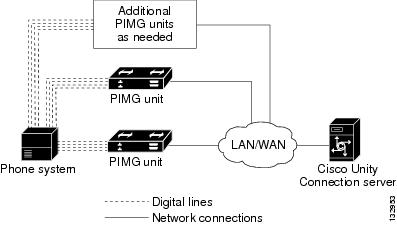
The phone system sends call information, MWI requests, and voice connections through the digital lines, which connect the phone system to the PIMG units (media gateways). The PIMG units communicate with the Unity Connection server through the LAN or WAN using Session Initiation Protocol (SIP). Figure 1-1 shows the required connections for a digital integration using digital PIMG units.
DTMF Integration with Analog PIMG Units
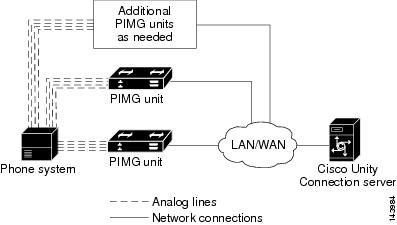
The phone system sends call information, MWI requests, and voice connections through the analog lines, which connect the phone system to the PIMG units (media gateways). The PIMG units communicate with the Unity Connection server through the LAN or WAN using Session Initiation Protocol (SIP). Figure 1-2 shows the required connections for a DTMF integration using analog PIMG units.
Serial (SMDI, MCI, or MD-110) Integration with Analog PIMG Units
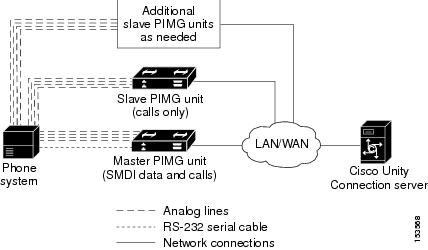
The phone system sends call information and MWI requests through the data link, which is an RS-232 serial cable that connects the phone system and the master PIMG unit (media gateway). Voice connections are sent through the analog lines between the phone system and the PIMG units. The PIMG units communicate with the Unity Connection server through the LAN or WAN using Session Initialization Protocol (SIP). Figure 1-3 shows the required connections for a serial integration using analog PIMG units.

 Feedback