Decision Points
| Consideration | Questions to answer | Resources |
|
Architecture & Infrastructure |
How many XSPs? How do they take mTLS? |
Cisco BroadWorks System Capacity Planner Cisco BroadWorks System Engineering Guide XSP CLI Reference This document |
| Customer and user provisioning |
Can you assert that you trust emails in BroadWorks? Do you want users to provide email addresses to activate their own accounts? Can you build tools to use our API? |
Public API docs at https://developer.webex.com This document |
| Branding | What color and logo do you want to use? | Webex app branding article |
| Templates | What are your different customer use cases? | This document |
| Subscriber Features per customer/enterprise/group | Choose package to define level of service per template. Basic, Standard, Premium, or Softphone. |
This document Feature/package matrix |
| User authentication | BroadWorks, or Webex | This document |
| Provisioning adapter (for flowthrough provisioning options) |
Do you already use Integrated IM&P, eg for UC-One SaaS? Do you intend to use multiple templates? Is there a more common use case anticipated? |
This document Application Server CLI reference |
Architecture & Infrastructure
-
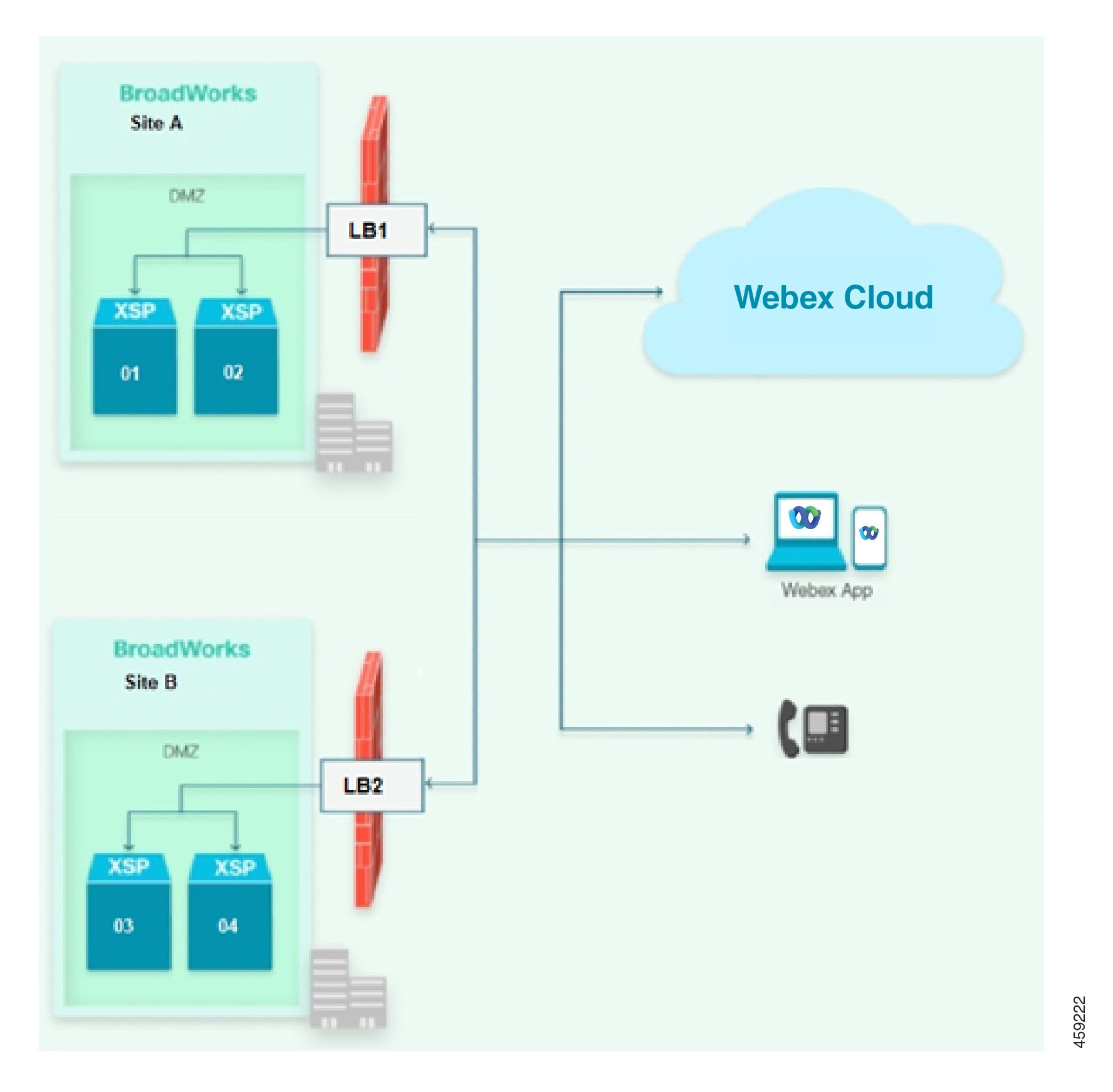
What kind of scale do you intend to start with? It is possible to scale up in future, but your current usage estimate should drive infrastructure planning.
-
Work with your Cisco account manager / sales representative to size your XSP infrastructure, according to the Cisco BroadWorks System Capacity Planner and the Cisco BroadWorks System Engineering Guide.
-
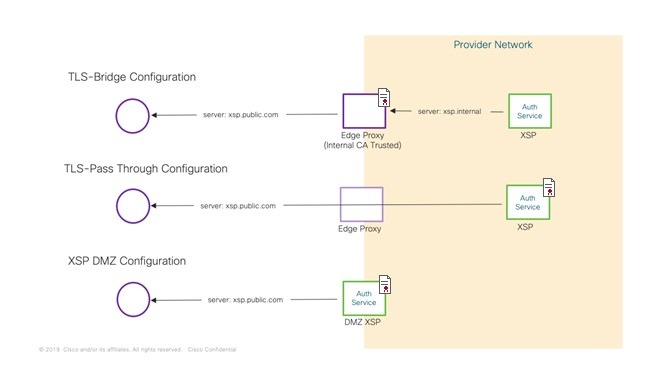
How will Webex make Mutual TLS connections to your XSPs? Directly to the XSP in a DMZ, or via TLS proxy? This affects your certificate management, and the URLs you use for the interfaces. (We do not support unencrypted TCP connections to the edge of your network).
Customer and User Provisioning
Which user provisioning method suits you best?
-
Flowthrough Provisioning With Trusted Emails: By assigning the “Integrated IM&P” service on BroadWorks, the subscriber is automatically provisioned in Webex.
If you can also assert that the subscriber email addresses in BroadWorks are valid, and unique to Webex, then you can use the "trusted email" variant of flowthrough provisioning. Subscriber Webex accounts are created and activated without their intervention; they simply download the client and sign in.
Email Address is a key user attribute on Webex. Therefore the Service Provider must supply a valid email address for the user in order to provision them for Webex services. This must be in the user’s Email ID attribute in BroadWorks. We recommend that you copy it into the Alternate ID attribute as well.
-
Flowthrough Provisioning Without Trusted Emails: If you cannot trust the subscriber email addresses, you can still assign the Integrated IM&P service in BroadWorks to provision users in Webex.
With this option, the accounts are created when you assign the service, but the subscribers need to supply and validate their email addresses to activate the Webex accounts.
-
User Self-Provisioning: This option does not require IM&P service assignment in BroadWorks. You (or your customers) distribute a provisioning link instead, and the links to download the different clients, with your branding and instructions.
Subscribers follow the link, then supply and validate their email addresses to create and activate their Webex accounts. Then they download the client and sign in, and Webex fetches some additional configuration about them from BroadWorks (including their primary numbers).
-
SP Controlled Provisioning via APIs: Webex exposes a set of Public APIs that allow Service Providers to build user/subscriber provisioning into their existing workflows.
Provisioning Requirements
The following table summarizes the requirements for each provisioning method. In addition to these requirements, your deployment must meet the general system requirements that are described in this guide.
|
Provisioning Method |
Requirements |
|---|---|
|
Flowthrough Provisioning (Trusted or Untrusted emails) |
The Webex provisioning API adds existing BroadWorks users to Webex automatically once the user meets requirements and you toggle the Integrated IM+P service to on. There are two flows (trusted emails or untrusted emails) which you assign via the Customer Template on Webex. BroadWorks requirements:
Webex requirements: The Onboarding Template includes the following settings:
|
|
User Self-Provisioning |
Admin provides an existing BroadWorks user with a link to the User Activation Portal. The user must log in to the portal using BroadWorks credentials and provide a valid email address. After the email is validated, Webex fetches additional user information to complete provisioning. BroadWorks requirements:
Webex requirements: The Onboarding Template includes the following settings:
|
|
SP controlled provisioning via API (Trusted or Untrusted emails) |
Webex exposes a set of public APIs that enable you to build user provisioning into your existing workflows and tools. There are two flows:
BroadWorks Requirements:
Webex Requirements:
To use the APIs, go to BroadWorks Subscribers. |
Required Patches with Flow-through Provisioning
If you are using flow-through provisioning, you must install a system patch and apply a CLI property. Refer to the below list for instructions that apply to your BroadWorks release:
For R22:
-
Install AP.as.22.0.1123.ap376508.
-
After installation, set the property
bw.msg.includeIsEnterpriseInOSSschematotruefrom the CLI in Maintenance/ContainerOptions.For more information, see the patch notes https://www.cisco.com/web/software/286326332/154309/AP.as.22.0.1123.ap376508.txt.
For R23:
-
Install AP.as.23.0.1075.ap376509
-
After installation, set the property
bw.msg.includeIsEnterpriseInOSSschematotruefrom the CLI in Maintenance/ContainerOptions.For more information, see the patch notes https://www.cisco.com/web/software/286326332/154325/AP.as.23.0.1075.ap376509.txt.
For R24:
-
Install AP.as.24.0.944.ap375100
-
After installation, set the property
bw.msg.includeIsEnterpriseInOSSschematotruefrom the CLI in Maintenance/ContainerOptions.For more information, see the patch notes https://www.cisco.com/web/software/286326332/154326/AP.as.24.0.944.ap375100.txt.
 Note |
After you complete these steps, you will be unable to provision new users with UC-One Collaborate services. Newly provisioned users must be Webex for Cisco BroadWorks users. |
Supported Language Locales
During provisioning, the language that was assigned in BroadWorks to the first provisioned administration user gets assigned automatically as the default locale for that customer organization. This setting determines the default language used for activation emails, meetings, and meeting invites under that customer organization.
Five character language locales in (ISO-639-1)_(ISO-3166) format are supported. For example, en_US corresponds to English_UnitedStates. If only a two letter language is requested (using ISO-639-1 format), the service will generate a five character language locale by combining the requested language with a country code from the template i.e. "requestedLanguage_CountryCode", if unable to get a valid locale, then the default sensible locale used based on the required language code.
The following table lists the supported locales, and the mapping that converts a two-letter language code to a five-character locale for situations where a five-character locale is not available.
|
Supported Language Locales (ISO-639-1)_(ISO-3166) |
If only a two-letter language code is available... |
|
|---|---|---|
|
Language code (ISO-639-1) ** |
Use Default Sensible Locale instead (ISO-639-1)_(ISO-3166) |
|
|
en_US en_AU en_GB en_CA |
en |
en_US |
|
fr_FR fr_CA |
fr |
fr_FR |
|
cs_CZ |
cs |
cs_CZ |
|
da_DK |
da |
da_DK |
|
de_DE |
de |
de_DE |
|
hu_HU |
hu |
hu_HU |
|
id_ID |
id |
id_ID |
|
it_IT |
it |
it_IT |
|
ja_JP |
ja |
ja_JP |
|
ko_KR |
ko |
ko_KR |
|
es_ES es_CO es_MX |
es |
es_ES |
|
nl_NL |
nl |
nl_NL |
|
nb_NO |
nb |
nb_NO |
|
pl_PL |
pl |
pl_PL |
|
pt_PT pt_BR |
pt |
pt_PT |
|
ru_RU |
ru |
ru_RU |
|
ro_RO |
ro |
ro_RO |
|
zh_CN zh_TW |
zh |
zh_CN |
|
sv_SE |
sv |
sv_SE |
|
ar_SA |
ar |
ar_SA |
|
tr_TR |
tr |
tr_TR |
Note |
The locales es_CO, id_ID, nb_NO and pt_PT are not supported by Webex Meeting Sites. For these locales, The Webex Meetings sites will be in English only. English is the default locale for sites if no/invalid/unsupported locale is required for the site. This language field is applicable while creating an Organization and Webex Meetings site. If no language is mentioned in a post or in the subscriber's API then language from the template will be used as a default language. |
Branding
Partner administrators can use Advanced Branding Customizations to customize how the Webex App looks for the customer organizations that the partner manages. Partner administrators can customize the following settings to ensure that the Webex App reflects their company brand and identity:
-
Company logos
-
Unique Color Schemes for Light mode or Dark mode
-
Customized Support URLs
For details on how to customize branding, refer to Configure Advanced Branding Customizations.
Note |
|
Onboarding Templates
Onboarding Templates allow you to define the parameters by which customers and associated subscribers are automatically provisioned on Webex for Cisco BroadWorks. You may configure multiple Onboarding Templates as required, but when you onboard a customer it is associated with only one template (you cannot apply multiple templates to one customer).
Some of the primary template parameters are listed below.
Package
-
You must select a default package when you create a template (See Packages in the Overview section for details). All users who are provisioned with that template, whether by flowthrough- or self-provisioning, receive the default package.
-
You have control over the package selection for different customers by creating multiple templates and selecting different default packages in each. You could then distribute different provisioning links, or different per-enterprise provisioning adapters, depending on your chosen user provisioning method for those templates.
-
You can change the package of specific subscribers from this default, using the provisioning API (see Webex for Cisco BroadWorks API documentation or through Partner Hub (see Change User Package in Partner Hub).
-
You cannot change a subscriber’s package from BroadWorks. The assignment of the Integrated IM&P service is either on or off; if the subscriber is assigned this service in BroadWorks, the Partner Hub template associated with that subscriber’s enterprise’s provisioning URL defines the package.
Reseller and Enterprises or Service Provider and Groups?
-
The way your BroadWorks system is configured has an impact on flow through provisioning. If you are a reseller with Enterprises, then you need to enable Enterprise mode when you create a template.
-
If your BroadWorks system is configured in Service Provider mode, you can leave the Enterprise mode switch off in your templates.
-
If you plan to provision customer organizations using both BroadWorks modes, you must use different templates for groups and enterprises.
Note |
Make sure that you have applied the BroadWorks patches that are required for flow-through provisioning. For details, see Required Patches with Flow-through Provisioning. |
Authentication Mode
Decide how you want subscribers to authenticate when they log in to Webex. You can assign the mode using the Authentication Mode setting in the Onboarding Template. The following table outlines some of the options.
Note |
This setting has no effect on login to the User Activation Portal. Users who sign in to the portal must enter their BroadWorks user ID and password, as configured on BroadWorks, irrespective of how you configure Authentication Mode on the Onboarding Template. |
| Authentication Mode | BroadWorks | Webex |
| Primary user identity | BroadWorks user ID | Email address |
| Identity Provider |
BroadWorks.
|
Cisco Common Identity |
| Multi-factor authentication? | No | Requires Customer IdP that supports multi-factor authentication. |
|
Credential validation path |
|
|
Note |
For a more detailed breakdown of the SSO login flow with direct authentication to BroadWorks, see SSO Login Flow. |
UTF-8 Encoding with BroadWorks Authentication
With BroadWorks authentication, we recommend that you configure UTF-8 encoding for the authentication header. UTF-8 resolves an issue that can occur with passwords that use special characters whereby the web browser does not encode the characters properly. Using a UTF-8 encoded, base 64-encoded header resolves this issue.
You can configure UTF-8 encoding by running one of the following CLI commands on the XSP or ADP:
-
XSP_CLI/Applications/WebContainer/Tomcat/GeneralSettings> set authenticationEncoding UTF-8 -
ADP_CLI/Applications/WebContainer/Tomcat/GeneralSettings> set authenticationEncoding UTF-8
Country
You must select a country when you create a template. This country will be automatically assigned as the organisation country for all the customers that are provisioned with the template in Common Identity. Additionally, the organization country will determine the default global call-in numbers for Cisco PSTN in Webex Meeting Sites.
The site's default global call-in numbers will be set to the first available dial-in number defined in the telephony domain based on the organization's country. If the organization's country is not found in the dial-in number defined in the telephony domain, the default number of that location will be used.
|
S No. |
Location |
Country Code |
Country Name |
|---|---|---|---|
|
1 |
AMER |
+1 |
US, CA |
|
2 |
APAC |
+65 |
Singapore |
|
3 |
ANZ |
+61 |
Australia |
|
4 |
EMEA |
+44 |
UK |
|
5 |
EURO |
+49 |
Germany |
Multiple Partner Arrangements
Are you going to sub-license Webex for Cisco BroadWorks to another service provider? In this case, each service provider will need a distinct partner organization in Webex Control Hub to allow them provision the solution for their customer base.
Provisioning Adapter and Templates
When you are using flowthrough provisioning, the provisioning URL that you enter in BroadWorks is derived from the template in Control Hub. You can have multiple templates, and therefore multiple provisioning URLs. This enables you to select, on an enterprise by enterprise basis, which package to apply to subscribers when they are granted the Integrated IM&P service.
You need to consider whether you want to set a system level provisioning URL as a default provisioning path, and which template you want to use for that. This way, you only need to explicitly set the provisioning URL for those enterprises that need a different template.
Also, bear in mind that you may already be using a system level provisioning URL, for example with UC-One SaaS. If that is the case, you may opt to preserve the system level URL for provisioning users on UC-One SaaS, and override for those enterprises moving to Webex for Cisco BroadWorks. Alternatively, you may want to go the other way and set the system level URL for Webex for BroadWorks, and reconfigure those enterprises you want to keep on UC-One SaaS.
The configuration choices related to this decision are detailed in Configure Application Server with Provisioning Service URL.
Provisioning Adapter Proxy
For added security, the Provisioning Adapter Proxy lets you use an HTTP(S) proxy on the Application Delivery Platform for flowthrough provisioning between the AS and Webex. The proxy connection creates an end-to-end TCP tunnel that relays traffic between the AS and Webex, thereby negating the need for the AS to connect to the public internet directly. For secure connections, TLS can be used.
This feature requires that you set up the proxy on BroadWorks. For details, see Cisco BroadWorks Provisioning Adapter Proxy Feature Description.

 Feedback