Overview

Overview


Caution

Starting December 30, 2020, Hybrid Call Service for end users will be End of Support (EoS) for all customers. See the EoS announcement for more information.

Going forward, customers must configure the Webex Teams app to register directly to Cisco Unified Communications Manager (Unified CM) for enterprise calling capabilities for their users. Hybrid Call for devices will continue to work but must be migrated to the Device Connector solution.

Calling in Webex Teams (Unified CM) for users closely follows familiar Jabber deployment models where Webex Teams registers directly to Unified CM as a soft phone. No extra Expressway connector infrastructure nor firewall traversal capacity is required beyond what is needed for remote access (MRA).


This document describes only the changes you need to make to your existing Hybrid Calling deployment so that the SIP addresses migrate successfully to the Webex domain. The guide contains configuration steps that are required in your on-premises environment (Expressway pair, Unified CM) and required cloud or intermediary configuration (Control Hub, Expressway connector host) to complete the SIP address migration for Webex users and cloud-registered Webex video devices (Room, Desk, and Board devices) in a Workspace.


Note

This guide is only for customers that have already deployed Hybrid Calling in their organization. If you're a new deployment, you can only do Hybrid Calling for devices in a Workspace; follow the deployment guide and ignore this document.

The information here is only relevant while existing Hybrid Calling customers need to change from Spark-branded call routing to Webex-branded routing. The deployment guide is the more permanent and more frequently updated material, so cross-references from this document may become irrelevant.


High-Level Scope

  • The application names and the service names have changed; all the “Cisco Spark” branded products and services changed to the “Cisco Webex” brand . See https://www.webex.com/.

  • To be aligned with the change to Webex branding, the SIP calling domains are changing:

    Table 1. Changes to SIP Calling Domains
    Purpose Current Value Rebranded

    SIP routing domain

    callservice.ciscospark.com

    callservice.webex.com

    SIP TLS Authentication domain for Hybrid Call Service (CN entries on cloud hosts certificates)

    callservice.ciscospark.com

    sip.webex.com

    Calls to and from Webex users

    *.call.ciscospark.com

    *.calls.webex.com

    Calls to and from devices in a Workspace (Room, Desk, and Board devices) enabled for Hybrid Call Service

    *.room.ciscospark.com

    *.rooms.webex.com

    Hybrid calls to spaces (in Webex)

    *.meet.ciscospark.com

    *.meetup.webex.com

    General SIP Calls to Webex—for example, for Hybrid Collaboration Meeting Rooms or on-net audio

    *.webex.com

    *.webex.com

    (no change)

    SIP TLS Authentication domain for general calls to Webex (name on cloud hosts' certificates)

    sip.webex.com

    sip.webex.com

    (no change)

  • Version X8.11 of the Expressway-E introduced a new type of DNS zone that copes with all Webex calling traffic from your premises; that is, calls to WebEx Hybrid Collaboration Meeting Rooms (CMRs) and calls to Cisco Spark—all through the same DNS zone.

  • This document describes how to reconfigure your on-premises components to adapt and puts those changes in the context of the migration. Remember to read just the one, relevant Expressway section.

SIP Routing Changes

Hybrid Calling routes calls between your on-premises Unified Communications Manager and the Cisco Webex cloud (formerly Cisco Collaboration Cloud). The related SIP addresses for Cisco Webex are changing from the Cisco Spark brand to the Webex brand, so we’re going to create new routing from your on-premises infrastructure toward the new addresses.

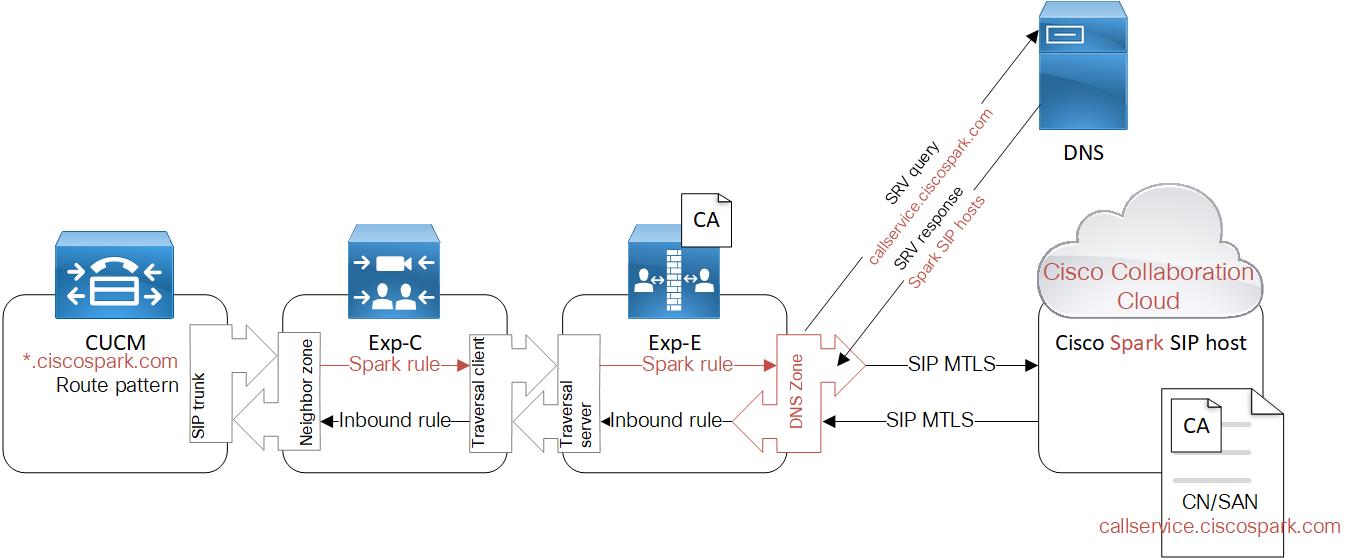
Figure 1. Your Hybrid Calling Routing (Before Migration)

This diagram shows only the relevant configuration that is required from the Hybrid Calling deployment. We are concerned with the call routing configuration, specifically the items highlighted in red which are affected by the rebrand.

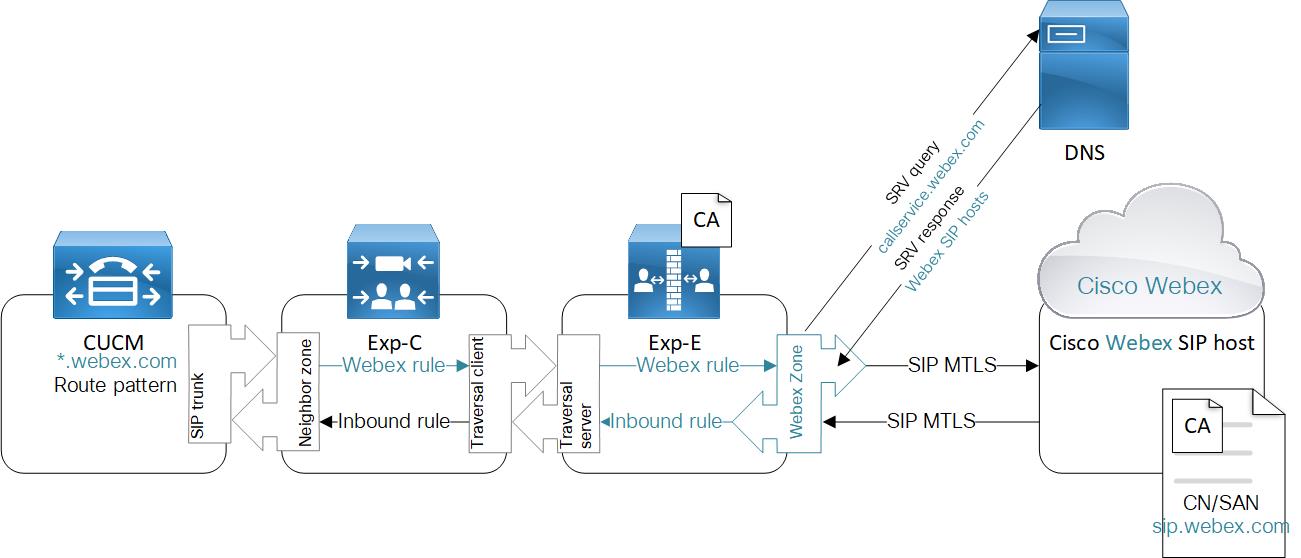
From left to right, calls originating from your Unified Communications Managers are trunked to Expressway-Cs, traversed out through Expressway-Es, and terminated on the Cisco Collaboration Cloud SIP service.

From right to left, calls originating from the cloud SIP service are routed to Expressway-Es, traversed in through Expressway-Cs, and trunked (neighbored) to Unified Communications Manager.

We’re going to create the new routing alongside this existing routing to avoid disrupting service.

Figure 2. You Hybrid Call Service Routing (After Migration)

Items highlighted in blue are results of migration, including changes made by Cisco.

Deployment Assumptions

  • This document assumes you already deployed Hybrid Call Service for your organization and followed the Deployment Guide for Hybrid Call Service.

  • We assume that you can access the required systems, and recommend that you perform these migration steps during a maintenance window or after typical work hours.

  • The tasks here assume that Hybrid Call Service uses a dedicated Expressway traversal pair for call routing. If your Expressway traversal pair is shared with other services, you can still follow this advice to migrate Hybrid Call Service, but you should take more care with your Expressway-E search rules and DNS zone configuration. Read Shared Expressway Traversal Pair in this document.

  • If on an earlier release, you must upgrade your traversal pair to Expressway X8.11.4 (or later) before you start the routing changes; the tasks are much simpler with those versions and this is a required change to remain on a supported deployment model.

  • If your on-premises systems have configuration not mentioned here, you can assume that configuration is not affected.

Shared Traversal Expressway Pair

Apart from this topic, all the information that is presented in this document assumes that you are using a dedicated Expressway pair for Hybrid Call Service traversal. We did not want to make the document unnecessarily complex.

You could be using your traversal pair to route calls for business to business calls, for example, or for Cisco Webex Meetings (formerly CMR Hybrid), or Webex Edge Audio (previously On-Net Audio). These kinds of deployments also require DNS zones and the search rules to route outwards toward those zones.

Also, several different "Cisco cloud" deployments now share the Cisco Webex brand, although technically there are still different cloud hosts listening for the call signalling.

If you are sharing your traversal pair with other deployments, here are some things to consider while you are performing your Call Service migration:

  • You may already have one or more *.webex.com route patterns through the Expressway pair. For X8.11.4 and later (the minimum supported release for Hybrid Calling), you can route those and the Hybrid Calling patterns through the one Webex Zone on your Expressway-E clusters. That zone takes care of the routing to the correct cloud addresses.

  • If you have or more *.webex.com route patterns through the Expressway pair, and are not on X8.11.4 (or later), we recommend that you upgrade as soon as possible. That is because earlier releases do not have the Webex Zone. Also, you must ensure you're on the minimum supported release to continue to receive support for Hybrid Calling.

  • One route pattern for *.webex.com on Cisco Unified CM clusters should suffice.

  • When cleaning up the old Hybrid Calling routing rules, take extra care not to delete any of your adjacent configuration.

Related Topics

Webex Zone

The Webex Zone not only automates and simplifies Hybrid Calling configuration, but it is also a single zone entry that ensures that all calling and meetings solutions under the Webex banner precisely route to the correct cloud microservices and are handled accordingly.

The decision-making for call routing and protocols is offloaded from the Expressway itself (manual configuration by you, the admin) onto DNS (automated configuration, managed by Cisco). The decisions are made by a Name Authority Pointer (NAPTR) DNS record that is able to pinpoint call and meeting paths that are then advertised to the DNS SRV record. For example:

;; ANSWER SECTION:
example.call.ciscospark.com. 300 INNAPTR 50 50 "S" "SIPS+D2T" "" _sips._tcp.call.ciscospark.com.
example.call.ciscospark.com. 300 INNAPTR 30 50 "S" "SIPSM+D2T" "" _sips._tcp.callservice.ciscospark.com.

The two entries in ANSWER SECTION determine the SRV lookup that gets advertised back to the Expressway-E. The Expressway-E then does the SRV lookup as usual.

All of this happens behind the scenes, and all you have to do is create the Webex Zone on Expressway with preconfigured settings; no further zones-per-service are required. A further benefit is that you future-proof your deployment as more services are added to our Webex cloud and more complex routing decisions need to be made.