Cisco Unified Videoconferencing 5100 MCU Functionality
• About the Cisco Unified Videoconferencing 5100 MCU
•Main Features
•Call Capacity
•About Cisco Unified Videoconferencing 5100 MCU Architecture
•About Cisco Unified Videoconferencing 5100 MCU Topologies
About the Cisco Unified Videoconferencing 5100 MCU
The Cisco Unified Videoconferencing 5100 MCU enables multimedia, multiparty collaboration in applications such as group conferencing, distance learning, training and video telephony. The MCU supports multimedia, multiparty communications in the board room, at the desktop, in the home, or on the road over wireless.
The MCU provides core IP-centric functionality, a wide range of layouts, powerful audio and video transcoding, support of web-initiated data collaboration, and software upgradeable technology. The system can be fully customized according to the needs of the administrator.
Main Features
Table 1-1 lists the main features provided by the Cisco Unified Videoconferencing 5100 MCU for effective audio and videoconferencing and a satisfying user experience.
Table 1-1 Summary of Cisco Unified Videoconferencing 5100 MCU Features
|
|
|
Superior video processing |
Video and audio processing is carried out per user rather than per conference. Each user connects using unique, optimized audio and video settings to enjoy the best audio and video quality supported by their endpoint and network. |
Seamless interoperability |
The MCU is built on the strong foundation of the Cisco H.323 and SIP software, ensuring full compliance and unmatched interoperability with IP and ISDN networks. The MCU enables H.323, SIP and SCCP devices to participate in the same conference session. When used with the Cisco Unified Videoconferencing 3545 Gateway, the MCU also enables ISDN and V.35 wireless devices to participate in the same conference session. |
Intuitive web-based management and control |
Both the Cisco Unified Videoconferencing 5100 MCU system and the actual conference sessions are managed, configured, and dynamically modified through an intuitive, web-based interface that offers easy, high-level conference control and administrative flexibility for an enhanced user experience. |
Unlimited number of conferences |
The number of supported conferences is limited only by the number of ports provided by your license. |
In-meeting indicators |
A range of messages and icons are displayed on the endpoint monitor during conferences when certain operations occur, including when a participant joins or leaves a conference, an audio-only participant speaks, and a participant's personal video layout changes. |
Personal layouts per participant |
Fully customizable personal video layouts for each conference participant. |
Single LAN connection |
Only a single Ethernet connection is required for the entire Cisco Unified Videoconferencing 5100 MCU system. |
Snapshot files for Customer Support |
One-click creation of a file of bundled logs and configuration files which you can send to Cisco Customer Support for debugging. |
Supported protocols |
•H.323 version 4 •SIP RFC 3261 for the Session Initiation Protocol •SCCP •H.243 for conference control •RFC 2833 for in-band DTMF with SIP •H.281 for far end camera control (FECC) •H.235 for IP-based media encryption •H.239 for standard simultaneous transmission of live video and presentation sharing feeds. •SDP (RFC 3264, 2327) •H.320 (when using a Gateway)
Note The MCU supports calls from H.323 and SIP endpoints in the same conference. Call signaling is handled on all ports regardless of the protocol type.
|
Audio transcoding codecs |
•G.711 A/µ Law •G.722 •G.722.1 •Siren 14/G.722.1 C •G.729 A and B |
Unmatched video quality |
The MCU delivers exceptionally high quality video and audio processing, using latest industry standards and upgradeable DSP chip software. The MCU achieves the best video quality by supporting the following video capabilities: •High definition and standard definition participants in the same conference. •H.263 and H.264 in the same conference •A choice of 16 layouts •Up to 6 Mbps on each stream without affecting capacity •Resolutions from CIF to 720p in the same conference •VGA, SVGA, XGA (supported for presentation channel only) |
Security and privacy |
•Administrator and operator password protection for accessing the MCU web interface. •Optional PIN protection for joining a conference and web access. •Additional PIN protection for conference Moderator Control. •The MCU uses H.235-based encryption to achieve secure communication with endpoints that support this standard. |
In-conference control using DTMF or H.243 |
During a conference, participants may use their endpoint remote control or keypad to perform actions such as mute, volume control, changing video layouts and inviting participants. Users interact with the MCU through DTMF signaling or the on-screen GUI of H.243-compliant endpoints. |
Optional no self see |
The administrator can configure the MCU service to remove the self-view for each conference participant. This feature enables more effective use of the video screen. |
Interactive Voice Response (IVR) messages |
The MCU includes pre-recorded greetings to conference participants and announcements as each new participant joins the conference. You can record messages to provide custom greetings and announcements. |
Call Capacity
The MCU provides a flat capacity of 10 ports (for the 5110 unit) and 15 ports (for the 5115 unit). This capacity is regardless of the call bit rate or resolution. Each video call consumes a single port.
High Definition calls can connect at up to 720p at 30fps.
Enhanced Definition calls can connect at up to 4CIF/352p at 30fps.
In some cases, the frame rate of calls using 4CIF might drop but not to less than 15fps.
About Cisco Unified Videoconferencing 5100 MCU Architecture
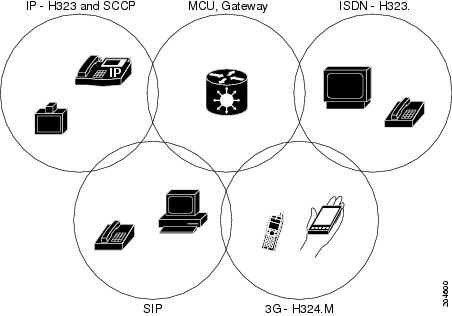
The Cisco Unified Videoconferencing 5100 MCU enables both voice-only and video conference calls for H.323, SIP, H.320, SCCP and regular PSTN network phones. H.323 and SIP devices can connect to a conference directly through the Cisco Unified Videoconferencing 5100 MCU. Other devices such as phones and video conferencing terminals (H.320) can connect to a conference through a gateway, such as the Cisco Unified Videoconferencing 3545 Gateway.
Figure 1-1 Supported Devices and Protocols
The MCU supports devices that can send and receive video streams, as well as those that cannot send but only receive video streams. This means that terminals without a video camera or video capturing capabilities can participate in a conference as voice-only participants while benefiting from seeing the other participants.
About Cisco Unified Videoconferencing 5100 MCU Topologies
The Cisco Unified Videoconferencing 5100 MCU can work in a centralized or cascaded topology. This section describes these two options.
•Centralized Topology
•Cascaded Conferences
Centralized Topology
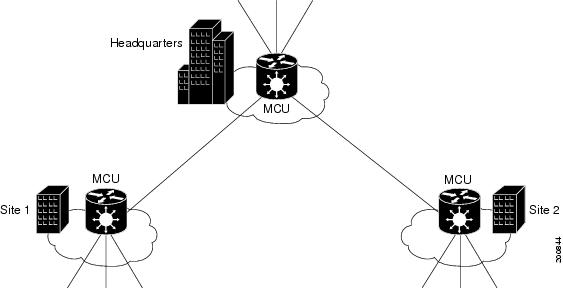
In a centralized topology, the MCU performs media processing for all connected terminals, regardless of their location. The MCU can handle multiple conferences simultaneously.
Figure 1-2 Centralized Topology
Cascaded Conferences
The MCU allows you to combine two or more conferences resulting in a larger conference with many more participants. This is called cascading. Cascading creates a distributed environment that helps reduce the drain on network resources. In addition, the processing resources required by the MCU are distributed between participating MCUs. Costly phone or ISDN line usage can be further reduced with the mediation of a gateway.
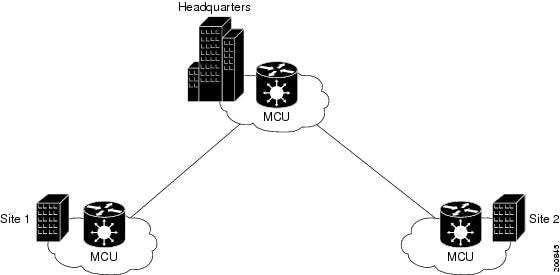
Cascading occurs when one conference with "x" number of participants invites another conference with "y" number of participants. The two conferences effectively become one large conference. The bandwidth required across a cascaded conference link is only that of one audio/video stream between the two conferences. This is significantly less than the accumulated bandwidth of all the participants. Each separate MCU participating in a conference retains control of its individual conference resources and participants.
The cascaded conference in Figure 1-3 minimizes the use of network bandwidth while distributing processing among the participating MCUs.
Figure 1-3 Cascaded Conference

 Feedback