Overview
This chapter contains the following sections:
- About the Multi-Node Setup
- Minimum System Requirements for a Multi-Node Setup
- Guidelines and Limitations for a Multi-Node Setup
- Best Practices for a Multi-Node Setup
- Upgrade of a Multi-Node Setup
About the Multi-Node Setup
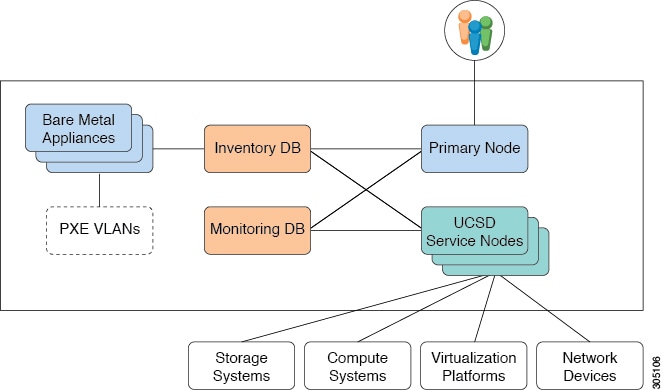
The multi-node setup is supported for Cisco UCS Director on a 64-bit operating system only. With a multi-node setup, you can scale Cisco UCS Director to support a larger number of VMs than is supported by a single installation of Cisco UCS Director. This setup includes the following nodes:
 Note | For a multi-node setup, you have to install the license on the primary node only. |
A multi-node setup improves scalability by offloading the processing of system tasks, such as inventory data collection, from the primary node to one or more service nodes. The number of nodes determines how the processing of system tasks are scaled.
Node pools combine service nodes into groups and enable you to assign system tasks to more than one service node. This provides you with control over which system task is executed by which service node or group of service nodes. If you have multiple service nodes in a node pool and one of the service nodes is busy when a system task needs to be run, Cisco UCS Director uses a round-robin assignment to determine which service node should process that system task. if all service nodes are busy, you can have the primary node run the system task.
However, if you do not need that level of control over the system tasks, you can use the default task policy and add all of the service nodes to the default node pool. All system tasks are already associated with the default task policy, and the round-robin assignment is used to determine which service node should process a system task.
If you want to have some critical tasks processed only by the primary node, you can assign those tasks to a local-run policy.
For more information about how to configure the primary node and service nodes, and how to assign system tasks, see the Cisco UCS Director Administration Guide.
Primary Node
A multi-node setup can have only one primary node. This primary node contains the license for Cisco UCS Director.
The workflow engine is always on the primary node. The primary node also contains the configuration for the node pools and the service nodes, along with the list of which system tasks can be offloaded to the service nodes for processing.
Service Nodes
A multi-node setup can have one or more service nodes. The number of service nodes in a multi-node setup depends on the number of devices and VMs you plan to configure and manage through Cisco UCS Director.
The service nodes process any system tasks offloaded by the primary node. If the service nodes are not set up or reachable, the primary node executes the system tasks.
Database Nodes
The inventory and monitoring databases are created from the Cisco UCS Director MySQL database. The data that Cisco UCS Director collects is divided between the two databases. The multi-node setup segregates the data collection which is historically very heavy on the database into a separate database.
Inventory Database
A multi-node setup can have only one inventory database. This database contains the following:
Monitoring Database
A multi-node setup can have only one monitoring database. This database contains the data that Cisco UCS Director uses for historical computations, such as aggregations and trend reports.
The parameters of the monitoring database depend on the number of devices and VMs you plan to configure and manage through Cisco UCS Director
Minimum System Requirements for a Multi-Node Setup
The minimum system requirements for a multi-node setup depends upon the number of VMs that need to be supported by Cisco UCS Director. We recommend deploying a Cisco UCS Director VM on a local datastore with a minimum of 25 Mbps I/O speed, or on an external datastore with a minimum of 50 Mbps I/O speed. The following table describes the number of VMs supported by each deployment size.
| Deployment Size | Number of VMs Supported |
|---|---|
|
Small |
5,000 to 10,000 VMs |
|
Medium |
10,000 to 20,000 VMs |
|
Large |
20,000 to 50,000 VMs |
- Minimum System Requirements for a Small Multi-Node Setup
- Minimum System Requirements for a Medium Multi-Node Setup
- Minimum System Requirements for a Large Multi-Node Setup
Minimum System Requirements for a Small Multi-Node Setup
The small multi-node setup supports from 5,000 to 10,000 VMs. We recommend that this deployment include the following nodes:
Note | For optimal performance, reserve additional CPU and memory resources. |
Minimum Requirements for each Primary Node and Service Node
| Element | Minimum Supported Requirement |
|---|---|
|
vCPU |
4 |
|
Memory |
16 GB |
|
Hard disk |
100 GB |
Minimum Requirements for the Inventory Database
| Element | Minimum Supported Requirement |
|---|---|
|
vCPU |
4 |
|
Memory |
30 GB |
|
Hard disk |
100 GB (SSD Type Storage) |
Minimum Requirements for the Monitoring Database
| Element | Minimum Supported Requirement |
|---|---|
|
vCPU |
4 |
|
Memory |
30 GB |
|
Hard disk |
100 GB (SSD Type Storage) |
Minimum Memory Configuration for Cisco UCS Director Services on Primary and Service Nodes
| Service | Recommended Configuration | File Location | Parameter |
|---|---|---|---|
|
inframgr |
8 GB |
/opt/infra/bin/inframgr.env |
MEMORY_MAX |
Note | To modify the memory settings for the inframgr service, in the inframgr.env file, update the "MEMORY_MAX" parameter to the value you want. After changing this parameter, restart the service for the changes to take effect. |
Minimum System Requirements for a Medium Multi-Node Setup
The medium multi-node setup supports between 10,000 and 20,000 VMs. We recommend that this deployment include the following nodes:
Note | For optimal performance, reserve additional CPU and memory resources. |
Minimum Requirements for each Primary Node and Service Node
| Element | Minimum Supported Requirement |
|---|---|
|
vCPU |
8 |
|
Memory |
30 GB |
|
Hard disk |
100 GB |
Minimum Resource Requirements for the Inventory Database
| Element | Minimum Supported Requirement |
|---|---|
|
vCPU |
8 |
|
Memory |
60 GB |
|
Hard disk |
100 GB (SSD type storage) |
Minimum Resource Requirements for the Monitoring Database
| Element | Minimum Supported Requirement |
|---|---|
|
vCPU |
8 |
|
Memory |
60 GB |
|
Hard disk |
100 GB (SSD type storage) |
Minimum Memory Configuration for Cisco UCS Director Services on Primary and Service Nodes
| Service | Recommended Configuration | File Location | Parameter |
|---|---|---|---|
|
inframgr |
12 GB |
/opt/infra/bin/inframgr.env |
MEMORY_MAX |
To modify the memory settings for the inframgr service, in the inframgr.env file, update the "MEMORY_MAX" parameter to the value you want. After changing this parameter, restart the service for the changes to take effect.
Minimum Inventory Database Configuration
| Component | Minimum Supported Configuration |
|---|---|
|
thread_cache_size |
2000 |
|
max_connections |
2000 |
|
innodb_lock_wait_timeout |
100 |
|
query_cache_size |
128 MB |
|
innodb_buffer_pool_size |
43,008 MB |
|
max_connect_errors |
10,000 |
|
connect_timeout |
20 |
|
innodb_read_io_threads |
64 |
|
innodb_write_io_threads |
64 |
Make these changes in the /etc/my.cnf file.
Minimum Monitoring Database Configuration
| Component | Minimum Supported Configuration |
|---|---|
|
thread_cache_size |
2000 |
|
max_connections |
2000 |
|
innodb_lock_wait_timeout |
100 |
|
query_cache_size |
128 MB |
|
innodb_buffer_pool_size |
43,008 MB |
|
max_connect_errors |
10,000 |
|
connect_timeout |
20 |
|
innodb_read_io_threads |
64 |
|
innodb_write_io_threads |
64 |
Make these changes in the /etc/my.cnf file.
Minimum System Requirements for a Large Multi-Node Setup
The large multi-node setup supports between 20,000 and 50,000 VMs. We recommend that this deployment include the following nodes:
Note | For optimal performance, reserve additional CPU and memory resources. |
Minimum Resource Requirements for each Primary Node and Service Node
| Element | Minimum Supported Requirement |
|---|---|
|
vCPU |
8 |
|
Memory |
60 GB |
|
Hard disk |
100 GB |
Minimum Resource Requirements for the Inventory Database
| Element | Minimum Supported Requirement |
|---|---|
|
vCPU |
8 |
|
Memory |
120 GB |
|
Hard disk |
200 GB (SSD type storage) |
Minimum Resource Requirements for the Monitoring Database
| Element | Minimum Supported Requirement |
|---|---|
|
vCPU |
8 |
|
Memory |
120 GB |
|
Hard disk |
600 GB (SSD type storage) |
Minimum Memory Configuration for Cisco UCS Director Services on Primary and Service Nodes
| Service | Recommended Configuration | File Location | Parameter |
|---|---|---|---|
|
inframgr |
24 GB |
/opt/infra/bin/inframgr.env |
MEMORY_MAX |
To modify the memory settings for the inframgr service, in the inframgr.env file, update the "MEMORY_MAX" parameter to the value you want. After changing this parameter, restart the service for the changes to take effect.
Minimum Inventory Database Configuration
| Component | Minimum Supported Configuration |
|---|---|
|
thread_cache_size |
4000 |
|
max_connections |
4000 |
|
innodb_lock_wait_timeout |
100 |
|
query_cache_size |
128 MB |
|
innodb_buffer_pool_size |
86,016 MB |
|
max_connect_errors |
10,000 |
|
connect_timeout |
20 |
|
innodb_read_io_threads |
64 |
|
innodb_write_io_threads |
64 |
Make these changes in the /etc/my.cnf file.
Minimum Monitoring Database Configuration
| Component | Minimum Supported Configuration |
|---|---|
|
thread_cache_size |
4000 |
|
max_connections |
4000 |
|
innodb_lock_wait_timeout |
100 |
|
query_cache_size |
128 MB |
|
innodb_buffer_pool_size |
86,016 MB |
|
max_connect_errors |
10,000 |
|
connect_timeout |
20 |
|
innodb_read_io_threads |
64 |
|
innodb_write_io_threads |
64 |
Make these changes in the /etc/my.cnf file.
Guidelines and Limitations for a Multi-Node Setup
Before you configure a multi-node setup for Cisco UCS Director, review the following guidelines:
-
Cisco UCS Director supports the multi-node setup on a 64-bit operating system only.
-
A multi-node setup can have only one primary node.
-
You must provide the Cisco UCS Director server primary node IP address in order for the VMware OVF Deployment task to provision a VM.
-
You must plan the locations and IP addresses of your nodes carefully. You can reconfigure a service node as a primary node, but otherwise you cannot change the types of any nodes. For example, you cannot reconfigure a primary node as a service node or an inventory database node as a monitoring database node.
-
You must install the license on the primary node only.
-
After you configure the nodes, the list of operations available in the shelladmin changes for the service nodes, the inventory database node, and the monitoring database node.
Best Practices for a Multi-Node Setup
Before you configure a multi-node setup for Cisco UCS Director, consider the following best practices:
-
To maximize output and minimize network latency, we recommend that the primary node, service nodes, inventory database node, and monitoring database node reside on the same host.
-
Network latency (average RTT) between the primary or service node and the physical, virtual compute, storage, and network infrastructures should be minimized. A lower average RTT results in increased overall performance.
-
You can offload system tasks to available service nodes by associating the service nodes with a service node pool.
-
You can reserve more CPU cycles (MHz) and memory than recommended for better performance at system load.
-
To restart the services in the multi-node setup, perform the following steps:
Note
Before performing the following steps, make sure that the database service is up and running on the inventory as well as monitoring databases.
Upgrade of a Multi-Node Setup
For detailed information on upgrading a Cisco UCS Director multi-node setup, see the Cisco UCS Director Upgrade Guide.
 Feedback