- Preface
- New and Changed Information for this Release
- Overview
- Installing Cisco UCS Director Bare Metal Agent
- Configuring Cisco UCS Director Bare Metal Agent
- Managing Bare Metal Agent
- Adding Non-Windows OS Images
- Adding Windows OS Images
- Provisioning OS Images through Orchestration Workflow Tasks
- Sample Operating System Configuration Template Files
- Ports
Overview
This chapter contains the following sections:
- Cisco UCS Director Bare Metal Agent
- Minimum System Requirements
- Guidelines and Limitations
- Network Configuration Options
- Provisioning Bare Metal Servers through Bare Metal Agent
- Upgrade of Bare Metal Agent
Cisco UCS Director Bare Metal Agent
Cisco UCS Director Bare Metal Agent (BMA) automates the process of using a Preboot Execution Environment (PXE) to install operating systems on bare metal servers or virtual machines. Bare Metal Agent provides the following services that are required for a functional PXE install environment:
-
Dynamic Host Control Protocol (DHCP)
-
Hypertext Transfer Protocol (HTTP)
-
Trivial File Transfer Protocol (TFTP)
When this environment is operational and Bare Metal Agent and Cisco UCS Director are correctly configured, you can build PXE installation tasks into any Cisco UCS Director infrastructure workflow.
You can access Bare Metal Agent through Secure Shell (SSH). You can also perform services on Bare Metal Agent, such as DHCP configuration and starting and stopping services, through Cisco UCS Director. A single Cisco UCS Director node can support multiple Bare Metal Agent applications.
Minimum System Requirements
For proper installation and operation of Bare Metal Agent, your environment must meet the minimum system requirements.
Minimum Requirements for VMware vSphere
| Name | Requirements |
|---|---|
|
VMware vCenter Server |
4.0 and later |
|
Minimum reservation in VMware vCenter |
Minimum number of CPUs—2 Memory—3 GB Hard disk—40 GB |
Minimum Requirements for Microsoft Hyper-V
| Name | Requirements |
|---|---|
|
Hyper-V |
Windows Server 2008 R2 or Windows Server 2012 with one of the following: |
|
Minimum reservation in Hyper-V |
Minimum number of CPUs—2 Memory—3 GB Hard disk—40 GB |
Guidelines and Limitations
Before you install Bare Metal Agent, take note of the following guidelines and limitations.
Bare Metal Agent Connections
Each Bare Metal Agent application can connect to only one Cisco UCS Director node.
Network Availability
After installation and configuration, your environment must have the following network availability:
- Bare Metal Agent must be able to reach Cisco UCS Director over the network.
-
Cisco UCS Director must be able to reach Bare Metal Agent over the network.
-
The bare metal servers (blade or rack) must be able to reach the DHCP network of the Bare Metal Agent during the initial stage of operating system installation over PXE.
DHCP Configuration
If you use DHCP, locate a DHCP server in the same PXE VLAN as Bare Metal Agent. Then configure that DHCP server with the IP address range required by your DHCP server.
VLAN Configuration
When setting up the network configuration, the most common configuration uses one PXE VLAN and one Management VLAN (separate VLANs). However, Bare Metal Agent supports one VLAN for both, if you prefer.
Configure the VLANs end-to-end between Cisco UCS, Cisco UCS Director, and Bare Metal Agent. However, when you configure Bare Metal Agent, do not assume that routing occurs between the PXE_VLAN Layer 2 network and the Management VLAN network.
If you configure Bare Metal Agent to use DHCP, locate and configure the DHCP server in the PXE VLAN and its subnet. This DHCP server serves the transient IP address required for the PXE process. In an environment with two VLANs, the server is allocated an IP address from the subnet of the Management VLAN. An IP address pool managed by Cisco UCS Director assigns this IP address.
If you configure Bare Metal Agent with two VLANs, set up two IP address attributes:
TFTP Server
With Bare Metal Agent, use the Cisco UCS Director TFTP server to ensure that configurations such as dynamic variables function properly.
When you add a Bare Metal Agent account, Bare Metal Agent configures the TFTP server when services are started.
Network Configuration Options
You can choose between the following network configuration options for Bare Metal Agent
-
Single network for management and Preboot Execution Environment (PXE)
-
Separate networks for management and PXE
Choose the network configuration option that best meets the requirements of your environment.
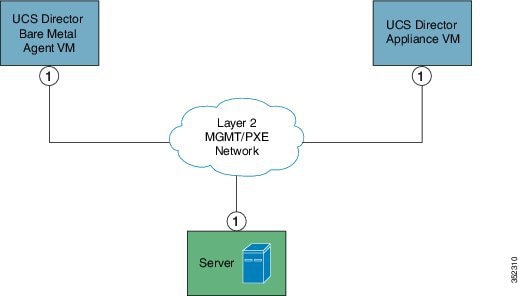
Single Network for Management and PXE
We recommend that you choose this network configuration option if your environment permits the following to be hosted on the same VLAN (Layer 2) network (see the following figure):
-
Services provided by Bare Metal Agent, such as DHCP, TFTP, and HTTP
-
Management traffic between Bare Metal Agent and Cisco UCS Director or other devices and appliances
Separate Networks for Management and PXE
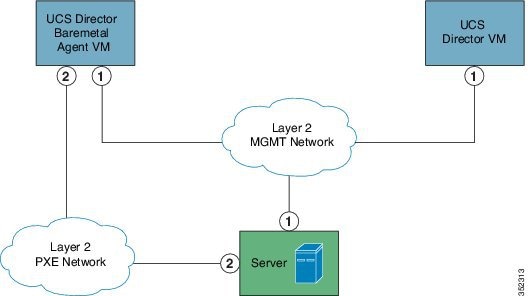
We recommend that you choose this network configuration option if your environment does not permit the following to be hosted on the same network interface and Layer 2 network (see the following figure):
-
On the PXE network, services provided by Bare Metal Agent, such as DHCP, TFTP, and HTTP
-
On the Management network, traffic between Bare Metal Agent and Cisco UCS Director or other devices and appliances
Prerequisites and Assumptions for a Network Configuration
Make sure that your environment meets the following prerequisites for Bare Metal Agent network configuration:
-
Cisco UCS Director has been installed and the network interface configured, as described in the appropriate Cisco UCS Director installation guide.
-
Cisco UCS Director Bare Metal Agent is reachable through a web browser and you can log in.
-
Bare Metal Agent has been installed, and no additional configuration has been performed.
-
For a single network configuration, make sure that the required single Management and PXE VLAN is provisioned and available as a virtual port group or port profile that virtual machines (VMs) can be attached to or leveraged.
-
For a separate network configuration, make sure that the following networks are provisioned and available as a virtual port group or port profile that VMs can be attached to or leveraged:
Provisioning Bare Metal Servers through Bare Metal Agent
The process involved in installing operating systems on bare metal servers through Bare Metal Agent is as follows:
-
Install Bare Metal Agent. See Installing Cisco UCS Director Bare Metal Agent.
-
Configure Bare Metal Agent. See Configuring Cisco UCS Director Bare Metal Agent.
-
Add OS images in Bare Metal Agent. See Adding Windows OS Images or Adding Non-Windows OS Images.
-
Deploy OS images on bare metal servers through workflow tasks. See Provisioning OS Images through Orchestration Workflow Tasks.
For managing Bare Metal Agent operations through Cisco UCS Director, see Managing Bare Metal Agent.
Upgrade of Bare Metal Agent
For detailed information on upgrading Bare Metal Agent, see the Cisco UCS Director Upgrade Guide.
 Feedback