- About This Manual
- Overview of the Cisco MGX RPM
- Preparing to Install the Cisco MGX RPM
- Installing the Cisco MGX RPM
- Cabling Cisco MGX RPM Port Adapters
- Configuring the Cisco MGX RPM
- Setting Up Connections Between Other Devices and the RPM
- Configuring MPLS and VPN
- Maintaining the Cisco MGX RPM
- Cable and Connector Specifications
- Glossary
Setting Up Connections Between Other Devices and the RPM
This chapter describes how to make connections between an RPM and a PXM and among either service modules or other RPMs. The chapter contains the following sections:
• Configuring Connections Between the RPM and Other Devices
•Setting Up Connections Between CWM and the RPM
•Setting Up Connections Between Service Modules and the RPM
•Fully Meshed ATM Configuration Example
•RPM-to-Service Module DAX Connections
•RPM-to-PXM Feeder Trunk Connections
Configuring Connections Between the RPM and Other Devices
After configuring port adapters on the RPM, the user's next step is to configure connections between the RPM and other devices (service modules, other RPMs) via the PXM.
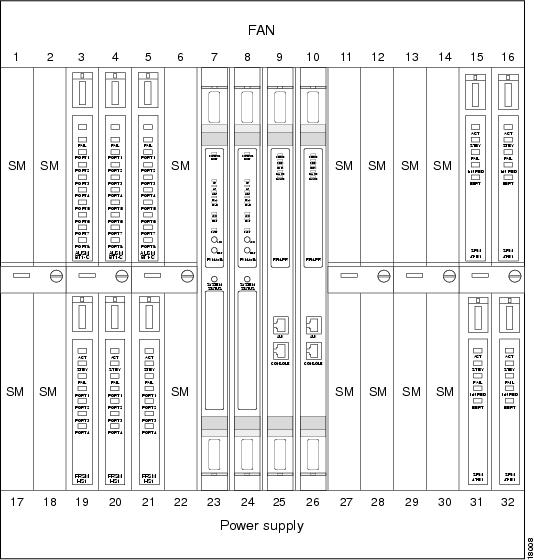
The PXM (the main processor on the MGX 8850) coordinates all communication between the RPM and service modules and other RPMs. See Figure 6-1 for a view of how service modules fit in the MGX 8850.
Figure 6-1 Service Modules in the MGX 8850
A complete connection between the RPM and any of these devices includes two parts:
•Half between the RPM and the PXM.
•Half between the PXM and the service module or a different RPM.
Setting Up the RPM Connection to the PXM
First, set up the connection between the RPM and the PXM.
For the RPM in slot 9 connecting to slot 6, perform the following procedure:
Step 1 Set up a logical interface:
RPM-3(config)# int sw 5/1.1 point-to-point
ip address 1.0.0.1 255.0.0.0
Step 2 Set up pvc:
RPM-3(config-if)# atm pvc 2 0 1 aal5snap
Step 3 To return to the global level, type exit:
RPM-3(config-if)# exit
RPM-3(config)#
Step 4 Enter the rpmrscprtn command to set up resource partitioning
RPM-3(config)# rpmrscprtn PAR 100 100 1 255 0 3840 4080
Partition type [par|tag|pnni] Percent ingress [<0-100>] Percent egress [<0-100>] Minimum
VPI [<0-255>] Maximum VPI [<0-255> Minimum VCI [<0-3840>] Maximum VCI [<0-3840>] Number of
LCNs [<0-4080>]
Step 5 Add a connection to the PVC—either VCC (virtual circuit connection) or VPC (virtual path connection):
RPM-3(config)# addcon vcc Switch slot/1[.sub-interface] vci [rname rname] rslot rslot
r_int r_vpi r_vci [master {local | remote}]
or
RPM-3(config)# addcon vpc Switch slot/1[.sub-interface] vpi [rname rname] rslot rslot
r_int r_vpi [master {local | remote}]
Available Parameters
The following parameters are available to set up the RPM to PXM connection.
•slot—RPM slot number
•sub-interface—Optional sub-interface
•vci—Local VCI
•vpi—Local VPI
•rname—Remote nodename
•rslot—Remote slot
•r_int—Remote interface, for example, Switch interface number, or SM port number
•r_vpi— Remote VPI
•r_vci —Remote VCI
•master
–Local makes this RPM the master end of the connection. Type master local to make the local RPM you are configuring master.
Use master local for connections to the PXM or to other SMs, or when connecting to FRSM, PXM for 2- or 3-segment connections. In a local (DAX) RPM-RPM connection, one side must be master.
–Remote (default) makes the other RPM the master end of the connection. Type master remote or press Enter to make the far-end RPM master.
•cost—Maximum connection cost, <1-255> (default 255)
•priority—Routing priority, <0-15> (default 0)
–none—No restriction (default)
–satellite—Avoid satellite trunks
–terrestrial—Avoid terrestrial trunks
•restriction—Restricted Trunk Type
–none—No restriction (default)
–satellite—Avoid satellite trunks
–terrestrial—Avoid terrestrial trunks
•rmcr—Remote MCR value, <0-353208> (default 0; allowed rmcr range will be either <0-rpcr> or <0-0> if rpcr is not explicitly configured)
•rpcr—Remote PCR value, <0-353208> (default 353208)
•rutil—Remote percent utilization, <0-100> (default 100)
•util—Connection percent utilization value, <0-100> (default 100)
Example RPM-PXM Configuration
The following example displays a configuration linking the RPM to the PXM module.
popeye01.1.7.PXM.a > cc
(session redirected)
RPM configuration
User Access Verification
Password: (cisco)
rpm01>ena
Password: (cisco)
rpm01#conf t
Enter configuration commands, one per line. End with CNTL/Z.
rpm01(config)#int ?
ATM ATM interface
Async Async interface
BVI Bridge-Group Virtual Interface
Cable CMTS interface
Dialer Dialer interface
Ethernet IEEE 802.3
FastEthernet FastEthernet IEEE 802.3
Group-Async Async Group interface
Lex Lex interface
Loopback Loopback interface
Null Null interface
Port-channel Ethernet Channel of interfaces
Switch Switch Virtual Interface
Tunnel Tunnel interface
Virtual-Template Virtual Template interface
Virtual-TokenRing Virtual TokenRing
rpm01(config)#int sw ?
<1-16> Chassis slot number
rpm01(config)#int sw 9/?
<0-1> Switch interface number
rpm01(config)#int sw 9/1?
. <0-1>
rpm01(config)#int sw 9/1.66 ?
multipoint Treat as a multipoint link
point-to-point Treat as a point-to-point link
tag-switching Treat as a tag switching link
<cr>
rpm01(config)#int sw 9/1.66 point
rpm01(config-subif)#ip ?
Interface IP configuration subcommands:
access-group Specify access control for packets
accounting Enable IP accounting on this interface
address Set the IP address of an interface
authentication authentication subcommands
bandwidth-percent Set EIGRP bandwidth limit
broadcast-address Set the broadcast address of an interface
cgmp Enable/disable CGMP
directed-broadcast Enable forwarding of directed broadcasts
dvmrp DVMRP interface commands
hello-interval Configures IP-EIGRP hello interval
helper-address Specify a destination address for UDP broadcasts
hold-time Configures IP-EIGRP hold time
igmp IGMP interface commands
irdp ICMP Router Discovery Protocol
load-sharing Style of load sharing
mask-reply Enable sending ICMP Mask Reply messages
mroute-cache Enable switching cache for incoming multicast packets
mtu Set IP Maximum Transmission Unit
multicast IP multicast interface commands
nat NAT interface commands
nhrp NHRP interface subcommands
rpm01(config-subif)#ip address 6.6.6.6 255.255.255.0
rpm01(config-subif)#atm ?
address-registration Address Registration
arp-server Configure IP ARP Server
auto-configuration ATM interface auto configuration
classic-ip-extensions Specify the type of Classic IP extensions
e164 E164 Configuration
esi-address 7-octet ATM ESI address
ilmi-enable ILMI Configuration
ilmi-keepalive Keepalive polling configuration
lecs-address LECS Address
multipoint-signaling Multipoint Signaling
nsap-address 20-octet ATM NSAP address
pvc Create a PVC
signaling Signaling subcommands
rpm01(config-subif)#atm pvc ?
<1-4095> VCD number
rpm01(config-subif)#atm pvc 66 ?
<0-255> VPI number
rpm01(config-subif)#atm pvc 66 0 ?
<1-65535> VCI number
rpm01(config-subif)#atm pvc 66 0 66 ?
aal5ciscoppp Cisco PPP over AAL5 Encapsulation
aal5mux AAL5+MUX Encapsulation
aal5nlpid AAL5+NLPID Encapsulation
aal5snap AAL5+LLC/SNAP Encapsulation
rpm01(config-subif)#atm pvc 66 0 66 aal5snap ?
<1-155000> Peak rate(Kbps)
inarp Inverse ARP enable
oam OAM loopback enable
<cr>
rpm01(config-subif)#atm pvc 66 0 66 aal5snap
rpm01(config-subif)#exit
rpm01(config)#rpmrscprtn ?
par Partition for PAR
pnni Partition for PNNI
tag Partition for TAG
rpm01(config)#rpmrscprtn par ?
<0-100> Ingress Percent Bandwidth
rpm01(config)#rpmrscprtn par 100 ?
<0-100> Egress Percent Bandwidth
rpm01(config)#rpmrscprtn par 100 100 ?
<0-255> Minimum VPI Value
rpm01(config)#rpmrscprtn par 100 100 0 ?
<0-255> Maximum VPI Value
rpm01(config)#rpmrscprtn par 100 100 0 255 ?
<0-3840> Minimum VCI Value
rpm01(config)#rpmrscprtn par 100 100 0 255 0 ?
<0-3840> Maximum VCI Value
rpm01(config)#rpmrscprtn par 100 100 0 255 0 3840 ?
<0-4080> Number of LCNs
rpm01(config)#rpmrscprtn par 100 100 0 255 0 3840 4080
rpm01(config)#addcon ?
vcc Add a vcc connection
vpc Add a vpc connection
rpm01(config)#addcon vcc ?
Switch Switch Virtual Interface
rpm01(config)#addcon vcc sw ?
<1-16> Chassis slot number
rpm01(config)#addcon vcc sw 9/?
<0-1> Switch interface number
rpm01(config)#addcon vcc sw 9/1?
<0-1> Switch sub-interface number
rpm01(config)#addcon vcc sw 9/1.66 ?
<1-3824> local VCI value
rpm01(config)#addcon vcc sw 9/1.66 66 ?
rname remote node name
rslot Remote slot number
rpm01(config)#addcon vcc sw 9/1.66 66 rslot ?
<0-30> Remote slot number
rpm01(config)#addcon vcc sw 9/1.66 66 rslot 0 ?
<0-512> Remote interface
rpm01(config)#addcon vcc sw 9/1.66 66 rslot 0 1 ?
<0-255> Remote VPI
rpm01(config)#addcon vcc sw 9/1.66 66 rslot 0 1 0 ?
<0-65535> Remote VCI
rpm01(config)#addcon vcc sw 9/1.66 66 rslot 0 1 0 66 ?
cost Maximum connection cost
master Master end of the ATM connection
priority Routing priority
restriction Restricted Trunk Type
rmcr Connection Remote MCR
rpcr Connection Remote PCR
rutil Connection Remote percent utilization
util Connection precent utilization
<cr>
rpm01(config)#addcon vcc sw 9/1.66 66 rslot 0 1 0 66 master ?
local Local option
remote Remote option
rpm01(config)#addcon vcc sw 9/1.66 66 rslot 0 1 0 66 master local ?
cost Maximum connection cost
priority Routing priority
restriction Restricted Trunk Type
rmcr Connection Remote MCR
rpcr Connection Remote PCR
rutil Connection Remote percent utilization
util Connection precent utilization
<cr>
rpm01(config)#addcon vcc sw 9/1.66 66 rslot 0 1 0 66 master local

Note The above example adds a connection to the active PXM.
The RPM is the MASTER and not the slave.
SlotNo = 0 (zero) which points to the active PXM.
rpm01(config)#exit
rpm01#wr mem
Building configuration...
rpm01#wr t
Building configuration...
Current configuration:
!
version 12.0
no service pad
service timestamps debug uptime
service timestamps log uptime
no service password-encryption
!
hostname rpm01
!
boot system c:rpm-js-mz.120-2.5.T
enable password cisco
!
ip subnet-zero
!
!
!
interface FastEthernet1/1
no ip address
no ip directed-broadcast
shutdown
!
interface Ethernet2/1
no ip address
no ip directed-broadcast
shutdown
!
.
.
!
interface Ethernet2/4
no ip address
no ip directed-broadcast
shutdown
!
interface Switch9/1
no ip address
no ip directed-broadcast
!
!
interface Switch9/1.66 point-to-point
ip address 6.6.6.6 255.255.255.0
no ip directed-broadcast
atm pvc 66 0 66 aal5snap
!
!
ip classless
!
!
!
line con 0
transport input none
line aux 0
line vty 0 4
password cisco
login
!
rpmrscprtn PAR 100 100 0 255 0 3840 4080
addcon vcc switch 9/1.66 66 rslot 0 1 0 66 master local
end
rpm01#cc 7
(session redirected)
PXM configuration
popeye01.1.7.PXM.a > dspcons (connection added is shown in blue)
dspcons
This End Node Name Other End Status
1.1.0.0 popeye01 7.1.10.100 OK
2.1.0.100 popeye01 7.1.0.100 OK
3.1.20.200 popeye01 7.1.20.200 OK
7.1.0.100 popeye01 2.1.0.100 OK
7.1.10.100 popeye01 1.1.0.0 OK
7.1.20.200 popeye01 3.1.20.200 OK
7.1.0.66 popeye01 9.1.0.66 OK
9.1.0.66 popeye01 7.1.0.66 OK
popeye01.1.7.PXM.a > addcon
addcon
ERR: incorrect number of parameters: (not enough)
Syntax: addcon "port_no conn_type local_VPI local_VCI service [mastership]
[remoteConnId]"
port_no -- a number 1..32
conn_type -- a number 1..2 (1: vpc 2: vcc)
local_VPI -- a number 0..4095
local_VCI -- a number 0..65535
service -- a number 1..4 (1:cbr 2:vbr 3:abr 4:ubr)
mastership -- a number 1..2 (1:master 2:slave default:2)
remoteConnId -- a string (format: NodeName.SlotNo.PortNo.VPI.VCI),
required if mastership is 1 (master)
popeye01.1.7.PXM.a > addcon 1 2 0 66 1 2 popeye01.9.1.0.66
addcon 1 2 0 66 1 2 popeye01.9.1.0.66
Connection ID: popeye01.0.1.0.66
Note The above example completes the RPM connection.
The PXM is NOT the master but the slave.
Setting Up Connections Between CWM and the RPM
In an MGX 8850 standalone application, you need to set up and configure connections between the Cisco WAN Manager (CWM) and the RPM in order to access and configure the PXM module through the RPM. Do this by adding a connection to the 7.34 port on the PXM.
On the RPM Side
Use the following configuration procedure on the RPM side to set up this connection.
Step 1 Add a sub-interface and provide an IP address and a VPI/VCI.
Step 2 Enter the addcon command to add a connection to the 7.34 port on the PXM and configure this connection as Master.
Note This is the only place that the remote slot number is designated as 7 for PXM.
Step 3 Verify the connection by entering the show switch connection command. The connection should be in sync.
Step 4 Add a static route for the ATM IP address of the PXM pointing to the sub-interface that was added above in Step 1.
Step 5 Verify that the static route exists in the RPM by entering the show ip route command.
On the PXM Side
Use the following configuration procedure on the PXM side to set up this connection.
Step 1 Configure an ATM IP address using the cnfifip command.
Step 2 Verify that the connection added from the RPM is available in the PXM by entering the dspcons command.
Note The LAN IP and IP relay address need to be on different networks.
The connection should be in OK state.
Step 3 Verify that the PXM ATM IP address is accessible from RPM by using the ping command.
Step 4 Add a route on the CWM to the PXM ATM IP address pointing to the RPM Ethernet IP address.
Step 5 ping the PXM ATM IP address from CWM.
You should now be able to access the MGX 8850, MGX 8250, or MGX 8230 shelf from CWM via the RPM.
Sample CWM-PXM Configuration
Here is a sample configuration linking the CWM with the PXM through the RPM module.
On the RPM Side
The following screen capture displays how the connection looks from the RPM.
interface Switch1.1 point-to-point
ip address 11.11.11.1 255.255.255.252
no ip route-cache
no ip mroute-cache
pvc 0/10
encapsulation aal5snap
!
ip route 0.0.0.0 0.0.0.0 Ethernet1/1
ip route 172.1.1.0 255.255.255.0 Switch1.1 <---- Important
!
rpmrscprtn PAR 100 100 0 255 0 3840 4080
addcon auto_synch off
addcon vcc switch 1.1 10 rslot 7 34 0 34 master local
Show commands
netboot-rpm2#show switch connections
Synch
1Vpi lVci remoteNodeName remoteSlot remoteIf rVpi rVci Status
0 10 7 34 0 34 inSynch
netboot-rpm2#show ip route
Codes: C - connected, S - static, I - IGRP, R - RIP, M - mobile, B - BGP
D - EIGRP, EX - EIGRP external, O - OSPF, IA - OSPF inter area
N1 - OSPF NSSA external type 1, N2 - OSPF NSSA external type 2
E1 - OSPF external type 1, E2 - OSPF external type 2, E - EGP
i - IS-IS, L1 - IS-IS level-1, L2 - IS-IS level-2, ia - IS-IS
inter area
* - candidate default, U - per-user static route, o - ODR
P - periodic downloaded static route
Gateway of last resort is 0.0.0.0 to network 0.0.0.0
172.1.0.0/24 is subnetted, 1 subnets
S 172.1.1.0 is directly connected, Switch1.1
172.29.0.0/24 is subnetted, 1 subnets
C 172.29.37.0 is directly connected, Ethernet1/1
10.0.0.0/8 is variably subnetted, 2 subnets, 2 masks
S 10.10.10.2/32 is directly connected, Switch1.1
C 10.10.10.0/24 is directly connected, Loopback0
11.0.0.0/30 is subnetted, 1 subnets
C 11.11.11.0 is directly connected, Switch1.1
S* 0.0.0.0/0 is directly connected, Ethernet1/1
netboot-rpm2#
Verification of PXM ATM/ip address access from RPM
netboot-rpm2#ping 172.1.1.201
Type escape sequence to abort.
Sending 5, 100-byte ICMP Echos to 172.1.1.201, timeout is 2 seconds:
!!!!!
Success rate is 100 percent (5/5), round-trip min/avg/max = 1/2/4 ms
netboot-rpm2#
On the PXM Side
The following screen capture displays how the connection looks from the PXM.
mgx2.1.7.PXM.a > dspifip
Interface Flag IP Address Subnetmask Broadcast Addr
-------------- ---- --------------- --------------- ---------------
Ethernet/lnPci0 UP 172.29.37.91 255.255.255.0 172.29.37.255
SLIP/sl0 DOWN 0.0.0.0 255.0.0.0 (N/A)
ATM/atm0 UP 172.1.1.201 255.255.255.0 172.1.1.255
mgx2.1.7.PXM.a > dspcons
This End Node Name Other End Status
2.1.0.10 mgx2 7.34.0.34 OK
7.34.0.34 mgx2 2.1.0.10 OK
mgx2.1.7.PXM.a > dspcon 2.1.0.10
Conn Par Addr : 2.1.0.10
Vc Index : 805306369
Conn SM Addr : Ept: vpi = 0 vci = 10 vpc = 0
ifNum = 0x20001 conNum = 0x7fff glcn = 0x2c1 lcn = 26
qosFwd = 263 qosBwd = 263 pcrFwd = 353208 pcrBwd = 353208 mcrFwd =
0 mcrBwd
= 0
Remote Node Name : mgx2
Remote Conn PAR Addr: 7.34.0.34
Remote Conn SM Addr: Ept: vpi = 0 vci = 34 vpc = 0
ifNum = 0x70022 conNum = 0x7fff glcn = 0x2c0 lcn = 0
qosFwd = 263 qosBwd = 263 pcrFwd = 353208 pcrBwd = 353208 mcrFwd =
0 mcrBwd
= 0
OE VC Index : 805306369
Oper Status : OK
Conn Failure Reason :
RRT Failure Reason :
Admin Status : UP
Route :
Setting Up Connections Between Service Modules and the RPM
To complete a RPM-to-service module connection, configure the connection between the service module and the PXM.
Types of Service Modules
Service modules can be of various types, including FRSM (Frame Relay Service Module), AUSM (ATM UNI Service Module), and VISM (Voice Interworking Service Module).
•AUSM—The AUSM-8T1/E1 is a multipurpose card that supports up to 8 T1 or E1 ports.
•VISM—VISM is a multi-DSP, co-processing card and software package that adds voice over IP or voice over ATM AAL2 capabilities to the MGX 8850 platform. The MGX 8850 uses this new feature card along with LAN/WAN routing capabilities to provide a 192/240 channel gateway for VoIP packetized voice traffic to and from TDM traffic.
•FRSM—The FRSM is a two-card set consisting of an FRSM front card (channelized or fractional, T1 or E1, 8 port) and either an 8T1, or 8E1 port adapter back card. The FRSM converts Frame Relay packets into ATM cells. Other FRSMs are available with T3/E3, channelized T3, V.35, X21, and HSSI interfaces of varying supported speeds, depending upon service module type.
•FRSM-VHS—The FRSM-VHS is a two-card set consisting of an FRSM-VHS front card (channelized or fractional, T3 or E3, 8 port) and either a 2T3, 2E3, HS1, HS2 or 2CT3 port adapter back card. The FRSM converts Frame Relay packets into ATM cells.
Data Forwarding to RPMs
Service modules can be configured to forward data to the RPMs in one of two modes: port forwarding or connection forwarding.
FRSM Frame Aggregation: Port Forwarding
In this mode, all frames received on a port are forwarded to the router for L3 processing. For example, a FRSM T1 could be configured for PPP IP access, by doing the following.
1. Setting up a frame forwarding (FF) connection from a FRSM T1 port to the RPM cellbus address on VPI/VCI.
2. Configuring the router to terminate PPP frames forwarded over an ATM connection on the ATM Deluxe Port Adaptor port on VCI 0/xFrame-forwarding (a proprietary method whereby all HDLC frames received on a port are converted to ATM AAL5 frames with a null encapsulation and sent over a single VC). Cisco has already implemented code to terminate frame-forwarded PPP over ATM.
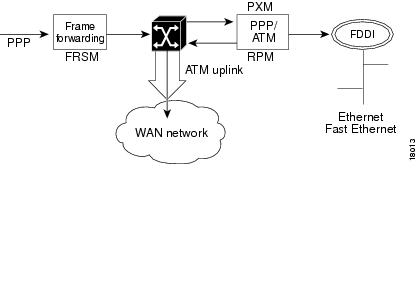
The data flow for a PPP connection destined for the RPM is shown in the figure below. The packet enters the FRSM module as PPP and is frame forwarded to the RPM. The RPM receives the packet in PPP over ATM because MGX 8850 internal connectivity is ATM. The RPM runs software that works with PPP over ATM encapsulation, allowing the router to reach the IP layer and route the packet to its destination (such as the Internet). Packets then destined to the Internet via a WAN network are then sent back to the PXM, and out the ATM uplink.
Figure 6-2 Internal Path of a PPP Packet Destined for RPM
PPP over ATM Example
In this PPP over ATM example, the FRSM is in slot 18 and RPM A is in slot 12. A serial port on Router B is connected to the FRSM line 1.
***
Router B (connected to line 1 of FRSM) configuration example:
interface Serial5/0
ip address 192.168.100.2 255.255.255.0
encapsulation ppp
***
The following is an example of a FRSM configuration. (See FRSM documentation for complete command syntax.)
Step 1 Configure the line.
SQureshi.1.18.FRSM.a> addln 1
Step 2 Configure a frame-forwarding port on the line.
SQureshi.1.18.FRSM.a> addport 1 1 2 1 24 3
Step 3 Configure a frame-forwarding channel from the port to the RPM.
Step 4 Connect DLCI 1000 on the port to a unique VCI on the RPM, using VPI 0.
SQureshi.1.18.FRSM.a> addcon 1 1000 1536000 5 2 1 2 SQureshi.12.1.0.1001
***
RPM configuration example:
interface Virtual-Template12/1
ip address 192.168.100.12 255.255.255.0
!
interface Switch12/1.100 point-to-point
atm pvc 100 0 1001 aal5ciscoppp Virtual-Template12/1
!
rpmrscprtn par 100 100 0 255 0 3840 4080
addcon vcc Switch 12/1.100 1001 rslot 18 1 0 1000 master local
***
The following example displays how to verify connectivity.
RPM A--
rpm_slot12# show atm vc 100
Switch12/1.100:VCD:100, VPI:0, VCI:1001
UBR, PeakRate:149760
AAL5-CISCOPPP, etype:0x9, Flags:0xC2A, VCmode:0x0
OAM frequency:0 second(s)
InARP DISABLED
Transmit priority 4
InPkts:57, OutPkts:90, InBytes:1828, OutBytes:2068
InPRoc:57, OutPRoc:90
InFast:0, OutFast:0, InAS:0, OutAS:0
InPktDrops:0, OutPktDrops:0
CrcErrors:0, SarTimeOuts:0, OverSizedSDUs:0
OAM cells received:0
OAM cells sent:0
Status:UP
PPP:Virtual-Access12/1 from Virtual-Template12/1
rpm_slot12#show interface Virtual-Template12/1
Virtual-Access12/1 is up, line protocol is up
Hardware is Virtual Access interface
Internet address is 192.168.100.12/24
MTU 1500 bytes, BW 100000 Kbit, DLY 100000 usec,
reliablility 255/255, txload 1/255, rxload 1/255
Encapsulation PPP, loopback not set
Keepalive set (10 sec)
DTR is pulsed for 5 seconds on reset
LCP Open
Open:IPCP
Bound to Switch12/1.100 VCD:100, VPI:0, VCI:1001
Cloned from virtual-template:1
Last input 00:00:07, output never, output hang never
Last clearing of "show interface" counters 00:06:17
Queueing strategy:fifo
Output queue 0/40, 0 drops; input queue 0/75, 0 drops
5 minute input rate 0 bits/sec, 0 packets/sec
5 minute output rate 0 bits/sec, 0 packets/sec
59 packets input, 1632 bytes, 0 no buffer
Received 59 broadcasts, 0 runts, 0 giants, 0 throttles
0 input errors, 0 CRC, 0 frame, 0 overrun, 0 ignored, 0 abort
92 packets output, 2100 bytes, 0 underruns
0 output errors, 0 collisions, 0 interface resets
0 output buffer failures, 0 output buffers swapped out
0 carrier transitions
rpm_slot12#ping 192.168.100.2
Type escape sequence to abort.
Sending 5, 100-byte ICMP Echos to 192.168.100.2, timeout is 2 seconds:
!!!!!
Success rate is 100 percent (5/5), round-trip min/avg/max = 4/4/8 ms
rpm_slot12#sh ip ro
...
192.168.100.0/24 is variably subnetted, 2 subnets, 2 masks
C 192.168.100.0/24 is directly connected, Virtual-Access12/1
C 192.168.100.2/32 is directly connected, Virtual-Access12/1
Router B --
router_B#sh int s5/0
Serial5/0 is up, line protocol is up
Hardware is M4T
Internet address is 192.168.100.2/24
MTU 1500 bytes, BW 1544 Kbit, DLY 20000 usec,
reliablility 255/255, txload 1/255, rxload 1/255
Encapsulation PPP, crc 16, loopback not set, keepalive set (10 sec)
LCP Open
Listen:CDPCP
Open:IPCP
Last input 00:00:00, output 00:00:00, output hang never
Last clearing of "show interface" counters never
Input queue:0/75/0 (size/max/drops); Total output drops:0
Queueing strategy:weighted fair
Output queue:0/1000/64/0 (size/max total/threshold/drops)
Conversations 0/1/256 (active/max active/max total)
Reserved Conversations 0/0 (allocated/max allocated)
5 minute input rate 0 bits/sec, 0 packets/sec
5 minute output rate 0 bits/sec, 0 packets/sec
35953 packets input, 529169 bytes, 0 no buffer
Received 35639 broadcasts, 0 runts, 1 giants, 0 throttles
211 input errors, 176 CRC, 0 frame, 0 overrun, 0 ignored, 35 abort
36172 packets output, 487073 bytes, 0 underruns
0 output errors, 0 collisions, 2465 interface resets
0 output buffer failures, 0 output buffers swapped out
2475 carrier transitions DCD=up DSR=up DTR=up RTS=up CTS=up
router_B#sh ip ro
...
192.168.100.0/24 is variably subnetted, 2 subnets, 2 masks
C 192.168.100.12/32 is directly connected, Serial5/0
C 192.168.100.0/24 is directly connected, Serial5/0
router_B#ping 192.168.100.12
Type escape sequence to abort.
Sending 5, 100-byte ICMP Echos to 192.168.100.12, timeout is 2 seconds:
!!!!!
Success rate is 100 percent (5/5), round-trip min/avg/max = 4/5/8 ms
FRSM --
SQureshi.1.18.FRSM.a > dsplns
Line Conn Type Status/Coding Length XmtClock Alarm Stats
Type Source Alarm
---- ----- ------------ ------ -------- ------------- -------- ----- -----
18.1 RJ-48 dsx1ESF Ena/dsx1B8ZS 0-131 ft LocalTim No No
18.2 RJ-48 dsx1ESF Dis/dsx1B8ZS 0-131 ft LocalTim
18.3 RJ-48 dsx1ESF Dis/dsx1B8ZS 0-131 ft LocalTim
18.4 RJ-48 dsx1ESF Dis/dsx1B8ZS 0-131 ft LocalTim
18.5 RJ-48 dsx1ESF Dis/dsx1B8ZS 0-131 ft LocalTim
18.6 RJ-48 dsx1ESF Dis/dsx1B8ZS 0-131 ft LocalTim
18.7 RJ-48 dsx1ESF Dis/dsx1B8ZS 0-131 ft LocalTim
18.8 RJ-48 dsx1ESF Dis/dsx1B8ZS 0-131 ft LocalTim
LineNumOfValidEntries:8
Syntax :dsplns
SQureshi.1.18.FRSM.a > dspports
Port Ena/Speed EQServ SignalType T391 T392 N391 N392 N393 Type Alarm ELMI
Ratio
-------- --- ----- ------ ------------ ---- ---- ---- ---- ---- -------- ----- ----
18.1.1 Add/1536k 1 NoSignaling 10 15 6 3 4 frForwar No Off
Number of ports: 1
PortDs0UsedLine1: 0x00ffffff
PortDs0UsedLine2: 0x00000000
PortDs0UsedLine3: 0x00000000
PortDs0UsedLine4: 0x00000000
PortDs0UsedLine5: 0x00000000
PortDs0UsedLine6: 0x00000000
PortDs0UsedLine7: 0x00000000
PortDs0UsedLine8: 0x00000000
PortNumNextAvailable: 119
Syntax :dspports
SQureshi.1.18.FRSM.a > dspchans
DLCI Chan EQ I/EQDepth I/EQDEThre I/EECNThre Fst/ DE Type Alarm
------------- ---- -- ----- ----- ----- ----- ----- ----- --- --- ----- -----
18.1.1.1000 101 2 65535/65535 32767/32767 6553/6553 Dis/Dis frFor No
Number of channels: 1
ChanNumNextAvailable: 30
Syntax :dspchans
*****
Connection Forwarding
In this mode, all frames received on a given connection are forwarded to the router using the appropriate ATM encapsulation. For example, Frame Relay connections on a FRSM port could be forwarded to the RPM by
•Translating a Frame Relay connection to an ATM connection or service interworking (FRF.8)
•Configuring DLCI to the RPM cellbus address with VPI/VCI 0/x
•Configuring the RPM to terminate Frame Relay to ATM connections (RFC 1483) on the ATM interface on VCI 0/x
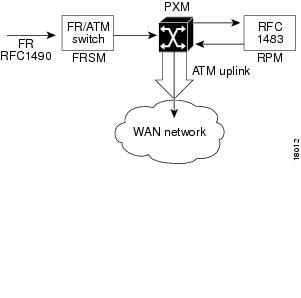
The data flow for a native Frame Relay connection destined to the RPM is shown in Figure 6-3. This data flow is identical to that of PPP packets, but the encapsulation techniques are different. Standard Frame Relay is encapsulated using RFC1490. When a packet is received at the FRSM that has been encapsulated using RFC1490, the standard FR-ATM service interworking translation mode (FRF.8) is performed so that when the packet is forwarded to the RPM it is encapsulated using RFC1483. The router also reads RFC1483, enabling it to reach the IP layer, and route the packet.
Figure 6-3 Path of a Native Frame Relay Connection
Frame over ATM Example
In this example, the FRSM-8T1 is in slot 18 of the MGX 8850, while the RPM is in slot 12.
A Frame Relay router (connected to line 1 of FRSM) configuration example follows:
interface Serial0
ip address 192.168.101.2 255.255.255.0
encapsulation frame-relay IETF
***
The following is an example of a FRSM configuration. (See FRSM documentation for complete command syntax.)
Step 1 Configure the line.
SQureshi.1.18.FRSM.a> addln 1
Step 2 Configure a Frame Relay port on the line, with StrataLMI signaling.
SQureshi.1.18.FRSM.a> addport 1 1 2 1 24 1
SQureshi.1.18.FRSM.a> xcnfport -pt 1 -sig 3
Step 3 Configure a service-interworking or network-interworking channel from the port to the RPM. Connect each DLCI on the port to a unique VCI on the RPM, using VPI 0.
SQureshi.1.18.FRSM.a> addcon 1 212 1536000 3 2 1 2 SQureshi.12.1.0.101
***
RPM configuration example:
interface Switch12/1.101 multipoint
ip address 192.168.101.12 255.255.255.0
atm pvc 101 0 101 aal5snap inarp
!
rpmrscprtn par 100 100 0 255 0 3840 4080
addcon vcc Switch 12/1.101 101 rslot 18 1 0 212 master local
***
To verify connectivity:
RPM --
rpm_slot12#ping 192.168.101.2
Type escape sequence to abort.
Sending 5, 100-byte ICMP Echos to 192.168.101.2, timeout is 2 seconds:
!!!!!
Success rate is 100 percent (5/5), round-trip min/avg/max = 4/5/8 ms
rpm_slot12#sh arp
Protocol Address Age (min) Hardware Addr Type Interface
Internet 192.168.101.2 0 0 / 101 ATM Switch12/1.101
rpm_slot12#
Frame Relay router --
rpm7206_2#show frame-relay map
Serial5/0 (up):ip 192.168.101.12 dlci 212(0xD4,0x3440), dynamic,
broadcast,
IETF, BW = 1536000, status defined, active
rpm7206_2#ping 192.168.101.12
Type escape sequence to abort.
Sending 5, 100-byte ICMP Echos to 192.168.101.12, timeout is 2 seconds:
!!!!!
Success rate is 100 percent (5/5), round-trip min/avg/max = 4/4/8 ms
rpm7206_2#
FRSM --
SQureshi.1.18.FRSM.a > dspchans
DLCI Chan EQ I/EQDepth I/EQDEThre I/EECNThre Fst/ DE Type Alarm
------------- ---- -- ----- ----- ----- ----- ----- ----- --- --- ----- -----
18.1.1.212 121 2 65535/65535 32767/32767 6553/6553 Dis/Dis SIW-X No
Number of channels: 1
ChanNumNextAvailable: 26
Syntax :dspchans
SQureshi.1.18.FRSM.a > dspports
Port Ena/Speed EQServ SignalType T391 T392 N391 N392 N393 Type Alarm ELMI
Ratio
-------- --- ----- ------ ------------ ---- ---- ---- ---- ---- -------- ----- ----
18.1.1 Add/1536k 1 StrataLMI 10 15 6 3 4 frameRel No Off
Number of ports: 1
PortDs0UsedLine1: 0x00ffffff
PortDs0UsedLine2: 0x00000000
PortDs0UsedLine3: 0x00000000
PortDs0UsedLine4: 0x00000000
PortDs0UsedLine5: 0x00000000
PortDs0UsedLine6: 0x00000000
PortDs0UsedLine7: 0x00000000
PortDs0UsedLine8: 0x00000000
PortNumNextAvailable: 83
Syntax :dspports
SQureshi.1.18.FRSM.a > dsplns
Line Conn Type Status/Coding Length XmtClock Alarm Stats
Type Source Alarm
---- ----- ------------ ------ -------- ------------- -------- ----- -----
18.1 RJ-48 dsx1ESF Ena/dsx1B8ZS 0-131 ft LocalTim No No
18.2 RJ-48 dsx1ESF Dis/dsx1B8ZS 0-131 ft LocalTim
18.3 RJ-48 dsx1ESF Dis/dsx1B8ZS 0-131 ft LocalTim
18.4 RJ-48 dsx1ESF Dis/dsx1B8ZS 0-131 ft LocalTim
18.5 RJ-48 dsx1ESF Dis/dsx1B8ZS 0-131 ft LocalTim
18.6 RJ-48 dsx1ESF Dis/dsx1B8ZS 0-131 ft LocalTim
18.7 RJ-48 dsx1ESF Dis/dsx1B8ZS 0-131 ft LocalTim
18.8 RJ-48 dsx1ESF Dis/dsx1B8ZS 0-131 ft LocalTim
LineNumOfValidEntries:8
Syntax :dsplns
SQureshi.1.18.FRSM.a >
ATM Service
The ATM UNI Service Modules (AUSMs) provide native ATM UNI (compliant with ATM Forum v3.0 and v3.1) interfaces at T1 and E1 speeds, with eight ports per card, providing up to16 Mbps of bandwidth for ATM service interfaces. This is compliant with the physical and ATM layer, but not with signaling.
Consistent with Cisco Intelligent QoS Management features, AUSM cards support per-VC queuing on ingress and multiple class-of-service queues on egress. AUSM cards fully support continuous bit rate (CBR), variable bit rate (VBR), unspecified bit rate (UBR), and available bit rate (ABR) service classes.
The AUSM-8 cards also support ATM Forum-compliant inverse multiplexing for ATM (IMA). This capability enables multiple T1 or E1 lines to be grouped into a single high-speed ATM port. This
N x T1 and N x E1 capability fills the gap between T1/E1 and T3/E3, providing bandwidth up to
12 Mbps (N x T1) or 16 Mbps (N x E1) without requiring a T3/E3 circuit.
A single AUSM card can provide hot standby redundancy for all active AUSM cards of the same type in the shelf (1:N redundancy).
AUSM modules are supported by standards-based management tools, including SNMP, TFTP (for configuration and statistics collection), and a command line interface. The Cisco WAN Manager application also provides full graphical user interface support for connection management, and CiscoView software provides equipment management.
Table 6-1 summarizes the key attributes of the AUSM cards.
Setting Up the FRSM Connections to the PXM
The following procedure may be used for configuring the FRSM connections to the PXM. The AUSM is slightly different and is in the section "Setting Up the AUSM Connection to the PXM," later in this chapter.
Step 1 Go to the PXM and login.
Step 2 Enter the cc command to go to the slot where the service module is.
8250name.1.slot.FRSM.a> cc 12
Step 3 Enter dsplns to view the line interfaces.
8250name.1.slot.FRSM.a> dsplns
Step 4 To establish the physical connection between the service module and the PXM, enter the addln command to enable a line.
8250name.1.slot.FRSM.a> addln 2
Step 5 Enter the dspports command to display ports.
8250name.1.slot.FRSM.a> dspports
Step 6 Enter the addport command to add a port.
8250name.1.slot.FRSM.a> addport port_num line_num port_type
Step 7 Enter the dspports command to display ports.
8250name.1.slot.FRSM.a> dspports
Step 8 Enter the xcnfport command to choose signaling type.
8250name.1.slot.FRSM.a> xcnfport "-pt" (PortNum) -sig (type)"
<cr>
Step 9 Configure the logical link between the service module and the PXM by entering the addcon command.
8250name.1.slot.FRSM.a> addcon "port dlci cir chan_type [CAC]
[Controller_Type][mastership][remoteConnId]"
The parameters are
•port number—values ranging from 1-192 are accepted for T1 and 1-248 for E1
•DLCI number—value ranging from 0 to 1023
•committed rate—0-1536000 bps for T1; 0-2048000 bps for E1
•chan type—values 1-5:
–1=NIW
–2=SIW-transparent
–3=SIW-xlation
–4=FUNI
–5=frForward
•CAC—Connection Admission Control (optional); 1 = enable, 2 = disable (default)
•Controller Type (Signaling)—1:PVC (PAR) - Default , 2:SPVC (PNNI)
•mastership—1 for master, 2 for slave
•Remote end Connection ID—Formated as follows:
–NodeName.SlotNo.PortNo.Dlci OR
–NodeName.SlotNo.PortNo.ControllerId.Dlci for FR end point OR
–NodeName.SlotNo.PortNo.VPI.VCI for ATM end point.
Where controller ID can be 1(PAR), 2(PNNI), 3(TAG)
FRSM-PXM Configuration Example
The following example displays a FRSM-PXM configuration.
popeye01.1.2.FRSM.a > dspcd
ModuleSlotNumber: 2
FunctionModuleState: Active
FunctionModuleType: FRSM-8T1
FunctionModuleSerialNum: 788039
FunctionModuleHWRev: ab
FunctionModuleFWRev: 5.0.00_04Feb99_2_CIR
FunctionModuleResetReason: Reset by ASC from Cell Bus
LineModuleType: LM-RJ48-8T1
LineModuleState: Present
mibVersionNumber: 20
configChangeTypeBitMap: CardCnfChng, LineCnfChng
cardIntegratedAlarm: Clear
fab number: 28-2069-02
popeye01.1.2.FRSM.a >
popeye01.1.2.FRSM.a > addln
ERR : incorrect number of parameters (not enough)
Syntax : addln "line_num"
line number -- values ranging from 1-8 are accepted, for FRSM_8
possible errors are :
a) illegal/invalid parameters
b) line aleady exists
popeye01.1.2.FRSM.a > addln 1
popeye01.1.2.FRSM.a > cnfln
ERR : incorrect number of parameters (not enough)
Syntax : cnfln "line_num line_code line_len clk_src [E1-signaling]"
line number -- values ranging from 1-8 are accepted, for FRSM_8
line code -- 2 for B8ZS (T1),
3 for HDB3 (E1),
4 for AMI (T1/E1)
line length -- 10-15 for T1,
8 for E1 with SMB line module,
9 for E1 with RJ48 line module
clock source -- clock source : 1 for loop clock, 2 for local clock
E1 signaling -- CAS: CAS, no CRC; CAS_CRC: CAS, with CRC;
CCS: CCS, no CRC; CCS_CRC: CCS, with CRC
CLEAR : Clear E1
possible errors are :
a) illegal/invalid parameters
b) line doesn't exist, use addln to add line first
c) loopback/bert is on
popeye01.1.2.FRSM.a > cnfln 1 2 10 2
popeye01.1.2.FRSM.a > dsplns
Line Conn Type Status/Coding Length XmtClock Alarm Stats
Type Source Alarm
---- ----- ------------ ------ -------- ------------- -------- ----- -----
2.1 RJ-48 dsx1ESF Mod/dsx1B8ZS 0-131 ft LocalTim No No
2.2 RJ-48 dsx1ESF Dis/dsx1B8ZS 0-131 ft LocalTim
2.3 RJ-48 dsx1ESF Dis/dsx1B8ZS 0-131 ft LocalTim
2.4 RJ-48 dsx1ESF Dis/dsx1B8ZS 0-131 ft LocalTim
2.5 RJ-48 dsx1ESF Dis/dsx1B8ZS 0-131 ft LocalTim
2.6 RJ-48 dsx1ESF Dis/dsx1B8ZS 0-131 ft LocalTim
2.7 RJ-48 dsx1ESF Dis/dsx1B8ZS 0-131 ft LocalTim
2.8 RJ-48 dsx1ESF Dis/dsx1B8ZS 0-131 ft LocalTim
LineNumOfValidEntries: 8
Syntax : dsplns
popeye01.1.2.FRSM.a > addport
ERR : incorrect number of parameters (not enough)
Syntax : addport "port_num line_num ds0_speed begin_slot num_slot port_type"
port number -- values ranging from 1-192 are accepted for T1 and 1-248
for E1
line number -- value ranging from 1 to 8
DS0 speed -- 1 for 56K, 2 for 64K
beginning slot -- beginning time slot in 1 base
number of slot -- number of DS0 time slots assigned to
port type -- values 1-3, 1=frame relay, 2=FUNI mode-1a, 3=frForward
possible errors are :
a) illegal/invalid parameters
b) port already exists
c) line not enabled
d) line not channelized
popeye01.1.2.FRSM.a > addport 1 1 2 1 2 1
popeye01.1.2.FRSM.a > upport
ERR : incorrect number of parameters (not enough)
Syntax : upport "port_num "
port number -- values ranging from 1-192 are accepted for T1 and 1-248
for E1
possible errors are :
a) illegal/invalid parameter for port number
sprint01.1.2.FRSM.a > upport 1
popeye01.1.2.FRSM.a > dspports
Port Ena/Speed EQServ SignalType T391 T392 N391 N392 N393 Type Alarm ELMI
Ratio
-------- --- ----- ------ ------------ ---- ---- ---- ---- ---- -------- ----- ----
2.1.1 Mod/ 128k 1 NoSignaling 10 15 6 3 4 frameRel No Off
Number of ports: 1
PortDs0UsedLine1: 0x00000003
PortDs0UsedLine2: 0x00000000
PortDs0UsedLine3: 0x00000000
PortDs0UsedLine4: 0x00000000
PortDs0UsedLine5: 0x00000000
PortDs0UsedLine6: 0x00000000
PortDs0UsedLine7: 0x00000000
PortDs0UsedLine8: 0x00000000
PortNumNextAvailable: 19
Syntax : dspports
popeye01.1.2.FRSM.a > addcon
ERR : incorrect number of parameters (not enough)
Syntax : addcon "port dlci cir chan_type [CAC][Controller_Type][mastership]
[remoteConnId]"
port number -- values ranging from 1-192 are accepted for T1 and 1-248
for E1
DLCI number -- value ranging from 0 to 1023
committed rate -- 0-1536000 bps for T1; 0-2048000 bps for E1
chan type -- values 1-5, 1=NIW 2=SIW-transparent 3=SIW-xlation 4=FUNI 5
=frForward
CAC -- Connection Admission Control (optional); 1 = enable, 2 = disable
(default)
Controller Type (Signaling) -- 1: PVC (PAR) - Default , 2: SPVC (PNNI)
mastership -- 1 for master, 2 for slave
Remote end Connection ID -- Format :
NodeName.SlotNo.PortNo.Dlci OR
NodeName.SlotNo.PortNo.ControllerId.Dlci for FR end point OR
NodeName.SlotNo.PortNo.VPI.VCI for ATM end point.
Where controller ID can be 1(PAR),2(PNNI),3(TAG)
possible errors are :
a) Illegal/Invalid parameters
b) channel already exists
c) port may not be up
popeye01.1.2.FRSM.a > addcon 1 100 128000 2 2 1 2 popeye01.0.1.0.100
Note SlotNo = 0 (zero) which points to the active PXM.
Setting Up the AUSM Connection to the PXM
Use the following procedure to establish an ATM UNI/NNI connection using the AUSM card. The connection is between a T1 or E1 ATM UNI on the AUSM card and an ATM service interface elsewhere in the IPX/BPX network.
Step 1 Log in to the AUSM card.
Step 2 To add the line, enter the addln command.
RPM-3 (configure)# addln <line # (between 1 and 8)>
Step 3 Enter the cnfln command for line code, line length, and clock source.
Step 4 Enter the upport command, specifying the port to be upped.
Step 5 Enter the cnfportq command to set up egress queues.
The parameters are
•Port number (1-8)
•Queue number (1-16)
•Queue priority
0 = disable queue
1 = high priority, always serve
2 = best available
3 = Min. guaranteed bandwidth
4 = Min. guaranteed bandwidth with max. rate shaping
5 = CBR with smoothing
•Service sequence number (1-16)
•Max. queue depth (1-8000)
•CLP low threshold (1-8000)
•CLP high threshold (1-8000)
•EFCI threshold (1-8000)
Step 6 Enter the addcon command to add the connection.
The parameters are
•Logical Connection (LCN 16-271)
•Connection Type (1 = vpc, 2 = vcc)
•Port Number (1-4)
•VPI (0-255)
•VCI (0-65535)
•Service Type (1 = cbr, 2 = vbr, 3 = abr)
•Queue Number (1-16)
Step 7 To configure UPC, use one of the following cnfupc commands.
cnfupc cbr
cnfupc vbr
cnfupc abr
Step 8 Enter the cnfchanfst command to configure ForeSight.
Step 9 If queue depths need to be changed, enter the cnfchanq command.
Step 10 To add IMA ports, enter the addimagrp command.
AUSM-PXM Configuration Example
The following example displays an AUSM to PXM configuration.
AUSM configuration
popeye01.1.3.AUSMB8.a > dspcd
ModuleSlotNumber: 3
FunctionModuleState: Active
FunctionModuleType: AUSMB-8T1
FunctionModuleSerialNum: 023113
FunctionModuleHWRev: aa
FunctionModuleFWRev: 10.0.00_12Feb99_1
FunctionModuleResetReason: Reset by ASC from Cell Bus
LineModuleType: LM-RJ48-8T1
LineModuleState: Present
mibVersionNumber: 20
configChangeTypeBitMap: CardCnfChng, LineCnfChng
cardIntegratedAlarm: Major
cardMajorAlarmBitMap: Line Alarm
cardMinorAlarmBitMap: Channel failure
fab number: 28-2580-01
popeye01.1.3.AUSMB8.a > addln
ERR : incorrect number of parameters (not enough)
Syntax : addln "line_num"
line number -- values ranging from 1-8 are accepted, for AUSM-8T1/8E1,
IMATM-T3T1/E3E1
possible errors are :
a) illegal/invalid parameters
b) line aleady exists
popeye01.1.3.AUSMB8.a > addln 1
popeye01.1.3.AUSMB8.a > cnfln 1
ERR : incorrect number of parameters (not enough)
Syntax : cnfln "line_num line_code line_len clk_src [E1-signaling]"
line number -- values ranging from 1-8 are accepted, for AUSM-8T1/8E1,
IMATM-T3T1/E3E1
line code -- 2 for B8ZS (T1),
3 for HDB3 (E1)
line length -- 10-15 for T1, 8 for E1 with SMB module,
9 for E1 with RJ48 line module
clock source -- clock source : 1 for loop clock, 2 for local clock
E1 signaling -- CCS: CCS, no CRC; CCS_CRC: CCS, with CRC;
CLEAR: Clear E1
possible errors are :
a) illegal/invalid parameters
b) line doesn't exist, use addln to add line first
c) loopback/bert is on
popeye01.1.3.AUSMB8.a > cnfln 1 2 10 2
popeye01.1.3.AUSMB8.a > dsplns
Line Conn Type Status/Coding Length XmtClock Alarm Stats
Type Source Alarm
---- ----- ------------ ------ -------- ------------- -------- ----- -----
3.1 RJ-48 dsx1ESF Mod/dsx1B8ZS 0-131 ft LocalTim Yes No
3.2 RJ-48 dsx1ESF Dis/dsx1B8ZS 0-131 ft LocalTim
3.3 RJ-48 dsx1ESF Dis/dsx1B8ZS 0-131 ft LocalTim
3.4 RJ-48 dsx1ESF Dis/dsx1B8ZS 0-131 ft LocalTim
3.5 RJ-48 dsx1ESF Dis/dsx1B8ZS 0-131 ft LocalTim
3.6 RJ-48 dsx1ESF Dis/dsx1B8ZS 0-131 ft LocalTim
3.7 RJ-48 dsx1ESF Dis/dsx1B8ZS 0-131 ft LocalTim
3.8 RJ-48 dsx1ESF Dis/dsx1B8ZS 0-131 ft LocalTim
LineNumOfValidEntries: 8
Syntax : dsplns
popeye01.1.3.AUSMB8.a > addport
ERR : incorrect number of parameters (not enough)
Syntax : addport "port_num port_type line_num"
port number -- values ranging from 1-8
Port Type -- 1 - UNI, 2 - NNI
line number -- value ranging from 1 to 8
possible errors are :
a) Incorrect parameters
b) Line not present
c) Line part of another IMA port or ATM port
d) Port already in use
popeye01.1.3.AUSMB8.a > addport 1 1 1
popeye01.1.3.AUSMB8.a > dspports
List of ATM ports:
==================
Port PortType Line# Portenable Speed PortState
---- -------- ----- ---------- ----- ---------
3.1 UNI 1 UP 3622 Active
No IMA ports are currently active
Syntax : dspports
popeye01.1.3.AUSMB8.a > addcon
ERR : incorrect number of parameters (not enough)
Syntax : addcon "port_num vpi vci conn_type service_type [Controller_Type] [mast
ership] [remoteConnId]"
port number -- values ranging from 1-8
Channel VPI -- Virtual Path Identifier: 0 - 255
Channel VCI -- Virtual Channel Identifier: 0 - 65535 for VCC, * for VPC
Connection Type -- Connection Type : 0 - VCC , non zero - Local
VP Id of the VPC (1 to 20)
Service Type -- Service Type: 1 - CBR, 2 - VBR, 3 - ABR, 4 - UBR
Controller Type (Signaling) -- 1: PVC (PAR) - Default , 2: SPVC (PNNI)
Mastership -- 1 for master, 2 for slave Default:Slave
Remote end Connection ID -- Format : NodeName.SlotNo.PortNo.ExternalConnId
possible errors are :
a) Illegal/Invalid parameters
b) channel already exists
c) port may not be up
popeye01.1.3.AUSMB8.a > addcon 1 20 200 0 2 1 2 popeye01.0.1.20.200
Local Connection Id is : popeye01.3.1.20.200
Note This example displays how to add the AUSM connection to the active PXM.
Note SlotNo = 0 (zero) which points to the active PXM.
ATM Configuration Examples
The following sections contain examples of ATM interface configurations:
•Example of PVCs with AAL5 and LLC/SNAP Encapsulation
•Example of PVCs in a Fully Meshed Network
For examples of emulated LAN configurations, refer to the MGX 8850 Wide Area Switch Installation and Configuration.
Example of PVCs with AAL5 and LLC/SNAP Encapsulation
The following example shows how PVCs are created on the ATM interface 5/1 using LLC/SNAP encapsulation over AAL5. ATM interface 5/1 (IP address 1.1.1.2 255.255.255.0) connects with the ATM interface (IP address 1.1.1.1 255.255.255.0) at the other end of the connection. The static map list named atm1 declares that the next node is a broadcast point for multicast packets from IP.
interface switch 5/1
ip address 1.1.1.2 255.255.255.0
map-group atm1
atm pvc 2 0 1 aal5snap
!
no ip classless
!
map-list atm1
ip 1.1.1.1 atm-vc 2 broadcast
The following example displays a typical ATM configuration for a PVC.
interface switch 5/1
ip address 131.108.168.112 255.255.255.0
map-group atm
atm pvc 2 2 2 aal5snap
atm pvc 6 6 6 aal5snap
atm pvc 7 7 7 aal5snap
clns router iso-igrp comet
!
router iso-igrp comet
net 47.0004.0001.0000.0c00.6666.00
!
router igrp 109
network 131.108.0.0
!
ip domain-name CISCO.COM
!
map-list atm
ip 131.108.168.110 atm-vc 7 broadcast
clns 47.0004.0001.0000.0c00.6e26.00 atm-vc 6 broadcast
ip 131.108.168.120 atm-vc 2 broadcast
using <protocol> <address> atm-vc 2 broadcast
where
•protocol = ip
Example of PVCs in a Fully Meshed Network
The configurations for RPMs A, B, and C follow. In this example, the RPMs are configured to use PVCs. Fully meshed indicates that each network node has either a physical circuit or a virtual circuit connecting it to every other network node.
Note that the two map-list statements configured in RPM A identify the ATM addresses of RPMs B and C. The two map-list statements in RPM B identify the ATM addresses of RPMs A and C. The two map list statements in RPM C identify the ATM addresses of RPMs A and B.
Fully Meshed ATM Configuration Example
In the following example, RPM A, RPM B, and RPM C are located in the same MGX 8850 chassis.
RPM A (slot 4)
ip routing
!
interface Switch 4/1
ip address 131.108.168.1 255.255.255.0
atm pvc 10 0 10 aal5snap
atm pvc 3 0 20 aal5snap
map-group test-a
!
map-list test-a
ip 131.108.168.2 atm-vc 10 broadcast
ip 131.108.168.3 atm-vc 3 broadcast
!
rpmrscprtn PAR 100 100 1 255 0 3840 4080
addcon vcc sw4/1 10 rslot 5 1 0 20
addcon vcc sw4/1 20 rslot 3 1 0 21
RPM B (slot 5)
ip routing
!
interface Switch 5/1
ip address 131.108.168.2 255.255.255.0
atm pvc 10 0 20 aal5snap
atm pvc 3 0 21 aal5snap
map-group test-b
!
map-list test-b
ip 131.108.168.1 atm-vc 10 broadcast
ip 131.108.168.3 atm-vc 3 broadcast
!
rpmrscprtn PAR 100 100 1 255 0 3840 4080
addcon vcc sw5/1 20 rslot 4 1 0 10 master local
addcon vcc sw5/1 21 rslot 3 1 0 22
RPM C (slot 3)
ip routing
!
interface Switch 3/1
ip address 131.108.168.3 255.255.255.0
atm pvc 3 0 21 aal5snap
atm pvc 4 0 22 aal5snap
map-group test-c
!
map-list test-c
ip 131.108.168.1 atm-vc 3 broadcast
ip 131.108.168.2 atm-vc 4 broadcast
!
rpmrscprtn PAR 100 100 1 255 0 3840 4080
addcon vcc sw3/1 21 rslot 4 1 0 20 master local
addcon vcc sw3/1 22 rslot 5 1 0 21 master local
RPM-to-Service Module DAX Connections
All the configuration examples in the following section illustrate designs where datagrams enter and leave the RPM via the switch interface, get switched on the local PXM, and leave and enter a Service Module on the same MGX 8850 shelf.
RPM-to-FRSM-8T1 ATM/Frame Relay SIW DAX Connection
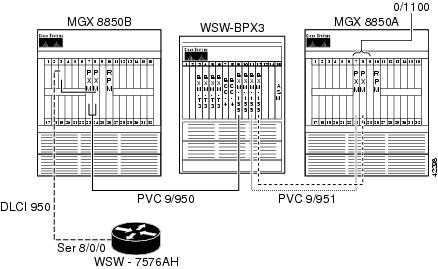
In this example, IP connectivity is established between a Cisco 3620 router and the RPM blade on the MGX 8850. The T1 WAN interface card (WIC) (serial 0/0) on the Cisco 3620 is connected to physical line 1 on the Frame Relay Service Module (FRSM)-8T1 in slot 11 on the MGX 8850. A digital access and cross-connect (DAX) connection is built through the PXM to switch the cells between the FRSM and the RPM switch interface.
Figure 6-4 RPM-to-FRSM-8T1 ATM/Frame Relay SIW DAX Connection
Configuring the FRSM Interface
This example shows how to configure the FRSM interface, enable the physical line, enable a logical port on the line, and adjust the parameters as necessary.
mgx8850a.1.11.FRSM.a > addln 1
mgx8850a.1.11.FRSM.a > dspln 1
LineNum: 1
LineConnectorType: RJ-48
LineType: dsx1ESF
LineEnable: Enabled
LineCoding: dsx1B8ZS
LineLength: 0-131 ft
LineXmtClockSource: LocalTiming
LineLoopbackCommand: NoLoop
LineSendCode: NoCode
LineUsedTimeslotsBitMap: 0x0
LineLoopbackCodeDetection: codeDetectDisabled
LineBertEnable: Disable
The logical port consists of timeslots 1 through 6, and uses Gang of Four Logical Management Interface (LMI) with Enhanced Local Management Interface (ELMI).
Syntax : addport "port_num line_num ds0_speed begin_slot num_slot port_type"
port number -- values ranging from 1-192 are accepted for T1 and 1-248 for E1
line number -- value ranging from 1 to 8
DS0 speed -- 1 for 56K, 2 for 64K
beginning slot -- beginning time slot in 1 base
number of slot -- number of DS0 time slots assigned to
port type -- values 1-3, 1=frame relay, 2=FUNI mode-1a, 3=frForward
mgx8850a.1.11.FRSM.a > addport 10 1 2 1 6 1
Syntax : cnfport "portNum lmiSig asyn ELMI T391 T392 N391 N392 N393"
port number -- values ranging from 1-192 are accepted for T1 and 1-248 for E1
LMI signaling -- (N)one (S)trataLMI au-AnnexAUNI
du-AnnexDUNI an-AnnexANNI dn-AnnexDNNI
asyn UPD/UFS -- (UPD = Update Status, UFS = Unsolicited Full Status)
(n or 1) = both dis, (y or 2) = UPD en, 3 = UFS en, 4 = both en
Enhanced LMI -- (N or n) disable (Y or y) enable
T391 timer -- value ranging from 5 to 30 sec.
T392 timer -- value ranging from 5 to 30 sec.
N391 counter -- value ranging from 1 to 255
N392 counter -- value ranging from 1 to 10
N393 counter -- value ranging from 1 to 10, greater than N392
mgx8850a.1.11.FRSM.a > cnfport 10 S n y
mgx8850a.1.11.FRSM.a > dspport 10
SlotNum: 11
PortLineNum: 1
PortNum: 10
PortRowStatus: Mod
PortDs0Speed: 64k
PortDs0ConfigBitMap(1stDS0): 0x3f(1)
PortEqueueServiceRatio: 1
PortFlagsBetweenFrames: 1
PortSpeed: 384kbps
SignallingProtocolType: StrataLMI
AsynchronousMsgs: UPD_UFS disabled
T391LineIntegrityTimer: 10
T392PollingVerificationTimer: 15
N391FullStatusPollingCounter: 6
N392ErrorThreshold: 3
N393MonitoredEventCount: 4
EnhancedLmi: On
PortState: FailedDuetoSignallingFailure
PortSignallingState: LMI Failure
CLLMEnableStatus: Disable
CLLMxmtStatusTimer: 0
portType: frameRelay
PortIngrPercentUtil: 0
PortEgrPercentUtil: 0
PortOversubscribed: False
PortSvcStatus: Disable
PortSvcInUse: Not In-Use
PortSvcShareLcn: Card-based
PortSvcLcnLow: 0
PortSvcLcnHigh: 0
PortSvcDlciLow: 0
PortSvcDlciHigh: 0
PortDs0UsedLine1: 0x0000003f
PortDs0UsedLine2: 0x00000000
PortDs0UsedLine3: 0x00000000
PortDs0UsedLine4: 0x00000000
PortDs0UsedLine5: 0x00000000
PortDs0UsedLine6: 0x00000000
PortDs0UsedLine7: 0x00000000
PortDs0UsedLine8: 0x00000000
PortNumNextAvailable: 11
Configuring the Router Interface
For the router interface, supply the appropriate physical, data-link, and network layer parameters. Because connectivity will be established through Frame Relay/ATM Service Interworking, use Internet Engineering Task Force (IETF) Frame Relay encapsulation on the interface instead of the default Cisco encapsulation, as shown in the following example.
wsw-3620a#conf t
Enter configuration commands, one per line. End with CNTL/Z.
wsw-3620a(config)#int s 0/0
wsw-3620a(config-if)#service-module T1 clock source line
wsw-3620a(config-if)#service-module T1 framing esf
wsw-3620a(config-if)#service-module T1 linecode b8zs
wsw-3620a(config-if)#service-module T1 timeslots 1-6 speed 64
wsw-3620a(config-if)#encap frame ietf
wsw-3620a(config-if)#frame-relay qos-autosense
wsw-3620a(config)#int s 0/0.110 point
wsw-3620a(config-subif)#frame-relay interface-dlci 110
wsw-3620a(config-fr-dlci)#exit
wsw-3620a(config-subif)#ip address 10.97.110.1 255.255.255.0
wsw-3620a(config-if)#no shut
wsw-3620a(config-if)#^Z
wsw-3620a#
wsw-3620a#sh int s 0/0
Serial0/0 is up, line protocol is up
Hardware is QUICC with integrated T1 CSU/DSU
Description: T1 to MGX8850A FRSM 11.1
MTU 1500 bytes, BW 384 Kbit, DLY 20000 usec,
reliability 255/255, txload 1/255, rxload 1/255
Encapsulation FRAME-RELAY IETF, loopback not set
Keepalive set (10 sec)
Restart-Delay is 4294967 secs
LMI enq sent 30, LMI stat recvd 32, LMI upd recvd 0, DTE LMI up
LMI enq recvd 0, LMI stat sent 0, LMI upd sent 0
LMI DLCI 1023 LMI type is CISCO frame relay DTE
FR SVC disabled, LAPF state down
Broadcast queue 0/64, broadcasts sent/dropped 0/0, interface broadcasts 0
Last input 00:00:03, output 00:00:03, output hang never
Last clearing of "show interface" counters 00:05:11
Input queue: 0/75/0 (size/max/drops); Total output drops: 0
Queueing strategy: weighted fair
Output queue: 0/1000/64/0 (size/max total/threshold/drops)
Conversations 0/1/256 (active/max active/max total)
Reserved Conversations 0/0 (allocated/max allocated)
5 minute input rate 0 bits/sec, 0 packets/sec
5 minute output rate 0 bits/sec, 0 packets/sec
32 packets input, 475 bytes, 0 no buffer
Received 0 broadcasts, 0 runts, 0 giants, 0 throttles
0 input errors, 0 CRC, 0 frame, 0 overrun, 0 ignored, 0 abort
34 packets output, 502 bytes, 0 underruns
0 output errors, 0 collisions, 0 interface resets
0 output buffer failures, 0 output buffers swapped out
1 carrier transitions
DCD=up DSR=up DTR=up RTS=up CTS=up
wsw-3620a#sh fram qos-auto
ELMI information for interface Serial0/0
Connected to switch:FRSM-8T1 Platform:AXIS Vendor:Cisco
(Time elapsed since last update 00:00:50)
Configuring the RPM Interface
Set the traffic shaping for vbr-nrt at 128000 bps peak cell rate (PCR), 64000 bps minimum cell rate (MCR), and 38 cell burst, as shown in the following example.
wsw-8850a-rpm#conf t
Enter configuration commands, one per line. End with CNTL/Z.
wsw-8850a-rpm(config)#int switch 1.110 point
wsw-8850a-rpm(config)#ip address 10.97.110.2 255.255.255.0
wsw-8850a-rpm(config-subif)#pvc 3620a-frame 0/1100
wsw-8850a-rpm(config-if-atm-)#vbr-nrt 128 64 38
wsw-8850a-rpm(config)#^Z
Building the RPM Slave Connection
Build the RPM Slave connection, as shown in the following example.
wsw-8850a-rpm#conf t
Enter configuration commands, one per line. End with CNTL/Z.
wsw-8850a-rpm(config)#addcon vcc switch 1.110 1100 rname mgx8850a rslot 11 10 0 110
wsw-8850a-rpm(config)#^Z
wsw-8850a-rpm#show switch connections
Synch
lVpi lVci remoteNodeName remoteSlot remoteIf rVpi rVci Status
0 1100 mgx8850a 11 10 0 110 inSynch
wsw-8850a-rpm#show switch connections vcc 1100
----------------------------------------------------------
Local Sub-Interface : 110
Local VPI : 0
Local VCI : 1100
Remote Node Name : mgx8850a
Remote Slot : 11
Remote Interface : 10
Remote VPI : 0
Remote VCI : 110
Routing Priority : 0
Max Cost : 255
Restricted Trunk Type : none
Percent Util : 100
Remote PCR : 302
Remote MCR : 151
Remote Percent Util : 100
Connection Master : Remote
Synch Status : inSynch
Building the FRSM-8T1 Master Connection
The following example specifies that Frame Relay/ATM Service Interworking will be used. The conversion from Frame Relay to ATM and vice versa occurs on the FRSM. Once the connection is configured, adjust policing on the channel by entering the cnfchanpol command.
Syntax : addcon "port dlci cir chan_type [CAC] [Controller_Type] [mastership]
[remoteConnId]"
              port number -- values ranging from 1-192 are accepted for T1 and 1-248 for
E1
DLCI number -- value ranging from 0 to 1023
committed rate -- 0-1536000 bps for T1; 0-2048000 bps for E1
              chan type -- values 1-5, 1=NIW 2=SIW-transparent 3=SIW-xlation 4=FUNI
5=frForward
              CAC -- Connection Admission Control (optional); 1 = enable, 2 = disable
(default)
Controller Type (Signaling) -- 1: PVC (PAR) - Default , 2: SPVC (PNNI)
mastership -- 1 for master, 2 for slave
Remote end Connection ID -- Format :
NodeName.SlotNo.PortNo.Dlci OR
NodeName.SlotNo.PortNo.ControllerId.Dlci for FR end point OR
NodeName.SlotNo.PortNo.VPI.VCI for ATM end point.
Where controller ID can be 1(PAR),2(PNNI),3(TAG)
mgx8850a.1.11.FRSM.a > addcon 10 110 64000 3 2 1 1 mgx8850a.10.1.0.1100
mgx8850a.1.11.FRSM.a > dspcons
Line ConnId Chan EQ I/EQDepth I/EQDEThre I/EECNThre Fst/ DE Type Alarm
---- --------------------- ---- -- ----- ----- ----- ----- ----- ----- --- --- ----- -----
1 mgx8850a.11.10.0.110 27 2 65535/65535 32767/32767 6553/6553 Dis/Dis SIW-X No
Syntax : cnfchanpol "chan_num cir bc be ibs detag egrat"
channel number -- value ranging from 16 to 1015
committed rate -- 0-1536000 bps for T1, 0-2048000 bps for E1
committed burst -- 0-65535 in bytes
excess burst -- 0-65535 in bytes
initial burst -- 0-65535 in bytes. Less or equal to Bc
DE bit tagging -- 1 for enable, 2 for disable
Egress Service Rate -- 0-1536000 bps for T1, 0-2048000 bps for E1
mgx8850a.1.11.FRSM.a > cnfchanpol 27 64000 8000 2000 2000 1 384000
mgx8850a.1.11.FRSM.a > dspchan 27
ChanNum: 27
ChanRowStatus: Mod
ChanPortNum: 10
ChanDLCI: 110
EgressQSelect: 2
IngressQDepth: 65535
IngressQDEThresh: 32767
IngressQECNThresh: 6553
EgressQDepth: 65535
EgressQDEThresh: 32767
EgressQECNThresh: 6553
DETaggingEnable: Enabled
CIR: 64000
Bc: 8000
Be: 2000
IBS: 2000
ForeSightEnable: Disabled
QIR: 166
MIR: 166
PIR: 166
ChanLocalRemoteLpbkState: Disabled
ChanTestType: TestOff
ChanTestState: NotInProgress
ChanRTDresult: 65535 ms
ChanType: SIW-Xlat
ChanFECNmap: setEFCIzero
ChanDEtoCLPmap: mapCLP
ChanCLPtoDEmap: mapDE
ChanFrConnType: PVC
ChanIngrPercentUtil: 100
ChanEgrPercentUtil: 100
ChanEgrSrvRate: 384000
ChanOvrSubOvrRide: Enabled
ChanLocalVpi: 0
ChanLocalVci: 110
ChanLocalNSAP: 6d6778383835306100000000000000000b000a00
ChanRemoteVpi: 0
ChanRemoteVci: 1100
ChanRemoteNSAP: 6d6778383835306100000000000000000a000100
ChanMastership: Master
ChanVpcFlag: Vcc
ChanConnServiceType: ATFR
ChanRoutingPriority: 1
ChanMaxCost: 255
ChanRestrictTrunkType: No Restriction
ChanConnPCR: 166
ChanConnMCR: 166
ChanConnPercentUti: 100
mgx8850a.1.11.FRSM.a > cc 7
(session redirected)
mgx8850a.1.7.PXM.a > dspcons
This End Node Name Other End Status
10.1.0.1100 mgx8850a 11.10.0.110 OK
11.10.0.110 mgx8850a 10.1.0.1100 OK
Verifying the Configuration
Enter the ping command to verify that you have a good connection.
wsw-3620a#ping 10.97.110.2
Type escape sequence to abort.
Sending 5, 100-byte ICMP Echos to 10.97.110.2, timeout is 2 seconds:
!!!!!
Success rate is 100 percent (5/5), round-trip min/avg/max = 24/24/28 ms
Note Because the FRSM defaults to no signaling and the routers default to Gang of Four (also known as Cisco LMI), the two devices will not communicate until they both share the same protocol.
Note You must have encap frame ietf configured on the router before you can have Frame Relay/ATM Service Interworking.
Note The VPI on the RPM switch PVC is always 0.
Note You must match the shaping and policing parameters to prevent data loss.
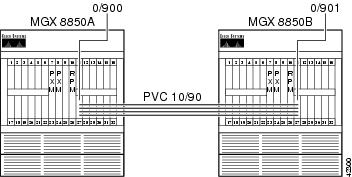
RPM-to-AUSM-8T1 IMA DAX Connection
For this connection, use the ATM user service module (AUSM)-8T1 card as an Inverse Multiplexing for ATM (IMA) trunk to another AUSM-8T1 card. A connection is built from the RPM on one
MGX 8850 to the RPM on the other MGX 8850 across this IMA trunk.
Figure 6-5 RPM-to-AUSM-8T1 IMA DAX Connection
Configuring the AUSM Interface
The following example shows an AUSM interface configuration.
/** MGX8850A **/
mgx8850a.1.27.AUSMB8.a > addln 5
mgx8850a.1.27.AUSMB8.a > addln 6
mgx8850a.1.27.AUSMB8.a > addln 7
mgx8850a.1.27.AUSMB8.a > addln 8
Syntax : cnfln "line_num line_code line_len clk_src [E1-signaling]"
              line number -- values ranging from 1-8 are accepted, for AUSM-8T1/8E1,
IMATM-T3T1/E3E1
line code -- 2 for B8ZS (T1),
3 for HDB3 (E1)
line length -- 10-15 for T1, 8 for E1 with SMB module,
9 for E1 with RJ48 line module
clock source -- clock source : 1 for loop clock, 2 for local clock
E1 signaling -- CCS: CCS, no CRC; CCS_CRC: CCS, with CRC;
CLEAR: Clear E1
mgx8850a.1.27.AUSMB8.a > cnfln 5 2 10 2
mgx8850a.1.27.AUSMB8.a > cnfln 6 2 10 2
mgx8850a.1.27.AUSMB8.a > cnfln 7 2 10 2
mgx8850a.1.27.AUSMB8.a > cnfln 8 2 10 2
Syntax : addimagrp (or addaimgrp) "group_num port_type list_of_lines minNumLinks"
IMA group number -- value ranging from 1 to 8
Port Type -- 1 - UNI, 2 - NNI
List of links -- list of links separated by dots
              minimum no of links -- minimum number of links for the group formation
:value ranging from 1 to 8
mgx8850a.1.27.AUSMB8.a > addimagrp 5 1 5.6.7.8 2
Syntax : cnfimagrp (or cnfaimgrp) "grp max_diff_delay min_num_links"
IMA group number -- value ranging from 1 to 8
              Max diff delay -- value between 0 and 275 for AUSM 8T1; btwn 0 and 200 for
AUSM 8E1
              minimum no of links -- minimum number of links for the group formation
:value ranging from 1 to 8
mgx8850a.1.27.AUSMB8.a > cnfimagrp 5 150 2
/** MGX8850B **/
mgx8850b.1.27.AUSMB8.a > addln 5
mgx8850b.1.27.AUSMB8.a > addln 6
mgx8850b.1.27.AUSMB8.a > addln 7
mgx8850b.1.27.AUSMB8.a > addln 8
mgx8850b.1.27.AUSMB8.a > cnfln 5 2 10 2
mgx8850b.1.27.AUSMB8.a > cnfln 6 2 10 2
mgx8850b.1.27.AUSMB8.a > cnfln 7 2 10 2
mgx8850b.1.27.AUSMB8.a > cnfln 8 2 10 2
mgx8850b.1.27.AUSMB8.a > addimagrp 6 1 5.6.7.8 2
mgx8850b.1.27.AUSMB8.a > cnfimagrp 6 150 2
mgx8850b.1.27.AUSMB8.a > dspimagrp 6
IMA Group number : 6
Port type : UNI
Lines configured : 5.6.7.8
Enable : Modify
IMA Port state : Active
IMA Group Ne state : operational
PortSpeed (cells/sec) : 14364
GroupTxAvailCellRate (cells/sec) : 14364
ImaGroupTxFrameLength(cells) : 128
LcpDelayTolerance (IMA frames) : 1
ReadPtrWrPtrDiff (cells) : 4
Minimun number of links : 2
MaxTolerableDiffDelay (msec) : 150
Lines Present : 5.6.7.8
ImaGroupRxImaId : 0x4
ImaGroupTxImaId : 0x5
Observed Diff delay (msec) : 0
Clock Mode : CTC
GroupAlpha : 2
GroupBeta : 2
GroupGamma : 1
GroupConfiguration : 1
IMAGrp Failure status : No Failure
Timing reference link : 5
Configuring the Router Interface
The following example shows a router interface configuration.
/** WSW-8850A-RPM **/
wsw-8850a-rpm#conf t
Enter configuration commands, one per line. End with CNTL/Z.
wsw-8850a-rpm(config)#int sw 1.900 p
wsw-8850a-rpm(config-subif)#ip address 10.97.90.1 255.255.255.0
wsw-8850a-rpm(config-subif)#pvc RPM-IMA_Trunk 0/900
wsw-8850a-rpm(config-if-atm-)#abr 96 64
wsw-8850a-rpm(config-if-atm-)#encap aal5snap
wsw-8850a-rpm(config-if-atm-)#^Z
/** WSW-8850B-RPM **/
wsw-8850b-rpm#conf t
Enter configuration commands, one per line. End with CNTL/Z.
wsw-8850b-rpm(config)#int sw 1.901 p
wsw-8850b-rpm(config-subif)#ip addr 10.97.90.2 255.255.255.0
wsw-8850b-rpm(config-subif)#pvc RPM-IMA_TRUNK 0/901
wsw-8850b-rpm(config-if-atm-)#abr 96 64
wsw-8850b-rpm(config-if-atm-)#encap aal5snap
wsw-8850b-rpm(config-if-atm-)#^Z
Building the RPM-to-AUSM-IMA Slave Connection
The following example shows how to build the RPM to AUSM-IMA slave connection.
/** WSW-8850A-RPM **/
wsw-8850a-rpm#conf t
Enter configuration commands, one per line. End with CNTL/Z.
wsw-8850a-rpm(config)#addcon vcc switch 1.900 900 rname mgx8850a rslot 27 5 10 90
wsw-8850a-rpm(config)#^Z
wsw-8850a-rpm#sh sw conn vcc 900
----------------------------------------------------------
Local Sub-Interface : 900
Local VPI : 0
Local VCI : 900
Remote Node Name : mgx8850a
Remote Slot : 27
Remote Interface : 5
Remote VPI : 10
Remote VCI : 90
Routing Priority : 0
Max Cost : 255
Restricted Trunk Type : none
Percent Util : 100
Remote PCR : 227
Remote MCR : 151
Remote Percent Util : 100
Connection Master : Remote
Synch Status : inSynch
/** WSW-8850B-RPM **/
wsw-8850b-rpm#conf t
Enter configuration commands, one per line. End with CNTL/Z.
wsw-8850b-rpm(config)#addcon vcc switch 1.901 901 rname mgx8850b rslot 27 6 10 90
wsw-8850b-rpm(config)#^Z
wsw-8850b-rpm#sh sw conn vcc 901
----------------------------------------------------------
Local Sub-Interface : 901
Local VPI : 0
Local VCI : 901
Remote Node Name : mgx8850b
Remote Slot : 27
Remote Interface : 6
Remote VPI : 10
Remote VCI : 90
Routing Priority : 0
Max Cost : 255
Restricted Trunk Type : none
Percent Util : 100
Remote PCR : 227
Remote MCR : 151
Remote Percent Util : 100
Connection Master : Remote
Synch Status : inSynch
Building the AUSM-IMA-to-AUSM-IMA Trunk Connection
The following example shows how to build the AUSM-IMA to AUSM-IMA trunk connection.
/** MGX8850A **/
     Syntax : addcon "port_num vpi vci conn_type service_type [Controller_Type]
[mastership] [remoteConnId] "
port number -- values ranging from 1-8
Channel VPI -- Virtual Path Identifier: 0 - 255
Channel VCI -- Virtual Channel Identifier: 0 - 65535 for VCC, * for VPC
Connection Type -- Connection Type : 0 - VCC , non zero - Local
VP Id of the VPC (1 to 1000)
Service Type -- Service Type: 1 - CBR, 2 - VBR, 3 - ABR, 4 - UBR
Controller Type (Signaling) -- 1: PVC (PAR) - Default , 2: SPVC (PNNI)
Mastership -- 1 for master, 2 for slave Default:Slave
Remote end Connection ID -- Format : NodeName.SlotNo.PortNo.ExternalConnId
mgx8850a.1.27.AUSMB8.a > addcon 5 10 90 0 3 1 1 mgx8850a.10.1.0.900
Syntax : cnfupcabr "Port.VPI.VCI enable pcr[0+1] cdvt[0+1] scr scr_police
mbs IngPcUtil EgSrvRate EgPcUtil clp_tag "
Port.VPI.VCI -- A unique Port.VPI.VCI identifying a connection
Enable/Disable -- UPC : 1 - Disable, 2 - Enable
PeakCellRate -- PCR [0+1]: 10-PortRate(T1-3622,E1-4528,clearE1-4830),
For IMA,T1-3591,E1-4490,clrE1-4789, multiply rate by #links
CDVT[0+1] -- Cell Delay Variation [0+1]: 1 - 250000 micro_secs
SCR -- Sustained Cell Rate:10-PortRate(T1-3622,E1-4528,clearE1- 4830),
For IMA,T1-3591,E1-4490,ClrE1-4789, multiply rate by #links
SCR Policing -- 1 - CLP[0] Cells, 2 - CLP[0+1] Cells, 3 - No SCR Policing
Maximum Burst -- 1 - 5000 cells
IngPcUtil -- Ingress percentage util: 1 to 127. 0 for default
EgSrvRate -- Egress service rate:1-PortRate(T1-3622,E1-4528,clearE1-4830)
For IMA,T1-3591,E1-4490,clrE1-4789, multiply rate by #links.
EgPcUtil -- Egress percentage util: 1 to 127. 0 for default
Clp Tagging -- CLP TAG Enable : 1 - Disable, 2 - Enable
mgx8850a.1.27.AUSMB8.a > cnfupcabr 5.10.90 2 227 1000 151 2 38 0 227 0 1
/** MGX8850B **/
mgx8850b.1.27.AUSMB8.a > addcon 6 10 90 0 3 1 1 mgx8850b.10.1.0.901
mgx8850b.1.27.AUSMB8.a > cnfupcabr 6.10.90 2 227 1000 151 2 38 0 227 0 1
Verifying the Configuration
The following example shows a ping from RPM to RPM. In this example, more than 15 cells have gone out. Because this is an available bit rate (ABR) connection, Resource Management cells will be present on the link.
/** WSW-8850A-RPM **/
wsw-8850a-rpm#ping 10.97.90.2
Type escape sequence to abort.
Sending 5, 100-byte ICMP Echos to 10.97.90.2, timeout is 2 seconds:
!!!!!
Success rate is 100 percent (5/5), round-trip min/avg/max = 20/25/32 ms
/** MGX8850A **/
mgx8850a.1.27.AUSMB8.a > dspchancnt 5.10.90
ChanNum: 18
ChannelState: Active
ChannelEgressRcvState: Normal
ChannelEgressXmitState: Normal
ChannelIngressRcvState: Normal
ChannelIngressXmtState: Normal
ChanInServiceSeconds: 534
ChanIngressPeakQDepth(cells): 1
ChanIngressReceiveCells: 17
ChanIngressClpSetCells: 0
ChanIngressEfciSetRcvCells: 0
ChanIngressEfciSetXmtCells: 0
ChanIngressUpcClpSetCells: 0
ChanIngressQfullDiscardCells: 0
ChanIngressClpSetDiscardCells: 0
ChanIngressTransmitCells: 17
ChanShelfAlarmDiscardCells: 0
ChanEarlyPacketDiscardCells: 0
ChanPartialPacketDiscardCells: 0
ChanIngressTransmitAAL5Frames: 5
ChanIngressReceiveCellRate(cells/sec): 0
ChanIngressReceiveUtilization(percentage): 0
ChanIngressTransmitCellRate(cells/sec): 0
ChanIngressTransmitUtilization(percentage): 0
ChanEgressReceiveCellRate(cells/sec): 0
ChanEgressReceiveUtilization(percentage): 0
ChanEgressPortQFullDiscardCells: 0
ChanEgressPortQClpThreshDiscardCells: 0
ChanTransmitFifoFullCount (per card): 0
/** MGX8850B **/
mgx8850b.1.27.AUSMB8.a > dspchancnt 6.10.90
ChanNum: 27
ChannelState: Active
ChannelEgressRcvState: Normal
ChannelEgressXmitState: Normal
ChannelIngressRcvState: Normal
ChannelIngressXmtState: Normal
ChanInServiceSeconds: 184
ChanIngressPeakQDepth(cells): 1
ChanIngressReceiveCells: 17
ChanIngressClpSetCells: 0
ChanIngressEfciSetRcvCells: 0
ChanIngressEfciSetXmtCells: 0
ChanIngressUpcClpSetCells: 0
ChanIngressQfullDiscardCells: 0
ChanIngressClpSetDiscardCells: 0
ChanIngressTransmitCells: 17
ChanShelfAlarmDiscardCells: 0
ChanEarlyPacketDiscardCells: 0
ChanPartialPacketDiscardCells: 0
ChanIngressTransmitAAL5Frames: 5
ChanIngressReceiveCellRate(cells/sec): 0
ChanIngressReceiveUtilization(percentage): 0
ChanIngressTransmitCellRate(cells/sec): 0
ChanIngressTransmitUtilization(percentage): 0
ChanEgressReceiveCellRate(cells/sec): 0
ChanEgressReceiveUtilization(percentage): 0
ChanEgressPortQFullDiscardCells: 0
ChanEgressPortQClpThreshDiscardCells: 0
ChanTransmitFifoFullCount (per card): 0
/** WSW-8850B-RPM **/
wsw-8850b-rpm#deb ip pack det
IP packet debugging is on (detailed)
     *Jan  4 21:26:45.636: IP: s=10.97.90.1 (Switch1.901), d=10.97.90.2 (Switch1.901), len
100, rcvd 3
*Jan 4 21:26:45.636: ICMP TYPE=8, code=0
*Jan 4 21:26:45.636:
     *Jan  4 21:26:45.636: IP: s=10.97.90.2 (local), d=10.97.90.1 (Switch1.901), len 100,
sending
*Jan 4 21:26:45.636: ICMP TYPE=0, code=0
*Jan 4 21:26:45.636:
     *Jan  4 21:26:45.660: IP: s=10.97.90.1 (Switch1.901), d=10.97.90.2 (Switch1.901), len
100, rcvd 3
*Jan 4 21:26:45.660: ICMP TYPE=8, code=0
*Jan 4 21:26:45.660:
     *Jan  4 21:26:45.660: IP: s=10.97.90.2 (local), d=10.97.90.1 (Switch1.901), len 100,
sending
*Jan 4 21:26:45.660: ICMP TYPE=0, code=0
*Jan 4 21:26:45.660:
Note The VPI on the RPM switch PVC is always 0.
Note Remember to set the usage parameter control (UPC) on all AUSM connections or the data might not be correctly policed.
RPM-to-FRSM-2CT3 ATM/PPP DAX Connection
In the following example, a Cisco 7576 router transmits IPX datagrams out of a channelized DS3 port adapter using PPP encapsulation. The PPP frames are received on an FRSM-2CT3 service module that uses a frame forwarding connection to convert the frames to ATM cells. The cells are received by the RPM on the switch interface, and the datagrams are reintegrated through the aal5ciscoppp encapsulation.
Figure 6-6 RPM-to-FRSM-2CT3 ATM/PPP DAX Connection
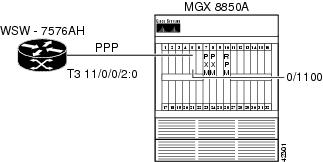
Configuring the FRSM-2CT3 Interface
The following example shows how to configure the FRSM-2CT3 interface.
mgx8850b.1.5.VHS2CT3.a > addln 1
Syntax : cnfln "line_num line_type clk_src "
DS1 line number -- value range from 1 to 56
DS1 line type -- 1 = dsx1ESF 2 = dsx1D4
clock source -- clock source : 1 for loop clock, 2 for local clock
mgx8850b.1.5.VHS2CT3.a > cnfln 2 1 2
Syntax : addport "port_num line_num ds0_speed begin_slot num_slot port_ type"
port number -- values ranging from 1-2( 2T3/2E3/HS2), 1-256 (2CT3)
port line number -- value ranging from 1 to 56
DS0 speed -- 1 for 56K, 2 for 64K
beginning slot -- beginning time slot in 1 base
number of slot -- number of DS0 time slots assigned to
port type -- values 1-3, 1=frame relay, 2=FUNI mode-1a, 3=frForward
mgx8850b.1.5.VHS2CT3.a > addport 20 2 2 1 12 3
Configuring the RPM Interface
The following example shows how to configure the RPM interface.
wsw-8850b-rpm#conf t
Enter configuration commands, one per line. End with CNTL/Z.
wsw-8850b-rpm(config)#ipx routing
wsw-8850b-rpm(config)#ipx internal DD0000
wsw-8850b-rpm(config)#username wsw-7576ah pass cisco
wsw-8850b-rpm(config)#int virtual-Template 1
wsw-8850b-rpm(config-if)#ipx ipxwan
wsw-8850b-rpm(config-if)#ppp auth chap
wsw-8850b-rpm(config-if)#int sw 1.1100 p
wsw-8850b-rpm(config-subif)#pvc PPP-ATM-FRSM 0/1100
wsw-8850b-rpm(config-if-atm-)#encap aal5ciscoppp virtual-Template 1
wsw-8850b-rpm(config-if-atm-)#vbr-nrt 768 512 600
wsw-8850b-rpm(config-if-atm-)#^Z
Configuring the Router Interface
The following example shows how to configure the router interface.
wss-7576ah#conf t
Enter configuration commands, one per line. End with CNTL/Z.
wss-7576ah(config)#ipx routing
wss-7576ah(config)#ipx internal AB0000
wss-7576ah(config)#controller T3 11/0/0
wss-7576ah(config-controller)#t1 2 channel-group 0 timeslots 1-12 speed 64
wss-7576ah(config-controller)#t1 2 fram esf
wss-7576ah(config-controller)#t1 2 clock source line
wss-7576ah(config-controller)#int s 11/0/0/2:0
wss-7576ah(config-if)#encap ppp
wss-7576ah(config-if)#ipx ipxwan
wss-7576ah(config-if)#ppp auth chap
wss-7576ah(config-if)#username wsw-8850b-rpm pass cisco
wss-7576ah(config)#^Z
Building the FRSM-2CT3 Slave Connection
The following example shows how to build the FRSM-2CT3 slave connection.
Syntax : addcon "port dlci cir chan_type serv_type [CAC] [Controller_Type] [mastership]
[remoteConnId]"
port number -- values ranging from 1-2( 2T3/2E3/HS2), 1-256 (2CT3)
DLCI number -- value ranging from 0-1023(2CT3/2T3/2E3/HS2)
committed rate -- 0-1536000 bps for 2CT3; 0-44210000 bps for 2T3;
0-34010000 bps for 2E3 , 0-51840000 bps for HS2
chan type -- values 1-5, 1=NIW 2=SIW-transparent 3=SIW-xlation
4=FUNI 5=frForward
Egress service type -- 1 = highpriorityQ 2 = rtVBRQ
3 = nrtVBRQ 4 = aBRQ
5 = uBRQ
              CAC -- Connection Admission Control (optional); 1 = enable, 2 = disable
(default)
Controller Type (Signaling) -- 1: PVC (PAR) - Default , 2: SPVC (PNNI)
mastership -- 1 for master, 2 for slave
Remote end Connection ID -- Format :
NodeName.SlotNo.PortNo.Dlci OR
NodeName.SlotNo.PortNo.ControllerId.Dlci for FR end point OR
NodeName.SlotNo.PortNo.VPI.VCI for ATM end point.
Where controller ID can be 1(PAR),2(PNNI),3(TAG)
mgx8850b.1.5.VHS2CT3.a > addcon 20 200 512000 5 3 2 1 2
Local Connection Id is : mgx8850b.5.20.0.1000
Building the RPM Connection
The following example shows how to build the RPM connection.
wsw-8850b-rpm#conf t
Enter configuration commands, one per line. End with CNTL/Z.
wsw-8850b-rpm(config)#addcon vcc sw 1.1100 1100 rname mgx8850b rslot 5 20 0 1000 master
local
wsw-8850b-rpm(config-if-atm-)#^Z
Verifying the Configuration
Enter the show ipx route command to view the contents of the IPX routing table and then enter the ping command to verify that you have a good connection, as shown in the following example.
wsw-8850b-rpm#sh ipx route
Codes: C - Connected primary network, c - Connected secondary network
S - Static, F - Floating static, L - Local (internal), W - IPXWAN
R - RIP, E - EIGRP, N - NLSP, X - External, A - Aggregate
s - seconds, u - uses, U - Per-user static
2 Total IPX routes. Up to 1 parallel paths and 16 hops allowed.
No default route known.
L DD0000 is the internal network
R AB0000 [07/01] via 0.00ab.0000.0000, 27s, Vi1
wsw-8850b-rpm#ping ipx ab0000.0000.0000.0001
Type escape sequence to abort.
Sending 5, 100-byte IPXcisco Echoes to AB0000.0000.0000.0001, timeout is 2 seconds:
!!!!!
Success rate is 100 percent (5/5), round-trip min/avg/max = 4/5/8 ms
Note The VPI on the RPM switch PVC is always 0.
Note Virtual Template/Interface and the aal5ciscoppp encap command are necessary for this configuration.
RPM-to-AUSM-8T1 ATM-IMA DAX Connection
The example below shows an IP connection between an RPM blade and a Cisco 7200 (see Figure 6-7). The Cisco 7200 hooks into the MGX 8850 through an IMA Port Adapter (PA) connected through four T1 lines to the AUSM-8T1 card in slot 28.
Figure 6-7 RPM-to-AUSM-8T1 ATM-IMA DAX Connection
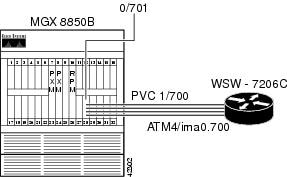
Configuring the AUSM Interface
The following example shows how to configure the AUSM interface.
mgx8850b.1.28.AUSMB8.a > addln 5
mgx8850b.1.28.AUSMB8.a > addln 6
mgx8850b.1.28.AUSMB8.a > addln 7
mgx8850b.1.28.AUSMB8.a > addln 8
Syntax : cnfln "line_num line_code line_len clk_src [E1-signaling]"
              line number -- values ranging from 1-8 are accepted, for AUSM-8T1/8E1,
IMATM-T3T1/E3E1
line code -- 2 for B8ZS (T1),
3 for HDB3 (E1)
line length -- 10-15 for T1, 8 for E1 with SMB module,
9 for E1 with RJ48 line module
clock source -- clock source : 1 for loop clock, 2 for local clock
E1 signaling -- CCS: CCS, no CRC; CCS_CRC: CCS, with CRC;
CLEAR: Clear E1
mgx8850b.1.28.AUSMB8.a > cnfln 5 2 10 2
mgx8850b.1.28.AUSMB8.a > cnfln 6 2 10 2
mgx8850b.1.28.AUSMB8.a > cnfln 7 2 10 2
mgx8850b.1.28.AUSMB8.a > cnfln 8 2 10 2
Syntax : addimagrp (or addaimgrp) "group_num port_type list_of_lines minNumLinks"
IMA group number -- value ranging from 1 to 8
Port Type -- 1 - UNI, 2 - NNI
List of links -- list of links separated by dots
              minimum no of links -- minimum number of links for the group formation
:value ranging from 1 to 8
mgx8850b.1.28.AUSMB8.a > addimagrp 1 1 5.6.7.8 2
mgx8850b.1.28.AUSMB8.a > dspaimgrp 1
IMA Group number : 1
Port type : UNI
Lines configured : 5.6.7.8
Enable : Enabled
IMA Port state : Active
IMA Group Ne state : operational
PortSpeed (cells/sec) : 14364
GroupTxAvailCellRate (cells/sec) : 14364
ImaGroupTxFrameLength(cells) : 128
LcpDelayTolerance (IMA frames) : 1
ReadPtrWrPtrDiff (cells) : 4
Minimun number of links : 2
MaxTolerableDiffDelay (msec) : 275
Lines Present : 5.6.7.8
ImaGroupRxImaId : 0x0
ImaGroupTxImaId : 0x0
Observed Diff delay (msec) : 0
Clock Mode : CTC
GroupAlpha : 2
GroupBeta : 2
GroupGamma : 1
GroupConfiguration : 1
IMAGrp Failure status : No Failure
Timing reference link : 5
Configuring the Cisco 7200 Router Interface
The following example shows how configure the layer 1 parameters for the IMA bundle on the Cisco 7200, create the IMA interface, and add the layer 3 addressing.
wsw-7206c#conf t
Enter configuration commands, one per line. End with CNTL/Z.
wsw-7206c(config)#int atm 4/0
wsw-7206c(config-if)#fram esf
wsw-7206c(config-if)#line b8
wsw-7206c(config-if)#clock source line
wsw-7206c(config-if)#lbo short 133
wsw-7206c(config-if)#ima 0
wsw-7206c(config-if)#int atm 4/1
wsw-7206c(config-if)#fram esf
wsw-7206c(config-if)#line b8
wsw-7206c(config-if)#clock source line
wsw-7206c(config-if)#lbo short 133
wsw-7206c(config-if)#ima 0
wsw-7206c(config-if)#int atm 4/2
wsw-7206c(config-if)#fram esf
wsw-7206c(config-if)#line b8
wsw-7206c(config-if)#clock source line
wsw-7206c(config-if)#lbo short 133
wsw-7206c(config-if)#ima 0
wsw-7206c(config-if)#int atm 4/3
wsw-7206c(config-if)#fram esf
wsw-7206c(config-if)#line b8
wsw-7206c(config-if)#clock source line
wsw-7206c(config-if)#lbo short 133
wsw-7206c(config-if)#ima 0
wsw-7206c(config-if)#int atm 4/ima0
wsw-7206c(config-if)#ima active-links-minimum 2
wsw-7206c(config-if)#ima clock comm 0
wsw-7206c(config-if)#ima diff 125
wsw-7206c(config-if)#int atm4/ima0.700 p
wsw-7206c(config-subif)#ip address 10.97.70.1 255.255.255.0
wsw-7206c(config-subif)#pvc WSW-8850B-RPM 1/700
wsw-7206c(config-if-atm-vc)#encap aal5snap
wsw-7206c(config-if-atm-vc)#vbr-nrt 128 96 38
wsw-7206c(config-if-atm-vc)#int atm 4/0
wsw-7206c(config-if)#no shut
wsw-7206c(config-if)#int atm 4/1
wsw-7206c(config-if)#no shut
wsw-7206c(config-if)#int atm 4/2
wsw-7206c(config-if)#no shut
wsw-7206c(config-if)#int atm 4/3
wsw-7206c(config-if)#no shut
wsw-7206c(config-if)#^Z
Configuring the RPM Interface
The following example shows how to configure the RPM interface.
wsw-8850b-rpm#conf t
Enter configuration commands, one per line. End with CNTL/Z.
wsw-8850b-rpm(config)#int sw 1.701 p
wsw-8850b-rpm(config-subif)#ip addr 10.97.70.2 255.255.255.0
wsw-8850b-rpm(config-subif)#PVC WSW-7206C-IMA 0/701
wsw-8850b-rpm(config-if-atm-)#encapsulation aal5snap
wsw-8850b-rpm(config-if-atm-)#vbr-nrt 128 96 38
wsw-8850b-rpm(config-if-atm-)#exit
wsw-8850b-rpm(config-subif)#^Z
Building the AUSM Slave Connection
The following example shows how to build the AUSM slave connection.
Syntax : addcon "port_num vpi vci conn_type service_type [Controller_Type] [mastership]
[remoteConnId]
port number -- values ranging from 1-8
Channel VPI -- Virtual Path Identifier: 0 - 255
Channel VCI -- Virtual Channel Identifier: 0 - 65535 for VCC, * for VPC
Connection Type -- Connection Type : 0 - VCC , non zero - Local
VP Id of the VPC (1 to 1000)
Service Type -- Service Type: 1 - CBR, 2 - VBR, 3 - ABR, 4 - UBR
Controller Type (Signaling) -- 1: PVC (PAR) - Default , 2: SPVC (PNNI)
Mastership -- 1 for master, 2 for slave Default:Slave
Remote end Connection ID -- Format : NodeName.SlotNo.PortNo.ExternalConnId
mgx8850b.1.28.AUSMB8.a > addcon 1 1 700 0 2 1 2
Local Connection Id is : mgx8850b.28.1.1.700
Syntax : cnfupcvbr "Port.VPI.VCI enable pcr[0+1] cdvt[0+1] scr scr_police
mbs IngPcUtil EgSrvRate EgPcUtil clp_tag "
Port.VPI.VCI -- A unique Port.VPI.VCI identifying a connection
Enable/Disable -- UPC : 1 - Disable, 2 - Enable
PeakCellRate -- PCR [0+1]: 10-PortRate(T1-3622,E1-4528,clearE1-4830),
For IMA,T1-3591,E1-4490,clrE1-4789, multiply rate by #links
CDVT[0+1] -- Cell Delay Variation [0+1]: 1 - 250000 micro_secs
SCR -- Sustained Cell Rate:10-PortRate(T1-3622,E1-4528,clearE1- 4830),
For IMA,T1-3591,E1-4490,ClrE1-4789, multiply rate by #links
SCR Policing -- 1 - CLP[0] Cells, 2 - CLP[0+1] Cells, 3 - No SCR Policing
Maximum Burst -- 1 - 5000 cells
IngPcUtil -- Ingress percentage util: 1 to 127. 0 for default
EgSrvRate -- Egress service rate:1-PortRate(T1-3622,E1-4528,clearE1-4830)
For IMA,T1-3591,E1-4490,clrE1-4789, multiply rate by #links.
EgPcUtil -- Egress percentage util: 1 to 127. 0 for default
Clp Tagging -- CLP TAG Enable : 1 - Disable, 2 - Enable
mgx8850b.1.28.AUSMB8.a > cnfupcvbr 1.1.700 2 302 1000 226 2 38 0 302 0 1
Now build the RPM Master connection, as shown in the following example.
wsw-8850b-rpm#conf t
Enter configuration commands, one per line. End with CNTL/Z.
     wsw-8850b-rpm(config)#addcon vcc sw 1.701 701 rname mgx8850b rslot 28 1 1 700 master
local
wsw-8850b-rpm(config)#^Z
Verifying the Configuration
Enter the ping command to verify that you have a good connection.
wsw-8850b-rpm#ping 10.97.70.1
Type escape sequence to abort.
Sending 5, 100-byte ICMP Echos to 10.97.70.1, timeout is 2 seconds:
!!!!!
Success rate is 100 percent (5/5), round-trip min/avg/max = 16/18/20 ms
Note Remember to set the UPC parameters on all AUSM connections or your data will most likely not be policed to your needs.
Note The VPI on the RPM switch PVC is always 0.
RPM-to-AUSM-8T1/B ATM/ATM DAX Connection
Establish IP connectivity between a Cisco MC3810 router and the RPM blade on the MGX 8850. In the following example, we have configured the Multi-Flex Trunk (MFT) on the 3810 (Controller T1 0) for ATM (logical interface ATM 0). The MFT is connected to the physical line 1 on the AUSM-8T1/B in slot 27 on the MGX 8850. A DAX connection is built through the PXM to switch cells between the AUSM and the RPM switch interface.
Figure 6-8 RPM-to-AUSM-8T1/B ATM/ATM DAX Connection
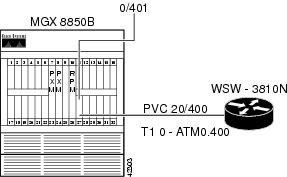
Configuring the AUSM Interface
The following example shows how to configure the AUSM interface. To do this, enable the physical line, enable a logical port on the line, adjust parameters as necessary, and enable payload scrambling on the line.
mgx8850b.1.27.AUSMB8.a > addln 1
mgx8850b.1.27.AUSMB8.a > dspln 1
LineNum: 1
LineConnectorType: RJ-48
LineType: dsx1ESF
LineEnable: Enabled
LineCoding: dsx1B8ZS
LineLength: 0-131 ft
LineXmtClockSource: LocalTiming
LineLoopbackCommand: NoLoop
LineSendCode: NoCode
LineUsedTimeslotsBitMap: 0xffffffff
LineLoopbackCodeDetection: codeDetectDisabled
LineBERTEnable: Disable
Syntax : addport "port_num port_type line_num"
port number -- values ranging from 1-8
Port Type -- 1 - UNI, 2 - NNI
line number -- value ranging from 1 to 8
mgx8850b.1.27.AUSMB8.a > addport 1 1 1
mgx8850b.1.27.AUSMB8.a > dspport 1
LogicalPortNumber: 1
Port Enable: UP
Port State: Active
PortType: UNI
PhysicalPortNumber: 1
CellFraming: ATM
CellScramble: No Scramble
Plpp Loopback: No Loopback
Single-bit error correction: Disabled
mgx8850b.1.27.AUSMB8.a > dspplpp 1
PhysicalPortNumber: 1
CellFraming: ATM
CellScramble: No Scramble
Plpp Loopback: No Loopback
Single-bit error correction: Disabled
Syntax : cnfplpp "phy_port_num loopback scramble singlebit_errcorr_ena"
physical port number -- value should be between 1 to 8
plpp loopback -- : 1- no loopback, 2- remote loopback, 3- local loopback
cell scramble -- cell scramble: 1: no scramble, 2: scramble
single bit errcorr -- 1: disable, 2: enable
mgx8850b.1.27.AUSMB8.a > cnfplpp 1 1 2 1
Configuring the Router Interface
The following example shows how to configure the router interface. To do this, be sure to supply the appropriate physical, data-link, and network layer parameters. Because this is a Cisco 3810 with MFT and digital voice module (DVM), be sure to set the proper clocking from the interface that connects to the AUSM (controller T1 0). Also, be sure to configure the ATM interface for payload scrambling.
wsw-3810n#conf t
Enter configuration commands, one per line. End with CNTL/Z.
wsw-3810n(config)#network-clock base-rate 64k
wsw-3810n(config)#network-clock-select 1 t1 0
wsw-3810n(config)#controller t1 0
wsw-3810n(config-controller)#framing esf
wsw-3810n(config-controller)#linecode b8zs
wsw-3810n(config-controller)#clock source line
wsw-3810n(config-controller)#mode atm
     *Mar  3 21:41:02.644:      TDMB   channel # 99 Timeslots ( X 48K, . 56K,* 64K, -
skipped)
0 1 2 3 4 5 6 7 8 9 0 1 2 3 4 5 6 7 8 9 0 1 2 3 4 5 6 7 8 9 0 1
wsw-3810n(config-controller)#int atm 0
wsw-3810n(config-if)#atm enable-payload-scrambling
wsw-3810n(config-if)#int atm 0.400 point
wsw-3810n(config-subif)#pvc MGX8850B-AUSM8 20/400
wsw-3810n(config-if-atm-vc)#ubr 64
wsw-3810n(config-if-atm-vc)#ip address 10.97.172.1 255.255.255.0
*Mar 3 21:44:41.893: Service Type: ATM peak rate provisioned UBR
wsw-3810n(config-if)#exit
wsw-3810n(config)#interface Loop 0
wsw-3810n(config-if)#ip address 10.97.175.1 255.255.255.0
wsw-3810n(config-if)#exit
wsw-3810n(config)#router ospf 777
wsw-3810n(config-router)#network 10.97.168.0 0.0.7.255 area 0
/**
     In order to prevent clock slips, we need to make sure either the MFT or the DVM
clocks the box, not both.
**/
wsw-3810n(config-router)#cont t1 1
wsw-3810n(config-controller)#clock source internal
wsw-3810n(config-controller)#^Z
Configuring the RPM Interface
The following example shows how to configure the RPM switch interface. Because the RPM operates like a PA-A3 on a Cisco 7200 router, it is configured accordingly. The following example also shows how to set the traffic shaping for unspecified bit rate (UBR) at 64000 bps PCR.
wsw-8850b-rpm#conf t
Enter configuration commands, one per line. End with CNTL/Z.
wsw-8850b-rpm(config)#int sw 1.400 point
wsw-8850b-rpm(config-subif)#ip addr 10.97.172.2 255.255.255.0
/**
     The default MTU on the RPM is 4470 which will cause OSPF fits if we try to establish
a connection to
a 3810 ATM interface with an MTU of 1500.
**/
wsw-8850b-rpm(config-subif)#ip mtu 1500
wsw-8850b-rpm(config-subif)#pvc WSW-3810N 0/401
wsw-8850b-rpm(config-if-atm-)#ubr 64
wsw-8850b-rpm(config-if-atm-)#router ospf 777
wsw-8850b-rpm(config-router)#network 10.97.168.0 0.0.7.255 area 0
wsw-8850b-rpm(config-router)#int loop 0
wsw-8850b-rpm(config-if)#ip addr 10.97.174.1 255.255.255.0
wsw-8850b-rpm(config-if)#^Z
Building the AUSM Slave Connection
The following example shows how to build the AUSM slave connection.
Syntax : addcon "port_num vpi vci conn_type service_type [Controller_Type] [mastership]
[remoteConnId]"
port number -- values ranging from 1-8
Channel VPI -- Virtual Path Identifier: 0 - 255
Channel VCI -- Virtual Channel Identifier: 0 - 65535 for VCC, * for VPC
Connection Type -- Connection Type : 0 - VCC , non zero - Local
VP Id of the VPC (1 to 1000)
Service Type -- Service Type: 1 - CBR, 2 - VBR, 3 - ABR, 4 - UBR
Controller Type (Signaling) -- 1: PVC (PAR) - Default , 2: SPVC (PNNI)
Mastership -- 1 for master, 2 for slave Default:Slave
Remote end Connection ID -- Format : NodeName.SlotNo.PortNo.ExternalConnId
mgx8850b.1.27.AUSMB8.a > addcon 1 20 400 0 4 1 2
Local Connection Id is : mgx8850b.27.1.20.400
Syntax : cnfupcubr "Port.VPI.VCI enable pcr[0+1] cdvt[0+1] IngPcUtil clp_tag "
Port.VPI.VCI -- A unique Port.VPI.VCI identifying a connection
Enable/Disable -- UPC : 1 - Disable, 2 - Enable
PeakCellRate -- PCR [0+1]: 10-PortRate(T1-3622,E1-4528,clearE1-4830),
For IMA,T1-3591,E1-4490,clrE1-4789, multiply rate by #links
CDVT[0+1] -- Cell Delay Variation [0+1]: 1 - 250000 micro_secs
IngPcUtil -- Ingress percentage util: 1 to 127. 0 for default
Clp Tagging -- CLP TAG Enable : 1 - Disable, 2 - Enable
mgx8850b.1.27.AUSMB8.a > cnfupcubr 1.20.400 2 151 10000 0 2
mgx8850b.1.27.AUSMB8.a > dspcon 1.20.400
ChanNum: 17
RowStatus: Mod
ConnectionType: VCC
ServiceType: UBR
ChanSvcFlag: PVC
PortNum: 1
VPI: 20
VCI (For VCC): 400
Local VPId(for VPC): 0
EgressQNum: 4
IngressQDepth(cells): 1000
IngressDiscardOption: CLP hysterisis
IngressFrameDiscardThreshold 1000
IngressQCLPHigh(cells): 900
IngressQCLPLow(cells): 800
QCLPState: LOW
IngressEfciThreshold(cells): 1000
UPCEnable: Enabled
PeakCellRate[0+1](cells/sec): 151
CellDelayVariation[0+1]: 10000 (micro secs)
PeakCellRate[0](cells/sec): 3622
CellDelayVariation[0]: 250000 (micro secs)
SustainedCellRate(cells/sec): 151
MaximumBurstSize(cells): 1000
SCRPolicing: CLP[0]
CLPTagEnable: Enabled
FrameGCRAEnable: Disable
ForesightEnable: Disable
InitialBurstSize(cells): 0
ForeSightPeakCellRate(cells/sec): 151
MinimumCellRate(cells/sec): 0
InitialCellRate(cells/sec): 0
LocalRemoteLpbkState: Disable
ChanTestType: No Test
ChanTestState: Not In Progress
ChanRTDresult: 65535 ms
Ingress percentage util: 1
Egress percentage util : 0
Egress Service Rate: 0
LocalVpi: 20
LocalVci: 400
LocalNSAP: 6d6778383835306200000000000000001b000100
RemoteVpi: 0
RemoteVci: 0
RemoteNSAP: 5468697320697320612064756d6d79204e534150
Mastership: Slave
VpcFlag: Vcc
ConnServiceType: UBR
RoutingPriority: 1
MaxCost: 255
RestrictTrunkType: No Restriction
ConnPCR: 151
ConnMCR: 0
ConnPercentUtil: 1
Building the RPM Master Connection
The following example shows how to build the RPM master connection.
wsw-8850b-rpm#conf t
Enter configuration commands, one per line. End with CNTL/Z.
     wsw-8850b-rpm(config)#addcon vcc switch 1.400 401 rname mgx8850b rslot 27 1 20 400
master local
wsw-8850b-rpm(config)#^Z
wsw-8850b-rpm#cc 7
(session redirected)
mgx8850b.1.7.PXM.a > dspcons
This End Node Name Other End Status
10.1.0.401 mgx8850b 27.1.20.400 OK
27.1.20.400 mgx8850b 10.1.0.401 OK
Verifying the Configuration
Enter the show ip ospf neighbor command to view the OSPF-neighbor information on a per-interface basis. Then enter the ping command to verify that you have a good connection, as shown in the following example.
wsw-3810n#sh ip ospf nei
Neighbor ID Pri State Dead Time Address Interface
10.97.174.1 1 FULL/ - 00:00:34 10.97.172.2 ATM0.400
wsw-3810n#ping 10.97.172.2
Type escape sequence to abort.
Sending 5, 100-byte ICMP Echos to 10.97.172.2, timeout is 2 seconds:
!!!!!
Success rate is 100 percent (5/5), round-trip min/avg/max = 36/36/36 ms
Caveats
The following caveats exist.
Note Always check scrambling. Often two ATM devices stop communicating because scrambling is enabled on one device but is disabled on the other.
Note The maximum transmission unit (MTU) sizing default is 4470 on the RPM switch interface and 1500 on the Cisco 3810. A mismatch will cause problems with Open Shortest Path First (OSPF) procedures.
Note On a Cisco 3810 with DVM and MFT, to take the time from the MFT, you must configure the clock source on the DVM to something other than the line; otherwise, clock slips will occur.
Note The VPI on the RPM switch PVC is always 0.

Warning It is necessary to match the shaping and policing parameters to prevent data loss. It is very easy to forget the CNFUPC*** command on the AUSM.
RPM-to-PXM Feeder Trunk Connections
In the configuration examples in this section, datagrams enter and leave an RPM, get switched on the local Processor Switching Module (PXM), and leave and enter through a feeder trunk on the PXM. The BPX 8600, attached to the MGX 8850, switches the ATM cells to either another feeder-attached MGX 8850, ATM-attached customer premises equipment (CPE), or a feeder-attached MGX 8220.
RPM-to-RPM Three-Segment Connection
In the following examples, IP connectivity is established between RPM blades on two different MGX 8850 nodes. A connection is configured on each RPM to the feeder trunk on its associated PXM. Then, a connection is built on the BPX to join the feeder segments.
Configuring the RPM Interfaces
The following example shows how to set the traffic shaping for unspecified bit rate (UBR) at 256000 bps peak cell rate (PCR).
/** WSW-8850A-RPM **/
wsw-8850a-rpm#conf t
Enter configuration commands, one per line. End with CNTL/Z.
wsw-8850a-rpm(config)#int switch 1.300 point
wsw-8850a-rpm(config-subif)#ip addr 10.97.30.1 255.255.255.0
wsw-8850a-rpm(config-subif)#pvc 8850b-rpm 0/3000
wsw-8850a-rpm(config-if-atm-)#ubr 256
wsw-8850a-rpm(config-if-atm-)#^Z
/** WSW-8850B-RPM **/
wsw-8850b-rpm#conf t
Enter configuration commands, one per line. End with CNTL/Z.
wsw-8850b-rpm(config)#int switch 1.300 point
wsw-8850b-rpm(config-subif)#ip addr 10.97.30.2 255.255.255.0
wsw-8850b-rpm(config-subif)#pvc 8850a-rpm 0/3001
wsw-8850b-rpm(config-if-atm-)#ubr 256
wsw-8850b-rpm(config-if-atm-)#^Z
Adding the RPM-to-Trunk Connections
The following example shows how to add the RPM to trunk connections.
/** WSW-8850A-RPM **/
wsw-8850a-rpm#conf t
Enter configuration commands, one per line. End with CNTL/Z.
     wsw-8850a-rpm(config)#addcon vcc sw 1.300 3000 rname mgx8850a rslot 0 1 30 3100
master local
wsw-8850a-rpm(config)#^Z
wsw-8850a-rpm#sh switch conn
Synch
lVpi lVci remoteNodeName remoteSlot remoteIf rVpi rVci Status
0 3000 mgx8850a 0 1 30 3100 inSynch
wsw-8850a-rpm#sh switch conn vcc 3000
----------------------------------------------------------
Local Sub-Interface : 300
Local VPI : 0
Local VCI : 3000
Remote Node Name : mgx8850a
Remote Slot : 0
Remote Interface : 1
Remote VPI : 30
Remote VCI : 3100
Routing Priority : 0
Max Cost : 255
Restricted Trunk Type : none
Percent Util : 100
Remote PCR : 604
Remote MCR : 604
Remote Percent Util : 100
Connection Master : Local
Synch Status : inSynch
/** Since we have not built the BPX connection, our RPM-PXM connection will
have A-Bit issues **/
wsw-8850a-rpm#cc 7
(session redirected)
mgx8850a.1.7.PXM.a > dspcons
This End Node Name Other End Status
7.1.30.3100 mgx8850a 10.1.0.3000 FAILED ABIT ALARM
10.1.0.3000 mgx8850a 7.1.30.3100 FAILED ABIT ALARM
/** WSW-8850B-RPM **/
wsw-8850b-rpm#conf t
Enter configuration commands, one per line. End with CNTL/Z.
     wsw-8850b-rpm(config)#addcon vcc sw 1.300 3001 rname mgx8850b rslot 0 1 31 3101
master local
wsw-8850b-rpm(config)#^Z
wsw-8850b-rpm#sh swit con
Synch
lVpi lVci remoteNodeName remoteSlot remoteIf rVpi rVci Status
0 3001 mgx8850b 0 1 31 3101 inSynch
wsw-8850b-rpm#sh sw conn vcc 3001
----------------------------------------------------------
Local Sub-Interface : 300
Local VPI : 0
Local VCI : 3001
Remote Node Name : mgx8850b
Remote Slot : 0
Remote Interface : 1
Remote VPI : 31
Remote VCI : 3101
Routing Priority : 0
Max Cost : 255
Restricted Trunk Type : none
Percent Util : 100
Remote PCR : 604
Remote MCR : 604
Remote Percent Util : 100
Connection Master : Local
Synch Status : inSynch
wsw-8850b-rpm#cc 7
(session redirected)
mgx8850b.1.7.PXM.a > dspcons
This End Node Name Other End Status
7.1.31.3101 mgx8850b 10.1.0.3001 FAILED ABIT ALARM
10.1.0.3001 mgx8850b 7.1.31.3101 FAILED ABIT ALARM
Adding the Trunk-to-Trunk Connection
The following example shows how to add a trunk-to-trunk connection, including the commands that must be entered to create this connection.
wsw-bpx3 TN StrataCom BPX 8620 9.2.10 July 29 1999 16:09 EDT
From Remote Remote Route
11.1.30.3100 NodeName Channel State Type Avoid COS O
11.1.30.3100 wsw-bpx3 9.1.31.3101 Ok ubr
Last Command: addcon 11.1.30.3100 wsw-bpx3 9.1.31.3101 ubr 604 * 5000 * *
wsw-bpx3 TN StrataCom BPX 8620 9.2.10 July 29 1999 16:09 EDT
Conn: 11.1.30.3100 wsw-bpx3 9.1.31.3101 ubr Status:OK
PCR(0+1) % Util CDVT(0+1) FBTC CLP Set
604/604 1/1 5000/5000 y 1
Path: Route information not applicable for local connections
wsw-bpx3 BXM : OK wsw-bpx3 BXM : OK
Line 11.1 : OK Line 9.1 : OK
OAM Cell RX: Clear NNI : OK
NNI : OK
This Command: dspcon 11.1.30.3100
Verifying the Configuration
Enter the ping command to verify that you have a good connection, as shown in the following example.
/** Ping from RPM to RPM **/
wsw-8850a-rpm#ping 10.97.30.2
Type escape sequence to abort.
Sending 5, 100-byte ICMP Echos to 10.97.30.2, timeout is 2 seconds:
!!!!!
Success rate is 100 percent (5/5), round-trip min/avg/max = 8/11/12 ms
/** Examine Channel Stats on BPX **/
wsw-bpx3 TN StrataCom BPX 8620 9.2.10 July 29 1999 16:11 EDT
Channel Statistics for 11.1.30.3100Cleared: July 29 1999 16:11 (-) Snapshot
PCR: 604/604 cps Collection Time: 0 day(s) 00:00:13 Corrupted: NO
Traffic Cells CLP Avg CPS %util Chan Stat Addr: 30F68D4C
From Port : 2686 0 205 33 OAM Cell RX: Clear
To Network : 2686 --- 205 33
From Network: 2699 0 206 34
To Port : 2699 0 206 34
Rx Frames Rcv : 29 NonCmplnt Dscd: 0 Rx Q Depth : 0
Tx Q Depth : 0 Rx CLP0 : 2686 Rx Nw CLP0 : 2699
Igr VSVD ACR : 0 Egr VSVD ACR : 0 Tx Clp0 Port : 2699
Rx Clp0+1 Port: 2686 NCmp CLP0 Dscd: 0 NCmp CLP1 Dscd: 0
Oflw CLP0 Dscd: 0 Oflw CLP1 Dscd: 0
Last Command: dspchstats 11.1.30.3100 1
/** Show Connections on PXMs - A-Bit alarms Disappear **/
mgx8850a.1.7.PXM.a > dspcons
This End Node Name Other End Status
7.1.30.3100 mgx8850a 10.1.0.3000 OK
10.1.0.3000 mgx8850a 7.1.30.3100 OK
mgx8850b.1.7.PXM.a > dspcons
This End Node Name Other End Status
7.1.31.3101 mgx8850b 10.1.0.3001 OK
10.1.0.3001 mgx8850b 7.1.31.3101 OK
Note The VPI on the RPM switch PVC is always 0.
Note Match the shaping and policing parameters on both the MGX and the BPX to prevent data loss.
RPM-to-FRSM-2E3 Three-Segment Connection
The FRSM uses the service interworking translation method to convert incoming Frame Relay frames to ATM cells. The ATM cells are switched out the PXM interface and switched between feeder trunks by the BPX. When the cells are received by the other PXM, they are switched to the switch interface on the RPM in the node where they are re-integrated back into IP datagrams.
In the example below, IP datagrams are transported through Frame Relay/ATM service interworking between a Frame Relay-attached router and an RPM. An unchannelized E3 port adapter is connected on a
Cisco 7576 router to line 1 on the Frame Relay Service Module (FRSM-2E3) in slot 3 of one MGX 8850.
Figure 6-9 RPM-to-FRSM-2E3 Three-Segment Connection
Configuring the FRSM-2E3 Interface
The following example shows how to configure the FRSM-2E3 interface.
mgx8850b.1.3.VHS2E3.a > addln 1
Syntax : cnfds3ln "line_num line_len clk_src "
E3 line number -- value range from 1 to 2
line length -- 1 for LessThan225ft,
2 for GreaterThan225ft
Dsx3 Xmt Clock Src -- 1 : backplane-clk 2 : recovery-clk 3 : Local-clk
mgx8850b.1.3.VHS2E3.a > cnfds3ln 1 1 1
Syntax : addport "port_num line_num port_type "
port number -- values ranging from 1-2( 2T3/2E3/HS2), 1-256 (2CT3)
port line number -- value ranging from 1 to 2
port type -- values 1-3, 1=frame relay, 2=FUNI mode-1a, 3=frForward
mgx8850b.1.3.VHS2E3.a > addport 1 1 1
Syntax : cnfport "portNum lmiSig asyn ELMI T391 T392 N391 N392 N393"
port number -- values ranging from 1-2( 2T3/2E3/HS2), 1-256 (2CT3)
LMI signaling -- (N)one (S)trataLMI au-AnnexAUNI
du-AnnexDUNI an-AnnexANNI dn-AnnexDNNI
asyn update -- (UPD = Update Status, UFS = Unsolicited Full Status)
(n or 1) = both dis, (y or 2) = UPD en, 3 = UFS en, 4 = both en
Enhanced LMI -- (N or n) disable (Y or y) enable
T391 timer -- value ranging from 5 to 30 sec.
T392 timer -- value ranging from 5 to 30 sec.
N391 counter -- value ranging from 1 to 255
N392 counter -- value ranging from 1 to 10
N393 counter -- value ranging from 1 to 10, greater than N392
mgx8850b.1.3.VHS2E3.a > cnfport 1 S n n
mgx8850b.1.3.VHS2E3.a > dspds3ln 1
LineNum: 1
LineEnable: Modify
LineType: G.751
LineCoding: e3HDB3
LineLength: LT225ft
LineSubRateEnable: Disable
LineDsuSelect: dl3100Mode
LineRate: 34368kbps
LineLoopbackCommand: NoLoop
LineXmitClockSource: backplaneClk
LineEqualizer: internal equalizer
LineBertEnable: Disable
Syntax : cnflnsubrate " line_num dsu_subrate_ena dsu_select dsu_line_rate "
E3 line number -- value range from 1 to 2
ds3 SubRate Enable -- 1 = disable, 2 = enable
ds3 Dsu Select -- 1 = dl3100Mode, 2 = adcKentroxMode
              dsu Line Rate -- values ranging from 300 to 44736 in steps of 300kbps
(dl3100Mode) or 500 Kbps (adcKentroxMode)
mgx8850b.1.3.VHS2E3.a > cnflnsubrate 1 2 1 33900
dsx3LineRate = 33900
Configuring the Router Interface
The following example shows how to configure the router interface:
wss-7576ah#conf t Enter configuration commands, one per line. End with CNTL/Z.
wss-7576ah(config)#int s 8/0/0
wss-7576ah(config-if)#encap frame ietf wss-7576ah(config-if)#no shut
wss-7576ah(config-if)#clock source line
wss-7576ah(config-if)#dsu band 33900
wss-7576ah(config-if)#int s 8/0/0.950 p
wss-7576ah(config-subif)#ip addr 10.97.95.2 255.255.255.0
wss-7576ah(config-subif)#frame-relay interface-dlci 950
wss-7576ah(config-fr-dlci)#^Z
Configuring the RPM Interface
The following example shows how to configure the RPM interface:
wsw-8850a-rpm#conf t
Enter configuration commands, one per line. End with CNTL/Z.
wsw-8850a-rpm(config)#int sw 1.951 p
wsw-8850a-rpm(config-subif)#ip address 10.97.95.1 255.255.255.0
wsw-8850a-rpm(config-subif)#PVC RPM-FRSM2E3 0/951
wsw-8850a-rpm(config-if-atm-)#vbr-nrt 384 256 151
wsw-8850a-rpm(config-if-atm-)#encap aal5snap
wsw-8850a-rpm(config-if-atm-)#^Z
Building the FRSM-2E3-to-Trunk Connection
The following example shows how to build the FRSM-2E3 to trunk connection.
Syntax : addcon "port dlci cir chan_type serv_type [CAC] [Controller_Type] [mastership]
[remoteConnId] "
port number -- values ranging from 1-2( 2T3/2E3/HS2), 1-256 (2CT3)
DLCI number -- value ranging from 0-1023(2CT3/2T3/2E3/HS2)
committed rate -- 0-1536000 bps for 2CT3; 0-44210000 bps for 2T3;
0-34010000 bps for 2E3 , 0-51840000 bps for HS2
chan type -- values 1-5, 1=NIW 2=SIW-transparent 3=SIW-xlation
4=FUNI 5=frForward
Egress service type -- 1 = highpriorityQ 2 = rtVBRQ
3 = nrtVBRQ 4 = aBRQ
5 = uBRQ
              CAC -- Connection Admission Control (optional); 1 = enable, 2 = disable
(default)
Controller Type (Signaling) -- 1: PVC (PAR) - Default , 2: SPVC (PNNI)
mastership -- 1 for master, 2 for slave
Remote end Connection ID -- Format :
NodeName.SlotNo.PortNo.Dlci OR
NodeName.SlotNo.PortNo.ControllerId.Dlci for FR end point OR
NodeName.SlotNo.PortNo.VPI.VCI for ATM end point.
Where controller ID can be 1(PAR),2(PNNI),3(TAG)
mgx8850b.1.3.VHS2E3.a > addcon 1 950 256000 3 3 2 1 1 mgx8850b.0.1.9.950
mgx8850b.1.3.VHS2E3.a > dspchans
DLCI Chan ServType I/EQDepth I/EQDEThre I/EECNThre Fst/ DE Type Alarm
--------- ---- -------- ----- ----- ----- ----- ----- ----- --- --- ----- -----
       3.1.1.950      21   nrtVBR 1048575/1048575 524287/524287 104857/104857 Dis/Dis
SIW-X  Yes
Syntax : cnfchanpol "chan_num cir bc be ibs detag"
channel number -- value ranging from 16-4015(2CT3), 16-2015( 2T3/2E3/HS2)
committed rate -- 0-1536000 bps for 2CT3; 0-44210000 2T3;
0-34010000 bps for 2E3; 0-51840000 bps for HS2
committed burst -- 0-2097151 in bytes
excess burst -- 0-2097151 in bytes
initial burst -- 0-2097151 in bytes, Less than or equal to Bc
DE bit tagging -- 1 for enable, 2 for disable
mgx8850b.1.3.VHS2E3.a > cnfchanpol 21 256000 32000 16000 8000 2
Building the RPM-to-Trunk Connection
The following example shows how to build the RPM to trunk connection:
wsw-8850a-rpm#conf t
Enter configuration commands, one per line. End with CNTL/Z.
     wsw-8850a-rpm(config)#addcon vcc switch 1.951 951 rname mgx8850a rslot 0 1 9 951
master local
wsw-8850a-rpm(config)#^Z
Building the Trunk-to-Trunk Connection
The following example shows how to configure a trunk-to-trunk connection, including the commands that must be entered to create this connection.
wsw-bpx3 TN StrataCom BPX 8620 9.2.10 Aug. 9 1999 10:09 EDT
From Remote Remote Route
11.1.9.951 NodeName Channel State Type Avoid COS O
11.1.9.951 wsw-bpx3 9.1.9.950 Ok atfr
Last Command: addcon 11.1.9.951 wsw-bpx3 9.1.9.950 atfr 906 * 1000 604 151 * * * *
wsw-bpx3 TN StrataCom BPX 8620 9.2.10 Aug. 9 1999 10:09 EDT
Conn: 11.1.9.951 wsw-bpx3 9.1.9.950 atfr Status:OK
PCR(0+1) % Util CDVT(0+1) SCR MBS
906/906 100/100 1000/1000 604/604 151/151
Policing VC Qdepth EFCI IBS
3 1280/1280 35/35 1/1
Path: Route information not applicable for local connections
wsw-bpx3 BXM : OK wsw-bpx3 BXM : OK
Line 11.1 : OK Line 9.1 : OK
OAM Cell RX: Clear NNI : OK
NNI : OK
This Command: dspcon 11.1.9.951
Verifying the Configuration
Enter the ping command to verify that you have a good connection, as shown in the following example.
/** The Ubiquitous Ping Test **/
wsw-8850a-rpm#ping 10.97.95.2
Type escape sequence to abort.
Sending 5, 100-byte ICMP Echos to 10.97.95.2, timeout is 2 seconds:
!!!!!
Success rate is 100 percent (5/5), round-trip min/avg/max = 4/4/4 ms
/** Examine Channel Stats on BPX **/
wsw-bpx3 TN StrataCom BPX 8620 9.2.10 Aug. 9 1999 10:11 EDT
Channel Statistics for 11.1.9.951 Cleared: Aug. 9 1999 10:11 (-)
PCR: 906/906 cps Collection Time: 0 day(s) 00:00:06 Corrupted: NO
Traffic Cells CLP Avg CPS %util Chan Stat Addr: 30F6933C
From Port : 15 0 2 0 OAM Cell RX: Clear
To Network : 15 --- 2 0
From Network: 15 0 2 0
To Port : 15 0 2 0
Rx Frames Rcv : 5 NonCmplnt Dscd: 0 Rx Q Depth : 0
Tx Q Depth : 0 Rx CLP0 : 15 Rx Nw CLP0 : 15
Igr VSVD ACR : 0 Egr VSVD ACR : 0 Tx Clp0 Port : 15
Rx Clp0+1 Port: 15 NCmp CLP0 Dscd: 0 NCmp CLP1 Dscd: 0
Oflw CLP0 Dscd: 0 Oflw CLP1 Dscd: 0
This Command: dspchstats 11.1.9.951 1
Caveats
The following caveats exist.
Note Because the FRSM defaults to no signaling and the routers default to Gang of Four (also known as Cisco LMI), the two devices will not communicate until they both share a protocol.
Note The encap frame ietf command is needed on the router for the Frame Relay/ATM Service Interworking.
Note The VPI on the RPM switch PVC is always 0.
Note To prevent data loss, you must match the shaping and policing parameters.
Connection Synchronization
Because connections are added separately to the RPM and to PXM or other RPM cards, connections may exist on the RPM but not on the PXM or the other RPM cards. Therefore, connection synchronization, which is also referred to as service module resynchronization, between the RPM and the other service modules is necessary.
Note This refers to synchronization between the modules' databases, not between the endpoints.
•If connection parameters are mismatched between the two databases, the connection status is set to "MISMATCH." To correct the problem the user is required to delete and re-add the connection.
•Administrative status is not considered as a connection parameter. Therefore, any mismatch in administrative status will not be detected by the connection synchronization feature. The mismatch, however, can be made known by using the OAM loopback test.
•If a connection exists on the RPM but not on a PXM or another RPM, the connection status will be set to "ONLY_ON_RPM." To correct the problem the user is required to delete and re-add the connection.
•If connection exists on a PXM or another RPM, but not on the local RPM, the connection status will be set to "NOT_ON_RPM." To correct the problem the user is required to delete and re-add the connection. The connection on the other service module can be deleted by issuing "no switch connection" on the RPM as if the connection exists on the RPM.
Manually Resynchronizing Connections
You can manually resynchronize connections. However, out of synchronization conditions may be triggered by
•Periodic kickoffs
•Connection provisioning time-out on the RPM
•PXM switchover
•RPM reset
You can force resynchronization by entering the start_resynch command at the configure interface level as shown here:
NY_9# conf t
NY_9(config)# int sw1
NY-9(config-if)#switch start_resynch
Automatically Resynchronizing Connections
auto_synch corrects mismatches between the PXM and the RPM databases. If your network is highly unstable, do not turn on auto_synch.
The commands that are used to enable/disable the auto_synch feature are moved under the new switch command. Here is an example of how you use this command on the config level.
NY_9# conf t
NY_9(config)# int sw1
NY-9(config-if)#switch auto_synch on <off|manual> "default is off"
Connection State Alarms
This section describes the alarm state of each PNNI, how alarms occur, and what they mean.
Endpoint status indicators reported by RPM and their meanings include:
•egrAisRdi—The endpoint is receiving AIS or RDI cells in the egress direction (from the network).
•ccFail—An OAM loopback failure has occurred.
•mismatch—There is a mismatch between the RPM and Connection Manager databases.
•conditioned—There is a routing failure.
These alarms are triggered when
•There is a change in the endpoint status.
•If a failure is detected by the Connection Manager during a routine routing status check.
Connection State Resynchronization
Connection state resynchronization is triggered by a PXM-1 switchover or an RPM reset. This happens when an alarm state is not persistent nor contains redundant data, and needs to be rebuilt after a switchover or reset.
 Feedback