- About This Manual
- Overview of the Cisco MGX RPM
- Preparing to Install the Cisco MGX RPM
- Installing the Cisco MGX RPM
- Cabling Cisco MGX RPM Port Adapters
- Configuring the Cisco MGX RPM
- Setting Up Connections Between Other Devices and the RPM
- Configuring MPLS and VPN
- Maintaining the Cisco MGX RPM
- Cable and Connector Specifications
- Glossary
Cable and Connector Specifications
This appendix provides the following pinout information:
• Console and Auxiliary Port Signals and Pinouts
•MGX-RJ45-4E, -4E/B, and -FE Port Adapter Cable Pinouts
•Fast Ethernet MII Port Adapter Pinouts
•FDDI Optical Bypass Switch Pinouts (for RPM/B)

Note All pins not listed in the tables in this appendix are not connected.
Note Cisco Systems does not provide 4E, FE, and FDDI port adapter cables. These cables must be ordered from outside commercial cable vendors. Cisco Systems does not provide console and auxiliary cables in the kit. Console and auxiliary cables can be ordered as spares from Cisco Systems.
Console and Auxiliary Port Signals and Pinouts
The RPM requires console and auxiliary cables so you can connect a console (an ASCII terminal or PC running terminal emulation software) or modem to your RPM. Cisco Systems does not provide these items. You will need the following items:
•Standard RJ-45-to-RJ-45 rollover cable (see the next section, "Identifying a Rollover Cable" for more information)
•Cable adapters
–RJ-45-to-DB-9 female DTE adapter (labeled Terminal)
–RJ-45-to-DB-25 female DTE adapter (labeled Terminal)
–RJ-45-to-DB-25 male DCE adapter (labeled Modem)
For console connections, proceed to the "Console Port Signals and Pinouts" section later in this appendix; for modem connections, proceed to the "Auxiliary Port Signals and Pinouts" section later in this appendix.
Identifying a Rollover Cable
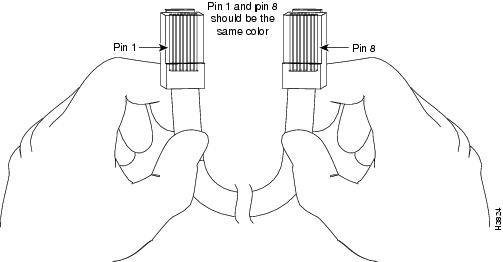
You can identify a rollover cable by comparing the two modular ends of the cable. Holding the cables side-by-side, with the tab at the back, the wire connected to the pin on the outside of the left plug should be the same color as the wire connected to the pin on the outside of the right plug (see Figure B-1). If your cable was purchased from Cisco Systems, pin 1 will be white on one connector, and pin 8 will be white on the other (a rollover cable reverses pins 1 and 8, 2 and 7, 3 and 6, and 4 and 5).
Figure B-1 Identifying a Rollover Cable
Console Port Signals and Pinouts
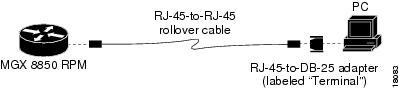
Use the thin, flat RJ-45-to-RJ-45 rollover cable and RJ-45-to-DB-9 female DTE adapter (labeled Terminal) to connect the console port to a PC running terminal emulation software. Figure B-2 shows how to connect the console port to a PC. Table B-1 lists the pinouts for the asynchronous serial console port, the RJ-45-to-RJ-45 rollover cable, and the RJ-45-to-DB-9 female DTE adapter (labeled Terminal).
Figure B-2 Connecting the Console Port to a PC

|
|
|
Terminal Adapter |
|
|
|---|---|---|---|---|
|
|
|
|
|
|
RTS |
11 |
8 |
8 |
CTS |
DTR |
2 |
7 |
6 |
DSR |
TxD |
3 |
6 |
2 |
RxD |
GND |
4 |
5 |
5 |
GND |
GND |
5 |
4 |
5 |
GND |
RxD |
6 |
3 |
3 |
TxD |
DSR |
7 |
2 |
4 |
DTR |
CTS |
8 |
1 |
7 |
RTS |
1 Pin 1 is connected internally to pin 8. |
Note This cabling configuration can also be used to connect a PC with the auxiliary port.
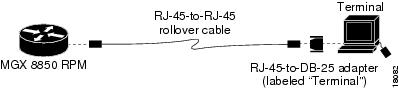
Use the thin, flat RJ-45-to-RJ-45 rollover cable and RJ-45-to-DB-25 female DTE adapter (labeled Terminal) to connect the console port to a terminal. Figure B-3 shows how to connect the console port to a terminal. Table B-2 lists the pinouts for the asynchronous serial console port, the RJ-45-to-RJ-45 rollover cable, and the RJ-45-to-DB-25 female DTE adapter (labeled Terminal).
Figure B-3 Connecting the Console Port to a Terminal
|
|
|
|
|
|
|---|---|---|---|---|
|
|
|
|
|
|
RTS |
11 |
8 |
5 |
CTS |
DTR |
2 |
7 |
6 |
DSR |
TxD |
3 |
6 |
3 |
RxD |
GND |
4 |
5 |
7 |
GND |
GND |
5 |
4 |
7 |
GND |
RxD |
6 |
3 |
2 |
TxD |
DSR |
7 |
2 |
20 |
DTR |
CTS |
8 |
1 |
4 |
RTS |
1 Pin 1 is connected internally to pin 8. |
Note This cabling configuration can also be used to connect a terminal with the auxiliary port.
Auxiliary Port Signals and Pinouts
Use the thin, flat RJ-45-to-RJ-45 rollover cable and RJ-45-to-DB-25 male DCE adapter (labeled Modem) to connect the auxiliary port to a modem. Figure B-4 shows how to connect the auxiliary port to a modem. Table B-3 lists the pinouts for the asynchronous serial auxiliary port, the RJ-45-to-RJ-45 rollover cable, and the RJ-45-to-DB-25 male DCE adapter (labeled Modem).
Figure B-4 Connecting the Auxiliary Port to a Modem
MGX-RJ45-4E, -4E/B, and -FE Port Adapter Cable Pinouts
Table B-4 provides pinouts for the 4E RJ-45 connector.
Note Cisco Systems does not provide 4E, 4E/B, or FE port adapter cables. These cables must be ordered from commercial cable vendors.
|
|
|
|---|---|
1 |
Receive Data + (RxD+) |
2 |
RxD- |
3 |
Transmit Data + (TxD+) |
6 |
TxD- |
Note Referring to the RJ-45 pinout in Table B-4, proper common-mode line terminations should be used for the unused Category 5, UTP cable pairs 4/5 and 7/8. Common-mode termination reduces the contributions to electromagnetic interference (EMI) and susceptibility to common-mode sources. Wire pairs 4/5 and 7/8 are actively terminated in the RJ-45 port circuitry in the 4E and 4E/B port adapter and in the 100BaseTX port circuitry in the FE-TX port adapter.
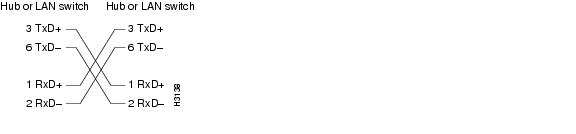
Depending on your RJ-45 interface cabling requirements, use the pinouts in Figure B-5 and Figure B-6.
Figure B-5 Straight-Through Cable Pinout, 4E, 4E/B, or FE-TX RJ-45 Connection to a Hub or Repeater
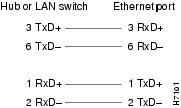
Figure B-6 Crossover Cable Pinout, 4E, 4E/B, or FE-TX RJ-45 Connections Between Hubs and Repeaters
Fast Ethernet MII Port Adapter Pinouts
Table B-5 provides pinouts for the fast ethernet MII RJ-45 connector.
|
|
|
|
|
|
|---|---|---|---|---|
14-17 |
- |
Yes |
- |
Transmit Data (TxD) |
12 |
Yes |
- |
- |
Transmit Clock (Tx_CLK)2 |
11 |
- |
Yes |
- |
Transmit Error (Tx_ER) |
13 |
- |
Yes |
- |
Transmit Enable (Tx_EN) |
3 |
- |
Yes |
- |
MII Data Clock (MDC) |
4-7 |
Yes |
- |
- |
Receive Data (RxD) |
9 |
Yes |
- |
- |
Receive Clock (Rx_CLK) |
10 |
Yes |
- |
- |
Receive Error (Rx_ER) |
8 |
Yes |
- |
- |
Receive Data Valid (Rx_DV) |
18 |
Yes |
- |
- |
Collision (COL) |
19 |
Yes |
- |
- |
Carrier Sense (CRS) |
2 |
- |
- |
Yes |
MII Data Input/Output (MDIO) |
22-39 |
- |
- |
- |
Common (ground) |
1, 20, 21, 40 |
- |
- |
- |
+5.0 volts (V) |
1 Any pins not indicated are not used. 2 Tx_CLK and Rx_CLK are generated by the external transceiver. |
FDDI Optical Bypass Switch Pinouts (for RPM/B)
Table B-6 lists the signal descriptions for the mini-DIN optical bypass switch available on the FDDI port adapters. The mini-DIN-to-DIN adapter cable (CAB-FMDD=) allows a connection to an optical bypass switch with a DIN connector (which is larger than the mini-DIN connector on the FDDI port adapters).
Note Cisco Systems does not provide FDDI port adapter cables. These cables must be ordered from commercial cable vendors.
 Feedback