- Preface
- Configuration Management
- Administering the Cisco ME 1200 NID
- Configuring Notifications
- Zero Touch Provisioning
- Configuring Synchronous Ethernet
- Configuring Ethernet Virtual Connections
- Configuring Switch Ports
- Configuring Spanning-Tree Protocol
- Configuring Link Aggregation Control Protocol (LACP)
- Provisioning Link Layer Discovery Protocol
- Configuring SNMP
- Configuring PTP
- Configuring ACLs
- Configuring Quality of Service (QoS)
- Configuring Ethernet OAM, Link OAM, and CFM
- Configuring Performance Monitoring
- Configuring EPS
- Configuring ERPS
- Configuring L2CP
- Configuring MAC Security
- Configuring NTP
- Configuring Storm Control
- Configuring Syslog
- Configuring Dedicated Debug Shell
- Configuring SPAN
- Configuring RSPAN
- Configuring RFC 2544
- Configuring sFlow
- Configuring UDLD
- Configuring Flex Links
- Configuring Y.1564
- Configuring LST
- Configuring Security Access Control Lists
- Multicast Vlan Register
- Double-tagged management VLAN using IVID parameter
- Configuring LAG Aggregation
Configuring SPAN
This document describes the Switched Port Analyzer (SPAN) feature and configuration steps to implement SPAN.
- Prerequisites for Configuring SPAN
- Restrictions for Configuring SPAN
- Information About SPAN
- How to Provision SPAN
- Verifying Diagnostics POST
- Additional References
Prerequisites for Configuring SPAN
Restrictions for Configuring SPAN
Information About SPAN
Switched Port Analyzer (SPAN) feature, sometimes called port mirroring or port monitoring, selects network traffic for analysis by a network analyzer. The SPAN feature is local when the monitored ports are all located on the same switch as the destination port. A local SPAN session is an association of a destination port with source ports. You can monitor incoming or outgoing traffic on a series or range of ports.
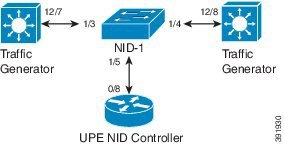
How to Provision SPAN
Enabling SPAN Globally to Start a Monitoring Session
Configuration Example
-
The example shows how to enable SPAN globally:
Switch(config)# controller nid 1/1
Switch(config-controller)# span
Switch(config-controller-SPAN)# setSpanGlobalConf setSpanGlobalConfReq enable
Switch(config-controller-SPAN)# setSpanGlobalConf review
Switch(config-controller-SPAN)# setSpanGlobalConf commit
Switch(config-controller-SPAN)# exit
Configuring SPAN Source Interface
Perform the steps to enable SPAN globally. See Enabling SPAN Globally to Start a Monitoring Session.
Configuration Example
-
The example shows how to configure SPAN on an interface range:
Switch(config)# controller nid 1/1
Switch(config-controller)# span
Switch(config-controller-SPAN)# setSpanGlobalConf setSpanGlobalConfReq enable
Switch(config-controller-SPAN)# setSpanGlobalConf review
Switch(config-controller-SPAN)# setSpanGlobalConf commit
Switch(config-controller-SPAN)# exit
Switch(config-controller-SPAN)# setSpanSrcConf commitsetSpanSrcConf setSpanSrcConfRequest source interface intf_range 1-2
Switch(config-controller-SPAN)# setSpanSrcConf commitsetSpanSrcConf setSpanSrcConfRequest source interface traffic-type both
Switch(config-controller-SPAN)# setSpanSrcConf review
Switch(config-controller-SPAN)# setSpanSrcConf commit
Switch(config-controller-SPAN)# exit
Configuring SPAN Source CPU
Perform the steps to enable SPAN globally. See Enabling SPAN Globally to Start a Monitoring Session.
Configuration Example
-
The example shows how to configure SPAN on an interface range:
Switch(config)# controller nid 1/1
Switch(config-controller)# span
Switch(config-controller-SPAN)# setSpanGlobalConf setSpanGlobalConfReq enable
Switch(config-controller-SPAN)# setSpanGlobalConf review
Switch(config-controller-SPAN)# setSpanGlobalConf commit
Switch(config-controller-SPAN)# exit
Switch(config-controller-SPAN)# setSpanSrcConf setSpanSrcConfRequest source cpu both
Switch(config-controller-SPAN)# setSpanSrcConf review
Switch(config-controller-SPAN)# setSpanSrcConf commit
Switch(config-controller-SPAN)# exit
Configuring SPAN Source VLAN
Perform the steps to enable SPAN globally. See Enabling SPAN Globally to Start a Monitoring Session.
Configuration Example
-
The example shows how to configure SPAN on an interface range:
Switch(config)# controller nid 1/1
Switch(config-controller)# span
Switch(config-controller-SPAN)# setSpanGlobalConf setSpanGlobalConfReq enable
Switch(config-controller-SPAN)# setSpanGlobalConf review
Switch(config-controller-SPAN)# setSpanGlobalConf commit
Switch(config-controller-SPAN)# exit
Switch(config-controller-SPAN)# setSpanSrcConf setSpanSrcConfRequest source vlan vlan_list 100
Switch(config-controller-SPAN)# setSpanSrcConf review
Switch(config-controller-SPAN)# setSpanSrcConf commit
Switch(config-controller-SPAN)# exit
Configuring SPAN Destination
Perform the steps to enable SPAN globally. See Enabling SPAN Globally to Start a Monitoring Session.
Configuration Example
-
The example shows how to configure SPAN destination:
Switch(config)# controller nid 1/1
Switch(config-controller)# span
Switch(config-controller-SPAN)# setSpanGlobalConf setSpanGlobalConfReq enable
Switch(config-controller-SPAN)# setSpanGlobalConf review
Switch(config-controller-SPAN)# setSpanGlobalConf commit
Switch(config-controller-SPAN)# exit
Switch(config-controller-SPAN)# setSpanDestConf setSpanDestConfRequest destination intf_id 4
Switch(config-controller-SPAN)# setSpanDestConf review
Switch(config-controller-SPAN)# setSpanDestConf commit
Switch(config-controller-SPAN)# exit
Deleting SPAN Source Configuration
Perform the steps to enable SPAN globally. See Enabling SPAN Globally to Start a Monitoring Session.
Configuration Example
-
The example shows how to configure SPAN on an interface range:
Switch(config)# controller nid 1/1
Switch(config-controller)# span
Switch(config-controller-SPAN)# setSpanGlobalConf setSpanGlobalConfReq enable
Switch(config-controller-SPAN)# setSpanGlobalConf review
Switch(config-controller-SPAN)# setSpanGlobalConf commit
Switch(config-controller-SPAN)# exit
Switch(config-controller-SPAN)# delSpanSrcConf delSpanSrcConfRequest source cpu rx
Switch(config-controller-SPAN)# delSpanSrcConf review
Switch(config-controller-SPAN)# delSpanSrcConf commit
Switch(config-controller-SPAN)# exit
Deleting SPAN Destination Configuration
Perform the steps to enable SPAN globally. See Enabling SPAN Globally to Start a Monitoring Session.
Configuration Example
-
The example shows how to configure SPAN destination:
Switch(config)# controller nid 1/1
Switch(config-controller)# span
Switch(config-controller-SPAN)# setSpanGlobalConf setSpanGlobalConfReq enable
Switch(config-controller-SPAN)# setSpanGlobalConf review
Switch(config-controller-SPAN)# setSpanGlobalConf commit
Switch(config-controller-SPAN)# exit
Switch(config-controller-SPAN)# delSpanDstConf delSpanDstConfRequest detination intf_id 4
Switch(config-controller-SPAN)# delSpanDstConf review
Switch(config-controller-SPAN)# delSpanDstConf commit
Switch(config-controller-SPAN)# exit
Verifying Diagnostics POST
Use the following commands to verify the diagnostics test status.
-
showDiagResults showDiagTestResults
The following is a sample output from the command:
Switch(config-controller-Diagnostics)# showDiagResults showDiagTestResultsSwitch(config-controller-Diagnostics)# showDiagResults reviewCommands in queue: showDiagResults showDiagTestResults
Switch(config-controller-Diagnostics)# showDiagResults commitShowDiagResults_Output.diagTestResults.testresult[0] = 'External Port Loopback Test =>' ShowDiagResults_Output.diagTestResults.testresult[1] = 'Passed' ShowDiagResults_Output.diagTestResults.testresult[2] = 'Sync-E Reference Source Clock Test =>' ShowDiagResults_Output.diagTestResults.testresult[3] = 'Passed' ShowDiagResults_Output.diagTestResults.testresult[4] = 'PTP One PPS Test =>' ShowDiagResults_Output.diagTestResults.testresult[5] = 'Passed' ShowDiagResults Commit Success!!!
Additional References
Related Documents
| Related Topic | Document Title |
|---|---|
Cisco ME 3800x and ME 3600x Switches Software Configuration Guide, Cisco IOS Release 15.4(1)S |
MIBs
| MIB | MIBs Link |
|---|---|
MIBs Supporting Cisco IOS |
To locate and download MIBs for selected platforms, Cisco IOS releases, and feature sets, use Cisco MIB Locator found at the following URL: |
Technical Assistance
| Description | Link |
|---|---|
|
The Cisco Support website provides extensive online resources, including documentation and tools for troubleshooting and resolving technical issues with Cisco products and technologies. To receive security and technical information about your products, you can subscribe to various services, such as the Product Alert Tool (accessed from Field Notices), the Cisco Technical Services Newsletter, and Really Simple Syndication (RSS) Feeds. Access to most tools on the Cisco Support website requires a Cisco.com user ID and password. |
 Feedback