MACsec Encryption

Restrictions for MACsec Encryption

  • MACsec Key Agreement (MKA) is not supported with high availability.

  • MKA policy can only be applied to member of a port-channel. You cannot apply MKA policy to a port-channel.

  • MACsec is not supported in SVL mode for Cisco TrustSec and MKA.

  • MACsec is not supported with C9400-SUP-1XL-Y supervisor module. It is supported only with C9400-SUP-1 and C9400-SUP-1XL supervisor module.

  • Promiscuous Private VLAN (PVLAN) ports are not supported.

  • Delay protection and confidentiality offset of 50 is not supported on the supervisor ports.

  • For uplink ports (switch-to-switch connections) only multihost mode is supported for MACsec MKA using EAP-TLS. Single host mode and Multi Domain Authentication (MDA) mode are not supported.

  • The MACsec Cipher announcement is not supported for MACsec XPN Ciphers.

  • Certificated based MACSec (EAP-TLS) is not supported if the access-session mode is configured as open.

Information About MACsec Encryption

MACsec Encryption Overview

MACsec is the IEEE 802.1AE standard for authenticating and encrypting packets between two MACsec-capable devices. Cisco Catalyst 9400 Series Switches support 802.1AE encryption with MACsec Key Agreement (MKA) on the line card ports for encryption between the switch and the host device. The switch also supports MACsec encryption for switch-to-switch (inter-network device) security using both Cisco TrustSec Network Device Admission Control (NDAC), Security Association Protocol (SAP) and MKA-based key exchange protocol. Link layer security can include both packet authentication between switches and MACsec encryption between switches (encryption is optional). Link layer security is supported on SAP-based MACsec.

Table 1. MACsec Support on Switch Ports

Interface

Connections

MACsec support

Downlink Ports

Switch-to-host

MACsec MKA encryption

Uplink Ports

Switch-to-switch

MACsec MKA encryption

Cisco TrustSec NDAC MACsec

Cisco TrustSec and Cisco SAP are meant only for switch-to-switch links and are not supported on switch ports connected to end hosts, such as PCs or IP phones. MKA is supported on switch-to-host facing links and switch-to-switch facing links originating from the line card ports. Host-facing links typically use flexible authentication ordering for handling heterogeneous devices with or without IEEE 802.1x, and can optionally use MKA-based MACsec encryption. Cisco NDAC and SAP are mutually exclusive with Network Edge Access Topology (NEAT), which is used for compact switches to extend security outside the wiring closet.

Media Access Control Security and MACsec Key Agreement

MACsec, defined in 802.1AE, provides MAC-layer encryption over wired networks by using out-of-band methods for encryption keying. The MACsec Key Agreement (MKA) Protocol provides the required session keys and manages the required encryption keys. MKA and MACsec are implemented after successful authentication using the 802.1x Extensible Authentication Protocol (EAP-TLS) or Pre Shared Key (PSK) framework.

A switch using MACsec accepts either MACsec or non-MACsec frames, depending on the policy associated with the MKA peer. MACsec frames are encrypted and protected with an integrity check value (ICV). When the switch receives frames from the MKA peer, it decrypts them and calculates the correct ICV by using session keys provided by MKA. The switch compares that ICV to the ICV within the frame. If they are not identical, the frame is dropped. The switch also encrypts and adds an ICV to any frames sent over the secured port (the access point used to provide the secure MAC service to a MKA peer) using the current session key.

The MKA Protocol manages the encryption keys used by the underlying MACsec protocol. The basic requirements of MKA are defined in 802.1x-REV. The MKA Protocol extends 802.1x to allow peer discovery with confirmation of mutual authentication and sharing of MACsec secret keys to protect data exchanged by the peers.

The EAP framework implements MKA as a newly defined EAP-over-LAN (EAPOL) packet. EAP authentication produces a master session key (MSK) shared by both partners in the data exchange. Entering the EAP session ID generates a secure connectivity association key name (CKN).

It generates a random secure association key (SAK), which is sent to the client partner. The client is never a key server and can only interact with a single MKA entity, the key server. After key derivation and generation, the switch sends periodic transports to the partner at a default interval of 2 seconds.

The packet body in an EAPOL Protocol Data Unit (PDU) is referred to as a MACsec Key Agreement PDU (MKPDU). MKA sessions and participants are deleted when the MKA lifetime (6 seconds) passes with no MKPDU received from a participant. For example, if a MKA peer disconnects, the participant on the switch continues to operate MKA until 6 seconds have elapsed after the last MKPDU is received from the MKA peer.


Note

Integrity check value (ICV) indicator in MKPDU is optional. ICV is not optional when the traffic is encrypted.


MKA Policies

You apply a defined MKA policy to an interface to enable MKA on the interface. Removing the MKA policy disables MKA on that interface. You can configure these options:

  • Policy name, not to exceed 16 ASCII characters.

  • Confidentiality (encryption) offset of 0, 30, or 50 bytes for each physical interface

Virtual Ports

Use virtual ports for multiple secured connectivity associations on a single physical port. Each connectivity association (pair) represents a virtual port. In uplink, you can have only one virtual port per physical port. In downlink, you can have a maximum of two virtual ports per physical port, of which one virtual port can be part of a data VLAN; the other must externally tag its packets for the voice VLAN. You cannot simultaneously host secured and unsecured sessions in the same VLAN on the same port. Because of this limitation, 802.1x multiple authentication mode is not supported.

The exception to this limitation is in multiple-host mode when the first MACsec supplicant is successfully authenticated and connected to a hub that is connected to the switch. A non-MACsec host connected to the hub can send traffic without authentication because it is in multiple-host mode. We do not recommend using multi-host mode because after the first successful client, authentication is not required for other clients.

Virtual ports represent an arbitrary identifier for a connectivity association and have no meaning outside the MKA Protocol. A virtual port corresponds to a separate logical port ID. Valid port IDs for a virtual port are 0x0002 to 0xFFFF. Each virtual port receives a unique secure channel identifier (SCI) based on the MAC address of the physical interface concatenated with a 16-bit port ID.

MKA Statistics

Some MKA counters are aggregated globally, while others are updated both globally and per session. You can also obtain information about the status of MKA sessions.

MACsec, MKA and 802.1x Host Modes

You can use MACsec and the MKA Protocol with 802.1x single-host mode, multi-host mode, or Multi Domain Authentication (MDA) mode. Multiple authentication mode is not supported.

Single-Host Mode

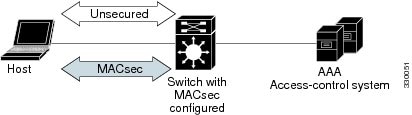
The figure shows how a single EAP authenticated session is secured by MACsec by using MKA

Figure 1. MACsec in Single-Host Mode with a Secured Data Session


Multiple Host Mode

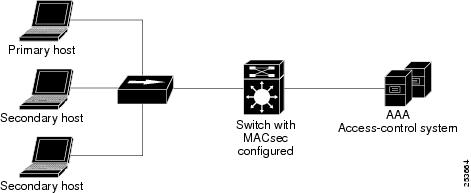
In standard (not 802.1x REV) 802.1x multiple-host mode, a port is open or closed based on a single authentication. If one user, the primary secured client services client host, is authenticated, the same level of network access is provided to any host connected to the same port. If a secondary host is a MACsec supplicant, it cannot be authenticated and traffic would not flow. A secondary host that is a non-MACsec host can send traffic to the network without authentication because it is in multiple-host mode. The figure shows MACsec in Standard Multiple-Host Unsecure Mode.

Figure 2. MACsec in Multiple-Host Mode - Unsecured


Note

Multi-host mode is not recommended because after the first successful client, authentication is not required for other clients, which is not secure.

In standard (not 802.1x REV) 802.1x multiple-domain mode, a port is open or closed based on a single authentication. If the primary user, a PC on data domain, is authenticated, the same level of network access is provided to any domain connected to the same port. If a secondary user is a MACsec supplicant, it cannot be authenticated and traffic would no flow. A secondary user, an IP phone on voice domain, that is a non-MACsec host, can send traffic to the network without authentication because it is in multiple-domain mode.

Multiple-Domain Mode

In standard (not 802.1x REV) 802.1x multiple-domain mode, a port is open or closed based on a single authentication. If the primary user, a PC on data domain, is authenticated, the same level of network access is provided to any domain connected to the same port. If a secondary user is a MACsec supplicant, it cannot be authenticated and traffic would no flow. A secondary user, an IP phone on voice domain, that is a non-MACsec host, can send traffic to the network without authentication because it is in multiple-domain mode.

MACsec MKA using EAP-TLS

Using IEE 802.1X Port-based Authentication with Extensible Authentication Protocol (EAP-TLS), you can configure MACsec MKA on the switch-to-switch links from the line card ports. EAP-TLS allows mutual authentication and obtains an MSK (master session key) from which the connectivity association key (CAK) is derived for MKA operations. Device certificates are carried, using EAP-TLS, for authentication to the AAA server.

Prerequisites for MACsec MKA using EAP-TLS

  • Ensure that you have a Certificate Authority (CA) server configured for your network.

  • Generate a CA certificate.

  • Ensure that you have configured Cisco Identity Services Engine (ISE) Release 2.0.

  • Ensure that both the participating devices, the CA server, and Cisco Identity Services Engine (ISE) are synchronized using Network Time Protocol (NTP). If time is not synchronized on all your devices, certificates will not be validated.

  • Ensure that 802.1x authentication and AAA are configured on your device.

MACsec Connection Across Intermediate Switches

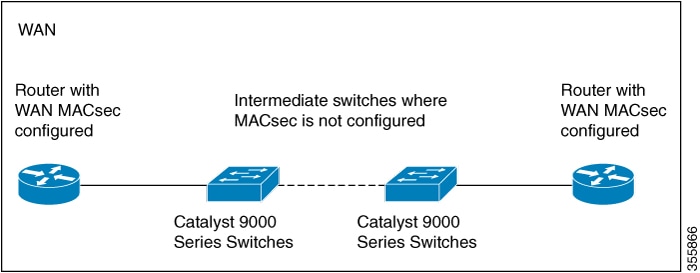
Prior to Cisco IOS XE Gibraltar 16.10.1, MACsec connection between end devices in a WAN MACsec deployment with the intermediate switches as the Cisco Catalyst 9000 Series Switches was not supported. The encrypted packets were dropped if WAN MACsec was configured on the end devices with MACsec not configured on the intermediate switches. With the ClearTag feature implemented on the ASIC, the switch forwards the encrypted packet without parsing the MACsec header. Below topology displays how the encrypted packets are forwarded through the intermediate switches with L2 switching.
Figure 3. Topology for ClearTag MACsec : MACsec not configured on the intermediate switches

Limitations for MACsec Connections Across Intermediate Switches

  • Hop-by-hop MACsec encryption with Catalyst 9000 Series switches as intermediate switches where WAN MACsec is configured on the routers is not supported.

  • WAN MACsec configured on the routers with intermediate switches as the Catalyst 9000 Series switches is not supported on Layer 3 VPNs.

  • WAN MACsec configured on the routers with intermediate switches as the Catalyst 9000 Series switches show Cisco Discovery Protocol neighbors only in should-secure mode.

MACsec Must Secure

Starting with Cisco IOS XE Fuji 16.8.1a, must-secure support is enabled on both the ingress and the egress. Must-secure is supported for MKA and SAP. With must-secure enabled, only EAPoL traffic will not be encrypted. The rest of the traffic will be encrypted. Unencrypted packets are dropped.


Note

Must-secure mode is enabled by default.


Prior to Cisco IOS XE Fuji 16.8.1a, should-secure was supported for MKA and SAP. With should-secure enabled, if the peer is configured for MACsec, the data traffic is encrypted, otherwise it is sent in clear text.

MKA/MACsec for Port Channel

MKA/MACsec can be configured on the port members of a port channel. MKA/MACsec is agnostic to the port channel since the MKA session is established between the port members of a port channel.


Note

Etherchannel links that are formed as part of the port channel can either be congruent or disparate i.e. the links can either be MACsec-secured or non-MACsec-secured. MKA session between the port members is established even if a port member on one side of the port channel is not configured with MACsec.


It is recommended that you enable MKA/MACsec on all the member ports for better security of the port channel.

MACsec Cipher Announcement

Cipher Announcement allows the supplicant (AnyConnect) and the authenticator (the switch) to announce their respective MACsec Cipher Suite capabilities to each other. Supported Cipher Suites are GCM-AES-128 and GCM-AES-256. Both, the supplicant and the authenticator, calculate the largest common supported MACsec Cipher Suite and use the same as the keying material for the MKA session. Cisco AnyConnect Secure Mobility Client, Release 4.6.02074 and above support Cipher Announcement.


Note

Only the MACsec Cipher Suite capabilities which are configured in the MKA policy are announced from the authenticator (the switch) to the supplicant (AnyConnect).


On the supplicant side, you can choose the cipher suite(s) — GCM-AES-128 or GCM-AES-128 or both — in the Profile Editor section of the AnyConnect Network Access Manager. You can only choose the cipher suites if you select MKA from the drop-down list in the Key Management tab.

There are two types of EAPoL Announcements :

  • Unsecured Announcements (EAPoL PDUs) : Unsecured announcments are EAPoL announcements carrying MACsec Cipher Suite capabilities in an unsecured manner. These announcements are used to decide the width of the key used for MKA session prior to authentication.

  • Secure Announcements (MKPDUs) : Secure announcements revalidate the MACsec Cipher Suite capabilities which were shared previously through unsecure announcements.

Once the session is authenticated, peer capabilities which were received through EAPoL announcements are revalidated with the secure announcements. If there is a mismatch in the capabilities, the MKA session tears down.

Limitations for MACsec Cipher Announcement

  • MACsec Cipher Announcement is supported only on the line card ports.

  • If MACsec Cipher Suite Capabilities get changed in an active policy at the authenticator, the updated capabilities are not take into effect until a shutdown/no shutdown is performed on the interface. If you do not disable and restart the interface, EAPoL Announcement continues to announce the older capabilities.

  • The MKA session between the supplicant and the authenticator does not tear down even if the MACsec Cipher Suite Capabilities configured on both do not result in a common cipher suite.

How to Configure MACsec Encryption

Configuring MKA and MACsec

By default, MACsec is disabled. No MKA policies are configured.

Configuring an MKA Policy

SUMMARY STEPS

  1. enable
  2. configure terminal
  3. mka policy policy-name
  4. key-server priority
  5. include-icv-indicator
  6. macsec-cipher-suite {gcm-aes-128 | gcm-aes-256}
  7. confidentiality-offset offset-value
  8. end
  9. show mka policy

DETAILED STEPS

  Command or Action Purpose
Step 1

enable

Example:
Device> enable

Enables privileged EXEC mode.

  • Enter your password if prompted.

Step 2

configure terminal

Example:
Device# configure terminal

Enters global configuration mode.

Step 3

mka policy policy-name

Example:
Device(config)# mka policy mka_policy

Identifies an MKA policy, and enters MKA policy configuration mode. The maximum policy name length is 16 characters.

Note 

The default MACsec cipher suite in the MKA policy will always be "GCM-AES-128". If the device supports both "GCM-AES-128" and "GCM-AES-256" ciphers, it is highly recommended to define and use a user defined MKA policy to include both 128 and 256 bits ciphers or only 256 bits cipher, as may be required.

Step 4

key-server priority

Example:
Device(config-mka-policy)# key-server priority 200

Configures MKA key server options and set priority (between 0-255).

Note 

When value of key server priority is set to 255, the peer can not become the key server. The key server priority value is valid only for MKA PSK; and not for MKA EAPTLS.

Step 5

include-icv-indicator

Example:
Device(config-mka-policy)# include-icv-indicator

Enables the ICV indicator in MKPDU. Use the no form of this command to disable the ICV indicator — no include-icv-indicator .

Step 6

macsec-cipher-suite {gcm-aes-128 | gcm-aes-256}

Example:
Device(config-mka-policy)# macsec-cipher-suite gcm-aes-128

Configures a cipher suite for deriving SAK with 128-bit or 256-bit encryption.

Step 7

confidentiality-offset offset-value

Example:
Device(config-mka-policy)# confidentiality-offset 0

Set the confidentiality (encryption) offset for each physical interface

Note 

Offset Value can be 0, 30 or 50. If you are using Anyconnect on the client, it is recommended to use Offset 0.

Step 8

end

Example:
Device(config-mka-policy)# end
Exit enters MKA policy configuration mode and returns to privileged EXEC mode.
Step 9

show mka policy

Example:
Device# show mka policy
Displays MKA policy configuration information.

Configuring MACsec on an Interface

Follow these steps to configure MACsec on an interface with one MACsec session for voice and one for data:

SUMMARY STEPS

  1. enable
  2. configure terminal
  3. interface interface-id
  4. switchport access vlan vlan-id
  5. switchport mode access
  6. macsec
  7. access-session host-mode multi-host
  8. access-session closed
  9. access-session port-control auto
  10. authentication periodic
  11. authentication timer reauthenticate
  12. authentication violation protect
  13. mka policy policy name
  14. dot1x pae authenticator
  15. spanning-tree portfast
  16. end
  17. show authentication session interface interface-id
  18. show macsec interface interface-id
  19. show mka sessions

DETAILED STEPS

  Command or Action Purpose
Step 1

enable

Example:
Device> enable

Enables privileged EXEC mode.

  • Enter the password if prompted.

Step 2

configure terminal

Example:
Device# configure terminal

Enters the global configuration mode.

Step 3

interface interface-id

Example:
Device(config)# interface GigabitEthernet 1/0/1

Identifies the MACsec interface, and enters interface configuration mode. The interface must be a physical interface.

Step 4

switchport access vlan vlan-id

Example:
Device(config-if)# switchport access vlan 1

Configures the access VLAN for the port.

Step 5

switchport mode access

Example:
Device(config-if)# switchport mode access

Configures the interface as an access port.

Step 6

macsec

Example:
Device(config-if)# macsec

Enables 802.1ae MACsec on the interface. The macsec command enables MKA MACsec on switch-to-host links (downlink ports) only.

Step 7

access-session host-mode multi-host

Example:
Device(config-if)# access-session host-mode multi-host

Allows hosts to gain access to the interface.

Step 8

access-session closed

Example:
Device(config-if)# access-session closed

Prevents preauthentication access on the interface.

Step 9

access-session port-control auto

Example:
Device(config-if)# access-session port-control auto

Sets the authorization state of a port.

Step 10

authentication periodic

Example:
Device(config-if)# authentication periodic

(Optional) Enables or disable reauthentication for this port .

Step 11

authentication timer reauthenticate

Example:
Device(config-if)# authentication timer reauthenticate

(Optional) Enters a value between 1 and 65535 (in seconds). Obtains re-authentication timeout value from the server. Default re-authentication time is 3600 seconds.

Step 12

authentication violation protect

Example:
Device(config-if)# authentication violation protect

Configures the port to drop unexpected incoming MAC addresses when a new device connects to a port or when a device connects to a port after the maximum number of devices are connected to that port. If not configured, the default is to shut down the port.

Step 13

mka policy policy name

Example:
Device(config-if)# mka policy mka_policy

Applies an existing MKA protocol policy to the interface, and enables MKA on the interface. If no MKA policy was configured (by entering the mka policy global configuration command).

Step 14

dot1x pae authenticator

Example:
Device(config-if)# dot1x pae authenticator
Configures the port as an 802.1x port access entity (PAE) authenticator.
Step 15

spanning-tree portfast

Example:
Device(config-if)# spanning-tree portfast

Enables spanning tree Port Fast on the interface in all its associated VLANs. When Port Fast feature is enabled, the interface changes directly from a blocking state to a forwarding state without making the intermediate spanning-tree state changes

Step 16

end

Example:
Device(config)# end

Exits interface configuration mode and returns to privileged EXEC mode.

Step 17

show authentication session interface interface-id

Example:
Device# show authentication session interface GigabitEthernet 1/0/1
Verify the authorized session security status.
Step 18

show macsec interface interface-id

Example:
Device# show macsec interface GigabitEthernet 1/0/1

Verify MACsec status on the interface.

Step 19

show mka sessions

Example:
Device# show mka sessions 

Verify the established mka sessions.

Configuring MKA MACsec using PSK

Configuring MACsec MKA using PSK

SUMMARY STEPS

  1. enable
  2. configure terminal
  3. key chain key-chain-name macsec
  4. key hex-string
  5. cryptographic-algorithm {gcm-aes-128 | gcm-aes-256}
  6. key-string { [0|6|7] pwd-string | pwd-string}
  7. lifetime local [start timestamp {hh::mm::ss | day | month | year}] [duration seconds | end timestamp {hh::mm::ss | day | month | year}]
  8. end

DETAILED STEPS

  Command or Action Purpose
Step 1

enable

Example:
Device> enable

Enables privileged EXEC mode.

  • Enter your password if prompted.

Step 2

configure terminal

Example:
Device# configure terminal

Enters global configuration mode.

Step 3

key chain key-chain-name macsec

Example:
Device(config)# key chain keychain1 macsec

Configures a key chain and enters the key chain configuration mode.

Step 4

key hex-string

Example:
Device(config-key-chain)# key 1000

Configures a unique identifier for each key in the keychain and enters the keychain's key configuration mode.

Note 

For 128-bit encryption, use any value between 1 and 32 hex digit key-string. For 256-bit encryption, use 64 hex digit key-string.

Step 5

cryptographic-algorithm {gcm-aes-128 | gcm-aes-256}

Example:
Device(config-key-chain)# cryptographic-algorithm gcm-aes-128

Set cryptographic authentication algorithm with 128-bit or 256-bit encryption.

Step 6

key-string { [0|6|7] pwd-string | pwd-string}

Example:
Device(config-key-chain)# key-string 12345678901234567890123456789012

Sets the password for a key string. Only hex characters must be entered.

Step 7

lifetime local [start timestamp {hh::mm::ss | day | month | year}] [duration seconds | end timestamp {hh::mm::ss | day | month | year}]

Example:
Device(config-key-chain)# lifetime local 12:12:00 July 28 2016 12:19:00 July 28 2016
Sets the lifetime of the pre shared key.
Step 8

end

Example:
Device(config-key-chain)# end
Exits key chain configuration mode and returns to privileged EXEC mode.

Configuring MACsec MKA on an Interface using PSK

SUMMARY STEPS

  1. enable
  2. configure terminal
  3. interface interface-id
  4. macsec network-link
  5. mka policy policy-name
  6. mka pre-shared-key key-chain key-chain name
  7. macsec replay-protection window-size frame number
  8. end

DETAILED STEPS

  Command or Action Purpose
Step 1

enable

Example:
Device> enable

Enables privileged EXEC mode.

  • Enter your password if prompted.

Step 2

configure terminal

Example:
Device# configure terminal

Enters global configuration mode.

Step 3

interface interface-id

Example:
Device(config-if)# interface GigabitEthernet 0/0/0

Enters interface configuration mode.

Step 4

macsec network-link

Example:
Device(config-if)# macsec network-link

Enables MACsec on the interface.

Step 5

mka policy policy-name

Example:
Device(config-if)# mka policy mka_policy

Configures an MKA policy.

Step 6

mka pre-shared-key key-chain key-chain name

Example:
Device(config-if)# mka pre-shared-key key-chain key-chain-name

Configures an MKA pre-shared-key key-chain name.

Note 

The MKA pre-shared key can be configured on either physical interface or sub-interfaces and not on both.

Step 7

macsec replay-protection window-size frame number

Example:
Device(config-if)# macsec replay-protection window-size 10

Sets the MACsec window size for replay protection.

Step 8

end

Example:
Device(config-if)# end
Exits interface configuration mode and returns to privileged EXEC mode.

Configuring MACsec MKA using EAP-TLS

To configure MACsec with MKA on point-to-point links, perform these tasks:

  • Configure Certificate Enrollment

    • Generate Key Pairs

    • Configure SCEP Enrollment

    • Configure Certificates Manually

  • Configure an Authentication Policy

  • Configure EAP-TLS Profiles and IEEE 802.1x Credentials

  • Configure MKA MACsec using EAP-TLS on Interfaces

Generating Key Pairs

Procedure
  Command or Action Purpose
Step 1

enable

Example:
Device> enable

Enables privileged EXEC mode.

  • Enter your password if prompted.

Step 2

configure terminal

Example:
Device# configure terminal

Enters global configuration mode.

Step 3

crypto key generate rsa label label-name general-keys modulus size

Example:
Device(config)# crypto key generate rsa label general-keys  modulus 
2048 

Generates a RSA key pair for signing and encryption.

You can also assign a label to each key pair using the label keyword. The label is referenced by the trustpoint that uses the key pair. If you do not assign a label, the key pair is automatically labeled <Default-RSA-Key>.

If you do not use additional keywords this command generates one general purpose RSA key pair. If the modulus is not specified, the default key modulus of 1024 is used. You can specify other modulus sizes with the modulus keyword.

Step 4

end

Example:
Device(config)# end
Exits global configuration mode and returns to privileged EXEC mode.
Step 5

show authentication session interface interface-id

Example:
Device# show authentication session interface gigabitethernet 0/1/1

Verifies the authorized session security status.

Configuring Enrollment using SCEP

Simple Certificate Enrollment Protocol (SCEP) is a Cisco-developed enrollment protocol that uses HTTP to communicate with the certificate authority (CA) or registration authority (RA). SCEP is the most commonly used method for sending and receiving requests and certificates.

Procedure
  Command or Action Purpose
Step 1

enable

Example:
Device> enable

Enables privileged EXEC mode.

  • Enter your password if prompted.

Step 2

configure terminal

Example:
Device# configure terminal

Enters global configuration mode.

Step 3

crypto pki trustpoint server name

Example:
Device(config)# crypto pki trustpoint ka

Declares the trustpoint and a given name and enters ca-trustpoint configuration mode.

Step 4

enrollment url url name pem

Example:
Device(ca-trustpoint)# enrollment url http://url:80

Specifies the URL of the CA on which your device should send certificate requests.

An IPv6 address can be added in the URL enclosed in brackets. For example: http:// [2001:DB8:1:1::1]:80.

The pem keyword adds privacy-enhanced mail (PEM) boundaries to the certificate request.

Step 5

rsakeypair label

Example:
Device(ca-trustpoint)# rsakeypair exampleCAkeys

Specifies which key pair to associate with the certificate.

Note 

The rsakeypair name must match the trust-point name.

Step 6

serial-number none

Example:
Device(ca-trustpoint)# serial-number none

The none keyword specifies that a serial number will not be included in the certificate request.

Step 7

ip-address none

Example:
Device(ca-trustpoint)# ip-address none

The none keyword specifies that no IP address should be included in the certificate request.

Step 8

revocation-check crl

Example:
Device(ca-trustpoint)# revocation-check crl

Specifies CRL as the method to ensure that the certificate of a peer has not been revoked.

Step 9

auto-enroll percent regenerate

Example:
Device(ca-trustpoint)# auto-enroll 90 regenerate

Enables auto-enrollment, allowing the client to automatically request a rollover certificate from the CA.

If auto-enrollment is not enabled, the client must be manually re-enrolled in your PKI upon certificate expiration.

By default, only the Domain Name System (DNS) name of the device is included in the certificate.

Use the percent argument to specify that a new certificate will be requested after the percentage of the lifetime of the current certificate is reached.

Use the regenerate keyword to generate a new key for the certificate even if a named key already exists.

If the key pair being rolled over is exportable, the new key pair will also be exportable. The following comment will appear in the trustpoint configuration to indicate whether the key pair is exportable: “! RSA key pair associated with trustpoint is exportable.”

It is recommended that a new key pair be generated for security reasons.

Step 10

exit

Example:
Device(ca-trustpoint)# exit

Exits ca-trustpoint configuration mode and returns to global configuration mode.

Step 11

crypto pki authenticate name

Example:
Device(config)# crypto pki authenticate myca

Retrieves the CA certificate and authenticates it.

Step 12

end

Example:
Device(config)# end

Exits global configuration mode and returns to privileged EXEC mode.

Step 13

show crypto pki certificate trustpoint name

Example:
Device# show crypto pki certificate ka

Displays information about the certificate for the trust point.

Configuring Enrollment Manually

If your CA does not support SCEP or if a network connection between the router and CA is not possible. Perform the following task to set up manual certificate enrollment:

Procedure
  Command or Action Purpose
Step 1

enable

Example:
Device> enable

Enables privileged EXEC mode.

  • Enter your password if prompted.

Step 2

configure terminal

Example:
Device# configure terminal

Enters global configuration mode.

Step 3

enable

Example:
Device> enable

Enables privileged EXEC mode.

  • Enter your password if prompted.

Step 4

configure terminal

Example:
Device# configure terminal

Enters global configuration mode.

Step 5

crypto pki trustpoint server name

Example:
Device# crypto pki trustpoint ka

Declares the trustpoint and a given name and enters ca-trustpoint configuration mode.

Step 6

enrollment url url name pem

Example:
Device(ca-trustpoint)# enrollment url http://url:80

Specifies the URL of the CA on which your device should send certificate requests.

An IPv6 address can be added in the URL enclosed in brackets. For example: http:// [2001:DB8:1:1::1]:80.

The pem keyword adds privacy-enhanced mail (PEM) boundaries to the certificate request.

Step 7

rsakeypair label

Example:
Device(ca-trustpoint)#  rsakeypair exampleCAkeys

Specifies which key pair to associate with the certificate.

Step 8

serial-number none

Example:
Device(ca-trustpoint)# serial-number none

The none keyword specifies that a serial number will not be included in the certificate request.

Step 9

ip-address none

Example:
Device(ca-trustpoint)# ip-address none

The none keyword specifies that no IP address should be included in the certificate request.

Step 10

revocation-check crl

Example:
Device(ca-trustpoint)# revocation-check crl

Specifies CRL as the method to ensure that the certificate of a peer has not been revoked.

Step 11

exit

Example:
Device(ca-trustpoint)# exit

Exits ca-trustpoint configuration mode and returns to global configuration mode.

Step 12

crypto pki authenticate name

Example:
Device(config)# crypto pki authenticate myca

Retrieves the CA certificate and authenticates it.

Step 13

crypto pki enroll name

Example:
Device(config)# crypto pki enroll myca

Generates certificate request and displays the request for copying and pasting into the certificate server.

Enter enrollment information when you are prompted. For example, specify whether to include the device FQDN and IP address in the certificate request.

You are also given the choice about displaying the certificate request to the console terminal.

The base-64 encoded certificate with or without PEM headers as requested is displayed.

Step 14

crypto pki import name certificate

Example:
Device(config)# crypto pki import myca certificate

Imports a certificate via TFTP at the console terminal, which retrieves the granted certificate.

The device attempts to retrieve the granted certificate via TFTP using the same filename used to send the request, except the extension is changed from “.req” to “.crt”. For usage key certificates, the extensions “-sign.crt” and “-encr.crt” are used.

The device parses the received files, verifies the certificates, and inserts the certificates into the internal certificate database on the switch.

Note 

Some CAs ignore the usage key information in the certificate request and issue general purpose usage certificates. If your CA ignores the usage key information in the certificate request, only import the general purpose certificate. The router will not use one of the two key pairs generated.

Step 15

end

Example:
Device(config)# end

Exits global configuration mode and returns to privileged EXEC mode.

Step 16

show crypto pki certificate trustpoint name

Example:
Device# show crypto pki certificate  ka

Displays information about the certificate for the trust point.

Applying the 802.1x MACsec MKA Configuration on Interfaces

To apply MACsec MKA using EAP-TLS to interfaces, perform the following task:

Procedure
  Command or Action Purpose
Step 1

enable

Example:
Device> enable

Enables privileged EXEC mode.

  • Enter your password if prompted.

Step 2

configure terminal

Example:
Device# configure terminal

Enters global configuration mode.

Step 3

interface interface-id

Example:
Device(config)# interface gigabitethernet 0/2/1

Identifies the MACsec interface, and enter interface configuration mode. The interface must be a physical interface.

Step 4

macsec network-link

Example:
Device(config-if)# macsec network-link

Enables MACsec on the interface.

Step 5

authentication periodic

Example:
Device(config-if)# authentication periodic

(Optional) Enables reauthentication for this port.

Step 6

authentication timer reauthenticate interval

Example:
Device(config-if)# authentication timer reauthenticate interval

(Optional) Sets the reauthentication interval.

Step 7

access-session host-mode multi-host

Example:
Device(config-if)# access-session host-mode multi-domain

Allows hosts to gain access to the interface.

Step 8

access-session closed

Example:
Device(config-if)# access-session closed

Prevents preauthentication access on the interface.

Step 9

access-session port-control auto

Example:
Device(config-if)# access-session port-control auto

Sets the authorization state of a port.

Step 10

dot1x pae both

Example:
Device(config-if)# dot1x pae both

Configures the port as an 802.1X port access entity (PAE) supplicant and authenticator.

Step 11

dot1x credentials profile

Example:
Device(config-if)# dot1x credentials profile

Assigns a 802.1x credentials profile to the interface.

Step 12

end

Example:
Device(config-if)# end

Exits interface configuration mdoe and returns to privileged EXEC mode.

Step 13

show macsec interface

Example:
Device# show macsec interface

Displays MACsec details for the interface.

Configuring MKA/MACsec for Port Channel using PSK

SUMMARY STEPS

  1. enable
  2. configure terminal
  3. interface interface-id
  4. macsec network-link
  5. mka policy policy-name
  6. mka pre-shared-key key-chain key-chain-name
  7. macsec replay-protection window-size frame number
  8. channel-group channel-group-number mode {auto | desirable} | {active | passive} | {on}
  9. end

DETAILED STEPS

  Command or Action Purpose
Step 1

enable

Example:

Device> enable

Enables privileged EXEC mode.

  • Enter your password if prompted.

Step 2

configure terminal

Example:

Device# configure terminal

Enters global configuration mode.

Step 3

interface interface-id

Example:

Device(config-if)# interface gigabitethernet 1/0/3

Enters interface configuration mode.

Step 4

macsec network-link

Example:

Device(config-if)# macsec network-link

Enables MACsec on the interface. Supports layer 2 and layer 3 port channels.

Step 5

mka policy policy-name

Example:

Device(config-if)# mka policy mka_policy

Configures an MKA policy.

Step 6

mka pre-shared-key key-chain key-chain-name

Example:

Device(config-if)# mka pre-shared-key key-chain key-chain-name

Configures an MKA pre-shared-key key-chain name.

Note 

The MKA pre-shared key can be configured on either physical interface or sub-interfaces and not on both.

Step 7

macsec replay-protection window-size frame number

Example:

Device(config-if)# macsec replay-protection window-size 0

Sets the MACsec window size for replay protection.

Step 8

channel-group channel-group-number mode {auto | desirable} | {active | passive} | {on}

Example:

Device(config-if)# channel-group 3 mode auto active on

Configures the port in a channel group and sets the mode.

Note 

You cannot configure ports in a channel group without configuring MACsec on the interface. You must configure the commands in Step 3, 4, 5 and 6 before this step.

The channel-number range is from 1 to 4096. The port channel associated with this channel group is automatically created if the port channel does not already exist.For mode, select one of the following keywords:

  • auto — Enables PAgP only if a PAgP device is detected. This places the port into a passive negotiating state, in which the port responds to PAgP packets it receives but does not start PAgP packet negotiation.

    Note 

    The auto keyword is not supported when EtherChannel members are from different switches in the switch stack.

  • desirable — Unconditionally enables PAgP. This places the port into an active negotiating state, in which the port starts negotiations with other ports by sending PAgP packets.

    Note 

    The desirable keyword is not supported when EtherChannel members are from different switches in the switch stack.

  • on — Forces the port to channel without PAgP or LACP. In the on mode, an EtherChannel exists only when a port group in the on mode is connected to another port group in the on mode.

  • active — Enables LACP only if a LACP device is detected. It places the port into an active negotiating state in which the port starts negotiations with other ports by sending LACP packets.

  • passive — Enables LACP on the port and places it into a passive negotiating state in which the port responds to LACP packets that it receives, but does not start LACP packet negotiation.

Step 9

end

Example:

Device(config-if)# cend
Exits interface configuration mode and returns to privileged EXEC mode.

Configuring Port Channel Logical Interfaces for Layer 2 EtherChannels

To create a port channel interface for a Layer 2 EtherChannel, perform this task:

SUMMARY STEPS

  1. enable
  2. configure terminal
  3. [no] interface port-channel channel-group-number
  4. switchport
  5. switchport mode {access | trunk}
  6. end

DETAILED STEPS

  Command or Action Purpose
Step 1

enable

Example:
Device> enable

Enables privileged EXEC mode.

  • Enter your password if prompted.

Step 2

configure terminal

Example:
Device# configure terminal

Enters global configuration mode.

Step 3

[no] interface port-channel channel-group-number

Example:
Device(config)# interface port-channel 1

Creates the port channel interface.

Note 

Use the no form of this command to delete the port channel interface.

Step 4

switchport

Example:
Device(config-if)# switchport

Switches an interface that is in Layer 3 mode into Layer 2 mode for Layer 2 configuration.

Step 5

switchport mode {access | trunk}

Example:
Device(config-if)# switchport mode access

Assigns all ports as static-access ports in the same VLAN, or configure them as trunks.

Step 6

end

Example:
Device(config-if)# end
Exits interface configuration mode and returns to privileged EXEC mode.

Configuring Port Channel Logical Interfaces for Layer 3 EtherChannels

To create a port channel interface for a Layer 3 EtherChannel, perform this task:

SUMMARY STEPS

  1. enable
  2. configure terminal
  3. interface interface-id
  4. no switchport
  5. ip address ip-address subnet-mask
  6. end

DETAILED STEPS

  Command or Action Purpose
Step 1

enable

Example:
Device> enable

Enables privileged EXEC mode.

  • Enter your password if prompted.

Step 2

configure terminal

Example:
Device# configure terminal

Enters global configuration mode.

Step 3

interface interface-id

Example:
Device(config)# interface gigabitethernet 1/0/2

Enters interface configuration mode.

Step 4

no switchport

Example:
Device(config-if)# no switchport

Switches an interface that is in Layer 2 mode into Layer 3 mode for Layer 3 configuration.

Step 5

ip address ip-address subnet-mask

Example:
Device(config-if)# ip address 10.2.2.3 255.255.255.254

Assigns an IP address and subnet mask to the EtherChannel.

Step 6

end

Example:
Device(config-if)# end
Exits interface configuration mode and returns to privileged EXEC mode.

Configuring MACsec Cipher Announcement

Configuring an MKA Policy for Secure Announcement

SUMMARY STEPS

  1. enable
  2. configure terminal
  3. mka policy policy-name
  4. key-server priority
  5. [no] send-secure-announcements
  6. macsec-cipher-suite {gcm-aes-128 | gcm-aes-256}
  7. end
  8. show mka policy

DETAILED STEPS

  Command or Action Purpose
Step 1

enable

Example:
Device> enable

Enables privileged EXEC mode.

  • Enter your password if prompted.

Step 2

configure terminal

Example:
Device# configure terminal

Enters global configuration mode.

Step 3

mka policy policy-name

Example:
Device(config)# mka policy mka_policy

Identifies an MKA policy, and enters MKA policy configuration mode. The maximum policy name length is 16 characters.

Note 

The default MACsec cipher suite in the MKA policy will always be "GCM-AES-128". If the device supports both "GCM-AES-128" and "GCM-AES-256" ciphers, it is highly recommended to define and use a user defined MKA policy to include both 128 and 256 bits ciphers or only 256 bits cipher, as may be required.

Step 4

key-server priority

Example:
Device(config-mka-policy)# key-server priority 200

Configures MKA key server options and set priority (between 0-255).

Note 

When value of key server priority is set to 255, the peer can not become the key server. The key server priority value is valid only for MKA PSK; and not for MKA EAPTLS.

Step 5

[no] send-secure-announcements

Example:
Device(config-mka-policy)# send-secure-announcements

Enables sending of secure announcements. Use the no form of the command to disable sending of secure announcements. By default, secure announcements are disabled.

Step 6

macsec-cipher-suite {gcm-aes-128 | gcm-aes-256}

Example:
Device(config-mka-policy)# macsec-cipher-suite gcm-aes-128

Configures cipher suite for deriving SAK with 128-bit or 256-bit encryption.

Step 7

end

Example:
Device(config-mka-policy)# end
Exits MKA policy configuration mode and returns to privileged EXEC mode.
Step 8

show mka policy

Example:
Device# show mka policy
Displays MKA policies.

Configuring Secure Announcement Globally (Across all the MKA Policies)

SUMMARY STEPS

  1. enable
  2. configure terminal
  3. mka defaults policy send-secure-announcements
  4. end

DETAILED STEPS

  Command or Action Purpose
Step 1

enable

Example:
Device> enable

Enables privileged EXEC mode.

  • Enter your password if prompted.

Step 2

configure terminal

Example:
Device# configure terminal

Enters global configuration mode.

Step 3

mka defaults policy send-secure-announcements

Example:
Device(config)# mka defaults policy send-secure-announcements

Enables sending of secure announcements in MKPDUs across MKA policies. By default, secure announcements are disabled.

Step 4

end

Example:
Device(config)# end
Exits global configuration mode and returns to privileged EXEC mode.

Configuring EAPoL Announcements on an interface

SUMMARY STEPS

  1. enable
  2. configure terminal
  3. interface interface-id
  4. eapol annoucement
  5. end

DETAILED STEPS

  Command or Action Purpose
Step 1

enable

Example:
Device> enable

Enables privileged EXEC mode.

  • Enter your password if prompted.

Step 2

configure terminal

Example:
Device# configure terminal

Enters global configuration mode.

Step 3

interface interface-id

Example:
Device(config)# interface gigabitethernet 1/0/1

Identifies the MACsec interface, and enters interface configuration mode. The interface must be a physical interface.

Step 4

eapol annoucement

Example:
Device(config-if)# eapol announcement

Enables EAPoL announcements. Use the no form of the command to disable EAPoL announcements. By default,EAPoL announcements are disabled.

Step 5

end

Example:
Device(config-if)# configure terminal
Exits interface configuration mode and returns to privileged EXEC mode.

Configuring Examples for MACsec Encryption

Example: Configuring MKA and MACsec

This example shows how to create an MKA policy:

Device> enable
Device# configure terminal
Device(config)# mka policy mka_policy
Device(config-mka-policy)# key-server priority 200
Device(config-mka-policy)# macsec-cipher-suite gcm-aes-128
Device(config-mka-policy)# confidentiality-offset 30
Device(config-cmap)#end
This example shows how to configure MACsec on an interface:

Device> enable
Device# configure terminal
Device(config)# interface GigabitEthernet 1/0/1
Device(config-if)# switchport access vlan 1
Device(config-if)# switchport mode access
Device(config-if)# macsec
Device(config-if)#access-session event linksec fail action authorize vlan 1
Device(config-if)# access-session host-mode multi-domain
Device(config-if)# access-session linksec policy must-secure
Device(config-if)# access-session port-control auto
Device(config-if)#authentication periodic
Device(config-if)# authentication timer reauthenticate
Device(config-if)# authentication violation protect
Device(config-if)#mka policy mka_policy
Device(config-if)# dot1x pae authenticator
Device(config-if)# spanning-tree portfast
Device(config-if)#end

Examples: Configuring MACsec MKA using PSK

This example shows how to configure MACsec MKA using PSK.

Device> enable
Device# configure terminal
Device(config)# Key chain keychain1 macsec
Device(config-key-chain)# key 1000
Device(config-keychain-key)# cryptographic-algorithm gcm-aes-128
Device(config-keychain-key)# key-string 12345678901234567890123456789012
Device(config-keychain-key)# lifetime local 12:12:00 July 28 2016 12:19:00 July 28 2016
Device(config-keychain-key)# end
This example shows how to configure MACsec MKA on an interface using PSK.

Device> enable
Device# configure terminal
Device(config)# interface GigabitEthernet 0/0/0
Device(config-if)# mka policy mka_policy
Device(config-if)# mka pre-shared-key key-chain key-chain-name
Device(config-if)# macsec replay-protection window-size 10
Device(config-if)# end

Examples: Configuring MACsec MKA using EAP-TLS

This example shows how to configure MACsec MKA using EAP-TLS:
Device> enable
Device# configure terminal
Device(config)# interface Gigabitethernet 1/0/1
Device(config-if)# macsec network-link
Device(config-if)# authentication periodic
Device(config-if)# authentication timer reauthenticate interval
Device(config-if)#access-session host-mode multi-domain
Device(config-if)# access-session closed
Device(config-if)# access-session port-control auto
Device(config-if)# dot1x pae both
Device(config-if)#dot1x credentials profile
Device(config-if)# dot1x supplicant eap profile profile_eap_tls
Device(config-if)#service-policy type control subscriber sub1
Device(config-if)# end

Example: Configuring MACsec MKA for Port Channel using PSK

Etherchannel Mode — Static/On

The following is sample configuration on Device 1 and Device 2 with EtherChannel Mode on:


Device> enable
Device# configure terminal
Device(config)# key chain KC macsec
Device(config-key-chain)# key 1000
Device(config-key-chain)# cryptographic-algorithm aes-128-cmac
Device(config-key-chain)# key-string FC8F5B10557C192F03F60198413D7D45
Device(config-key-chain)# exit
Device(config)# mka policy POLICY
Device(config-mka-policy)# key-server priority 0
Device(config-mka-policy)# macsec-cipher-suite gcm-aes-128
Device(config-mka-policy)# confidentiality-offset 0
Device(config-mka-policy)# exit
Device(config)# interface gigabitethernet 1/0/1
Device(config-if)# channel-group 2 mode on
Device(config-if)# macsec network-link
Device(config-if)# mka policy POLICY
Device(config-if)# mka pre-shared-key key-chain KC
Device(config-if)# exit
Device(config)# interface gigabitethernet 1/0/2
Device(config-if)# channel-group 2 mode on
Device(config-if)# macsec network-link
Device(config-if)# mka policy POLICY
Device(config-if)# mka pre-shared-key key-chain KC
Device(config-if)# end

Layer 2 EtherChannel Configuration

Device 1


Device> enable
Device# configure terminal
Device(config)# interface port-channel 2
Device(config-if)# switchport
Device(config-if)# switchport mode trunk
Device(config-if)# no shutdown
Device(config-if)# end

Device 2


Device> enable
Device# configure terminal
Device(config)# interface port-channel 2
Device(config-if)# switchport
Device(config-if)# switchport mode trunk
Device(config-if)# no shutdown
Device(config-if)# end
The following is sample output from theshow etherchannel summary command:

	Flags:  D - down        P - bundled in port-channel
        I - stand-alone s - suspended
        H - Hot-standby (LACP only)
        R - Layer3      S - Layer2
        U - in use      f - failed to allocate aggregator

        M - not in use, minimum links not met
        u - unsuitable for bundling
        w - waiting to be aggregated
        d - default port

        A - formed by Auto LAG


	Number of channel-groups in use: 1
	Number of aggregators:           1

	Group  Port-channel  Protocol    Ports
	------+-------------+-----------+-----------------------------------------------
	2      Po2(RU)          -        Te1/0/1(P)  Te1/0/2(P)

Layer 3 EtherChannel Configuration

Device 1


Device> enable
Device# configure terminal
Device(config)# interface port-channel 2
Device(config-if)# no switchport
Device(config-if)# ip address 10.25.25.3 255.255.255.0
Device(config-if)# no shutdown
Device(config-if)# end

Device 2

Device> enable
Device# configure terminal
Device(config)# interface port-channel 2
Device(config-if)# no switchport
Device(config-if)# ip address 10.25.25.4 255.255.255.0
Device(config-if)# no shutdown
Device(config-if)# end
The following is sample output from the show etherchannel summary command:

	Flags:  D - down        P - bundled in port-channel
        I - stand-alone s - suspended
        H - Hot-standby (LACP only)
        R - Layer3      S - Layer2
        U - in use      f - failed to allocate aggregator

        M - not in use, minimum links not met
        u - unsuitable for bundling
        w - waiting to be aggregated
        d - default port

        A - formed by Auto LAG


	Number of channel-groups in use: 1
	Number of aggregators:           1

	Group  Port-channel  Protocol    Ports
	------+-------------+-----------+-----------------------------------------------
	2      Po2(RU)          -        Te1/0/1(P)  Te1/0/2(P)

Etherchannel Mode — LACP

The following is sample configuration on Device 1 and Device 2 with EtherChannel Mode as LACP.


Device> enable
Device# configure terminal
Device(config)# key chain KC macsec
Device(config-key-chain)# key 1000
Device(config-key-chain)# cryptographic-algorithm aes-128-cmac
Device(config-key-chain)# key-string FC8F5B10557C192F03F60198413D7D45
Device(config-key-chain)# exit
Device(config)# mka policy POLICY
Device(config-mka-policy)# key-server priority 0
Device(config-mka-policy)# macsec-cipher-suite gcm-aes-128
Device(config-mka-policy)# confidentiality-offset 0
Device(config-mka-policy)# exit
Device(config)# interface gigabitethernet 1/0/1
Device(config-if)# channel-group 2 mode active
Device(config-if)# macsec network-link
Device(config-if)# mka policy POLICY
Device(config-if)# mka pre-shared-key key-chain KC
Device(config-if)# exit
Device(config)# interface gigabitethernet 1/0/2
Device(config-if)# channel-group 2 mode active
Device(config-if)# macsec network-link
Device(config-if)# mka policy POLICY
Device(config-if)# mka pre-shared-key key-chain KC
Device(config-if)# end

Layer 2 EtherChannel Configuration

Device 1

Device> enable
Device# configure terminal
Device(config)# interface port-channel 2
Device(config-if)# switchport
Device(config-if)# switchport mode trunk
Device(config-if)# no shutdown
Device(config-if)# end

Device 2

Device> enable
Device# configure terminal
Device(config)# interface port-channel 2
Device(config-if)# switchport
Device(config-if)# switchport mode trunk
Device(config-if)# no shutdown
Device(config-if)# end
The following is sample output from the show etherchannel summary command:
	Flags:  D - down        P - bundled in port-channel
        I - stand-alone s - suspended
        H - Hot-standby (LACP only)
        R - Layer3      S - Layer2
        U - in use      f - failed to allocate aggregator

        M - not in use, minimum links not met
        u - unsuitable for bundling
        w - waiting to be aggregated
        d - default port

        A - formed by Auto LAG


	Number of channel-groups in use: 1
	Number of aggregators:           1

	------+-------------+-----------+-----------------------------------------------
	2      Po2(SU)         LACP      Te1/1/1(P)  Te1/1/2(P)

Layer 3 EtherChannel Configuration

Device 1

Device> enable
Device# configure terminal
Device(config)# interface port-channel 2
Device(config-if)# no switchport
Device(config-if)# ip address 10.25.25.3 255.255.255.0
Device(config-if)# no shutdown
Device(config-if)# end

Device 2

Device> enable
Device# configure terminal
Device(config)# interface port-channel 2
Device(config-if)# no switchport
Device(config-if)# ip address 10.25.25.4 255.255.255.0
Device(config-if)# no shutdown
Device(config-if)# end
The following is sample output from the show etherchannel summary command:
	Flags:  D - down        P - bundled in port-channel
        I - stand-alone s - suspended
        H - Hot-standby (LACP only)
        R - Layer3      S - Layer2
        U - in use      f - failed to allocate aggregator

        M - not in use, minimum links not met
        u - unsuitable for bundling
        w - waiting to be aggregated
        d - default port

        A - formed by Auto LAG


	Number of channel-groups in use: 1
	Number of aggregators:           1

	Group  Port-channel  Protocol    Ports
	------+-------------+-----------+-----------------------------------------------
	2      Po2(RU)         LACP      Te1/1/1(P)  Te1/1/2(P)

Etherchannel Mode — PAgP

The following is sample configuration on Device 1 and Device 2 with EtherChannel Mode as PAgP:


Device> enable
Device# configure terminal
Device(config)# key chain KC macsec
Device(config-key-chain)# key 1000
Device(config-key-chain)# cryptographic-algorithm aes-128-cmac
Device(config-key-chain)# key-string FC8F5B10557C192F03F60198413D7D45
Device(config-key-chain)# exit
Device(config)# mka policy POLICY
Device(config-mka-policy)# key-server priority 0
Device(config-mka-policy)# macsec-cipher-suite gcm-aes-128
Device(config-mka-policy)# confidentiality-offset 0
Device(config-mka-policy)# exit
Device(config)# interface gigabitethernet 1/0/1
Device(config-if)# channel-group 2 mode desirable
Device(config-if)# macsec network-link
Device(config-if)# mka policy POLICY
Device(config-if)# mka pre-shared-key key-chain KC
Device(config-if)# exit
Device(config)# interface gigabitethernet 1/0/2
Device(config-if)# channel-group 2 mode desirable
Device(config-if)# macsec network-link
Device(config-if)# mka policy POLICY
Device(config-if)# mka pre-shared-key key-chain KC
Device(config-if)# end

Layer 2 EtherChannel Configuration

Device 1

Device> enable
Device# configure terminal
Device(config)# interface port-channel 2
Device(config-if)# switchport
Device(config-if)# switchport mode trunk
Device(config-if)# no shutdown
Device(config-if)# end

Device 2

Device> enable
Device# configure terminal
Device(config)# interface port-channel 2
Device(config-if)# switchport
Device(config-if)# switchport mode trunk
Device(config-if)# no shutdown
Device(config-if)# end
The following shows a sample output from the show etherchannel summary command.
	Flags:  D - down        P - bundled in port-channel
        I - stand-alone s - suspended
        H - Hot-standby (LACP only)
        R - Layer3      S - Layer2
        U - in use      f - failed to allocate aggregator

        M - not in use, minimum links not met
        u - unsuitable for bundling
        w - waiting to be aggregated
        d - default port

        A - formed by Auto LAG


	Number of channel-groups in use: 1
	Number of aggregators:           1

	------+-------------+-----------+-----------------------------------------------
	2      Po2(SU)         PAgP      Te1/1/1(P)  Te1/1/2(P)

Layer 3 EtherChannel Configuration

Device 1

Device> enable
Device# configure terminal
Device(config)# interface port-channel 2
Device(config-if)# no switchport
Device(config-if)# ip address 10.25.25.3 255.255.255.0
Device(config-if)# no shutdown
Device(config-if)# end

Device 2

Device> enable
Device# configure terminal
Device(config)# interface port-channel 2
Device(config-if)# no switchport
Device(config-if)# ip address 10.25.25.4 255.255.255.0
Device(config-if)# no shutdown
Device(config-if)# end
The following is sample output from the show etherchannel summary command:
	Flags:  D - down        P - bundled in port-channel
        I - stand-alone s - suspended
        H - Hot-standby (LACP only)
        R - Layer3      S - Layer2
        U - in use      f - failed to allocate aggregator

        M - not in use, minimum links not met
        u - unsuitable for bundling
        w - waiting to be aggregated
        d - default port

        A - formed by Auto LAG


	Number of channel-groups in use: 1
	Number of aggregators:           1

	Group  Port-channel  Protocol    Ports
	------+-------------+-----------+-----------------------------------------------
	2      Po2(RU)         PAgP      Te1/1/1(P)  Te1/1/2(P)

Displaying Active MKA Sessions

The following shows all the active MKA sessions.
Device# show mka sessions interface Te1/0/1

===============================================================================
Interface      Local-TxSCI         Policy-Name      Inherited         Key-Server                                            
Port-ID        Peer-RxSCI          MACsec-Peers     Status            CKN                                                   
=========================================================================================
Te1/0/1        00a3.d144.3364/0025 POLICY           NO                NO                                                    
37             701f.539b.b0c6/0032 1                Secured           1000                                                            

Examples: Configuring MACsec Cipher Announcement

This example shows how to configure MKA policy for Secure Announcement:
Device> enable
Device# configure terminal
Device(config)# mka policy mka_policy
Device(config-mka-policy)# key-server 2
Device(config-mka-policy)# send-secure-announcements
Device(config-mka-policy)#macsec-cipher-suite gcm-aes-128confidentiality-offset 0
Device(config-mka-policy)# end
This example shows how to configure Secure Announcement globally:
Device> enable
Device# configure terminal
Device(config)# mka defaults policy send-secure-announcements
Device(config)# end
This example shows how to configure EAPoL Announcements on an interface:
Device> enable
Device# configure terminal
Device(config)# interface GigabitEthernet 1/0/1
Device(config-if)# eapol announcement
Device(config-if)# end
The following is sample output from the show running-config interface interface-name command with EAPoL announcement enabled.
Device# show running-config interface GigabitEthernet 1/0/1

switchport mode access
 macsec
 access-session host-mode multi-host
 access-session closed
 access-session port-control auto
 dot1x pae authenticator
 dot1x timeout quiet-period 10
 dot1x timeout tx-period 5
 dot1x timeout supp-timeout 10
 dot1x supplicant eap profile peap
 eapol announcement
 spanning-tree portfast
 service-policy type control subscriber Dot1X

The following is sample output from the show mka sessions interface interface-name detail command with secure announcement disabled.
Device# show mka sessions interface GigabitEthernet 1/0/1 detail


MKA Detailed Status for MKA Session
===================================
Status: SECURED - Secured MKA Session with MACsec

Local Tx-SCI............. 204c.9e85.ede4/002b
Interface MAC Address.... 204c.9e85.ede4
MKA Port Identifier...... 43
Interface Name........... GigabitEthernet1/0/1
Audit Session ID.........
CAK Name (CKN)........... 0100000000000000000000000000000000000000000000000000000000000000
Member Identifier (MI)... D46CBEC05D5D67594543CEAE
Message Number (MN)...... 89567
EAP Role................. NA
Key Server............... YES
MKA Cipher Suite......... AES-128-CMAC

Latest SAK Status........ Rx & Tx
Latest SAK AN............ 0
Latest SAK KI (KN)....... D46CBEC05D5D67594543CEAE00000001 (1)
Old SAK Status........... FIRST-SAK
Old SAK AN............... 0
Old SAK KI (KN).......... FIRST-SAK (0)

SAK Transmit Wait Time... 0s (Not waiting for any peers to respond)
SAK Retire Time.......... 0s (No Old SAK to retire)

MKA Policy Name.......... p2
Key Server Priority...... 2
Delay Protection......... NO
Replay Protection........ YES
Replay Window Size....... 0
Confidentiality Offset... 0
Algorithm Agility........ 80C201
Send Secure Announcement.. DISABLED
SAK Cipher Suite......... 0080C20001000001 (GCM-AES-128)
MACsec Capability........ 3 (MACsec Integrity, Confidentiality, & Offset)
MACsec Desired........... YES

# of MACsec Capable Live Peers............ 1
# of MACsec Capable Live Peers Responded.. 1

Live Peers List:
  MI                        MN          Rx-SCI (Peer)        KS Priority
  ----------------------------------------------------------------------
  38046BA37D7DA77E06D006A9  89555       c800.8459.e764/002a   10

Potential Peers List:
  MI                        MN          Rx-SCI (Peer)        KS Priority
  ----------------------------------------------------------------------

Dormant Peers List:
  MI                        MN          Rx-SCI (Peer)        KS Priority
  ----------------------------------------------------------------------
The following is sample output from the show mka sessions details command with secure announcement disabled.
Device# show mka sessions details

MKA Detailed Status for MKA Session
===================================
Status: SECURED - Secured MKA Session with MACsec

Local Tx-SCI............. 204c.9e85.ede4/002b
Interface MAC Address.... 204c.9e85.ede4
MKA Port Identifier...... 43
Interface Name........... GigabitEthernet1/0/1
Audit Session ID.........
CAK Name (CKN)........... 0100000000000000000000000000000000000000000000000000000000000000
Member Identifier (MI)... D46CBEC05D5D67594543CEAE
Message Number (MN)...... 89572
EAP Role................. NA
Key Server............... YES
MKA Cipher Suite......... AES-128-CMAC

Latest SAK Status........ Rx & Tx
Latest SAK AN............ 0
Latest SAK KI (KN)....... D46CBEC05D5D67594543CEAE00000001 (1)
Old SAK Status........... FIRST-SAK
Old SAK AN............... 0
Old SAK KI (KN).......... FIRST-SAK (0)

SAK Transmit Wait Time... 0s (Not waiting for any peers to respond)
SAK Retire Time.......... 0s (No Old SAK to retire)

MKA Policy Name.......... p2
Key Server Priority...... 2
Delay Protection......... NO
Replay Protection........ YES
Replay Window Size....... 0
Confidentiality Offset... 0
Algorithm Agility........ 80C201
Send Secure Announcement.. DISABLED
SAK Cipher Suite......... 0080C20001000001 (GCM-AES-128)
MACsec Capability........ 3 (MACsec Integrity, Confidentiality, & Offset)
MACsec Desired........... YES

# of MACsec Capable Live Peers............ 1
# of MACsec Capable Live Peers Responded.. 1

Live Peers List:
  MI                        MN          Rx-SCI (Peer)        KS Priority
  ----------------------------------------------------------------------
  38046BA37D7DA77E06D006A9  89560       c800.8459.e764/002a   10

Potential Peers List:
  MI                        MN          Rx-SCI (Peer)        KS Priority
  ----------------------------------------------------------------------

Dormant Peers List:
  MI                        MN          Rx-SCI (Peer)        KS Priority
  ----------------------------------------------------------------------
The following is sample output from the show mka policy policy-name detail command with secure announcement disabled.
Device# show mka policy p2 detail

MKA Policy Configuration ("p2")
========================
MKA Policy Name........ p2
Key Server Priority.... 2
Confidentiality Offset. 0
Send Secure Announcement..DISABLED
Cipher Suite(s)........ GCM-AES-128

Applied Interfaces...
  GigabitEthernet1/0/1

Examples: Displaying MKA Statistics

The following is sample output from the show mka sessions command.
Device# show mka sessions


Total MKA Sessions....... 1
      Secured Sessions... 1
      Pending Sessions... 0

====================================================================================================
Interface      Local-TxSCI         Policy-Name      Inherited         Key-Server
Port-ID        Peer-RxSCI          MACsec-Peers     Status            CKN
====================================================================================================
Gi1/0/1        204c.9e85.ede4/002b p2               NO                YES
43             c800.8459.e764/002a 1                Secured           010000000000000000000000000000
                                                                      0000000000000000000000000000000000
The following is sample output from the show mka sessions interface interface-name command.
Device# show mka sessions interface GigabitEthernet 1/0/1


Summary of All Currently Active MKA Sessions on Interface GigabitEthernet1/0/1...

====================================================================================================
Interface      Local-TxSCI         Policy-Name      Inherited         Key-Server
Port-ID        Peer-RxSCI          MACsec-Peers     Status            CKN
====================================================================================================
Gi1/0/1        204c.9e85.ede4/002b p2               NO                YES
43             c800.8459.e764/002a 1                Secured           0100000000000000000000000000000
                                                                      000000000000000000000000000000000
The following is sample output from the show mka sessions interface interface-name detailcommand.
Device# show mka sessions interface GigabitEthernet 1/0/1 detail


MKA Detailed Status for MKA Session
===================================
Status: SECURED - Secured MKA Session with MACsec

Local Tx-SCI............. 204c.9e85.ede4/002b
Interface MAC Address.... 204c.9e85.ede4
MKA Port Identifier...... 43
Interface Name........... GigabitEthernet1/0/1
Audit Session ID.........
CAK Name (CKN)........... 0100000000000000000000000000000000000000000000000000000000000000
Member Identifier (MI)... D46CBEC05D5D67594543CEAE
Message Number (MN)...... 89567
EAP Role................. NA
Key Server............... YES
MKA Cipher Suite......... AES-128-CMAC

Latest SAK Status........ Rx & Tx
Latest SAK AN............ 0
Latest SAK KI (KN)....... D46CBEC05D5D67594543CEAE00000001 (1)
Old SAK Status........... FIRST-SAK
Old SAK AN............... 0
Old SAK KI (KN).......... FIRST-SAK (0)

SAK Transmit Wait Time... 0s (Not waiting for any peers to respond)
SAK Retire Time.......... 0s (No Old SAK to retire)

MKA Policy Name.......... p2
Key Server Priority...... 2
Delay Protection......... NO
Replay Protection........ YES
Replay Window Size....... 0
Confidentiality Offset... 0
Algorithm Agility........ 80C201
Send Secure Announcement.. DISABLED
SAK Cipher Suite......... 0080C20001000001 (GCM-AES-128)
MACsec Capability........ 3 (MACsec Integrity, Confidentiality, & Offset)
MACsec Desired........... YES

# of MACsec Capable Live Peers............ 1
# of MACsec Capable Live Peers Responded.. 1

Live Peers List:
  MI                        MN          Rx-SCI (Peer)        KS Priority
  ----------------------------------------------------------------------
  38046BA37D7DA77E06D006A9  89555       c800.8459.e764/002a   10

Potential Peers List:
  MI                        MN          Rx-SCI (Peer)        KS Priority
  ----------------------------------------------------------------------

Dormant Peers List:
  MI                        MN          Rx-SCI (Peer)        KS Priority
  ----------------------------------------------------------------------
The following is sample output from the show mka sessions details command.
Device# show mka sessions details

MKA Detailed Status for MKA Session
===================================
Status: SECURED - Secured MKA Session with MACsec

Local Tx-SCI............. 204c.9e85.ede4/002b
Interface MAC Address.... 204c.9e85.ede4
MKA Port Identifier...... 43
Interface Name........... GigabitEthernet1/0/1
Audit Session ID.........
CAK Name (CKN)........... 0100000000000000000000000000000000000000000000000000000000000000
Member Identifier (MI)... D46CBEC05D5D67594543CEAE
Message Number (MN)...... 89572
EAP Role................. NA
Key Server............... YES
MKA Cipher Suite......... AES-128-CMAC

Latest SAK Status........ Rx & Tx
Latest SAK AN............ 0
Latest SAK KI (KN)....... D46CBEC05D5D67594543CEAE00000001 (1)
Old SAK Status........... FIRST-SAK
Old SAK AN............... 0
Old SAK KI (KN).......... FIRST-SAK (0)

SAK Transmit Wait Time... 0s (Not waiting for any peers to respond)
SAK Retire Time.......... 0s (No Old SAK to retire)

MKA Policy Name.......... p2
Key Server Priority...... 2
Delay Protection......... NO
Replay Protection........ YES
Replay Window Size....... 0
Confidentiality Offset... 0
Algorithm Agility........ 80C201
SAK Cipher Suite......... 0080C20001000001 (GCM-AES-128)
MACsec Capability........ 3 (MACsec Integrity, Confidentiality, & Offset)
MACsec Desired........... YES

# of MACsec Capable Live Peers............ 1
# of MACsec Capable Live Peers Responded.. 1

Live Peers List:
  MI                        MN          Rx-SCI (Peer)        KS Priority
  ----------------------------------------------------------------------
  38046BA37D7DA77E06D006A9  89560       c800.8459.e764/002a   10

Potential Peers List:
  MI                        MN          Rx-SCI (Peer)        KS Priority
  ----------------------------------------------------------------------

Dormant Peers List:
  MI                        MN          Rx-SCI (Peer)        KS Priority
  ----------------------------------------------------------------------
The following is sample output from the show mka policy command.
Device# show mka policy


MKA Policy Summary...

Policy            KS       Delay   Replay  Window Conf   Cipher          Interfaces
Name              Priority Protect Protect Size   Offset Suite(s)        Applied
======================================================================================================
*DEFAULT POLICY*  0        FALSE   TRUE    0      0      GCM-AES-128

p1                1        FALSE   TRUE    0      0      GCM-AES-128

p2                2        FALSE   TRUE    0      0      GCM-AES-128     Gi1/0/1
The following is sample output from the show mka policy policy-name command.
Device# show mka policy p2


MKA Policy Summary...

Policy            KS       Delay   Replay  Window Conf   Cipher          Interfaces
Name              Priority Protect Protect Size   Offset Suite(s)        Applied
======================================================================================================
p2                2        FALSE   TRUE    0      0      GCM-AES-128     Gi1/0/1
The following is sample output from the show mka policy policy-name detail command.
Device# show mka policy p2 detail

MKA Policy Configuration ("p2")
========================
MKA Policy Name........ p2
Key Server Priority.... 2
Confidentiality Offset. 0
Send Secure Announcement..DISABLED
Cipher Suite(s)........ GCM-AES-128

Applied Interfaces...
  GigabitEthernet1/0/1
The following is sample output from the show mka statistics interface interface-name command.
Device# show mka statistics interface GigabitEthernet 1/0/1


MKA Statistics for Session
==========================
Reauthentication Attempts.. 0

CA Statistics
   Pairwise CAKs Derived... 0
   Pairwise CAK Rekeys..... 0
   Group CAKs Generated.... 0
   Group CAKs Received..... 0

SA Statistics
   SAKs Generated.......... 1
   SAKs Rekeyed............ 0
   SAKs Received........... 0
   SAK Responses Received.. 1

MKPDU Statistics
   MKPDUs Validated & Rx... 89585
      "Distributed SAK".. 0
      "Distributed CAK".. 0
   MKPDUs Transmitted...... 89596
      "Distributed SAK".. 1
      "Distributed CAK".. 0

The following is sample output from the show mka summary command.
Device# show mka summary

Total MKA Sessions....... 1
      Secured Sessions... 1
      Pending Sessions... 0

====================================================================================================
Interface      Local-TxSCI         Policy-Name      Inherited         Key-Server
Port-ID        Peer-RxSCI          MACsec-Peers     Status            CKN
====================================================================================================
Gi1/0/1        204c.9e85.ede4/002b p2               NO                YES
43             c800.8459.e764/002a 1                Secured           01000000000000000000000000000000
                                                                      00000000000000000000000000000000


MKA Global Statistics
=====================
MKA Session Totals
   Secured.................... 1
   Reauthentication Attempts.. 0

   Deleted (Secured).......... 0
   Keepalive Timeouts......... 0

CA Statistics
   Pairwise CAKs Derived...... 0
   Pairwise CAK Rekeys........ 0
   Group CAKs Generated....... 0
   Group CAKs Received........ 0

SA Statistics
   SAKs Generated............. 1
   SAKs Rekeyed............... 0
   SAKs Received.............. 0
   SAK Responses Received..... 1

MKPDU Statistics
   MKPDUs Validated & Rx...... 89589
      "Distributed SAK"..... 0
      "Distributed CAK"..... 0
   MKPDUs Transmitted......... 89600
      "Distributed SAK"..... 1
      "Distributed CAK"..... 0

MKA Error Counter Totals
========================
Session Failures
   Bring-up Failures................ 0
   Reauthentication Failures........ 0
   Duplicate Auth-Mgr Handle........ 0

SAK Failures
   SAK Generation................... 0
   Hash Key Generation.............. 0
   SAK Encryption/Wrap.............. 0
   SAK Decryption/Unwrap............ 0
   SAK Cipher Mismatch.............. 0

CA Failures
   Group CAK Generation............. 0
   Group CAK Encryption/Wrap........ 0
   Group CAK Decryption/Unwrap...... 0
   Pairwise CAK Derivation.......... 0
   CKN Derivation................... 0
   ICK Derivation................... 0
   KEK Derivation................... 0
   Invalid Peer MACsec Capability... 0
MACsec Failures
   Rx SC Creation................... 0
   Tx SC Creation................... 0
   Rx SA Installation............... 0
   Tx SA Installation............... 0

MKPDU Failures
   MKPDU Tx......................... 0
   MKPDU Rx Validation.............. 0
   MKPDU Rx Bad Peer MN............. 0
   MKPDU Rx Non-recent Peerlist MN.. 0

Additional References for MACsec Encryption

Related Documents

Related Topic Document Title

Cisco IOS commands

Cisco IOS Master Command List, All Releases

Standards and RFCs

Standard/RFC Title

IEEE 802.1AE-2006

Media Access Control (MAC) Security

IEEE 802.1X-2010

Port-Based Network Access Control

IEEE 802.1AEbw-2013

Media Access Control (MAC) Security (Amendment to IEEE 802.1AE-2006)—Extended Packet Numbering (XPN)

IEEE 802.1Xbx-2014

Port-Based Network Access Control (Amendment to IEEE 802.1X-2010)

RFC 4493

The AES-CMAC Algorithm

Technical Assistance

Description Link

The Cisco Support website provides extensive online resources, including documentation and tools for troubleshooting and resolving technical issues with Cisco products and technologies.

To receive security and technical information about your products, you can subscribe to various services, such as the Product Alert Tool (accessed from Field Notices), the Cisco Technical Services Newsletter, and Really Simple Syndication (RSS) Feeds.

Access to most tools on the Cisco Support website requires a Cisco.com user ID and password.

http://www.cisco.com/support

Feature Information for MACsec Encryption

The following table provides release information about the feature or features described in this module. This table lists only the software release that introduced support for a given feature in a given software release train. Unless noted otherwise, subsequent releases of that software release train also support that feature.

Use Cisco Feature Navigator to find information about platform support and Cisco software image support. To access Cisco Feature Navigator, go to www.cisco.com/go/cfn. An account on Cisco.com is not required.
Table 2. Feature Information for MACsec Encryption

Feature Name

Releases

Feature Information

MACsec Must Secure Support (128-bit and 256-bit)

Cisco IOS XE Fuji 16.8.1a

Support for the must-secure feature is enabled for MKA uplink. With must-secure, all the packets in data traffic are encrypted and unencrypted packets are dropped.

MACsec Variable length CKN and optional support for ICV

Cisco IOS XE Fuji 16.8.1a

MACsec Variable length CKN—Connectivity association key name (CKN) is enhanced to support variable length key-string for 128-bit encryption of MKA-PSK sessions. The range for CKN key-string varies from 1 to 32 hex-digits.

Optional support for ICV—A switch configured with MACsec accepts either MACsec or non-MACsec frames, depending on the policy associated with the MKA peer. MACsec frames are encrypted and protected with an integrity check value (ICV). Starting with this release, the ICV indicator in MACsec Key Agreement Protocol Data Unit (MKPDU) is made optional.

MACsec Host Link Encryption

Cisco IOS XE Fuji 16.8.1a

Support for 128-bit AES MACsec (IEEE 802.1AE) encryption with MACsec Key Agreement (MKA) on downlink ports is enabled.

MACsec Encryption

MACsec is the IEEE 802.1AE standard for authenticating and encrypting packets between two MACsec-capable devices.