- Index
- Preface
- Overview
- Using the Command-Line Interface
- Assigning the Switch IP Address and Default Gateway
- Configuring Cisco IOS CNS Agents
- Clustering Switches
- Administering the Switch
- Configuring SDM Templates
- Configuring Switch-Based Authentication
- Configuring IEEE 802.1x Port-Based Authentication
- Configuring Interface Characteristics
- Configuring Smartports Macros
- Configuring VLANs
- Configuring VTP
- Configuring Voice VLAN
- Configuring STP
- Configuring MSTP
- Configuring Optional Spanning-Tree Features
- Configuring IGMP Snooping and MVR
- Configuring Port-Based Traffic Control
- Configuring CDP
- Configuring LLDP
- Configuring UDLD
- Configuring SPAN
- Configuring RMON
- Configuring System Message Logging
- Configuring SNMP
- Configuring QoS
- Configuring EtherChannels
- Troubleshooting
- Supported MIBs
- Working with the Cisco IOS File System, Configuration Files, and Software Images
- Recommendations for Upgrading a Catalyst 2950 Switch to a Catalyst 2960 Switch
- Unsupported Commands in Cisco IOS Release 12.2(37)EY
Configuring SPAN
This chapter describes how to configure Switched Port Analyzer (SPAN) and on the Catalyst 2960 switch.

Note  For complete syntax and usage information for the commands used in this chapter, see the command reference for this release.
This chapter consists of these sections:
Understanding SPAN
You can analyze network traffic passing through ports or VLANs by using SPAN to send a copy of the traffic to another port on the switch or on another switch that has been connected to a network analyzer or other monitoring or security device. SPAN copies (or mirrors) traffic received or sent (or both) on source ports or source VLANs to a destination port for analysis. SPAN does not affect the switching of network traffic on the source ports or VLANs. You must dedicate the destination port for SPAN use. Except for traffic that is required for the SPAN session, destination ports do not receive or forward traffic.
Only traffic that enters or leaves source ports or traffic that enters or leaves source VLANs can be monitored by using SPAN; traffic routed to a source VLAN cannot be monitored. For example, if incoming traffic is being monitored, traffic that gets routed from another VLAN to the source VLAN cannot be monitored; however, traffic that is received on the source VLAN and routed to another VLAN can be monitored.
You can use the SPAN destination port to inject traffic from a network security device. For example, if you connect a Cisco Intrusion Detection System (IDS) sensor appliance to a destination port, the IDS device can send TCP reset packets to close down the TCP session of a suspected attacker.
These sections contain this conceptual information:
•SPAN Concepts and Terminology
•SPAN Interaction with Other Features
Local SPAN
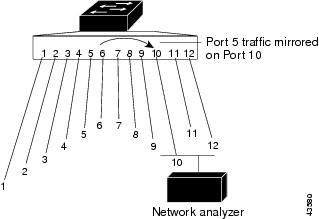
Local SPAN supports a SPAN session entirely within one switch; all source ports or source VLANs and destination ports are in the same switch. Local SPAN copies traffic from one or more source ports in any VLAN or from one or more VLANs to a destination port for analysis. For example, in Figure 23-1, all traffic on port 5 (the source port) is mirrored to port 10 (the destination port). A network analyzer on port 10receives all network traffic from port 5 without being physically attached to port 5.
Figure 23-1 Example of Local SPAN Configuration on a Single Switch
SPAN Concepts and Terminology
This section describes concepts and terminology associated with SPAN configuration.
SPAN Sessions
SPAN sessions allow you to monitor traffic on one or more ports, or one or more VLANs, and send the monitored traffic to one or more destination ports.
A local SPAN session is an association of a destination port with source ports or source VLANs, all on a single network device. Local SPAN does not have separate source and destination sessions. Local SPAN sessions gather a set of ingress and egress packets specified by the user and form them into a stream of SPAN data, which is directed to the destination port.
Traffic monitoring in a SPAN session has these restrictions:
•Sources can be ports or VLANs, but you cannot mix source ports and source VLANs in the same session.
•The switch supports up to two source sessions (local SPAN source sessions). You can run both a local SPAN source session in the same switch. The switch supports a total of 66 source destination sessions.
•You can have multiple destination ports in a SPAN session, but no more than 64 destination ports.
•You can configure two separate SPAN source sessions with separate or overlapping sets of SPAN source ports and VLANs.
•SPAN sessions do not interfere with the normal operation of the switch. However, an oversubscribed SPAN destination, for example, a 10-Mb/s port monitoring a 100-Mb/s port, can result in dropped or lost packets.
•You can configure SPAN sessions on disabled ports; however, a SPAN session does not become active unless you enable the destination port and at least one source port or VLAN for that session.
Monitored Traffic
SPAN sessions can monitor these traffic types:
•Receive (Rx) SPAN—The goal of receive (or ingress) SPAN is to monitor as much as possible all the packets received by the source interface or VLAN before any modification or processing is performed by the switch. A copy of each packet received by the source is sent to the destination port for that SPAN session.
Packets that are modified because of routing or quality of service (QoS)—for example, modified Differentiated Services Code Point (DSCP)—are copied before modification.
Features that can cause a packet to be dropped during receive processing have no effect on ingress SPAN; the destination port receives a copy of the packet even if the actual incoming packet is dropped. These features include IP standard and extended input access control lists (ACLs), ingress QoS policing, and egress QoS policing.
•Transmit (Tx) SPAN—The goal of transmit (or egress) SPAN is to monitor as much as possible all the packets sent by the source interface after all modification and processing is performed by the switch. A copy of each packet sent by the source is sent to the destination port for that SPAN session. The copy is provided after the packet is modified.
Features that can cause a packet to be dropped during transmit processing also affect the duplicated copy for SPAN. These features include IP standard and extended output ACLs and egress QoS policing.
•Both—In a SPAN session, you can also monitor a port or VLAN for both received and sent packets. This is the default.
The default configuration for local SPAN session ports is to send all packets untagged. SPAN also does not normally monitor bridge protocol data unit (BPDU) packets and Layer 2 protocols, such as Cisco Discovery Protocol (CDP), VLAN Trunk Protocol (VTP), Dynamic Trunking Protocol (DTP), Spanning Tree Protocol (STP), and Port Aggregation Protocol (PAgP). However, when you enter the encapsulation replicate keywords when configuring a destination port, these changes occur:
•Packets are sent on the destination port with the same encapsulation—untagged or IEEE 802.1Q—that they had on the source port.
•Packets of all types, including BPDU and Layer 2 protocol packets, are monitored.
Therefore, a local SPAN session with encapsulation replicate enabled can have a mixture of untagged and IEEE 802.1Q tagged packets appear on the destination port.
Switch congestion can cause packets to be dropped at ingress source ports, egress source ports, or SPAN destination ports. In general, these characteristics are independent of one another. For example:
•A packet might be forwarded normally but dropped from monitoring due to an oversubscribed SPAN destination port.
•An ingress packet might be dropped from normal forwarding, but still appear on the SPAN destination port.
•An egress packet dropped because of switch congestion is also dropped from egress SPAN.
In some SPAN configurations, multiple copies of the same source packet are sent to the SPAN destination port. For example, a bidirectional (both Rx and Tx) SPAN session is configured for the Rx monitor on port A and Tx monitor on port B. If a packet enters the switch through port A and is switched to port B, both incoming and outgoing packets are sent to the destination port. Both packets are the same.
Source Ports
A source port (also called a monitored port) is a switched port that you monitor for network traffic analysis. In a local SPAN session, you can monitor source ports or VLANs for traffic in one or both directions. The switch supports any number of source ports (up to the maximum number of available ports on the switch) and any number of source VLANs (up to the maximum number of VLANs supported). However, the switch supports a maximum of two sessions with source ports or VLANs, and you cannot mix ports and VLANs in a single session.
A source port has these characteristics:
•It can be monitored in multiple SPAN sessions.
•Each source port can be configured with a direction (ingress, egress, or both) to monitor.
•It can be any port type (for example, EtherChannel, Fast Ethernet, Gigabit Ethernet, and so forth).
•For EtherChannel sources, you can monitor traffic for the entire EtherChannel or individually on a physical port as it participates in the port channel.
•It can be an access port, trunk port, or voice VLAN port.
•It cannot be a destination port.
•Source ports can be in the same or different VLANs.
•You can monitor multiple source ports in a single session.
Source VLANs
VLAN-based SPAN (VSPAN) is the monitoring of the network traffic in one or more VLANs. The SPAN source interface in VSPAN is a VLAN ID, and traffic is monitored on all the ports for that VLAN.
VSPAN has these characteristics:
•All active ports in the source VLAN are included as source ports and can be monitored in either or both directions.
•On a given port, only traffic on the monitored VLAN is sent to the destination port.
•If a destination port belongs to a source VLAN, it is excluded from the source list and is not monitored.
•If ports are added to or removed from the source VLANs, the traffic on the source VLAN received by those ports is added to or removed from the sources being monitored.
•You cannot use filter VLANs in the same session with VLAN sources.
•You can monitor only Ethernet VLANs.
VLAN Filtering
When you monitor a trunk port as a source port, by default, all VLANs active on the trunk are monitored. You can limit SPAN traffic monitoring on trunk source ports to specific VLANs by using VLAN filtering.
•VLAN filtering applies only to trunk ports or to voice VLAN ports.
•VLAN filtering applies only to port-based sessions and is not allowed in sessions with VLAN sources.
•When a VLAN filter list is specified, only those VLANs in the list are monitored on trunk ports or on voice VLAN access ports.
•SPAN traffic coming from other port types is not affected by VLAN filtering; that is, all VLANs are allowed on other ports.
•VLAN filtering affects only traffic forwarded to the destination SPAN port and does not affect the switching of normal traffic.
Destination Port
Each local SPAN session must have a destination port (also called a monitoring port) that receives a copy of traffic from the source ports or VLANs and sends the SPAN packets to the user, usually a network analyzer.
A destination port has these characteristics:
•For a local SPAN session, the destination port must reside on the same switch as the source port.
•When a port is configured as a SPAN destination port, the configuration overwrites the original port configuration. When the SPAN destination configuration is removed, the port reverts to its previous configuration. If a configuration change is made to the port while it is acting as a SPAN destination port, the change does not take effect until the SPAN destination configuration had been removed.
•If the port was in an EtherChannel group, it is removed from the group while it is a destination port.
•It can be any Ethernet physical port.
•It cannot be a secure port.
•It cannot be a source port.
•It cannot be an EtherChannel group or a VLAN.
•It can participate in only one SPAN session at a time (a destination port in one SPAN session cannot be a destination port for a second SPAN session).
•When it is active, incoming traffic is disabled. The port does not transmit any traffic except that required for the SPAN session. Incoming traffic is never learned or forwarded on a destination port.
•If ingress traffic forwarding is enabled for a network security device, the destination port forwards traffic at Layer 2.
•It does not participate in any of the Layer 2 protocols (STP, VTP, CDP, DTP, PagP).
•A destination port that belongs to a source VLAN of any SPAN session is excluded from the source list and is not monitored.
•The maximum number of destination ports in a switch is 64.
Local SPAN destination ports behave differently regarding VLAN tagging and encapsulation:
•For local SPAN, if the encapsulation replicate keywords are specified for the destination port, these packets appear with the original encapsulation (untagged or IEEE 802.1Q). If these keywords are not specified, packets appear in the untagged format. Therefore, the output of a local SPAN session with encapsulation replicate enabled can contain a mixture of untagged or IEEE 802.1Q-tagged packets.
SPAN Interaction with Other Features
SPAN interacts with these features:
•STP—A destination port does not participate in STP while its SPAN session is active. The destination port can participate in STP after the SPAN session is disabled. On a source port, SPAN does not affect the STP status.
•CDP—A SPAN destination port does not participate in CDP while the SPAN session is active. After the SPAN session is disabled, the port again participates in CDP.
•VLAN and trunking—You can modify VLAN membership or trunk settings for source or destination ports at any time. However, changes in VLAN membership or trunk settings for a destination port do not take effect until you remove the SPAN destination configuration. Changes in VLAN membership or trunk settings for a source port immediately take effect, and the respective SPAN sessions automatically adjust accordingly.
•EtherChannel—You can configure an EtherChannel group as a source port but not as a SPAN destination port. When a group is configured as a SPAN source, the entire group is monitored.
If a physical port is added to a monitored EtherChannel group, the new port is added to the SPAN source port list. If a port is removed from a monitored EtherChannel group, it is automatically removed from the source port list.
A physical port that belongs to an EtherChannel group can be configured as a SPAN source port and still be a part of the EtherChannel. In this case, data from the physical port is monitored as it participates in the EtherChannel. However, if a physical port that belongs to an EtherChannel group is configured as a SPAN destination, it is removed from the group. After the port is removed from the SPAN session, it rejoins the EtherChannel group. Ports removed from an EtherChannel group remain members of the group, but they are in the inactive or suspended state.
If a physical port that belongs to an EtherChannel group is a destination port and the EtherChannel group is a source, the port is removed from the EtherChannel group and from the list of monitored ports.
•Multicast traffic can be monitored. For egress and ingress port monitoring, only a single unedited packet is sent to the SPAN destination port. It does not reflect the number of times the multicast packet is sent.
•A secure port cannot be a SPAN destination port.
For SPAN sessions, do not enable port security on ports with monitored egress when ingress forwarding is enabled on the destination port.
•An IEEE 802.1x port can be a SPAN source port. You can enable IEEE 802.1x on a port that is a SPAN destination port; however, IEEE 802.1x is disabled until the port is removed as a SPAN destination.
For SPAN sessions, do not enable IEEE 802.1x on ports with monitored egress when ingress forwarding is enabled on the destination port.
Configuring SPAN
These sections contain this configuration information:
Default SPAN Configuration
Table 23-1 shows the default SPAN configuration.
Configuring Local SPAN
These sections contain this configuration information:
•SPAN Configuration Guidelines
•Creating a Local SPAN Session
•Creating a Local SPAN Session and Configuring Incoming Traffic
SPAN Configuration Guidelines
Follow these guidelines when configuring SPAN:
•For SPAN sources, you can monitor traffic for a single port or VLAN or a series or range of ports or VLANs for each session. You cannot mix source ports and source VLANs within a single SPAN session.
•The destination port cannot be a source port; a source port cannot be a destination port.
•You cannot have two SPAN sessions using the same destination port.
•When you configure a switch port as a SPAN destination port, it is no longer a normal switch port; only monitored traffic passes through the SPAN destination port.
•Entering SPAN configuration commands does not remove previously configured SPAN parameters. You must enter the no monitor session {session_number | all | local} global configuration command to delete configured SPAN parameters.
•For local SPAN, outgoing packets through the SPAN destination port carry the original encapsulation headers—untagged or IEEE 802.1Q—if the encapsulation replicate keywords are specified. If the keywords are not specified, the packets are sent in native form.
•You can configure a disabled port to be a source or destination port, but the SPAN function does not start until the destination port and at least one source port or source VLAN are enabled.
•You can limit SPAN traffic to specific VLANs by using the filter vlan keyword. If a trunk port is being monitored, only traffic on the VLANs specified with this keyword is monitored. By default, all VLANs are monitored on a trunk port.
•You cannot mix source VLANs and filter VLANs within a single SPAN session.
Creating a Local SPAN Session
Beginning in privileged EXEC mode, follow these steps to create a SPAN session and specify the source (monitored) ports or VLANs and the destination (monitoring) ports:
To delete a SPAN session, use the no monitor session session_number global configuration command. To remove a source or destination port or VLAN from the SPAN session, use the no monitor session session_number source {interface interface-id | vlan vlan-id} global configuration command or the no monitor session session_number destination interface interface-id global configuration command. For destination interfaces, the encapsulation options are ignored with the no form of the command.
This example shows how to set up SPAN session 1 for monitoring source port traffic to a destination port. First, any existing SPAN configuration for session 1 is deleted, and then bidirectional traffic is mirrored from source Gigabit Ethernet port 1 to destination Gigabit Ethernet port 2, retaining the encapsulation method.
Switch(config)# no monitor session 1
Switch(config)# monitor session 1 source interface gigabitethernet0/1
Switch(config)# monitor session 1 destination interface gigabitethernet0/2
encapsulation replicate
Switch(config)# end
This example shows how to remove port 1 as a SPAN source for SPAN session 1:
Switch(config)# no monitor session 1 source interface gigabitethernet0/1
Switch(config)# end
This example shows how to disable received traffic monitoring on port 1, which was configured for bidirectional monitoring:
Switch(config)# no monitor session 1 source interface gigabitethernet0/1 rx
The monitoring of traffic received on port 1 is disabled, but traffic sent from this port continues to be monitored.
This example shows how to remove any existing configuration on SPAN session 2, configure SPAN session 2 to monitor received traffic on all ports belonging to VLANs 1 through 3, and send it to destination Gigabit Ethernet port 2. The configuration is then modified to also monitor all traffic on all ports belonging to VLAN 10.
Switch(config)# no monitor session 2
Switch(config)# monitor session 2 source vlan 1 - 3 rx
Switch(config)# monitor session 2 destination interface gigabitethernet0/2
Switch(config)# monitor session 2 source vlan 10
Switch(config)# end
Creating a Local SPAN Session and Configuring Incoming Traffic
Beginning in privileged EXEC mode, follow these steps to create a SPAN session, to specify the source ports or VLANs and the destination ports, and to enable incoming traffic on the destination port for a network security device (such as a Cisco IDS Sensor Appliance).
For details about the keywords not related to incoming traffic, see the "Creating a Local SPAN Session" section.
To delete a SPAN session, use the no monitor session session_number global configuration command. To remove a source or destination port or VLAN from the SPAN session, use the no monitor session session_number source {interface interface-id | vlan vlan-id} global configuration command or the no monitor session session_number destination interface interface-id global configuration command. For destination interfaces, the encapsulation and ingress options are ignored with the no form of the command.
This example shows how to remove any existing configuration on SPAN session 2, configure SPAN session 2 to monitor received traffic on Gigabit Ethernet source port 1, and send it to destination Gigabit Ethernet port 2 with the same egress encapsulation type as the source port, and to enable ingress forwarding with IEEE 802.1Q encapsulation and VLAN 6 as the default ingress VLAN.
Switch(config)# no monitor session 2
Switch(config)# monitor session 2 source gigabitethernet0/1 rx
Switch(config)# monitor session 2 destination interface gigabitethernet0/2 encapsulation
replicate ingress dot1q vlan 6
Switch(config)# end
Specifying VLANs to Filter
Beginning in privileged EXEC mode, follow these steps to limit SPAN source traffic to specific VLANs:
To monitor all VLANs on the trunk port, use the no monitor session session_number filter global configuration command.
This example shows how to remove any existing configuration on SPAN session 2, configure SPAN session 2 to monitor traffic received on Gigabit Ethernet trunk port 2, and send traffic for only VLANs 1 through 5 and VLAN 9 to destination Gigabit Ethernet port 1.
Switch(config)# no monitor session 2
Switch(config)# monitor session 2 source interface gigabitethernet0/2 rx
Switch(config)# monitor session 2 filter vlan 1 - 5, 9
Switch(config)# monitor session 2 destination interface gigabitethernet0/1
Switch(config)# end
Displaying SPAN Status
To display the current SPAN configuration, use the show monitor user EXEC command. You can also use the show running-config privileged EXEC command to display configured SPAN sessions.
 Feedback