FCoE Over FEX

Overview

The Fibre Channel over Ethernet (FCoE) over Fabric Extenders (FEX) feature allows Fibre Channel traffic to be carried on a FEX port. The FEX is connected to a Cisco Nexus 9000 device that is in FCoE NPV mode through a Fabric Port Channel (FPC). FCoE over FEX enables the provisioning of FCoE on host connections.

For more information about FEX, see the Cisco Nexus 2000 Series NX-OS Fabric Extender Configuration Guide for Cisco Nexus 9000 Series Switches.

FCoE Over FEX with vPC

FCoE over FEX with virtual Port Channel (vPC) allows Fibre Channel traffic to be carried over a FEX using a virtual Port Channel (vPC).

LAN Shutdown

The LAN shutdown feature detects the capability of the FCoE host to support Data Center Bridging (DCBX). DCBX allows the switch to send the LAN Logical Link status (LLS) messages in a type-length-value (TLV) format. The LAN shutdown feature enables bring up and bring down of LAN links on a unified link carrying both FCoE and LAN traffic. When you use the shutdown lan command, only the LAN traffic stops while the FCoE traffic continues.

FCoE Over FEX Topologies

FCoE over FEX is supported in the following topologies:

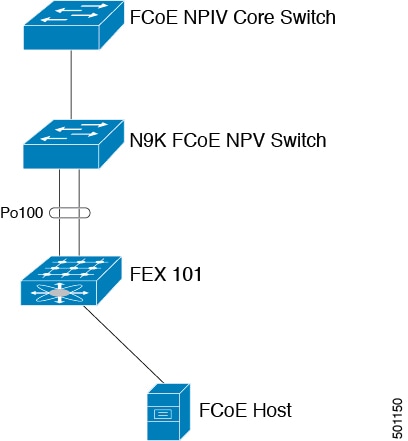
Straight Through FEX with Host Topology

The straight through FEX with host topology is supported with Cisco NX-OS Release 9.3(3) and later.


Straight Through FEX with Host VPC Topology

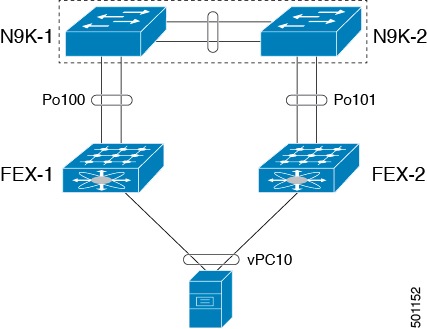
The straight through FEX with host VPC topology is supported with Cisco NX-OS Release 9.3(3) and later.


Dual-Homed FEX Topology (Active/Active FEX Topology)

The dual-homed FEX topology is supported with Cisco NX-OS Release 9.3(3) and later with Cisco Nexus 9300-EX and 9300-FX Series switches.

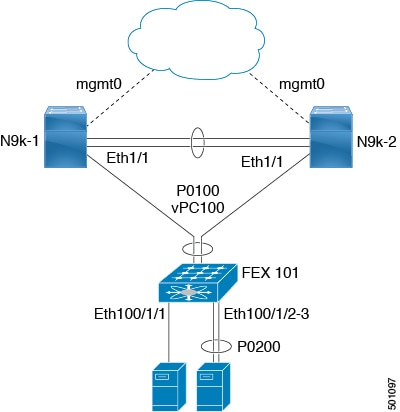
The following topology shows that each FEX is dual-homed with two Cisco Nexus 9000 Series switches. The FEX-fabric interfaces for each FEX are configured as a vPC on both peer switches. The host interfaces on the FEX appear on both peer switches.


Note

The host interfaces configuration should be the same on both switches.


Figure 1. Dual-Homed FEX Topology


Operational vPC is mandatory for the dual-homed FEX topology. In the Dual-Homed FEX Active/Active Topology, the vPC is already operational. FEX 101 is dual-homed to both parent switches: N9k-1 and N9k-2 on FEX-fabric interfaces Ethernet 1/1.


Note

Only the following support an active-active FEX topology:

  • N2K-C2232PP

  • N2K-C2348UPQ

  • NB22IBM

  • NB22HP


Note

A port channel within the same FEX is supported on Cisco Nexus 2200 Series Fabric Extenders.


Guidelines and Limitations for FCoE Over FEX

  • Starting from Release 7.0(3)I5(1) FCOE over FEX in Straight through mode is supported in the below platforms:

    • N9K-C93180YC-EX

    • N9K-C9332PQ

    • N9K-C9372PX

    • N9K-C9372PX-E

    • N9K-C9396PX

    • N9K-X9464PX line cards

    • N9K-X9564PX line cards

  • Starting from Release 7.0(3)I7(2), FCOE over FEX is supported on the N9K-C93180YC-FX platforms in both ST and AA mode.

  • SAN boot via FEX HIF port is not supported in below platforms when the HIF port is member of a port-channel and the channel mode is active:

    • N9K-C9332PQ

    • N9K-C9372PX

    • N9K-C9372PX-E

    • N9K-C9396PX

    • N9K-X9464PX line cards

    • N9K-X9564PX line cards

  • FCoE over FEX is supported on the following FEXs:

    • N2K-C2348UPQ

    • N2K-C2232PP

    • N2K-B22IBM-P

    • N2K-B22HP-P

  • Starting in Release 7.0(3)I6(1), N9K-C93180LC-EX supports FCoE over FEX only on the N2K-C2348UPQ. Other FEX models are not supported with this device.

  • FCoE over FEX is not supported on the following:

  • FEX HIF ports only support vFC in F mode. NP mode vFCs are not supported over FEX HIF ports.

  • A Fabric Port Channel cannot exceed a maximum of eight member ports.

  • 4q policies are supported on FCoE over FEX.

  • 8q policies are not supported on FCoE over FEX.

  • FC ports are not supported on FEX.


Note

For information about scalability, see the Cisco Nexus 9000 Series NX-OS Verified Scalability Guide.


Information Before Configuring FCoE Over FEX


Note

This information is applicable only for Cisco Nexus 9500 switches and the following specific Cisco Nexus 9300 switches (not applicable to other Cisco Nexus 9000 switches):

  • N9K-C93180LC-EX

  • N9K-C9332PQ

  • N9K-C9372PX

  • N9K-C9372PX-E

  • N9K-C9396PX


  • Enable the Configuration

    Using the fcoe enable-fex command results in disabling any load-balancing (based on SID, DID, OXID) on the switch.

    The fcoe enable-fex command is needed for the FCOE host logins to work properly when connected to the FEX HIF ports. This command is supported and required only on the following Cisco Nexus 9000 FCoE NPVswitches: (N9K-C9332PQ, N9K-C9372PX-E, N9K-C9372PX, N9K-C9396PX, N9K-X9464PX line cards, and N9K-X9564PX line cards).

    
    switch(config)# fcoe enable-fex
    Warning: Enabling FCoE over FEX may cause traffic drop. Continue [y/n]? 
    
  • Disable the Configuration

    Using the no fcoe enable-fex command results in enabling any load-balancing (based on SID, DID, OXID) on the switch.

    
    switch(config)# no fcoe enable-fex
    Warning: Enabling FCoE over FEX may cause traffic drop. Continue [y/n]? 
    

Configuring FCoE Over FEX

Configuring Straight Through FEX with Host


Note

Considerations for FEX Fabric Port Channel (FPC):

  • Priority flow control (PFC) requires to be enabled explicitly for Pause to work.

    
    interface "port-channel"
    priority-flow-control mode on
    
  • If the switch is connected to a host that does not have DCBX support, PFC needs to be enabled explicitly on HIF interfaces.

    
    interface "hif interface"
    priority-flow-control mode on
    
  • The LLDP feature should be enabled on the switch with the feature lldp command.

  • First attach the interfaces to the fex-fabric port-channel and then enable the priority-flow-control mode with the priority-flow-control mode on command.

  • The fcoe enable-fex command is required for the FCoE host logins to work properly when connected to the FEX HIF ports. This command is supported and required only on the following Cisco Nexus 9000 series switches such as N9K-C9332PQ, N9K-C9372PX-E, N9K-C9372PX, N9K-C9396PX, N9K-X9464PX line cards, and N9K-X9564PX line cards.


Before you begin

  • Ensure configuration of FEX. For more information, see the Cisco Nexus 2000 Series NX-OS Fabric Extender Configuration Guide for Cisco Nexus 9000 Series Switches.

  • Ensure the configuration of FCoE NPV. For more information, see the section: Configuring FCoE NPV.

  • You must apply the QoS policy at the system (global) level and to the Host Interfaces (HIF's) to honor the pause frames in the FCoE traffic.

    
    switch(config)# system qos
    switch(config-sys-qos)# service-policy type queuing input policy-name
    switch(config-sys-qos)# service-policy type queuing output policy-name
    switch(config-sys-qos)# service-policy type network-qos policy-name
    switch(config-sys-qos)# service-policy type qos input policy-name
    

Procedure

  Command or Action Purpose
Step 1

configure terminal

Example:


switch# configure terminal
switch(config)#

Enters global configuration mode.

Step 2

interface port-channel <port_num>

Example:


switch(config)#interface port-channel 101

Creates port-channel and enters the interface configuration mode.

Step 3

switchport

Example:


switch(config-if)#switchport

Sets Layer 2 switching port.

Step 4

switchport mode fex-fabric

Example:


switch(config-if)#switchport mode fex-fabric

Sets the interface type to be a uplink port for a Fabric extender (FEX).

Step 5

fex associate <fex_id>

Example:


switch(config-if)#fex associate 101

Associates a Fabric Extender (FEX) to a Fabric interface.

Step 6

mtu 9216

Example:


switch(config-if)#mtu 9216

Configures the MTU value to that of jumbo frames to carry FCoE traffic through the NIF ports.

Step 7

no shutdown

Example:


switch(config-if)#no shutdown

Sets the port-channel to up (administratively).

Step 8

exit

Example:


switch(config-if)#exit

Exits the interface configuration mode.

Step 9

interface ethernet slot/port

Example:


switch(config)#interface Ethernet1/1

Enters interface configuration mode.

Step 10

switchport

Example:


switch(config-if)#switchport

Sets Layer 2 switching port.

Step 11

switchport mode fex-fabric

Example:


switch(config-if)#switchport mode fex-fabric

Sets the interface type to be an uplink port for a fabric extender (FEX).

Step 12

fex associate <fex_id>

Example:


switch(config-if)#fex associate 101

Associates a Fabric Extender (FEX) to a Fabric interface.

Step 13

mtu 9216

Example:


switch(config-if)#mtu 9216

Configures the MTU value to that of jumbo frames to carry FCoE traffic through the NIF ports.

Step 14

channel-group <port_number>

Example:


switch(config-if)channel-group 101

Sets the Fabric interface a member of the Fabric port channel.

Step 15

no shutdown

Example:


switch(config-if)#no shutdown

Sets the port-channel to up (administratively).

Step 16

exit

Example:


switch(config-if)#exit

Exits the interface configuration mode.

Step 17

interface ethernet chassis_id/slot/port_number

Example:


switch(config)interface ethernet 101/1/1

Configures a FEX satellite interface or HIF (host interface) port and enters interface configuration mode.

Step 18

switchport mode trunk

Example:


switch(config-if)#switchport mode trunk

Sets interface type to be a trunk port.

Step 19

service-policy type qos input fcoe

Example:


switch(config-if)# service-policy type qos input fcoe

Sets the QoS policy on the HIF port channel to a no drop policy.

Note 

For more information about queuing policy configurations, see the section: Configuring QoS for no-drop support.

Step 20

no shutdown

Example:


switch(config-if)#no shutdown

Sets the port-channel to up (administratively).

Step 21

exit

Example:


switch(config-if)#exit

Exits the interface configuration mode.

Example

The following is an example of FEX bring up in straight through mode with a host.


install feature-set fex
feature-set fex

fex 101
  pinning max-links 1
  description "2232PP-1"

interface port-channel101
  switchport
  switchport mode fex-fabric
  fex associate 101
  mtu 9216

interface Ethernet1/1
  switchport
  switchport mode fex-fabric
  fex associate 101
  mtu 9216
  channel-group 101
  no shutdown

interface Ethernet101/1/1
  switchport mode trunk
  service-policy type qos input fcoe-qo-policy
  no shutdown

Binding vFC to FEX Interface Explicitly

Procedure

  Command or Action Purpose
Step 1

configure terminal

Example:


switch# configure terminal
switch(config)#

Enters global configuration mode.

Step 2

interface vfc < vfc-id>

Example:


N9k(config)# interface vfc 1

Creates a virtual Fibre Channel interface and enters the interface configuration mode.

The chassis-id range is from 101 to 199.

Step 3

bind interface ethernet [chassid-id/slot/port]

Example:


N9k(config-if)# bind interface ethernet101/1/1

Explicitly binds the virtual fibre channel interface to the specified interface. Use the no form of the command to unbind the interface.

Chassis id range is from 101 to 199.

Step 4

no shutdown

Example:


switch(config-if)#no shutdown

Brings up the interface (administratively).

Step 5

end

Example:


N9k(config-if)#end

Returns to exec mode.

Example


interface vfc1       
  bind interface ethernet 101/1/1
  switchport trunk mode on
  no shutdown

Binding VFC to FEX Interface Implicitly

Procedure

  Command or Action Purpose
Step 1

configure terminal

Example:


switch# configure terminal
switch(config)#

Enters global configuration mode.

Step 2

interface vfc < chassis-id>/<slot>/<port>

Example:


switch(config)# interface vfc 101/1/1

Creates a virtual fibre Channel Interface and enters interface configuration mode; implicitly binding it to the underlying Ethernet interface (ethernet chassid-id/slot/port).

The chassis-id range is from 101 to 199.

Step 3

no shutdown

Example:


switch(config-if)#no shutdown

Brings up the interface (administratively).

Step 4

end

Example:


switch(config-if)#end

Returns to exec mode.

Example


interface vfc101/1/1
  switchport trunk mode on
  no shutdown

Binding vFC to MAC Address

A MAC address bound vFC can also be created for a FEX host interface (HIF) port.


Note

A MAC bound vFC can be configured to a host sitting behind a FIP Snooping Bridge (FSB).

When both MAC bound vFC and port-bound vFC are configured for the same interface, the port-bound vFC takes precedence.

As a best practice, you should have either a MAC bound vFC or a port- bound vFC for a physical Ethernet port or a port-channel. However, you cannot have both.


Procedure

  Command or Action Purpose
Step 1

configure terminal

Enters global configuration mode.

Step 2

interface vfc <number>

Creates a virtual fibre Channel Interface.

Step 3

bind mac-address <mac-address>

Binds the MAC address.

Example

The following example shows how to bind a virtual Fibre Channel interface to a MAC address:


switch# configure terminal
switch(config)# interface vfc 2
switch(config-if)# bind mac-address 00:0a:00:00:00:36

Configuring Straight Through FEX with Host vPC

Before you begin

  • Ensure configuration of vPC between two Cisco Nexus 9000 Series switches. For more information, see the Cisco Nexus 9000 Series NX-OS Interfaces Configuration Guide.

  • Ensure configuration of FEX. For more information, see the Cisco Nexus 2000 Series NX-OS Fabric Extender Configuration Guide for Cisco Nexus 9000 Series Switches.

  • Ensure the configuration of FCoE NPV. For more information, see the section: Configuring FCoE NPV.

Procedure

  Command or Action Purpose
Step 1

configure terminal

Example:


switch# configure terminal
switch(config)#

Enters global configuration mode.

Step 2

interface port-channel <port_num>

Example:


switch(config)#interface port-channel 101

Creates port-channel and enters the interface configuration mode.

Step 3

switchport

Example:


switch(config-if)#switchport

Sets Layer 2 switching port.

Step 4

switchport mode fex-fabric

Example:


switch(config-if)#switchport mode fex-fabric

Sets the interface type to be a uplink port for a Fabric extender (FEX).

Step 5

fex associate <fex_id>

Example:


switch(config-if)#fex associate 101

Associates a Fabric Extender (FEX) to a Fabric interface.

Step 6

mtu 9216

Example:


switch(config-if)#mtu 9216

Configures the MTU value to that of jumbo frames to carry FCoE traffic through the NIF ports.

Step 7

no shutdown

Example:


switch(config-if)#no shutdown

Sets the port-channel to up (administratively).

Step 8

exit

Example:


switch(config-if)#exit

Exits the interface configuration mode.

Step 9

interface ethernet slot/port

Example:


switch(config)#interface Ethernet1/1

Enters the interface configuration mode.

Step 10

switchport

Example:


switch(config-if)#switchport

Sets Layer 2 switching port.

Step 11

switchport mode fex-fabric

Example:


switch(config-if)#switchport mode fex-fabric

Sets the interface type to be an uplink port for a fabric extender (FEX).

Step 12

fex associate <fex_id>

Example:


switch(config-if)#fex associate 101

Associates a Fabric Extender (FEX) to a Fabric interface.

Step 13

mtu 9216

Example:


switch(config-if)#mtu 9216

Configures the MTU value to that of jumbo frames to carry FCoE traffic through the NIF ports.

Step 14

channel-group <port_number>

Example:


switch(config-if)channel-group 101

Sets the Fabric interface a member of the Fabric port channel.

Step 15

no shutdown

Example:


switch(config-if)#no shutdown

Sets the port-channel to up (administratively).

Step 16

exit

Example:


switch(config-if)#exit

Exits the interface configuration mode.

Step 17

interface ethernet chassis_id/slot/port_number

Example:


switch(config)interface ethernet 101/1/1

Configures a FEX satellite interface or HIF (host interface) port and enters interface configuration mode.

Step 18

switchport mode trunk

Example:


switch(config-if)#switchport mode trunk

Sets interface type to be a trunk port.

Step 19

channel group <host_port_num>

Example:


switch(config-if)# channel group 1

Makes the HIF port a member of a port-channel

Step 20

no shutdown

Example:


switch(config-if)#no shutdown

Sets the port-channel to up (administratively).

Step 21

exit

Example:


switch(config-if)#exit

Exits the interface configuration mode.

Step 22

interface port-channel <host_port_number>

Example:


switch(config)#interface port-channel 1

Creates a HIF port-channel.

Step 23

switchport

Example:


switch(config-if)#switchport

Sets Layer 2 switching port.

Step 24

switchport mode trunk

Example:


switch(config-if)#switchport mode trunk

Sets the interface to be a trunk port.

Step 25

service-policy type qos input fcoe

Example:


switch(config-if)# service-policy type qos input fcoe

Sets the QoS policy on the HIF port channel to a no drop policy.

Note 

For more information about queuing policy configurations, see the section: Configuring QoS for no-drop support.

Step 26

vpc 3

Configures VPC on the HIF port-channel. The VPC id on both the peers should be same for this Host VPC.

Step 27

no shutdown

Example:


switch(config-if)#no shutdown

Sets the port-channel to up (administratively).

Step 28

exit

Example:


switch(config-if)#exit

Exits the interface configuration mode.

Example

The following is an example of FEX bring up in straight through mode with a host vPC.

  • Configuration on Peer-1

    
    install feature-set fex
    feature-set fex
    
    fex 101
      pinning max-links 1
      description "2232PP-1"
    
    interface port-channel101
      switchport mode fex-fabric
      fex associate 101
    
    interface port-channel101
      switchport
      switchport mode fex-fabric
      fex associate 101
      mtu 9216
    
    interface Ethernet1/1
      switchport
      switchport mode fex-fabric
      fex associate 101
      mtu 9216
      channel-group 101
      no shutdown
    
    interface Ethernet101/1/1
      switchport mode trunk
      channel-group 1
      no shutdown
    
    interface port-channel1
      switchport
      switchport mode trunk
      service-policy type qos input fcoe
      vpc 3
    
    interface vfc-po1      /*** Implicit binding with VFC bound to port-channel ***/
      bind interface port-channel1
      switchport trunk mode on
      no shutdown
    
    interface vfc101/1/1   /*** Implicit binding with VFC bound to member port ***/
      bind interface ethernet101/1/1
      switchport trunk mode on
      no shutdown
    
    
  • Configuration on Peer-2

    
    install feature-set fex
    feature-set fex
    
    fex 102
      pinning max-links 1
      description "2348UPQ-2"
    
    interface port-channel102
      switchport
      switchport mode fex-fabric
      fex associate 102
      mtu 9216
    
    interface Ethernet102/1/1
      switchport mode trunk
      channel-group 1
      no shutdown
    
    interface port-channel1
      switchport
      switchport mode trunk
      service-policy type qos input fcoe
      vpc 3
    
    interface vfc1   /*** Explicit binding with VFC bound to port-channel ***/
      bind interface port-channel1
      switchport trunk mode on
      no shutdown
    
    interface vfc2   /*** Explicit binding with VFC bound to member port ***/
      bind interface ethernet102/1/1
      switchport trunk mode on
      no shutdown
    

Note

The vFC binding should be either to the port-channel or to the member host interface.


Configuring Dual-Homed FEX

Procedure

  Command or Action Purpose
Step 1

configure terminal

Example:


switch# configure terminal
switch(config)#

Enters global configuration mode.

Step 2

fex fex-chassis_ID

Example:


switch# fex 101
switch(config)#

Enters the configuration mode for the specified FEX. The range for fex-chassis_ID is from 101 to 199.

Step 3

fcoe

Example:


switch# fcoe
switch(config)#

Configures the FEX to send FCoE traffic only to this switch.

Note 

Cisco recommends that FCOE pinning is configured on the primary vPC switch in case of dual homed FEX.

Step 4

interface port-channel <port_num>

Example:


switch(config)#interface port-channel170

Creates port-channel and enters the interface configuration mode.

Step 5

switchport

Example:


switch(config-if)#switchport

Sets Layer 2 switching port.

Step 6

switchport mode fex-fabric

Example:


switch(config-if)#switchport mode fex-fabric

Sets the interface type to be a uplink port for a Fabric extender (FEX).

Step 7

fex associate <fex_id>

Example:


switch(config-if)#fex associate 170

Associates a Fabric Extender (FEX) to a Fabric interface.

Step 8

mtu 9216

Example:


switch(config-if)#mtu 9216

Configures the MTU value to that of jumbo frames to carry FCoE traffic through the NIF ports.

Step 9

vpc 1

Configures VPC on the HIF port-channel.

Step 10

no shutdown

Example:


switch(config-if)#no shutdown

Sets the port-channel to up (administratively).

Step 11

exit

Example:


switch(config-if)#exit

Exits the interface configuration mode.

Step 12

interface ethernet slot/port

Example:


switch(config)#interface Ethernet170/1/18

Enters interface configuration mode.

Step 13

switchport

Example:


switch(config-if)#switchport

Sets Layer 2 switching port.

Step 14

switchport mode trunk

Example:


switch(config-if)#switchport mode trunk

Sets the interface to be a trunk port.

Step 15

service-policy type qos input fcoe-qo-policy

Example:


switch(config-if)# service-policy type qos input fcoe

Sets the QoS policy on the HIF port channel to a no drop policy.

Note 

For more information about queuing policy configurations, see the section: Configuring QoS for no-drop support.

Step 16

no shutdown

Example:


switch(config-if)#no shutdown

Sets the port-channel to up (administratively).

Step 17

exit

Example:


switch(config-if)#exit

Exits the interface configuration mode.

Note 

The same configuration should be performed on the other side for the Active-Active FEX to be up on both the sides.

Example


Note

Cisco recommends that FCOE pinning is configured on the primary vPC switch in case of dual homed FEX.


  • Peer 1

    
    fex 170
      pinning max-links 1
      description "2232PP-3 AA"
      fcoe
    
    interface port-channel170
      switchport
      switchport mode fex-fabric
      fex associate 170
      mtu 9216
      vpc 1
    
    interface Ethernet170/1/18
      switchport mode trunk
      service-policy type qos input fcoe-qo-policy
      no shutdown
    
    interface vfc1718     /*** Explicit binding ***/
      bind interface Ethernet170/1/18
      switchport trunk mode on
      no shutdown
    
    interface vfc170/1/18 /*** Implicit binding ***/
      bind interface Ethernet170/1/18
      switchport trunk mode on
      no shutdown
    
    
  • Peer 2

    
    fex 170
      pinning max-links 1
      description "2232PP-3 AA"
      
    interface port-channel170
      switchport
      switchport mode fex-fabric
      fex associate 170
      mtu 9216
      vpc 1
    
    interface Ethernet170/1/18
      switchport mode trunk
      service-policy type qos input fcoe-qo-policy
      no shutdown


Note

  • HOST vPC is not supported with dual-homed FEX.

  • The vFC binding should be either to the port channel or to the member host interfaces.