- Preface
- New and Changed Information
- Overview
- Configuring Basic Interface Parameters
- Configuring Layer 2 Interfaces
- Configuring Layer 3 Interfaces
- Configuring Bidirectional Forwarding Detection
- Configuring Port Channels
- Configuring vPCs
- Configuring IP Tunnels
- IETF RFCs supported by Cisco NX-OS Interfaces
- Configuration Limits for Cisco NX-OS Interfaces
Configuring IP Tunnels
This chapter describes how to configure IP tunnels using Generic Route Encapsulation (GRE) on Cisco NX-OS devices.
- Information About IP Tunnels
- Licensing Requirements for IP Tunnels
- Prerequisites for IP Tunnels
- Guidelines and Limitations
- Default Settings
- Configuring IP Tunnels
- Verifying the IP Tunnel Configuration
- Configuration Examples for IP Tunneling
- Related Documents
Information About IP Tunnels
IP tunnels can encapsulate a same-layer or higher layer protocol and transport the result over IP through a tunnel created between two devices.
- IP Tunnel Overview
- GRE Tunnels
- Point-to-Point IP-in-IP Tunnel Encapsulation and Decapsulation
- Multi-Point IP-in-IP Tunnel Decapsulation
- Path MTU Discovery
- High Availability
IP Tunnel Overview
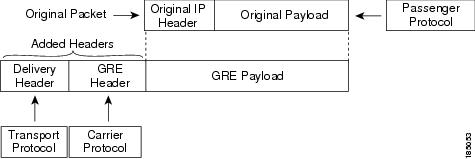
IP tunnels consists of the following three main components:
-
Passenger protocol—The protocol that needs to be encapsulated. IPv4 is an example of a passenger protocol.
-
Carrier protocol—The protocol that is used to encapsulate the passenger protocol. Cisco NX-OS supports GRE as a carrier protocol.
-
Transport protocol—The protocol that is used to carry the encapsulated protocol. IPv4 is an example of a transport protocol. An IP tunnel takes a passenger protocol, such as IPv4, and encapsulates that protocol within a carrier protocol, such as GRE. The device then transmits this carrier protocol over a transport protocol, such as IPv4.
You configure a tunnel interface with matching characteristics on each end of the tunnel.
You must enable the tunnel feature before you can configure it. The system automatically takes a checkpoint prior to disabling the feature, and you can roll back to this checkpoint. See the Cisco Nexus 9000 Series NX-OS System Management Configuration Guide for information about rollbacks and checkpoints.
GRE Tunnels
You can use generic routing encapsulation (GRE) as the carrier protocol for a variety of passenger protocols.
The following figure shows the IP tunnel components for a GRE tunnel. The original passenger protocol packet becomes the GRE payload and the device adds a GRE header to the packet. The device then adds the transport protocol header to the packet and transmits it.
Point-to-Point IP-in-IP Tunnel Encapsulation and Decapsulation
Point-to-point IP-in-IP encapsulation and decapsulation is a type of tunnel that you can create to send encapsulated packets from a source tunnel interface to a destination tunnel interface. This type of tunnel will carry both inbound and outbound traffic.
 Note | The selection of IP-in-IP tunnel based on the PBR policy is not supported. |
Multi-Point IP-in-IP Tunnel Decapsulation
Multi-point IP-in-IP decapsulate-any is a type of tunnel that you can create to decapsulate packets from any number of IP-in-IP tunnels to one tunnel interface. This tunnel will not carry any outbound traffic. However, any number of remote tunnel endpoints can use a tunnel configured this way as their destination.
Path MTU Discovery
Path maximum transmission unit (MTU) discovery (PMTUD) prevents fragmentation in the path between two endpoints by dynamically determining the lowest MTU along the path from the packet's source to its destination. PMTUD reduces the send MTU value for the connection if the interface receives information that the packet would require fragmentation.
When you enable PMTUD, the interface sets the Don't Fragment (DF) bit on all packets that traverse the tunnel. If a packet that enters the tunnel encounters a link with a smaller MTU than the MTU value for the packet, the remote link drops the packet and sends an ICMP message back to the sender of the packet. This message indicates that fragmentation was required (but not permitted) and provides the MTU of the link that dropped the packet.
Note | PMTUD on a tunnel interface requires that the tunnel endpoint can receive ICMP messages generated by devices in the path of the tunnel. Check that ICMP messages can be received before using PMTUD over firewall connections. |
High Availability
IP tunnels support stateful restarts. A stateful restart occurs on a supervisor switchover. After the switchover, Cisco NX-OS applies the runtime configuration after the switchover.
Licensing Requirements for IP Tunnels
The following table shows the licensing requirements for this feature:
|
Product |
License Requirement |
|---|---|
|
Cisco NX-OS |
IP tunnels require no license. Any feature not included in a license package is bundled with the Cisco NX-OS system images and is provided at no extra charge to you. |
Prerequisites for IP Tunnels
IP tunnels have the following prerequisites:
Guidelines and Limitations
IP tunnels have the following configuration guidelines and limitations:
-
Cisco NX-OS supports only the following protocols:
-
Cisco NX-OS supports the following maximum number of tunnels:
-
IP tunnels do not support access control lists (ACLs) or QoS policies.
-
Cisco NX-OS supports the GRE header defined in IETF RFC 2784. Cisco NX-OS does not support tunnel keys and other options from IETF RFC 1701.
-
Cisco NX-OS does not support GRE tunnel keepalives.
-
All unicast routing protocols are supported by IP tunnels.
-
The IP tunnel interface cannot be configured to be a span source or destination.
-
IP tunnels do not support PIM or other Multicast features and protocols.
-
The selection of IP-in-IP tunnel based on the PBR policy is not supported.
-
IP tunnels are supported only in the default system routing mode and not in other modes.
Default Settings
The following table lists the default settings for IP tunnel parameters.
|
Parameters |
Default |
|---|---|
|
Path MTU discovery age timer |
10 minutes |
|
Path MTU discovery minimum MTU |
64 |
|
Tunnel feature |
Disabled |
Configuring IP Tunnels
Note | If you are familiar with the Cisco IOS CLI, be aware that the Cisco NX-OS commands for this feature might differ from the Cisco IOS commands that you would use. |
- Enabling Tunneling
- Creating a Tunnel Interface
- Configuring a Tunnel Interface
- Enabling Path MTU Discovery
- Assigning VRF Membership to a Tunnel Interface
Enabling Tunneling
You must enable the tunneling feature before you can configure any IP tunnels.
1.
configure terminal
2.
feature tunnel
3.
exit
4.
show feature
5.
copy running-config startup-config
DETAILED STEPS
Creating a Tunnel Interface
You can create a tunnel interface and then configure this logical interface for your IP tunnel.
Note | Cisco NX-OS supports a maximum of 8 IP tunnels. |
You can configure the tunnel source and the tunnel destination in different VRFs. Ensure that you have enabled the tunneling feature.
1.
configure
terminal
2.
interface tunnel
number
3.
tunnel source {ip-address |interface-name}
4.
tunnel destination
{ip-address |host-name}
5.
tunnel use-vrf
vrf-name
6.
show interfaces tunnel
number
7.
copy running-config startup-config
DETAILED STEPS
| Command or Action | Purpose | |
|---|---|---|
| Step 1 |
configure
terminal
Example: switch# configure terminal switch(config)# |
Enters global configuration mode. |
| Step 2 |
interface tunnel
number
Example: switch(config)# interface tunnel 1 switch(config-if)# |
Creates a new tunnel interface. |
| Step 3 | tunnel source {ip-address |interface-name}
Example: switch(config-if)# tunnel source ethernet 1/2 |
Configures the source address for this IP tunnel. |
| Step 4 | tunnel destination
{ip-address |host-name}
Example: switch(config-if)# tunnel destination 192.0.2.1 |
Configures the destination address for this IP tunnel. |
| Step 5 |
tunnel use-vrf
vrf-name
Example: switch(config-if)# tunnel use-vrf blue |
(Optional) Uses the configured VRF to look up the tunnel IP destination address. |
| Step 6 | show interfaces tunnel
number
Example: switch# show interfaces tunnel 1 |
(Optional) Displays the tunnel interface statistics. |
| Step 7 | copy running-config startup-config
Example: switch(config-if)# copy running-config startup-config |
(Optional) Saves this configuration change. |
This example shows how to create a tunnel interface
switch# configure terminal switch(config)# interface tunnel 1 switch(config-if)# tunnel source ethenet 1/2 switch(config-if)# tunnel destination 192.0.2.1 switch(config-if)# copy running-config startup-config
Configuring a Tunnel Interface
You can set a tunnel interface to GRE tunnel mode, ipip mode, or ipip decapsulate-only mode. GRE mode is the default tunnel mode.
Ensure that you have enabled the tunneling feature.
1.
configure
terminal
2.
interface tunnel
number
3.
tunnel
mode {gre ip
|
ipip
{ip |
decapsulate-any}}
4.
show interfaces tunnel
number
5.
mtu
value
6.
copy running-config
startup-config
DETAILED STEPS
| Command or Action | Purpose | |
|---|---|---|
| Step 1 |
configure
terminal
Example: switch# configure terminal switch(config)# |
Enters global configuration mode. |
| Step 2 | interface tunnel
number
Example: switch(config)# interface tunnel 1 switch(config-if)# |
Creates a new tunnel interface. |
| Step 3 |
tunnel
mode {gre ip
|
ipip
{ip |
decapsulate-any}}
|
Sets this tunnel mode to GRE, ipip, or ipip decapsulate-only. The gre and ip keywords specify that GRE encapsulation over IP will be used. The ipip keyword specifies that IP-in-IP encapsulation will be used. The optional decapsulate-any keyword terminates IP-in-IP tunnels at one tunnel interface. This keyword creates a tunnel that will not carry any outbound traffic. However, remote tunnel endpoints can use a tunnel configured as their destination. |
| Step 4 |
show interfaces tunnel
number
Example: switch(config-if)# show interfaces tunnel 1 |
(Optional) Displays the tunnel interface statistics. |
| Step 5 | mtu
value
|
Sets the maximum transmission unit (MTU) of IP packets sent on an interface. The range is from 64 to 9192 units. |
| Step 6 |
copy running-config
startup-config
Example: switch(config-if)# copy running-config startup-config |
(Optional) Saves this configuration change. |
This example shows how to create the tunnel interface to GRE:
switch# configure terminal switch(config)# interface tunnel 1 switch(config-if)# tunnel mode gre ip switch(config-if)# copy running-config startup-config
This example shows how to create an ipip tunnel:
switch# configure terminal switch(config)# interface tunnel 1 switch(config-if)# tunnel mode ipip switch(config-if)# mtu 1400 switch(config-if)# copy running-config startup-config switch(config-if)# no shut
Enabling Path MTU Discovery
Use the tunnel path-mtu discovery command to enable path MTU discovery on a tunnel.
1.
tunnel path-mtu-discovery
age-timer
min
2.
tunnel path-mtu-discovery
min-mtu
bytes
DETAILED STEPS
| Command or Action | Purpose | |
|---|---|---|
| Step 1 | tunnel path-mtu-discovery
age-timer
min
Example: switch(config-if)# tunnel path-mtu-discovery age-timer 25 |
Enables Path MTU Discovery (PMTUD) on a tunnel interface. |
| Step 2 | tunnel path-mtu-discovery
min-mtu
bytes
Example: switch(config-if)# tunnel path-mtu-discovery min-mtu 1500 |
Enables Path MTU Discovery (PMTUD) on a tunnel interface. |
Assigning VRF Membership to a Tunnel Interface
You can add a tunnel interface to a VRF.
Ensure that you have enabled the tunneling feature.
Assign the IP address for a tunnel interface after you have configured the interface for a VRF.
1.
configure terminal
2.
interface tunnel
number
3.
vrf member
vrf-name
4.
ip address
ip-prefix/length
5.
show vrf [vrf-name]
interface
interface-type number
6.
copy running-config startup-config
DETAILED STEPS
| Command or Action | Purpose | |
|---|---|---|
| Step 1 |
configure terminal
Example: switch# configure terminal switch(config)# |
Enters global configuration mode. |
| Step 2 |
interface tunnel
number
Example: switch(config)# interface tunnel 0 switch(config-if)# |
Enters interface configuration mode. |
| Step 3 | vrf member
vrf-name
Example: switch(config-if)# vrf member RemoteOfficeVRF |
Adds this interface to a VRF. |
| Step 4 |
ip address
ip-prefix/length
Example: switch(config-if)# ip address 192.0.2.1/16 |
Configures an IP address for this interface. You must do this step after you assign this interface to a VRF. |
| Step 5 |
show vrf [vrf-name]
interface
interface-type number
Example: switch(config-vrf)# show vrf Enterprise interface tunnel 0 |
(Optional) Displays VRF information. |
| Step 6 | copy running-config startup-config
Example: switch# copy running-config startup-config |
(Optional) Saves this configuration change. |
This example shows how to add a tunnel interface to the VRF:
switch# configure terminal switch(config)# interface tunnel 0 switch(config-if)# vrf member RemoteOfficeVRF switch(config-if)# ip address 209.0.2.1/16 switch(config-if)# copy running-config startup-config
Verifying the IP Tunnel Configuration
To verify the IP tunnel configuration information, perform one of the following tasks:
|
Command |
Purpose |
|---|---|
|
show interface tunnel number |
Displays the configuration for the tunnel interface (MTU, protocol, transport, and VRF). Displays input and output packets, bytes, and packet rates. |
|
show interface tunnel number brief |
Displays the operational status, IP address, encapsulation type, and MTU of the tunnel interface. |
|
show interface tunnel number description |
Displays the configured description of the tunnel interface. |
|
show interface tunnel number status |
Displays the operational status of the tunnel interface. |
|
show interface tunnel number status err-disabled |
Displays the error disabled status of the tunnel interface. |
Configuration Examples for IP Tunneling
The following example shows a simple GRE tunnel. Ethernet 1/2 is the tunnel source for router A and the tunnel destination for router B. Ethernet interface 2/1 is the tunnel source for router B and the tunnel destination for router A.
Router A:
feature tunnel
interface tunnel 0
ip address 209.165.20.2/8
tunnel source ethernet 1/2
tunnel destination 192.0.2.2
tunnel mode gre ip
tunnel path-mtu-discovery 25 1500

interface ethernet 1/2
ip address 192.0.2.55/8
Router B:
feature tunnel
interface tunnel 0
ip address 209.165.20.1/8
tunnel source ethernet 2/1
tunnel destination 192.0.2.55
tunnel mode gre ip

interface ethernet 2/1
ip address 192.0.2.2/8
Related Documents
|
Related Topic |
Document Title |
|---|---|
|
IP Tunnel commands |
Cisco Nexus 9000 Series NX-OS Interfaces Command Reference |
 Feedback